
Choosing the right remote-access hardware can make desktop maintenance, troubleshooting, and BIOS-level control far easier. The best options balance video quality, reliability, security, and simple deployment.
This roundup covers the top kvm over ip switches for desktops so you can compare compact single-port models, rack-ready units, and easy-to-use picks for home labs, offices, and IT workflows.
Best 10 Kvm Over Ip Switches for Desktops Picks for 2026
Remote BIOS Control

- BIOS-level remote control
- 4K 30Hz hardware encoding
- No host software required
Best For: IT admins and remote users managing one desktop or server
Enterprise Rack IP KVM
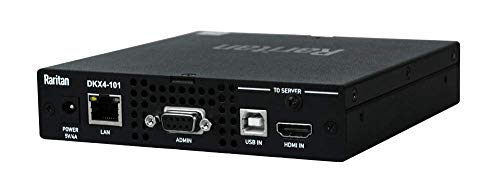
- 1-port 4K KVM-over-IP
- Ethernet-based remote control
- Rack-mount enterprise design
Best For: Single critical systems in rack-mounted or enterprise environments
PoE Remote KVM

- PoE and Type-C power
- 4K at 30FPS streaming
- 32GB built-in eMMC
Best For: Users who want PoE-powered remote access for one desktop or server
8-Port Cat5 IP KVM
Tripp Lite NetCommander B072-008-1-IP

- 8 ports with CAT5 cabling
- Simultaneous local and remote use
- Expandable up to 128 servers
Best For: Multi-desktop or server management in a rackmount setup
Open-Source Remote Control Pick

- 1080p60 video with 30–60 ms latency
- Local browser access plus optional cloud login
- Open-source Linux design with expansion support
Best For: Tinkerers and home lab users who want a customizable remote KVM
Enterprise Security Pick
Lantronix SecureLinx Spider/SpiderDuo KVM-Over-IP

- BIOS-level remote keyboard, video, and mouse access
- Hardware AES encryption with secure communications
- Built for business-critical deployments
Best For: Enterprise IT teams needing secure out-of-band access
Wireless Desktop Flex Pick
GL.iNet GL-RM10 Comet Pro Remote KVM

- Dual-band Wi‑Fi 6 plus wired connectivity
- 4K@30FPS passthrough with two-way audio
- Web cloud, app access, and self-hosted options
Best For: Home labs and offices that want wireless flexibility and 4K passthrough
Cloud-Ready IP KVM
AweSun Q1 Compact Remote Access

- BIOS-level control from power-on to desktop
- Plug-and-play with no host software needed
- Ultra-compact design for portable use
Best For: Remote IT support and BIOS-level recovery
Dual-Display Desktop Switch
3 PC 2 Monitor KVM with USB 3.0

- Controls 3 PCs with 2 monitors and 1 peripheral set
- EDID emulation helps preserve display settings
- Includes USB 3.0 ports and wired remote
Best For: Local dual-monitor workstation switching
Open-Source Network KVM

- Browser-based LAN and cloud remote access
- 1080P@60FPS streaming with low latency
- Open-source firmware with SSH customization
Best For: Home labs and privacy-focused remote troubleshooting
Remote BIOS Control – GL.iNet Comet GL-RM1
If you want kvm over ip switches for desktops that are easy to deploy and still feel modern to use, the GL.iNet Comet GL-RM1 is built around remote BIOS access, hardware-based control, and 4K streaming at 30Hz. It’s a practical fit when you need to reboot, reinstall an OS, or manage a desktop without adding software on the host machine.
Best For: IT admins, remote workers, and smart home users who need BIOS-level desktop control without host software.
Pros:
- Supports remote rebooting, power-on control, and BIOS interface access
- Hardware-based KVM with H.264 encoding and 3840×2160@30Hz video
- No software required on the computer being controlled
- Includes remote audio output and file transfer support
Cons:
- PD adapters cannot be used
- Single-port design is better for one target system than a larger rack
For a desktop KVM-over-IP setup where ease of access matters more than port count, this model focuses on clear visuals, simple setup, and always-on remote reach. It’s especially appealing if your priority is hands-on system recovery rather than multi-machine switching.
Enterprise Rack IP KVM – Raritan Dominion KX IV-101
Raritan Dominion KX IV-101 Ultra High Performance 1-Port 4K KVM-Over-IP Switch
Check Price On AmazonFor buyers comparing kvm over ip switches for desktops in a more enterprise-oriented setup, the Raritan Dominion KX IV-101 is a 1-port 4K KVM-over-IP switch designed for remote control over Ethernet. Its rack-mount form factor and dedicated remote-control focus make it suitable when reliability and centralized access matter more than consumer-style simplicity.
Best For: Enterprise and rack-mounted users who need a single high-performance 4K KVM-over-IP connection.
Pros:
- 1-port KVM-over-IP switch with 4K support
- Remote control via Ethernet connectivity
- Rack-mount design for organized installations
- Two-year warranty included
Cons:
- Only one port, so it is not a multi-PC switch
- More specialized than a basic desktop KVM setup
This is the kind of unit to consider when you want a purpose-built IP KVM for a single critical system. It is less about broad switching and more about delivering a focused, high-performance remote access path for one machine.
PoE Remote KVM – GL.iNet Comet GL-RM1PE
If you’re shopping kvm over ip switches for desktops and want cleaner power options, the GL.iNet Comet PoE Remote KVM adds PoE plus Type-C dual power supply in a compact remote-management device. It also keeps the same practical remote-access focus with 4K streaming at 30FPS, remote BIOS reinstall support, and built-in eMMC storage.
Best For: Desktop and server users who want PoE-powered remote KVM access with BIOS reinstall capability.
Pros:
- PoE and Type-C dual power supply options
- 4K streaming at 30FPS
- 32GB built-in eMMC for onboard storage
- Supports remote BIOS reinstall and ATX/Fingerbot USB interface use
Cons:
- Best suited to one target machine rather than multiple desktops
- Requires Ethernet/HDMI-based setup for operation
This model stands out if you want remote access hardware that simplifies installation and power delivery. For a desktop-focused setup, the PoE option can make the cabling story cleaner while still keeping BIOS-level control in reach.
8-Port Cat5 IP KVM – Tripp Lite NetCommander B072-008-1-IP
For larger desktop or server setups, this Tripp Lite option fits the kvm over ip switches for desktops category by combining 8 ports, CAT5 cabling, and remote browser access. It is designed for managing multiple systems from one station, with local and remote simultaneous use and support for IPv4 and IPv6.
Best For: Users managing multiple desktops or servers who need an 8-port rackmount IP KVM.
Pros:
- 8-port CAT5 KVM-over-IP switch with 1U rackmount design
- Supports simultaneous 1 local and 1 remote user
- Java-based browser control for remote access over a secure IP connection
- Expandable to control up to 128 servers through cascading
Cons:
- Bulkier 6.3-pound rackmount unit
- More complex than a single-device desktop KVM
- Requires rack-oriented planning and cabling
This is the most scalable option in the group, especially if you are consolidating multiple machines into one managed access point. If your priority is switching between several desktops or servers, the port count and cascade support are the main reasons to look here.
Open-Source Remote Control Pick – JetKVM IP KVM, Ethernet IPKVM
If you’re comparing kvm over ip switches for desktops, JetKVM is built for simple setup and flexible remote access. Connect it by USB-C and HDMI, plug in Ethernet, then open the browser to start controlling the machine locally or through the optional cloud dashboard.
Best For: Tinkerers, home lab users, and anyone who wants an open-source KVM over Ethernet with room to customize.
Pros:
- 1080p at 60FPS video with 30–60 ms latency for responsive mouse and keyboard control
- Offers local browser access, optional cloud access, and Wake on LAN support
- Open-source Linux-based design with SSH uploads and customization options
- Extension port supports add-ons like ATX power control, RS-232, and sensors
Cons:
- Cloud access is optional, so remote features may require extra setup
- Video quality is adjustable, but not fixed at the highest setting on every connection
- Customization-focused design may be more than casual users need
This is a strong choice if you want a compact, adaptable IP KVM that goes beyond basic remote viewing and control. Its main advantage is flexibility, especially for users who value open-source software and future expansion.
Enterprise Security Pick – Lantronix SecureLinx Spider/SpiderDuo KVM-Over-IP
For buyers comparing kvm over ip switches for desktops, the Lantronix SecureLinx Spider / SpiderDuo is aimed at professional remote management rather than consumer convenience. It focuses on BIOS-level access, secure communications, and hardware AES encryption for business-critical environments.
Best For: Enterprise IT teams and professional deployments that need secure remote server or desktop access.
Pros:
- BIOS-level access for remote keyboard, video, and mouse control
- Hardware AES encryption and secure communications for enterprise security
- Official Lantronix product with limited warranty and technical support
- Designed for business-critical deployments
Cons:
- Built with a professional focus, so it may be more than casual users need
- Product details emphasize security over convenience features
- Less feature-rich in the notes than some desktop-oriented alternatives
This is the right pick if security and dependable out-of-band access matter more than extra consumer features. It is best viewed as a serious enterprise tool for controlled environments.
Wireless Desktop Flex Pick – GL.iNet GL-RM10 Comet Pro Remote KVM
If you want kvm over ip switches for desktops with less cable clutter, the GL.iNet GL-RM10 Comet Pro stands out with dual-band Wi‑Fi 6 and wired connectivity. It also adds 4K passthrough, two-way audio, and multiple remote access paths for practical day-to-day support.
Best For: Home labs, offices, and remote support setups that want wireless flexibility and 4K passthrough.
Pros:
- Dual-band Wi‑Fi 6 plus wired connectivity for flexible desktop setups
- 4K@30FPS passthrough with two-way audio for clearer remote interaction
- Built-in touchscreen for easy setup and cloud management
- Supports web cloud access, GLKVM app access, and self-hosted cloud deployment
Cons:
- Wireless features may not suit users who want the simplest possible wired-only device
- Some remote power options require add-ons like ATX Board or Fingerbot
- Self-hosted cloud is available, but it still adds setup complexity
For desktop remote control with a more modern, wireless-first approach, this model offers a lot of flexibility. It is especially appealing if you want strong video passthrough, audio support, and multiple control paths in one device.
Cloud-Ready IP KVM – AweSun Q1 Compact Remote Access
If you want kvm over ip switches for desktops that focus on true remote recovery, the AweSun IPKVM Switch Q1 is built for BIOS-level control and offline-style access workflows. It is aimed at situations where you need to reboot, troubleshoot, or recover a machine remotely without installing host software.
Best For: IT admins, technicians, and remote support users who need compact BIOS-level remote control for desktops and servers.
Pros:
- BIOS-level control lets you work from power-on through desktop, even during crashes.
- Plug-and-play design needs no drivers or software on the controlled device.
- Very compact and portable for racks, workstations, or travel kits.
- Supports remote access across Windows, macOS, iOS, and Android systems.
Cons:
- Designed as a remote-access device rather than a full multi-PC desktop switch.
- Requires Ethernet and HDMI/USB-C connectivity in the target setup.
- Core remote features are available out of the box, but a membership bonus is part of the offer flow.
Overall, the Q1 stands out if your priority is dependable remote recovery rather than desk-side switching convenience. Its small footprint and BIOS access make it a strong fit for support-heavy environments where downtime matters.
Dual-Display Desktop Switch – 3 PC 2 Monitor KVM with USB 3.0
For a desktop setup that needs to share two monitors across multiple PCs, this HDMI KVM switch is built around dual-display control and high-bandwidth USB 3.0 support. Among kvm over ip switches for desktops, this model is less about remote internet access and more about clean local switching with preserved display settings.
Best For: Dual-monitor desktop users who want one keyboard and mouse to control up to three PCs locally.
Pros:
- Supports 3 computers with 1 keyboard, 1 mouse, and 2 monitors.
- 4K@60Hz support and EDID emulation help preserve resolution and window order.
- Includes USB 3.0 ports for peripherals like printers and scanners.
- Cabled remote and top-panel button give two practical switching methods.
Cons:
- Requires 2 HDMI connections per computer for dual-display use.
- Not an IP-based remote access device.
- Best performance depends on correct USB 3.0 and display cabling.
This is a sensible pick if your main goal is faster local desktop switching across a dual-monitor workflow. EDID emulation is especially useful for keeping display behavior stable when moving between PCs.
Open-Source Network KVM – JetKVM Remote Desktop Access
If you are comparing kvm over ip switches for desktops and want a modern network-first option, JetKVM is built for browser-based remote access with low-latency video and BIOS-level rescue. It is designed for hands-on troubleshooting of PCs, labs, and servers without needing extra software on the host.
Best For: Home labs, remote admins, and privacy-minded users who want browser access plus open-source flexibility.
Pros:
- Browser access over LAN, with WebRTC cloud remote access and NAT traversal.
- 1080P@60FPS H.264 streaming with 30-160 ms latency for responsive control.
- BIOS-level remote rescue supports crash screens, rebooting, safe mode, and reinstall tasks.
- Open-source firmware and SSH customization appeal to advanced users.
Cons:
- Does not do audio transfer.
- Non-POE design cannot work with fully-off targets without optional power modules.
- ATX/DC power control and some related options are sold separately.
JetKVM is a strong fit if you want a compact IP KVM that feels more like a modern browser appliance than a traditional hardware switch. Its mix of open-source software, low latency, and cross-platform support makes it especially attractive for lab and remote support setups.
How We Picked the Best Kvm Over Ip Switches for Desktops
We focused on practical features that matter most for desktop remote management: stable network access, BIOS-level control, video resolution and frame rate, authentication and encryption options, local passthrough where available, and ease of setup. We also considered whether a unit is better suited to a single desktop, a dual-purpose workstation, or a more traditional multi-device environment.
Quick Comparison
Single-port devices are usually the best fit for one critical PC, while rackmount and Cat5-based models make more sense when you need structured cabling or shared access. If you want the simplest experience, look for plug-and-play remote KVM units with clear browser access and dependable HDMI/USB support. If security or advanced networking matters most, prioritize stronger remote authentication, VPN-friendly workflows, and firmware support.
Key Buying Factors for Kvm Over Ip Switches for Desktops
Video Quality
Check the maximum supported resolution and refresh rate. For modern desktops, 4K support is important, but 30Hz may be enough for admin work while 4K60 is better for smoother interaction.
Connectivity and Cabling
Some products connect directly over HDMI and USB, while others use Cat5 or Ethernet-based architecture. Choose the style that matches your desk layout, rack, or network switch setup.
Security and Remote Access
Look for BIOS access, secure login methods, and encrypted remote control. Features like Tailscale support, VPN compatibility, and strong authentication are especially useful for remote troubleshooting.
Local Vs. Remote Use
Some units support simultaneous local and remote access, which is ideal if you need someone at the desk while also managing the machine from elsewhere. If the desktop is mostly unattended, remote-only functionality may be enough.
Compatibility and Use Case
Make sure the device works with your target hardware, display inputs, and operating system needs. Lightweight desktop control, small office support, and advanced server-style management each call for different feature sets.
Who Should Buy Which Kvm Over Ip Switches for Desktops?
Buy a compact single-port model if you want remote control for one desktop, home lab PC, or travel rig. Choose a higher-end, security-focused option if you manage sensitive systems or need dependable access to BIOS and recovery tools. Pick a rackmount or multi-device solution if you want cleaner infrastructure, shared access, or future expansion. For budget-minded buyers, the best value usually comes from a straightforward HDMI/USB remote KVM with the features you will actually use every day.