
The best MIDI interfaces make it easier to connect keyboards, synthesizers, drum machines, and controllers to a computer or other MIDI hardware. The right model can simplify recording, improve timing, and help older gear work smoothly with modern USB-C setups.
This roundup includes dedicated USB-to-MIDI cables, multi-port interfaces, USB host solutions, and audio interfaces with built-in MIDI connectivity. Use the buying guide below to narrow your choices by setup, port requirements, and workflow.
Best 10 Midi Interfaces Picks for 2026
Best Flexible MIDI Router

- 3-in/3-out standalone MIDI routing
- Filtering, merging, splitting, and mapping
- Broad computer and mobile OS support
Best For: Complex multi-device MIDI setups
Best MIDI-and-Audio Studio Hub
Focusrite Scarlett 4i4 4th Gen

- MIDI I/O with extensive audio connections
- Two mic preamps and two Hi-Z inputs
- 24-bit/192kHz recording support
Best For: Home studios combining MIDI and audio recording
Best Plug-and-Play MIDI Cable

- 1-in/1-out USB-to-MIDI connection
- No-driver compatibility across major OS
- Built-in filtering, routing, and mapping
Best For: Simple single-instrument computer connections
Best Compact MIDI Audio Interface
Focusrite Scarlett Solo 4th Gen

- Compact mic-and-instrument recording setup
- 24-bit/192kHz support and 120dB range
- Air mode and bundled recording software
Best For: Solo recording setups using external MIDI gear
Best Advanced MIDI Router

- Standalone USB host supports up to 8 devices via hub
- DIN, USB-A host, and USB-C client connectivity
- Advanced routing with four saved presets
Best For: Guitarists and producers with complex MIDI rigs
Best for Recording and Streaming
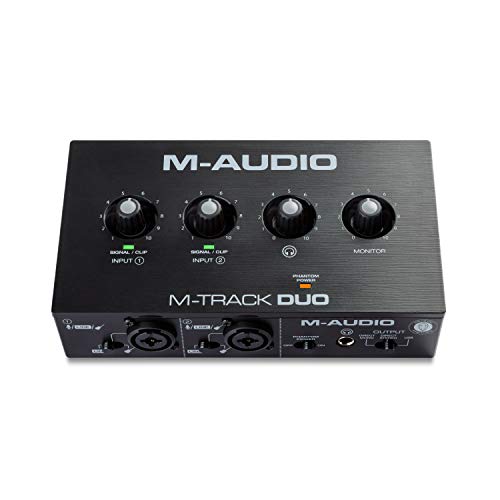
- Two combo XLR, line, and instrument inputs
- Zero-latency USB/Direct monitoring switch
- Includes MPC Beats and Ableton Live Lite
Best For: Home recording, podcasts, and livestreams
Best Compact MIDI Host

- Bridges USB MIDI devices and 5-pin DIN gear
- Supports up to 8 USB MIDI ports via hub
- Compact design with routing presets
Best For: Portable hybrid MIDI setups
Best Type-C Pick
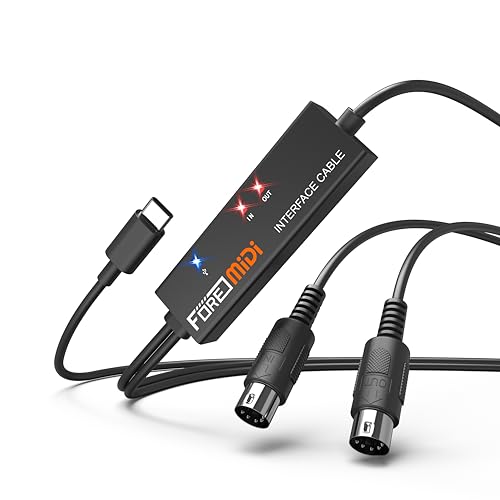
- USB-C connection for modern computers, phones, and tablets
- Plug-and-play setup with LED status indicators
- One MIDI in, one MIDI out, and 16 channels
Best For: USB-C MIDI setups with standard 5-pin devices
Best for Simple Studio Connections

- USB-C cable for keyboards, synths, pianos, and drum pads
- Plug-and-play operation with signal LEDs
- One MIDI in, one MIDI out, and 16 channels
Best For: Home studios using standard MIDI hardware
Best USB-A Option

- USB-A connection for computers and laptops
- Plug-and-play design with power and signal LEDs
- One MIDI in, one MIDI out, and 16 channels
Best For: USB-A computers connecting to standard 5-pin MIDI gear
Best Flexible MIDI Router – CME U6MIDI Pro
The CME U6MIDI Pro is a versatile choice for musicians comparing midi interfaces for multi-device setups. It provides three MIDI inputs and three MIDI outputs, plus routing, filtering, merging, splitting, and mapping through UxMIDI Tools.
Best For: Keyboardists, producers, and performers managing several MIDI instruments or complex routing setups.
Pros:
- Standalone 3-in-3-out MIDI operation with router and filter functions.
- Works with macOS, iOS, Windows, Android, Linux, and Chrome OS.
- Supports MIDI channels and messages including clock, SysEx, MTC, and MPE.
- Designed for low-latency, jitter-free, error-resistant transmission.
Cons:
- Advanced routing configuration requires UxMIDI Tools.
- Offers MIDI connectivity only, not audio inputs or outputs.
Choose the U6MIDI Pro when flexible routing and multiple DIN MIDI connections matter more than audio recording features. Its broad device compatibility and standalone operation make it a strong hub for a larger MIDI rig.
Best MIDI-and-Audio Studio Hub – Focusrite Scarlett 4i4 4th Gen
The Focusrite Scarlett 4i4 4th Gen is suited to musicians who want midi interfaces built into a broader USB-C audio interface. Alongside MIDI input and output, it offers mic, instrument, and line connections for recording synths, drum machines, vocals, and guitars.
Best For: Home studios needing MIDI connectivity plus multiple audio inputs and outputs.
Pros:
- Includes MIDI I/O, four line inputs, four line outputs, two mic preamps, and two Hi-Z inputs.
- Offers up to 24-bit/192kHz operation and a stated 120dB dynamic range.
- Air mode, Auto Gain, and Clip Safe support practical recording workflows.
- Includes Pro Tools Intro+, Ableton Live Lite, Cubase LE, and additional software.
Cons:
- Larger and heavier than dedicated MIDI-only interfaces.
- Its wider audio feature set may be unnecessary for MIDI-only users.
The Scarlett 4i4 makes sense when MIDI is only part of your studio connection needs. It gives you a substantial set of audio I/O while retaining MIDI connectivity for keyboards, synths, and drum machines.
Best Plug-and-Play MIDI Cable – CME U2MIDI Pro
The CME U2MIDI Pro is a compact cable-style option for connecting one MIDI instrument to a computer or mobile device. Among midi interfaces, it stands out for plug-and-play USB operation, integrated filtering and mapping tools, and a 6.5-foot cable.
Best For: Players who need a simple one-in/one-out connection for a keyboard, drum machine, synth, or other MIDI instrument.
Pros:
- 1-in/1-out USB-to-MIDI connection with no drivers required.
- Supports macOS, iOS, Windows, Android, Linux, and ChromeOS.
- UxMIDI Tools adds filtering, routing, and mapping options.
- Smart LED indicators and color-coded MIDI plugs help with setup.
Cons:
- Only provides one MIDI input and one MIDI output.
- Uses a USB-A plug, so some newer devices may require an adapter.
The U2MIDI Pro is a practical pick when you want minimal setup and a direct connection rather than a multi-port MIDI hub. Its integrated cable design can also reduce clutter around a small computer-based rig.
Best Compact MIDI Audio Interface – Focusrite Scarlett Solo 4th Gen
The Focusrite Scarlett Solo 4th Gen is a compact audio interface for songwriters who need to record a microphone and guitar or another instrument. While it is not a dedicated MIDI interface, it can complement a MIDI-based setup when audio recording is the priority.
Best For: Solo musicians recording vocals and instruments alongside an external MIDI controller or keyboard.
Pros:
- Provides one XLR mic preamp and one Hi-Z instrument input.
- Supports 24-bit/192kHz recording with a stated 120dB dynamic range.
- Air mode adds presence and harmonic drive to vocals and guitars.
- Includes recording software, plugins, and PC, Mac, and iPad compatibility.
Cons:
- The supplied notes do not list MIDI input or output.
- Only one audio input is provided.
Consider the Scarlett Solo when your central need is compact vocal-and-instrument recording rather than direct MIDI hardware connectivity. Pair it with a separate MIDI interface or USB MIDI controller if your setup requires DIN MIDI ports.
Best Advanced MIDI Router – CME H4MIDI WC
For musicians comparing midi interfaces, the CME H4MIDI WC stands out as a compact USB host and MIDI routing solution. It connects class-compliant USB MIDI gear directly to traditional MIDI hardware, works with computers and mobile devices, and supports advanced routing, filtering, mapping, splitting, and merging.
Best For: Guitarists, producers, and performers building flexible pedalboard, studio, or hybrid MIDI setups.
Pros:
- Connects up to eight USB MIDI devices through a standard USB hub without a computer.
- Offers 5-pin DIN, USB-A host, and USB-C client connectivity.
- Supports advanced MIDI routing tools and four switchable presets.
- Can run from 5V USB or 9V DC power for standalone use.
Cons:
- WIDI Bluetooth MIDI requires the optional WIDI Core module.
- Its advanced routing features may be more than a basic MIDI setup needs.
The H4MIDI WC is a strong choice when you need more than simple MIDI conversion. Its broad connectivity, standalone power options, and configurable presets make it particularly useful for complex live or studio rigs.
Best for Recording and Streaming – M-AUDIO M-Track Duo
Although it is primarily a USB audio interface rather than a dedicated MIDI interface, the M-AUDIO M-Track Duo is useful for creators who need to record instruments, microphones, or line-level sources alongside a computer-based setup. It provides two combo inputs, direct monitoring, and bundled production software.
Best For: Home recording, podcasting, livestreaming, and musicians who need dual mic, line, or instrument inputs.
Pros:
- Two combo XLR, line, and instrument inputs support varied recording sources.
- Phantom power accommodates condenser microphones.
- USB/Direct monitoring switch enables zero-latency monitoring.
- Includes MPC Beats and Ableton Live Lite software.
Cons:
- It is an audio interface, not a dedicated MIDI I/O interface.
- Maximum sample rate is 48 kHz.
Choose the M-Track Duo when your priority is capturing vocals, guitar, or other audio rather than routing MIDI hardware. Its dual inputs and monitoring controls make it a practical entry-level recording hub.
Best Compact MIDI Host – CME H2MIDI Pro
The CME H2MIDI Pro is one of the more compact midi interfaces for connecting modern USB MIDI devices with legacy 5-pin DIN equipment. It works without a computer, supports computer and mobile connections over USB-C, and uses HxMIDI Tools for routing, filtering, mapping, and preset management.
Best For: Musicians who need a small, portable bridge between USB MIDI controllers, synthesizers, and DIN MIDI hardware.
Pros:
- Connects USB class-compliant MIDI gear to 5-pin DIN hardware without a computer.
- Supports up to eight USB MIDI device ports through a standard hub.
- 32-bit processing is designed for precise handling of clock, sysex, MTC, and MPE data.
- Stores up to four routing configurations for quick changes.
Cons:
- Provides one-in/one-out DIN MIDI connection.
- USB-C virtual MIDI is limited to two inputs and two outputs.
For compact hybrid rigs, the H2MIDI Pro offers a focused feature set in a very small enclosure. It is especially appealing when portability and accurate MIDI data handling matter more than having multiple DIN ports.
Best Type-C Pick – FORE T1 MIDI USB Interface
For musicians looking for convenient MIDI interfaces, the FORE T1 connects one 5-pin MIDI input and one MIDI output to USB-C devices. Its built-in driver, LED status indicators, and bus-powered design make it practical for recording and editing with compatible computers, phones, and tablets.
Best For: USB-C setups using keyboards, synthesizers, electronic drums, or other standard 5-pin MIDI devices.
Pros:
- USB-C connection with support for iOS, Android, Windows, and macOS systems.
- Plug-and-play design with no separate driver installation required.
- LED indicators help show power, signal transfer, and connections.
- Supports 16 MIDI input and output channels with a 6.5-foot cable.
Cons:
- USB A-C adapter is not included.
- Only one MIDI input and one MIDI output are provided.
This is a straightforward choice when your setup centers on a USB-C port and standard 5-pin MIDI hardware. Confirm that your device has the required MIDI connections and that an adapter is available if needed.
Best for Simple Studio Connections – LEKATO MIDI to USB-C Cable
The LEKATO MIDI cable is one of the more practical MIDI interfaces for connecting a keyboard, synthesizer, digital piano, or drum pad to a Windows computer, Mac, or iPad. It combines plug-and-play operation with signal LEDs that make incoming and outgoing MIDI activity easier to monitor.
Best For: Home studios and standard MIDI setups that need a USB-C connection and simple status monitoring.
Pros:
- One MIDI input and one MIDI output with support for up to 16 channels.
- Built-in driver enables plug-and-play use with Windows and macOS.
- Red and blue LED indicators help identify power and signal activity.
- 6.5-foot cable and soft bare-copper construction support flexible placement.
Cons:
- Some older or specific vintage instruments may require special driver settings or proprietary interfaces.
- Compatibility details are focused on Windows, macOS, and iPad rather than every mobile device.
The LEKATO is a sensible cable-style option for a conventional one-in/one-out MIDI workflow. Its compatibility note is worth taking seriously if you are connecting an older synthesizer or unusual hardware.
Best USB-A Option – FORE MIDI USB Interface
For computers and hubs with traditional USB-A ports, this FORE cable-style interface offers a simple way to connect standard 5-pin MIDI equipment for recording and editing. It is bus-powered, includes built-in drivers, and uses LED indicators to show power and MIDI signal activity.
Best For: Desktop or laptop setups with USB-A ports and keyboards, synthesizers, electronic drums, or other 5-pin MIDI gear.
Pros:
- Native USB-A connectivity with compatibility listed for Windows, macOS, iOS, and Android systems.
- Plug-and-play design avoids a separate driver installation.
- Supports one MIDI input, one MIDI output, and 16 input/output channels.
- 6.5-foot, interference-resistant cable with LED status indicators.
Cons:
- USB A-C adapter is not included for Type-C devices.
- It provides only one MIDI input and one MIDI output.
This is a good fit for an existing USB-A computer setup that does not need multiple MIDI ports. If your computer has only USB-C, budget for a compatible adapter before buying.
How We Picked These Midi Interfaces
We focused on practical compatibility, connection options, portability, and the needs of modern home studios. The selection includes simple one-device USB-to-MIDI cables, multi-input and multi-output interfaces for more complex rigs, and USB host models designed to connect MIDI devices without relying on a computer. Audio interfaces with MIDI connectivity were also included for musicians who need recording inputs and MIDI in one unit.
We also considered whether each product suits USB-A or USB-C computers, the type of MIDI connections provided, and how easily it can fit into a recording, rehearsal, or live-performance setup.
Quick Comparison
| Best For | Recommended Type | Why It Makes Sense |
|---|---|---|
| Basic computer-to-keyboard connection | USB-to-MIDI cable | Affordable, compact, and easy to carry |
| Several keyboards or synths | Multi-port MIDI interface | Provides more simultaneous inputs and outputs |
| Connecting MIDI hardware without a computer | USB host interface | Acts as the bridge between USB MIDI and traditional hardware |
| Recording audio and MIDI | Audio interface with MIDI | Combines microphone, instrument, and MIDI connections |
Key Buying Factors for Midi Interfaces
Ports and Connection Format
Count the MIDI devices you plan to connect now, not just the ones you own. A single MIDI In and Out may be enough for one keyboard, while a larger synthesizer setup benefits from multiple ports. Check whether the interface uses standard five-pin MIDI, USB-A, USB-C, or a combination.
Computer Versus USB Host Use
Most USB MIDI cables are designed to connect an instrument to a computer, tablet, or laptop. USB host interfaces serve a different purpose: they allow USB MIDI devices to communicate with traditional MIDI hardware or other equipment without a conventional computer in the middle. Confirm the host requirements before buying.
Audio Recording Needs
If you also record vocals, guitars, or line-level instruments, an audio interface such as a Scarlett or M-Track model may provide better overall value than a dedicated MIDI box. If you only need MIDI, a compact cable or dedicated interface is usually simpler and less expensive.
Compatibility and Power
Verify your computer’s connector and operating-system support, especially when using USB-C devices with older USB-A computers. For a live rig, consider power requirements, cable strain, status indicators, and the physical durability of the unit.
Who Should Buy Which Midi Interfaces?
Choose a Compact USB-To-MIDI Cable If…
You need to connect one keyboard, synthesizer, or controller to a computer for editing, sequencing, or recording. These models are ideal for beginners, mobile producers, and simple setups.
Choose a Multi-Port MIDI Interface If…
You use several hardware instruments, need independent MIDI routing, or want room to expand. The CME U6MIDI Pro is the strongest fit among these options for a more developed hardware studio.
Choose a USB Host Interface If…
You want to connect USB MIDI equipment to traditional five-pin MIDI hardware without depending on a computer. The CME H4MIDI WC and H2MIDI Pro are better suited to specialized hardware workflows.
Choose an Audio Interface with MIDI If…
You want one central device for microphones, instruments, headphones, and MIDI. The Focusrite Scarlett 4i4 offers more I/O for an expanding studio, while the Scarlett Solo is better for a smaller recording setup. The M-AUDIO M-Track Duo is another practical option for basic audio and MIDI production.