
When you need dependable remote access to servers, workstations, or lab machines, powered KVM over IP switches can save time and reduce downtime. They let you see the screen, use the keyboard and mouse, and reach BIOS-level controls from anywhere.
In this roundup, we focus on 10 strong options for different setups, from compact single-system units to rackmount switches built for shared remote administration.
Best 10 Powered Kvm Over Ip Switches Picks for 2026
Remote BIOS KVM

- BIOS-level remote control with reboot and power-on support
- 4K 30Hz video with low latency and audio output
- No host software needed; works with laptops, desktops, and servers
Best For: IT pros and remote users who need straightforward hardware-based remote access
Open-Source Mini KVM
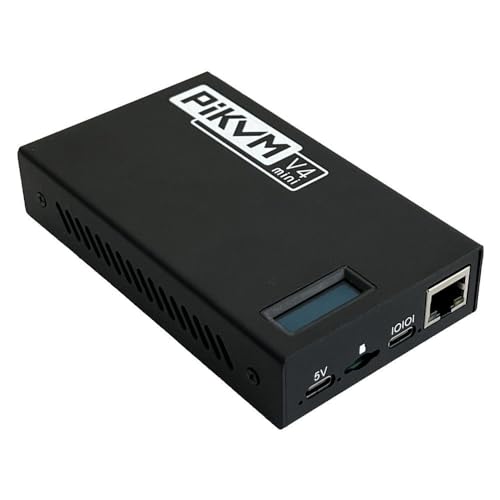
- Open-source, Raspberry Pi based remote KVM
- Remote power/reset control plus UEFI/BIOS access
- Mass storage emulation for remote OS installs
Best For: Technical users who want a compact, fanless, open-source KVM over IP
PoE Remote KVM

- PoE and Type-C dual power supply simplify installation
- 4K 30FPS streaming with 32GB built-in eMMC
- Remote BIOS reinstall and ATX/Fingerbot USB support
Best For: Rack and server deployments that benefit from PoE and remote BIOS maintenance
Rack KVM Switch
ATEN KN1108VA KVM Over IP Switch

- Traditional KVM over IP switch format
- Packaged as a full hardware unit for PC use
- Best suited to rack-style switching setups
Best For: Users looking for a conventional rack KVM over IP switch
Portable Wi‑Fi 6 KVM for flexible remote access
GL.iNet Comet Pro remote KVM with Wi‑Fi 6

- Dual-band Wi‑Fi 6 and wired connectivity
- 4K@30FPS passthrough with two-way audio
- Touchscreen plus web, app, and self-hosted access
Best For: Home labs and small offices needing flexible remote access
Rackmount 8-port KVM for centralized control
Vertiv Avocent AV3000 8-port rackmount KVM

- 8-port rackmount design for multi-system control
- Local and remote access with centralized management
- CAC support and multilingual on-screen menu
Best For: IT rooms and racks that need centralized access control
Open-source Ethernet KVM for low-latency recovery
JetKVM open-source IP KVM with cloud access

- 1080p/60FPS with low-latency H.264 streaming
- Open-source Linux software with SSH customization
- Local browser access, cloud access, and Wake-on-LAN
Best For: Developers and remote admins who want customizable control
Expandable 8-Port Choice
Tripp Lite NetCommander 8-Port Cat5 Compact KVM Over IP Switch

- 8 ports with cascade support up to 128 servers
- 1 local + 1 remote user at the same time
- Supports IPv4, IPv6, and browser-based control
Best For: Small server rooms needing compact, scalable IP KVM access
High-Resolution Enterprise Pick
ATEN KN1116VA 16-Port Cat 5 KVM Over IP Switch with Virtual Media
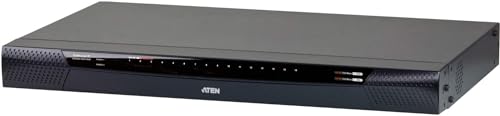
- 16 ports with local and remote access
- Up to 1920 x 1200 at 60Hz video resolution
- Includes virtual media and FIPS 140-2 Level 1 support
Best For: Enterprise users who want stronger security and high-resolution remote control
Multi-User 16-Port Rack Option
Tripp Lite NetCommander 16-Port Cat5 KVM Over IP Switch

- 16 ports with 2 remote sessions plus 1 local user
- Supports up to 1920 x 1080 at 60Hz
- Uses Cat5e/6 cabling and 128-bit AES/HTTPS security
Best For: Shared server environments needing concurrent remote access
Remote BIOS KVM – GL.iNet Comet GL-RM1 4K30
If you want a powered KVM over IP switches option for everyday remote admin, the GL.iNet Comet GL-RM1 focuses on practical, BIOS-level control without requiring software on the host machine. It supports remote reboot, OS installation, power on, and file transfer, while also offering 4K 30Hz visuals and low latency for a smoother hands-on feel.
Best For: IT pros, remote workers, and smart home users who need simple remote control with BIOS access.
Pros:
- BIOS-level access for rebooting, installing operating systems, and powering on computers remotely.
- Supports laptops, desktops, servers, and more with no additional software required on the controlled computer.
- 4K 3840 x 2160 at 30Hz with low latency and remote audio output.
- Built-in H.264 hardware encoding plus instant file transfer.
Cons:
- PD adapters cannot be used.
- Single-port hardware design may be limiting if you need to manage multiple endpoints from one unit.
This is a strong fit if you want a compact hardware-based remote KVM that covers the essentials cleanly. Its value is in simple setup, broad compatibility, and always-on access rather than extra enterprise switching features.
Open-Source Mini KVM – PiKVM V4 Mini IP KVM
The PiKVM V4 Mini is a feature-rich powered KVM over IP switches choice for users who want open-source remote control with production-grade flexibility. It lets you manage servers or PCs remotely, handle keyboard and mouse input, access UEFI/BIOS settings, emulate mass storage for installs, and use hardware reset and power functions from afar.
Best For: Open-source enthusiasts and admins who want a compact remote KVM with deep control options.
Pros:
- Open-source, Raspberry Pi based, production-grade KVM over IP device.
- Supports remote keyboard/mouse control plus power and reset button functions.
- Mass storage device emulation helps with remote booting and OS reinstall tasks.
- Fanless design with passive heatsink and a locator LED.
Cons:
- Idle power draw is listed at 2.67 watts, so it is not completely zero-power.
- May suit technical users better than buyers looking for a simple plug-and-play appliance.
For a compact remote management tool, the PiKVM V4 Mini stands out for hands-on control and open-source flexibility. It is especially appealing when BIOS access, remote reinstall capability, and quiet fanless operation matter more than polished consumer extras.
PoE Remote KVM – GL.iNet Comet RM1PE 4K PoE
If you are comparing powered KVM over IP switches with simpler deployment in mind, the GL.iNet Comet PoE RM1PE is built around remote BIOS reinstall support, 4K streaming at 30FPS, and flexible power options. The PoE and Type-C dual power setup can make installation easier in racks or other networked environments, while the built-in eMMC adds onboard storage.
Best For: Rack or server setups where PoE convenience and remote BIOS maintenance are priorities.
Pros:
- PoE and Type-C dual power supply for flexible deployment.
- 4K at 30FPS streaming for clear remote viewing.
- Remote BIOS reinstall support and USB interface for ATX and Fingerbot integration.
- 32GB built-in eMMC adds onboard storage.
Cons:
- Product details focus on core remote management features rather than a broad feature list.
- Single included remote KVM unit may not suit larger multi-system rollouts by itself.
The RM1PE is a practical pick if you want remote control features plus the convenience of PoE. It leans toward clean deployment and maintenance-friendly hardware rather than adding unnecessary complexity.
Rack KVM Switch – ATEN KN1108VA KVM Over IP Switch
The ATEN KN1108VA is a traditional powered KVM over IP switches option for buyers who need a rack-focused switch rather than a compact remote device. The supplied notes identify it as a KVM over IP switch in a larger package format, which makes it the most straightforward fit when your priority is integrated switching hardware for a workstation or server environment.
Best For: Buyers who need a rack-mount style KVM over IP switch in a conventional hardware setup.
Pros:
- Explicitly identified as a KVM over IP switch.
- Packaged as a full hardware product with substantial dimensions and weight.
- Suitable for personal computer use in a switch-based setup.
Cons:
- The provided notes do not list detailed remote-management features.
- Technical specifications are sparse compared with the other products in this roundup.
This model makes sense if you are shopping for an established rack-style KVM over IP switch rather than a small remote-access box. Based on the available details, it is the most traditional option in the group, though buyers may want to verify the feature set before choosing it.
Portable Wi‑Fi 6 KVM for flexible remote access – GL.iNet Comet Pro remote KVM with Wi‑Fi 6
If you want a modern option among powered kvm over ip switches, the GL.iNet GL-RM10 Comet Pro focuses on convenience and clean cabling. It combines dual-band Wi‑Fi 6 with wired connectivity, adds 4K@30FPS passthrough, and supports remote management through web, app, or self-hosted control.
Best For: Home labs, small offices, and IT support teams that want wireless flexibility with remote BIOS-level access.
Pros:
- Dual-band Wi‑Fi 6 plus wired connectivity helps reduce cable clutter and avoid single points of failure.
- 4K@30FPS passthrough with H.264 encoding and two-way audio supports clearer remote sessions.
- Built-in touchscreen makes setup tasks like Wi‑Fi changes and cloud toggles easier.
- Supports web-based cloud control, the GLKVM app, and self-hosted deployment options.
Cons:
- ATX Board and Fingerbot remote power accessories are sold separately.
- Cloud convenience may not appeal to buyers who want only a simple rack-style appliance.
- The compact desktop design is less suited to traditional rackmount builds.
The Comet Pro is a strong fit if you value flexible connectivity and straightforward remote recovery tools over a purely rack-centric setup. Its wireless support, touchscreen, and recovery-oriented feature set make it especially practical for mixed environments.
Rackmount 8-port KVM for centralized control – Vertiv Avocent AV3000 8-port rackmount KVM
For buyers comparing powered kvm over ip switches in a rack environment, the Vertiv Avocent AV3000 is built around centralized management and straightforward local or remote access. Its 8-port design, CAC support, and multilingual OSD make it a practical fit for organized server control.
Best For: IT rooms and rackmount setups that need centralized access to multiple machines.
Pros:
- 8-port rackmount design is suited to managing multiple systems from one console.
- Supports local and remote access for flexible administration.
- Common Access Card support adds stronger user access control.
- Graphical, multilingual OSD can simplify day-to-day management.
Cons:
- Wired rackmount design is less flexible than compact desktop KVM options.
- Video support is aimed at traditional interfaces such as VGA, DisplayPort, DVI, and HDMI.
- Not as feature-rich for wireless or app-based remote workflows.
The AV3000 is best when you need dependable, centralized KVM management in a structured rack setup. It favors access control and operational clarity over modern wireless convenience.
Open-source Ethernet KVM for low-latency recovery – JetKVM open-source IP KVM with cloud access
JetKVM is a practical pick if you want powered kvm over ip switches behavior in a compact, developer-friendly package. It connects by USB-C and HDMI, adds Ethernet-based remote access, and emphasizes ultra-low-latency control for rescue, recovery, and everyday remote use.
Best For: Tinkerers, developers, and remote admins who want open-source control with fast response.
Pros:
- Ultra-low latency video at 1080p/60FPS supports responsive mouse and keyboard control.
- Offers local browser access, cloud access, and Wake-on-LAN options.
- Open-source Linux-based software is designed for customization and SSH uploads.
- Extension port supports add-ons like ATX power control, serial console, and sensors.
Cons:
- Ethernet and cable connections keep it firmly in a wired setup.
- Cloud access is optional, so advanced users may need to configure features themselves.
- The compact unit is oriented more toward control flexibility than rack density.
JetKVM stands out for users who want quick recovery tools plus software that can be adapted over time. If open-source flexibility and low-latency remote handling matter most, it is an appealing choice.
Expandable 8-Port Choice – Tripp Lite NetCommander 8-Port Cat5 Compact KVM Over IP Switch
If you want a compact option in powered kvm over ip switches, this Tripp Lite NetCommander model is built for small-to-mid rack environments that still need flexible access. It supports one local and one remote user at the same time, uses Cat5 cabling to reduce clutter, and adds IP-based control for managing servers securely from a browser.
Best For: Small server rooms that need 8 ports, dual-user access, and easy rack-friendly cabling.
Pros:
- 8-port design with support for cascading a second level to reach up to 128 servers
- Simultaneous 1 local + 1 remote user access
- Supports IPv4 and IPv6, plus Java-based browser control over secure IP
- 1U rackmount form factor helps save space
Cons:
- Only one remote session is supported at a time
- Resolution details are not listed in the supplied notes
- More advanced security and automation features are limited compared with larger enterprise models
This is a practical pick if you need straightforward IP-based KVM access without overcomplicating a smaller setup. The cascade support and dual network protocol compatibility make it a solid growth-friendly choice.
High-Resolution Enterprise Pick – ATEN KN1116VA 16-Port Cat 5 KVM Over IP Switch with Virtual Media
Among powered kvm over ip switches, this ATEN unit stands out for high-resolution remote access and enterprise-oriented security. It delivers 16 ports, supports both local and remote operation, and includes virtual media plus a dedicated laptop USB console for easier hands-on setup and maintenance.
Best For: Teams that need 16 ports, strong security, and sharper remote video performance.
Pros:
- Up to 1920 x 1200 at 60Hz for local and remote sessions
- 16-port Cat 5 design with 1-local/1-remote access
- Supports virtual media for more flexible server management
- FIPS 140-2 level 1 security support and Laptop USB Console access
Cons:
- Only one remote user is supported at a time
- No multi-remote collaboration in the supplied specs
- More feature-rich than basic setups, so it may be more than small racks need
If secure remote administration and strong video quality are priorities, this ATEN switch is a very capable fit. It balances a broad port count with practical tools like virtual media and direct laptop console access.
Multi-User 16-Port Rack Option – Tripp Lite NetCommander 16-Port Cat5 KVM Over IP Switch
For buyers comparing powered kvm over ip switches with more shared access, this Tripp Lite model is aimed at busy environments that need multiple users online at once. It supports up to two remote sessions plus one local user, uses inexpensive Cat5e/6 cabling for longer runs, and focuses on secure browser-based access.
Best For: Shared server management where multiple remote users and a local operator need concurrent access.
Pros:
- 16 direct ports with support for up to 2 remote sessions and 1 local user simultaneously
- Cat5e/6 cabling supports connected computers up to 100 ft. away with compatible SIUs
- Supports video resolutions up to 1920 x 1080 at 60Hz
- Includes 128-bit AES and HTTPS security support
Cons:
- Higher port count may be unnecessary for smaller racks
- Resolution tops out at 1920 x 1080 rather than higher-end workstation levels
- Requires compatible SIUs for the listed cable distance setup
This is a strong fit when you need more than one remote operator and want a straightforward rackmount design. The mix of shared access, long-run Cat5 cabling, and secure browser control makes it a practical admin tool.
How We Picked These Powered Kvm Over Ip Switches
We focused on models that balance remote access reliability, video quality, and practical deployment features. That means BIOS-level control, stable networking, and management tools that make sense for IT teams, labs, and advanced home users. We also considered power options, since Powered Kvm Over Ip Switches can be especially useful when you want cleaner installs or better uptime than passive solutions.
Quick Comparison
For a simple one-device setup, compact units with HDMI-style capture and easy app or cloud-based access are the most straightforward. For rack environments, multi-port switches with local and remote access, virtual media, and centralized management are better suited to shared infrastructure. If you need cleaner cabling or easier placement, PoE and wireless-capable options can also make deployment simpler.
Key Buying Factors for Powered Kvm Over Ip Switches
Video Resolution and Refresh Rate
Check the maximum supported resolution and refresh rate against your hardware. Higher-resolution remote consoles are easier to use for admin tasks, but compatibility with older servers and BIOS screens matters too.
Networking and Power Options
Look for Ethernet, PoE, or dual-band wireless where available. The best Powered Kvm Over Ip Switches should fit your rack layout and network design without adding unnecessary complexity.
BIOS, Virtual Media, and Out-Of-Band Control
BIOS access is essential if you need to recover systems, change boot order, or install an OS remotely. Virtual media support is a major plus for OS deployment and maintenance.
Security and Access Control
Choose features like multi-user permissions, password protection, VPN or Tailscale-style remote access, and support for secure protocols if the switch will live on a business network.
Ports and Scalability
Match the port count to your current needs plus a little headroom. Smaller units are great for one or a few machines, while 8-port and 16-port models are better for server rooms and growing environments.
Who Should Buy Which Powered Kvm Over Ip Switches?
Buy compact, feature-rich units if you need remote support for a single PC, home lab node, or travel kit. Choose PoE or rackmount Powered Kvm Over Ip Switches if you want tidier installations, always-on access, or centralized control in a server rack. Multi-port models are the best fit for IT admins, MSPs, and anyone managing several systems that need secure remote recovery and maintenance.