
The best gaming mice for office work combine precise tracking and programmable controls with comfort you can rely on through a full workday. They can also provide a smoother upgrade path for gaming without requiring separate work and play peripherals.
This roundup compares 10 popular wired and wireless options, including lightweight travel-friendly designs, ergonomic right-handed mice, and models with extra buttons for shortcuts.
Best 10 Gaming Mice for Office Work Picks for 2026
Best Battery Life
Logitech G305 Lightspeed Wireless

- Up to 250 hours on one AA battery
- Lightweight 3.36-ounce wireless design
- 12,000 DPI HERO optical sensor
Best For: Wireless office setups and laptop travel
Best for Custom Shortcuts

- 11 programmable buttons
- Adjustable DPI up to 8,000
- No batteries or charging required
Best For: Macro-heavy productivity and gaming
Best Premium Wireless Controls
Razer Basilisk V3 X HyperSpeed

- HyperSpeed wireless and Bluetooth
- Up to 535 hours on Bluetooth
- Nine customizable controls
Best For: Right-handed work-and-gaming setups
Best Plug-and-Play Value

- Driver-free USB plug-and-play setup
- Six-button ergonomic design
- Four DPI settings up to 3,600
Best For: Basic wired office and casual gaming use
Best Wireless Pick
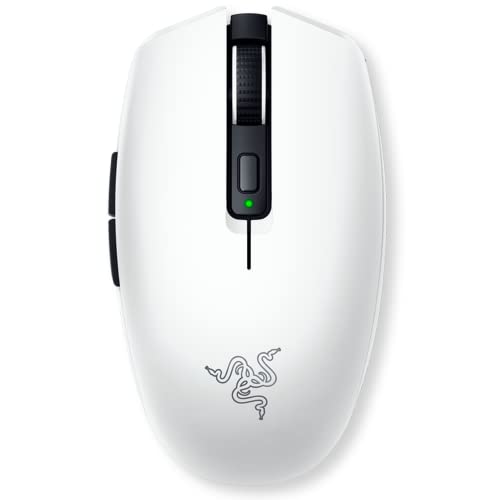
- Up to 950 hours of Bluetooth battery life
- Compact design under 60g excluding battery
- Bluetooth and HyperSpeed Wireless connectivity
Best For: Wireless office work, travel, and gaming
Best for Customization

- 11 programmable buttons for shortcuts and controls
- 25,600 DPI HERO sensor with precise tracking
- Adjustable weights and dual-mode scroll wheel
Best For: Desktop users who want extensive customization
Best Ergonomic Value

- Ergonomic right-handed wired design
- 6,400 DPI optical sensor with DPI buttons
- Five programmable buttons and tactile scroll wheel
Best For: Simple office use and casual gaming on a desktop
Balanced Wired Pick

- 8,000 DPI optical sensor
- Six programmable buttons
- Five selectable DPI settings
Best For: Everyday office work and occasional gaming
Feature-Rich Ergonomic Pick

- Thumb-rest ergonomic shape
- 11 programmable buttons
- Free-spin or tactile scroll wheel
Best For: Shortcut-heavy workflows and right-handed users
Budget Customization Pick

- Adjustable up to 7,200 DPI
- Eight remappable buttons
- Works with Windows, Mac, and Linux
Best For: Affordable customization across multiple operating systems
Best Battery Life – Logitech G305 Lightspeed Wireless
For shoppers seeking gaming mice for office work, the Logitech G305 combines a compact wireless design with a 1 ms report rate and a long-lasting AA battery. Its lightweight build also suits everyday desk use and laptop travel.
Best For: Office users who want a lightweight wireless mouse with minimal battery maintenance.
Pros:
- Up to 250 hours of continuous use from one AA battery, or up to nine months in Endurance mode.
- LIGHTSPEED wireless connectivity provides a 1 ms report rate.
- Lightweight 3.36-ounce design with built-in receiver storage.
- HERO optical sensor offers up to 12,000 DPI sensitivity and 400 IPS precision.
Cons:
- Uses a replaceable AA battery rather than an integrated rechargeable battery.
- Designed for Windows 10 or later according to the supplied requirements.
The G305 is a practical all-rounder for a home office, especially if you value wireless freedom, portability, and infrequent battery changes over extra ergonomic features.
Best for Custom Shortcuts – Redragon M612 Wired RGB
The Redragon M612 is a useful choice among gaming mice for office work when programmable controls matter. Its 11 editable buttons can handle work shortcuts as well as game commands, while the wired connection avoids battery concerns.
Best For: Users who want many remappable buttons for productivity shortcuts and gaming.
Pros:
- 11 programmable buttons support customizable tactical keybinds.
- Five DPI levels are available, with software support for settings from 500 to 8,000 DPI.
- Frosted coating and textured side grip are designed for comfortable control.
- Wired USB connection requires no charging or battery replacement.
Cons:
- Wired design limits desk mobility compared with wireless alternatives.
- Right-handed claw-grip design may not suit every hand position.
- RGB lighting and 11 buttons may be more than needed for basic office work.
Choose the M612 if you can accommodate a cable and want a feature-rich mouse for macros, shortcuts, and extended sessions. It is less suited to minimalist desks or users who prefer a simple button layout.
Best Premium Wireless Controls – Razer Basilisk V3 X HyperSpeed
For gaming mice for office work that need flexible connectivity and extra controls, the Razer Basilisk V3 X HyperSpeed offers both 2.4 GHz wireless and Bluetooth. Its ergonomic right-handed shape, programmable controls, and long battery ratings make it suitable for a mixed work-and-gaming setup.
Best For: Right-handed users who want multi-device wireless connectivity and programmable controls.
Pros:
- Supports Razer HyperSpeed wireless and Bluetooth for flexible device pairing.
- Rated for up to 285 hours on HyperSpeed or 535 hours on Bluetooth.
- Ergonomic form includes nine customizable controls and a right-handed design.
- 18,000 DPI optical sensor and Gen-2 mechanical switches provide gaming-focused hardware.
Cons:
- Requires one AA battery and is not described as rechargeable.
- Right-handed shape is not suitable for left-handed users.
- Full feature access relies on Razer Synapse and supported operating systems.
The Basilisk V3 X is a strong fit for a desk shared by work and play. Bluetooth extends battery life and supports a streamlined setup, while the programmable controls can reduce repetitive actions during office tasks.
Best Plug-and-Play Value – BENGOO RGB Wired Mouse
The BENGOO wired mouse is a straightforward option for gaming mice for office work, with plug-and-play USB connectivity and six practical buttons. Its adjustable DPI settings and ergonomic shape cover basic productivity and casual gaming without requiring a driver.
Best For: Budget-conscious users who want a simple wired mouse with RGB lighting.
Pros:
- Plug-and-play USB operation requires no driver.
- Four adjustable DPI settings range from 1,200 to 3,600.
- Six-button layout includes forward and DPI controls.
- Ergonomic shape and skin-friendly material are designed to reduce fatigue.
Cons:
- Wired connection provides less flexibility than wireless models.
- Maximum sensitivity is lower than the other listed gaming mice.
- Supplied warranty information lists no warranty.
The BENGOO makes sense for a basic office station where dependable USB operation and low setup effort matter most. Consider another model if you need extensive remapping, modern operating-system support, or wireless convenience.
Best Wireless Pick – Razer Orochi V2
For shoppers comparing gaming mice for office work, the Razer Orochi V2 stands out as a compact wireless option with exceptional battery endurance. Bluetooth supports everyday productivity, while HyperSpeed Wireless is available when you want lower-latency gaming performance.
Best For: Office users who want a lightweight, travel-friendly mouse that can also handle serious gaming.
Pros:
- Up to 950 hours of battery life over Bluetooth and up to 425 hours with HyperSpeed Wireless.
- Lightweight design under 60g excluding the battery, with support for either AA or AAA batteries.
- Dual wireless connectivity, an 18,000 DPI optical sensor, and durable switches rated for up to 60 million clicks.
Cons:
- Battery-powered operation means you will eventually need to replace the battery.
- Its compact, right-handed design may not suit users who prefer a larger mouse.
The Orochi V2 is a strong fit when reducing charging interruptions matters as much as gaming responsiveness. Its Bluetooth mode keeps office use simple, while the compact shape makes it convenient for laptops and travel.
Best for Customization – Logitech G502 HERO
The Logitech G502 HERO is a wired choice for shoppers seeking gaming mice for office work with extensive customization. Its 11 programmable buttons, adjustable weights, and dual-mode scroll wheel can be useful for shortcuts, navigation, and game controls alike.
Best For: Desktop users who prioritize programmable controls, customizable weight, and precise wired tracking.
Pros:
- 11 programmable buttons provide extensive control customization.
- HERO sensor tracks at up to 25,600 DPI without smoothing, filtering, or acceleration.
- Adjustable weights and a dual-mode hyper-fast scroll wheel support personalized handling and navigation.
- LIGHTSYNC RGB lighting offers customizable illumination.
Cons:
- The wired USB connection limits desk flexibility and portability.
- Its feature-rich design may be more than needed for basic office tasks.
Choose the G502 HERO if you want one mouse for productivity shortcuts and gaming controls and do not mind a cable. The adjustable weight system also lets you tailor its balance to your preferred feel.
Best Ergonomic Value – Razer DeathAdder Essential
The Razer DeathAdder Essential offers a straightforward wired design for shoppers looking at gaming mice for office work. Its ergonomic right-handed shape, tactile scroll wheel, and programmable buttons make it practical for everyday pointing, scrolling, and gaming.
Best For: Right-handed users who want a simple ergonomic wired mouse for work and casual gaming.
Pros:
- Ergonomic design is intended for comfortable right-handed use.
- 6,400 DPI optical sensor supports sensitivity adjustment through dedicated, reprogrammable DPI buttons.
- Five programmable buttons can be remapped or assigned macro functions through Razer Synapse.
- Ridged, rubberized scroll wheel provides controlled scrolling.
Cons:
- The wired connection reduces flexibility compared with wireless alternatives.
- Its 6,400 DPI maximum is lower than the other listed mice.
- It is designed for right-handed use.
The DeathAdder Essential is a sensible pick when comfort and uncomplicated operation matter more than wireless convenience or extensive button counts. It covers everyday office tasks while retaining useful gaming-focused controls.
Balanced Wired Pick – Logitech G203
The Logitech G203 is a practical choice for shoppers looking for gaming mice for office work without giving up gaming-focused control. Its 8,000 DPI optical sensor, six-button layout, and wired USB connection suit everyday navigation, productivity shortcuts, and occasional gaming.
Best For: Office users who want a compact, customizable wired mouse with straightforward sensitivity controls.
Pros:
- 8,000 DPI optical sensor with zero filtering and smoothing.
- Six buttons can be assigned commands or controls through Logitech G HUB.
- Up to five DPI settings can be cycled with the middle button.
- Mechanical primary buttons use metal springs for crisp, consistent feedback.
Cons:
- It is corded rather than wireless.
- The right-hand design may not suit left-handed users.
- RGB lighting may be unnecessary in a traditional office setup.
The G203 keeps its feature set focused while adding useful customization for work and play. Choose it if you prefer a dependable wired connection and do not need an especially large button array.
Feature-Rich Ergonomic Pick – Razer Basilisk V3
The Razer Basilisk V3 stands out among gaming mice for office work when you want extensive controls and a supportive right-hand shape. Its thumb rest, 11 programmable buttons, and Hyperscroll tilt wheel can make shortcuts, scrolling, and multitasking more flexible.
Best For: Right-handed power users who want many customizable controls and a versatile scroll wheel.
Pros:
- Ergonomic design includes a dedicated thumb rest.
- Eleven programmable buttons support macros and secondary functions.
- Hyperscroll wheel switches between free-spinning and tactile modes.
- 26,000 DPI optical sensor and optical switches provide precise, responsive tracking and clicking.
Cons:
- The extensive button layout may feel excessive for simple office tasks.
- It is a wired USB mouse.
- The design is intended for right-handed use.
With its large control set and thumb support, the Basilisk V3 is better suited to users who will actively configure shortcuts in Razer Synapse. It is a strong productivity option if you value customization over a minimalist design.
Budget Customization Pick – Redragon M602
The Redragon M602 offers a budget-friendly route into gaming mice for office work, with adjustable sensitivity, remappable buttons, and an ergonomic shape. Its wired USB connection and compatibility with Windows, Mac, and Linux make it adaptable across common work setups.
Best For: Users who want programmable controls and adjustable DPI at an accessible price-oriented feature level.
Pros:
- Adjustable sensitivity reaches up to 7,200 DPI.
- Eight-button layout supports remapping and macro editing.
- Ergonomic shape includes dedicated finger positions for comfort.
- RGB lighting offers seven modes and effects, including an off setting.
Cons:
- It is a wired mouse with a glossy plastic finish.
- Customization requires downloading Redragon software.
- The right-hand design may not fit left-handed users.
The M602 is a practical fit when programmable buttons matter more than premium materials or wireless convenience. Its broad operating-system compatibility also makes it a flexible choice for mixed-device households and offices.
How We Picked the Best Gaming Mice for Office Work
We focused on features that matter beyond gaming: long-session comfort, dependable tracking, connection type, button layout, customization, and everyday practicality. The selection includes both wired and wireless mice, compact models for smaller hands or portable setups, and larger ergonomic designs for users who prefer palm support.
Programmable buttons were considered useful for shortcuts such as copy, paste, browser navigation, and application switching. We also looked for products with adjustable sensitivity, since office tasks often benefit from controlled cursor movement while games may require faster tracking.
Quick Comparison
| Best For | What to Look For | Recommended Type |
|---|---|---|
| Wireless desk setups | Reliable 2.4GHz connection and battery life | G305 or Basilisk V3 X |
| Travel and smaller hands | Lightweight, compact shape | Orochi V2 |
| Shortcut-heavy office work | Multiple programmable buttons | G502 Hero or Basilisk V3 |
| Simple plug-and-play use | Wired connection and familiar controls | G203 or DeathAdder Essential |
| Lower-cost RGB features | Adjustable DPI and remappable buttons | Redragon or BENGOO models |
Key Buying Factors for Gaming Mice for Office Work
Comfort and Shape
Choose a shape that matches your grip and hand size. Ergonomic right-handed mice can reduce strain for palm and relaxed claw grips, while symmetrical or compact designs may suit fingertip users and smaller hands. Weight also matters: lighter mice feel agile, while heavier models can feel more planted during precise office work.
Wired Vs. Wireless
Wired mice avoid charging and offer consistent plug-and-play performance, but their cables can add desk clutter. Wireless models create a cleaner workspace and are easier to reposition. Check whether a model uses a USB receiver, Bluetooth, or both, and consider battery replacement or charging needs.
Buttons, Software, and Sensitivity
Extra buttons are valuable only if they are easy to reach without accidental presses. Look for onboard memory or dependable configuration software if you move between computers. Adjustable DPI is helpful, but extremely high sensitivity ratings are not essential for normal office use; accurate, consistent tracking matters more.
Noise and Desk Compatibility
Click sound, cable length, mouse feet, and the surface used on your desk all affect daily comfort. If you work in a shared space, quieter switches may be preferable. A mouse pad can improve tracking and reduce friction, especially on glossy or uneven surfaces.
Who Should Buy Which Gaming Mice for Office Work?
Choose a lightweight wireless model if you want a clean desk, easy repositioning, or occasional gaming. Pick a larger ergonomic mouse if comfort and palm support are your priorities. A multi-button model is the better choice for spreadsheet work, editing, browsing, or any workflow that benefits from custom shortcuts.
For buyers who want the simplest reliable option, a wired mouse keeps setup and maintenance straightforward. Budget RGB models can provide useful controls at a lower price, but verify the shape, software support, and button quality before prioritizing lighting. The best Gaming Mice for Office Work are ultimately the ones whose size, grip, connection, and controls fit your daily routine.