
Compact smart home hubs can simplify your setup by connecting devices, automations, and voice assistants in one place. The right hub makes it easier to control lighting, security, routines, and more without juggling multiple apps.
Below, we focus on the best options for different homes and ecosystems, from Matter-ready controllers to advanced automation hubs and IR-enabled remotes.
Best 10 Compact Smart Home Hubs Picks for 2026
Official Local-First Hub

- Home Assistant preinstalled for quick setup
- Small fanless hub with low power use
- USB support for Z-Wave, Zigbee, and Thread
Best For: People who want local control and advanced automation in a compact hub
Wall-Mounted Control Panel
Echo Hub 8-inch Smart Home Control Panel

- 8-inch dashboard for devices, cameras, and routines
- Supports Zigbee, Matter, Thread, Wi-Fi, and more
- Wall-mountable with cleaner cable options
Best For: Alexa households wanting a dedicated wall display for smart home control
Multi-Protocol Automation Hub
Aqara Hub M3 with Matter Bridge and IR

- Supports Zigbee, Thread, Wi-Fi, and Matter bridge
- Edge Hub design emphasizes local automations
- Built-in 360° IR blaster for AC and remotes
Best For: Advanced users who want Aqara, Matter, and IR control in one hub
Sensor and Chime Hub
Tapo H200 Smart Hub with Chime

- Connects up to 64 sensors/buttons plus 4 cameras or doorbells
- Built-in alarm and chime functions
- Supports local microSD recording storage
Best For: Tapo users building a compact sensor and doorbell hub
Most Versatile Hub
Aeotec Smart Home Hub for SmartThings Users

- Supports Matter, Z-Wave, Zigbee, Wi‑Fi
- Runs many automations locally for speed
- Works with SmartThings, Alexa, and Google Home
Best For: SmartThings-based homes needing broad protocol support
Best Universal Remote Hub
Tapo Matter IR & IoT Hub with Chime

- Controls TVs, ACs, fans, and more
- Supports 8,000+ IR brands and 18 appliance types
- Includes a built-in 93 dB alarm
Best For: Rooms and homes with lots of IR-controlled appliances
Best Lighting Bridge
Lutron Caseta Smart Hub for Quick Setup

- Supports up to 75 Caseta devices
- Compatible with Alexa, HomeKit, Google, Ring, and Sonos
- Plugs in and connects to your router easily
Best For: Lighting-focused homes wanting a simple, reliable bridge
Compact Matter bridge hub

- Bridges Aqara Zigbee to Matter ecosystems
- Supports Thread and local automations
- USB-A powered with adjustable placement
Best For: People who want a tiny Aqara hub for Matter bridging and local control
IR remote control hub

- Adds IR control for TVs and air conditioners
- Includes temp, humidity, and light sensing
- Supports Matter for select SwitchBot devices
Best For: Homes that want one hub for IR control and basic environmental automation
Local Matter bridge hub
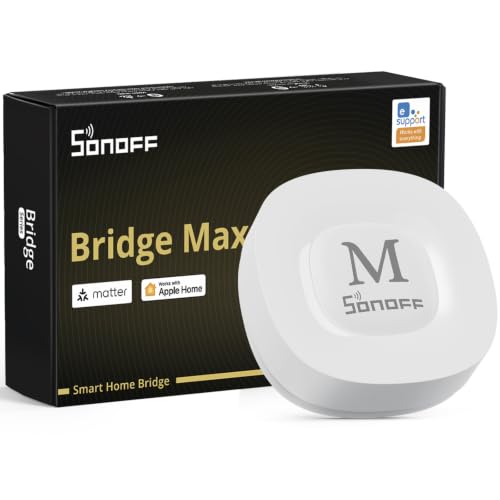
- Bridges Zigbee, BTHome, and eWeLink to Matter
- Local web console works from LAN
- Supports Home Assistant and Zigbee security setups
Best For: Privacy-minded users who want local control and Matter bridging
Official Local-First Hub – Home Assistant Green
Home Assistant Green | Smart Home hub with Advanced Automation | Official Home Assistant Hardware
Check Price On AmazonHome Assistant Green is a strong pick for compact smart home hubs if you want a simple way to centralize devices and automation at home. It arrives with Home Assistant already installed, so setup is mostly about plugging in power and Ethernet, then building out your system from there.
Best For: Users who want official Home Assistant hardware with local control and room to grow.
Pros:
- Home Assistant is preinstalled for a fast start.
- Small, fanless, silent design with quad-core processor, 4GB RAM, and 32GB storage.
- Keeps home data local on the device for privacy-minded setups.
- USB expandability supports Z-Wave, Zigbee, and Thread accessories.
Cons:
- Requires Ethernet and included power supply for initial setup.
- Expansion depends on adding separate USB devices.
Overall, this is a practical hub for buyers who want a compact, energy-efficient base for advanced automations without relying on multiple apps.
Wall-Mounted Control Panel – Echo Hub 8-inch Smart Home Control Panel
Amazon Echo Hub is built for buyers who want one of the most convenient compact smart home hubs to manage devices from a wall-mounted screen. Its customizable dashboard makes it easy to arrange controls, view cameras, trigger routines, and handle everyday smart home tasks in one place.
Best For: Households that want a dedicated Alexa smart home control panel.
Pros:
- 8-inch display with customizable dashboard sections and layouts.
- Built-in smart home hub supports Wi-Fi, Bluetooth, Zigbee, Matter, Sidewalk, and Thread devices.
- Can arm and disarm compatible security systems from the screen.
- Wall-mountable with cable-hiding options for a cleaner install.
Cons:
- Some features, like Ring event summaries, require separate subscriptions.
- Power-over-Ethernet adapter and tabletop stand are sold separately.
If you want a dedicated dashboard instead of juggling phone apps, Echo Hub is a polished way to put smart home control in a visible, central spot.
Multi-Protocol Automation Hub – Aqara Hub M3 with Matter Bridge and IR
The Aqara Smart Home Hub M3 is aimed at buyers who want compact smart home hubs with broad protocol support and a strong focus on local automation. It combines Zigbee, Thread, Wi-Fi, and Matter bridge features in a small unit, while also adding IR control for traditional air conditioners and remotes.
Best For: Advanced users building a local-first Aqara and Matter setup.
Pros:
- Supports Aqara Zigbee and Thread devices, plus Matter bridge functionality.
- Prioritizes local control and automation through its Edge Hub design.
- Includes a 360° IR blaster with feedback and learning for compatible appliances.
- Offers dual-band Wi-Fi, PoE, and USB-C options for flexible connectivity.
Cons:
- Supports only Aqara Zigbee devices, not third-party Zigbee devices.
- Some cloud-based notifications still need internet access.
This is a versatile hub if you want a compact controller that can bridge multiple ecosystems and handle local automations with less dependence on the cloud.
Sensor and Chime Hub – Tapo H200 Smart Hub with Chime
The Tapo Smart Hub H200 is a compact smart home hub for shoppers building a Tapo-based security and sensor setup. It connects a large number of compatible switches, sensors, buttons, cameras, and doorbells, while also adding built-in chime and local microSD storage for recordings.
Best For: Tapo users who want a hub for sensors, doorbells, and local alerts.
Pros:
- Supports up to 64 switches, sensors, or buttons plus 4 cameras or doorbells.
- Works as a smart alarm and chime for motion or visitor alerts.
- Local microSD storage supports recordings up to 512 GB.
- Low-power wireless protocol helps compatible sensors and buttons last longer.
Cons:
- Designed around Tapo devices rather than broad third-party compatibility.
- Requires 2.4GHz Wi-Fi.
For Tapo households, this hub adds useful alerting and storage features without taking up much space, making it a practical center for sensors and camera accessories.
Most Versatile Hub – Aeotec Smart Home Hub for SmartThings Users
If you want one of the more flexible compact smart home hubs, the Aeotec Smart Home Hub is built to connect a wide range of devices through SmartThings. It supports Matter, Z-Wave, Zigbee, Wi‑Fi, Alexa, and Google Home, so it can sit at the center of a mixed-device setup without much friction.
Best For: Homes that want broad device compatibility, SmartThings automations, and local execution for faster routines.
Pros:
- Works with SmartThings and supports thousands of compatible devices.
- Supports Matter, Z-Wave, Zigbee, Wi‑Fi, Alexa, and Google Home.
- Automations can run locally for improved speed and reliability.
- Easy setup with either Wi‑Fi or Ethernet through the SmartThings app.
Cons:
- Z-Wave Plus support applies to the V3 model only.
- Designed for use in North America.
- Best value depends on whether you already use SmartThings devices and app workflows.
This is a strong pick if you want a compact smart home hub that can grow with your setup. Its wide protocol support and SmartThings automation tools make it especially practical for users mixing newer Matter devices with older standards.
Best Universal Remote Hub – Tapo Matter IR & IoT Hub with Chime
The Tapo Smart IR & IoT Hub is a smart home hub aimed at turning remotes, appliances, and older gear into one manageable system. It supports Matter, IR control for thousands of brands, and app, voice, or automation control, making it useful if your home includes a mix of legacy electronics and newer connected devices.
Best For: Households that want to control TVs, AC units, fans, and other IR devices from one compact hub.
Pros:
- Controls 8,000+ IR brands and supports 18 appliance types.
- Built-in 93 dB alarm for Tapo sensor alerts.
- Works with Alexa, Google Assistant, and Siri through Matter.
- Supports app access, schedules, location-based control, and remote management.
Cons:
- IR control depends on being within IR range.
- Best features are strongest in a Tapo-centered setup.
- Primarily focused on appliance and entertainment control rather than broad hub protocols like Zigbee or Z-Wave.
This hub stands out if you want one device to replace a stack of remotes and automate everyday appliances. It is especially practical for rooms where AC, TV, fans, and other IR gear all need to work together.
Best Lighting Bridge – Lutron Caseta Smart Hub for Quick Setup
The Lutron Caseta Smart Hub is a compact smart home hub focused on Lutron lighting and related accessories. It plugs into your router, uses Clear Connect technology that avoids Wi‑Fi congestion, and works with a wide range of platforms including Alexa, Apple HomeKit, Google Assistant, Ring, Serena shades, and Sonos.
Best For: Users building a reliable Lutron lighting setup with simple installation and broad platform compatibility.
Pros:
- Supports up to 75 Caseta devices for gradual expansion.
- Easy setup: plugs into an outlet and connects to your Wi‑Fi router.
- Compatible with Alexa, Apple HomeKit, Google Assistant, Ring, Serena shades, and Sonos.
- Clear Connect technology does not interfere with Wi‑Fi devices.
Cons:
- Designed mainly for Lutron Caseta devices rather than general-purpose device control.
- Coordinating accessories are sold separately.
- Voice-based lighting control depends on compatible Alexa devices and Caseta dimmers/switches.
If your priority is dependable lighting control in a compact hub, this is a very straightforward option. It is less of an all-in-one hub and more of a purpose-built bridge, which can be exactly what many lighting-focused setups need.
Compact Matter bridge hub – Aqara Smart Hub M100
If you want one of the most compact smart home hubs for mixing Aqara gear with broader Matter ecosystems, the Aqara Smart Hub M100 is built around flexibility and local reliability. It bridges Aqara Zigbee products into Apple Home, Amazon Alexa, and Home Assistant, while also supporting Thread devices and local automations for faster response times.
Best For: Buyers who want a small hub for Aqara devices, Matter bridging, and local automation.
Pros:
- Supports Aqara Zigbee and Thread devices in a compact design.
- Works as a Matter Bridge for Apple Home, Alexa, and Home Assistant.
- Local automation can keep Zigbee and Matter routines running without Wi‑Fi or cloud access.
- USB-A power makes placement flexible with power banks, wall outlets, PCs, or routers.
Cons:
- Only supports Aqara Zigbee devices, not third-party Zigbee devices.
- Needs a 5V 0.5A power adapter, which is not included.
- Stable Wi‑Fi placement matters; Aqara recommends keeping it within 6 to 19 feet of the router.
This is a strong pick if you want compact smart home hubs that focus on ecosystem bridging and dependable local control rather than broad Zigbee compatibility. Its small size and adjustable shaft make it easy to tuck into tight spaces.
IR remote control hub – SwitchBot Hub 2
The SwitchBot Hub 2 is a practical choice if you want compact smart home hubs that do more than just connect devices. It combines Wi‑Fi remote control, a thermometer/hygrometer, and a light sensor, while also consolidating infrared remotes for TVs, air conditioners, and other appliances.
Best For: Homes that need IR remote control, environment sensing, and easy SwitchBot integration.
Pros:
- Built-in temperature, humidity, and light sensing for automation triggers.
- Controls multiple infrared appliances from the app, voice assistants, or Apple Watch.
- Includes two smart buttons for simple manual control of scenes or devices.
- Supports Matter for SwitchBot Lock, Curtains, and Blind Tilts.
Cons:
- Maximum supported devices is listed at 6.
- Requires 2.4GHz Wi‑Fi.
- HomeKit support via Matter is limited to specific SwitchBot products.
This hub stands out when you want a small device that can bridge older IR appliances and newer smart home gear in one place. The built-in sensor data and buttons add useful everyday control without making the setup complicated.
Local Matter bridge hub – SONOFF Bridge Max
For shoppers comparing compact smart home hubs with a stronger privacy and local-control angle, the SONOFF Bridge Max is designed to bridge Zigbee, BTHome, and eWeLink devices into Matter platforms. It also offers a local web console, so you can manage the bridge from your LAN without relying on an app or cloud service.
Best For: Users who want a local-first Zigbee hub with Matter bridging and Home Assistant support.
Pros:
- Bridges Zigbee, BTHome, and eWeLink devices to Matter ecosystems like Alexa, Google Home, and Apple Home.
- Local web console works from your LAN without cloud dependence.
- Supports Home Assistant via MQTT and can bridge devices to Matter-compatible platforms.
- Built-in 90 dB alarm adds a security layer when paired with Zigbee sensors.
Cons:
- Security features depend on pairing with Zigbee sensors.
- It is more focused on bridging than on extras like temperature sensing or IR control.
- Broad compatibility is strong, but the notes emphasize SONOFF and third-party Zigbee support rather than universal device support.
This is a smart option if you value local management and want a hub that can connect multiple smart home ecosystems without cloud-first setup. It fits well in a compact, privacy-conscious home automation build.
How We Picked the Best Compact Smart Home Hubs
We prioritized Compact Smart Home Hubs that balance compatibility, automation depth, and ease of setup. Key factors included support for major ecosystems, Matter readiness, wired and wireless connectivity, and whether the hub adds useful functions like IR control, built-in chime support, or sensor readings.
We also looked for models that fit real-world needs: small footprints for shelves or desks, reliable local control where possible, and enough device support to serve as a central home controller rather than just a simple bridge.
Quick Comparison: What Matters Most
For many buyers, the best choice comes down to the ecosystem you already use. Some Compact Smart Home Hubs are best for advanced automation and broad device compatibility, while others are better as dedicated controllers for lights, sensors, or entertainment gear. Matter support is increasingly important, but Zigbee, Z-Wave, IR, and app compatibility still matter a lot depending on what you own.
Best for Advanced Automation
Choose a hub that emphasizes local rules, broad protocol support, and reliable device orchestration if you want more complex routines and fewer cloud dependencies.
Best for Simple Control Panels
If you want a wall- or tabletop-style command center, look for a hub with a clear interface, strong assistant integration, and easy access to your most-used controls.
Key Buying Factors for Compact Smart Home Hubs
Compatibility: Make sure the hub supports the devices you already own, including Matter, Zigbee, Z-Wave, Wi-Fi, or proprietary accessories.
Automation features: Some hubs are built for basic linking, while others support advanced scenes, sensor triggers, presence rules, and local processing.
Size and placement: Compact Smart Home Hubs should fit neatly in a media cabinet, on a shelf, or on a wall without adding clutter.
Extra functions: IR control, built-in chimes, temperature and humidity sensing, or voice-assistant integration can replace separate gadgets and save space.
Future-proofing: Matter support and strong platform compatibility help keep your system flexible as you add more smart devices later.
Who Should Buy Which Compact Smart Home Hubs?
If you want the most flexible home automation brain, choose a hub designed for broad protocol support and deeper customization. If you mainly want a simple central controller for lights and routines, a display-style hub may be the better fit. If your home includes IR appliances or budget smart accessories, a multi-function hub can consolidate several remotes and bridges into one device.
For buyers already committed to one ecosystem, it usually makes sense to stay within that platform for the smoothest setup. For everyone else, the best Compact Smart Home Hubs are the ones that match your current devices while leaving room to expand.