
Need to reboot, troubleshoot, or access a machine when you are away from the desk? The best KVM over IP switches for home offices make that possible with secure remote control and reliable out-of-band access.
Below, we focus on practical options for remote work, homelab use, and mixed home-office setups, with picks that balance video quality, ease of setup, and useful management features.
Best 10 Kvm Over Ip Switches for Home Offices Picks for 2026
Remote BIOS Access

- 4K 30Hz remote viewing
- BIOS-level control without host software
- Built-in file transfer and Tailscale access
Best For: Home office users needing remote recovery and BIOS access
Open-Source Server Control

- Open-source Raspberry Pi CM4-based KVM
- 1080p60 and 1200p60 support
- WiFi, Ethernet, and cellular connectivity
Best For: Open-source users who want flexible remote management
PoE 4K Remote KVM

- PoE and Type-C dual power
- 4K at 30FPS streaming
- 32GB eMMC with remote BIOS reinstall
Best For: Home office users who want PoE-powered remote access
Compact Internet KVM
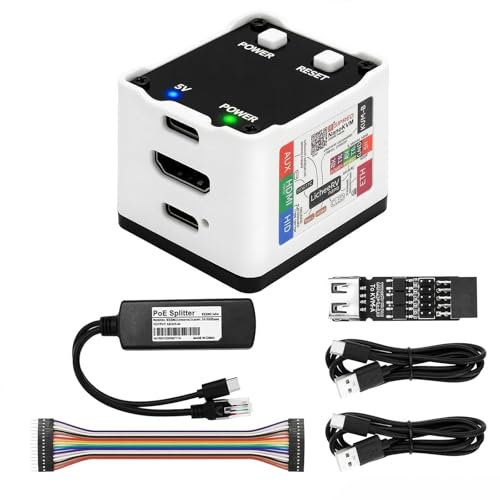
- 1080P HDMI capture with USB HID control
- ATX power control in the Full version
- 100Mbps Ethernet and OLED status display
Best For: Home office users needing a compact BIOS-capable KVM
Wireless 4K Remote KVM
GL.iNet GL-RM10 Comet Pro Remote KVM

- Dual-band Wi‑Fi 6 and wired connectivity
- 4K@30FPS passthrough with two-way audio
- Touchscreen plus cloud, app, and self-hosted access
Best For: Users wanting cleaner cabling and flexible remote access for home office or home lab use.
Compact Crash-Recovery KVM
AweSun IPKVM Switch Q1 Remote KVM

- BIOS-level control even during crashes
- No-driver plug-and-play setup
- Ultra-compact design for small workspaces
Best For: Small home offices that need compact, always-available remote recovery access.
High-Density Rack KVM
Tripp Lite NetCommander 16-Port IP KVM

- Connects up to 16 computers or servers
- Supports 2 remote sessions plus 1 local user
- 1080p/60Hz with AES and HTTPS security
Best For: Multi-system home labs or office racks that need shared remote access and secure management.
Open-Source Remote Control Pick

- 1080p/60 FPS video with 30-60 ms latency
- Local browser, cloud dashboard, and Wake-on-LAN access
- Open-source Linux platform with expansion support
Best For: Home office users and tinkerers who want flexible remote rescue control
Simple In-Home Extension Pick
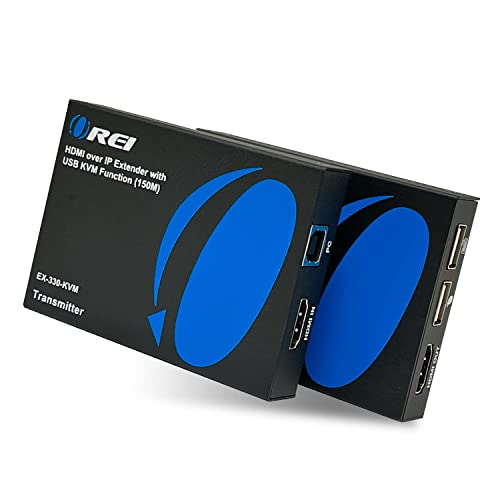
- Controls a PC over your home network
- Plug-and-play with no software installation
- Supports remote keyboard and mouse use
Best For: In-home workstation access from another room with minimal setup
Compact DIY-Friendly Pick

- Ultra-compact 23x37 mm remote KVM box
- HDMI capture plus USB HID and storage simulation
- Open-source firmware and hardware for customization
Best For: Tiny home servers and DIY users needing BIOS-level remote access
Remote BIOS Access – GL.iNet Comet GL-RM1
If you want kvm over ip switches for home offices that feel closer to a full remote workstation tool than a basic controller, the GL.iNet Comet GL-RM1 is built for that job. It supports BIOS-level access, remote rebooting, OS installs, and hardware-based control without needing software on the host machine.
Best For: Home office users who need reliable BIOS access, remote recovery, and easy control of PCs or laptops from anywhere.
Pros:
- 4K 30Hz remote viewing with low-latency H.264 hardware encoding
- BIOS-level control and remote power actions without host software
- One-click app connection plus file transfer between computers
- Compact hardware with Ethernet, HDMI, USB 2.0, and USB-C
Cons:
- PD adapters cannot be used
- Only one USB port is listed in the specifications
For a home office setup that needs dependable remote access and quick recovery tools, this is a strong hardware-first option. Its mix of 4K output, BIOS control, and file transfer makes it especially useful when you manage multiple machines.
Open-Source Server Control – PiKVM V4 Plus
Among kvm over ip switches for home offices, the PiKVM V4 Plus stands out if you want a feature-rich, open-source approach with a turnkey bundle. It is designed for remotely managing servers or PCs, and the included cables, power supply, and PCI brackets make it easier to set up right away.
Best For: Users who want an open-source, production-grade KVM over IP solution with strong compatibility and flexible connectivity.
Pros:
- Open-source, Raspberry Pi CM4-based KVM over IP platform
- Supports 1920×1080@60Hz and 1920×1200@60Hz for better UEFI/BIOS compatibility
- Turnkey package includes power supply, USB and Ethernet cables, and PCI brackets
- Three connectivity options: WiFi, Ethernet, and cellular support
Cons:
- Positioned more like a technical platform than a simple plug-and-play consumer device
- Storage expansion depends on using the internal USB 3.0 slot
This is a practical choice if you value flexibility, open-source control, and a kit that is ready to deploy. The stronger BIOS-friendly resolution support and multiple connection paths make it a capable remote management tool.
PoE 4K Remote KVM – GL.iNet Comet GL-RM1PE
If you’re comparing kvm over ip switches for home offices and want simpler cabling, the GL.iNet Comet PoE GL-RM1PE is a practical upgrade. It combines PoE and Type-C power options with 4K 30FPS remote streaming, built-in eMMC storage, and remote BIOS reinstall support.
Best For: Home office setups that benefit from Power over Ethernet, always-on access, and remote BIOS recovery tools.
Pros:
- PoE plus Type-C dual power supply options
- 4K at 30FPS remote streaming with hardware KVM control
- 32GB built-in eMMC for onboard storage
- Supports remote BIOS reinstall and ATX/Fingerbot USB interface
Cons:
- Uses Ethernet and HDMI, so it is not a wireless-first KVM setup
- No detailed software or app workflow is listed in the supplied notes
This model makes sense if you want fewer power-adapter headaches and a more streamlined hardware installation. Its PoE support and built-in storage add convenience for remote work and recovery tasks.
Compact Internet KVM – Sipeed NanoKVM Full W
The Sipeed NanoKVM Full W is a compact option in kvm over ip switches for home offices when you need direct hardware control without installing host software. It offers 1080P HDMI capture, USB HID control, Ethernet connectivity, and ATX power control in the Full version.
Best For: Users who want a small remote KVM for BIOS access, power cycling, and basic server or PC management.
Pros:
- 1080P HDMI input for remote screen capture
- USB HID support for keyboard and mouse control
- 100Mbps Ethernet for video and control signals
- Full version includes ATX power control and OLED status display
Cons:
- Network speed is limited to 100Mbps
- Resolution is capped at 1080P rather than 4K
- Feature set depends on the Full version rather than the Lite model
This is a sensible pick if you want a small, externally managed KVM device for occasional recovery or remote maintenance. Its support for BIOS access and power cycling makes it useful, though it is less feature-heavy than larger premium options.
Wireless 4K Remote KVM – GL.iNet GL-RM10 Comet Pro Remote KVM
If you want one of the more flexible kvm over ip switches for home offices, the GL.iNet GL-RM10 Comet Pro stands out for its dual-band Wi‑Fi 6 and wired connectivity, helping reduce cable clutter while keeping remote access options open. It supports 4K@30FPS passthrough with low-latency H.264 video, plus two-way audio for more natural support and remote collaboration.
Best For: Home office users, home labs, and remote support setups that want wireless flexibility, 4K passthrough, and browser/app-based access.
Pros:
- Dual-band Wi‑Fi 6 plus wired connectivity for a cleaner, more flexible setup
- 4K@30FPS video passthrough with two-way audio
- Built-in touchscreen makes setup and cloud controls easy to manage
- Supports cloud access, the GLKVM app, and self-hosted deployment options
Cons:
- ATX Board and Fingerbot are sold separately
- Advanced features may be more than some basic home office users need
- Cloud/self-hosted options may take extra setup compared with simpler devices
Overall, this is a strong pick if you want remote KVM hardware that blends home-office convenience with more serious recovery and support features. It is especially compelling when you need BIOS access, OS reinstallation, or flexible access across Windows, macOS, Linux, iOS, and Android.
Compact Crash-Recovery KVM – AweSun IPKVM Switch Q1 Remote KVM
The AweSun IPKVM Switch Q1 is a practical choice if you need kvm over ip switches for home offices that can still handle serious recovery tasks. It offers BIOS-level control even when the OS crashes, no-driver plug-and-play operation, and compact hardware that is easy to place in a workstation, rack, or travel kit.
Best For: Home office users who need BIOS access, crash recovery, and a very compact remote KVM device.
Pros:
- BIOS-level control for recovery when the system is down
- Plug-and-play with no software needed on the host device
- Very compact and portable footprint for tight setups
- Supports remote control across Windows, macOS, iOS, and Android devices
Cons:
- Designed as a single-device remote access tool, not a multi-port switch
- Remote access is focused on KVM control rather than broader network management
- Uses a membership bonus, so some enhanced features may depend on the app ecosystem
If your main goal is dependable out-of-band access in a small office setup, Q1 delivers the basics that matter most: boot-time control, recovery support, and simple deployment. Its tiny size makes it especially appealing where desk space is limited.
High-Density Rack KVM – Tripp Lite NetCommander 16-Port IP KVM
For users comparing kvm over ip switches for home offices with more devices to manage, the Tripp Lite NetCommander 16-Port is built for heavier-duty control. It directly connects up to 16 computers or servers, supports simultaneous remote and local users, and uses Cat5e/6 cabling to keep long cable runs manageable.
Best For: Power users, advanced home labs, and office-style setups that need to manage many computers from one KVM.
Pros:
- Directly supports up to 16 computers or servers
- Allows up to 2 remote sessions plus 1 local user at the same time
- Uses Cat5e/6 cabling for connections up to 100 ft. away
- Supports 1080p at 60Hz and AES/HTTPS security
Cons:
- 1U rack-mount design is less home-office friendly than compact desktop units
- Requires SIUs and cabling accessories for connected systems
- May be more capability than a typical single-PC home office needs
This is the most scalable option in the group, but that scalability comes with a more rack-centric design. If you need multi-user, multi-system access and value secure browser-based control, it is a capable long-term platform.
Open-Source Remote Control Pick – JetKVM IP KVM
If you want kvm over ip switches for home offices that can handle rescue work as well as everyday remote access, JetKVM is built around fast browser-based control, low-latency video, and flexible power options. It connects through HDMI and USB-C, then lets you reach the machine locally, through the cloud dashboard, or with Wake-on-LAN.
Best For: Home office users, developers, and tinkerers who want a compact, open-source IP KVM with cloud and local access options.
Pros:
- 1080p video at 60 FPS with stated 30-60 ms latency for responsive control
- Three access methods: local browser access, cloud dashboard, and Wake-on-LAN
- Open-source design on Linux with SSH uploads for customization
- Extension port supports add-ons like ATX power control, RS-232, and sensors
Cons:
- Requires HDMI and USB-C connections plus Ethernet for setup
- Best suited to users comfortable with browser-based and cloud-managed remote access
JetKVM stands out if you want a compact tool that goes beyond basic remote viewing and into recovery and customization. For a home office setup where you may need to reboot, reach BIOS, or troubleshoot a frozen system remotely, it offers a lot of flexibility in a small package.
Simple In-Home Extension Pick – OREI HDMI KVM Extender
For kvm over ip switches for home offices that are mainly about reaching a PC elsewhere in the house, this OREI extender focuses on simple over-network control. It uses a sender and receiver pair, works over a home network switch, and supports remote keyboard and mouse control without software installation.
Best For: Users who want straightforward in-home PC access from another room with minimal setup.
Pros:
- Designed for control over your home network, with one-to-many receiver support
- Plug-and-play setup with no software installation required
- Supports remote keyboard and mouse control through the receiver
- Works with a wide range of HDMI devices, including PCs, laptops, and media players
Cons:
- More of an HDMI extender/KVM solution than a full-featured internet-based IP KVM
- Best fit for in-home use rather than advanced remote management
This is the practical choice if your main goal is to extend a workstation to another room and keep keyboard, mouse, and video in sync. It is less about advanced admin features and more about easy, reliable in-home access.
Compact DIY-Friendly Pick – Sipeed NanoKVM Lite
If you’re comparing kvm over ip switches for home offices and want the smallest possible remote management box, the Sipeed NanoKVM Lite is aimed at compact, plug-and-play control. It combines HDMI capture, USB HID simulation, and web-based access so you can reach BIOS, boot screens, and OS installs without relying on the host system.
Best For: Home lab builders, developers, and compact server setups that need open-source remote BIOS and OS access.
Pros:
- Ultra-compact 23×37 mm design that fits tight spaces
- Supports HDMI capture and USB keyboard, mouse, and storage simulation
- No host OS required for browser-based control
- Open-source firmware and hardware support customization
Cons:
- 100 Mbps networking may be limiting for users prioritizing higher throughput
- Best suited to DIY-minded buyers who want to customize or integrate the device
NanokVM Lite is the strongest fit when size, low power use, and open-source flexibility matter more than polished consumer extras. It is a smart option for compact home office rigs, home servers, or edge devices that need reliable out-of-band access.
How We Picked the Best Kvm Over Ip Switches for Home Offices
We prioritized devices that make remote recovery simple for everyday users, not just IT teams. That means stable BIOS-level control, dependable keyboard and mouse input, solid video capture, and networking options that fit home-office environments. We also favored products with sensible security features, straightforward setup, and clear compatibility with common PCs, mini PCs, and workstations.
Quick Comparison
Among Kvm Over Ip Switches for Home Offices, the biggest differences usually come down to video resolution, network connection type, and whether you need a true switch for multiple systems or a compact single-machine remote access device. Compact units are easier to deploy on a desk or in a small studio, while rack-style switches make more sense if you manage several computers from one location.
Key Buying Factors for Kvm Over Ip Switches for Home Offices
Video Quality and Responsiveness
If you work with modern monitors, prioritize 1080p or 4K support and pay attention to refresh rate. Higher resolution helps with readable text, but low-latency performance matters just as much for smooth cursor movement and faster troubleshooting.
Access Method and Networking
Ethernet is usually the most reliable choice for remote access, though some models add Wi-Fi or PoE for easier installation. For a home office, think about where the device will sit and whether you want a cleaner single-cable setup or a wired connection for maximum stability.
Security and Remote Management
Look for strong authentication, encrypted access, and support for secure remote connectivity tools when possible. If you plan to reach your system from outside the home, security should be treated as a core feature rather than an extra.
Port Count and Form Factor
A single-system remote KVM is usually enough for one primary workstation, development box, or home server. Multi-port switches are better if you want one console for several machines. Also consider rackmount versus compact desktop designs based on space and cable management needs.
Who Should Buy Which Kvm Over Ip Switches for Home Offices?
If you want a simple remote recovery tool for one PC or mini PC, choose a compact KVM-over-IP box with BIOS support and easy setup. If you manage a home lab, multiple work computers, or a small office rack, a multi-port switch is the better long-term fit. If your priority is cleaner installation and fewer cables, look for PoE or integrated networking features. For most home users, the right choice is the smallest device that still gives you the video quality, security, and remote access range you actually need.