
Choosing a workstation computer for architecture is about more than raw specs. CAD, BIM, rendering, and multitasking all place different demands on the system, so the right balance matters.
Below, we focus on machines that can handle demanding design workflows with strong processors, dependable graphics, fast storage, and upgrade room for future projects.
Best 10 Workstation Computer for Architecture Picks for 2026
Performance Tower
Lenovo ThinkStation P3 Tower Workstation

- Core Ultra 9 285 vPro processor
- RTX 2000 Ada 16GB graphics
- 64GB DDR5 RAM with 1TB SSD
Best For: High-end architecture and CAD workloads
Midrange Workhorse
- Core i7-14700K with 20 cores
- NVIDIA T1000 8GB graphics
- 32GB DDR5 RAM, expandable to 128GB
Best For: Reliable CAD and design productivity
Compact Space Saver
- Ultra-compact 3.01 lb mini workstation
- ISV-certified for major CAD apps
- Dual-display support up to 8K/4K
Best For: Small desks and light-to-moderate CAD work
Modern Expandable Tower
- Core Ultra 7 265 with 20 cores
- RTX A1000 8GB professional graphics
- Up to 256GB RAM support
Best For: Newer AI-ready CAD and visualization workflows
Tiny Workstation Pick
Lenovo ThinkStation P3 Tiny for compact CAD

- 20-core i7-14700 for CAD and engineering apps
- Up to 64GB DDR5 RAM and 2TB NVMe SSD options
- DP + HDMI output for multi-display work
Best For: Compact architecture setups that prioritize desk space and general workstation performance
Balanced Tower Choice
Dell Pro Tower for architecture multitasking
- Core i7-14700 with 20 cores and 28 threads
- 32GB DDR5 RAM plus 1TB PCIe SSD
- Dual 4K monitor support for productivity
Best For: Users who want a reliable tower for architecture multitasking and dual-monitor workflows
Premium Compact Workstation
Lenovo ThinkStation P3 Ultra for BIM and 3D

- RTX 4000 SFF Ada with 20GB GDDR6
- Core Ultra 9 plus integrated NPU for AI tasks
- WiFi 7 and Windows 11 Pro in an SFF chassis
Best For: Architecture, BIM, and 3D users who want premium graphics in a compact workstation
Enterprise Tower
Dell Pro Tower for CAD and business workflows

- 20-core Core i7-14700 for demanding multitasking
- 32GB DDR5 and 1TB SSD for fast project handling
- Dual 4K display support for productive setups
Best For: Architects and professionals who need a reliable business tower for CAD and multitasking
Compact Workstation
Lenovo ThinkStation P3 Ultra for space-saving design work

- Compact SFF chassis with workstation-grade hardware
- 64GB DDR5 RAM and 2TB SSD for large projects
- Dedicated NVIDIA T400 graphics and Thunderbolt 4
Best For: Architects who need a compact, professional workstation with strong memory and dedicated graphics
Graphics-Ready Tower
Dell Tower Plus for rendering and visualization

- RTX 5060 graphics for stronger visualization support
- Intel Ultra 7-265 and 32GB DDR5 for fast workflows
- 3 DisplayPort and 2 HDMI for multi-monitor setups
Best For: Architects who want dedicated graphics for rendering and multi-display work
Performance Tower – Lenovo ThinkStation P3 Tower Workstation
If you need a workstation computer for architecture that can handle heavy CAD files, 3D visualization, and multitasking, the Lenovo ThinkStation P3 Tower is built for serious professional use. Its Intel Core Ultra 9 285 vPro, 64GB of DDR5 memory, and NVIDIA RTX 2000 Ada 16GB give it the kind of headroom architects often want for demanding design workflows.
Best For: Architects and design teams that want a powerful tower for CAD, modeling, and 4K display workflows.
Pros:
- Intel Core Ultra 9 285 vPro processor with high boost clocks for demanding workloads
- NVIDIA RTX 2000 Ada 16GB dedicated graphics for professional visualization
- 64GB DDR5 RAM and 1TB PCIe Gen4 SSD for smooth multitasking and fast project loads
- Windows 11 Pro and Intel vPro security features for business use
Cons:
- Only a 1-year warranty listed in the supplied details
- Large tower footprint compared with compact office systems
- Not the most storage-heavy configuration for massive local project libraries
Overall, this is the most robust option in the group if your architecture work leans toward performance, professional graphics, and a traditional tower setup. It is especially appealing when stability and upgrade room matter more than saving desk space.
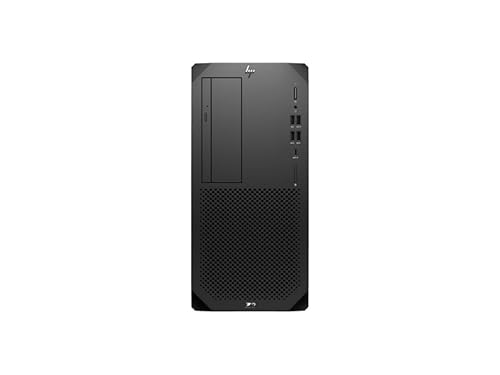
Midrange Workhorse – HP Z2 G9 Workstation
The HP Z2 G9 Workstation is a practical workstation computer for architecture when you want a balanced mix of CPU power, professional graphics, and business features. With a 14th Gen Core i7-14700K, 32GB of DDR5 memory, and NVIDIA T1000 8GB graphics, it suits everyday drafting, design work, and office productivity.
Best For: Architects who want a reliable midrange tower for CAD work and general design productivity.
Pros:
- 14th Gen Intel Core i7-14700K with 20 cores for responsive multitasking
- NVIDIA T1000 8GB dedicated graphics for professional display and design tasks
- 32GB DDR5 RAM with room to expand up to 128GB
- 3-year manufacturer warranty listed in the supplied notes
Cons:
- 512GB SSD is modest if you store many large project files locally
- Graphics tier is lower than higher-end RTX Ada workstation options
- Wireless support is listed, but the core spec sheet focuses on wired connectivity
This model makes sense if you want workstation reliability without moving into the highest-priced configurations. It is a strong fit for architects who value expandability and proven business hardware over top-end rendering performance.
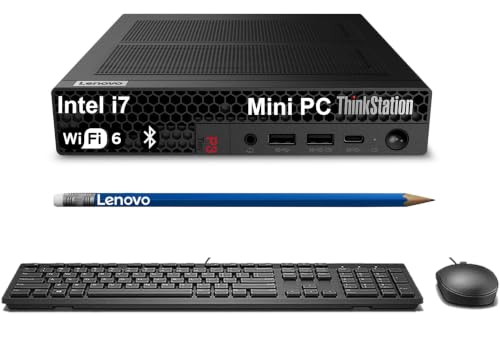
Compact Space Saver – Lenovo ThinkStation P3 Tiny
If desk space is tight, the Lenovo ThinkStation P3 Tiny is a compact workstation computer for architecture that still aims at professional software compatibility. It is ISV-certified for tools like AutoCAD, SOLIDWORKS, ArcGIS, Creo, and MATLAB, and the supplied notes highlight support for dual displays up to 8K and 4K.
Best For: Architects and designers who need a tiny desktop for CAD work, dual displays, and small offices.
Pros:
- Ultra-compact 3.01 lb design that saves a lot of desk space
- ISV-certified for AutoCAD, SOLIDWORKS, ArcGIS, Creo, and MATLAB
- Intel Core i7-14700 with up to 64GB DDR5 RAM options
- Dual-display support with up to 8K via DisplayPort 1.4 and 4K via HDMI 2.1
Cons:
- Uses Intel UHD Graphics 770, not a discrete workstation GPU
- Brand-new unit is noted as resealed for memory/SSD upgrades
- Less suitable than a tower if your workflow depends on heavier 3D graphics work
This is the best pick for users who want architecture software compatibility in the smallest possible footprint. It trades raw graphics muscle for convenience, connectivity, and space-saving flexibility.
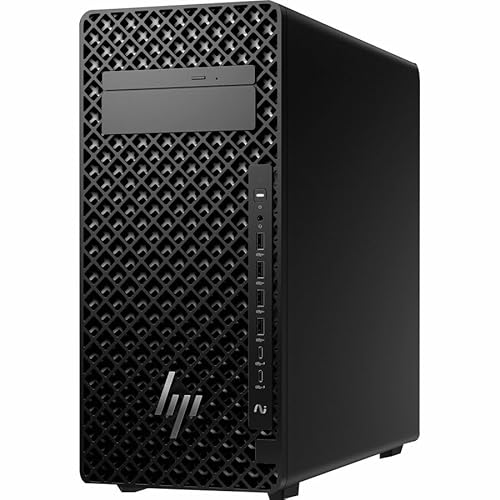
Modern Expandable Tower – HP Z2 G1i Workstation
The HP Z2 G1i is a modern workstation computer for architecture if you want a newer Core Ultra platform with dedicated graphics and room to grow. The supplied notes highlight a Core Ultra 7 265, 32GB of DDR5 memory, a 1TB SSD, and NVIDIA RTX A1000 8GB graphics, which should fit a wide range of professional design tasks.
Best For: Architects who want a newer AI-focused tower for CAD, visualization, and expandable workstation use.
Pros:
- Intel Core Ultra 7 265 with 20-core/20-thread configuration
- NVIDIA RTX A1000 8GB dedicated graphics for professional visualization
- 32GB DDR5 RAM and 1TB PCIe 4.0 SSD for responsive everyday use
- Memory support up to 256GB for future expansion
Cons:
- Power consumption is listed at 700W, so efficiency is not its main strength
- No warranty details are provided in the supplied notes
- Large tower dimensions may be more than some offices need
For architects wanting a fresh-generation tower with strong expandability, this is a compelling choice. It looks well suited to users who want a balance of modern CPU features, professional GPU support, and headroom for future upgrades.
Tiny Workstation Pick – Lenovo ThinkStation P3 Tiny for compact CAD
If you need a workstation computer for architecture but have very limited desk space, the Lenovo ThinkStation P3 Tiny is built around a high-core-count Intel Core i7-14700 and workstation-focused connectivity in a mini PC footprint. It’s aimed at CAD, engineering applications, and professional multitasking, with DDR5 memory and PCIe NVMe SSD options that help keep large projects moving.
Best For: Architects, designers, and power users who want workstation-class performance in a very compact system.
Pros:
- Intel Core i7-14700 with 20 cores for demanding professional workloads
- Supports 16GB to 64GB DDR5 RAM and up to 2TB PCIe NVMe SSD storage
- DisplayPort and HDMI output support multiple high-resolution displays
- Wi-Fi 6, Bluetooth, and RJ-45 Gigabit Ethernet for flexible connectivity
Cons:
- Integrated Intel UHD Graphics 770 is not a dedicated workstation GPU
- Very small Tiny design may limit expansion flexibility
- Only 2 total USB ports are listed in the supplied details
Overall, this is a strong fit if your architecture workflow leans on CAD, general design work, and multi-display productivity rather than heavy GPU rendering. The compact chassis and Windows 11 Pro make it easy to place in a tight office or studio setup.
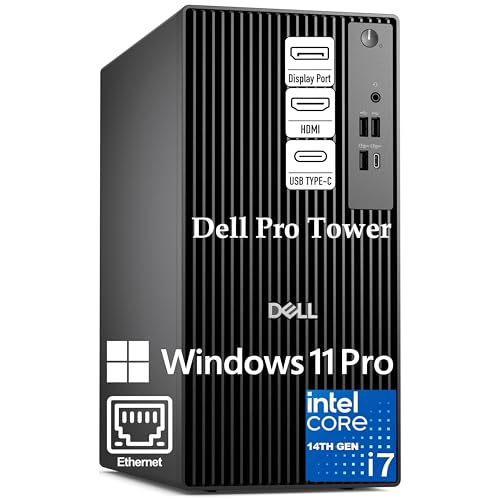
Balanced Tower Choice – Dell Pro Tower for architecture multitasking
The Dell Pro Tower is a practical workstation computer for architecture teams that want a reliable desktop format with strong everyday responsiveness. Its Intel Core i7-14700, 32GB of DDR5 RAM, and 1TB PCIe SSD are a solid match for multitasking, file-heavy projects, and running multiple professional apps at once.
Best For: Architecture professionals who want a dependable tower for multitasking, productivity, and dual-monitor workflows.
Pros:
- Intel Core i7-14700 with 20 cores and 28 threads for heavy multitasking
- 32GB DDR5 RAM and 1TB PCIe SSD included out of the box
- Dual 4K monitor support helps with side-by-side project viewing
- Windows 11 Pro and enterprise-focused features like BitLocker and Remote Desktop
Cons:
- No built-in Wi-Fi is included
- Uses integrated Intel UHD Graphics 770 rather than a dedicated graphics card
- Tower design takes up more space than a mini workstation
This Dell makes sense if you want a straightforward business workstation that can handle architecture workflows, office productivity, and remote work without much setup fuss. It’s especially appealing for users who value dual 4K displays and a roomy tower chassis over compact size.
Premium Compact Workstation – Lenovo ThinkStation P3 Ultra for BIM and 3D
For a high-end workstation computer for architecture, the Lenovo ThinkStation P3 Ultra SFF Gen 2 stands out because it pairs a Core Ultra 9 processor with NVIDIA RTX 4000 SFF Ada graphics in a small-form-factor design. That combination is aimed at BIM software, 3D modeling, advanced imaging, and content creation while still keeping the chassis compact and energy-efficient.
Best For: Architecture, BIM, and 3D design users who want premium graphics performance in a compact workstation.
Pros:
- NVIDIA RTX 4000 SFF Ada graphics with 20GB GDDR6 for professional visual workloads
- Intel Core Ultra 9 285 vPro with integrated NPU for AI and demanding tasks
- Fast 6400MHz DDR5 memory and 512GB Gen 4 SSD for quick loading
- WiFi 7 and Windows 11 Pro add modern business-ready connectivity and security
Cons:
- Only 16GB RAM is included by default
- 512GB SSD may feel small for large project libraries
- Small form factor may be less practical for users wanting easy internal expansion
This is the most capable pick here for graphics-forward architecture workloads, especially if your projects rely on BIM, 3D modeling, or visualization tools. If you want strong workstation performance without moving to a full-size tower, it offers a compelling balance of power and footprint.
Enterprise Tower – Dell Pro Tower for CAD and business workflows
If you need a workstation computer for architecture that leans more toward dependable office-to-studio productivity than flashy graphics, this Dell Pro Tower is a practical fit. The Intel Core i7-14700, 32GB of DDR5 memory, and 1TB PCIe SSD give it the responsiveness needed for CAD work, 4K content review, and juggling multiple project files at once.
Best For: Architects, designers, and business users who want a stable tower for CAD, 4K displays, and everyday productivity.
Pros:
- 20-core Intel Core i7-14700 handles multitasking and demanding professional apps.
- 32GB DDR5 RAM and 1TB SSD support fast loading for large files and projects.
- Dual 4K display support is useful for multi-monitor drafting and review setups.
- Windows 11 Pro adds business security and remote desktop features.
Cons:
- No built-in Wi-Fi is listed.
- Integrated graphics may be limiting for heavier 3D rendering.
- More focused on business reliability than specialized visualization hardware.
Overall, this is a solid architecture workstation if your priority is dependable CPU performance, fast storage, and dual-display productivity in a business-class tower.
Compact Workstation – Lenovo ThinkStation P3 Ultra for space-saving design work
This workstation computer for architecture is a strong pick when desk space is tight but performance still matters. The Lenovo ThinkStation P3 Ultra pairs a Core i7-14700 vPro processor with 64GB of DDR5 RAM, a 2TB PCIe SSD, and dedicated NVIDIA T400 graphics, making it well suited to professional design workflows and multi-monitor use.
Best For: Architects and design professionals who need a compact workstation with dedicated graphics and lots of memory.
Pros:
- Compact SFF design saves space without giving up workstation-grade hardware.
- 64GB DDR5 RAM and 2TB SSD offer strong headroom for large files and projects.
- Dedicated NVIDIA T400 graphics are better suited to professional visual workloads than integrated graphics.
- Thunderbolt 4, dual Ethernet, and Wi-Fi 6E add flexible connectivity.
Cons:
- Small-form-factor design may be less expandable than a full tower.
- T400 graphics are professional-focused, not high-end rendering hardware.
- Higher-performance components may be overkill for lighter office-only use.
For architects who want a compact yet capable system, this ThinkStation balances memory, storage, and professional graphics in a space-efficient chassis.
Graphics-Ready Tower – Dell Tower Plus for rendering and visualization
If your workstation computer for architecture needs more graphics muscle for visualization, this Dell Tower Plus stands out. It combines an Intel Ultra 7-265 processor with 32GB of DDR5 memory, a 1TB PCIe SSD, and GeForce RTX 5060 graphics, giving it a better balance for rendering, display-heavy workflows, and general professional use.
Best For: Architects and creators who want a tower with dedicated RTX graphics for rendering and visualization tasks.
Pros:
- GeForce RTX 5060 graphics provide dedicated GPU support for visual workloads.
- 20-core Intel Ultra 7-265 offers strong all-around processing power.
- Multiple video outputs, including 3 DisplayPort and 2 HDMI, support multi-monitor setups.
- Wi-Fi 7, Bluetooth 5.4, and Ethernet give modern connectivity options.
Cons:
- 32GB RAM is good, but less than some higher-memory workstation builds.
- Storage is fast but limited to 1TB out of the box.
- Still a general-purpose tower, not a specialized CAD-certified workstation line.
For architects who care about GPU-assisted visualization and flexible display connectivity, this Dell Tower Plus is the most graphics-forward option in the group.
How We Picked the Best Workstation Computer for Architecture
For architecture work, we prioritized systems that are well suited to large project files, multi-application workflows, and long design sessions. That means strong single-core performance for modeling, enough cores for rendering, ample RAM capacity, fast NVMe storage, and graphics options that support modern viewport performance.
We also favored builds with workstation-class reliability, sensible connectivity, and upgrade paths. A good Workstation Computer for Architecture should be able to grow with your projects instead of forcing a full replacement too soon.
Quick Comparison
In simple terms, tower workstations usually offer the best expandability and thermal headroom, making them ideal for heavier modeling and rendering. Small form factor systems are better when desk space is limited, but they may trade off some future upgrade flexibility. Systems with higher-end professional GPUs are better for complex BIM, visualization, and GPU-accelerated rendering, while lighter graphics options are more suitable for drafting, coordination, and office-heavy workflows.
Key Buying Factors for a Workstation Computer for Architecture
Processor
Look for a modern high-performance CPU with strong single-threaded speed. Architecture software often benefits from fast responsiveness in model navigation, drawing updates, and general workflow, while rendering and simulation can take advantage of additional cores.
Memory
32GB is a practical starting point for many users, but 64GB or more is preferable for large Revit, Rhino, Archicad, or 3D rendering projects. If you regularly keep many files and applications open at once, memory capacity becomes especially important.
Graphics
Professional GPUs are valuable for stability and viewport performance, especially in visualization-heavy work. If your workflow includes real-time rendering or complex 3D scenes, a stronger GPU can make a noticeable difference. For lighter CAD tasks, a modest professional card may be enough.
Storage and Expandability
At least 1TB of fast SSD storage is a smart baseline, especially once project files, textures, and caches start accumulating. Expandability matters too: extra drive bays, accessible memory slots, and flexible PCIe options can extend the useful life of the system.
Who Should Buy Which Workstation Computer for Architecture?
Choose a tower workstation if you want the best long-term value, the most upgrade room, and the strongest cooling for sustained workloads. Choose a small form factor model if space is tight and your work leans more toward CAD drafting, coordination, and moderate BIM.
If you handle large renderings, real-time visualization, or dense project assemblies, prioritize systems with 64GB RAM and a more capable GPU. If your work is mostly 2D drafting, specification work, and lighter 3D modeling, a balanced midrange configuration will usually deliver better value than overbuying on graphics.
In short, the best Workstation Computer for Architecture is the one that matches your software demands today while leaving enough headroom for bigger projects tomorrow.