
Choosing the right workstation computer for music production can make a big difference in recording reliability, plugin performance, and mix speed. The best systems balance strong CPU performance, plenty of memory, fast storage, and quiet operation.
Below, we’ve focused on 10 options that fit a range of studio needs, from compact desktops to high-core workstations built for demanding sessions.
Best 10 Workstation Computer for Music Production Picks for 2026
Entry-Level Studio Tower
Dell Precision 3620 Music Workstation

- 32GB DDR4 RAM
- 512GB SSD + 2TB HDD
- Intel i7-6700, Windows 11 Pro
Best For: Affordable home-studio users who need a reliable multitasking tower
Modern All-Rounder

- Ryzen 7 8700G with 8 cores
- 32GB DDR5 and 1TB NVMe SSD
- Wi-Fi 6, Bluetooth 5.4 included
Best For: Producers wanting a modern, compact desktop with strong everyday performance
Heavy-Duty Workstation

- 64GB DDR4 RAM
- Xeon W-2133 CPU
- 512GB NVMe SSD + 2TB HDD
Best For: Advanced studio users who need lots of memory and a pro workstation tower
Mini Desktop Pick

- Ryzen 5 3500U with Vega 8
- 16GB RAM and 512GB SSD
- Triple 4K display support
Best For: Minimalist setups and light music production on a tiny footprint
Xeon Powerhouse
Dual Xeon Music Studio Workstation

- 24-core / 48-thread dual Xeon setup
- 1TB NVMe SSD for fast project loading
- RAM expandable up to 256GB DDR4
Best For: Heavy DAW sessions and large sample libraries
Compact Performer

- Intel Core i7-14700 with 20 cores
- 64GB DDR5 RAM and 2TB PCIe SSD
- Compact small-form-factor workstation
Best For: Small studios needing strong all-around performance
Budget Workhorse

- Intel Core i5-9500 for everyday workloads
- 1TB SSD and Windows 11 Pro
- Includes keyboard, mouse, WiFi 6, and Bluetooth
Best For: Affordable basic music production and home studio use
Certified Creative Workhorse
HP Workstation PC with Quadro K1200

- 32GB RAM with 1TB SSD and 4TB HDD
- Quadro K1200 supports creative software use
- Many ports for studio peripherals
Best For: Users who need a renewed workstation with big storage
Modern Business Tower
Dell Pro i7-14700 Dual 4K Desktop
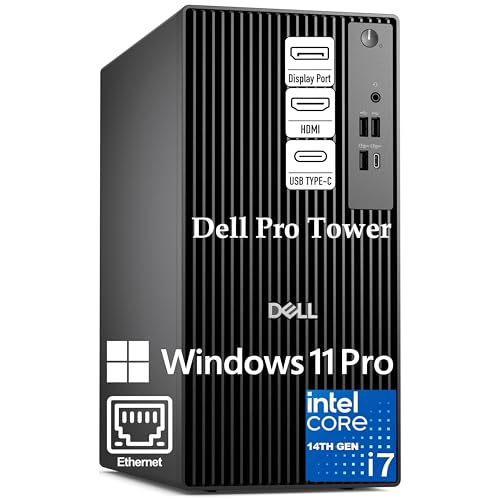
- 20-core Core i7-14700 for demanding multitasking
- 32GB DDR5 RAM with 1TB PCIe SSD
- Dual 4K support for expanded workspace
Best For: Power users building a fast, modern production workstation
Entry-Level Studio Tower – Dell Precision 3620 Music Workstation
If you want a workstation computer for music production that keeps costs sensible, this renewed Dell Precision 3620 is built around a 4-core Intel Core i7-6700, 32GB of DDR4 memory, and a fast 512GB SSD paired with a 2TB HDD. That mix gives you quick boot times, plenty of room for samples and projects, and enough memory for typical DAW workloads and plugin sessions.
Best For: Home studio users who want a practical, affordable tower with strong multitasking headroom.
Pros:
- 32GB DDR4 RAM helps with multitasking, plugins, and larger sessions.
- 512GB SSD + 2TB HDD balances fast project loading with lots of storage.
- Intel i7-6700 and Windows 11 Pro make it a straightforward studio-ready setup.
- Plenty of USB 3.0 ports and HDMI/DisplayPort outputs for common peripherals and monitors.
Cons:
- Integrated Intel HD Graphics 530 is basic and not aimed at heavy visual work.
- Renewed system, so condition may vary compared with new desktops.
- Memory maximum is listed at 32GB, leaving less upgrade room than some workstations.
This Dell is a sensible choice if your priority is dependable music production performance rather than flashy hardware. It focuses on the essentials: RAM, storage, and a proven Intel platform for everyday studio use.
Modern All-Rounder – HP OmniDesk Ryzen 7 Studio PC
The HP OmniDesk is a strong pick if you want a workstation computer for music production with newer core hardware and a compact tower design. Its AMD Ryzen 7 8700G, 32GB of DDR5 memory, and 1TB PCIe Gen4 NVMe SSD should handle fast project loading, smooth app switching, and everyday studio multitasking well.
Best For: Producers who want a newer desktop platform with fast storage, modern wireless, and solid general-purpose studio performance.
Pros:
- Ryzen 7 8700G offers 8 cores and up to 5.1GHz max speed.
- 32GB DDR5-5200 memory and 1TB NVMe SSD support responsive workflows.
- Wi-Fi 6, Bluetooth 5.4, and wired Ethernet give you flexible connectivity.
- Includes keyboard and mouse, which makes setup easier out of the box.
Cons:
- Integrated Radeon 780M graphics are fine for studio use but not a specialty graphics solution.
- Windows 11 Home is less business-focused than Pro editions.
- Single 1TB SSD means less built-in storage than dual-drive workstations.
Overall, this OmniDesk is a balanced modern desktop for music creators who want speed without moving into workstation-class pricing. It combines current-gen memory, fast storage, and a capable processor in a relatively compact tower.
Heavy-Duty Workstation – HP Z4 G4 Creator Tower
For a workstation computer for music production that leans toward serious professional headroom, the HP Z4 G4 stands out with 64GB of DDR4 memory, a Xeon W-2133 processor, and a 512GB NVMe boot drive plus 2TB HDD storage. It is clearly built as a professional-use tower, so it suits larger sessions, lots of virtual instruments, and users who want more breathing room than a typical desktop.
Best For: Advanced producers and studio owners who want a high-memory tower with expansion-friendly workstation roots.
Pros:
- 64GB DDR4 RAM gives generous room for large sessions and multitasking.
- Xeon W-2133 and Windows 11 Pro fit a professional workstation setup.
- 512GB NVMe SSD + 2TB HDD offers both speed and project storage.
- Quadro P400 graphics and multiple Mini DisplayPorts support multi-monitor use.
Cons:
- Integrated-style workstation graphics are modest and not intended for heavy graphics workloads.
- Renewed unit means condition and wear can vary.
- Memory max is listed at 512GB, but the system ships with one slot available in the provided specs.
This Z4 G4 makes the most sense if your music projects are growing and you value RAM capacity and workstation stability. It is less about compact convenience and more about giving your studio a capable, professional base.
Mini Desktop Pick – GMKtec NucBox G10 Compact PC
If desk space matters, this GMKtec mini PC can still serve as a workstation computer for music production for lighter project loads and portable studio setups. It comes with a Ryzen 5 3500U, 16GB of DDR4 memory, and a 512GB PCIe SSD, plus support for triple 4K displays and a broad set of ports for a compact machine.
Best For: Small studios, minimalist desks, and users who want a compact computer for light music production tasks.
Pros:
- Very small footprint makes it easy to fit on crowded desks or mount behind a display.
- Triple-display support via HDMI, DisplayPort, and USB-C is useful for multitasking.
- 16GB dual-channel RAM and 512GB SSD provide a solid baseline for lighter studio work.
- 2.5GbE LAN and Wi-Fi/Bluetooth add flexible networking and accessory support.
Cons:
- 16GB RAM is the smallest memory amount in this group.
- Ryzen 5 3500U is aimed more at office and light workloads than heavy production sessions.
- Best suited to lighter music projects rather than demanding plugin-heavy arrangements.
For producers who value size and versatility, the GMKtec is an easy desktop to place in a tight setup. It is the least powerful option here, but it can be a smart fit when portability and simplicity matter more than maximum audio workload headroom.
Xeon Powerhouse – Dual Xeon Music Studio Workstation
If you need a workstation computer for music production that can handle heavy sessions, this PCSP P920 is built around dual Intel Xeon Gold 5118 processors and expandable memory. It’s aimed at content creation and music studio workflows, so it suits users who want lots of core count, fast NVMe storage, and room to scale as projects grow.
Best For: Producers running demanding DAWs, large sample libraries, and multitask-heavy studio setups.
Pros:
- Dual Xeon Gold 5118 CPUs provide 24 cores and 48 threads total.
- 1TB NVMe SSD helps with fast project loading and session access.
- Upgradeable DDR4 RAM options up to 256GB support bigger production workloads.
- Dedicated P4000 graphics add extra headroom for creative applications.
Cons:
- Uses a workstation-class platform that is larger and less simple than a typical home PC.
- Basic included RAM is 32GB, so heavier users may want to upgrade.
- 90-day warranty is shorter than many buyers may prefer.
This is a serious power-first choice for buyers who care more about core count and expandability than compact size. For music production, it makes the most sense when you expect complex sessions and want a machine that can grow with your studio.
Compact Performer – ThinkStation P3 Ultra SFF
This Lenovo ThinkStation P3 Ultra is a strong workstation computer for music production if you want modern performance in a compact chassis. With an Intel Core i7-14700, 64GB of DDR5 RAM, and a 2TB PCIe SSD, it has the speed and storage to support busy audio projects without taking up much desk space.
Best For: Studio users who want a small, fast Windows 11 Pro workstation with generous RAM and storage.
Pros:
- Intel Core i7-14700 offers 20 cores and 28 threads for demanding multitasking.
- 64GB DDR5 RAM is a strong out-of-the-box fit for large music sessions.
- 2TB PCIe SSD gives plenty of fast storage for projects and libraries.
- Compact SFF design is easier to fit into a studio or office workspace.
Cons:
- NVIDIA T400 graphics are professional and modest, not built for heavy visual workloads.
- Small form factor limits the upgrade-and-expand approach of a larger tower.
- Premium business hardware may cost more than basic consumer desktops.
For music production, this Lenovo stands out as a balanced mix of speed, memory, and storage in a space-saving build. It’s a practical pick if you want workstation stability without dedicating a full tower to your studio.
Budget Workhorse – Dell Precision Renewed Tower
If you’re shopping for a workstation computer for music production on a tighter budget, this renewed Dell Precision offers a practical mix of reliability and core specs. It includes an Intel Core i5-9500, 16GB of RAM, and a 1TB SSD, which is enough for lighter to moderate audio projects and everyday studio use.
Best For: Buyers who want an affordable, ready-to-use workstation for basic music production and home studio tasks.
Pros:
- 1TB SSD provides quick boot times and fast access to files.
- Windows 11 Pro adds business-friendly security and remote desktop features.
- Included keyboard and mouse make setup easier out of the box.
- WiFi 6 and Bluetooth support convenient wireless connectivity.
Cons:
- 16GB RAM is workable, but not as roomy for larger sample libraries.
- Core i5-9500 is older than the processors in newer workstation options.
- Renewed condition may not suit buyers who want a brand-new system.
This Dell Precision is a sensible entry point if you want workstation features without stepping into a high-cost build. It’s best for straightforward production work where dependable storage and a clean setup matter more than maximum power.
Compact Productivity Tower – ASUS V500 32GB/1TB Business Desktop
If you want a workstation computer for music production that also handles everyday business work well, the ASUS V500 is built around a 10-core Intel Core i7-13620H, 32GB of DDR5 RAM, and a 1TB SSD. It should feel responsive for DAWs, plugins, sample libraries, and general multitasking, while the HDMI and DisplayPort outputs make it easy to build a tidy dual-monitor setup.
Best For: Producers who want a fast, modern tower for recording, editing, and day-to-day office use.
Pros:
- 10-core Core i7 processor supports demanding multitasking
- 32GB DDR5 RAM and 1TB SSD help with fast loading and smooth workflow
- HDMI and DisplayPort outputs support multi-monitor setups
- Windows 11 Pro adds business-friendly security and management tools
Cons:
- Uses integrated Intel UHD graphics rather than a dedicated GPU
- Wireless details are listed, but studio buyers may still prefer wired audio networking
- Original seal was opened for RAM/SSD upgrade purposes
Overall, this is a practical choice if you need a capable desktop workstation without chasing workstation-class graphics. Its strength is balanced performance, quick storage, and modern connectivity in a straightforward tower design.
Certified Creative Workhorse – HP Workstation PC with Quadro K1200
This HP workstation computer for music production is aimed more at creative workloads than gaming, with a Core i5 8th Gen processor, 32GB of DDR4 RAM, and a 1TB SSD paired with a 4TB HDD. While it is marketed for editing and design, the roomy storage and workstation focus can also suit users who keep large project files, sample folders, and archives on hand.
Best For: Buyers who want a renewed workstation with lots of storage and certified creative-app compatibility.
Pros:
- 32GB DDR4 RAM supports heavier multitasking
- 1TB SSD plus 4TB HDD offers fast booting and large storage capacity
- Quadro K1200 graphics is positioned for creative and ISV-certified software
- Wide port selection includes USB-C, DisplayPort, VGA, and audio connections
Cons:
- Older 8th Gen Core i5 platform is not the newest option here
- Renewed unit with a 90-day extended warranty
- Integrated use case leans more toward editing/design than audio-specific features
For music makers who care more about storage, stability, and creative workstation pedigree than cutting-edge specs, this HP has a strong practical case. It is especially appealing if you want a lot of room for projects and a machine built around professional software compatibility.
Modern Business Tower – Dell Pro i7-14700 Dual 4K Desktop
As a workstation computer for music production, the Dell Pro tower brings a strong mix of speed and headroom with a Core i7-14700, 32GB of DDR5 RAM, and a 1TB PCIe SSD. The dual 4K display support and business-focused design make it a sensible fit for producers who also want a clean remote-work or office setup, though you will need to plan for network access because built-in Wi-Fi is not included.
Best For: Producers who want a fast, modern desktop for heavy multitasking and dual-monitor workflows.
Pros:
- 20-core Core i7-14700 is well suited to heavy multitasking
- 32GB DDR5 RAM and 1TB PCIe SSD support quick project loading
- Dual 4K monitor support helps with arranging DAW windows and tools
- Windows 11 Pro adds enterprise-grade security and remote desktop features
Cons:
- No built-in Wi-Fi, so networking needs to be planned
- Integrated graphics only, not a dedicated creative GPU
- Focus is business and developer use rather than audio-specific optimization
This Dell is the most performance-forward option in the group, especially if you like to keep many apps, windows, and plugins open at once. It is a strong match for a serious desktop-based workflow where speed, stability, and expandability matter more than extras.
How We Picked the Best Workstation Computer for Music Production
To build this list, we looked for machines that are practical for real studio use: strong multi-core processors, at least 16GB of RAM, SSD storage, and enough connectivity for audio interfaces, external drives, and peripherals. We also favored models that should handle modern DAWs, sample libraries, and plugin-heavy projects without constant upgrades.
For a Workstation Computer for Music Production, raw speed matters less than sustained performance, stability, and the ability to keep sessions responsive when tracks, virtual instruments, and effects stack up.
Quick Comparison
In general, smaller systems are best for simple writing, podcasting, and home studios, while higher-core workstations are better for larger sessions, orchestral libraries, and heavy mixing. Midrange towers often offer the best value for most producers because they combine strong CPU headroom with expandable storage and memory.
Key Buying Factors for a Workstation Computer for Music Production
CPU Performance
DAWs and plugins benefit from strong single-core speed, but larger projects also need multiple cores. If you work with many virtual instruments, look for a newer Intel Core i7/i9 or Ryzen 7/9 class processor, or a workstation CPU with enough cores to keep playback smooth.
RAM Capacity
16GB is the practical minimum, but 32GB is the safer choice for most producers. If you use large sample libraries, plan on 64GB or more. More memory helps reduce load times and prevents stuttering when projects get dense.
Storage Configuration
An SSD is essential for fast booting, quick project loading, and responsive sample access. NVMe SSDs are ideal for your operating system and active sessions, while a secondary HDD or larger SSD can store archives, sample packs, and backups.
Noise, Ports, and Expandability
Quiet cooling matters in a studio, especially for close-mic recording. Also check for enough USB ports for audio interfaces and controllers, plus room to add more storage or memory later.
Who Should Buy Which Workstation Computer for Music Production?
If you need a budget-friendly Workstation Computer for Music Production, a smaller desktop with 16GB to 32GB of RAM and an SSD may be enough for beat making, basic tracking, and editing. If you produce full arrangements, use large sample libraries, or mix commercial projects, choose a machine with a newer CPU, 32GB to 64GB of RAM, and NVMe storage.
Content creators who also edit video or run design software should lean toward higher-core towers with stronger cooling and more expansion. For portable or space-saving setups, mini PCs can work well, but only if your workload stays moderate and your interface, storage, and monitor needs are simple.