
Revit can punish underpowered hardware, especially on larger models, linked files, and multi-user BIM workflows. The right workstation computer for Revit should balance strong single-core speed, enough memory, and dependable graphics.
In this roundup, we focused on practical systems that suit architects, designers, and BIM teams who want smooth navigation, faster view updates, and a more stable day-to-day workflow.
Best 10 Workstation Computer for Revit Picks for 2026
Tiny Workstation Pick
Lenovo ThinkStation P3 Tiny for Revit

- ISV-certified for Revit and other pro apps
- Intel Core i7-14700 with NVIDIA T400 graphics
- Extremely compact 3.01 lb workstation design
Best For: Compact, certified Revit work in tight spaces
Memory-Heavy Tower Pick
HP Z440 Revit Workstation Tower

- 128GB RAM for large Revit files and multitasking
- 2TB SSD for fast access to projects and apps
- Quadro K620 graphics for CAD and 3D modeling
Best For: Large-file Revit users who prioritize memory and storage
Compact Value Pick
Lenovo ThinkStation P3 Tiny i5 for Revit

- Certified for Revit and other professional software
- Core i5-14500 vPro with 16GB DDR5 and 512GB SSD
- Tiny 3 lb chassis with Wi-Fi 6 and Bluetooth 5.1
Best For: Small-footprint Revit work and office BIM tasks
Mobile Power Pick

- ISV-certified with RTX PRO 500 graphics
- Core Ultra 7 255H, 32GB DDR5, and 1TB SSD
- Portable workstation with Wi-Fi 7 and Thunderbolt 4
Best For: Portable Revit users who need desktop-level performance
Refurbished Full-Tower Pick
ThinkStation P520 for CAD and BIM

- Xeon W-2123 CPU for stable workstation tasks
- 32GB RAM and 512GB NVMe SSD
- Quadro M2000 with 4 DisplayPort outputs
Best For: Revit users who want a roomy, expandable tower
Ultra-Compact Powerhouse
ThinkStation P3 Tiny for Revit

- ISV-certified for Revit and other pro apps
- Core i7-14700, 64GB DDR5, 2TB SSD
- Compact chassis with support for up to 5 displays
Best For: Architects who need a tiny but capable workstation
Space-Saving Certified Workstation

- Quadro P1000 certified for Revit and CAD apps
- 8-core Core i7-9700 processor
- Compact SFF chassis with Windows 11 Pro
Best For: Revit users who need a compact, certified desktop
Elite Tower
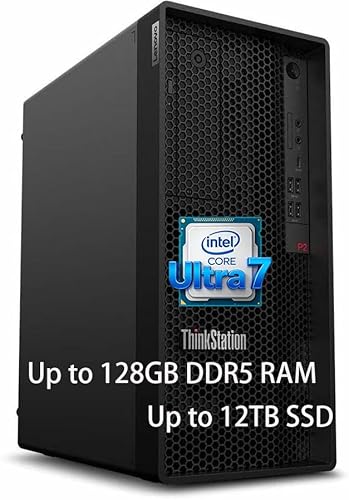
- 20-core Core Ultra 7 processor
- 128GB DDR5 memory for big projects
- ISV certified for Revit and CAD
Best For: Large Revit models and multi-app professional workflows
Compact Workhorse
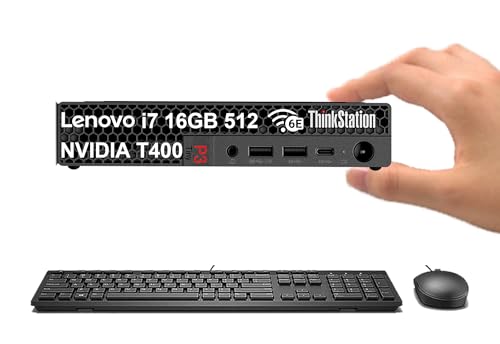
- Tiny 3.01 lb workstation design
- Core i7-14700 with NVIDIA T400
- ISV certified for Revit and CAD
Best For: Space-saving Revit setups with dedicated graphics
Balanced Tiny Build
Lenovo ThinkStation P3 Tiny 32GB

- 32GB DDR5 for smoother multitasking
- Dual 512GB SSD configuration
- ISV certified for Revit and CAD
Best For: Compact Revit work with better memory headroom
Tiny Workstation Pick – Lenovo ThinkStation P3 Tiny for Revit
If you need a workstation computer for Revit that fits in a very small space, the Lenovo ThinkStation P3 Tiny is built for that job. It combines an Intel Core i7-14700, NVIDIA T400 graphics, and ISV certifications for Revit and other design apps, so it is aimed at reliable everyday BIM and CAD work rather than flashy gaming specs.
Best For: Architects, designers, and engineers who want a compact Revit workstation with professional app certification.
Pros:
- ISV-certified for Revit, AutoCAD, SOLIDWORKS, and other professional apps
- Intel Core i7-14700 plus NVIDIA T400 4GB graphics for workstation-class responsiveness
- Very small 3.01 lb chassis that is ideal for tight desks or client spaces
- Supports up to 5 monitors with multiple DisplayPort and HDMI outputs
Cons:
- Only a 4GB workstation GPU, so it is better for moderate than heavy 3D workloads
- Base memory and storage may need configuration depending on project size
- Disclosure notes mention the system has been resealed for memory/SSD upgrades
Overall, this is a practical choice if your Revit work values certified stability and a tiny footprint more than maximum graphics muscle. It should suit offices, home workspaces, and multi-monitor setups where space is at a premium.
Memory-Heavy Tower Pick – HP Z440 Revit Workstation Tower
If your workstation computer for Revit needs to handle large project files and lots of multitasking, the HP Z440 stands out for capacity. It pairs a Xeon E5-1620 v3 processor with 128GB of RAM, a 2TB SSD, and Nvidia Quadro K620 graphics, making it a straightforward tower option for older but demanding architectural workflows.
Best For: Users who want a renewed tower with very high memory capacity for Revit projects and multitasking.
Pros:
- 128GB of RAM for large central files and multiple apps open at once
- 2TB SSD for fast boot times, quick loading, and roomy project storage
- Nvidia Quadro K620 is designed for CAD and 3D modeling tasks
- Windows 10 Pro included and preconfigured for immediate use
Cons:
- Older Xeon E5-1620 v3 platform compared with newer workstations
- Quadro K620 is an entry-level professional GPU by current standards
- Renewed unit may appeal less to buyers wanting a current-generation system
This is a capacity-first Revit workstation rather than a cutting-edge one, but that can still be a smart tradeoff for file-heavy work. If RAM and storage are your biggest concerns, the Z440 is built around those priorities.
Compact Value Pick – Lenovo ThinkStation P3 Tiny i5 for Revit
For buyers comparing a workstation computer for Revit in a compact format, this Lenovo ThinkStation P3 Tiny focuses on core productivity hardware. It uses an Intel Core i5-14500 vPro, 16GB DDR5 memory, and a 512GB SSD, with Lenovo describing it as certified to run professional software such as Revit and SOLIDWORKS reliably.
Best For: Designers and IT buyers who want a small certified Revit-ready workstation with a modest footprint.
Pros:
- ISV-certified for Revit and other professional engineering and creative apps
- Intel Core i5-14500 vPro and DDR5 memory for smooth everyday multitasking
- Compact 3 lb mini PC format saves desk space
- Includes Wi-Fi 6, Bluetooth 5.1, and multiple display outputs
Cons:
- Uses integrated Intel UHD 770 graphics rather than a discrete GPU
- Only 16GB RAM and 512GB SSD in the base configuration
- Expandable to 2 monitors, which may be limiting for some users
In practice, this model makes the most sense for lighter Revit workloads, office BIM tasks, or users who mainly need reliability in a tiny chassis. It is a balanced choice if you want workstation branding without overbuying on size or power.
Mobile Power Pick – HP ZBook X G1i for Revit
If you want a workstation computer for Revit that travels well, the HP ZBook X G1i brings desktop-style performance in a mobile form factor. It combines an Intel Core Ultra 7 255H, NVIDIA RTX PRO 500 Blackwell graphics, 32GB DDR5, and a 1TB SSD, with ISV certifications for Revit and other professional applications.
Best For: Architects, engineers, and creators who need a portable Revit workstation with strong graphics and battery-backed mobility.
Pros:
- ISV-certified for Revit, SolidWorks, AutoCAD, ANSYS, and MATLAB
- NVIDIA RTX PRO 500 Blackwell 6GB graphics for rendering and graphics-heavy work
- 32GB DDR5 RAM and 1TB SSD support multitasking and fast project access
- Wi-Fi 7, Thunderbolt 4, and support for up to 3 external monitors
Cons:
- Laptop format is less upgradable than a desktop tower
- Designed for portability, so sustained heavy workloads depend on thermal management
- Premium mobile workstation features may put it above entry-level budgets
For users who move between office, field, and home, this ZBook offers a strong mix of performance, security, and portability. It is the most flexible option here if Revit needs to follow you around.
Refurbished Full-Tower Pick – ThinkStation P520 for CAD and BIM
If you want a workstation computer for Revit with a more traditional tower layout, the ThinkStation P520 is a practical refurbished option. Its Xeon W-2123 CPU, 32GB of DDR4 RAM, and Quadro M2000 graphics are aimed at stable day-to-day CAD, drafting, and BIM work, while the 512GB NVMe SSD helps the system stay responsive.
Best For: Designers and engineers who need a dependable tower workstation with room to expand.
Pros:
- Intel Xeon W-2123 processor is built for steady workstation use.
- 32GB DDR4 and 512GB NVMe SSD support smooth multitasking and quick boot times.
- Quadro M2000 4GB includes certified drivers and 4 DisplayPort outputs for multi-monitor setups.
- Full-size tower design makes storage expansion easier.
Cons:
- Refurbished unit with a 90-day warranty.
- Older-generation processor and graphics compared with newer workstation options.
- Large tower footprint takes up more desk space.
Overall, this is a solid pick if your priority is dependable workstation behavior and expandability rather than the newest hardware. It fits Revit users who value certified graphics support and a more serviceable tower chassis.
Ultra-Compact Powerhouse – ThinkStation P3 Tiny for Revit
The ThinkStation P3 Tiny is a strong workstation computer for Revit if you need professional performance in a very small footprint. It pairs a 20-core Intel Core i7-14700 with NVIDIA T400 graphics, 64GB of DDR5 memory, and a 2TB SSD, plus ISV certifications that include Revit for more reliable application support.
Best For: Architects and designers who need a compact, certified workstation for serious multitasking.
Pros:
- ISV certifications include Revit, AutoCAD, ANSYS, Creo, MATLAB, and SOLIDWORKS.
- Intel Core i7-14700, NVIDIA T400 4GB, and 64GB DDR5 deliver strong multitasking headroom.
- 2TB SSD provides generous fast storage.
- Supports up to 5 displays with 4K output capability.
Cons:
- Very small chassis may be less flexible for future internal upgrades.
- T400 graphics are professional entry-level rather than high-end 3D GPU power.
- Premium configuration may be more than casual users need.
This model stands out if desk space is limited but you still want a serious Revit-capable machine. The mix of modern CPU power, large memory, and compact design makes it especially appealing for tight offices or clean workstation setups.
Space-Saving Certified Workstation – Dell Precision 3431 SFF
The Dell Precision 3431 SFF is a compact workstation computer for Revit that focuses on certified graphics and efficient desktop use. It combines an Intel Core i7-9700, NVIDIA Quadro P1000 graphics, 8GB of DDR4 memory, and a 256GB SSD, making it suitable for core design work in a smaller form factor.
Best For: Users who want a space-saving workstation with professional Quadro graphics support.
Pros:
- Quadro P1000 is certified for Revit, AutoCAD, SolidWorks, CATIA, and Adobe Creative Suite.
- Core i7-9700 offers 8-core processing for workstation workloads.
- Small Form Factor chassis saves desk space.
- Windows 11 Pro comes preinstalled for immediate use.
Cons:
- 8GB RAM is modest for heavier Revit projects and multitasking.
- 256GB SSD is limited if you store large project files locally.
- Renewed unit with a 90-day limited warranty.
As a budget-conscious or space-conscious option, this Dell makes sense when you want professional graphics validation without moving to a large tower. For bigger models or more demanding workflows, you may want to plan an upgrade to memory and storage.
Elite Tower – Lenovo ThinkStation P2 Gen 2
If you want a workstation computer for Revit that can handle demanding model files, the Lenovo ThinkStation P2 Gen 2 is built around high-end CPU power, huge memory, and professional software certification. With an Intel Core Ultra 7 265K, 128GB of DDR5 RAM, and ISV testing for Revit and other pro apps, it targets users who need desktop stability more than compact size.
Best For: Architects and BIM users who want a full-size Revit workstation with very large memory headroom.
Pros:
- Intel Core Ultra 7 265K processor with up to 5.5 GHz and 20 cores
- Massive 128GB DDR5 RAM for large models, multitasking, and heavy workloads
- ISV certified for professional software including Revit, AutoCAD, and SOLIDWORKS
- Up to 3TB of included storage, with notes pointing to flexible upgrade potential
Cons:
- Integrated graphics only, so it is not aimed at graphics-heavy visualization work
- Full tower design takes up more desk or floor space than a mini PC
- Higher-end configuration may be more machine than casual users need
This is the strongest fit if your priority is raw workstation capacity for Revit and related design tools. The combination of 128GB RAM and professional certification makes it a safer pick for large, memory-hungry projects.
Compact Workhorse – Lenovo ThinkStation P3 Tiny
The Lenovo ThinkStation P3 Tiny is a compact workstation computer for Revit when desk space is tight but you still want certified professional reliability. It combines an Intel Core i7-14700, NVIDIA T400 graphics, and ISV certifications for Revit and other engineering apps in a very small 3-pound chassis.
Best For: Users who need a tiny Revit workstation with dedicated graphics and flexible multi-monitor support.
Pros:
- Very small 3.01 lb design that fits easily into tight workspaces
- Intel Core i7-14700 with NVIDIA T400 4GB graphics for professional tasks
- ISV certified for Revit, AutoCAD, ANSYS, Creo, and more
- Supports up to 5 displays with multiple DisplayPort and HDMI connections
Cons:
- 16GB RAM is modest compared with larger workstation builds
- 512GB SSD may fill up quickly with larger project files
- Renewed listing means it is not a brand-new unit
This model makes sense if you need a practical Revit workstation in a tiny footprint and value certified software support. It is more about space efficiency and reliability than maximum internal expansion.
Balanced Tiny Build – Lenovo ThinkStation P3 Tiny 32GB
If you want a workstation computer for Revit in a compact form but with more memory than the base tiny model, this Lenovo ThinkStation P3 Tiny steps up to 32GB DDR5 and dual 512GB SSDs. It keeps the same Core i7-14700 and NVIDIA T400 4GB graphics, plus ISV certification for Revit and other pro applications.
Best For: Revit users who want a small workstation with stronger multitasking headroom than the 16GB version.
Pros:
- 32GB DDR5 RAM gives more breathing room for Revit and multitasking
- Dual 512GB SSD setup helps separate system and storage drives
- ISV certified for Revit, AutoCAD, ANSYS, Creo, and SOLIDWORKS
- Supports up to 5 displays and 4K output at 60Hz
Cons:
- NVIDIA T400 4GB is still a modest graphics option
- Storage is split across two 512GB SSDs rather than a larger single drive
- Small chassis limits the expansion room of a tower workstation
This version is the more practical tiny-workstation choice if you keep several applications open or work with larger Revit projects. It improves everyday responsiveness without losing the compact footprint.
How We Picked the Best Workstation Computer for Revit
We prioritized the hardware most relevant to Revit performance: fast modern CPUs, sufficient RAM for real projects, SSD storage for quick loading, and professional or capable discrete graphics for stable viewport work. We also considered form factor, upgrade potential, and whether each system makes sense for office, studio, or mobile use.
Quick Comparison
For most users, the best Workstation Computer for Revit is not the one with the biggest graphics card—it is the one that matches the project size and workflow. Tiny desktops are great for compact desks and standard office tasks, towers usually offer better expansion, and mobile workstations are the best fit for users who need to run Revit away from the office.
- Best for compact offices: Tiny and small-form-factor desktops
- Best for heavy multitasking: Higher-RAM tower configurations
- Best for portability: Mobile workstations
- Best value: Configurations with modern CPUs and at least 32GB RAM
Key Buying Factors for a Workstation Computer for Revit
CPU Performance
Revit still benefits heavily from strong single-thread performance, so prioritize newer Intel Core or Xeon models with high boost clocks. More cores help when you are multitasking, rendering, or running other BIM tools, but pure clock speed remains important for day-to-day modeling.
Memory Capacity
16GB is workable for light Revit use, but 32GB is the safer baseline for serious productivity. If you work with large models, multiple linked files, or additional apps like Navisworks, Bluebeam, or Photoshop, 64GB or more is a smart upgrade.
Graphics
Revit does not always need a massive GPU, but a dedicated workstation-class card or solid discrete graphics can improve viewport responsiveness and help with larger scenes. For most buyers, balanced graphics matter more than chasing the highest-end card.
Storage and Expandability
An SSD is essential. NVMe drives improve project opening, file saving, and overall responsiveness. If you expect your workload to grow, choose a desktop with upgrade room for more RAM and storage rather than a system you will outgrow quickly.
Who Should Buy Which Workstation Computer for Revit?
If you want the most balanced everyday choice, look for a modern small desktop with 32GB RAM and a fast SSD. If you regularly handle demanding models, a tower workstation with more memory and expansion headroom is the better long-term investment. If you travel between job sites, client offices, or home and studio, a mobile workstation is the most practical option.
For buyers on a budget, older renewed systems can still work for lighter Revit projects, but they are best suited to smaller teams, basic modeling, or secondary office stations. For long-term productivity, a newer Workstation Computer for Revit is usually worth the extra upfront cost because it stays useful longer and handles project growth more gracefully.