
Replacing a pile of remotes does not have to mean investing in an expensive universal control system. The best smart remote controls under $100 simplify everyday entertainment and smart-home routines by combining infrared, Bluetooth, Wi-Fi, or RF control in practical packages.
This roundup includes app-connected hubs, programmable multi-device remotes, and straightforward TV replacements. Use the buying guide below to match device compatibility, setup style, and automation features with the way you use your home.
Best 10 Smart Remote Controls Under 100 Picks for 2026
Best Smart Hub Remote

- Controls up to 25 IR and selected Bluetooth devices
- Matter and Apple Home support with a compatible hub
- Up to 150 days of battery life
Best For: SwitchBot households and multi-device smart-home control
Best Budget TV Replacement

- Supports numerous major TV brands
- Includes 49 buttons, manual, and code list
- Uses infrared with a 30-foot stated range
Best For: Replacing a standard remote for a compatible TV
Best Voice-Control IR Blaster

- Works with the Smart Life/Tuya app
- Supports Alexa and Google Assistant
- DIY IR learning helps with unlisted devices
Best For: App and voice control of compatible IR appliances
Best Simple Smart TV Remote

- Supports several major smart TV brands
- No pairing required with infrared operation
- Includes four app shortcuts and history access
Best For: Quick replacement control for a compatible smart TV
Best for IR and RF Coverage
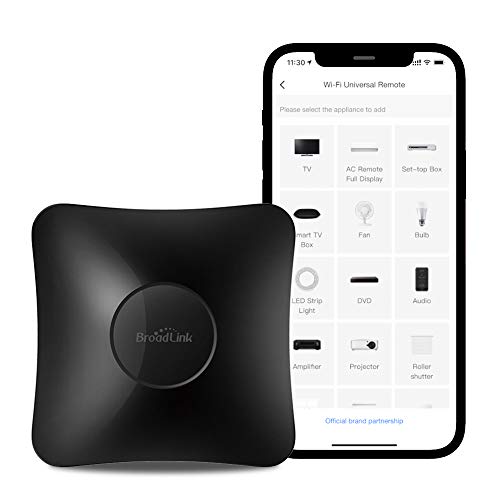
- Controls IR and 433MHz RF devices
- Supports 50,000+ IR devices
- Works with Alexa and Google Home
Best For: Mixed IR appliances and supported RF accessories
Best Traditional Handheld Upgrade

- Controls up to eight devices
- Works with 7,000+ brands
- Includes learning and streaming shortcuts
Best For: A single physical remote for home entertainment
Best for Tuya App Control
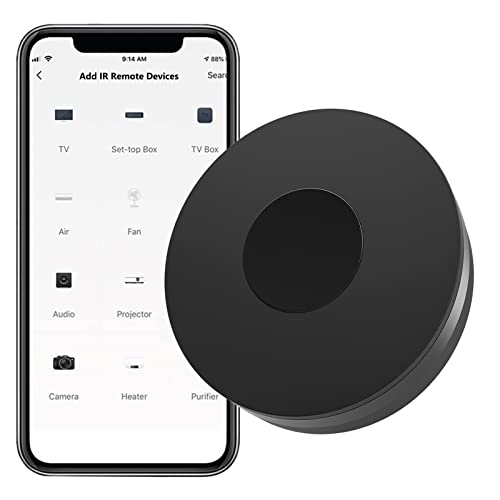
- Controls 50,000+ IR devices
- Uses Tuya Smart or Smart Life
- Supports Alexa and Google Assistant
Best For: Tuya-based app and voice control of IR appliances
Best Voice-Controlled IR Hub
Smart WiFi IR Universal Remote

- Controls IR devices through an app
- Compatible with Alexa and Google Home
- Supports DIY IR learning
Best For: Remote access and voice control of IR appliances
Best Automation-Friendly Hub

- Supports app and remote control
- Works with Alexa, Google Home, and IFTTT
- Offers DIY setup for additional IR devices
Best For: Smart-home routines for compatible IR appliances
Best Smart Hub Remote – SwitchBot Universal Remote
For shoppers comparing smart remote controls under 100, the SwitchBot Universal Remote stands out as a hub-friendly option for managing compatible infrared and selected Bluetooth devices. It can control up to 25 devices, but buyers should verify compatibility and note that it requires 2.4GHz Wi-Fi.
Best For: Smart-home users who want one remote for IR appliances, SwitchBot devices, and select Bluetooth TV boxes.
Pros:
- Supports up to 25 devices, including up to 10 IR and 15 Bluetooth devices.
- Works with select Apple TV, Fire TV, Nvidia Shield, and other Bluetooth TV boxes.
- Offers Matter and Apple Home integration when paired with a compatible SwitchBot hub.
- Large IR code library, customizable scenes, touch wheel, and up to 150 days of battery life.
Cons:
- Does not support RF remotes or most third-party Bluetooth devices.
- Matter integration requires a SwitchBot Hub Mini (Matter) or Hub 2.
- Works only with 2.4GHz Wi-Fi and currently supports Matter through Apple Home.
This is the most capable option here for a connected smart-home setup, especially if you already use SwitchBot products. Compatibility checks are important before purchase because its Bluetooth and Matter support is selective.
Best Budget TV Replacement – Acoyer Universal TV Remote
Among smart remote controls under 100, this Acoyer model is a straightforward replacement for many popular TV brands. It uses infrared rather than Wi-Fi or Bluetooth, includes 49 buttons, and requires manual code setup with two AAA batteries.
Best For: Replacing a lost or damaged TV remote for compatible Samsung, LG, Vizio, Sony, Hisense, Roku, TCL, and other supported TVs.
Pros:
- Supports many major TV brands, including Samsung, LG, Vizio, Sony, Hisense, Roku, and TCL.
- Also supports some DVD/Blu-ray players and media streaming players.
- Includes a user manual and code list for setup.
- Has a 1-year warranty and a compact 58-gram design.
Cons:
- Batteries are not included.
- Not compatible with Roku streaming sticks, Fire TV devices, Apple TV, Chromecast TV, or several sound bars.
- Requires infrared code programming rather than automatic pairing.
This remote is a practical low-cost choice when you need basic control of a compatible television. Check the exclusions carefully, particularly if your setup depends on a streaming stick, TV cube, or sound bar.
Best Voice-Control IR Blaster – MOES WiFi Smart IR Remote
For shoppers seeking smart remote controls under 100, the MOES WiFi Smart IR Remote turns a phone or voice assistant into a controller for infrared appliances. It works through the Smart Life/Tuya app, requires no hub, and supports Alexa and Google Assistant over 2.4GHz Wi-Fi.
Best For: Controlling TVs, air conditioners, fans, DVD players, and other compatible IR devices through an app or voice commands.
Pros:
- Controls multiple types of infrared appliances from the Smart Life/Tuya app.
- Supports Alexa and Google Assistant voice control.
- Enables remote control from anywhere through the app.
- Includes a DIY learning function for some devices missing from the app’s brand list.
Cons:
- Supports IR only and does not work with RF devices.
- Requires 2.4GHz Wi-Fi and should generally be used within the same room because infrared cannot pass through walls.
- It is a plugged-in controller rather than a handheld remote.
The MOES is a useful smart-home upgrade when app and voice control matter more than a physical handset. Confirm that your appliance uses compatible 38kHz infrared signals and place the unit where it has a clear line of sight.
Best Simple Smart TV Remote – EWO'S Universal TV Remote
This EWO’S replacement is a simple choice among smart remote controls under 100 for compatible Samsung, LG, Vizio, Hisense, TCL, Philips, Sony, and Roku TVs. It uses infrared, needs no pairing, and offers shortcut buttons for selected apps plus a history-access button.
Best For: Users who want a quick, no-pairing replacement remote for a supported smart TV.
Pros:
- Supports several major TV brands, including Samsung, LG, Vizio, TCL, Hisense, Philips, Sony, and Roku TVs.
- Infrared operation requires no pairing or setup beyond inserting batteries.
- Includes four app shortcut buttons and a browsing-history button.
- Offers a stated 45-foot range and a 90-day warranty return service.
Cons:
- Does not support Roku streaming sticks, TV sticks, TV cubes, or several sound bars.
- Batteries are not included.
- Designed for one television rather than multi-device control.
This is a convenient replacement when your TV is on the supported-brand list and you prefer immediate infrared control. Its device exclusions make it less suitable for setups centered on streaming sticks, cubes, or sound bars.
Best for IR and RF Coverage – BroadLink RM4 Pro
For shoppers comparing smart remote controls under 100, the BroadLink RM4 Pro stands out as a versatile hub for both infrared and 433MHz RF devices. It can control TVs, air conditioners, set-top boxes, fans, projectors, curtain motors, and more through the BroadLink app, with Alexa and Google Home support for compatible devices.
Best For: Homes that need one hub for IR appliances and supported RF devices such as curtain motors or light switches.
Pros:
- Supports more than 50,000 IR-controlled devices and 433MHz RF devices.
- Offers device learning when a product is not available in the cloud library.
- Works with Alexa, Google Home, and IFTTT for voice and automation control.
- Supports optional temperature and humidity monitoring with a separate USB sensor.
Cons:
- Does not support Bluetooth devices.
- Setup requires a 2.4GHz Wi-Fi network rather than 5GHz.
- The temperature and humidity sensor is sold separately.
The RM4 Pro is a strong choice when your setup includes more than standard IR electronics. Its RF support and broad device library make it especially useful for mixed smart-home equipment, though Bluetooth owners will need another solution.
Best Traditional Handheld Upgrade – One For All URC7880
If you prefer a physical remote instead of an app-based hub, the One For All URC7880 is a practical option among smart remote controls under 100. It controls up to eight devices, supports more than 7,000 brands, and uses a smartphone app plus learning features for setup and customization.
Best For: Users who want one handheld infrared remote for a TV, streaming device, soundbar, Blu-ray player, game console, or other home-entertainment equipment.
Pros:
- Controls up to eight devices and works with more than 7,000 brands.
- Learning feature can copy functions from an original remote.
- Includes three shortcut keys for streaming services such as Netflix, YouTube, or Prime Video.
- Offers a stated range of around 10 meters and a two-year warranty.
Cons:
- Uses infrared only, so it does not provide Wi-Fi or RF control.
- Batteries are not included.
- It is intended for compatible entertainment devices rather than broad smart-home automation.
The URC7880 is a good fit for simplifying several entertainment remotes into one familiar handheld controller. Choose it over a smart hub if direct physical buttons and device learning matter more than remote access from anywhere.
Best for Tuya App Control – Zecamin Smart IR Hub
The Zecamin Smart IR Remote is a compact choice for shoppers seeking smart remote controls under 100 with app and voice access. It connects through 2.4GHz Wi-Fi and the Tuya Smart or Smart Life app, allowing remote control of compatible TVs, air conditioners, fans, soundbars, and other infrared equipment.
Best For: Smart-home users already using Tuya Smart or Smart Life who want app-based control of multiple IR appliances.
Pros:
- Supports more than 50,000 infrared-controlled entertainment and household devices.
- Offers DIY learning to copy commands from an original remote.
- Works with Alexa, Google Assistant, and IFTTT for voice control and automation.
- Compact design measures 2.68 by 2.68 by 0.94 inches.
Cons:
- Supports IR devices but not RF or Bluetooth equipment.
- Requires a 2.4GHz Wi-Fi connection.
- Recommended control distance is no more than 10 meters between the hub and appliance.
The Zecamin hub is most appealing for households centered on the Tuya ecosystem. Its learning mode helps with less-common devices, while Alexa and Google Assistant support add hands-free convenience for everyday IR appliances.
Best All-in-One Pick – One For All Smart Control Pro 5
For shoppers comparing smart remote controls under 100, the One For All URC7956 is a practical choice for consolidating up to five entertainment devices. Its activity controls can combine a TV, cable box, and soundbar, while app-guided setup helps simplify configuration.
Best For: Households that want one physical remote for several compatible home-entertainment devices.
Pros:
- Controls up to five compatible devices.
- Activities let you operate multiple devices together for tasks such as watching TV.
- App-guided setup, customizable activities, macros, and learnable functions.
- Supports Bluetooth and infrared connections.
Cons:
- Requires four AAA batteries.
- Its 30-foot maximum range is intended primarily for typical room use.
- Designed for compatible entertainment devices rather than broader household appliances.
This is the strongest fit when you want a conventional button remote with multi-device control and customization. The five-device limit and entertainment-focused compatibility make it less suitable for whole-home IR automation.
Best Voice-Controlled IR Hub – Smart WiFi IR Universal Remote
Among smart remote controls under 100, this compact WiFi IR blaster stands out for app-based and voice control. It works with the Smart Life or Tuya Smart app and can operate compatible TVs, fans, air conditioners, DVD players, and other infrared devices from a phone.
Best For: Users who want remote access and voice commands for compatible infrared appliances.
Pros:
- Supports app control from home or away.
- Works with Alexa and Google Home voice commands.
- Claims compatibility with more than 50,000 IR-controlled devices.
- DIY learning can add functions when a device brand is not listed.
Cons:
- Only supports 2.4GHz WiFi.
- USB cable is included, but the power adapter is not.
- Infrared range is recommended at no more than 10 meters and requires an unobstructed path.
This hub is a flexible option for adding smartphone routines and voice control to existing IR appliances. It is a better match for smart-home automation than for users seeking a standalone button remote.
Best Automation-Friendly Hub – SENCKIT WiFi Smart Remote
This SENCKIT model is another practical contender among smart remote controls under 100, using WiFi and infrared to put compatible household appliances in the Smart Life or Tuya app. It supports remote operation, voice assistants, IFTTT, and automation routines without requiring a separate hub.
Best For: Smart-home users who want app, voice, and IFTTT control for compatible IR equipment.
Pros:
- Supports more than 50,000 IR devices, with DIY configuration for additional devices.
- Works with Alexa, Google Home, and IFTTT.
- Enables remote control through the Tuya or Smart Life app.
- Includes a 24-month warranty and USB cable.
Cons:
- Requires a 2.4GHz WiFi connection.
- USB power adapter is not included.
- Infrared operation requires a clear path and is limited to about 10 meters.
Choose this hub if automation integrations are a priority and your appliances use compatible 38kHz infrared signals. Its compact design and broad device database are useful, but it cannot replace a traditional remote for every control scenario.
How We Picked the Best Smart Remote Controls Under 100
We focused on the features that matter most in this price range: supported device types, connection methods, setup process, app quality, programmable buttons, and automation potential. The selection includes both traditional handheld remotes and smart hubs that use a phone app or voice assistant. We also considered whether each option is best suited to a single television, several entertainment devices, or broader home control.
Compatibility claims should still be checked before purchase. Infrared remotes generally need line of sight, while Wi-Fi and RF models may offer control from another room or through routines. Product listings can also vary by region and device generation.
Quick Comparison
| Type | Best For | Typical Strength | Watch For |
|---|---|---|---|
| Smart hub | App and voice control | Automation and multiple device types | Requires Wi-Fi and setup |
| Programmable handheld | Living-room convenience | Physical buttons and macro controls | Usually limited to supported device count |
| TV replacement | Replacing a lost or damaged remote | Simple, inexpensive operation | Limited smart-home functionality |
| IR/RF hub | Entertainment and home accessories | Broader range and hidden-device control | RF compatibility can vary |
Key Buying Factors for Smart Remote Controls Under $100
Device and Signal Compatibility
Confirm that the remote supports your exact TV, streaming box, sound system, air conditioner, or other appliance. IR is common for televisions and older equipment; Bluetooth is useful for some streaming devices, while RF can control compatible equipment without direct aiming.
Setup and Control Method
Choose a handheld model if you want immediate, button-based control. A Wi-Fi hub is more suitable if you want smartphone access, voice commands, scheduled actions, or scenes such as turning on the TV and sound system together. App-based setup can take longer but offers more flexibility.
Smart-Home Integration
Check support for the platforms you already use, such as Alexa, Google Home, Apple Home, or Matter. Matter support may improve cross-platform compatibility, but the individual devices being controlled still need to work with the remote’s signal and database.
Ergonomics and Everyday Usability
Look for clearly labeled buttons, a comfortable layout, backlighting if needed, and dependable power options. For family rooms, physical controls may be faster and easier than opening an app for basic volume or channel changes.
Range, Placement, and Reliability
Place IR hubs where they can reach the equipment, or verify whether the package includes an extender or supports RF control. A strong Wi-Fi connection and stable app are important for remote access and automated routines.
Who Should Buy Which Smart Remote Controls Under 100?
Choose a smart hub if you want app control, voice commands, routines, or control of several device categories. These models are the strongest fit for connected homes and mixed entertainment systems.
Choose a programmable handheld remote if you want one physical controller for multiple devices without depending on your phone. It is often the better choice for shared living rooms and users who value simplicity.
Choose a basic TV replacement if one original remote is missing or broken and you only need reliable television control. It is typically the quickest and most economical solution.
Choose an IR/RF model if your setup includes equipment behind cabinet doors, curtains, or devices that require more than standard infrared. Verify RF support carefully before ordering.