
Choosing a workstation computer for engineering comes down to more than raw speed. CAD responsiveness, rendering performance, memory capacity, and driver stability all matter when your workflow gets demanding.
This roundup focuses on well-rounded systems that can handle engineering software more confidently, whether you need a tower for the desk or a mobile workstation for work in the field.
Best 10 Workstation Computer for Engineering Picks for 2026
AI-Accelerated Tower Workstation
Lenovo ThinkStation P2 for CAD & Design

- Core Ultra 7 with integrated NPU
- 64GB DDR5 RAM and 2TB SSD
- Supports RTX 5000 Ada upgrades
Best For: Engineers and designers needing a fast, expandable desktop
Mobile 4K Workstation
Lenovo ThinkPad P16 for Engineers

- ISV-certified for CAD and simulation apps
- Core i7-14700HX with RTX 2000 Ada 8GB
- 16-inch 4K+ display with 800 nits
Best For: Mobile engineers who want certified software support
Renewed Budget Precision
Dell Precision 3431 for Office CAD

- Core i5-9500 with 16GB DDR4 RAM
- 1TB SSD and Windows 11 Pro
- Quadro P620 for light CAD work
Best For: Budget-minded users needing a basic CAD desktop
Ultra-Compact Tiny Workstation
Lenovo ThinkStation P3 for Engineers

- Tiny 3.01 lb workstation design
- 14-core i5-14500 vPro with DDR5
- Dual-display support up to 8K
Best For: Users who need a tiny workstation for professional desktops
Business Tower Workhorse
Dell Pro Tower for Engineering Teams
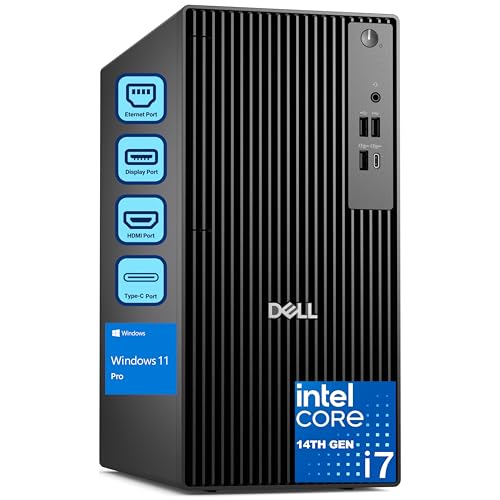
- 20-core i7-14700 for strong multitasking
- 32GB DDR5 RAM and 1TB PCIe SSD
- Dual 4K display support for productivity
Best For: Engineers, analysts, and professionals needing a reliable desktop tower
Mobile Engineering Flagship
Dell Precision 7680 Workstation Laptop
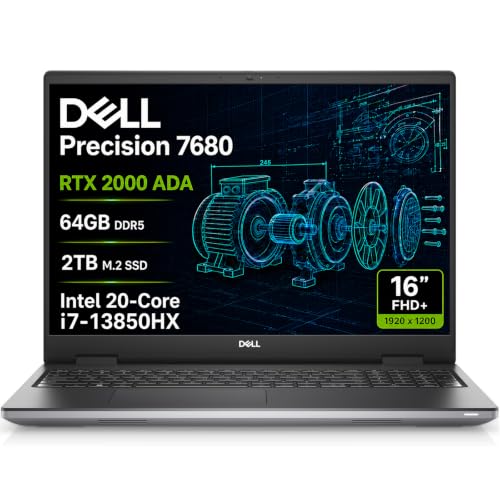
- RTX 2000 Ada 8GB for pro workloads
- 64GB DDR5 CAMM and 2TB SSD
- Up to four external 4K displays
Best For: Engineers and designers who need a powerful mobile workstation
Refurbished CAD Value Tower
ThinkStation P520 for Engineering

- Xeon W-2123 for stable workstation use
- Quadro M2000 with four 4K outputs
- 32GB RAM, 512GB NVMe, expandable tower
Best For: Budget-minded CAD and engineering users who want certified workstation support
Premium Mobile Workstation
Dell Precision 7000 7680 for Designers and Engineers

- RTX 2000 Ada 8GB graphics for pro workloads
- Core i7 HX, 64GB RAM, and 1TB SSD
- Thunderbolt 4, HDMI, and enterprise features
Best For: Engineers and designers needing a powerful mobile workstation
Ultra-Compact Desktop
Lenovo ThinkStation P3 Tiny for Engineering

- 1L workstation saves desk space
- Core i5-14500 vPro with 32GB DDR5
- 1TB NVMe SSD and dual-monitor support
Best For: Engineers and business users who need a tiny workstation
Portable AI Workstation
Dell Precision 3490 for Engineers

- Light 3.09 lb chassis for mobile work
- Core Ultra 5, 64GB RAM, and 2TB SSD
- Thunderbolt 4, HDMI, and Wi-Fi 6
Best For: Mobile engineers who need a light, capable laptop
AI-Accelerated Tower Workstation – Lenovo ThinkStation P2 for CAD & Design
If you need a workstation computer for engineering that feels responsive under CAD, modeling, and simulation workloads, the Lenovo ThinkStation P2 Tower is built around modern desktop performance and expansion-ready hardware. Its Core Ultra 7 processor adds an integrated NPU for AI tasks, while 64GB of DDR5 memory and a 2TB SSD help keep large projects moving smoothly.
Best For: Engineers and designers who want a desktop workstation with AI-accelerated workflows, strong multitasking, and room for professional graphics upgrades.
Pros:
- Intel Core Ultra 7 265K with integrated NPU for AI-assisted engineering and design tasks
- 64GB DDR5 RAM and 2TB SSD for fast loading, storage, and responsive multitasking
- Supports up to NVIDIA RTX 5000 Ada Generation graphics for CAD and 3D design
- Multiple DisplayPort and HDMI outputs for productive multi-monitor setups
Cons:
- Graphics are listed as integrated, so the GPU upgrade path matters for demanding visual work
- Wired keyboard and mouse are included, but the system is still a tower you’ll need to place at a desk
Overall, this ThinkStation P2 is a strong pick if you want a modern engineering workstation with fast memory, large storage, and connectivity geared toward serious office or lab setups.
Mobile 4K Workstation – Lenovo ThinkPad P16 for Engineers
If your workstation computer for engineering needs to travel, the Lenovo ThinkPad P16 Mobile Workstation keeps the focus on certified professional software support and strong mobile performance. It pairs an Intel Core i7-14700HX with an NVIDIA RTX 2000 Ada GPU, plus a 16-inch 4K+ display that is well suited to detailed CAD, simulation, and visual review work.
Best For: Engineers, architects, and designers who need a certified mobile workstation with a high-resolution display and dedicated graphics.
Pros:
- ISV-certified for professional apps like AutoCAD, SolidWorks, Creo, ANSYS, and MATLAB
- Intel Core i7-14700HX and RTX 2000 Ada 8GB for graphics-heavy workloads
- 16-inch UHD+ IPS display with 100% DCI-P3, HDR 400, and 800 nits brightness
- Strong connectivity with Thunderbolt 4, HDMI 2.1, Wi-Fi 6E, and support for up to 3 monitors
Cons:
- Heavier than an ultrabook at 6.5 pounds
- Memory has been upgraded and the warranty is split between the upgrader and Lenovo
For professionals who need mobility without giving up workstation-class features, this ThinkPad P16 offers a capable mix of certified software support, strong graphics, and a standout display.
Renewed Budget Precision – Dell Precision 3431 for Office CAD
For buyers looking for a workstation computer for engineering on a tighter budget, this renewed Dell Precision 3431 focuses on practical reliability rather than cutting-edge specs. It combines an Intel Core i5-9500, 16GB of RAM, and a 1TB SSD with a Quadro P620 GPU, making it a sensible option for office productivity, light CAD, and everyday design work.
Best For: Engineers, office users, and creatives who want a renewed desktop workstation with basic CAD-ready graphics and solid storage.
Pros:
- Intel Core i5-9500 and 16GB DDR4 RAM for general business multitasking
- 1TB SSD for quick boot times and fast file access
- NVIDIA Quadro P620 graphics for CAD, 3D modeling, and multi-display use
- Includes Windows 11 Pro plus WiFi 6 and Bluetooth for easy setup
Cons:
- Renewed system with a 30-day warranty, so long-term coverage is limited
- Older 9th Gen processor and 2GB GPU are not ideal for heavier engineering workloads
This Precision is best viewed as a value-oriented desktop for lighter professional tasks, where dependable basics matter more than top-tier workstation performance.
Ultra-Compact Tiny Workstation – Lenovo ThinkStation P3 for Engineers
If desk space is tight, this workstation computer for engineering delivers a compact form factor without giving up workstation-class positioning. The Lenovo ThinkStation P3 Tiny packs a 14-core Intel i5-14500 vPro processor, 16GB of DDR5 memory, and a 512GB SSD into a mini PC that supports dual displays up to 8K and 4K, making it a smart fit for modern professional workspaces.
Best For: Engineers, designers, and hybrid-office users who need a very small workstation with solid performance and multi-display support.
Pros:
- Ultra-compact 3.01 lb design that saves significant desk space
- 14-core Intel i5-14500 vPro with DDR5 memory for responsive productivity
- Dual-display output with DisplayPort 1.4 and HDMI 2.1, including up to 8K@60Hz
- ISV-certified and built to military-grade durability standards for professional use
Cons:
- Integrated Intel UHD 770 graphics are less capable than dedicated workstation GPUs
- 512GB SSD is modest if you store large project files locally
The P3 Tiny is a compelling choice when you want reliable workstation performance in a compact chassis, especially for offices that prioritize clean layouts and dual-monitor productivity.
Business Tower Workhorse – Dell Pro Tower for Engineering Teams
If you need a workstation computer for engineering that can also handle office-heavy multitasking, this Dell Pro Tower is built around an Intel Core i7-14700, 32GB of DDR5 RAM, and a 1TB PCIe SSD. It is aimed at professionals who want fast everyday responsiveness plus enough headroom for CAD, data analysis, 3D rendering, and other demanding workflows in a desktop form factor.
Best For: Engineers, analysts, designers, and business users who want a dependable tower with strong multitasking and dual-monitor support.
Pros:
- 20-core Intel Core i7-14700 delivers strong multitasking for business and technical work.
- 32GB DDR5 memory and 1TB PCIe SSD support fast loading and smooth workflow switching.
- Dual 4K display support is useful for multi-monitor engineering and productivity setups.
- Windows 11 Pro adds business-oriented security and remote desktop features.
Cons:
- No built-in Wi-Fi is included.
- Not a dedicated graphics workstation for heavy GPU-based 3D workloads.
This is a practical choice if your engineering work is centered on CPU performance, multitasking, and reliability rather than high-end graphics acceleration. It fits well in professional offices or team deployments where manageability matters.
Mobile Engineering Flagship – Dell Precision 7680 Workstation Laptop
For buyers looking for a workstation computer for engineering that can move between office, studio, and jobsite work, this Dell Precision 7680 brings workstation-class hardware in a mobile package. It combines an Intel Core i7-13850HX, NVIDIA RTX 2000 Ada graphics, 64GB of DDR5 CAMM memory, and a 2TB SSD for demanding professional applications like CAD, simulation, and 3D rendering.
Best For: Engineers, architects, designers, and technical professionals who need a high-performance mobile workstation with pro-grade graphics.
Pros:
- NVIDIA RTX 2000 Ada 8GB supports design, engineering, and creative workloads.
- 64GB DDR5 CAMM RAM and 2TB PCIe SSD provide serious multitasking and storage.
- Can connect up to four external 4K monitors through its ports.
- ISV certifications and MIL-STD-810H testing add confidence for professional use.
Cons:
- More expensive and heavier than a typical general-purpose laptop.
- 16-inch FHD+ display is functional, but not a 4K built-in panel.
This is the strongest option here if mobility matters and your engineering workflow depends on a dedicated GPU plus lots of memory. It is designed for users who need workstation reliability without giving up portability.
Refurbished CAD Value Tower – ThinkStation P520 for Engineering
If you want a workstation computer for engineering on a tighter budget, this refurbished ThinkStation P520 focuses on stable, certified workstation basics. It pairs a Xeon W-2123 processor with 32GB of DDR4 RAM, a 512GB NVMe SSD, and Quadro M2000 graphics, making it suitable for CAD, drafting, and multi-monitor professional use.
Best For: Budget-conscious engineers and CAD users who want a dependable refurbished tower with certified graphics support.
Pros:
- Xeon W-2123 offers stable workstation-oriented CPU performance.
- Quadro M2000 graphics with 4x DisplayPort support up to four 4K monitors.
- 32GB RAM and NVMe SSD help keep the system responsive.
- Full-size tower design allows storage expansion and includes a 900W Platinum PSU.
Cons:
- Older 4-core processor is less powerful than newer workstation CPUs.
- Refurbished unit comes with a shorter 90-day warranty.
This is a sensible pick if you care more about proven workstation compatibility than raw speed. It is especially appealing for teams or individuals who need certified graphics support and room to expand later.
Premium Mobile Workstation – Dell Precision 7000 7680 for Designers and Engineers
If you need a workstation computer for engineering that can also handle demanding creative work, the Dell Precision 7000 7680 is built for heavy professional use. Its RTX 2000 Ada graphics, Core i7 HX processor, 64GB of CAMM memory, and 1TB SSD make it a strong fit for CAD, simulation, 3D rendering, and other workflows that benefit from fast multitasking and dedicated GPU support.
Best For: Engineers, architects, and technical professionals who want a high-end mobile workstation with strong graphics and enterprise features.
Pros:
- RTX 2000 Ada 8GB GPU is suited to design, architecture, video, and engineering workloads.
- Intel Core i7-13850HX and 64GB DDR5 CAMM memory support fast multitasking.
- 1TB SSD and multiple connectivity options, including Thunderbolt 4, make it flexible for pro setups.
- ISV certifications and MIL-STD-810H testing add confidence for professional use.
Cons:
- At 5.9 pounds, it is not the lightest choice for frequent travel.
- 16″ FHD+ panel is practical, but not as sharp or wide as higher-resolution alternatives.
This is a strong pick if you want workstation-class power in a laptop that can move between office, studio, and job site. It prioritizes performance, durability, and pro compatibility over ultraportable convenience.
Ultra-Compact Desktop – Lenovo ThinkStation P3 Tiny for Engineering
For buyers who want a workstation computer for engineering without sacrificing desk space, the Lenovo ThinkStation P3 Tiny delivers a full professional setup in a 1L mini desktop. Its Core i5-14500 vPro processor, 32GB of DDR5 RAM, and 1TB NVMe SSD are aimed at CAD, multitasking, and everyday business workloads in a very small footprint.
Best For: Engineers, office professionals, and STEM users who need a compact workstation that is easy to place or move.
Pros:
- World’s smallest 1L workstation design saves a lot of desk space.
- Intel Core i5-14500 vPro handles CAD, multitasking, and business tasks.
- 32GB DDR5 RAM and 1TB NVMe SSD provide a solid ready-to-use setup.
- Dual monitor support, Wi-Fi 6, and multiple USB-A ports improve everyday usability.
Cons:
- Integrated graphics may not suit users who need a dedicated GPU for heavier 3D work.
- Maximum memory is listed at 32GB, so expansion room is limited.
This model makes the most sense when space efficiency matters as much as performance. It is a practical workstation for engineering tasks where compact size, reliability, and straightforward connectivity are the priority.
Portable AI Workstation – Dell Precision 3490 for Engineers
The Dell Precision 3490 is a practical workstation computer for engineering if you want portability without giving up pro-level memory and storage. With an Intel Core Ultra 5 135H, 64GB DDR5 RAM, and a 2TB SSD, it is built for multitasking, mobile productivity, and demanding professional applications such as CAD and 3D work.
Best For: Mobile engineers, consultants, and technical professionals who want a lighter workstation for travel and on-site work.
Pros:
- Weighs just 3.09 lbs, making it easy to carry between meetings or job sites.
- 64GB DDR5 RAM and 2TB SSD offer strong capacity for large projects and fast loading.
- Two Thunderbolt 4 ports, HDMI, Ethernet, and Wi-Fi 6 provide versatile connectivity.
- ISV certifications and MIL-STD-810H testing support professional reliability.
Cons:
- Integrated graphics are less suited to graphics-heavy workloads than a dedicated GPU.
- 14″ FHD display is functional but compact for users who prefer more screen space.
If your work takes you away from a permanent desk, this Precision 3490 offers a strong balance of portability and workstation features. It is especially appealing for users who value memory, storage, and business-focused connectivity in a lighter chassis.
How We Picked the Best Workstation Computer for Engineering
We prioritized engineering-friendly specs that affect real workloads: multicore CPU performance, professional or creator-grade graphics, at least 32GB of RAM for serious use, fast NVMe storage, and form factors suited to office, lab, or mobile work. We also looked for practical details like Windows Pro support, upgrade potential, and build quality.
Quick Comparison
Use the fastest tower options for sustained desktop work, the mobile workstations for travel and on-site review, and the compact mini PCs when space is limited but reliability still matters. In general, larger chassis allow better cooling and easier upgrades, while laptops trade some performance headroom for portability.
Key Buying Factors for a Workstation Computer for Engineering
CPU Performance
Engineering apps often rely on both single-core speed and multi-core throughput. Drafting and modeling can benefit from high clock speeds, while simulations, compiling, and rendering scale better with more cores.
GPU Capability
For 3D modeling, visualization, and GPU-accelerated rendering, a professional or creator-focused GPU is often worth the cost. If your work is mostly 2D CAD, a modest certified graphics option may be enough.
Memory and Storage
32GB RAM is a practical baseline for many engineers, while 64GB is better for large assemblies, simulation, and multitasking. A 1TB SSD is a good starting point, and 2TB is helpful if you store large project files locally.
Form Factor and Cooling
Tower systems usually deliver better sustained performance and easier upgrades. Mobile workstations are best when you need to review models, run presentations, or work between sites. Tiny desktops save space, but they can be more limited in expansion and cooling.
Who Should Buy Which Workstation Computer for Engineering?
If you need maximum desk-bound performance, choose a full tower workstation. If you move between office, job site, and client meetings, a mobile workstation is the better fit. If your workspace is tight or you want a simple, low-profile setup, a mini desktop can be a smart compromise. For the best Workstation Computer for Engineering overall, match the CPU, GPU, and RAM to the heaviest software you use today, not just your everyday tasks.