
If you want automatic, network-based Mac backups, the right NAS can make Time Machine easier, safer, and far more flexible than a single external drive.
Below, we’ve focused on NAS options that fit different budgets, household sizes, and expansion needs so you can choose a setup that works well with your Mac today and later.
Best 10 NAS for Mac Time Machine Picks for 2026
Home & Office Backup Hub
Synology DS223 2-Bay Diskless NAS

- Automated backups for Macs, PCs, phones, cloud, and external drives
- Centralizes files into one accessible hub with full ownership
- Also supports file collaboration and IP camera surveillance
Best For: Mac users needing a flexible 2-bay backup and file hub
Budget Time Machine Pick
QNAP TS-133-US 1-Bay Desktop NAS

- Supports Mac computers with Time Machine backups
- Budget-friendly home NAS for storage and streaming
- Snapshot technology helps mitigate ransomware threats
Best For: Mac users looking for an affordable Time Machine-ready NAS
Value All-in-One Option
BUFFALO LinkStation 210 6TB NAS

- 6TB HDD included for an out-of-the-box setup
- Compatible with Windows and macOS for backup use
- Subscription-free personal cloud with secure file sharing
Best For: Mac users who want included storage and simple backup convenience
High-Capacity Compact Pick

- Six bays give strong RAID and storage flexibility
- Supports 2.5-inch HDDs and SSDs in a compact chassis
- Snapshot-focused file system adds protection and recovery options
Best For: Power users wanting a compact, flexible NAS for Mac backups
Budget 1-Bay Home Backup
- 2TB HDD included for faster setup
- Supports Windows and macOS 15 and earlier
- Subscription-free personal cloud storage
Best For: Budget-minded Mac users who want simple, ready-to-use backup storage
Private Backup Hub
Synology DS124 Personal Backup & File Hub

- Backs up Mac, Windows, iPhone, and Android
- Private file cloud with remote access
- Diskless design lets you choose your drive
Best For: Users who want a flexible, secure backup hub and prefer to pick their own drive
High-Capacity Starter NAS

- Supports up to 128TB across 4 bays
- Beginner-friendly setup with NFC and guided help
- Automatic backups across macOS and other devices
Best For: First-time buyers who want a large, easy-to-manage private storage system
Budget-Friendly Secure Backup

- Includes 4TB HDD and is ready to use
- Works with Windows and MacOS 26
- Subscription-free personal cloud with encryption
Best For: Mac users who want simple, secure, ready-to-use backup storage
High-Capacity Private Cloud
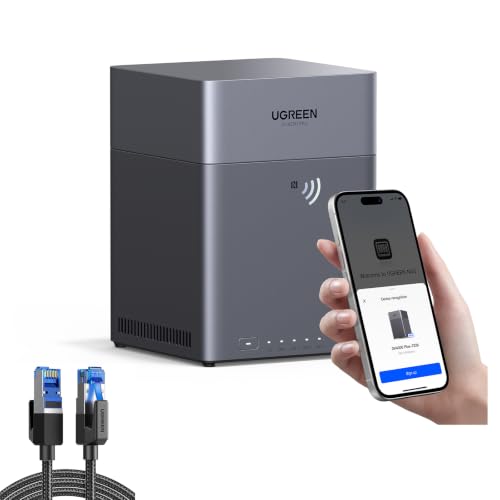
- Up to 128TB expandable capacity
- Automatic backups across macOS and other platforms
- Diskless design with local-data privacy controls
Best For: Mac users who want a highly expandable private backup and storage solution
Quiet Multimedia Backup Hub

- Intel x86 quad-core CPU with 4GB RAM
- 2.5GbE networking for faster transfers
- Very quiet 21dB(A) operation
Best For: Mac users who want a quiet, fast NAS for backups plus media streaming
Home & Office Backup Hub – Synology DS223 2-Bay Diskless NAS
If you want a NAS for Mac Time Machine that can also handle broader home and office storage, the Synology DS223 is built around centralized backups and file organization. It gives Mac users a straightforward place to store data, protect multiple devices, and keep files accessible from different computers, phones, and external drives.
Best For: Mac users who want a simple 2-bay backup hub for Time Machine-style protection, shared storage, and long-term file organization.
Pros:
- Automated backup protection for Macs, PCs, mobile devices, cloud, and external drives
- Centralizes scattered files into one accessible hub with full ownership
- Supports professional file collaboration with sharing and version control
- Can also be used as a DIY surveillance system for IP cameras
Cons:
- Diskless, so you still need to buy and install drives separately
- Only 2 bays, so expansion options are more limited than larger NAS units
The DS223 stands out as a practical all-around backup hub if your priority is dependable Mac backups plus everyday file sharing. Its mix of automated backup tools and simple centralized storage makes it a strong fit for users who want more than just Time Machine support.
Budget Time Machine Pick – QNAP TS-133-US 1-Bay Desktop NAS
The QNAP TS-133-US is a budget-friendly NAS for Mac Time Machine users who want a simple desktop setup for backups and basic home storage. With its included support for Mac computers through Time Machine, it also covers Windows backup and everyday media storage in a compact 1-bay design.
Best For: Budget-conscious Mac users who want an affordable NAS for Time Machine backups, plus simple file and media storage.
Pros:
- Supports Mac computers with Time Machine
- Budget-friendly home NAS for file storage and multimedia streaming
- Includes snapshot technology to help mitigate ransomware risk
- Uses 2 GB DDR4 RAM with an ARM Cortex-A55 quad-core processor
Cons:
- Single-bay design offers less redundancy and expansion than multi-bay NAS options
- Diskless, so you must add your own drive
If you want the lowest-friction entry into NAS for Mac Time Machine, this QNAP is a sensible starting point. It focuses on the essentials: backup compatibility, basic storage, and a compact design that fits a home setup.
Value All-in-One Option – BUFFALO LinkStation 210 6TB NAS
The BUFFALO LinkStation 210 is a practical NAS for Mac Time Machine users who want a simple, subscription-free setup with storage already included. It works with Windows and macOS, offers centralized backup for multiple devices, and comes as a 6TB 1-bay unit that is ready to go out of the box.
Best For: Mac users who want an easy, subscription-free NAS with included storage and straightforward backup features.
Pros:
- 6TB capacity with HDD included, so there is no drive shopping required
- Compatible with Windows and macOS for shared home backup use
- Subscription-free personal cloud with centralized storage access
- Includes secure file sharing, SSL encryption, and 24/7 US-based support
Cons:
- Only compatible with macOS 15 and earlier for the included NAS Navigator 2 utility
- Single-bay design limits RAID and redundancy options
- The notes direct macOS 26 users to the LS 700 series instead
For buyers who want the simplest path to using a NAS for Mac Time Machine-like backups, the LinkStation 210 offers convenience through included storage and a closed, security-focused system. Just make sure your MacOS version aligns with the compatibility notes before buying.
High-Capacity Compact Pick – Synology DS620slim 6-Bay NAS
The Synology DS620slim is a compact 6-bay NAS for Mac Time Machine users who want more storage flexibility than a typical desktop unit. Its support for 2.5-inch HDDs and SSDs, snapshot-heavy file system, and fast encrypted transfer performance make it a strong fit for users building a more capable backup system.
Best For: Power users who want a compact 6-bay NAS with flexible drive options and strong snapshot-based protection.
Pros:
- Six drive bays provide better RAID flexibility than smaller NAS units
- Supports 2.5-inch HDDs and SSDs for compact storage builds
- Offers over 220 MB/s read and 190 MB/s write performance under encrypted transmission
- Includes up to 65,000 system-wide snapshots and 1,024 per shared folder
Cons:
- Diskless, so drives must be purchased separately
- 2.5-inch drive focus may not suit buyers wanting larger 3.5-inch drives
- Designed more for server-style use than a simple plug-and-play desktop setup
If your NAS for Mac Time Machine needs are growing beyond basic backup, the DS620slim adds the kind of capacity and flexibility that more advanced users appreciate. It is especially appealing if you want snapshots and compact drive bays in a small footprint.
Budget 1-Bay Home Backup – BUFFALO LinkStation 210 2TB
If you want a straightforward NAS for Mac Time Machine-style backup and shared home storage, the BUFFALO LinkStation 210 is built around simplicity and value. It includes a 2TB drive, supports macOS 15 and earlier, and gives you a centralized place to back up computers, phones, photos, and files without a monthly fee.
Best For: Mac users on supported macOS versions who want an affordable, ready-to-use backup NAS with included storage.
Pros:
- 1-bay NAS with a 2TB HDD included, so setup is more immediate.
- Compatible with Windows and macOS 15 and earlier, with NAS Navigator 2 for macOS 15 and earlier.
- Subscription-free personal cloud for storing and backing up media and files.
- Includes 24/7 US-based support and a 2-year warranty.
Cons:
- Only supports macOS 15 (Sequoia) and earlier; macOS 26 users are directed to the LS 700 series.
- Single-drive design limits expansion and redundancy options.
- Focused on basic storage rather than advanced features.
This is a practical pick if you mainly need a simple, budget-friendly NAS for Mac backups and centralized file storage. It trades advanced capabilities for ease of use and an included drive, which can be exactly what many home users need.
Private Backup Hub – Synology DS124 Personal Backup & File Hub
The Synology DS124 is a diskless NAS for Mac Time Machine-style backup if you want a private file hub instead of a subscription cloud service. It is designed to automatically protect photos, documents, and videos from Mac, Windows, iPhone, and Android devices, while also giving you remote access and sharing features.
Best For: Mac users who want a secure, diskless backup hub with flexible multi-device support and room to choose their own drive.
Pros:
- Automatically backs up photos, documents, and videos from Mac, Windows, iPhone, and Android.
- Works as a private file cloud for remote access and large file sharing.
- Diskless design lets you choose the drive capacity that fits your needs.
- Includes a 2-year warranty and ongoing software updates.
Cons:
- Storage drive is not included, so the total cost is higher once you add a disk.
- Single-bay setup is less expandable than multi-bay NAS options.
- Assembly is required.
For users who care more about control and software support than bundled hardware, the DS124 is a strong entry point. It fits well if you want a compact NAS that can serve as a private backup target and file hub across multiple devices.
High-Capacity Starter NAS – UGREEN NAS DH4300 Plus 4-Bay
The UGREEN NAS DH4300 Plus is a beginner-friendly NAS for Mac Time Machine-style backups when you also want lots of room for media and files. It supports macOS, automatic backups, remote access, and a simple setup flow, while adding 4-bay expandability and 2.5GbE performance for users ready to move beyond cloud storage.
Best For: First-time NAS buyers who want a large-capacity, easy-to-use private cloud for Mac backups and mixed-device storage.
Pros:
- 4-bay design supports up to 128TB of storage capacity.
- Automatic backups and access from macOS, iOS, Android, Windows, web browsers, and smart TVs.
- Beginner-friendly app, NFC setup, and included manual/video instructions.
- 2.5GbE networking, 8GB RAM, and 4K HDMI output for better performance.
Cons:
- Drives are not included.
- Docker is supported, but virtual machines are not.
- Advertised capacity depends on RAID 0 with compatible drives.
This is the most future-ready option in the group if you expect your storage needs to grow. It combines easy onboarding with higher capacity and stronger hardware, making it a good fit for a household building a private backup and media hub.
Budget-Friendly Secure Backup – BUFFALO LinkStation 710 4TB
If you want a straightforward NAS for Mac Time Machine-style backups and shared home storage, the BUFFALO LinkStation 710 focuses on simple setup, security, and subscription-free cloud access. It includes a 4TB drive, works with MacOS 26 and Windows, and is designed to centralize backups without monthly fees.
Best For: Mac users who want an easy, all-in-one NAS with included storage and secure home backup features.
Pros:
- Includes a 4TB hard drive, so it is ready to use out of the box
- Compatible with Windows and MacOS 26 for mixed-device households
- Subscription-free personal cloud with Dropbox, Azure, and OneDrive integration
- Closed-system design and SSL encryption help protect file transfers
Cons:
- Only one drive bay, so expansion is limited
- Not as fast or flexible as higher-end multi-bay NAS options
- Focuses more on storage and backup than advanced media features
The LinkStation 710 is a practical choice if you want dependable NAS storage for Mac Time Machine use and basic family backups without added subscription costs. Its biggest strengths are simplicity, included capacity, and security-minded design.
High-Capacity Private Cloud – UGREEN NAS DH4300 Plus
The UGREEN NAS DH4300 Plus is a diskless 4-bay option for buyers who want a flexible NAS for Mac Time Machine backups and a lot of room to grow. It supports automatic backups across macOS, Windows, iOS, Android, and web access, while keeping data on your own drives instead of a third-party cloud.
Best For: Mac owners who want massive expandability and private, locally controlled backup storage.
Pros:
- Up to 128TB capacity gives plenty of headroom for long-term storage
- Automatic backups and access across macOS, Windows, iOS, Android, and web browsers
- NFC-based setup and beginner-friendly instructions simplify onboarding
- Advanced privacy features include local storage and TRUSTe-certified encryption
Cons:
- Diskless design means you must buy drives separately
- More of a storage platform than a turnkey out-of-box system
- Feature-rich software may be more than casual users need
For users prioritizing scale and privacy, the DH4300 Plus stands out as a strong long-term backup base. It suits households or creators who want to pair Mac backups with broader file management and remote access.
Quiet Multimedia Backup Hub – TERRAMASTER F4-425 4-Bay NAS
The TERRAMASTER F4-425 is a diskless 4-bay NAS aimed at home users who want fast backups, quiet operation, and strong media handling alongside a NAS for Mac Time Machine workflows. With Intel x86 hardware, 4GB RAM, and 2.5GbE networking, it is built for multitasking and fast transfers.
Best For: Mac users who also want a quiet media server and fast multi-device backup performance.
Pros:
- Intel x86 quad-core CPU and 4GB RAM support multitasking and 4K transcoding
- 2.5GbE LAN helps speed up file transfers and concurrent access
- Very quiet at 21dB(A), making it suitable for bedrooms or shared spaces
- TerraSync supports two-way sync between the NAS and PCs/Macs
Cons:
- Diskless, so storage drives must be purchased separately
- Best features are spread across media and backup use cases rather than one simple purpose
- Plastic enclosure may feel less premium than metal alternatives
The F4-425 is a good fit if your backup box also needs to handle media streaming and everyday file syncing. It brings stronger hardware than basic entry-level NAS models, while still keeping noise and setup friction low.
How We Picked the Best NAS for Mac Time Machine
We looked for NAS models that are practical for Mac users running Time Machine, with an emphasis on setup simplicity, stable backups, capacity options, and enough network performance for everyday home or small-office use. We also favored models with strong app support, clear storage expansion paths, and designs that suit either a basic backup role or broader file-sharing duties.
Quick Comparison
For a straightforward NAS for Mac Time Machine setup, single-bay units are the easiest and often the least expensive starting point, but they offer no drive redundancy. Two-bay models are the sweet spot for most buyers because they allow more capacity and the option to mirror a drive for protection. Four-bay and larger systems make more sense if you want room to grow, plan to back up multiple Macs, or expect the NAS to serve as a family media and file hub too.
Key Buying Factors for NAS for Mac Time Machine
Drive Bays and Redundancy
Choose at least two bays if you want better protection against drive failure. A single-bay NAS can still work well for Time Machine, but the data is stored on one disk only, so the NAS itself becomes a single point of failure.
Storage Capacity and Future Growth
Time Machine backups tend to expand over time as your Mac’s data grows. Make sure the NAS supports enough capacity for your current library plus future backups, especially if you also plan to store photos, videos, or shared household files.
Network Speed
Gigabit Ethernet is the baseline for reliable backups. If you have a newer Mac, a faster switch, or heavier multi-user traffic, 2.5GbE or better can improve transfer times and make large initial backups less painful.
Mac Compatibility and Setup
The best NAS for Mac Time Machine should support SMB shares, user permissions, and easy Mac client access. A clean web interface and good companion apps matter because backup reliability often comes down to how easy the system is to configure and maintain.
Noise, Power, and Home Placement
If the NAS will sit near your desk or in a bedroom, consider acoustic output and power draw. Smaller desktop units are often the most convenient for apartments and home offices.
Who Should Buy Which NAS for Mac Time Machine?
If you mainly want simple, affordable Mac backups, a one-bay NAS can be enough. If you care about safer storage and room to expand, a two-bay model is usually the best all-around choice. If you have multiple Macs, large photo libraries, or want the NAS to double as a home media server, look at four-bay or higher-capacity systems.
In short, the best NAS for Mac Time Machine is the one that matches your backup habits, growth plans, and comfort level with setup. Start with your storage needs first, then choose the simplest model that gives you enough headroom for the next few years.