
If you want a compact system that can be tailored to your exact needs, a barebone computer with 2.5GbE is a smart place to start. These machines give you the chassis, platform, and network speed you need, while leaving RAM, storage, and sometimes OS choices up to you.
That makes them especially useful for firewall builds, home servers, small-office PCs, and performance-focused mini desktops where upgrade flexibility matters as much as size.
Best 10 Barebone Computer with 2.5GbE Picks for 2026
Fanless 6-LAN Firewall Pick
N150 6-Port 2.5GbE Barebone Mini PC

- Six Intel i226-V 2.5GbE LAN ports
- Fanless aluminum alloy body
- Barebone with dual M.2 NVMe slots
Best For: Quiet firewall and router builds with lots of wired networking
Flexible Office Barebone
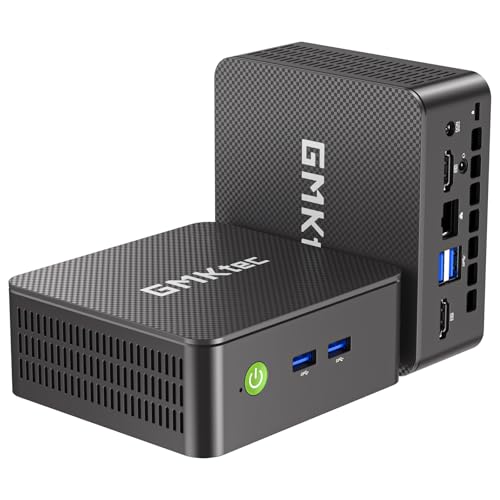
- Core i3-10110U with barebone customization
- 2.5GbE LAN plus Wi‑Fi 6 and BT 5.2
- Dual HDMI 4K@60Hz and dual M.2 slots
Best For: Custom office or home lab builds with fast wired networking
Low-Power Firewall Choice
J6413 4-LAN 2.5GbE Barebone Appliance

- Four Intel i226-V 2.5GbE LAN ports
- Fanless low-power Celeron J6413 platform
- Two DDR4 and two NVMe slots plus SATA
Best For: Quiet, expandable firewall and router deployments
Performance Pick
Ryzen 7640HS Dual 2.5GbE Mini PC

- Ryzen 5 7640HS with 32GB DDR5 installed
- Dual 2.5GbE LAN for network-heavy tasks
- Triple-display support with USB4 and DP
Best For: Power users who want speed and dual wired networking
Multi-Port Firewall Pick
Intel N150 fanless firewall with 6x 2.5GbE

- 6 Intel I226-V 2.5GbE LAN ports
- Fanless Intel N150 with AES-NI support
- DDR5, dual NVMe, and SATA3 expansion
Best For: Multi-port firewall and router builds
Quiet 2.5GbE Firewall Pick
Fanless Intel N100 firewall with 4x 2.5GbE

- 4 Intel I226 2.5GbE NICs
- Fanless N100 with AES-NI support
- DDR5 and PCIe 3.0 SSD upgrade options
Best For: Quiet firewall and router builds
Value Gaming Pick
GMKtec M5 Ultra Ryzen 7 Mini PC

- Ryzen 7 7730U with 8C/16T
- Dual 2.5GbE LAN connectivity
- 16GB RAM and 512GB SSD included
Best For: Office users and casual gamers who want fast wired networking
Premium Barebone Choice
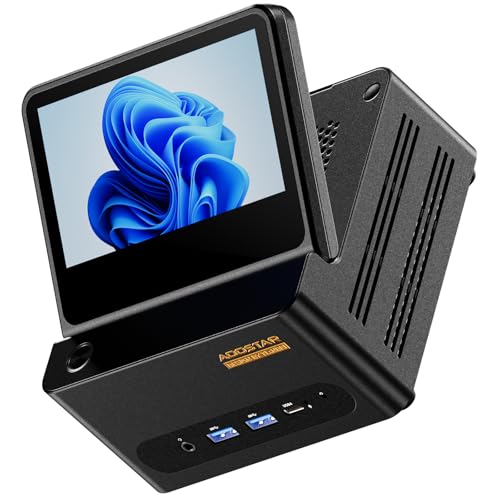
- True barebone: no RAM, SSD, or OS
- Dual 2.5GbE plus dual USB4 and OCuLink
- Built-in 5-inch foldable touch screen
Best For: Power users who want to customize a compact high-speed build
Home Server Pick
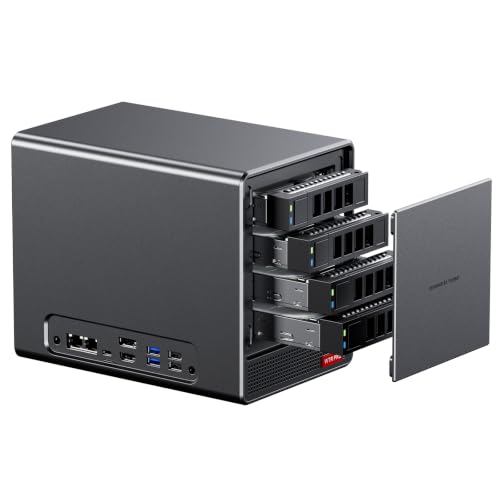
- Barebone NAS with no RAM, SSD, or OS
- 4 SATA bays plus 2 M.2 NVMe slots
- Dual Intel 2.5GbE LAN for server tasks
Best For: NAS builders and home lab users needing high storage capacity
Fanless 6-LAN Firewall Pick – N150 6-Port 2.5GbE Barebone Mini PC
If you want a barebone computer with 2.5GbE for a compact router or firewall build, this Glovary mini PC is aimed squarely at that use case. It combines an Intel N150, six i226-V 2.5GbE ports, and a fanless metal chassis, making it a practical choice for OPNsense, Proxmox, ESXi, and similar setups where low power and quiet operation matter.
Best For: Home or small-office firewall builds, multi-LAN routing, and quiet always-on network appliances.
Pros:
- Six Intel i226-V 2.5GbE ports for flexible routing and network segmentation
- Fanless aluminum-alloy design for silent operation
- Dual M.2 NVMe slots plus SATA support for storage expansion
- Triple-display support with 2 HDMI ports and USB-C video output
Cons:
- Sold as barebone, so you must add RAM and storage
- Intel N150 is efficient, but it is still a low-power CPU for heavier workloads
This is a strong pick if your priority is networking hardware first and desktop performance second. The six 2.5GbE ports, fanless build, and broad firewall compatibility make it especially useful for home labs and security-focused deployments.
Flexible Office Barebone – G3 Pro Core i3 2.5GbE Mini PC
For shoppers looking for a barebone computer with 2.5GbE that can also handle office and light server duties, the GMKtec G3 Pro is a versatile option. Its Core i3-10110U, dual HDMI output, Wi‑Fi 6, Bluetooth 5.2, and 2.5GbE LAN make it useful for productivity builds, monitor stations, or compact lab systems where you want more general-purpose flexibility than a firewall-only box.
Best For: Office users, home lab builders, and buyers who want a customizable mini PC with wired 2.5GbE.
Pros:
- Core i3-10110U is positioned for better single-core responsiveness
- 2.5GbE LAN plus Wi‑Fi 6 and Bluetooth 5.2 for modern connectivity
- Barebone design with M.2 2242 SATA and M.2 2280 NVMe slots
- Dual 4K@60Hz HDMI outputs for multi-monitor work
Cons:
- No RAM, SSD, or OS included
- Only one 2.5GbE port, so it is less network-focused than firewall appliances
This model makes sense when you want a compact system you can configure yourself rather than a fixed-purpose appliance. It brings useful networking, display, and storage options together in a small barebones package.
Low-Power Firewall Choice – J6413 4-LAN 2.5GbE Barebone Appliance
If your search is for a barebone computer with 2.5GbE that leans toward always-on networking, this Glovary J6413 appliance is built for that role. It uses a low-power Celeron J6413, four Intel i226-V 2.5GbE ports, and a fanless enclosure, giving you a compact hardware base for OPNsense, router duties, and multi-LAN routing without excess noise.
Best For: Home labs, firewall/router installs, and low-power network appliances with room to expand.
Pros:
- Four i226-V 2.5GbE LAN ports for routing and segmentation
- Fanless design keeps operation silent
- Two DDR4 slots and two NVMe slots, plus two SATA 3.0 bays
- USB-C and dual HDMI output for flexible local access
Cons:
- Barebone configuration means you need to add your own RAM and storage
- J6413 is focused on efficiency rather than high-end compute performance
Overall, this is a very practical pick if your main goal is reliable network hardware with strong expandability. The four 2.5GbE ports and silent cooling make it especially appealing for long-running firewall deployments.
Performance Pick – Ryzen 7640HS Dual 2.5GbE Mini PC
Not every barebone computer with 2.5GbE is meant for networking only, and this GMKtec M6 Ultra shows the performance side of the category. It ships with a Ryzen 5 7640HS, 32GB of DDR5, 1TB SSD, and dual 2.5GbE LAN, so it fits better as a ready-to-use desktop or compact server than as a blank barebones build.
Best For: Buyers who want a fast mini PC with dual 2.5GbE for work, media, or light server use.
Pros:
- Ryzen 5 7640HS offers strong 6-core, 12-thread performance
- Dual 2.5GbE LAN is useful for server, firewall, or network-heavy setups
- Includes 32GB DDR5 and 1TB SSD out of the box
- Supports triple 4K displays, plus USB4 and DisplayPort
Cons:
- Not a barebone model, so it is less customizable at purchase time
- Higher-power design is less suited to ultra-low-power always-on appliance use
This is the most performance-oriented option in the group, with networking as one of several strengths rather than the main focus. If you want speed, modern connectivity, and dual 2.5GbE in one compact system, it stands out.
Multi-Port Firewall Pick – Intel N150 fanless firewall with 6x 2.5GbE
If you want a barebone computer with 2.5GbE for routing, firewall, or home-lab networking, this fanless mini PC is built around six Intel I226-V 2.5GbE ports and an Intel N150 processor. It’s a practical choice for OPNsense, Untangle, Proxmox, and similar setups where low power use and stable wired connectivity matter more than raw desktop performance.
Best For: Multi-port firewall, soft router, and network appliance builds that need six 2.5GbE LAN ports.
Pros:
- Six Intel I226-V 2.5GbE LAN ports for dense network segmentation
- Fanless Intel N150 design with AES-NI support for low-noise operation
- DDR5 SO-DIMM support up to 32GB, plus dual M.2 NVMe and SATA3 options
- Dual HDMI 2.1 and USB-C output for 4K display support
Cons:
- Barebone configuration ships without an operating system
- Only one DDR5 slot is listed, so memory expansion is limited by that layout
- Built primarily for networking tasks rather than general-purpose graphics work
This is the strongest pick here if your priority is port count and router/firewall flexibility. The hardware mix is especially attractive for anyone building a compact wired network hub with plenty of 2.5GbE connectivity.
Customizable Office Pick – Ryzen 5 barebone mini PC with triple 4K support
As a barebone computer with 2.5GbE only in the broader search sense, this mini PC is really aimed at custom office and home-use builds rather than a dedicated network appliance. It gives you a Ryzen 5 3500U, triple-display output, and a full set of expansion options, but the wired networking is standard gigabit Ethernet rather than 2.5GbE.
Best For: Buyers who want a customizable barebone mini PC for work, study, or light media use.
Pros:
- Ryzen 5 3500U with 4 cores and 8 threads for everyday multitasking
- Triple 4K display support through USB-C, HDMI, and DisplayPort
- Dual DDR4 slots and dual M.2 SSD slots for flexible upgrades
- WiFi, Bluetooth, Wake-on-LAN, and PXE Boot included
Cons:
- Does not list 2.5GbE networking; it includes gigabit Ethernet instead
- RAM, storage, and OS are not included
- Not designed as a fanless firewall or router appliance
This is the most versatile general-purpose barebone in the group, but it’s not the one to choose if 2.5GbE is your main requirement. It makes sense for users who value display output, upgrade flexibility, and a compact desktop footprint.
Quiet 2.5GbE Firewall Pick – Fanless Intel N100 firewall with 4x 2.5GbE
If you’re shopping for a barebone computer with 2.5GbE for firewall or soft-router duties, this fanless mini PC is built around four Intel I226 network ports and an Intel N100-class processor with AES-NI support. It’s a strong fit for pfSense, OPNsense, OpenWrt, and similar software where silent operation, low power draw, and reliable wired throughput matter.
Best For: Small firewall, router, and virtualization builds that need four 2.5GbE ports.
Pros:
- Four Intel I226 2.5GbE NICs for WAN/LAN and segmented networks
- Fanless Intel N100 platform with AES-NI and 6W TDP
- DDR5 support up to 32GB and M.2 PCIe 3.0 SSD expansion
- Dual 4K display support via HDMI 2.1 and DisplayPort 1.4
Cons:
- Sold as a barebone unit, so RAM and SSD installation is up to you
- Only one memory slot is listed, limiting RAM configuration flexibility
- Best suited to networking workloads rather than general desktop use
Among these options, this model offers the cleanest balance of four-port 2.5GbE networking and compact fanless design. It’s especially appealing if you want a small appliance that can run quietly while handling routing, firewalling, or a light virtualization setup.
Value Gaming Pick – GMKtec M5 Ultra Ryzen 7 Mini PC
If you want a barebone computer with 2.5GbE features in a ready-to-use mini PC, the GMKtec M5 Ultra is aimed at everyday productivity, light gaming, and home office use. Its Ryzen 7 7730U, dual 2.5G LAN, and triple-display support make it a practical choice when wired network speed and compact size both matter.
Best For: Users who want a compact mini PC for office work, media, and dual-network use without needing a barebone build.
Pros:
- Ryzen 7 7730U with 8 cores and 16 threads for general productivity and casual gaming
- Dual 2.5GbE LAN for fast wired networking, server use, or router-style setups
- Supports triple 8K display output with HDMI, DP, and USB-C
- Includes 16GB DDR4 RAM and 512GB PCIe SSD already installed
Cons:
- Not a barebone system, so RAM and SSD are already populated
- Expansion details are useful, but upgrades are not included
Overall, this model is best treated as a value-packed mini PC rather than a build-it-yourself barebone option. It stands out most when you want strong networking, broad display support, and a straightforward setup.
Premium Barebone Choice – AOOSTAR G-FLIP Ryzen 7 H255
The AOOSTAR G-FLIP is a true barebone computer with 2.5GbE networking and a feature set that leans heavily toward power users. With a Ryzen 7 H255, dual 2.5G LAN, dual USB4, and OCuLink, it is built for users who want to choose their own RAM, SSD, and operating system.
Best For: Enthusiasts who want a barebone mini PC with strong networking, expansion options, and a built-in touch display.
Pros:
- Barebone design lets you add your own DDR5 memory, NVMe storage, and OS
- Dual 2.5GbE LAN plus WiFi 6 and Bluetooth 5.2 for flexible networking
- Ryzen 7 H255 with Radeon 780M for demanding multitasking and graphics use
- Includes a 5-inch foldable touch screen and OCuLink for eGPU support
Cons:
- No RAM, SSD, or pre-installed operating system included
- OCuLink requires careful handling and the system should be powered off before connection changes
This is the most feature-rich option here if you want to build around your own components. The tradeoff is the extra setup, but the dual 2.5GbE, USB4, and display extras make it a standout workstation-style barebone.
Home Server Pick – AOOSTAR WTR PRO 4+2 Bay NAS
If your priority is a barebone computer with 2.5GbE networking for storage, routing, or a home lab, the AOOSTAR WTR PRO is built for that job. Its 4+2 bay layout, dual 2.5G LAN, and Ryzen 7 5825U make it especially practical for NAS duties and always-on server use.
Best For: Users building a NAS, soft router, or home server that needs flexible drive expansion and dual 2.5GbE.
Pros:
- Barebone NAS platform with no RAM, SSD/HDD, or OS included
- 4 SATA bays plus 2 M.2 NVMe slots for large storage expansion
- Dual Intel I226-V 2.5GbE LAN ports for fast wired networking
- Supports Windows, Ubuntu, OpenWrt, OPNsense, and virtualization use
Cons:
- Requires separate purchase of memory and storage before use
- Designed more for server and storage tasks than for traditional desktop convenience
This model makes the most sense when storage capacity, 24-hour operation, and network throughput matter more than plug-and-play simplicity. For a compact NAS or router build, it offers one of the strongest combinations of bays and 2.5GbE in this group.
How We Picked the Best Barebone Computer with 2.5GbE
For this roundup, we prioritized systems that balance build flexibility, reliable networking, and practical real-world use. A strong Barebone Computer with 2.5GbE should offer at least one fast 2.5GbE port, good CPU headroom for its class, sensible expandability, and cooling that matches the intended workload.
We also looked at whether each system is better suited to routing and firewall tasks, NAS duties, or general desktop use. That helps narrow the field before you choose based on ports, storage support, and power efficiency.
Quick Comparison
Some picks are built first for networking, with multiple Intel 2.5GbE ports, fanless designs, and low-power CPUs. Others lean toward office and productivity use, with stronger processors, dual NIC layouts, and more room for memory and storage. A few models go further with NAS-focused bays or higher-end mobile Ryzen chips for heavier multitasking.
Key Buying Factors for a Barebone Computer with 2.5GbE
1. Number of 2.5GbE Ports
One port is enough for a standard LAN upgrade, but dual-port or quad-port systems are better for routing, firewall, virtualization, and lab environments. If you plan to separate traffic or run OPNsense, pfSense, or a similar platform, more ports can save you from needing extra adapters.
2. CPU Class and Workload Fit
Low-power Intel N-series chips are ideal for firewall and routing tasks. Ryzen U-series processors are a better fit for general-use desktops, light content creation, or small business multitasking. If you want the most versatile Barebone Computer with 2.5GbE, look for a CPU that leaves room for growth without driving up power use too much.
3. Memory and Storage Expansion
Check whether the system supports DDR4 or DDR5, how many slots it has, and whether it includes M.2, SATA, or drive-bay options. Barebones can be excellent value, but only if the platform supports the storage and RAM size you actually need.
4. Cooling and Noise
Fanless designs are attractive for always-on network gear, while active cooling may be preferable for higher-performance mini PCs. Consider where the machine will live: a quiet office, a rack shelf, a media cabinet, or a closet.
Who Should Buy Which Barebone Computer with 2.5GbE?
If your main goal is a router, firewall, or lab appliance, choose a low-power system with multiple Intel 2.5GbE ports and efficient cooling. If you need a daily driver PC for office work or home use, a Ryzen-based barebone with dual NICs will usually feel more responsive. For NAS or hybrid storage builds, prioritize drive-bay count, M.2 support, and port layout over raw CPU speed.
In short, the best Barebone Computer with 2.5GbE is the one that matches your network plan first and your performance needs second. Start with the ports, then confirm CPU, memory, storage, and cooling before you buy.