
Strong guest Wi‑Fi is no longer optional in a restaurant. The right access point can help keep ordering tablets, POS systems, staff devices, and customer connections stable during busy service.
This roundup focuses on practical choices for real dining environments, with an emphasis on coverage, roaming, capacity, and easy deployment.
Best 10 Wireless Access Point for Restaurant Picks for 2026
Best Wi‑Fi 6 Business Pick
Omada EAP610 Business WiFi 6 AX1800 Access Point

- Wi‑Fi 6 AX1800 up to 1800 Mbps
- Omada cloud/app management
- Mesh, roaming, WPA3 support
Best For: Restaurants needing centralized Wi‑Fi 6 management
Budget 2.4GHz Option
TP-Link TL-WA801N 300Mbps Access Point
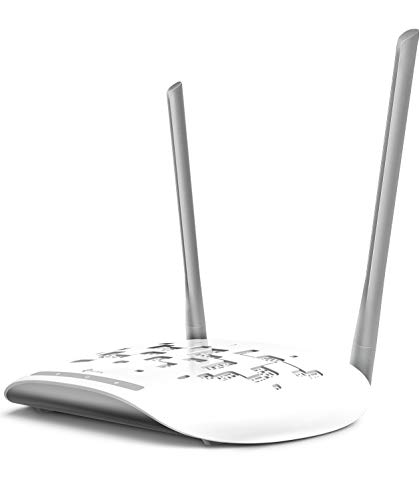
- 300 Mbps single-band 2.4GHz
- Multiple modes including AP and bridge
- Passive PoE with included injector
Best For: Small restaurants on a tight networking budget
Balanced Business Favorite
Omada EAP225 AC1350 Gigabit Access Point

- AC1350 dual-band gigabit performance
- MU-MIMO plus mesh support
- Omada cloud access and app control
Best For: Restaurants wanting solid business Wi‑Fi without Wi‑Fi 6 pricing
Compact Wi‑Fi 6 Choice
NETGEAR WAX210PA AX1800 Access Point

- Wi‑Fi 6 AX1800 up to 1,800 Mbps
- Up to 128 registered devices
- Compact wall or ceiling mount design
Best For: Small restaurants needing discreet Wi‑Fi 6 coverage
Best Multi-AP Restaurant Bundle
TP-Link EAP613 5-Pack Omada AP

- Wi-Fi 6 AX1800 up to 1800 Mbps
- Omada cloud/app management with mesh support
- PoE+ powered slim ceiling or wall design
Best For: Restaurants needing a compact, centrally managed multi-AP Wi-Fi 6 setup
Best Premium Future-Proof Option

- Wi-Fi 7 up to 5.0 Gbps with 4-stream design
- 2.5G port for faster backbones and upgrades
- Omada cloud tools with mesh and roaming support
Best For: Busy restaurants wanting high-capacity Wi-Fi and room to grow
Weather-Ready Coverage
Tenda AC1200 Dual-Band Business AP

- IP65-rated enclosure for tougher environments
- Up to 3200 sq. ft. and 100+ devices
- PoE or 24V DC power for flexible install
Best For: restaurants needing durable indoor/outdoor coverage
Compact Wi-Fi 6 Pick

- Wi-Fi 6 AX1800 with up to 128 registered devices
- Up to 4 SSIDs for staff and guest separation
- PoE-powered with wall or ceiling mounting
Best For: small restaurants needing simple network isolation
Restaurant-Ready Wi-Fi 6

- Wi-Fi 6 AX3000 speeds up to 2976 Mbps
- Free Omada cloud management and app setup
- PoE+, passive PoE, or DC power options
Best For: restaurants wanting scalable cloud-managed Wi-Fi
Best Wi‑Fi 6 Business Pick – Omada EAP610 Business WiFi 6 AX1800 Access Point
If you’re comparing a wireless access point for restaurant use, the Omada EAP610 is a strong fit for busy dining rooms, patios, and back-of-house spaces that need fast, centrally managed Wi‑Fi. It combines Wi‑Fi 6 speeds, mesh support, seamless roaming, and cloud control in a compact design that blends into modern hospitality spaces.
Best For: Restaurants that want a Wi‑Fi 6 access point with cloud management and enterprise-style roaming.
Pros:
- Wi‑Fi 6 AX1800 dual-band speeds up to 1800 Mbps.
- Omada cloud access and app management for centralized control.
- Supports mesh WiFi, seamless roaming, WPA3, and load balancing.
- Flexible powering options include 802.3at PoE+, passive PoE, or DC power.
Cons:
- Mesh and seamless roaming require Omada SDN controllers.
- Best value is tied to users who will actually use the Omada ecosystem.
Overall, this is a practical choice when you need a restaurant access point that can handle modern devices and be managed from anywhere. Its business-focused feature set is more advanced than basic APs, but that also makes it easier to scale and maintain.
Budget 2.4GHz Option – TP-Link TL-WA801N 300Mbps Access Point
For a low-cost wireless access point for restaurant basics, the TP-Link TL-WA801N focuses on simple 2.4GHz coverage and flexible deployment. It offers access point, range extender, bridge, and client modes, which can help cover small seating areas, POS corners, or staff-only spaces without a complicated setup.
Best For: Small restaurants that need an affordable, straightforward access point for light wireless use.
Pros:
- Supports AP, range extender/bridge, multi-SSID, and client modes.
- Passive PoE with included injector helps with flexible placement.
- 300 Mbps wireless speed and MIMO technology for basic connectivity.
- Dual fixed antennas and WPA2 security included.
Cons:
- 2.4GHz single-band design is less capable than modern dual-band models.
- 300 Mbps speed is better for light use than crowded or high-demand environments.
This is a sensible budget pick when the goal is dependable coverage rather than premium throughput. For restaurants with modest traffic and simpler networking needs, it covers the essentials without adding extra complexity.
Balanced Business Favorite – Omada EAP225 AC1350 Gigabit Access Point
The Omada EAP225 is a well-rounded wireless access point for restaurant setups that need dual-band business Wi‑Fi without jumping all the way to Wi‑Fi 6. With MU-MIMO, mesh support, seamless roaming, and cloud access through Omada SDN, it is built for steady service in busy guest and staff areas.
Best For: Restaurants that want a reliable dual-band business access point with roaming and mesh support.
Pros:
- AC1350 dual-band gigabit wireless performance.
- Supports MU-MIMO for simultaneous data transmission to multiple devices.
- Omada app and cloud access for centralized network control.
- Mesh capability and seamless roaming for broader coverage.
Cons:
- Seamless roaming depends on compatible 802.11k/802.11v clients and setup.
- Wi‑Fi 5 is older than newer Wi‑Fi 6 options.
If you want a restaurant access point that feels business-grade but remains straightforward to deploy, this model lands in a useful middle ground. It has the features many hospitality spaces need, especially when you want consistent coverage across multiple areas.
Compact Wi‑Fi 6 Choice – NETGEAR WAX210PA AX1800 Access Point
The NETGEAR WAX210PA is a compact wireless access point for restaurant owners who want Wi‑Fi 6 coverage with simple deployment. It supports up to 128 registered devices, includes WPA3 security, and can be powered by the included adapter or a PoE-capable switch, making it a practical fit for smaller dining areas and front-of-house spaces.
Best For: Small restaurants, retail counters, or hospitality spaces that want compact Wi‑Fi 6 coverage.
Pros:
- Wi‑Fi 6 AX1800 dual-band speeds up to 1,800 Mbps.
- Supports up to 128 registered devices and 30 active devices.
- Compact design with wall or ceiling mounting options.
- WPA2/WPA3 security and browser-based setup.
Cons:
- Requires an existing router and Ethernet connection.
- Only one Gigabit Ethernet port is included.
For restaurants that need a discreet, business-ready access point rather than a full networking platform, this model keeps things simple. It offers modern Wi‑Fi 6 performance in a small package, which makes it easy to place without drawing attention.
Best Multi-AP Restaurant Bundle – TP-Link EAP613 5-Pack Omada AP
If you need a wireless access point for restaurant seating areas, the TP-Link EAP613 5-pack is built for multi-device traffic, simple ceiling or wall placement, and centralized control. Its Wi-Fi 6 design, PoE+ power support, and Omada management options make it a practical fit for businesses that want easier deployment across dining rooms, patios, and back-of-house spaces.
Best For: Restaurants wanting a compact, centrally managed Wi-Fi 6 AP bundle for broad indoor coverage and roaming.
Pros:
- Wi-Fi 6 AX1800 with up to 1800 Mbps and 4 spatial streams for stronger multi-user throughput
- Supports Omada SDN, cloud access, and app-based remote management for easier multi-site control
- Includes Mesh, seamless roaming, WPA3, band steering, load balancing, airtime fairness, and beamforming
- PoE+ support helps simplify ceiling or wall installation without needing a nearby outlet
Cons:
- DC power adapter is not included in the package
- Seamless roaming and Omada Mesh require Omada SDN controllers
- Designed for standard coverage rather than long-range outdoor use
For restaurant operators, this 5-pack stands out when you want consistent guest Wi-Fi across multiple zones and prefer centralized management over individual routers. The slim design also helps it blend into customer-facing spaces without drawing attention.
Best Budget Ceiling Mount – Cudy AP1300 AC1200 Access Point
This wireless access point for restaurant use focuses on practical coverage, easy ceiling mounting, and flexible power options. The Cudy AP1300 offers dual-band AC1200 performance, multi-SSID support, and centralized control, making it a solid choice for smaller dining areas or secondary spaces where dependable guest Wi-Fi matters more than premium throughput.
Best For: Smaller restaurants or café areas that want a ceiling-mounted AP with flexible power and straightforward management.
Pros:
- Dual-band AC1200 with MU-MIMO and beamforming for better handling of multiple users
- Supports 802.3at/af PoE, passive PoE, or 12V DC input for flexible installation
- Centralized multi-AP control through Cudy AC Controller for batch provisioning and firmware updates
- Multi-SSID and WPA3 support help separate guest and business networks
Cons:
- Lower wireless throughput than Wi-Fi 6 or Wi-Fi 7 models
- Coverage is listed at about 1100 sq. ft., which may be limited for larger floor plans
- Only one RJ45 port may reduce wired expansion options
Overall, the AP1300 is a sensible pick when you want affordable, ceiling-mounted Wi-Fi with enough features to keep a busy service area organized. It is less future-facing than newer standards, but it covers the basics well for simpler deployments.
Best Premium Future-Proof Option – Omada EAP720 WiFi 7 AP
If you want a wireless access point for restaurant networking that is built for heavy traffic and future upgrades, the Omada EAP720 brings Wi-Fi 7 performance, a 2.5G port, and business-focused management tools. It is a strong fit for busy dining rooms that need room for more devices, faster uplinks, and easier centralized administration.
Best For: Busy restaurants that want Wi-Fi 7 speed, multi-gig uplink capacity, and advanced cloud management.
Pros:
- Wi-Fi 7 dual-band performance with up to 5.0 Gbps aggregate speed
- 2.5G Ethernet port is ready for faster network backbones and broadband upgrades
- Supports Omada Cloud Management, remote configuration, ZTP, monitoring, and AI features
- Business features include mesh, seamless roaming, airtime fairness, VLAN segmenting, and bandwidth management
Cons:
- Wi-Fi 7 and 2.5G hardware may be more than smaller venues need
- Some advanced networking features are described as available to develop, not fully detailed here
- Designed for indoor business use rather than outdoor coverage
The EAP720 makes the most sense for restaurants planning ahead, especially where guest density, back-office systems, and future internet upgrades all matter. Its mix of speed, management tools, and multi-gig support gives it a stronger long-term profile than basic access points.
Weather-Ready Coverage – Tenda AC1200 Dual-Band Business AP
If you need a wireless access point for restaurant seating areas, patios, and busy dining rooms, the Tenda i24 is built for flexible coverage and steady multi-client performance. Its IP65-rated enclosure, dual-band Wi-Fi 5 radios, and PoE/DC power support make it easier to place where coverage is needed most.
Best For: Restaurants that want durable indoor/outdoor coverage with flexible mounting and simple deployment.
Pros:
- IP65-rated enclosure helps it handle harsher environments.
- Dual-band AC1200 design supports up to 100+ devices and 3200 sq. ft. coverage.
- PoE and 24V DC power options make installation more flexible.
- Cloud management and seamless roaming suit multi-zone spaces.
Cons:
- Wi-Fi 5 is older than newer Wi-Fi 6 options.
- Best suited to businesses that can work within its 1200 Mbps class.
For restaurants that need an access point that can cover a large footprint and tolerate tougher placement conditions, the i24 is a practical, business-friendly choice. It focuses on dependable coverage and deployment flexibility rather than premium Wi-Fi 6 speed.
Compact Wi-Fi 6 Pick – NETGEAR WAX210 AX1800 AP
The NETGEAR WAX210 is a strong wireless access point for restaurant networks that need separated staff and guest Wi-Fi without a complicated setup. It uses Wi-Fi 6, PoE power, and up to 4 SSIDs, making it a neat fit for smaller dining spaces, cafes, and front-of-house installs.
Best For: Small restaurants that want a compact Wi-Fi 6 access point with guest network separation.
Pros:
- Wi-Fi 6 AX1800 design supports up to 128 registered devices.
- Up to 4 SSIDs help isolate staff and guest networks.
- PoE-powered operation avoids needing a nearby power outlet.
- Wall or T-bar ceiling mounting works well in indoor business spaces.
Cons:
- Coverage is limited to up to 1,500 sq. ft., so it may not suit larger venues.
- AC adapter is not included in this SKU.
If your restaurant needs a manageable, modern access point for a compact footprint, the WAX210 checks the right boxes. It emphasizes easy browser-based management and network separation more than maximum range.
Restaurant-Ready Wi-Fi 6 – Omada EAP650 AX3000 AP
The Omada EAP650 is a strong wireless access point for restaurant setups that want Wi-Fi 6 performance, flexible power options, and cloud management. With AX3000 speeds, mesh and roaming support, and a slim design that fits cafes and modern dining spaces, it suits busy business environments where uptime and control matter.
Best For: Restaurants and cafes that want higher-capacity Wi-Fi 6 performance with cloud-managed control.
Pros:
- Wi-Fi 6 AX3000 speeds up to 2976 Mbps.
- Free Omada Essentials cloud management with app-based setup.
- Supports Mesh WiFi, seamless roaming, WPA3, and load balancing.
- Multiple power options include PoE+, passive PoE, and DC adapter support.
Cons:
- Seamless roaming and mesh require Omada SDN controllers.
- Best features are aimed at users comfortable with business network management.
For restaurants that want a more scalable and centrally managed wireless access point, the EAP650 stands out. Its mix of fast Wi-Fi 6 speeds, flexible powering, and Omada cloud tools makes it a polished option for demanding guest Wi-Fi deployments.
How We Picked the Best Wireless Access Point for Restaurant
For a Wireless Access Point for Restaurant use, we prioritized reliable dual-band or newer Wi‑Fi 6/7 performance, guest capacity, roaming support, and business-friendly features like PoE, WPA3, and centralized management. We also looked for models that fit common restaurant layouts, including dining rooms, patios, kitchens, and back-office areas.
Quick Comparison
Think in terms of size and traffic. Smaller cafés may do well with a single budget-friendly access point, while medium and high-traffic restaurants usually benefit from business-class models with mesh support, seamless roaming, and stronger uplink options. Multi-unit setups are often the best fit for larger floor plans or spaces with thick walls.
Key Buying Factors for a Wireless Access Point for Restaurant
Coverage and Placement
Look for ceiling-mountable hardware with solid range estimates, but plan around your building materials. Glass, brick, tile, and kitchen equipment can all affect signal quality, so placement matters as much as raw specs.
Capacity and Guest Load
Restaurants often have unpredictable peaks. Choose an access point that can handle many concurrent devices without slowing down staff tools or guest browsing.
Roaming and Mesh Support
If customers or employees move between rooms or floors, seamless roaming helps maintain connections. Mesh can also reduce dead zones when running Ethernet to every mount point is difficult.
Power and Installation
PoE is especially useful in restaurants because it simplifies installation and lets you place the access point where coverage is best, not just where outlets exist.
Security and Network Controls
Guest isolation, WPA3, and centralized management are valuable for separating customer traffic from payment terminals and staff devices. That separation is a major advantage in any Wireless Access Point for Restaurant deployment.
Who Should Buy Which Wireless Access Point for Restaurant?
Budget-conscious cafés and small eateries can start with a simpler dual-band model if their floor plan is straightforward. Busy full-service restaurants should lean toward Wi‑Fi 6 or Wi‑Fi 7 access points with PoE, roaming support, and stronger device handling. Larger venues, multi-room spaces, and restaurants with patios or upstairs seating should favor scalable systems that support multiple access points under one management platform.
If your top priority is basic internet access for a few users, a lower-cost model may be enough. If you need dependable service for guests, staff tablets, and cloud-connected POS gear, spend more on business-grade features now to reduce downtime later.