
If you want faster caches, responsive apps, and more flexible storage expansion, a NAS with NVMe storage is a smart upgrade over a basic hard-drive-only box.
These picks balance performance, bay count, networking, and upgrade paths so you can choose the right fit for backups, media, virtualization, or all-flash workflows.
Best 10 NAS with NVMe Storage Picks for 2026
Performance NAS
UGREEN DXP4800 Plus 4-Bay Desktop NAS

- 5-core Intel CPU with 8GB DDR5
- 2x M.2 NVMe slots and 10GbE
- Up to 144TB capacity, diskless
Best For: Small offices and power users who want a fast, expandable NAS
Speedy SSD Enclosure

- 40Gbps over USB4/Thunderbolt
- 4x M.2 NVMe 2280 slots, up to 32TB
- Active cooling and backup apps
Best For: Creators who need a fast multi-SSD enclosure for large-file workflows
Compact Home NAS
Beelink Me Mini 6-Slot NVMe NAS

- 6x M.2 NVMe slots for all-flash storage
- Dual 2.5G LAN with Wi-Fi 6
- Supports FNOS, UNRAID, and TrueNAS
Best For: Home users and tinkerers who want a compact all-NVMe NAS
All-Flash Speed Pick

- 6x M.2 NVMe slots for all-flash storage
- Dual 2.5GbE for quick transfers
- Quiet, low-heat design for studios
Best For: Creators and studios needing silent NVMe-focused storage
High-Bandwidth Hybrid Choice

- Dual 10GbE with link aggregation support
- 2x M.2 NVMe slots and large total capacity
- UGOS Pro adds Docker, VM, and surveillance tools
Best For: Power users wanting a fast hybrid NAS with app flexibility
Expandable Power Pick
- 3x M.2 NVMe slots for storage and cache
- Ryzen 7 255 with 10GbE + 5GbE networking
- USB4, PCIe x16, and OCuLink expansion
Best For: Advanced users needing a fast, expandable NAS platform
Budget-Friendly Hybrid NAS
ACEMAGIC N3A 4-Bay Desktop NAS

- 4 HDD bays plus 2 M.2 PCIe 3.0 NVMe slots
- Dual 2.5G + 1G LAN with link aggregation
- 8GB DDR4 RAM and 128GB pre-installed SSD
Best For: Home and small-office users who want a customizable diskless NAS
Enterprise-Grade Speed NAS
UGREEN NASync DXP8800 Plus 8-Bay

- 2 M.2 NVMe slots with 8 SATA bays and 272TB max capacity
- Dual 10GbE ports for up to 20G aggregated bandwidth
- Intel Core i5-1235U, 8GB DDR5, and 128GB built-in SSD
Best For: Power users and businesses that need fast, high-capacity storage
Balanced Home NAS

- 4 SATA bays plus 2 M.2 NVMe slots
- Dual 2.5GbE with link aggregation
- Intel N100, 8GB DDR4, and 4K HDMI
Best For: Families and enthusiasts wanting a quiet, customizable NAS
Performance NAS – UGREEN DXP4800 Plus 4-Bay Desktop NAS
If you want a NAS with NVMe storage that can do more than basic backups, the UGREEN DXP4800 Plus is built for heavier home or small-office use. It pairs a 5-core Intel Pentium Gold 8505 CPU, DDR5 memory, two M.2 NVMe slots, and fast 10GbE networking for quick transfers, virtualization, Docker, and private-cloud workflows.
Best For: Small offices and power users who want a fast, diskless NAS platform with NVMe caching and 10GbE.
Pros:
- Intel Pentium Gold 8505 5-core CPU with 8GB DDR5 RAM for smoother multitasking
- Two M.2 NVMe slots plus 1x 10GbE and 1x 2.5GbE for fast networking
- Supports Docker and virtual machines for more advanced use cases
- Up to 144TB capacity with centralized storage and RAID options
Cons:
- Drives are not included, so you must buy HDDs or SSDs separately
- Advertised speed depends on your router, CPU, drives, and file size
- Wired Ethernet only; no Wi-Fi on this model
The DXP4800 Plus is the most full-featured option here if you want a true NAS foundation with NVMe expansion, high-speed wired connectivity, and room to grow. It suits users who care about performance, collaboration, and flexible storage management more than plug-and-play simplicity.
Speedy SSD Enclosure – TERRAMASTER D4 SSD NVMe 4-Bay
For buyers focused on a NAS with NVMe storage-style speed in a compact external unit, the TERRAMASTER D4 SSD is a strong high-speed enclosure. It supports four M.2 NVMe 2280 SSDs, reaches up to 40Gbps over USB4 or Thunderbolt, and is aimed at workflows like 4K editing, fast backup, and portable storage expansion.
Best For: Creators and pros who need a very fast four-SSD enclosure for large files, backups, and mobile workflows.
Pros:
- 40Gbps connectivity with Thunderbolt 5/4/3 and USB4 support
- Supports 4x M.2 NVMe 2280 SSDs for up to 32TB total
- Active cooling with temperature-controlled fans and four sensors
- Includes backup tools and mobile app support for data protection
Cons:
- No built-in RAID; it uses four individual disks
- Requires a separate host device, so it is not a standalone NAS
- Diskless, so SSDs must be purchased separately
This is better viewed as a high-performance NVMe storage enclosure than a full network NAS. If your priority is speed, quiet operation, and flexible expansion for a workstation or mini PC, it is an easy product to justify.
Compact Home NAS – Beelink Me Mini 6-Slot NVMe NAS
If you want a compact NAS with NVMe storage built around all-flash expansion, the Beelink Me Mini is designed for dense storage in a small desktop footprint. It uses an Intel N95 CPU, 12GB LPDDR5 memory, 64GB eMMC, and six M.2 NVMe SSD slots, with support for FNOS, UNRAID, and TrueNAS.
Best For: Home users and tinkerers who want a small all-NVMe NAS platform with flexible software support.
Pros:
- Six M.2 NVMe slots supporting 2230/2242/2280 drives
- Dual 2.5G LAN for faster networking and soft-routing use
- Supports FNOS, UNRAID, and TrueNAS
- Quiet cooling design with reported low noise during transfer and playback
Cons:
- Maximum capacity depends on 4TB per slot in the supplied specs
- It is a mini PC-based NAS, so setup may suit enthusiasts more than beginners
- Storage drives are not included
The Me Mini stands out if you prefer an all-flash approach and want a small system that can double as a mini PC. Its mix of multiple NVMe bays, dual LAN, and NAS software compatibility makes it a flexible base for a personal storage server.
Hybrid NAS Mini PC – AOOSTAR WTR PRO Ryzen 7 NAS
The AOOSTAR WTR PRO is a hybrid NAS with NVMe storage and SATA expansion, aimed at users who want flexibility in a compact mini PC form. It uses an AMD Ryzen 7 5825U, supports up to four 3.5-inch SATA drives, and adds two M.2 2280 NVMe slots for extra fast storage or cache-style setups.
Best For: DIY NAS builders who want a mix of SATA bays and NVMe slots in one compact system.
Pros:
- Ryzen 7 5825U with 8 cores and 16 threads
- Two M.2 2280 NVMe slots plus four SATA drive bays
- Dual 2.5G LAN for networking flexibility
- Designed for 24/7 low-power operation and quiet cooling
Cons:
- NO RAM and NO SSD included
- Maximum memory support is 64GB, so it is still a DIY build
- Best suited to users comfortable assembling and configuring their own NAS
This model is attractive if you want a do-it-yourself storage platform with both mechanical-drive capacity and NVMe expansion. It offers more configuration freedom than a simple enclosure, while keeping the footprint relatively small.
All-Flash Speed Pick – Asustor Flashstor 6 FS6706T
If you want a NAS with NVMe storage that stays quiet while moving data fast, the Asustor Flashstor 6 FS6706T is built for all-flash workflows. With six M.2 NVMe SSD slots, dual 2.5GbE ports, and a compact SSD-only design, it fits creators who need responsive storage for editing, media libraries, and everyday file access.
Best For: Creative users who want silent all-NVMe storage for video work, media streaming, and fast collaborative file access.
Pros:
- 6x M.2 NVMe SSD slots for all-flash storage performance
- Dual 2.5GbE ports for faster transfers and multi-user access
- USB 3.2 Gen2 and HDMI 2.0b for flexible connectivity
- Low-noise, low-heat SSD design suits studios and quiet rooms
Cons:
- Diskless model means you need to supply your own SSDs
- 4GB RAM may be limiting for heavier multitasking
- Networking tops out at 2.5GbE rather than 10GbE
This is a strong pick if your priority is fast, quiet NVMe storage rather than maximum expansion. It is especially appealing for creators who want a compact NAS that can handle 4K media workflows without the noise of traditional drives.
High-Bandwidth Hybrid Choice – UGREEN NAS DXP4800 GT
The UGREEN NAS DXP4800 GT is a flexible NAS with NVMe storage built for users who want speed, expandability, and local control in one box. It combines dual 10GbE networking, two M.2 NVMe slots, and support for up to 144TB total capacity, making it a practical fit for fast backups, media work, smart home storage, and small office use.
Best For: Power users who want a fast hybrid NAS for 4K/8K workflows, backups, surveillance, and self-hosted apps.
Pros:
- Dual 10GbE ports for high-speed transfers and link aggregation
- 2x M.2 NVMe slots plus U.2-compatible bays for flexible storage
- UGOS Pro supports Docker, virtual machines, and SAN Manager
- Built-in Surveillance Center for compatible IP cameras
Cons:
- Diskless configuration means storage must be added separately
- Some advanced features may be more than casual users need
- NVMe support is limited compared with fully all-flash NAS models
For buyers who want a serious NAS with NVMe storage and room to grow, this model stands out for its networking and software breadth. It is a good middle ground between creator speed, office flexibility, and local privacy.
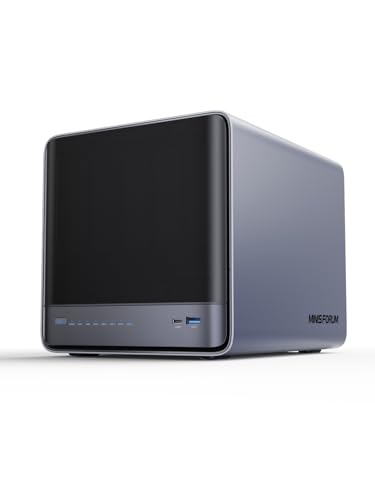
Expandable Power Pick – MINISFORUM N5 Air
The MINISFORUM N5 Air is a high-performance NAS with NVMe storage for users who want both speed and serious expandability. With three M.2 NVMe slots, a Ryzen 7 255 processor, 10GbE plus 5GbE networking, and multiple high-end expansion options, it is aimed at demanding homes and small teams that move large files and run more than just basic file shares.
Best For: Advanced users who want a highly expandable NAS for large storage pools, fast networking, and mixed workloads.
Pros:
- 3x M.2 NVMe slots for fast storage and cache options
- Ryzen 7 255 CPU with 8 cores and 16 threads
- 10GbE plus 5GbE ports for fast network performance
- USB4, PCIe x16, and OCuLink add major expansion flexibility
Cons:
- Diskless barebone design requires you to add drives and memory
- Feature set may be overkill for simple home backups
- Advanced expandability can make setup more complex
This NAS makes sense if you want a platform that can grow with your needs instead of a simple appliance. Its NVMe slots, strong CPU, and broad expansion support make it a standout for users planning storage-intensive or compute-heavy setups.
Budget-Friendly Hybrid NAS – ACEMAGIC N3A 4-Bay Desktop NAS
If you want NAS with NVMe storage without jumping straight to an enterprise price tier, the ACEMAGIC N3A is a practical hybrid option. It combines four 3.5-inch HDD bays with two M.2 PCIe 3.0 NVMe slots, giving you room for bulk storage plus faster SSD-based caching or system use in a compact desktop design.
Best For: Home users and small offices that want a flexible, diskless NAS with local control, dual LAN, and room to grow.
Pros:
- Supports up to 136TB total storage with 4 HDD bays and 2 NVMe slots
- Dual 2.5G + 1G LAN with link aggregation for faster transfers
- Includes 8GB DDR4 RAM and a pre-installed 128GB PCIe 3.0 SSD
- Works with Windows 11 Pro, TrueNAS, Unraid, and other OS options
Cons:
- Drives are not included
- Not aimed at buyers who want a fully built-in cloud ecosystem
- Performance depends on the OS and drives you install
Overall, the N3A stands out as a flexible value pick for buyers who want local storage, NVMe expansion, and a lot of capacity in one box. It is especially appealing if you prefer to customize the software stack instead of buying into a locked platform.
Enterprise-Grade Speed NAS – UGREEN NASync DXP8800 Plus 8-Bay
The UGREEN NASync DXP8800 Plus is a serious NAS with NVMe storage for users who care about speed, scale, and business-grade features. With eight SATA bays, two M.2 NVMe slots, dual 10GbE ports, and an Intel Core i5 processor, it is built for heavy file transfers, multi-user work, and large media or project libraries.
Best For: Businesses and power users who need high throughput, huge capacity, and advanced connectivity in a diskless NAS.
Pros:
- Two M.2 NVMe slots plus eight SATA bays for up to 272TB
- Dual 10GbE ports that can aggregate for up to 20G bandwidth
- 12th Gen Intel Core i5-1235U with 8GB DDR5 RAM
- Includes 128GB built-in SSD, 8K HDMI, and 2x Thunderbolt 4
Cons:
- Storage drives are not included
- Designed for wired networking only; no Wi-Fi support
- Higher-end hardware is more than many casual home users need
For demanding NAS buyers, the DXP8800 Plus offers one of the strongest mixes of NVMe support, network speed, and expansion headroom in this group. It makes the most sense when your priority is fast collaboration, large storage pools, and professional workflow support.
Balanced Home NAS – Yxk Zero1 Pro 4-Bay NAS
The Yxk Zero1 Pro is a well-rounded NAS with NVMe storage for home users who want fast access, flexible software, and quiet operation. It pairs four SATA bays with two M.2 NVMe slots, so you can build a storage setup that handles both bulk files and faster SSD-based workloads.
Best For: Enthusiasts and families who want a quiet, customizable NAS with dual 2.5GbE and strong media-friendly features.
Pros:
- 4 SATA bays plus 2 M.2 NVMe slots for up to 144TB total capacity
- Dual 2.5GbE ports with link aggregation for smoother transfers
- Intel N100 processor with 8GB DDR4 RAM
- Includes 4K HDMI, Docker support, and third-party OS compatibility
Cons:
- Drives are not included
- Third-party OS installation requires manual setup
- Not as fast or expansion-heavy as higher-end business models
The Zero1 Pro lands in a sweet spot for buyers who want a practical NAS with NVMe storage without overbuying. It offers enough performance for backups, streaming, and app hosting while staying approachable for home and enthusiast use.
How We Picked These NAS with NVMe Storage Options
We focused on real-world use cases rather than raw specs alone. The best models combine useful NVMe support with the right mix of CPU power, memory, network speed, and drive-bay configuration. We also looked for options that make sense for different buyers, from simple home backup units to higher-performance systems for creative work and small teams.
Because NAS with NVMe Storage can mean anything from cache acceleration to full SSD arrays, we prioritized flexibility. That means checking whether the M.2 slots are intended for cache, storage, or both, plus whether the system offers enough bandwidth to benefit from them.
Quick Comparison: What Matters Most
If you mainly want faster file access and system responsiveness, dual NVMe slots plus 2.5GbE can be plenty. If you plan to edit directly from the NAS or move large project files often, look for 10GbE, more RAM, and a stronger CPU.
All-flash designs are the speed champions, but hybrid NAS units often deliver the best value because they pair HDD capacity with NVMe acceleration. For many buyers, that mix is the sweet spot.
Best Fits by Use Case
- Home backup and general file storage: 4-bay models with a couple of NVMe slots.
- Media, photo, and creator workflows: Faster networking and stronger processors.
- All-flash performance: Multi-slot SSD systems when low latency matters more than raw capacity.
- Expandable small office setups: Higher bay counts and better networking for growth.
Key Buying Factors for NAS with NVMe Storage
NVMe role: Confirm whether the M.2 slots are for cache, volume storage, or both. Cache helps responsiveness, while NVMe storage volumes are better for active files and performance-focused workloads.
Network speed: NVMe can only shine if the network keeps up. A 2.5GbE port is a good baseline, but 10GbE is where a NAS with NVMe Storage starts to feel truly fast for large transfers and shared editing.
CPU and RAM: More cores and more memory help with containers, file indexing, media services, and multiple users. Entry-level CPUs are fine for backups; stronger chips are better for multitasking and heavier workloads.
Drive mix: Some buyers need capacity first, while others want latency and speed first. HDD-plus-NVMe hybrid systems are usually best for most households and small businesses.
Form factor and expandability: Check bay count, cooling, and whether the system supports the drive sizes you plan to use. All-SSD enclosures and desktop NAS units serve very different needs.
Who Should Buy Which NAS with NVMe Storage?
Choose a hybrid 4-bay model if you want a balanced setup for backups, media, and everyday file sharing.
Choose an all-SSD NAS if speed, silence, and low-latency access matter more than maximum capacity.
Choose a higher-bay NAS if you expect your storage needs to grow or want more flexibility across multiple drive types.
Choose a budget-friendly entry model if you mainly need reliable network storage and only want NVMe support for light caching or future expansion.
In short, the best NAS with NVMe Storage is the one that matches your workload, not just the one with the most slots. Start with your network speed, then decide how much performance you really need from the NVMe side.