
If you want a media server that can handle Plex, Jellyfin, or Emby without choking on high-resolution streams, the right NAS with hardware transcoding makes a huge difference. It can convert video on the fly, reduce buffering, and keep playback smooth across multiple devices.
In this roundup, we focus on models that balance streaming performance, storage flexibility, and modern network speeds so you can pick the right NAS for your home theater, family backup hub, or small media library.
Best 10 NAS with Hardware Transcoding Picks for 2026
Private Cloud Streaming Pick
Synology DS225+ 2-Bay Media Server

- Intel CPU with hardware transcoding
- Up to 282 MB/s transfer speeds
- Supports backups and up to 30 cameras
Best For: Home users who want a compact 2-bay media and backup NAS
Performance Value Pick

- 4K H.264 hardware decoding and transcoding
- Dual M.2 NVMe slots for cache or SSD pools
- 2.5GbE and 8GB DDR4 for faster multitasking
Best For: Users who want a media-ready 3-bay NAS with SSD caching
Quiet Home Media Pick

- 4K H.265 hardware decoding for Plex, Emby, and Jellyfin
- 2.5GbE networking for fast file transfers
- Ultra-quiet 19dB(A) operation
Best For: Home users who want a quiet 2-bay NAS for media streaming
Hybrid Media Server Pick
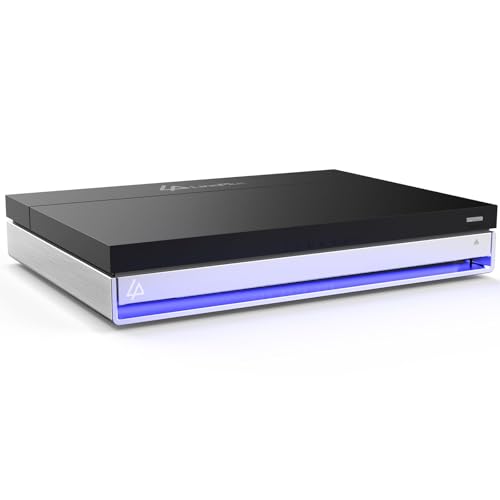
- Flawless 4K transcoding in Plex and Jellyfin
- 16GB RAM with Docker and app support
- 2 SATA bays plus 4 M.2 NVMe slots
Best For: Power users who want a flexible home server with transcoding
Best for Easy Setup
Quiet 4-Bay NAS for 4K Home Media

- Intel x86 quad-core with 4GB RAM
- Hardware-level 4K H.265 decoding
- 2.5GbE LAN and very quiet 21dB(A) operation
Best For: home users streaming 4K video and wanting quiet, easy-to-manage storage
High-Speed Power Pick
High-Speed 4-Bay NAS for Media and Backups

- Intel Pentium Gold 8505 with 8GB DDR5 RAM
- 10GbE, 2.5GbE, and 10Gbps USB support
- 2 M.2 NVMe slots, 128GB SSD, and 4K HDMI
Best For: power users and small offices needing fast storage and advanced app support
Silent All-Flash Choice
All-Flash NAS for Silent 4K Streaming

- Intel Celeron N5105 with hardware transcoding
- 6x M.2 NVMe SSD slots for all-flash speed
- Dual 2.5GbE and HDMI 2.0b connectivity
Best For: creators and media users wanting a quiet, compact all-SSD NAS
Enterprise 6-Bay Powerhouse

- Intel Core i3-1215U with 6 cores and 8 threads
- 10GbE + 2.5GbE networking with link aggregation
- 6 bays + 2 M.2 slots, up to 208TB capacity
Best For: Large media libraries, business storage, and Docker/VM users
Creator 4-Bay Media NAS
Asustor Lockerstor 4 Gen2+ AS6704T v2
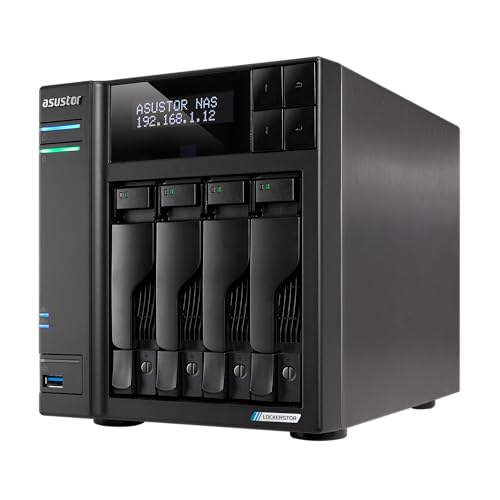
- Hardware 4K transcoding with HDMI output
- Dual 5GbE ports for fast file transfers
- 4 M.2 NVMe slots for cache or tiered storage
Best For: Creators and small businesses needing media playback and storage speed
Compact 2-Bay Streaming NAS
Asustor Lockerstor 2 Gen2+ AS6702T v2
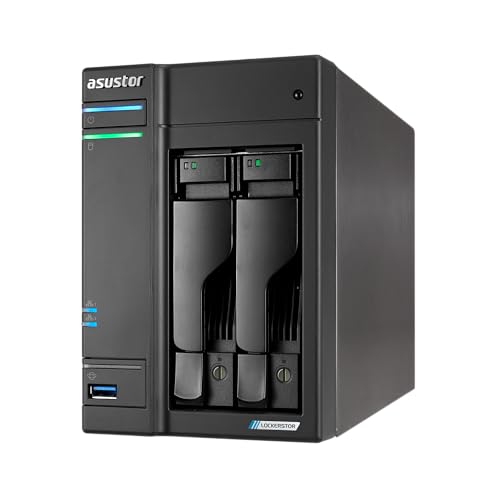
- Built-in hardware transcoding for 4K streaming
- Dual 5GbE ports for faster network performance
- 4 M.2 NVMe slots plus expandable DDR4 RAM
Best For: Compact Plex streaming and fast SSD-backed home storage
Private Cloud Streaming Pick – Synology DS225+ 2-Bay Media Server
If you want a NAS with hardware transcoding for a simple home media setup, the Synology DS225+ is built around streaming, backups, and private cloud access. Its Intel CPU is aimed at smoother 4K playback, while Synology’s software focus makes it a practical choice for storing photos, music, and video in one place.
Best For: Home users who want a reliable 2-bay media and backup NAS with 4K transcoding support.
Pros:
- Intel CPU supports hardware transcoding for 4K media streaming
- Fast file access with up to 282 MB/s transfer speeds
- Supports automated backups to cloud services, external drives, and remote NAS
- Can support up to 30 IP cameras with AI detection and remote monitoring
Cons:
- Diskless model, so storage drives must be purchased separately
- Only 2 bays, which limits raw expansion compared with larger NAS units
The DS225+ is a strong fit if your priority is dependable streaming and backup features rather than a large-scale storage chassis. It offers a balanced set of home-media and protection tools in a compact 2-bay design.
Performance Value Pick – QNAP TS-364 3-Bay NAS
The QNAP TS-364 is a solid NAS with hardware transcoding if you want a compact desktop system that does more than just file storage. Its Intel Celeron processor, 8GB of RAM, and 2.5GbE networking make it a practical option for media streaming, faster transfers, and light virtualization tasks.
Best For: Users who want a 3-bay NAS with multimedia performance, SSD caching, and faster 2.5GbE networking.
Pros:
- 4K H.264 hardware decoding and real-time transcoding
- Dual M.2 NVMe slots for cache acceleration or SSD storage pools
- 2.5GbE port speeds up file sharing across devices
- 8GB DDR4 RAM and Intel Celeron CPU support multitasking
Cons:
- Only one 2.5GbE port is listed
- Diskless chassis means drives are not included
This model stands out for buyers who want media-friendly hardware plus room to grow with cache or SSD storage. It is a practical middle ground between basic home NAS units and more advanced app-focused systems.
Quiet Home Media Pick – TERRAMASTER F2-425 2-Bay NAS
If you’re shopping for a NAS with hardware transcoding for a quiet home setup, the TerraMaster F2-425 is aimed squarely at media playback and everyday file sharing. It combines an Intel x86 quad-core processor, 4GB of RAM, and 2.5GbE networking with 4K H.265 decoding support for Plex, Emby, and Jellyfin.
Best For: Home users who want a quiet, affordable 2-bay multimedia NAS with 4K transcoding support.
Pros:
- Hardware-level 4K H.265 decoding for Plex, Emby, and Jellyfin
- 2.5GbE port supports fast transfers and multi-user access
- Very quiet operation at 19dB(A)
- Tool-free HDD trays make setup quick and easy
Cons:
- Diskless, so you need to supply your own drives
- 2-bay design limits expansion compared with larger models
The F2-425 is a practical choice when low noise and media playback matter more than maximum bay count. Its app support and quiet operation make it a friendly fit for bedrooms, living rooms, or shared family spaces.
Hybrid Media Server Pick – LincStation N1 6-Bay NAS
The LincStation N1 is a more flexible NAS with hardware transcoding for users who want media playback plus app hosting in one box. With an Intel N5105 CPU, 16GB of RAM, and support for Plex, Jellyfin, Docker apps, and 4K HDMI output, it is built for a home server that can handle several jobs at once.
Best For: Power users who want a hybrid NAS for transcoding, Docker apps, and flexible storage layouts.
Pros:
- Flawless 4K video transcoding support in Plex and Jellyfin
- 16GB RAM and 128GB eMMC help with multitasking and apps
- Hybrid design with 2 SATA bays and 4 M.2 NVMe slots
- Includes a 2.5GbE port and HDMI 2.0 output
Cons:
- Uses 2.5″ SATA HDD bays, which are more limited than full-size drive bays
- Diskless, so storage must be added separately
This model makes sense if you want a compact server that can stream media, run services, and use fast SSD storage alongside bulk disks. Its included Unraid license and wide port selection add to its appeal for tinkerers and home lab users.
Best for Easy Setup – Quiet 4-Bay NAS for 4K Home Media
If you want a NAS with hardware transcoding for a home media setup, the TERRAMASTER F4-425 is built around Intel x86 performance and hardware-level 4K H.265 decoding. It pairs that with 2.5GbE networking and support for Plex, Emby, and Jellyfin, making it a practical choice for smooth streaming, backups, and everyday file sharing.
Best For: Home users who want quiet 4K media streaming, simple setup, and roomy 4-bay storage.
Pros:
- Intel x86 quad-core CPU with 4GB RAM for multitasking and 4K transcoding
- Hardware-level 4K H.265 decoding works with Plex, Emby, and Jellyfin
- 2.5GbE LAN supports faster transfers and multi-user access
- Very quiet operation at 21dB(A) with tool-free HDD trays
Cons:
- Diskless, so storage drives must be purchased separately
- Plastic enclosure may not appeal to buyers wanting a more premium chassis
- 4GB RAM is modest for heavier app or virtual machine use
The F4-425 is a good fit if your priority is quiet, straightforward media serving rather than advanced expansion. Its mix of hardware transcoding support, fast networking, and easy maintenance makes it especially appealing for living-room or bedroom use.
High-Speed Power Pick – High-Speed 4-Bay NAS for Media and Backups
The UGREEN NAS DXP4800 Plus is a strong choice if you need a NAS with hardware transcoding potential, high-speed networking, and enough power for more than just file storage. Its Intel Pentium Gold 8505 CPU, 8GB DDR5 RAM, 10GbE plus 2.5GbE networking, and 4K HDMI output make it well suited to demanding home or small-office media and backup workflows.
Best For: Small offices and power users who want fast transfers, centralized storage, and room for advanced workloads.
Pros:
- Intel Pentium Gold 8505 and 8GB DDR5 RAM support smooth multitasking
- 10GbE, 2.5GbE, and 10Gbps USB ports enable very fast transfers
- Built-in 128GB SSD, 2x M.2 NVMe slots, and 4K HDMI add flexibility
- Supports Docker and virtual machines for advanced usage
Cons:
- Diskless, so drives need to be purchased separately
- Wired Ethernet only; no Wi-Fi support on this model
- Plex is run via Docker rather than being called out as a native app
For buyers who care about speed first, the DXP4800 Plus stands out more for connectivity and expansion than for simplicity. It brings a modern feature set that works well for a private cloud, media library, and backup hub in one box.
Silent All-Flash Choice – All-Flash NAS for Silent 4K Streaming
If you want a NAS with hardware transcoding in an all-flash design, the Asustor Flashstor 6 focuses on speed, silence, and media playback. Its Intel Celeron N5105 processor, six M.2 NVMe SSD slots, dual 2.5GbE ports, and hardware transcoding support make it a smart fit for compact media libraries and creator workflows.
Best For: Creators and home media users who want silent, fast SSD storage with 4K playback support.
Pros:
- Intel Celeron N5105 quad-core CPU handles multitasking and media workloads
- 6x M.2 NVMe slots deliver all-flash storage speed
- Dual 2.5GbE ports support fast, stable transfers
- Hardware transcoding and HDMI 2.0b suit 4K media playback
Cons:
- Diskless, so you must supply your own NVMe drives
- 4GB RAM may be limiting for heavier multitasking
- All-flash SSD storage typically costs more than HDD-based setups
The Flashstor 6 is appealing when low noise and high-speed SSD storage matter more than bulk capacity per dollar. It is especially attractive for a quiet studio or a modern media server where hardware transcoding and compact design are both important.
Enterprise 6-Bay Powerhouse – UGREEN DXP6800 Plus
If you want a NAS with hardware transcoding-class setup built around speed, expansion, and private storage control, the UGREEN DXP6800 Plus is aimed at demanding users. Its Intel Core i3-1215U processor, dual network ports, and 6-bay design make it a strong fit for large media libraries, backups, and mixed workloads.
Best For: Power users and small businesses that need high-capacity storage, fast networking, and Docker/VM support.
Pros:
- 12th Gen Intel Core i3-1215U with 6 cores and 8 threads for stronger overall processing
- 1x 10GbE plus 1x 2.5GbE port, with link aggregation support for up to 20G bandwidth
- 6 SATA bays plus 2 M.2 NVMe slots for up to 208TB of storage
- Supports Docker and virtual machines, and Plex can be run via Docker
Cons:
- Drives are not included, so total build cost depends on third-party storage purchases
- Wired Ethernet only; no Wi-Fi support
- Actual transfer speeds vary based on router, CPU, drives, and file sizes
This is the most expandable option in the group, especially if you value raw throughput and multi-purpose use over compact size. For buyers building a serious media or data server, it offers a lot of headroom.
Creator 4-Bay Media NAS – Asustor Lockerstor 4 Gen2+ AS6704T v2
The Asustor Lockerstor 4 Gen2+ is a practical NAS with hardware transcoding support for people who want smoother 4K playback and a fast hybrid storage layout. With dual 5GbE ports, four M.2 SSD slots, and HDMI output, it is built for creators, media users, and small teams that need speed and flexibility.
Best For: Creators and small businesses looking for a balanced NAS for media streaming, editing, and hybrid storage.
Pros:
- Hardware 4K transcoding support plus HDMI output for media playback
- Dual 5GbE ports for faster transfers than standard Gigabit NAS units
- Four M.2 NVMe SSD slots for cache acceleration or tiered storage
- Expandable DDR4 memory up to 16GB for more multitasking headroom
Cons:
- Only 4GB RAM included at purchase
- Diskless model, so you need to buy your own drives
- Four-bay design offers less raw capacity than larger NAS systems
This model stands out when media performance matters but you still want a flexible, all-purpose storage box. It looks especially appealing if you want SSD caching and 4K streaming in one enclosure.
Compact 2-Bay Streaming NAS – Asustor Lockerstor 2 Gen2+ AS6702T v2
If you want a NAS with hardware transcoding in a smaller desktop footprint, the Asustor Lockerstor 2 Gen2+ keeps the same performance-oriented core as its larger sibling. Dual 5GbE networking, four M.2 NVMe slots, and built-in transcoding support make it a strong pick for home media use and fast file access.
Best For: Users who want a compact media NAS for Plex streaming, backups, and high-speed SSD caching.
Pros:
- Built-in hardware transcoding support for smooth 4K playback and streaming
- Dual 5GbE ports for better transfer speeds than basic Gigabit NAS setups
- Four M.2 NVMe SSD slots for caching or an all-flash storage pool
- Expandable DDR4 memory up to 16GB for multitasking
Cons:
- 2-bay design limits maximum storage compared with 4-bay or 6-bay models
- Only 4GB RAM included initially
- Drives are not included
This is the most compact choice here, but it still brings serious networking and SSD expansion. For buyers focused on streaming efficiency rather than maximum capacity, it is a well-rounded option.
How We Picked the Best NAS with Hardware Transcoding
We prioritized systems with strong CPU support for hardware transcoding, practical drive bay counts, and network options that won’t bottleneck local streaming or file transfers. We also favored models with good expansion paths, SSD cache or NVMe support, and enough memory for media apps, downloads, and everyday NAS tasks.
For buyers building a NAS with Hardware Transcoding around Plex-style streaming, the goal is not just raw specs. It is the combination of a compatible Intel-based processor, stable software support, and connectivity that keeps transcoded video moving smoothly to TVs, phones, and tablets.
Quick Comparison
Two-bay models are best for compact, budget-friendly setups and simple mirrored storage. Four-bay and six-bay systems give you more room for growth, better flexibility with RAID, and a stronger long-term fit for large media libraries. All-SSD NAS units are the speed leaders, while hard-drive-based models usually offer the best cost per terabyte.
Key Buying Factors for NAS with Hardware Transcoding
CPU and Transcoding Support
Look for Intel processors with integrated graphics, since they are commonly used for hardware-accelerated video transcoding. That matters most if you stream 4K content, share media with multiple users, or need real-time conversion for devices that cannot handle a file format directly.
Bay Count and Storage Type
Choose the number of bays based on how much media you expect to store and how much redundancy you want. Two-bay NAS units are simpler and cheaper, while four- and six-bay options are better for larger Plex libraries, mixed backups, and future expansion. If you want maximum responsiveness, consider an all-SSD design.
Networking and Expandability
Faster networking helps a NAS with Hardware Transcoding do its job without being limited by the network. 2.5GbE is a solid baseline, 5GbE is better for heavier local use, and 10GbE is ideal if you move large files often or edit media directly from the NAS. M.2 NVMe slots, SSD cache, and extra RAM can also improve responsiveness.
Who Should Buy Which NAS with Hardware Transcoding?
If you want the simplest and most affordable media server, start with a two-bay NAS. If you expect your library to grow or want better RAID options, a four-bay model is the sweet spot for most homes. Power users who run virtual machines, sync lots of data, or serve several streams at once should look at six-bay systems with faster networking and more memory.
For shoppers focused mainly on streaming, choose the best transcoding-capable CPU first, then match the bay count and network speed to your storage needs. That approach will give you a smoother, more future-proof setup.