
A barebone computer gives you control over the memory and storage in your virtualization host. The right choice depends on what you plan to run: several general-purpose VMs, a quiet home lab, or a network-focused setup with multiple high-speed ports.
These nine options range from compact Ryzen and Core Ultra mini PCs to fanless firewall appliances. Before choosing, look beyond the processor name to RAM capacity, storage options, networking, cooling, and the parts you’ll need to supply.
Best 9 Barebone Computer for Virtualization Picks for 2026
Flexible Home Lab
GEEKOM A8 Max Barebones Mini PC
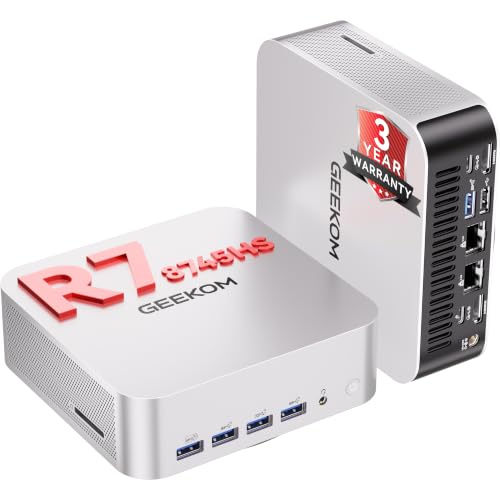
- Ryzen 7 8745HS with 8 cores and 16 threads
- Up to 64GB DDR5 and two M.2 slots
- Dual 2.5G Ethernet ports
Best For: Customizable compact home labs
Network-Rich Lab
MINISFORUM MS-03 Barebone Mini PC

- Core Ultra 5 336H with 12 cores and 12 threads
- Supports up to 128GB DDR5 and three M.2 SSDs
- Two 10G SFP+, 10G RJ45, and 2.5G RJ45
Best For: Memory-intensive, network-heavy lab builds
Virtual Firewall Host
Qotom Q20332G9-S20 Barebone Mini PC
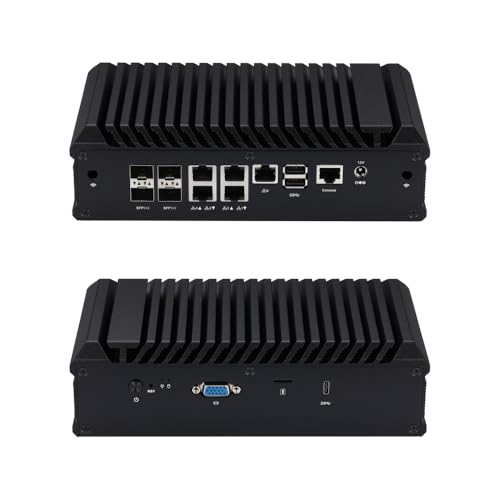
- Five LAN and four SFP(+) ports
- Listed Proxmox VE and firewall OS compatibility
- No RAM, storage, or OS included
Best For: DIY virtual firewalls and network services
Best for Expandable VM Labs

- 14-core, 18-thread Core Ultra 5
- Up to 96GB DDR5 memory
- Dual M.2 PCIe 4.0 slots with RAID support
Best For: Memory-heavy home labs and flexible VM storage
Best Compact Ryzen Host

- Eight-core Ryzen 7 8745H
- Up to 96GB DDR5; dual M.2 slots
- 2.5GbE, Wi-Fi 6E, and USB4
Best For: Compact Ryzen-based home labs
Best for Multi-Gig Network Labs
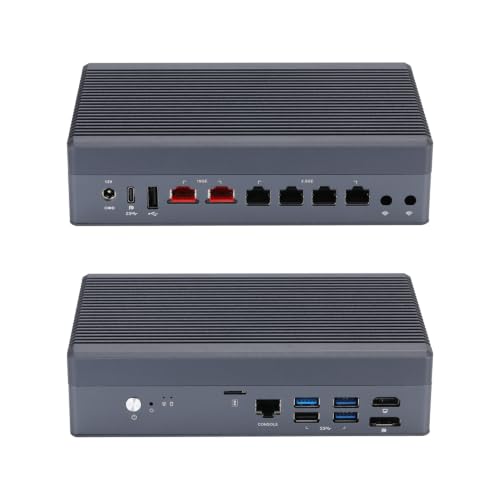
- Two 10GbE plus four 2.5GbE ports
- Eight-core Core i3-N305
- 32GB DDR5 maximum; check OS compatibility
Best For: Linux or Proxmox network labs needing multiple LAN ports
10GbE Network Lab

- Eight-core i3-N305 processor
- Four 2.5GbE and two 10GbE SFP ports
- Up to 32GB DDR5; PCIe 3.0 x1 NVMe
Best For: Network labs needing 2.5GbE and 10GbE ports
Silent Lab Host
Montvfieto 8505 Fanless Barebone

- Fanless cooling with dual heat pipes
- Four Intel i226 2.5GbE ports
- DDR5, PCIe 4.0 NVMe, and SATA support
Best For: Quiet, configurable home labs and firewalls
Compact Firewall Starter

- Silent, fanless aluminum enclosure
- Two Intel Gigabit Ethernet ports
- Dual-core J3060; up to 8GB RAM
Best For: Small, dedicated two-port firewall builds
Flexible Home Lab – GEEKOM A8 Max Barebones Mini PC
The GEEKOM A8 Max is a barebone computer for virtualization if you want to choose your own memory and storage. Its Ryzen 7 8745HS has 8 cores and 16 threads, and the dual 2.5G Ethernet ports give you options for separating lab and everyday network traffic.
Best For: A compact home lab where customizable hardware and two wired networks matter.
Pros:
- Supports up to 64GB of DDR5 SO-DIMM memory.
- Two M.2 2280 PCIe 4.0 SSD slots support up to 4TB of storage.
- Dual 2.5G Ethernet ports and a 40Gbps USB4 port offer useful connectivity.
Cons:
- RAM and storage are not included.
- The supplied specifications do not confirm compatibility with a particular hypervisor.
Choose this model for a build-it-yourself mini PC with a strong mix of CPU threads, storage slots, and network ports; verify your intended virtualization platform before buying components.
If your barebone computer for virtualization needs substantial memory and fast network connections, consider the MINISFORUM MS-03. Its Intel Core Ultra 5 336H has 12 cores and 12 threads, while support for up to 128GB of DDR5 memory and three M.2 SSD slots gives you room to configure a multi-workload lab.
Best For: Network-heavy labs that need high memory capacity and flexible storage placement.
Pros:
- Supports up to 128GB of DDR5 memory.
- Three M.2 slots include two PCIe 5.0 slots and one PCIe 4.0 slot.
- Two 10G SFP+ ports, one 10G RJ45 port, and one 2.5G RJ45 port support varied network setups.
- A physical PCIe x16 slot and two USB4 ports provide expansion options.
Cons:
- Intel vPro is supported only on select configurations.
- The supplied specifications do not name a supported hypervisor.
The MS-03 stands out for its combination of memory ceiling, storage slots, and networking. Confirm the exact configuration and your chosen virtualization software’s requirements before deployment.
The Qotom Q20332G9-S20 is a barebone computer for virtualization with an emphasis on networking. Its supplied notes list compatibility with Proxmox VE alongside pfSense, OPNsense, and TrueNAS, making it worth considering for a DIY firewall or network-services lab.
Best For: A configurable firewall, router, or network-services host with numerous physical ports.
Pros:
- Five LAN ports and four SFP(+) ports provide extensive network connectivity.
- Listed as compatible with Proxmox VE, pfSense, OPNsense, and TrueNAS.
- Mini SAS and a SIM slot add options for specialized builds.
Cons:
- No DDR4 RAM, SSD, 2.5-inch drive, or operating system is included.
- The supplied notes conflict on CPU core count: the bullets specify eight cores, while the details list four.
This is the most network-focused option here, but confirm the processor specification with the seller before planning how many virtualized services it should run.
Best for Expandable VM Labs – MINISFORUM M1 Pro-125H
If you want a barebone computer for virtualization with room to configure memory and storage, the MINISFORUM M1 Pro-125H is a flexible starting point. Its 14-core, 18-thread Core Ultra 5 125H supports up to 96GB of DDR5 memory, while two M.2 PCIe 4.0 slots let you separate VM storage or configure RAID.
Best For: Home labs running multiple VMs that need substantial memory and flexible local storage.
Pros:
- 14 cores and 18 threads for concurrent workloads.
- Supports up to 96GB DDR5 and two M.2 2280 PCIe 4.0 SSDs.
- RAID 0 and RAID 1 support; dual USB4 ports add connectivity.
Cons:
- RAM, SSD, and operating system are not included.
- Its listed networking details do not establish multiple Ethernet ports for dedicated network segments.
Choose this model when VM capacity and storage layout matter more than built-in multi-port networking. Budget for memory, drives, and an OS before deployment.
Best Compact Ryzen Host – MINISFORUM UM870 Slim
The MINISFORUM UM870 Slim is a compact barebone computer for virtualization built around an eight-core Ryzen 7 8745H. It supports up to 96GB of DDR5 memory and has two M.2 2280 PCIe 4.0 slots, giving you room to build a small VM host with separate system and workload drives.
Best For: Space-conscious home labs that want a configurable Ryzen-based VM host.
Pros:
- Eight CPU cores and support for up to 96GB DDR5.
- Two M.2 2280 PCIe 4.0 SSD slots.
- 2.5GbE wired networking, Wi-Fi 6E, and USB4 connectivity.
Cons:
- DDR5 memory, SSD, and operating system are not included.
- Only one wired network port is listed, limiting physical network separation without additional hardware.
Its memory ceiling and dual SSD slots make it versatile for a compact lab. If your virtualization plan requires several dedicated physical LAN ports, compare it with a network-focused box instead.
Best for Multi-Gig Network Labs – Qotom Q10932H6
For a barebone computer for virtualization centered on routing and network isolation, the Qotom Q10932H6 stands out with two 10GbE and four 2.5GbE RJ45 ports. Its eight-core Core i3-N305 and support for up to 32GB of DDR5 suit a network-focused lab, though its memory ceiling is lower than the other systems here.
Best For: Proxmox or Linux network labs that need several physical high-speed Ethernet ports.
Pros:
- Two 10GbE and four 2.5GbE RJ45 ports.
- Eight-core processor and DDR5 SO-DIMM support.
- Aluminum passive-cooling chassis with an auxiliary micro-fan.
Cons:
- Maximum listed memory is 32GB; RAM and storage are not included.
- Seller notes say the 10GbE chipsets are not compatible with pfSense, OPNsense, or FreeBSD.
This is the purpose-built pick when physical network interfaces matter most. Confirm your intended OS supports the Marvell AQC113 10GbE controllers before buying; the listed compatibility warning is especially important for firewall builds.
10GbE Network Lab – Dozlzyp X8 i3-N305 Barebone
For a barebone computer for virtualization centered on network testing, the Dozlzyp X8 pairs an eight-core i3-N305 with four 2.5GbE ports and two 10GbE SFP ports. Add your own DDR5 memory and storage before putting it to work.
Best For: A compact firewall and network lab that needs both 2.5GbE and 10GbE connections.
Pros:
- Four Intel i226-V 2.5GbE ports plus two 10GbE SFP ports offer flexible network connections.
- Supports up to 32GB of DDR5-4800 memory.
- HDMI, DisplayPort, and Type-C outputs support three 4K displays at 60Hz.
Cons:
- Memory and storage must be added to the barebone system.
- The M.2 NVMe connection is limited to PCIe 3.0 x1.
The port selection is the main draw for network-focused workloads; plan the storage configuration around that narrower NVMe connection.
Silent Lab Host – Montvfieto 8505 Fanless Barebone
If you want a barebone computer for virtualization in a quiet home lab, this Montvfieto 8505 model combines fanless cooling, four Intel i226 2.5GbE ports, and room for DDR5 memory and multiple storage types. It ships without RAM or storage, so budget for both.
Best For: A quiet, configurable home-lab host or firewall with four 2.5GbE connections.
Pros:
- Fanless chassis with dual copper heat pipes avoids fan noise.
- Supports dual-channel DDR5, PCIe 4.0 NVMe, and SATA 3.0 storage.
- Four 2.5GbE ports suit segmented network and firewall setups.
Cons:
- No RAM or storage is included.
- The notes list several processor variants and conflicting CPU details; verify the exact configuration before ordering.
This is the more flexible storage choice of the three, provided you confirm the processor in the listing and are comfortable completing the barebone build.
Compact Firewall Starter – Protectli Vault FW2B Barebone
Protectli Vault FW2B - 2 Port, Firewall Micro Appliance/Mini PC - Intel Dual Core, AES-NI, Barebone
Check Price On AmazonThe Protectli Vault FW2B is a barebone computer for virtualization only if your plans are modest: its dual-core Celeron J3060, two Gigabit Ethernet ports, and 8GB memory ceiling make more sense for a focused firewall project than a larger virtual-machine lab.
Best For: A compact, silent two-port firewall build with user-selected RAM and storage.
Pros:
- Fanless aluminum enclosure keeps operation silent.
- Two Intel Gigabit Ethernet ports and AES-NI support suit firewall use.
- Hardware has been tested with pfSense, OPNsense, Untangle, and other open-source software.
Cons:
- No RAM, mSATA storage, or operating system is included; memory compatibility needs checking.
- Dual-core processing, two Gigabit ports, and an 8GB RAM limit constrain larger lab plans.
Choose the FW2B for a small dedicated network appliance, not for expanding into many virtual machines. Protectli also notes that a newer V1210 model is available.
How We Picked the Best Barebone Computer for Virtualization
We focused on practical host requirements rather than headline clock speeds: CPU cores and threads, supported RAM and storage, network connectivity, and whether the chassis suits sustained use. The selection includes general-purpose mini PCs for mixed VM workloads and network appliances for router, firewall, and segmentation labs. Listings can vary by configuration, so verify the exact unit’s specifications before ordering.
Quick Comparison: Which Type Fits Your Lab?
For several Linux or Windows VMs, start with the GEEKOM A8 Max, MINISFORUM UM870 Slim, M1 Pro-125H, or MS-03. Their Ryzen or Core Ultra processors make more sense for mixed workloads than a low-power firewall box. If you want a small host with room to choose your own DDR5 memory and SSD, compare their supported capacities and expansion options—not just their core counts.
For virtualized firewalls, VLAN experiments, or storage-network testing, the Qotom Q20332G9 S20, Qotom Q10932H6, and i3-N305 firewall appliance stand out for their multiple Ethernet ports, including 10GbE connections. The Model 8505 fanless system offers a simpler four-port 2.5GbE starting point. The two-port Protectli FW2B is better suited to a modest firewall or a small number of lightweight services than a dense VM host.
Key Buying Factors for a Barebone Computer for Virtualization
Memory Comes First
VMs reserve RAM quickly. Check the maximum supported capacity, number of memory slots, and compatible memory type for the exact model. Dual-channel memory is useful, but sufficient capacity matters more: add up the RAM you expect to allocate to guests, then leave headroom for the host and future services.
Match CPU and Storage to the Workload
More cores and threads help when several guests are active at once; light firewall and DNS duties need far less compute. Confirm that the processor supports the virtualization features your hypervisor requires. For storage, check the number and type of M.2 or SATA connections. Separate drives can make it easier to keep a host installation apart from VM data, but available slots and supported drive sizes differ.
Check Ports, Cooling, and Total Cost
Dedicated Ethernet ports are valuable for physical WAN/LAN separation; 2.5GbE or 10GbE is worthwhile only if the rest of your network can use it. Fanless systems avoid fan noise but still need ventilation under sustained load. Because barebone listings may omit RAM, SSDs, or even a power adapter, check the package contents and price a complete build before comparing value.
Who Should Buy Which Barebone Computer for Virtualization?
Choose a Ryzen or Core Ultra mini PC if your priority is a flexible home-lab host for multiple application and desktop VMs. Pick a multi-port Qotom or i3-N305 appliance when network interfaces are central to the project. Consider the Model 8505 for a quieter, simpler 2.5GbE firewall lab, or the Protectli FW2B when two ports and light workloads are enough. For any Barebone Computer for Virtualization, confirm hypervisor compatibility and your planned RAM and storage configuration before you buy.