
Choosing the right barebone computer for pfSense comes down to more than just CPU speed. You need enough Ethernet ports, stable cooling, and the right expansion options for your network now and later.
Below, we focus on compact firewall appliances and mini PCs that can handle home, small office, and advanced routing workloads with a practical eye on value, performance, and durability.
Best 10 Barebone Computer for PfSense Picks for 2026
Fanless Firewall Pick
Compact Fanless Barebone Firewall Appliance
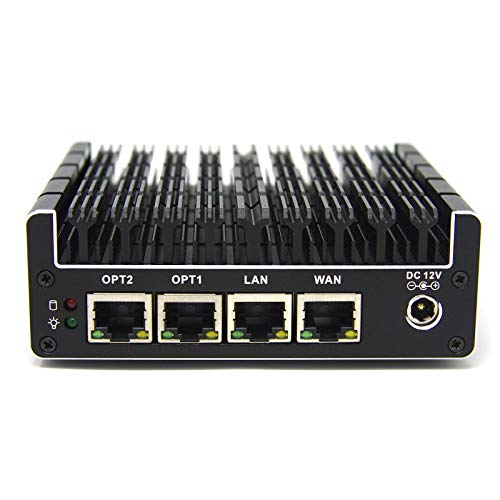
- 4 Intel Gigabit Ethernet ports for routing and firewall use
- Fanless chassis keeps operation silent for 24/7 deployment
- Barebone design lets you choose RAM, storage, and OS
Best For: Quiet pfSense or OPNsense firewall builds
Performance Barebone Choice
High-Performance Barebone Mini PC

- Ryzen 7 8745H with 8 cores and 16 threads
- Dual DDR5 and dual PCIe 4.0 M.2 storage support
- 2.5G LAN with Wi-Fi 6E, Bluetooth 5.3, and USB4
Best For: Users who want firewall flexibility plus strong everyday performance
Protectli Vault Pick
Protectli Vault FW6A 6-Port Fanless Firewall Mini PC
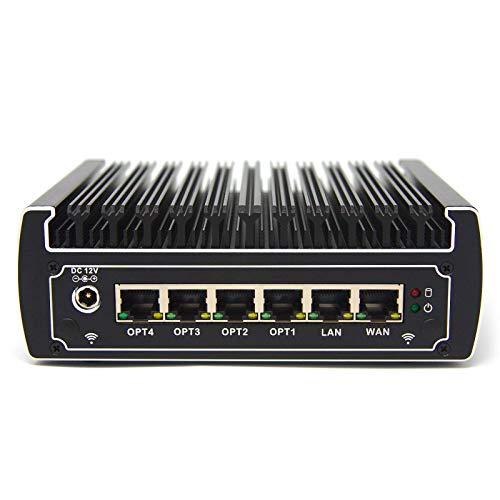
- 6 Intel Gigabit Ethernet ports
- Fanless barebones firewall appliance
- AES-NI support for firewall use
Best For: pfSense users who want a silent, customizable 6-port firewall box
Performance Pick
MINISFORUM AI X1-255 Ryzen 7 Barebone Mini PC

- Ryzen 7 255 with 8 cores/16 threads
- DDR5, dual M.2, and USB4 support
- 2.5G LAN plus Wi-Fi 7 and BT 5.4
Best For: Buyers who want a high-performance barebone mini PC with modern expansion
High-Performance Barebone Router Box

- Dual 2.5GbE LAN for routing and firewall-style setups
- Three M.2 2280 slots plus PCIe 4.0 x4 expansion
- Barebone unit with Ryzen 7 H 255 and DDR5 support
Best For: Buyers who want a powerful barebone mini PC with dual 2.5GbE and strong expansion room
Silent Multi-Gig Network Appliance
Qotom Q11032H6 Fanless Barebone
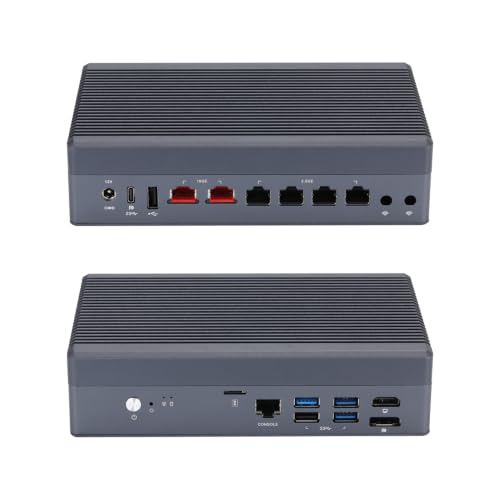
- 2x 10GbE plus 4x 2.5GbE for dense networking
- Fanless aluminum chassis for quiet operation
- Notes explicitly say it is not compatible with pfSense
Best For: Users who want a silent fanless network appliance for supported Linux or lab platforms
Budget Firewall-Friendly Barebone
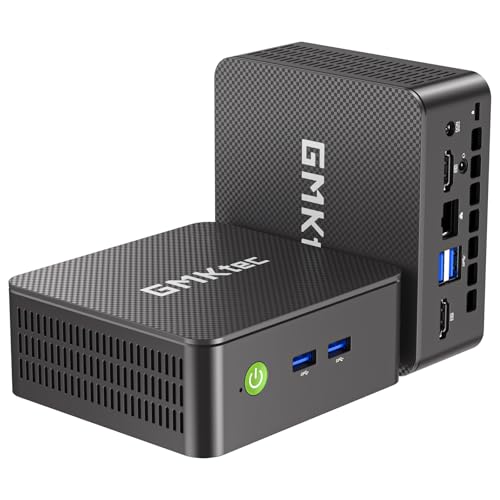
- Intel i226 2.5GbE LAN for basic firewall use
- Barebone design with M.2 2242 SATA and M.2 2280 NVMe
- WiFi 6, Bluetooth 5.2, and dual HDMI for general use
Best For: Budget-minded buyers who want a compact barebone mini PC with 2.5GbE
Fanless Firewall Pick – Compact Fanless Barebone Firewall Appliance
If you want a barebone computer for pfSense that prioritizes reliability and simplicity, the Protectli Vault FW4B is a straightforward firewall appliance. It ships with no RAM, no storage, and no OS, so you can build it around your preferred setup while benefiting from a fanless, silent chassis and Intel Gigabit networking.
Best For: Home labs and small-network firewall builds where quiet operation and open-source compatibility matter most.
Pros:
- Fanless, silent design with passive cooling and a compact footprint.
- 4 Intel Gigabit Ethernet ports, plus dual HDMI and USB 3.0 connectivity.
- AES-NI support and hardware tested with pfSense, OPNsense, Untangle, and more.
- Barebones layout leaves RAM and storage selection fully up to you.
Cons:
- No RAM, mSATA, or operating system included.
- Uses an older Celeron J3160 platform compared with newer mini PCs.
- coreboot BIOS is optional and must be installed by the user.
Overall, the FW4B is a purpose-built firewall box that stays focused on networking basics rather than general computing power. If pfSense compatibility and quiet 24/7 operation are your main goals, it remains an easy appliance to spec out.
Performance Barebone Choice – High-Performance Barebone Mini PC
For buyers comparing a barebone computer for pfSense against a more powerful all-around mini PC, the MINISFORUM UM870 Slim offers a much faster modern platform. It still arrives without RAM, SSD, or OS, but it adds an AMD Ryzen 7 8745H, dual DDR5 support, dual M.2 storage slots, and 2.5G wired networking for broader versatility.
Best For: Users who want a barebone system that can handle firewall duties and also serve as a general-purpose mini PC.
Pros:
- AMD Ryzen 7 8745H with 8 cores and 16 threads for strong performance.
- Dual DDR5 slots and two M.2 2280 PCIe 4.0 SSD slots.
- 2.5G wired networking plus Wi-Fi 6E and Bluetooth 5.3.
- USB4, HDMI 2.1, and DisplayPort support for flexible connectivity.
Cons:
- Uses active cooling rather than a fanless design.
- Still requires you to add RAM, SSD, and an operating system.
- More power-oriented than a dedicated firewall appliance.
The UM870 Slim makes sense if you want pfSense-capable networking hardware but do not want to give up everyday PC performance. It is a stronger fit for users who value expandability and speed over a minimal firewall-only layout.
Budget Firewall Appliance – Fanless 4-Port Firewall Mini PC
If your goal is a barebone computer for pfSense-like firewall work, this VNOPN F12 is built around networking first. It pairs a fanless 6.5W Intel J3710 platform with four Intel i226 LAN ports, making it a compact choice for soft routing, gateway use, and other always-on network tasks.
Best For: Budget-conscious firewall and network gateway builds that need quiet 24/7 operation.
Pros:
- Four Intel i226 Ethernet ports for multi-network firewall setups.
- Fanless aluminum design rated for silent, 24/7 use.
- Low 6.5W power consumption helps keep operating costs down.
- Includes 8GB RAM and 128GB mSATA SSD out of the box.
Cons:
- Processor is an older Intel J3710 platform.
- RAM maximum is limited to 8GB.
- Not intended for HDD storage.
This model is less about raw speed and more about stable, low-power firewall duty. If you need a simple always-on router or pfSense-style gateway with four NICs, it covers the basics well.
Flexible Barebone Mini PC – Ryzen 5 Triple-Display Barebone
This barebone computer for pfSense is better viewed as a flexible mini PC platform than a dedicated firewall appliance. The QAZIPO model uses an AMD Ryzen 5 3500U, dual RAM slots, dual SSD support, and gigabit Ethernet, so it can be customized for home office use, lab work, or a compact network machine.
Best For: Buyers who want a customizable mini PC that can also be adapted for networking and light workstation use.
Pros:
- AMD Ryzen 5 3500U with 4 cores and 8 threads.
- Dual RAM slots and dual M.2 SSD slots for flexible upgrades.
- Triple 4K display support via USB-C, HDMI 2.0, and DisplayPort 1.4.
- WiFi, Bluetooth, VESA mounting, and gigabit Ethernet included.
Cons:
- RAM, storage, and OS are not included.
- Single gigabit Ethernet port, so it is not a multi-NIC firewall appliance.
- More suited to general computing than dedicated firewall hardware.
As a barebone system, this QAZIPO mini PC gives you a lot of room to tailor the hardware stack. It is a better match for users who want a compact all-purpose machine first and a firewall-capable build second.
Protectli Vault Pick – Protectli Vault FW6A 6-Port Fanless Firewall Mini PC
Protectli Vault FW6A - 6 Port, Firewall Micro Appliance/Mini PC - Intel Dual Core, AES-NI, Barebone
Check Price On AmazonIf you’re shopping for a barebone computer for pfSense, the Protectli Vault FW6A is built around the basics that matter for a firewall appliance: fanless cooling, six Intel Gigabit Ethernet ports, and AES-NI support. Because it ships as a true barebones system, you’ll need to add compatible RAM and storage yourself, but that also gives you room to tailor the build to your needs.
Best For: Users who want a compact, silent pfSense box with 6 Intel NICs and hands-on hardware customization.
Pros:
- 6 Intel Gigabit Ethernet ports for firewall and gateway use
- Fanless, silent design with compact 6 x 5 x 2 inch footprint
- Intel Celeron 3867U with AES-NI hardware support
- Barebones layout lets you choose your own RAM and storage
Cons:
- No RAM, storage, or OS pre-installed
- Memory compatibility needs to be checked before buying
- coreboot BIOS is optional and must be installed by the user
Overall, this is a straightforward firewall-focused mini PC for users who want a proven barebone computer for pfSense rather than a general-purpose desktop. The hardware is modest, but the port count and silent operation make it a strong fit for network appliance duties.
Performance Pick – MINISFORUM AI X1-255 Ryzen 7 Barebone Mini PC
The MINISFORUM AI X1-255 is a powerful barebone computer, but it’s better suited to general-purpose mini PC work than a dedicated barebone computer for pfSense. With an AMD Ryzen 7 255, DDR5 support, dual M.2 slots, 2.5G LAN, and modern USB4 connectivity, it offers plenty of headroom for demanding workloads and future expansion.
Best For: Users who want a fast barebone mini PC with modern connectivity and room for expansion.
Pros:
- AMD Ryzen 7 255 with 8 cores and 16 threads
- DDR5 support up to 64 GB and dual PCIe 4.0 M.2 slots
- 2.5G LAN plus Wi-Fi 7 and Bluetooth 5.4
- USB4, HDMI, DisplayPort, and OCuLink for flexible connectivity
Cons:
- Only one LAN port is listed, which is limiting for pfSense routing setups
- Active cooling with a fan instead of a fanless design
- Overbuilt for users who only need a simple firewall appliance
This model makes sense if you want a capable barebone mini PC first and foremost, with networking features as part of a broader feature set. For pfSense specifically, the single LAN port makes it less appliance-like than firewall-focused alternatives.
Budget Firewall Pick – VNOPN F12 Fanless Intel J3710 Firewall Appliance
For a barebone computer for pfSense at the budget end, the VNOPN F12 keeps things focused on firewall basics. It uses an Intel J3710 processor with AES-NI support, four Intel I226 LAN ports, fanless cooling, and a compact aluminum shell that is designed for 24/7 operation.
Best For: Budget-conscious users who want a quiet, low-power firewall appliance with four Intel LAN ports.
Pros:
- 4 Intel I226 LAN ports for routing and firewall setups
- Fanless design with 6.5W power draw and silent operation
- Intel J3710 with AES-NI support
- Small enclosure includes VESA mounting hardware
Cons:
- Older J3710 platform is less powerful than newer mini PCs
- Ships with only 8GB DDR3 RAM and 64GB mSATA SSD
- Maximum RAM support is limited to 8GB
This is a practical firewall appliance rather than a flexible general-use barebone computer, and that’s exactly why it fits pfSense buyers on a budget. The low power draw, four Intel NICs, and silent cooling are the main reasons to consider it.
High-Performance Barebone Router Box – GMKtec K12 Ryzen 7 Mini PC
If you want a barebone computer for pfSense that can also handle heavier multitasking, the GMKtec K12 stands out with dual 2.5GbE LAN, a Ryzen 7 H 255, and room for serious storage expansion. It’s a high-powered mini PC platform, but note that the product notes focus on general networking and don’t specifically validate pfSense compatibility.
Best For: Buyers who want a powerful barebone mini PC with dual 2.5GbE, expansion headroom, and flexible networking hardware.
Pros:
- Dual 2.5GbE LAN ports can suit firewall, soft-routing, and aggregation use cases.
- Three M.2 2280 PCIe 4.0 slots and PCIe 4.0 x4 expansion give strong upgrade flexibility.
- Ryzen 7 H 255 and DDR5 support make it a very capable all-around barebone.
- Oculink, USB4, and quad-display outputs add uncommon connectivity for a mini PC.
Cons:
- Barebone configuration means you must add RAM, storage, and an operating system.
- Its gaming-oriented design and RGB cooling are not pfSense-specific features.
- The notes do not explicitly confirm pfSense or FreeBSD compatibility.
The K12 is best viewed as an aggressively featured barebone platform that could appeal to users who want network ports and upgrade room in one box. If your priority is raw hardware flexibility over a purpose-built firewall appliance, it makes sense to consider.
Silent Multi-Gig Network Appliance – Qotom Q11032H6 Fanless Barebone
For a barebone computer for pfSense, the Qotom Q11032H6 is the least attractive of the three because its own notes say it is not compatible with pfSense, OPNsense, or FreeBSD. Even so, it is built as a high-speed network appliance with dual 10G RJ45 and four 2.5G Intel LAN ports, so it may interest buyers who are evaluating multi-gig routing hardware for other supported platforms.
Best For: Users who want a silent fanless network appliance for Linux, OpenWrt, Proxmox, or Windows-based lab work.
Pros:
- 2x 10GbE and 4x 2.5GbE ports provide very high network density.
- Fanless aluminum chassis with an auxiliary micro-fan is designed for quiet operation.
- Intel Core i3-N355 and DDR5/NVMe support give it modern low-power hardware.
- Useful for high-speed routing, switching, and advanced homelabs on supported systems.
Cons:
- The notes explicitly say it is not compatible with pfSense, OPNsense, or FreeBSD.
- Barebone configuration requires you to add RAM and SSD.
- Marvell 10G chipsets need modern drivers, which narrows OS choices.
This is a strong network appliance on paper, but the compatibility warning is decisive if pfSense is your goal. For a pfSense roundup, it is more of a cautionary comparison point than a recommended pick.
Budget Firewall-Friendly Barebone – GMKtec G3 Pro Mini PC
If you’re shopping for a barebone computer for pfSense on a tighter budget, the GMKtec G3 Pro is the most straightforward of the group. It offers a 2.5GbE Intel LAN port, dual HDMI, WiFi 6, and barebone flexibility with no RAM, SSD, or OS included, making it a practical small-form-factor starting point for a compact network build.
Best For: Budget-minded buyers who want a compact barebone mini PC with 2.5GbE and basic expansion.
Pros:
- Intel i226 2.5GbE LAN is a strong fit for simple firewall and routing use.
- Two HDMI ports, WiFi 6, and Bluetooth 5.2 add useful general-purpose connectivity.
- Supports M.2 2242 SATA and M.2 2280 NVMe storage for flexible setup options.
- Barebone design lets you choose your own RAM, storage, and operating system.
Cons:
- Older Core i3-10110U platform is less capable than newer network-appliance hardware.
- Only one 2.5GbE port is listed, so it is less network-dense than dual- or quad-LAN options.
- It is positioned as an office/business mini PC rather than a dedicated firewall box.
Among these options, the G3 Pro is the most accessible barebone choice if you want a simple 2.5GbE mini PC and do not need advanced multi-port networking. It is practical, but its specs are more modest than a purpose-built pfSense appliance.
How We Picked the Best Barebone Computer for PfSense
For this roundup, we prioritized hardware that makes sense for a Barebone Computer for PfSense: dependable networking, sensible power use, and enough CPU headroom for firewall, VPN, VLAN, and routing tasks. We also looked at fanless designs where possible, since silent operation and fewer moving parts can improve long-term reliability.
We favored systems with Intel LAN where available, multiple Ethernet ports, and CPU platforms that offer solid single-thread performance. Barebone configurations were considered based on their suitability for adding your own RAM and storage.
Quick Comparison
If you want the simplest pfSense build, choose a compact firewall appliance with 4 ports and a low-power processor. If you need more throughput, VPN performance, or multi-gig connectivity, step up to models with newer Intel Core or Ryzen chips and 2.5GbE or 10GbE networking. For lab use or heavier gateway duties, more cores and more expansion usually matter more than raw graphics or gaming features.
Key Buying Factors for a Barebone Computer for PfSense
Ethernet Port Count and Speed
pfSense works best when the hardware matches your network design. A 4-port unit is often enough for WAN, LAN, and one or two VLAN or DMZ connections. Larger port counts can simplify more advanced segmentation. Also check whether the ports are 1GbE, 2.5GbE, or 10GbE, especially if your internet service or internal network can exceed gigabit speeds.
CPU and VPN Performance
For basic firewalling, modest CPUs can do the job well. But if you plan to run OpenVPN, WireGuard, IDS/IPS, traffic shaping, or heavy packet inspection, choose a stronger processor with more cores and better single-core speed. AES-NI support is still a meaningful plus for encrypted traffic.
Cooling, Noise, and Reliability
Fanless systems are attractive for always-on networking gear because they reduce dust buildup and noise. That said, make sure the chassis is designed to dissipate heat effectively under sustained load. If your pfSense box will live in a closet, rack, or office, thermal stability matters more than style.
Memory and Storage Flexibility
Most pfSense users should look for enough RAM headroom for packages and future growth, plus an SSD or mSATA/M.2 option for dependable boot performance. Barebone units are best when they let you choose the RAM and storage that fit your workload instead of locking you into a fixed configuration.
Who Should Buy Which Barebone Computer for PfSense?
Home users with a standard broadband connection can usually stick with a compact 4-port fanless model. Small businesses and power users should lean toward newer Intel or Ryzen barebones with stronger CPUs and multi-gig networking for better VPN and routing performance. If you are building a lab, testing advanced firewall features, or expecting faster internet in the future, choose the most expandable option you can justify now.
In short, the best Barebone Computer for PfSense is the one that balances port layout, cooling, and CPU power with the complexity of your network. Buy for your current needs, then leave room for growth.