
A good Proxmox host needs more than a small footprint. The right barebone gives you enough memory headroom, storage options, and network ports for the virtual machines and containers you plan to run.
These 10 picks span low-power firewall appliances, compact NAS-focused systems, and a higher-performance mini PC. The best fit depends on whether you prioritize quiet operation, fast networking, drive capacity, or compute power.
Best 10 Barebone Computer for Proxmox Picks for 2026
Best for Multi-Gig Networking
OAKNODE MGNASN Firewall Appliance

- Two 10GbE SFP+ and four 2.5GbE ports
- Intel N100 with AES-NI
- No RAM or storage included
Best For: Network-focused Proxmox builds needing multiple fast ports
Best for a Four-Port Firewall
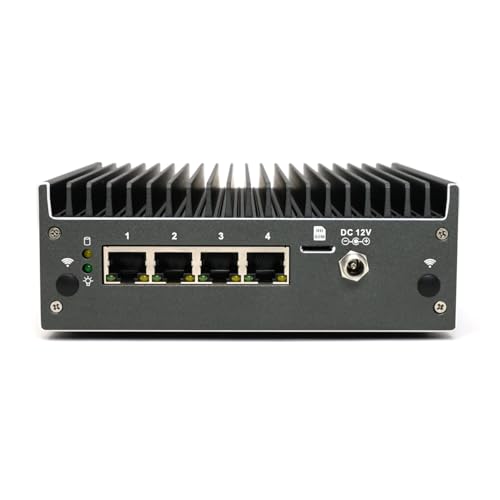
- Four Intel 2.5GbE NICs
- N150 with coreboot pre-installed
- Add your own RAM, SSD, and OS
Best For: Compact four-port network appliance builds
Best for Compute-Heavy Labs

- 14-core, 18-thread Core Ultra 5
- Up to 96GB DDR5 and dual M.2 slots
- No RAM, SSD, or OS included
Best For: Compact labs prioritizing VM compute and memory
Best for NAS Experiments

- Eight-core i3-N305
- Dual Intel 2.5GbE ports
- Storage expansion may need extra parts
Best For: DIY virtualization and small-scale NAS projects
Best for Network Labs
Glovary N150 Six-Port Firewall Mini PC

- Six Intel i226-V 2.5GbE ports
- Two M.2 NVMe slots and SATA connection
- Barebone: add DDR5 RAM and storage
Best For: Port-heavy Proxmox networking labs
Best for Storage-Heavy Labs
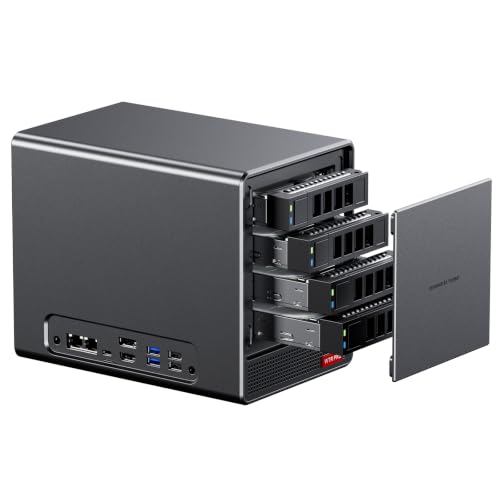
- Ryzen 7 5825U with 8 cores and 16 threads
- Four SATA bays plus two M.2 NVMe slots
- Linux SATA power management may need tuning
Best For: Drive-rich home labs with multitasking needs
Best Compact NVMe NAS
Healuck N150 Four-Slot Pocket NAS

- Four M.2 NVMe slots in a compact chassis
- Dual Intel i226-V 2.5GbE ports
- NVMe slots use PCIe 3.0 x1 signals
Best For: Small NVMe-focused Linux home servers
Storage-Focused Pick
Healuck N150 Four-Slot NVMe Mini NAS

- Four M.2 2280 NVMe slots
- Dual i226V 2.5GbE ports
- Add your own RAM and SSDs
Best For: Compact, storage-oriented Proxmox setups
Quiet Network Pick
HKUXZR J5005 Four-Port Firewall Mini PC

- Four Intel i226-V 2.5GbE ports
- Fanless design
- Listed 8GB maximum RAM
Best For: Lightweight, quiet Proxmox network labs
Flexible Firewall Pick
Fastcalc N150 Four-Port Mini PC

- Four Intel i226-V 2.5GbE ports
- NVMe and 2.5-inch SATA options
- DDR4 support up to 32GB
Best For: Network-focused Proxmox labs needing two storage formats
Best for Multi-Gig Networking – OAKNODE MGNASN Firewall Appliance
If your barebone computer for Proxmox needs several fast network connections, the OAKNODE MGNASN stands out with two 10GbE SFP+ ports and four Intel I226-V 2.5GbE ports. Its Intel N100 processor makes it a network-focused choice rather than a high-core-count virtualization host.
Best For: A Proxmox host for firewall and networking projects that need both 10GbE and 2.5GbE ports.
Pros:
- Two Intel 82599ES 10GbE SFP+ ports plus four Intel I226-V 2.5GbE ports.
- Intel N100 supports AES-NI; the listing names Proxmox among its suggested systems.
- Includes an M.2 NVMe slot, an external SATA connection, and a mini PCIe slot for an optional 4G modem.
Cons:
- This configuration includes no RAM or storage.
- The four-core, four-thread N100 may limit heavier VM workloads.
- The memory specifications conflict within the listing, so verify the required RAM type before ordering.
Choose this model for its port layout, but budget for components and confirm memory compatibility before building.
Best for a Four-Port Firewall – Protectli Vault Pro VP2430e
The Protectli Vault Pro VP2430e is a compact barebone computer for Proxmox shoppers who also want a dedicated firewall-style port layout. It pairs an Intel N150 with four Intel 2.5GbE NICs and ships with coreboot pre-installed.
Best For: A compact, four-port network appliance that you can equip with your choice of memory, storage, and operating system.
Pros:
- Four Intel I226-V 2.5GbE ports offer flexibility for separate network connections.
- Intel N150 includes AES-NI hardware support.
- Coreboot comes pre-installed, and Protectli advertises US-based support.
Cons:
- No RAM, SSD, or operating system is included.
- The four-core CPU and four network ports make it less suited to builds that need more compute capacity or 10GbE.
Protectli lists testing with several firewall platforms, but does not specifically claim Proxmox testing here. Check your intended configuration before treating it as a turnkey hypervisor.
Best for Compute-Heavy Labs – MINISFORUM M1 Pro-125H
For a barebone computer for Proxmox that prioritizes processing power and memory capacity, the MINISFORUM M1 Pro-125H offers a 14-core, 18-thread Intel Core Ultra 5 125H and support for up to 96GB of DDR5. It is a more compute-oriented mini PC than the firewall appliances in this roundup.
Best For: A compact virtualization lab that benefits from more CPU threads, substantial RAM, and two NVMe drives.
Pros:
- Core Ultra 5 125H provides 14 cores and 18 threads.
- Supports up to 96GB of DDR5 SODIMM memory.
- Two M.2 2280 PCIe 4.0 slots support RAID 0 or RAID 1 configurations.
Cons:
- No RAM, SSD, or operating system is included.
- The supplied notes do not specify the Ethernet port count or speed, so verify networking before purchase.
- Its dual-fan cooling is a consideration if you want a fanless host.
This is the stronger fit when VM resources matter more than a built-in multiport network layout; plan your storage and networking configuration accordingly.
Best for NAS Experiments – SIENSNET i3-N305 Mini PC
The SIENSNET i3-N305 is a barebone computer for Proxmox buyers interested in combining small-scale virtualization with a NAS-style project. Its eight-core processor, dual Intel I226-V 2.5GbE ports, and stated storage expansion options make it worth considering if you are comfortable planning the drive connections yourself.
Best For: DIY home-lab builds that need dual 2.5GbE networking and room to experiment with storage.
Pros:
- Eight-core Intel i3-N305 processor.
- Dual Intel I226-V 2.5GbE ports, plus AES-NI and PXE support.
- Supports one DDR5 SO-DIMM up to 48GB; the listing also describes SATA expansion.
Cons:
- No RAM or SSD is included.
- The listed SATA setup can require additional cables and a six-SATA expansion board.
- The title and details differ on the configuration and storage layout; verify the exact variant before ordering.
Its DIY appeal is clear, but confirm what drive connectors and accessories the seller actually includes before designing a Proxmox storage setup around it.
Best for Network Labs – Glovary N150 Six-Port Firewall Mini PC
If you want a barebone computer for Proxmox focused on networking, this Glovary N150 box offers six Intel i226-V 2.5GbE ports in a fanless aluminum chassis. The listing identifies PVE as compatible, making it a practical candidate for a compact router and firewall lab.
Best For: Proxmox networking labs that need several physical Ethernet ports.
Pros:
- Six 2.5GbE ports allow flexible physical network connections.
- Two M.2 NVMe slots plus a 2.5-inch SATA connection provide storage options.
- Fanless design avoids fan noise; the N150 has a stated 6W TDP.
Cons:
- No RAM, SSD, or operating system is included.
- One DDR5 SO-DIMM slot limits memory expansion to a single module.
This is the port-heavy choice rather than a high-core-count host. Budget for memory and storage before setting up PVE.
Best for Storage-Heavy Labs – AOOSTAR WTR PRO 4+2 Bay NAS
For a barebone computer for Proxmox that can also accommodate substantial local storage, the AOOSTAR WTR PRO pairs a Ryzen 7 5825U eight-core, 16-thread processor with four SATA drive bays and two M.2 NVMe slots. Dual 2.5GbE ports round out its home-server setup.
Best For: Home labs that prioritize multiple drives and CPU headroom for multitasking.
Pros:
- Eight cores and 16 threads offer more concurrency than the N150 options here.
- Four SATA bays and two M.2 NVMe slots support flexible storage layouts.
- Two DDR4 memory slots support up to 64GB, according to the listing.
Cons:
- RAM, drives, and an operating system must be purchased separately.
- The listing warns that sustained heavy loads under Linux may require a udev rule to address SATA link power-management speed reductions or CRC errors.
Its drive capacity makes it the strongest storage-oriented pick of the three, but factor the Linux SATA configuration note into your setup plans.
Best Compact NVMe NAS – Healuck N150 Four-Slot Pocket NAS
If your barebone computer for Proxmox needs to fit a small space while housing several SSDs, the Healuck pocket NAS provides four M.2 2280 NVMe slots, dual Intel i226-V 2.5GbE ports, and an N150 processor. Its notes state compatibility with Linux and NAS systems, though they do not specifically name Proxmox.
Best For: Compact Linux home-server builds centered on multiple NVMe drives.
Pros:
- Four M.2 NVMe slots pack multiple drives into a small chassis.
- Dual 2.5GbE ports provide separate wired network connections.
- An included USB fan helps cool the NVMe area.
Cons:
- No RAM or NVMe SSD is included.
- Each NVMe slot is specified with a PCIe 3.0 x1 signal.
- Only one DDR5 SO-DIMM slot is listed.
This is a space-saving option for an NVMe-focused lab, but check whether its per-slot PCIe bandwidth and stated Linux compatibility meet your intended Proxmox setup.
Storage-Focused Pick – Healuck N150 Four-Slot NVMe Mini NAS
If your barebone computer for Proxmox needs room for multiple SSDs, this Healuck N150 mini NAS is a compact starting point. It ships with no RAM or SSD, so budget for both before setting it up.
Best For: A compact Proxmox storage host with multiple NVMe drives and dual-network connectivity.
Pros:
- Four M.2 2280 NVMe slots provide flexible SSD capacity.
- Two Intel i226V 2.5GbE ports suit separate network connections.
- Includes a USB fan for cooling the SSD area.
Cons:
- RAM and SSDs are not included.
- Each NVMe slot uses a PCIe 3.0 x1 connection, limiting per-drive bandwidth.
Its four drive slots are the main reason to choose it; the modest N150 processor and limited NVMe lanes make it a better fit for storage-oriented, lighter-duty workloads than demanding virtualization.
Quiet Network Pick – HKUXZR J5005 Four-Port Firewall Mini PC
For a barebone computer for Proxmox that can host a small firewall or network lab, this fanless HKUXZR appliance emphasizes ports over processing headroom. It has four Intel i226-V 2.5GbE connections and arrives without RAM or storage.
Best For: Quiet, lightweight Proxmox networking experiments that benefit from four physical LAN ports.
Pros:
- Four 2.5GbE ports offer ample physical network connections.
- Fanless cooling avoids fan noise.
- Two DDR4 SO-DIMM slots and a 2.5-inch SATA drive bay allow you to choose compatible components.
Cons:
- The listed 8GB maximum RAM limits virtualization headroom.
- No RAM or SSD is included.
Choose this model for its quiet, four-port design rather than for running numerous VMs. Check your intended memory and storage configuration against the seller’s specifications before buying.
Flexible Firewall Pick – Fastcalc N150 Four-Port Mini PC
This Fastcalc N150 is worth considering as a barebone computer for Proxmox when networking flexibility matters most. Four Intel i226-V 2.5GbE ports, a console connection, and both NVMe and SATA storage options make it well suited to a small lab build.
Best For: A compact Proxmox host for network-focused services with separate NVMe and SATA drives.
Pros:
- Four 2.5GbE ports support multiple physical network connections.
- Accepts an M.2 2280 NVMe SSD and a 2.5-inch SATA drive.
- Includes an RJ45 COM console port and supports up to 32GB of DDR4 RAM.
Cons:
- Only one DDR4 SO-DIMM slot is listed.
- The NVMe slot is limited to a PCIe 3.0 x2 connection.
Its port selection and two storage formats offer useful build flexibility. Confirm the exact included RAM and storage configuration before ordering, since the supplied specifications do not establish what ships in the box.
How We Picked the Best Barebone Computer for Proxmox
We compared the listed CPU, network ports, storage connections, and barebone configuration of each system. We favored hardware with a clear role as a compact virtualization host, whether that means multiple NICs for a virtualized firewall, drive bays for storage, or a stronger processor for several concurrent workloads. Listings do not establish every detail of Proxmox compatibility, so confirm firmware options, Linux driver support, and the exact unit configuration before ordering.
Quick Comparison by Use Case
For a network-focused host, the N100 appliance with four 2.5GbE ports and two 10GbE SFP+ ports offers the fastest listed networking. The Protectli VP2430e and the four- or six-port N150 firewall boxes suit buyers who need several physical interfaces without relying on 10GbE. For storage-heavy projects, the i3-N305 and N150 pocket NAS models list four M.2 slots, while the AOOSTAR WTR PRO combines drive bays and M.2 slots. The MINISFORUM M1 Pro-125H is the compute-oriented option, with a 14-core/18-thread Core Ultra 5 125H. The older J5005 firewall appliance is better considered for lighter duties.
Key Buying Factors for a Barebone Computer for Proxmox
Memory and CPU Headroom
Budget RAM for the host plus every VM and container you expect to run at once. Check maximum supported capacity, memory slots, and whether the listing includes RAM; several options explicitly ship without it. More cores and threads help with concurrent guests, while an N100 or N150 can be a sensible choice for modest, low-power services. Verify that CPU virtualization features and relevant firmware settings are available on the exact model.
Storage Layout and Reliability
Distinguish M.2 SATA from NVMe: they are not interchangeable simply because the connectors look similar. Check which slots can hold a boot drive, how many are available for VM storage, and whether drive bays or M.2 slots share bandwidth. If you plan to use ZFS or pass disks through to a storage VM, check controller layout and leave room in the budget for appropriate drives and backups.
Networking, Noise, and Expansion
Multiple physical NICs make a Proxmox firewall setup easier to separate, but port count alone does not guarantee the layout you need. Confirm NIC chipsets, Linux support, and whether any ports share a controller. A 10GbE SFP+ connection is useful only if your switch and cabling support it. Fanless boxes may be quiet, but still need ventilation; systems with drive bays may require more space and cooling.
Who Should Buy Which Barebone Computer for Proxmox?
Choose a four- or six-port N150 appliance for a quiet, network-first lab; consider the Protectli if its coreboot-equipped configuration appeals to you. Pick the N100 SFP+ model when 10GbE is a real requirement. Choose the i3-N305 or N150 pocket NAS for an M.2-heavy build, or the AOOSTAR if physical drive bays matter. The MINISFORUM is the stronger starting point for CPU-intensive VMs. The N150 pocket NAS appears twice in this roundup, so treat those entries as the same model unless the seller confirms a meaningful configuration difference.