
Choosing a barebone computer for Linux is about more than raw specs. You want solid hardware support, easy setup, quiet operation, and upgrade room for the way you actually use it.
Our picks focus on mini PCs that pair well with modern Linux distros, from everyday desktop use to heavier multitasking, media work, and light gaming.
Best 10 Barebone Computer for Linux Picks for 2026
Performance-First Barebone
MINISFORUM X1 Lite-255 Ryzen 7 255 Mini PC
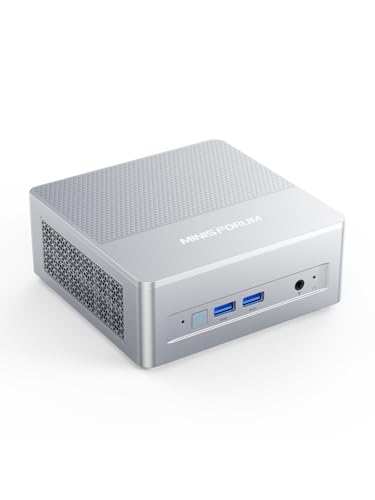
- Ryzen 7 255 with Radeon 780M
- Dual DDR5 and dual PCIe 4.0 SSD slots
- USB4, 2.5G LAN, Wi‑Fi 6E, OCuLink
Best For: Linux users wanting a fast, expandable compact workstation
Ultra-Compact Business Barebone

- Tiny 1.9-inch chassis for easy mounting
- Core 7-150U with dual DDR5 slots
- Dual 2.5G LAN and Thunderbolt 4
Best For: Office and business Linux setups that need a very small footprint
Expansion-Focused Gaming Barebone

- Ryzen 7 H 255 with Radeon 780M
- Three M.2 slots plus OCuLink support
- Dual 2.5GbE with quad-display output
Best For: Linux power users who want maximum expansion and eGPU potential
Modern Connectivity Barebone
MINISFORUM AI X1-255 Wi‑Fi 7 Mini PC

- Ryzen 7 255 with Radeon 780M
- Dual USB4 plus OCuLink support
- Wi‑Fi 7, Bluetooth 5.4, and 2.5G LAN
Best For: Linux buyers who want modern wireless and versatile connectivity
Wired Linux Utility Barebone
Core i3 2.5GbE Dual-HDMI Mini PC
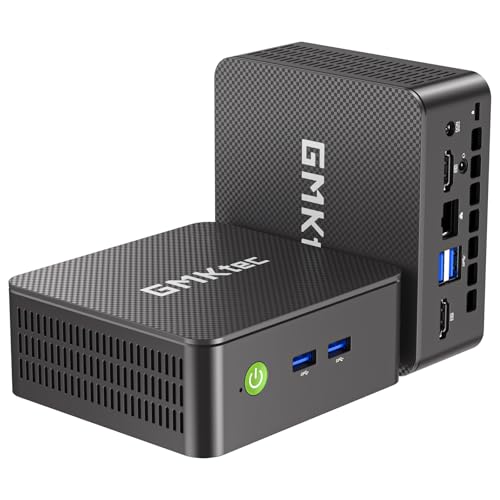
- Barebone design with M.2 SATA and NVMe storage slots
- Linux and home-lab friendly features like PXE Boot and WOL
- Dual HDMI, WiFi 6, Bluetooth 5.2, and 2.5GbE Ethernet
Best For: Home labs and office users who want a compact, wired-first Linux mini PC
Zen 4 Barebone Pick
MINISFORUM UM870 Slim 8745H Barebone

- Ryzen 7 8745H with Radeon 780M graphics
- Dual DDR5 and dual M.2 2280 PCIe 4.0 expansion
- USB4, HDMI 2.1, DisplayPort, and 2.5G LAN
Best For: Linux builders who want a compact, expandable desktop
High-Connect Barebone Choice
Reatan X7 AI Ryzen 7 255 Barebone

- Oculink, Wi-Fi 7, and two USB4 ports
- Quad-display support with DP 2.1 and HDMI 2.1
- Dual SODIMM and dual M.2 2280 storage support
Best For: Power users who want eGPU and multi-display flexibility
Balanced Linux Build
MINISFORUM UM870 Slim Barebone
- Ryzen 7 8745H with Radeon 780M graphics
- 2x DDR5 slots plus dual PCIe 4.0 SSD support
- HDMI 2.1, USB4, DP, and 2.5G Ethernet
Best For: DIY Linux desktops that need balance and expandability
Performance-First Barebone – MINISFORUM X1 Lite-255 Ryzen 7 255 Mini PC
If you want a barebone computer for Linux with strong CPU and graphics headroom, the MINISFORUM X1 Lite-255 is built around the Ryzen 7 255 and Radeon 780M. It pairs that hardware with dual DDR5 support, dual M.2 storage, triple display output, and modern connectivity like USB4, 2.5G LAN, and Wi‑Fi 6E, making it a flexible base for a fast desktop or compact workstation.
Best For: Linux users who want a high-performance barebone with room for storage, multi-monitor use, and future expansion.
Pros:
- Ryzen 7 255 8-core/16-thread processor with Radeon 780M for strong everyday and multitasking performance
- Dual DDR5 SO-DIMM slots and dual M.2 2280 PCIe 4.0 x4 slots for memory and storage expansion
- HDMI 2.1, USB4, and DisplayPort outputs support up to three independent displays
- Includes 2.5G LAN, Wi‑Fi 6E, Bluetooth 5.2, and OCuLink support for eGPU setups
Cons:
- Sold as a barebone system, so you must add RAM, SSDs, and an operating system
- OCuLink use requires the included adapter plate and is not hot-swappable
- Some of the expansion-focused features may be more than basic Linux desktop users need
This is a strong pick if you want a compact Linux base with serious expansion options and display flexibility. It is especially appealing when you want the speed of Ryzen 7 plus the option to grow storage or add an external GPU later.
Ultra-Compact Business Barebone – MSI Cubi NUC Core 7-150U
The MSI Cubi NUC is a practical barebone computer for Linux if you care more about small size, quiet deployment, and business features than raw graphics power. Its Intel Core 7-150U, dual DDR5 slots, dual 2.5G LAN, Thunderbolt 4, and quad-display support make it a tidy choice for office setups, signage, and lightweight productivity roles.
Best For: Linux business or office users who want a tiny barebone with strong connectivity and multi-display support.
Pros:
- Very compact 1.9-inch chassis that can be mounted behind a monitor or on a wall
- Intel Core 7-150U with 10 cores and 12 threads for dependable productivity performance
- Dual 2.5G LAN plus Thunderbolt 4 give it flexible wired connectivity and display/power options
- Supports up to four displays and includes TPM 2.0 for added security support
Cons:
- Integrated graphics and business-first design make it less ideal for gaming or heavier GPU workloads
- Barebone configuration means you still need to supply memory, storage, and Linux installation
- Maximum memory support is lower than some larger mini PCs at 64GB
If your Linux build is focused on a clean workspace, networking, and reliable everyday use, this model fits well. It trades raw upgrade depth for a very small footprint and a feature set that suits professional environments.
Expansion-Focused Gaming Barebone – GMKtec K12 Ryzen 7 H 255
The GMKtec K12 is a feature-heavy barebone computer for Linux users who want plenty of expansion and external GPU options. It combines the Ryzen 7 H 255 and Radeon 780M with triple M.2 storage, dual 2.5GbE, OCuLink, USB4, and quad-display support, so it can serve as a compact Linux workstation with a lot of connectivity.
Best For: Linux enthusiasts who want a barebone with broad expansion, dual LAN, and eGPU support.
Pros:
- Ryzen 7 H 255 with Radeon 780M offers strong 8-core/16-thread performance
- Three M.2 2280 PCIe 4.0 slots provide substantial internal storage expansion
- OCuLink and PCIe 4.0 x4 support make external GPU or controller setups more practical
- Dual 2.5GbE, Wi‑Fi 6E, Bluetooth 5.2, and quad-display outputs add flexibility
Cons:
- Sold with no RAM, SSD, or OS, so setup cost and effort are entirely up to you
- Its gaming-oriented design, RGB lighting, and cooling setup may be more than some Linux users want
- The feature-rich chassis is less minimal than simpler office-focused mini PCs
This model stands out when you want a Linux-ready barebone that can grow into a serious multi-use machine. It is especially compelling if you expect to use fast networking, multiple displays, or an external GPU later.
Modern Connectivity Barebone – MINISFORUM AI X1-255 Wi‑Fi 7 Mini PC
The MINISFORUM AI X1-255 is a well-rounded barebone computer for Linux if you want a modern compact system with strong I/O and current wireless support. It uses the Ryzen 7 255 and Radeon 780M, adds dual M.2 storage, dual USB4, OCuLink, 2.5G LAN, and Wi‑Fi 7, and even includes dual speakers plus a microphone for communication-heavy use.
Best For: Linux users who value up-to-date connectivity, multi-display support, and a compact all-around build.
Pros:
- Ryzen 7 255 and Radeon 780M provide capable performance for office, multimedia, and light gaming
- Dual USB4, OCuLink, HDMI, DisplayPort, and triple video paths support flexible setups
- Wi‑Fi 7, Bluetooth 5.4, and 2.5G LAN offer modern network connectivity
- Dual M.2 PCIe 4.0 slots and support for up to 64GB DDR5 keep the system expandable
Cons:
- Maximum memory support is lower than some competing barebones at 64GB
- As a barebone, it requires you to add memory, storage, and Linux yourself
- OCuLink is not hot-swappable and depends on the correct M.2 slot arrangement
This is a sensible choice if you want a compact Linux box with the newest wireless features and a good spread of ports. It balances expansion, connectivity, and everyday performance without pushing too far into niche territory.
Budget Linux Barebone – Ryzen 5 3500U Triple-Display Mini PC
If you want a barebone computer for Linux that keeps costs down while still giving you real desktop flexibility, this Ryzen 5 3500U mini PC is a practical starting point. It ships without RAM, storage, or an OS, so you can install your preferred Linux setup and choose the memory and SSD capacity that fit your workflow.
Best For: Budget-conscious Linux users, home office builds, students, and small business setups that need triple-display support.
Pros:
- Fully barebones design with no RAM, SSD, or OS, so you can customize the Linux install from scratch
- Ryzen 5 3500U with Radeon Vega 8 graphics handles everyday productivity, streaming, and light creative work
- Triple 4K@60Hz display support via USB-C, HDMI 2.0, and DisplayPort 1.4
- Includes WiFi, Bluetooth, gigabit Ethernet, three USB 3.2 ports, and a VESA mount
Cons:
- Requires you to supply and install RAM, storage, and an operating system before use
- Older Ryzen 5 3500U platform is aimed at general productivity rather than heavy workloads
This is a good pick if you want a low-friction barebone base for Linux with strong display flexibility and enough everyday performance for office or student use. The built-in remote management features like Wake-on-LAN and PXE Boot also make it appealing for home labs and deployment scenarios.
Premium Expandable Barebone – Ryzen AI 9 HX370 Copilot Mini PC
If your priority is a high-end barebone computer for Linux-class flexibility and maximum headroom, this MINISFORUM model is built around the Ryzen AI 9 HX370. It is sold as a barebone unit, so you can add your own memory and storage, while taking advantage of its strong connectivity and expansion options for demanding desktop or workstation-style use.
Best For: Power users, developers, creators, and enthusiasts who want a premium barebone mini PC with serious expansion and display support.
Pros:
- Ryzen AI 9 HX370 with Radeon 890M offers very high-end performance potential
- Supports dual USB4, HDMI 2.1, DisplayPort 2.0, and up to four 4K displays
- Includes OCuLink support for eGPU expansion plus dual 2.5Gb LAN, WiFi 7, and Bluetooth 5.4
- Barebone design supports up to 96GB DDR5 memory and multiple PCIe 4.0 SSDs
Cons:
- Higher-end platform will likely cost more than simpler mini PCs
- Ships without RAM, storage, or an operating system, so setup takes more work
For users who want a premium compact system and plan to build around their own components, this is the most expandable option in the group. Its fast I/O, broad display support, and eGPU-ready design make it especially compelling for performance-focused Linux or dual-purpose desktop builds.
Wired Linux Utility Barebone – Core i3 2.5GbE Dual-HDMI Mini PC
For a barebone computer for Linux that leans toward practical networking and small-server use, this GMKtec G3 Pro keeps the formula straightforward. It comes without RAM, SSD, or an OS, and it adds useful features like 2.5GbE, Wake-on-LAN, PXE boot, and Linux compatibility notes that fit home lab and office deployment needs.
Best For: Home labs, light server builds, office PCs, and Linux users who want a compact, wired-first system.
Pros:
- Barebones layout with M.2 2242 SATA and secondary M.2 2280 NVMe slots for your own storage
- Compatible with Linux, Proxmox, Firewall Server, Ubuntu, ESXi, and VMware per the product notes
- 2.5GbE Ethernet, WiFi 6, Bluetooth 5.2, and Wake-on-LAN / PXE Boot support
- Dual HDMI 2.0 outputs support 4K@60Hz on two displays
Cons:
- Core i3-10110U is aimed at light productivity rather than heavy compute work
- As a barebone unit, you must provide RAM, storage, and operating system installation
This model makes sense when network features and straightforward setup matter more than raw power. If you want a small Linux box for office tasks, monitoring, or home server roles, the G3 Pro offers the right mix of ports, wired speed, and platform flexibility.
Zen 4 Barebone Pick – MINISFORUM UM870 Slim 8745H Barebone
If you want a barebone computer for Linux with strong everyday performance and flexible expansion, the MINISFORUM UM870 Slim is a practical place to start. It pairs a Ryzen 7 8745H with Radeon 780M graphics, dual DDR5 slots, and dual M.2 2280 PCIe 4.0 SSD support, so you can build it out to match your distro, storage, and workload needs.
Best For: Linux users who want a compact, expandable barebone for productivity, media, and light-to-moderate creative work.
Pros:
- Ryzen 7 8745H with 8 cores/16 threads for responsive multitasking
- Dual DDR5 SODIMM slots and 2x M.2 2280 PCIe 4.0 SSD slots
- USB4, HDMI 2.1, DisplayPort, and 2.5G wired networking
- Active cooling is designed to stay quieter than passive designs under load
Cons:
- Sold as a barebone system with no RAM, SSD, or OS included
- Driver updates are recommended before system updates
- No built-in OS setup out of the box
Overall, this is a well-rounded choice if you want to install Linux yourself and value modern connectivity plus easy internal expansion. Its cooling, 8K-capable outputs, and dual-drive layout make it especially appealing for a compact desktop build.
High-Connect Barebone Choice – Reatan X7 AI Ryzen 7 255 Barebone
The Reatan X7 AI is a feature-heavy barebone computer for Linux if you care about fast networking, external GPU options, and multi-display output. It uses a Ryzen 7 255-class processor with Radeon 780M graphics, plus dual M.2 slots, dual SODIMM memory support, Oculink, and two USB4 ports for a very flexible compact build.
Best For: Linux users who want a highly connected barebone for gaming, docking, or multi-monitor setups.
Pros:
- Oculink support for faster eGPU expansion than Thunderbolt 4/USB4
- Wi-Fi 7, 2.5G LAN, and two full-spec USB4 ports
- Quad-display support with DP 2.1, HDMI 2.1, and dual USB4 outputs
- Dual SODIMM slots and two M.2 2280 slots for up to 4TB total storage
Cons:
- Barebone system includes no OS, RAM, or SSD
- Oculink uses one M.2 slot and does not support hot-swapping
- Needs a 65W minimum PD power supply for USB4 PD-IN/PD-OUT use
For Linux users who want maximum port flexibility in a small chassis, this model stands out. The combination of Wi-Fi 7, Oculink, and quad-display support makes it one of the more expansion-friendly mini PCs in this group.
Balanced Linux Build – MINISFORUM UM870 Slim Barebone
If your priority is a barebone computer for Linux that balances performance, expansion, and straightforward connectivity, the MINISFORUM UM870 Slim fits the brief well. It combines a Ryzen 7 8745H, Radeon 780M graphics, dual DDR5 slots, and two PCIe 4.0 storage bays, giving you a strong foundation for a custom Linux desktop.
Best For: Linux users who want a compact desktop for multitasking, media, and light gaming.
Pros:
- Ryzen 7 8745H with 8 cores/16 threads and Radeon 780M graphics
- Three display outputs, including HDMI 2.1 and USB4 with 8K@60Hz support
- 2x DDR5 slots and 2x PCIe 4.0 SSD slots for easy expansion
- 2.5G RJ45, WiFi 6E, and Bluetooth 5.3 for strong connectivity
Cons:
- Ships without RAM, SSD, or OS
- One SSD slot is listed separately from the additional PCIe 4.0 slot, so storage planning matters
- Linux buyers may need to install their own memory, storage, and system software
This model is a solid middle ground if you want the same core platform as other compact 8745H systems but need dependable expansion and display support. It is especially appealing for a DIY Linux setup where you want control over every component.
How We Picked the Best Barebone Computer for Linux
We prioritized models with strong Linux-friendly processors, modern connectivity, practical memory and storage expansion, and a form factor that makes installation and maintenance straightforward. We also looked for hardware that is commonly supported by current kernels and desktop environments, since that matters more than headline specs for a Barebone Computer for Linux.
Quick Comparison
If you want the safest all-around choice, look at Ryzen 7 and Ryzen AI-based systems for the best balance of speed and integrated graphics. Intel Core options can be excellent for office, media, and low-to-moderate workloads, especially when power efficiency and a smaller footprint matter. Entry-level picks are best for basic productivity and always-on home tasks.
Key Buying Factors for a Barebone Computer for Linux
CPU and Graphics Support
Check whether the CPU generation has reliable Linux support and whether the integrated GPU is well handled by current Mesa and kernel releases. For most buyers, AMD Radeon-integrated systems are a strong default because they tend to offer excellent open-source driver support and capable graphics.
Memory and Storage Expandability
Since barebone systems ship without RAM and SSDs, confirm the number of DDR slots, supported memory speeds, and M.2 layout before buying. If you plan to run containers, virtual machines, or browser-heavy workflows, aim higher on memory from the start.
Ports and Networking
USB4, dual HDMI or DisplayPort, 2.5GbE, Wi‑Fi 6E, and Bluetooth support can make a big difference in daily use. For Linux users who want docking, multiple monitors, or fast local networking, these features are worth paying for.
Storage and Upgrade Flexibility
If you expect to dual-boot, run multiple drives, or expand over time, choose a system with more than one M.2 slot or clear access to the main storage bay. That flexibility often matters more than a small CPU upgrade.
Who Should Buy Which Barebone Computer for Linux?
Choose a high-performance Ryzen 7 or Ryzen AI model if you want the best mix of Linux responsiveness, multitasking, and future-proofing. Pick an Intel-based barebone if your workload is mostly office apps, web use, and media playback and you prefer a simpler, more power-conscious setup. Go with an entry-level option if you need a budget-friendly Linux desktop for students, light business tasks, or a compact home server where cost matters most.
For most buyers, the best Barebone Computer for Linux is the one that offers stable driver support, enough RAM headroom, and the ports you’ll actually use every day.