
Switching between sitting and standing is easier when your desk converter can support two monitors without crowding your keyboard, mouse, or work essentials. The best models balance usable surface area, height range, stability, and monitor compatibility.
We compared 10 desk converters for dual monitors across wide platforms, built-in monitor mounts, corner-friendly designs, and electric lift systems to help you choose a practical fit for your workstation.
Best 10 Desk Converters for Dual Monitors Picks for 2026
Best Extra-Large Option
Mount-It! 48" Standing Desk Converter

- 48.5-inch surface for dual monitors and accessories
- Dual gas-spring height adjustment
- 33-pound capacity with keyboard tray
Best For: Large workstations needing maximum surface area
Best Proven Mid-Size Pick
VIVO 36" Standing Desk Converter

- 36-inch surface for dual monitors or laptops
- Synchronized wide keyboard tray
- 6.5- to 17-inch height range
Best For: Balanced home-office dual-monitor setups
Best Spring-Lift Design

- 36-inch dual-monitor workstation surface
- Mechanical spring lift system
- 33-pound desktop capacity with keyboard tray
Best For: Home offices wanting a mechanical lift and walnut finish
Best Corner-Desk Fit
VIVO 38" Corner Standing Desk Converter

- Corner-friendly 37.5-inch surface
- 4.3- to 20-inch adjustment range
- 33-pound desktop capacity
Best For: Corner desks using dual monitors and a laptop
Best Integrated Dual-Monitor Converter
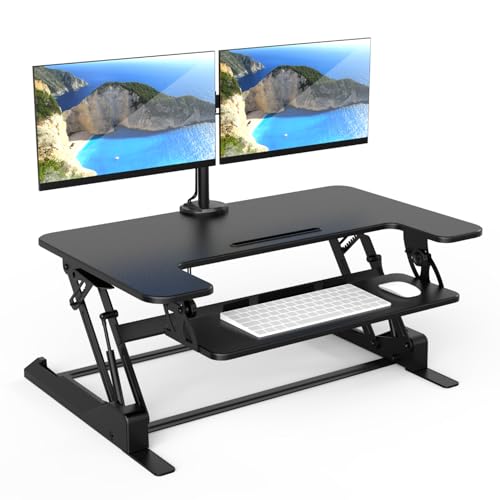
- Built-in mounts for two monitors up to 32 inches
- 36-inch work surface with keyboard tray
- 6.5–16.3-inch gas-spring height adjustment
Best For: Full dual-screen workstations needing integrated monitor mounting
Best Simple Steel Riser

- Steel frame supports up to 26 pounds
- 4.9–19.7-inch pneumatic height range
- Synchronized keyboard tray and minimal assembly
Best For: Simple dual-monitor setups using existing monitor stands
Best Value Workstation Surface

- 32-inch surface for monitors and accessories
- Includes dual monitor stand and keyboard tray
- 4.3–19.7-inch pneumatic height adjustment
Best For: Home offices and gaming setups wanting an included monitor stand
Balanced Dual-Screen Setup
VIVO 32-Inch Standing Desk Converter

- Supports two 13- to 30-inch monitors up to 17.6 pounds each
- Manual height range from 4.5 to 20 inches
- Full-motion dual mount and wide keyboard tray
Best For: A sturdy manual converter for flexible dual-monitor positioning
Electric Extra-Wide Pick
Mount-It! 47.2-Inch Electric Desk Converter

- One-touch electric height adjustment from 6.3 to 19.3 inches
- Supports two monitors up to 32 inches and 22 pounds each
- Extra-wide surface with USB charger and device channel
Best For: Large workspaces needing powered adjustment and dual-screen support
Compact Gas-Spring Option
Mount-It! Dual Monitor Standing Desk Riser

- Gas-spring height range from 5.7 to 17.1 inches
- Supports two monitors up to 32 inches and 22 pounds each
- Compact platform with wide tray and gel wrist pad
Best For: Smaller desks needing a compact dual-monitor workstation
Best Extra-Large Option – Mount-It! 48" Standing Desk Converter
For shoppers comparing desk converters for dual monitors, the Mount-It! MI-7925 stands out with a 48.5-inch-wide surface. It provides room for two monitors, a laptop, and accessories while offering manual sit-stand adjustment from 6 to 19.25 inches.
Best For: Large workstations that need generous monitor and accessory space.
Pros:
- Extra-large surface accommodates two monitors, a laptop, and essentials.
- Dual gas springs provide controlled height adjustment without electricity.
- Includes a keyboard tray and device slot.
- Steel frame supports up to 33 pounds and includes a lifetime warranty.
Cons:
- The large footprint may be too much for smaller desks.
- Its 33-pound capacity still requires attention to the combined equipment weight.
This is a practical pick when workspace is the priority. Its wide platform and 19.25-inch maximum height make it particularly useful for users building a substantial dual-monitor sit-stand setup.
Best Proven Mid-Size Pick – VIVO 36" Standing Desk Converter
The VIVO DESK-V000V is a versatile choice among desk converters for dual monitors, with a 36-inch desktop and synchronized keyboard tray. Its pneumatic lift adjusts from 6.5 to 17 inches for alternating between seated and standing work.
Best For: Home-office users wanting a balanced dual-monitor riser with simple setup.
Pros:
- 91cm by 56cm surface supports dual-monitor or laptop arrangements.
- Keyboard tray raises with the desktop for a coordinated workstation.
- Dual pneumatic springs provide assisted lifting and height locking.
- Almost no assembly is required, and it includes a three-year warranty.
Cons:
- The 36-inch width offers less room than larger converters.
- The maximum height is lower than some extra-tall models.
With its moderate footprint, included keyboard tray, and straightforward setup, this VIVO model is a well-rounded option for a typical office desk. It offers enough surface area for dual monitors without taking over the entire desktop.
Best Spring-Lift Design – FLEXISPOT 36" Desk Converter
The FLEXISPOT 36-inch riser is designed for shoppers seeking desk converters for dual monitors with a stable, ergonomic workstation. Its mechanical spring system supports smooth adjustment, while the 33-pound desktop capacity leaves room for monitors and accessories.
Best For: Users who prefer a mechanical spring lift and walnut-style desktop finish.
Pros:
- 36-inch surface is sized for a dual-monitor setup.
- Mechanical spring system is designed to avoid gas-spring air leakage.
- Reinforced steel frame is intended to improve stability.
- Includes a keyboard tray and arrives almost fully assembled.
Cons:
- The keyboard tray has a separate 4.4-pound capacity limit.
- Its engineered-wood surface may not suit shoppers seeking an all-metal desktop.
This model combines a standard dual-monitor footprint with a mechanical lift system and a walnut finish. It is a sensible choice for a home office where appearance, stability, and low-effort setup all matter.
Best Corner-Desk Fit – VIVO 38" Corner Standing Desk Converter
For corner workstations, the VIVO DESK-V000KL is one of the more specialized desk converters for dual monitors. Its 37.5-inch-wide surface and 18-inch depth are designed to fit corner desks while supporting monitors, a laptop, and office supplies.
Best For: Corner-desk users who need a dual-monitor sit-stand workstation.
Pros:
- Corner-oriented 37.5-inch by 18-inch surface supports dual monitors and a laptop.
- Wide keyboard tray raises with the main platform.
- Pneumatic lift adjusts from 4.3 to 20 inches with a touch-lock mechanism.
- Steel frame supports up to 33 pounds on the desktop.
Cons:
- The corner-focused shape may be less suitable for standard rectangular desks.
- The keyboard tray is limited to 4.4 pounds.
This converter makes the most sense when desk geometry is the deciding factor. Its deep-enough corner profile, tall adjustment range, and dual-monitor support help turn an otherwise underused corner into a flexible workstation.
Best Integrated Dual-Monitor Converter – Mount-It! MI-7934
The Mount-It! MI-7934 is a substantial option for shoppers comparing desk converters for dual monitors. Its integrated monitor mounts, 36-inch work surface, and manual gas-spring lift create a complete sit-stand workstation for two-screen productivity.
Best For: Users who want built-in dual-monitor mounting, a spacious surface, and a sturdier converter for a full workstation setup.
Pros:
- Integrated mounts support two monitors up to 32 inches, with tilt, swivel, and rotation adjustments.
- 36-inch desktop accommodates dual monitors, a laptop, and other accessories.
- Height adjusts from 6.5 to 16.3 inches, with a 33-pound desktop capacity and cable management.
Cons:
- At 46.1 pounds, it is considerably heavier than simpler riser-style converters.
- The monitor arms have a separate 17.6-pound-per-arm capacity, so monitor weight should be checked carefully.
This is the most feature-complete choice of the three, especially if you want to avoid purchasing a separate monitor stand. Its larger footprint and weight make it better suited to a stable, spacious desk than a compact workstation.
Best Simple Steel Riser – VIVO DESK-V000S
The VIVO DESK-V000S is a straightforward choice among desk converters for dual monitors, offering a 31.5-by-15.8-inch surface and a steel frame designed to support up to 26 pounds. Its pneumatic lift raises the workstation vertically without requiring a separate monitor arm.
Best For: Buyers seeking a simple, sturdy dual-monitor riser with minimal assembly and a broad sit-to-stand range.
Pros:
- High-grade steel construction supports up to 26 pounds on the desktop.
- Height adjusts from 4.9 to 19.7 inches with a touch height-locking mechanism.
- Keyboard tray raises in sync with the main surface and requires very little assembly.
Cons:
- The surface is smaller than the Mount-It! model, which may limit room for extra accessories.
- It does not include integrated monitor mounts, so monitors must sit directly on the riser or use separate arms.
The VIVO emphasizes a clean, uncomplicated design and a generous height range. It is a practical fit when your monitors already have suitable stands or you prefer to choose your own mounting solution.
Best Value Workstation Surface – TechOrbits OF-S05-1
The TechOrbits OF-S05-1 provides a wide 32-inch platform for shoppers looking at desk converters for dual monitors. It includes a dual monitor stand and keyboard tray, while its pneumatic lift adjusts from 4.3 to 19.7 inches for alternating between seated and standing work.
Best For: Home offices, study rooms, and gaming setups that need an included dual-monitor stand and a broad accessory-friendly surface.
Pros:
- 32-inch work area leaves room for dual monitors, keyboard, mouse, speakers, and accessories.
- Includes both a dual monitor stand and keyboard tray.
- Adjusts from 4.3 to 19.7 inches and supports up to 33 pounds.
Cons:
- The particle-board top may feel less premium than a steel-focused converter.
- The included tray requires attachment with the supplied tools.
This model balances included workstation features with a broad height range and mostly assembled setup. It is worth considering if you want a dual-monitor-oriented package without adding a separate stand, while still keeping setup relatively simple.
Balanced Dual-Screen Setup – VIVO 32-Inch Standing Desk Converter
The VIVO DESK-V000K-M2 is a practical choice among desk converters for dual monitors when you want a compact, manually adjustable workstation. Its 32-inch platform includes a dual monitor mount, keyboard tray, and height adjustment from 4.5 to 20 inches.
Best For: Users who want a sturdy manual converter for two smaller-to-large monitors and flexible screen positioning.
Pros:
- Supports two 13- to 30-inch monitors weighing up to 17.6 pounds each.
- Dual arms offer tilt, swivel, rotation, and height adjustment, with portrait or landscape positioning.
- Wide keyboard tray and padded steel frame provide a stable, organized setup.
- Requires minimal assembly and includes a three-year manufacturer warranty.
Cons:
- Manual height adjustment requires changing the height-lock mechanism rather than pressing a button.
- The monitor mount is specified for screens up to 30 inches, which may not suit larger displays.
Choose this VIVO model if you value broad monitor positioning and a durable steel construction over electric adjustment. The 31.5-inch work surface is useful for a focused dual-monitor station, though you should verify your monitor size, weight, and VESA pattern before buying.
Electric Extra-Wide Pick – Mount-It! 47.2-Inch Electric Desk Converter
The Mount-It! MI-8054 stands out among desk converters for dual monitors with its electric lift and extra-wide 47.2-inch desktop. One-touch adjustment moves the surface from 6.3 to 19.3 inches, while the included arm supports two monitors up to 32 inches each.
Best For: Users who need a spacious dual-monitor workspace and convenient powered sit-to-stand adjustment.
Pros:
- Electric height adjustment makes transitions simple with one-touch controls.
- Dual monitor arms support screens up to 32 inches and 22 pounds each.
- Large 47.2-by-23.2-inch surface provides substantial workspace.
- Built-in device channel and USB charger add organization and charging convenience.
Cons:
- The extra-large footprint may be too wide for smaller desks.
- Assembly is required, despite the product being designed for convenient setup.
- The converter itself supports up to 33 pounds, so total equipment weight should be checked carefully.
This is the strongest fit for shoppers prioritizing powered adjustment and generous desk space. Its screen capacity and USB charging feature make it well suited to a feature-rich workstation, provided your existing desk can accommodate its large footprint.
Compact Gas-Spring Option – Mount-It! Dual Monitor Standing Desk Riser
The Mount-It! MI-7914 is a compact option among desk converters for dual monitors, combining a gas-spring lift with a dedicated dual monitor mount. Its 23.6-by-15.7-inch platform raises from 5.7 to 17.1 inches and includes a wide keyboard tray with a gel wrist pad.
Best For: Users who want a smaller-footprint converter with dual-monitor support and a comfortable keyboard tray.
Pros:
- Gas-spring lift supports smooth sitting-to-standing adjustments.
- Monitor mount supports two screens up to 32 inches and 22 pounds each.
- Keyboard tray accommodates a keyboard and mouse and includes a soft gel wrist pad.
- Integrated cable management helps reduce cord clutter.
Cons:
- The 23.6-inch platform offers less workspace than the larger converters in this roundup.
- Height adjustment tops out at 17.1 inches, lower than some competing models.
- The supplied listing includes the unit only, so included accessories may be limited.
This Mount-It! is a sensible choice when desk space is limited but two mounted monitors remain essential. Its compact platform and ergonomic keyboard tray keep the setup focused, while the 33-pound overall weight recommendation makes careful equipment planning important.
How We Picked the Best Desk Converters for Dual Monitors
We focused on the features that matter most in a two-monitor setup: platform width and depth, stated weight capacity, height-adjustment method, monitor-mount support, footprint, and overall workstation flexibility. The selection includes manual and electric models, standalone risers, and converters with integrated dual-monitor arms.
Because monitor sizes and mounting standards vary, we also considered whether a design leaves enough room for peripherals and whether its mounting system is likely to suit common VESA-compatible displays. Always confirm the manufacturer’s dimensions and weight limits before ordering.
Quick Comparison
| Best For | What to Look For |
|---|---|
| Large dual-monitor setups | Platforms around 47 to 48 inches wide and higher weight capacity |
| Compact desks | 32- to 36-inch platforms with a manageable footprint |
| Corner workstations | Corner-shaped surfaces designed to use rear desk space efficiently |
| Easy height changes | Electric lift controls or smooth assisted adjustment |
| Clean monitor positioning | Integrated dual-monitor arms with VESA compatibility |
Key Buying Factors for Desk Converters for Dual Monitors
Width, Depth, and Stability
Measure the available desk area before choosing a converter. Two monitors need enough horizontal space, while a keyboard tray or deep main platform keeps your controls at a comfortable distance. Wider models can be more stable, but they also weigh more and may be difficult to reposition.
Monitor Mount Compatibility
An integrated arm can free valuable surface space and make screen alignment easier. Check the supported VESA pattern, monitor weight range, arm reach, and whether the mount clamps to the converter or attaches to the original desk. If your monitors use stands rather than VESA mounts, a large open platform may be more flexible.
Adjustment and Ergonomics
Manual converters generally cost less and work without power, while electric models make frequent transitions easier. Look for enough height range to keep the top of the screens near eye level while standing, and ensure the keyboard and mouse can remain at a relaxed elbow height.
Capacity and Desk Compatibility
Add the weight of both monitors, stands or arms, keyboard, and other equipment before comparing capacity ratings. Also check the converter’s minimum height, base dimensions, clearance, and compatibility with your existing desk surface.
Who Should Buy Which Desk Converters for Dual Monitors?
Choose a wide 47- or 48-inch model if you use two large monitors, speakers, and several accessories. A 32- to 36-inch converter is better for smaller desks or a simpler two-screen setup. Corner models suit L-shaped or corner workstations, while a converter with built-in monitor arms is a strong choice when you want to reclaim platform space. If you alternate positions throughout the day, an electric model is worth considering for faster, lower-effort adjustments.