
Choosing a barebone computer for virtualization means balancing CPU cores, memory expandability, storage options, and network throughput in a compact system.
This guide focuses on barebones that can handle Proxmox, VMware, Hyper-V, containers, and lab services without wasting space or power.
Best 10 Barebone Computer for Virtualization Picks for 2026
Fanless Firewall Barebone

- Six Intel 2.5GbE LAN ports
- Fanless aluminum chassis with micro-fan
- Compatible with pfSense, OPNsense, Proxmox
Best For: Firewall, router, and multi-LAN virtualization setups
High-End Compact Virtualization Box

- Ryzen 9 8945HS with 8C/16T and 5.2GHz boost
- Dual 2.5GbE plus USB4, HDMI, and DP
- OCuLink support and dual M.2 expansion
Best For: Power users needing a compact, expandable virtualization system
Rackmount Network Virtualization Platform
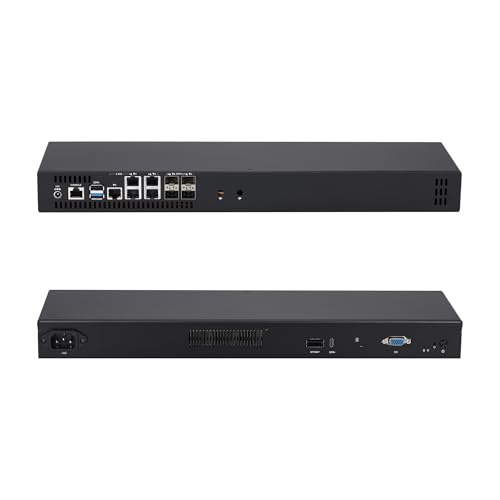
- 12-core Atom C3808 with Intel QAT
- 4x 10G SFP+ and 5x 2.5GbE ports
- 1U rack design with NVMe and SATA expansion
Best For: Rackmount labs and high-density network virtualization
Silent Network Lab Barebone

- Fanless passive design for silent 24/7 use
- 8-core Atom C3758 with Intel QAT
- 4x 10G SFP+ and 5x 2.5GbE networking
Best For: Quiet homelabs and fanless virtualization nodes
Premium Barebone Choice

- True barebone kit with 0GB RAM installed
- Core i5 1350P and support for up to 64GB RAM
- Wi‑Fi 6E, Bluetooth 5.3, and Gigabit Ethernet
Best For: Users who want a customizable mini PC base for VMs
Budget Barebone Value Pick
AMD Ryzen 5 3500U Barebone Mini PC
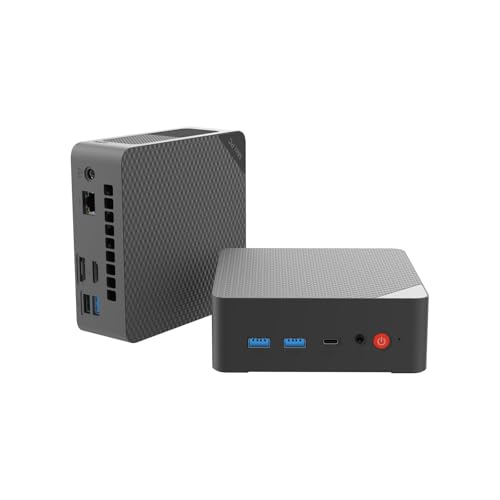
- Barebones design with no RAM, SSD, or OS included
- Dual RAM and dual SSD slots for flexible builds
- Wake-on-LAN and PXE Boot support remote deployment
Best For: Budget builders needing a customizable entry-level VM box
Enterprise Network Barebone – MINISFORUM MS-01 i5-12600H
If you need a barebone computer for virtualization with serious I/O, the MINISFORUM MS-01 stands out for its Intel vPro support, dual 10Gbps SFP+ ports, and flexible PCIe 4.0 expansion. It’s built more like a compact workstation or network appliance than a typical mini PC, which makes it a strong fit for lab servers, VM hosts, and storage-heavy builds.
Best For: Virtualization labs, network appliances, and high-speed storage or expansion builds.
Pros:
- Intel Core i5-12600H offers 12 cores and 16 threads for demanding multitasking.
- Intel vPro support adds hardware-level security and virtualization-friendly features.
- Dual 10Gbps SFP+ plus dual 2.5GbE gives excellent networking flexibility.
- Supports up to three M.2 NVMe SSDs plus U.2 expansion for dense storage builds.
Cons:
- Barebone configuration means you still need to add RAM, SSDs, and an OS.
- Passive cooling may be less ideal for consistently heavy sustained loads.
- Best value depends on whether you can use its enterprise-style connectivity.
For buyers who prioritize networking, storage, and virtualization features over gaming graphics, the MS-01 is one of the most capable barebone computer options in this roundup.
Gaming-Ready Expandable Barebone – GMKtec K12 Ryzen 7
The GMKtec K12 is a strong barebone computer for virtualization if you also want gaming-class graphics and external expansion options. Its Ryzen 7 H 255 processor, Oculink port, and three M.2 slots make it a flexible platform for labs, creator workloads, and multi-display setups.
Best For: Users who want a virtualization-capable barebone with strong graphics and expansion.
Pros:
- Ryzen 7 H 255 provides 8 cores, 16 threads, and boost speeds up to 4.9GHz.
- Three M.2 2280 PCIe 4.0 slots support large storage expansion up to 24TB total.
- Oculink and PCIe 4.0 x4 open the door to fast eGPU or controller upgrades.
- Quad-display support with HDMI 2.1, DP 1.4, USB4, and USB-C adds flexibility.
Cons:
- Sold as a barebone unit, so RAM, SSD, and OS must be added separately.
- Built-in graphics are good for a mini PC, but not a replacement for a strong discrete GPU.
- RGB lighting and gaming styling may not suit every workstation environment.
Overall, the K12 is a practical choice when your virtualization needs overlap with gaming, creator work, or expansion-heavy experimentation.
Fanless Firewall Barebone – Qotom Q10932G6 i3-N305
If your goal is a barebone computer for virtualization in a routing or firewall role, the Qotom Q10932G6 is purpose-built for that job. Its six Intel 2.5GbE LAN ports, fanless aluminum chassis, and Linux-friendly design make it especially appealing for pfSense, OPNsense, OpenWrt, or Proxmox-based network appliances.
Best For: Firewall, router, and multi-LAN virtualization appliances.
Pros:
- Six Intel i226-V 2.5GbE ports are ideal for segmented networks and routing.
- Intel Core i3-N305 offers 8 cores and enough headroom for light virtualization tasks.
- Fanless heatsink design supports silent operation, with an auxiliary micro-fan for added stability.
- Compatible with pfSense, OPNsense, OpenWrt, Proxmox VE, TrueNAS, and Linux.
Cons:
- Maximum DDR5 memory support is limited to 16GB.
- Not aimed at graphics-heavy workloads or desktop productivity use.
- Barebone configuration still requires memory and storage installation.
This is a focused networking appliance rather than a general-purpose mini PC, and that specialization is exactly what makes it useful for virtualization-centric firewall builds.
High-End Compact Virtualization Box – MINISFORUM UM890 Pro
The MINISFORUM UM890 Pro is a premium barebone computer for virtualization when you want strong CPU performance, broad display support, and expansion options in a compact system. With a Ryzen 9 8945HS, Radeon 780M graphics, dual 2.5GbE, and OCuLink support, it works well as a powerful lab host or flexible home-office workstation.
Best For: Power users who want a compact virtualization machine with strong performance and expansion.
Pros:
- Ryzen 9 8945HS brings 8 cores, 16 threads, and boost speeds up to 5.2GHz.
- Two USB4 ports, HDMI, and DisplayPort support flexible multi-monitor setups.
- Dual 2.5GbE LAN is useful for routing, network isolation, and lab environments.
- OCuLink and dual M.2 slots make it easier to expand storage or add an external GPU.
Cons:
- Barebone version means RAM, SSD, and operating system are not included.
- Storage expansion is solid, but the notes list SSD support up to 2TB.
- Cooling is fan-based, so it is not as silent as fanless network appliances.
For users who want a more balanced virtualization system rather than a pure firewall box, the UM890 Pro delivers a strong mix of CPU power, connectivity, and expandability.
Rackmount Network Virtualization Platform – Qotom Q20342G9 1U 12-Core 10G
If you need a barebone computer for virtualization that also doubles as a serious network appliance, this Qotom 1U system is built around speed, dense I/O, and 24/7 rack deployment. The Atom C3808 brings 12 cores for Proxmox VE and similar workloads, while the mix of 4x 10G SFP+ and 5x 2.5GbE ports makes it especially appealing for lab networks and firewall-heavy builds.
Best For: Rackmounted virtualization labs, firewall/router builds, and high-throughput network appliances.
Pros:
- 12-core Intel Atom C3808 with Intel QAT support for multi-threaded workloads
- 4x 10G SFP+ plus 5x Intel i226-V 2.5GbE ports for dense networking
- Supports 2x M.2 NVMe SSDs and 2x 2.5-inch SATA drives for flexible storage
- 1U rack chassis is designed for 19-inch server racks and continuous operation
Cons:
- Barebone unit requires your own RAM, storage, and operating system
- Atom platform is focused on networking efficiency rather than raw desktop performance
Overall, this is a strong fit when your virtualization needs are tightly paired with fast networking and rackmount convenience. It is less about general-purpose speed and more about dependable, always-on infrastructure.
High-End Barebone Virtualization Workstation – MINISFORUM MS-02 Ultra Core Ultra 5
For buyers looking for a barebone computer for virtualization with much more headroom than a typical mini PC, the MINISFORUM MS-02 Ultra stands out with its Core Ultra 5 235HX, four DDR5 slots, and PCIe 5.0 x16 expansion. It is designed for demanding multi-VM setups, compute-heavy workflows, and users who want workstation-grade flexibility in a compact chassis.
Best For: Heavy VM hosts, workstation-class homelabs, and performance-focused virtualization builds.
Pros:
- Intel Core Ultra 5 235HX with 14 cores and up to 5.1 GHz boost
- 4x DDR5 SO-DIMM slots supporting up to 256GB RAM
- PCIe x16 slot allows for desktop-class GPU expansion
- Built-in 10GbE plus 2.5GbE networking for fast storage and lab traffic
Cons:
- Ships barebone, so RAM, SSD, and OS must be added separately
- Its higher-end feature set may be more than basic home lab needs require
This model makes sense if virtualization is only part of a larger workstation or lab strategy. It offers a rare combination of memory capacity, expansion, and fast I/O in a compact barebone system.
Silent Network Lab Barebone – Qotom Q20332G9 Fanless 10G
Qotom Barebone System Mini PC 4X 10G SFP+ 5X i226V B3 2.5G LAN Atom C3758 8 Core Processor 2.2 GHz
Check Price On AmazonIf you want a barebone computer for virtualization that prioritizes silence and networking over everything else, this fanless Qotom is a practical option. Its Atom C3758 8-core processor, dual-channel DDR4 support, and 4x 10G SFP+ plus 5x 2.5GbE ports make it well suited to compact lab servers, lightweight VM hosting, and always-on network roles.
Best For: Silent homelabs, compact virtualization nodes, and fanless firewall or router builds.
Pros:
- Fanless passive cooling for silent 24/7 operation
- 8-core Intel Atom C3758 with Intel QAT for concurrency-focused tasks
- 4x 10G SFP+ and 5x Intel i226-V 2.5GbE ports
- Supports 2x M.2 NVMe drives and 2x 2.5-inch SATA drives
Cons:
- Barebone configuration means you must supply RAM and storage
- 8-core Atom chip is better for efficient workloads than heavy compute tasks
For users who value quiet operation and dense networking, this is a compelling virtualization base. It is especially attractive when the goal is to run services steadily and without fan noise.
Virtualization-Ready Performance Pick – GMKtec M8 Ryzen PRO 6650H Mini PC
If you want a barebone computer for virtualization, the GMKtec M8 stands out for its dual 2.5GbE LAN, AMD Ryzen PRO 6650H, and flexible expansion. It is a strong fit for compact lab builds, remote management setups, and workloads that benefit from fast networking and decent multicore performance.
Best For: Home labs, light virtualization, and users who want dual LAN plus expansion for a compact workstation.
Pros:
- Ryzen PRO 6650H with 6 cores and 12 threads for strong multitasking.
- Dual 2.5GbE LAN supports virtualization and home server use.
- OCuLink and USB4 add flexible expansion options.
- Dual M.2 2280 slots allow up to 8TB total storage.
Cons:
- Comes with 16GB LPDDR5, which may be limiting for heavier VM stacks.
- Not a barebone kit, since RAM and SSD are already included.
- Best suited to light-to-moderate virtualization rather than dense enterprise labs.
The M8 is a practical choice if you want a small system with server-friendly networking and modern expansion in a compact chassis. For virtualization-focused buyers who also want workstation flexibility, it offers a well-rounded feature set.
Premium Barebone Choice – ASUS NUC 13 Pro Slim Kit
For buyers looking for a barebone computer for virtualization, the ASUS NUC 13 Pro Slim Kit is the most direct fit in this group because it ships with no RAM installed and is ready for customization. Its Core i5 1350P, Wi‑Fi 6E, Bluetooth 5.3, and Gigabit Ethernet make it a clean starting point for a compact lab or office deployment.
Best For: Users who want a true barebone mini PC to customize for virtual machines, testing, or office deployments.
Pros:
- True barebone design with 0GB RAM installed.
- Core i5 1350P offers 12 cores and up to 4.7GHz turbo.
- Supports up to 64GB RAM for a more capable VM setup.
- Wi‑Fi 6E, Bluetooth 5.3, and Gigabit Ethernet add modern connectivity.
Cons:
- No memory included, so you must add RAM before use.
- Only Gigabit Ethernet is listed, not faster multi-gig networking.
- Storage details are not provided in the supplied notes.
If you want a clean, customizable base for virtualization, this NUC is easy to tailor around your preferred memory configuration. It is especially appealing when you want a small, branded platform with room to scale RAM for light to moderate VM workloads.
Budget Barebone Value Pick – AMD Ryzen 5 3500U Barebone Mini PC
This barebone computer for virtualization is a budget-friendly option for buyers who want to build a compact system from scratch. The Ryzen 5 3500U, dual RAM slots, dual SSD support, and built-in remote management features make it a flexible entry point for home labs, office tasks, and light VM use.
Best For: Budget-conscious builders who want a customizable mini PC for light virtualization and general-purpose use.
Pros:
- True barebones model with no RAM, storage, or OS included.
- Dual RAM slots support up to 32GB for customization.
- Dual SSD slots support up to 4TB total storage.
- Wake-on-LAN and PXE Boot add useful remote deployment features.
Cons:
- Older Ryzen 5 3500U platform is less powerful than newer mini PCs.
- Maximum RAM support is 32GB, which can limit heavier VM setups.
- Storage expansion is solid, but the system is still aimed at lighter workloads.
As a low-cost starting point, this model makes sense when you want to choose every core component yourself. It is best treated as a practical entry-level virtualization box rather than a high-density lab machine.
How We Picked the Best Barebone Computer for Virtualization
For virtualization, we prioritized processors with enough cores and threads for multiple light-to-moderate VMs, plus platforms that support ample RAM and NVMe storage. We also favored systems with strong I/O, since networking and storage speed often matter as much as raw CPU performance.
We gave extra weight to models with 2.5GbE, 10GbE, SFP+, USB4, PCIe expansion, and business-class features such as vPro or Ryzen PRO where they improve manageability and deployment flexibility.
Quick Comparison
Compact Intel and AMD mini PCs are best for general-purpose labs, while network-heavy barebones from Qotom and MINISFORUM MS-series models are stronger choices for firewall, router, or storage-forward builds. If you need a Barebone Computer for Virtualization with multiple high-speed NICs, select a model built around networking first. If your priority is app testing or mixed workloads, favor higher-performance mobile CPUs with better single-core and multithread capability.
Key Buying Factors for a Barebone Computer for Virtualization
CPU Platform
Look for 6 cores and 12 threads as a practical minimum for small labs; 8 cores or more is better if you plan to run several VMs, nested virtualization, or background services. Efficiency also matters because these systems may run 24/7.
Memory Support
Check maximum RAM capacity and whether the system uses standard SO-DIMM slots or soldered memory. Virtualization workloads scale quickly with memory, so upgradeability is one of the most important purchase factors.
Storage and Expansion
Multiple M.2 slots, PCIe lanes, and easy NVMe access help when you need separate drives for hypervisor, VM images, and backups. If you expect growth, choose a chassis that leaves room for expansion rather than a locked-down design.
Networking
For a Barebone Computer for Virtualization, network ports can be a deciding factor. Dual 2.5GbE is a solid baseline; 10GbE or SFP+ becomes valuable for VM storage, high-throughput labs, or virtual switching.
Cooling and Noise
Fanless designs are excellent for silent firewall or low-power services, but active cooling is usually better for sustained VM load. Match the cooling approach to your workload and location.
Who Should Buy Which Barebone Computer for Virtualization?
Home lab users who want a balanced host should favor high-core-count mini PCs with upgradeable RAM and fast storage. Network builders and firewall users should lean toward Qotom-style systems with multiple Intel NICs and SFP+ connectivity. Power users who want the most flexible virtualization platform should look at MS-02-class systems with PCIe expansion and faster I/O. For entry-level labs, a smaller barebone can still work well if you keep the VM count modest and choose carefully on RAM and SSD capacity.