
If you are searching for a SABRENT PCIe 3.0 x4 Card, 10GbE + 3X M.2 NVMe SSD Slots (EC-PM2L) review, this is a very specific kind of expansion card with a very specific job.
It is built for buyers who want to add 10GbE networking and three NVMe drives on one PCIe slot without dealing with bifurcation.
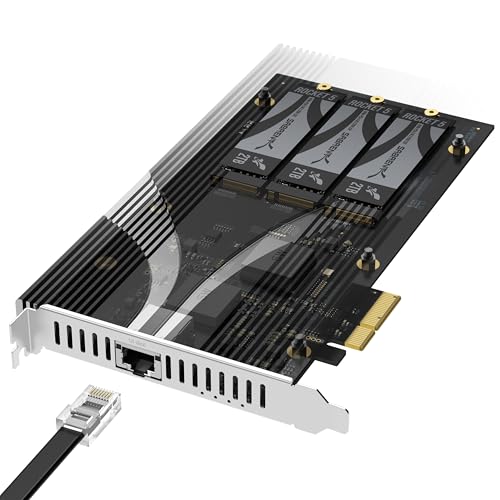
SABRENT PCIe 3.0 x4 Card Review Summary
The appeal here is straightforward: this card combines storage expansion and wired networking in one board, and it does so in a way that lowers setup friction.
For the right NAS, homelab, server, or desktop build, that is a real advantage because you get multiple upgrades from a single physical x4-or-larger slot.
It suits buyers who want density, simplicity, and a clean install more than absolute peak lane flexibility.
Review Scorecard
| Category | Score | Why it matters |
|---|---|---|
| Expansion density | 9/10 | Three NVMe slots plus integrated 10GbE on one card is highly space-efficient |
| Installation simplicity | 9/10 | No bifurcation required, so compatibility is easier to manage |
| Storage flexibility | 8/10 | Supports 2230 to 2280 NVMe drives and multiple PCIe generations |
| Thermal design | 8/10 | Tool-free aluminum heatsink and thermal padding help sustained use |
| Networking value | 8/10 | Built-in Marvell-based 10GbE adds a major upgrade path |
| System fit | 7/10 | Best for systems with a spare physical x4 or larger slot |
| Upgrade clarity | 8/10 | Easy to understand use case: one card, storage and network in one move |
Key Features and Specifications of SABRENT PCIe 3.0 x4 Card
This card is a PCIe 3.0 x4 expansion board with three M.2 NVMe SSD slots and one built-in 10GbE Ethernet port.
SABRENT positions it for NAS systems, servers, homelabs, and desktop PCs that have an available physical x4 or larger slot.
- Three M.2 NVMe slots for adding multiple SSDs on a single card
- Integrated 10GbE port based on Marvell networking
- No bifurcation required, which is the biggest setup advantage
- Supports 2230 to 2280 NVMe drives
- Works with PCIe Gen 2.0 to 5.0 NVMe SSDs, according to the listing
- Tool-free aluminum heatsink with thermal padding included
- PCIe 3.0 x4 interface, with each M.2 slot operating up to x2 PCIe 3.0 bandwidth
- Backward compatible Ethernet down to 100Mbps with CAT 5e or better
The strongest buying signal is not raw spec bragging but integration.
Many systems can spare one slot, but fewer can spare one slot and still cleanly accommodate a separate multi-NVMe card and a separate 10GbE adapter.
This product compresses both needs into one board.
Pros and Cons of SABRENT PCIe 3.0 x4 Card
Pros
- Combines storage and networking in one card
- Does not require PCIe lane bifurcation
- Supports a wide range of M.2 lengths from 2230 to 2280
- Includes a heatsink instead of leaving cooling to the user
- Fits naturally in NAS, server, and compact PC upgrade paths
Cons
- PCIe 3.0 x4 is a practical ceiling, so it is not aimed at maxing out every drive simultaneously
- Best value depends on whether you truly need both 10GbE and three NVMe slots
- A physical x4-or-larger slot is still required
- Buyers expecting simple desktop storage expansion only may be paying for networking they do not need
The main tradeoff is obvious: you get a lot of function in one device, but the device is specialized.
If your build only needs one side of the equation, a simpler card may make more sense.
Who Should Buy SABRENT PCIe 3.0 x4 Card?
This is a strong fit for NAS builders, homelab users, and small server owners who want to expand both storage and network throughput without using multiple add-in cards.
It also makes sense for desktop users who already know they need 10GbE and want to add several NVMe drives at the same time.
It is especially appealing when slot space is tight, because one card can replace two separate upgrades.
The no-bifurcation requirement also makes it more approachable for buyers who do not want to depend on motherboard lane-splitting support.
You should probably skip it if you only need one M.2 slot, if you already have separate 10GbE hardware, or if your system has no free physical x4 or larger slot.
In those cases, the extra integration is less valuable.
Installation and Compatibility of SABRENT PCIe 3.0 x4 Card
One Slot, Two Upgrades
The most important compatibility detail is that the card is designed to work without bifurcation.
That matters because many multi-drive expansion cards become much less convenient once you need motherboard-specific lane-splitting support.
Here, installation is closer to a standard add-in-card experience.
Drive Fit and Cooling
Support for 2230 through 2280 NVMe drives gives the card room for many common SSD form factors, including compact and full-length modules.
The included aluminum heatsink and thermal padding are there for a reason: when multiple NVMe drives sit in close proximity, cooling becomes part of the decision, not an afterthought.
Network Use Cases
The built-in 10GbE port is the feature that turns this from a storage card into a broader infrastructure upgrade.
For NAS and server users, that can be more important than the SSD slots themselves because network speed is often the bottleneck once local storage gets faster.
Alternatives to SABRENT PCIe 3.0 x4 Card
If you want a different balance of features, there are a few credible Amazon search alternatives worth comparing:
- ASUS Hyper M.2 x16 for buyers who want a more traditional multi-NVMe expansion path
- Sabrent NVMe PCIe adapter for simpler storage-only expansion
- 10GbE PCIe network adapter if networking is your only priority
- IOCREST M.2 to PCIe adapter for budget-conscious NVMe expansion
These alternatives matter because the SABRENT card is best understood as a hybrid.
If you want a cleaner separation between storage and networking, two dedicated adapters can be easier to reason about.
Is SABRENT PCIe 3.0 x4 Card Worth It?
Yes, if you need both 10GbE and triple NVMe expansion in one slot. That is the core value proposition, and it is strong for the right system.
The no-bifurcation design, integrated heatsink, and broad drive support make it a practical upgrade for NAS, server, and homelab builds.
No, if you only need one part of that package. A storage-only adapter or a standalone 10GbE card will usually be the better fit when your needs are narrower.
For buyers who want one well-targeted card that solves two infrastructure problems at once, though, this SABRENT board is an efficient choice.