
Choosing among the best WiFi routers for apartments means balancing coverage, speed, device capacity, and ease of setup without paying for features you will not use. A compact apartment may need only one well-placed router, while a larger or unusually shaped space can benefit from mesh networking.
This roundup compares 10 practical options, from affordable Wi-Fi 5 models to newer Wi-Fi 7 routers and flexible mesh systems, so you can match your network to your floor plan, internet plan, and connected devices.
Best 10 Wifi Routers for Apartments Picks for 2026
Best Value WiFi 6 Pick

- AX1800 dual-band Wi-Fi 6
- OFDMA supports multiple devices
- Four antennas and Gigabit ports
Best For: Affordable apartment Wi-Fi 6 upgrades
Most Flexible Performance

- AX3000 Wi-Fi 6 performance
- Four Gigabit Ethernet ports
- Multi-protocol VPN support
Best For: Apartments needing wired ports and flexible network modes
Best for Dead Zones
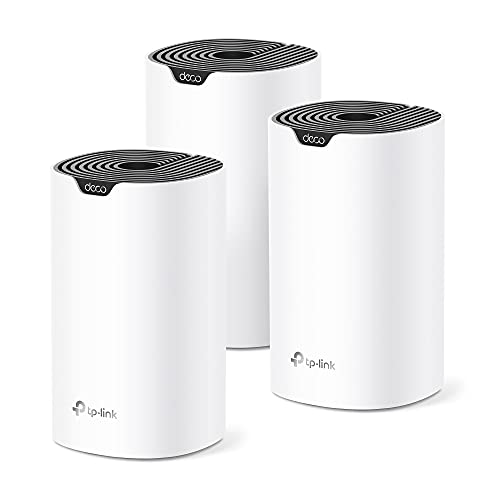
- Three-unit mesh coverage
- Rated up to 5,500 square feet
- Seamless roaming with one network
Best For: Large or difficult-to-cover apartments
Best Simple Apartment Setup

- AX1800 Wi-Fi 6 router
- App-guided setup and management
- Four Gigabit LAN ports
Best For: Small apartments wanting simple standalone Wi-Fi
Best Wi-Fi 7 Upgrade

- Wi-Fi 7 features with dual-band connectivity
- 2.5G WAN/LAN and 2.5G LAN ports
- Covers up to 2,000 sq. ft. and 60 devices
Best For: Fast internet plans, newer devices, and multi-gigabit wired connections
Best Mesh-Ready Choice
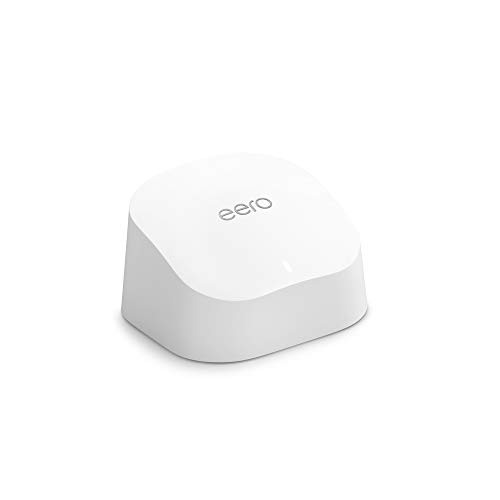
- Covers up to 1,500 sq. ft.
- Supports 75+ connected devices
- Simple app setup with TrueMesh technology
Best For: Easy apartment coverage and future mesh expansion
Best Budget Wired Option

- Up to 1,200 Mbps dual-band Wi-Fi
- Four Gigabit LAN ports
- Supports WPA3, AP mode, and OneMesh
Best For: Affordable everyday apartment networking with wired devices
Best Mesh Pick

- Covers up to 2,200 sq. ft. per router
- Expands to 4,400 sq. ft. with multiple routers
- Dual-band Wi-Fi 5 with WPA3 support
Best For: Simple whole-home mesh coverage
Best Budget Pick

- Up to 1,200 Mbps combined dual-band speed
- Covers up to 1,000 sq. ft.
- Includes WPA3, parental controls, and EasyMesh
Best For: Affordable everyday apartment Wi-Fi
Best Simple Pick

- Wi-Fi 7 with MLO, Multi-RUs, and 4K-QAM
- Covers up to 2,400 sq. ft. and 90 devices
- Includes 2.5 Gbps wired connectivity
Best For: High-speed apartment networks with newer devices
Best Value WiFi 6 Pick – Archer AX21
For apartments needing a dependable upgrade, the TP-Link Archer AX21 is a practical choice among wifi routers for apartments. Its dual-band Wi-Fi 6 connection is designed to reduce congestion, support multiple devices, and deliver up to 1.8 Gbps of combined theoretical bandwidth. A separate modem is required.
Best For: Apartment dwellers who want an affordable Wi-Fi 6 router with broad compatibility and straightforward app or voice control.
Pros:
- Wi-Fi 6 with OFDMA helps handle multiple connected devices.
- Beamforming, four high-gain antennas, and an FEM chipset support reliable coverage.
- Includes Gigabit Ethernet ports, WPA3 support, VPN server capability, and Alexa compatibility.
Cons:
- It is dual-band and does not support the 6 GHz band.
- A separate cable or DSL modem may be needed for internet access.
- Actual speed and coverage vary with walls, distance, and interference.
The Archer AX21 is a balanced apartment router for streaming, gaming, and everyday connectivity. Its Wi-Fi 6 features and four wired Gigabit ports give it useful flexibility without moving into a more complex mesh setup.
Most Flexible Performance – Cudy WR3000
The Cudy WR3000 stands out among wifi routers for apartments for its high rated throughput, flexible operating modes, and extensive VPN support. It offers dual-band AX3000 Wi-Fi 6, four Gigabit Ethernet ports, and coverage rated up to 1,400 square feet.
Best For: Apartment users who want strong wired connectivity, advanced VPN options, or the ability to use the device as a router, access point, extender, WISP, or client.
Pros:
- AX3000 Wi-Fi 6 supports up to 2,402 Mbps on 5 GHz and 574 Mbps on 2.4 GHz.
- OFDMA, MU-MIMO, and BSS Color improve efficiency in busy homes.
- Supports WireGuard, OpenVPN, PPTP, L2TP, and IPsec server or client modes.
- Cudy Mesh and app or cloud control add management flexibility.
Cons:
- Coverage is rated at up to 1,400 square feet, so larger spaces may need additional equipment.
- The manufacturer recommends up to 70 devices despite a stated capacity of 128.
- Its advanced settings may be more than casual users need.
With four Gigabit ports and unusually broad networking modes, the WR3000 is a versatile pick for apartments with wired devices or specialized VPN needs. Its stated coverage also fits many single-level spaces.
Best for Dead Zones – Deco S4 Mesh System
The TP-Link Deco S4 three-pack takes a different approach to wifi routers for apartments by using multiple mesh units instead of one central router. The system is rated to cover up to 5,500 square feet, with seamless roaming under one network name and password.
Best For: Larger apartments, unusually shaped layouts, or homes where one router leaves dead zones.
Pros:
- Three units create a unified mesh network with coverage rated up to 5,500 square feet.
- Devices automatically switch between units as you move around the home.
- Supports up to 100 devices and offers six Gigabit Ethernet ports across the three-pack.
- Includes parental controls, guest Wi-Fi, Alexa support, and wired Ethernet backhaul.
Cons:
- It uses Wi-Fi 5 rather than Wi-Fi 6.
- The three-unit design may be excessive for a small apartment with good existing coverage.
- A modem is required for most internet providers.
The Deco S4 is best when apartment layout, rather than raw wireless generation, is the main challenge. Its dedicated mesh nodes can help extend a consistent connection across rooms while keeping setup relatively simple through the Deco app.
Best Simple Apartment Setup – Nighthawk R6700AX
The NETGEAR Nighthawk R6700AX is a straightforward option among wifi routers for apartments, with Wi-Fi 6, app-guided setup, and coverage rated for up to 1,500 square feet. It connects to an existing modem or gateway through Ethernet and supports up to 20 connected devices.
Best For: Small apartments seeking an easy-to-manage standalone router for streaming, video calls, browsing, and smart-home devices.
Pros:
- Wi-Fi 6 provides up to 1.8 Gbps across the 2.4 GHz and 5 GHz bands.
- Nighthawk app supports guided setup, speed tests, device pausing, and guest networks.
- Four Gigabit LAN ports support consoles, computers, streaming players, and storage devices.
- Includes WPA3, automatic firmware updates, and a guest network without requiring a subscription.
Cons:
- Coverage is rated at up to 1,500 square feet and can be reduced by walls or interference.
- NETGEAR Armor protection requires a subscription after its 30-day trial.
- It requires an existing modem or gateway and does not use a coax connection directly.
For a compact apartment and a moderate number of devices, the R6700AX keeps the essentials accessible through its mobile app. It is a sensible standalone choice when a three-node mesh system would be unnecessary.
Best Wi-Fi 7 Upgrade – TP-Link Archer BE230
For apartments with fast internet plans and several connected devices, the TP-Link Archer BE230 is a forward-looking choice among wifi routers for apartments. Its dual-band Wi-Fi 7 design, multi-gigabit ports, and stated coverage for up to 2,000 square feet make it well suited to demanding streaming, gaming, and everyday use. A separate modem is required.
Best For: Apartment dwellers who want Wi-Fi 7 features, multi-gigabit wired connectivity, and room to support up to 60 devices.
Pros:
- Wi-Fi 7 features include Multi-Link Operation, Multi-RUs, and 4K-QAM.
- Includes a 2.5G WAN/LAN port, a 2.5G LAN port, and three 1G LAN ports.
- Rated for up to 2,000 square feet and 60 devices, with EasyMesh expansion support.
- Tether app setup, parental controls, IoT security, and WPA3 support add management options.
Cons:
- It is dual-band and does not support the 6 GHz band.
- A separate modem is required for most internet providers.
- Actual wireless performance varies with distance, walls, and other obstacles.
The Archer BE230 is the strongest fit here for apartment users with gigabit-plus service or newer Wi-Fi 7 devices. Its multi-gigabit Ethernet and mesh compatibility offer useful upgrade potential, while the lack of 6 GHz keeps it from being a complete tri-band Wi-Fi 7 solution.
Best Mesh-Ready Choice – Amazon eero 6
The Amazon eero 6 is a straightforward option among wifi routers for apartments, especially when easy setup and dependable whole-room coverage matter more than advanced wired features. This single unit covers up to 1,500 square feet, supports 75 or more devices, and uses TrueMesh technology to help reduce drop-offs. The eero app guides setup and lets you manage the network remotely.
Best For: Apartment residents who want simple Wi-Fi 6 coverage, app-based management, and an easy path to expand into a mesh system.
Pros:
- Covers up to 1,500 square feet and supports internet plans up to 900 Mbps.
- Supports 75 or more connected devices with Wi-Fi 6.
- TrueMesh technology is designed to reduce drop-offs and buffering.
- Built-in Zigbee smart home hub and automatic updates add convenience.
Cons:
- The single unit has a smaller stated coverage area than the Archer BE230.
- Its stated plan support tops out at 900 Mbps.
- Expansion may require purchasing additional compatible eero hardware.
For a typical apartment with moderate-to-fast service and many phones, laptops, and smart home devices, the eero 6 emphasizes convenience. Its 1-pack coverage may be enough for a compact layout, while cross-compatible expansion provides a practical option if dead spots appear later.
Best Budget Wired Option – TP-Link Archer A6
The TP-Link Archer A6 is a practical, budget-minded pick among wifi routers for apartments where reliable dual-band service and wired Gigabit ports are the priority. It offers up to 1,200 Mbps combined wireless speed, four Gigabit LAN ports, beamforming, and MU-MIMO for multiple devices. A modem is required for most providers.
Best For: Smaller apartments and households seeking affordable Wi-Fi 5 service with strong wired connectivity and optional OneMesh expansion.
Pros:
- Dual-band speeds are rated up to 1,200 Mbps, with up to 900 Mbps on 5 GHz.
- Four Gigabit LAN ports accommodate wired computers, consoles, and other devices.
- Four external antennas and beamforming help concentrate wireless signals.
- Includes WPA3 security, AP mode, MU-MIMO, and OneMesh support.
Cons:
- It uses the older Wi-Fi 5 generation rather than Wi-Fi 6 or Wi-Fi 7.
- It does not provide the newer Wi-Fi standards’ stated performance features.
- A separate modem is required for most internet service providers.
The Archer A6 makes sense when the apartment setup does not require the latest Wi-Fi generation or multi-gigabit networking. Its four Gigabit ports and OneMesh compatibility give it useful flexibility, while Wi-Fi 5 keeps the price-oriented design focused on everyday connectivity.
Best Mesh Pick – Google Nest Wifi
Google Nest Wifi - AC2200 - Mesh WiFi System - Wifi Router - 2200 Sq Ft Coverage - 1 pack
Check Price On AmazonFor apartments where coverage across multiple rooms matters, Google Nest Wifi is a straightforward mesh option. This Wi-Fi 5 router provides up to 2,200 square feet of coverage per unit and can scale to up to 4,400 square feet with multiple routers.
Best For: Apartment residents who want simple whole-home mesh coverage and app- or voice-based control.
Pros:
- Up to 2,200 square feet of coverage from one router
- Mesh networking can expand coverage with additional routers
- Supports dual-band Wi-Fi, WPA2-Enterprise, and WPA3 security
Cons:
- Uses Wi-Fi 5 rather than newer Wi-Fi 6 or Wi-Fi 7 technology
- Single-unit coverage may be more than needed for a small apartment, while larger spaces may require additional units
Choose this model if easy expansion and broad, reliable coverage are more important than the newest wireless generation. It is especially practical for apartments with dead zones or multiple rooms.
Best Budget Pick – TP-Link Archer A54
The TP-Link Archer A54 is a practical choice for smaller apartments and everyday online activity. Its dual-band Wi-Fi delivers up to 1,200 Mbps of combined bandwidth, while four external antennas are rated to cover up to 1,000 square feet.
Best For: Budget-conscious apartment dwellers who need a basic router for browsing, streaming, and connected devices.
Pros:
- Dual-band speeds of up to 867 Mbps on 5 GHz and 300 Mbps on 2.4 GHz
- Four external antennas support coverage up to 1,000 square feet
- Includes WPA3 security, parental controls, guest Wi-Fi, and Access Point mode
- EasyMesh compatibility allows future coverage expansion
Cons:
- Requires a separate modem
- Uses 10/100 Mbps Ethernet ports
- Does not support the 6 GHz band
For a compact apartment with moderate coverage needs, the Archer A54 offers useful management features without unnecessary complexity. Its Ethernet limits make it less suitable for multi-gig internet plans.
Best Simple Pick – TP-Link Archer BE400
The TP-Link Archer BE400 is a forward-looking option for apartments with newer devices and demanding workloads. Its Wi-Fi 7 features include Multi-Link Operation, Multi-RUs, and 4K-QAM, plus up to 2,400 square feet of coverage for as many as 90 devices.
Best For: Apartment users with Wi-Fi 7 devices, multi-gig internet, gaming, 4K/8K streaming, or many connected devices.
Pros:
- Wi-Fi 7 features are designed for newer compatible devices
- Supports up to 2,400 square feet and as many as 90 devices
- Includes one 2.5 Gbps WAN/LAN port, one 2.5 Gbps LAN port, and three 1 Gbps LAN ports
- Offers EasyMesh expansion, parental controls, and VPN client support
Cons:
- Requires a separate modem
- Wi-Fi 7 benefits depend on compatible client devices
- EasyMesh compatibility does not extend to Deco mesh systems
This router makes the most sense when an apartment has fast broadband and newer Wi-Fi hardware to take advantage of its capabilities. For basic browsing on older devices, its extra performance may be unnecessary.
How We Picked the Best Wifi Routers for Apartments
We focused on routers and mesh systems that fit common apartment needs: dependable wireless coverage, straightforward setup, useful wired ports, support for multiple devices, and compatibility with modern broadband plans. The selection includes Wi-Fi 5, Wi-Fi 6, and Wi-Fi 7 models to cover different budgets and performance expectations.
We also considered practical apartment factors such as compact placement, automatic updates or app-based management, mesh expandability, and whether the router offers enough capacity for streaming, gaming, video calls, smart-home devices, and work-from-home equipment.
Quick Comparison
| Best For | Recommended Type | Why It Stands Out |
|---|---|---|
| Lowest-cost basic networking | Wi-Fi 5 router | Affordable performance for smaller households |
| Most apartments | Wi-Fi 6 router | Better efficiency and capacity for busy networks |
| Large or difficult layouts | Mesh system | More consistent coverage across rooms |
| Newer high-speed plans | Wi-Fi 7 router | Higher performance and longer upgrade life |
| Simple app-managed setup | eero or Google Nest WiFi | Beginner-friendly controls and expansion |
Key Buying Factors for Wifi Routers for Apartments
Coverage and Layout
Apartment size is only part of the coverage equation. Thick walls, concrete, metal appliances, long hallways, and interference from nearby networks can reduce signal quality. A single router is often sufficient for an open, compact apartment, but mesh is preferable for separated rooms or dead zones.
Wi-Fi Generation and Speed
Wi-Fi 6 is a strong default for most households because it handles many connected devices more efficiently than older standards. Wi-Fi 7 makes more sense when you have very fast internet, newer compatible devices, or want additional headroom for future upgrades. A newer wireless standard cannot increase the speed of an internet plan beyond its rated connection.
Ports and Wired Connections
Gigabit Ethernet ports are useful for desktop computers, game consoles, streaming boxes, and workstations. Check the number and speed of ports if you plan to use several wired devices or a multi-gigabit internet service.
Management and Security
App-based setup can simplify installation, guest networks, parental controls, diagnostics, and firmware updates. Before buying, review whether advanced features require a subscription and confirm that the router supports the security controls your household needs.
Who Should Buy Which Wifi Routers for Apartments?
Choose an affordable Wi-Fi 5 router if your apartment is small, your internet plan is modest, and you mainly browse, stream, and connect a limited number of devices. For most households, a Wi-Fi 6 router offers the best balance of price, efficiency, and capacity.
Choose a mesh system if one router cannot reach every room reliably or if you want simple expansion later. A Wi-Fi 7 model is best for buyers with fast broadband, demanding local networking needs, or a preference for newer technology. Finally, prioritize app-managed systems such as eero or Google Nest WiFi if easy setup and household-friendly controls matter more than extensive manual configuration.