
If you share a monitor, keyboard, mouse, and speakers between multiple computers, the right switch can make your setup far more efficient.
This guide focuses on the best KVM switch with audio switching options for 2026, helping you match the right ports, resolution, and switching method to your workspace.
Best 10 KVM Switch with Audio Switching Picks for 2026
Legacy-friendly audio KVM
IOGEAR GCS72U 2-Port VGA Audio KVM

- Switches two computers with one USB keyboard, mouse, and VGA monitor
- Includes 2.1 stereo audio and microphone support
- Plug-and-play with remote push-button switching
Best For: Two-computer VGA setups needing simple audio and mic switching
Modern 4K HDMI KVM
2-Port 4K HDMI KVM with Audio and USB 3.0

- 4K@60Hz support with HDR10 and HDMI 2.0 compatibility
- Audio/microphone support plus USB 3.0 hub
- Hotkey switching, auto-scan, and digital display
Best For: Dual HDMI workstation users who want 4K video and flexible switching
Four-machine legacy switch
JideTech 4-Port VGA KVM with Audio

- Shares one keyboard, mouse, and VGA monitor across four computers
- Speaker and microphone switching included
- Push-button and hotkey switching with plug-and-play setup
Best For: Multi-PC VGA users who need audio support and simple control
USB-C desktop hub switch
Lemorele USB-C 2-Port 4K KVM with Audio

- Shares one HDMI display and USB peripherals across two USB-C devices
- Supports 4K@60Hz plus 3.5mm audio
- Adds 100W PD charging and one-click switching
Best For: USB-C laptop setups that need display sharing, audio, and charging
8K Multi-PC Upgrade
4-Port HDMI KVM with Audio Switching

- 4 computers, 1 monitor, and shared USB devices
- 8K@60Hz / 4K@144Hz support
- 3.5mm headset/microphone audio plus wired remote
Best For: Users who want a high-resolution 4-PC KVM with audio support
Classic VGA Workhorse
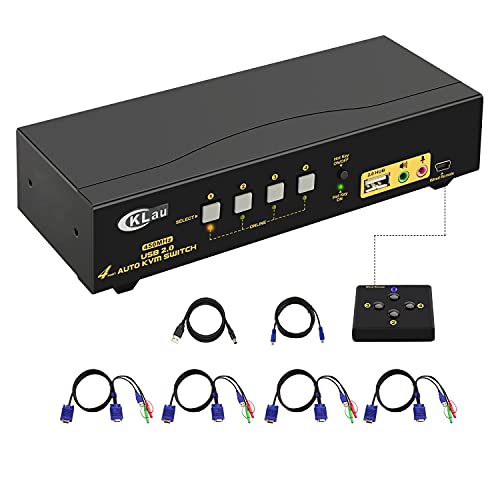
- Controls 4 VGA computers from one workstation
- Audio and microphone output included
- Four switching modes, including hotkeys and remote
Best For: Legacy VGA setups that still need audio and multi-OS support
Compact Dual-PC Pick
2-Port HDMI KVM with Stereo Audio

- Shares 2 computers with one monitor and peripherals
- 2.1 stereo sound and microphone support
- Pushbutton, hotkey, or wired USB mouse switching
Best For: Users who need a compact 2-PC HDMI KVM with audio
Best Two-PC Desktop Pick

- 1 monitor, 2 computers, plug-and-play
- 4 USB 3.0 ports including USB-C
- Button or wired remote switching
Best For: A compact two-PC desk with shared USB peripherals
Best Dual-Monitor Workstation Pick
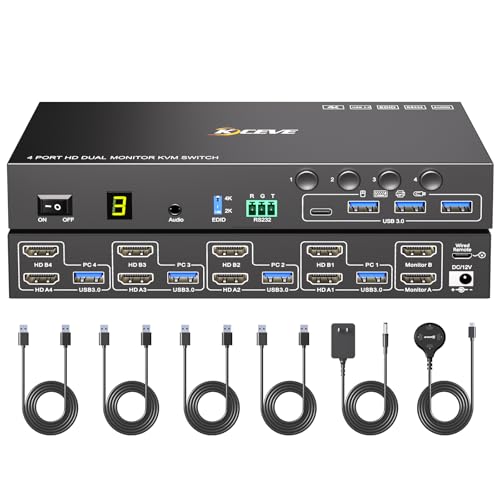
- 4 computers share 2 monitors and 4 USB ports
- EDID simulation preserves display layout
- Buttons, remote, and RS232 switching
Best For: A dual-monitor office setup with four computers and stable display behavior
Legacy-friendly audio KVM – IOGEAR GCS72U 2-Port VGA Audio KVM
If you need a straightforward KVM switch with audio switching for two legacy computers, this IOGEAR unit keeps the setup simple. It shares one USB keyboard, one USB mouse, and one VGA monitor while also handling 2.1 stereo audio and microphone support, making it a practical fit for basic desk switching.
Best For: Users connecting two PC, Mac, or Sun systems who want a compact, plug-and-play VGA KVM with audio and mic support.
Pros:
- Supports 2.1 stereo audio and microphone switching
- Plug-and-play design with no software drivers required
- Remote push-button switching for easy desk access
- Compatible with PC, Mac, and Sun platforms
Cons:
- Uses VGA instead of HDMI
- Limited to two connected computers
- Attached cables may be less flexible than fully separate ports
Overall, this is a practical audio-capable KVM for older monitor setups where simplicity matters more than modern video features. Its built-in cables, no-adapter power design, and broad platform support make it a solid no-fuss choice.
Modern 4K HDMI KVM – 2-Port 4K HDMI KVM with Audio and USB 3.0
This KVM switch with audio switching is built for modern dual-computer setups that use HDMI displays. It supports one monitor, keyboard, mouse, audio, microphone, and a USB 3.0 hub, while adding conveniences like hotkey control, auto-scan, and a front digital display.
Best For: Users who want a feature-rich HDMI KVM for two computers, with 4K@60Hz support and audio/mic routing.
Pros:
- Supports 4K@60Hz with HDR10 and HDMI 2.0 compatibility
- Includes audio and microphone support plus USB 3.0 hub functionality
- Hotkey switching and automatic switching modes
- Digital display helps show the active channel clearly
Cons:
- Requires both USB cables to be connected for front USB ports to work
- Audio output needs the correct speaker device selection in settings
- Limited to two connected computers
For users who want modern video quality and more switching convenience, this model offers a strong balance of performance and usability. The aluminum shell and built-in display give it a more premium feel than basic desktop switches.
Four-machine legacy switch – JideTech 4-Port VGA KVM with Audio
If you need a KVM switch with audio switching for multiple legacy PCs, this 4-port VGA model is aimed at shared desktop control. It lets you use one keyboard, one mouse, and one monitor across four computers while also supporting speaker and microphone switching.
Best For: Users who want a 4-port VGA KVM with audio support for offices or home labs using older monitor connections.
Pros:
- Controls four computers from one USB keyboard, mouse, and VGA monitor
- Supports speaker and microphone switching
- Push-button switching plus hotkey support
- Plug-and-play with no external power required
Cons:
- Uses VGA rather than HDMI or DisplayPort
- Best fit for legacy systems rather than modern video setups
- Audio and USB hub features are practical, but not advanced
This is a good fit when you need to manage more than two computers without moving to a more complex setup. The combination of audio support, USB hub sharing, and simple switching makes it useful for everyday multitasking.
USB-C desktop hub switch – Lemorele USB-C 2-Port 4K KVM with Audio
For a modern KVM switch with audio switching, this Lemorele model is built around USB-C devices and an HDMI display. It shares a monitor, USB peripherals, and a 3.5mm audio jack across two USB-C systems, while adding 100W PD charging and 4K@60Hz support.
Best For: USB-C laptop users who want one-button switching, 4K video, and charging in a compact shared-work setup.
Pros:
- Supports 4K@60Hz output over HDMI
- Includes 3.5mm audio support and shared USB ports
- Provides 100W PD charging with up to 60W to the active laptop
- Compact, plug-and-play design with one-click switching
Cons:
- Requires USB-C DP Alt Mode support on connected devices
- Must be connected directly to the host, not through a dock or hub
- Uses HDMI for the display path, so cable compatibility matters
This model is a strong fit for modern portable workstations where charging and video sharing matter as much as peripheral switching. Its USB-C focus makes it especially useful if your setup centers on laptops or other full-function Type-C devices.
8K Multi-PC Upgrade – 4-Port HDMI KVM with Audio Switching
If you want a KVM switch with audio switching for a modern multi-computer desk, this 4-port HDMI model stands out for its 8K@60Hz and 4K@144Hz support, USB 3.0 peripheral sharing, and included wired remote. It is built to keep video, USB devices, and audio moving between four computers without making the desk feel cluttered.
Best For: Power users who need to share one high-resolution monitor, keyboard, mouse, and headset across four computers.
Pros:
- Supports up to 8K@60Hz and 4K@144Hz, with ultrawide monitor compatibility noted.
- Includes 4 USB 3.0 ports with up to 5Gbps transfer speed for peripherals.
- 3.5mm audio jack supports headphone or microphone connections.
- Simulation EDID helps keep window layouts from changing when switching PCs.
Cons:
- Requires high-quality HDMI 2.0/2.1 cables under 1.5 meters for best results.
- Audio is handled through 3.5mm connections, so setup depends on your source devices and monitor routing.
Overall, this is a strong choice if you care about display quality, peripheral speed, and practical audio handling in a four-computer setup. The included power adapter and wired remote make it feel more complete than basic switchers.
Classic VGA Workhorse – 4-Port USB VGA KVM with Audio
This KVM switch with audio switching is aimed at older VGA-based setups, giving you one keyboard, mouse, and monitor for four computers while also adding audio and microphone output. If your priority is reliable switching for mixed operating systems rather than modern high-res video, it covers the essentials well.
Best For: Users with VGA computers who need basic multi-PC control plus audio and mic output.
Pros:
- Supports 4 VGA computers from one monitor, keyboard, and mouse setup.
- Includes audio and microphone output.
- Offers four switching methods: button, mouse, hot-key, and wired remote push button.
- Compatible with Windows, Linux, Mac, and several Debian/Ubuntu-based systems.
Cons:
- VGA resolution tops out at 2048×1536@60Hz, which is far below modern HDMI options.
- Button switching and wired remote push button switching cannot be used together.
For legacy desks and mixed-OS environments, this is a practical no-frills choice. Its biggest strength is coverage: it handles four machines, audio, and multiple switching methods without requiring software.
Compact Dual-PC Pick – 2-Port HDMI KVM with Stereo Audio
If you only need to share two computers, this KVM switch with audio switching offers a compact HDMI solution with 2.1 stereo sound and microphone support. It is designed for simple desktop sharing, with easy switching and USB peripheral sharing built in.
Best For: People who want a small 2-PC HDMI KVM for home, office, or light gaming use.
Pros:
- Shares 2 computers using one keyboard, mouse, and HD monitor.
- Supports 1920 x 1200 at 60Hz and includes EDID support.
- Offers switch options via pushbutton, hotkeys, or 3-button wired USB mouse.
- Includes 2.1 stereo sound and microphone support.
Cons:
- Only supports two computers, so it is not suited for larger multi-PC setups.
- Video resolution is limited to 1920 x 1200 at 60Hz.
For buyers who want straightforward sharing without extra complexity, this is an easy fit. The combination of HDMI, audio, peripheral sharing, and multiple switch methods makes it versatile for a two-system desk.
Best Two-PC Desktop Pick – 4K60 USB 3.0 KVM for 2 PCs
If you want a straightforward KVM switch with audio switching-friendly peripheral sharing for a two-computer desk, the Hearvo is built around convenience. It lets two PCs share one monitor, keyboard, mouse, and USB devices while supporting 4K@60Hz video and easy switching from a front button or wired desktop controller.
Best For: A clean 2-computer setup with one monitor and plenty of USB sharing.
Pros:
- Shares 1 monitor and 2 computers in a plug-and-play layout.
- Includes 4 USB 3.0 ports, including USB-A and USB-C, for peripherals like headsets, webcams, printers, and drives.
- Supports 4K@60Hz and HDCP 2.2 for modern displays and protected content.
- Two switching methods: on-device button and wired remote controller.
Cons:
- Designed for 2 computers, so it is not meant for larger multi-PC workstations.
- No dedicated audio-specific controls are listed in the supplied notes.
Overall, this is a practical pick if you want a compact desktop KVM that keeps cabling simple and makes peripheral sharing easy. Its USB 3.0 port mix and 4K support make it a solid fit for everyday work setups.
Most Flexible 4-Port Option – 4-Port 4K60 HDMI KVM with Audio
This KVM switch with audio switching is aimed at users who need one monitor and one control set for up to four computers. It supports 4K@60Hz, includes 4 kit cables, and offers several switching methods, making it a flexible choice for a shared desk or small office.
Best For: Managing four computers from one keyboard, mouse, and monitor setup.
Pros:
- Supports 4 computers sharing 1 monitor, keyboard, and mouse.
- Multiple switching options: keyboard hotkeys, mouse, manual button, and wired remote.
- Supports 4K@60Hz with 4:4:4 and includes EDID.
- Compatible with Windows, Mac, Linux, and devices like Apple TV and Android TV boxes.
Cons:
- Requires a DC 5V 2A power adapter for stable operation.
- It is a 4-port unit, so it may be more than needed for simple 2-PC setups.
For users who want broad device compatibility and lots of switching flexibility, this model stands out. The audio-focused product positioning and included cabling make it especially appealing for a centralized workstation.
Best Dual-Monitor Workstation Pick – 4-PC Dual-Monitor 4K60 KVM
If you need a KVM switch with audio switching for a dual-monitor workstation, this ANGEET model is built for a bigger setup. It lets four computers share two monitors and four USB 3.0 peripherals, while EDID simulation helps keep display settings steady when switching.
Best For: Multi-PC workstations using two monitors and shared USB devices.
Pros:
- Supports 4 computers and 2 monitors, with mirror and extended display modes.
- EDID simulation helps preserve resolution, refresh rate, and window layout during switching.
- Includes 4 USB 3.0 ports for shared peripherals and 5Gbps transfer.
- Three switching methods: panel buttons, wired remote, and RS232.
Cons:
- Needs the included 12V/2A power adapter to operate properly.
- More complex than a simple single-monitor KVM, so it is best for users with a real dual-display need.
This is the strongest fit if your desk depends on two monitors and you want switching that is less disruptive to your layout. The added EDID support and multiple control options make it practical for work setups where consistency matters.
How We Picked the Best KVM Switch with Audio Switching
We prioritized practical features that matter in real setups: stable video output, dependable audio handoff, compatible USB device sharing, and switching methods that are fast enough for daily use. We also looked at monitor support, cable inclusion, and whether each model is better suited for office work, mixed-device desks, or higher-resolution displays.
Quick Comparison
Before buying, narrow your choices by display type and computer count. HDMI models are usually the best fit for newer desktops, laptops, and media setups. VGA models can still be useful for legacy hardware and office environments. USB-C KVM options are ideal for modern laptops, especially when charging and data passthrough matter. If you need one monitor for multiple machines, a standard 2-port or 4-port KVM is often enough; dual-monitor users should focus on models built specifically for that workflow.
Key Buying Factors for KVM Switch with Audio Switching
Video Resolution and Refresh Rate
Match the switch to your monitor’s native resolution. For productivity, 1080p or 4K@60Hz is typically sufficient. If you work with gaming or high-frame-rate content, look for higher refresh-rate support and clear EDID handling to reduce handshake issues.
Audio and Microphone Support
Not every audio-capable KVM treats speakers and mic input the same way. Confirm whether the unit supports stereo audio only or also handles microphone passthrough. If you use a headset, conferencing apps, or voice chat, this detail matters a lot.
USB Sharing and Peripheral Needs
A KVM Switch with Audio Switching should also handle the USB devices you use most: keyboard, mouse, webcam, flash drive, printer, or external storage. Some models include extra USB 3.0 ports for faster peripherals, while others are limited to basic HID use.
Switching Convenience
Hotkeys, push buttons, and remote controls each suit different desks. Hotkeys are efficient for power users, while front-panel buttons are simple and dependable. If the switch includes auto EDID or adaptive EDID, it can improve display stability when switching between computers.
Compatibility and Power
Check support for your operating system and computer type, especially if you use Mac, Linux, or mixed platforms. Powered units often deliver better performance with more devices attached, and included cables can save time and reduce setup mistakes.
Who Should Buy Which KVM Switch with Audio Switching?
Choose a 2-port model if you alternate between a work laptop and a personal PC. Go with a 4-port option if you manage multiple desktops, home lab systems, or office stations. Pick USB-C if your laptop ecosystem is modern and you want a cleaner cable setup. If you need dual monitors, focus only on dual-display KVMs rather than adapting a single-monitor unit. For older systems, VGA remains a sensible choice when compatibility matters more than image quality.
In short, the best KVM Switch with Audio Switching is the one that matches your monitor, computers, and peripherals without adding friction. Prioritize the right video standard, reliable audio support, and the switching method you’ll actually use every day.