
If you want a fast, portable way to reuse an SSD, the right enclosure can turn a spare drive into reliable external storage in minutes.
This roundup focuses on value, speed, and ease of use, with options that fit a range of NVMe and SATA drives without pushing past your budget.
Best 10 SSD Enclosures Under 100 Picks for 2026
Tool-Free Dual-Protocol Pick
SABRENT Tool-Free NVMe & SATA M.2 SSD Enclosure

- Supports NVMe and SATA M.2 SSDs
- Tool-free install and removal
- USB 3.2 Type-C up to 10Gbps
Best For: People who want one enclosure for both NVMe and SATA M.2 drives
2.5-Inch SATA Value Pick
UGREEN USB C Hard Drive Enclosure for 2.5" SATA SSD/HDD

- Fits 2.5-inch SATA SSDs and HDDs up to 6TB
- Tool-free setup with UASP support
- Aluminum shell helps with heat dissipation
Best For: Users with a standard 2.5-inch SATA SSD who want simple portable storage
Transparent NVMe Speed Pick
M.2 NVMe SSD Enclosure with USB 3.2 Gen 2

- Supports 2230 to 2280 NVMe SSDs
- USB 3.2 Gen 2 with 10Gbps speeds
- Includes USB-C cable and USB-A adapter
Best For: NVMe users who want fast transfers and both USB-C and USB-A connectivity
Easy-Install SATA Carry Pick
BENFEI 2.5 Inch SATA to USB Tool Free Enclosure

- Tool-free install and plug-and-play use
- USB Type-C/Type-A connection design
- Supports 2.5-inch SATA SSDs up to 6TB
Best For: People with 2.5-inch SATA drives who want an easy portable enclosure
Tool-Free NVMe Pick
UGREEN Tool-Free USB-C 10Gbps NVMe Enclosure

- Tool-free install for fast setup
- Up to 10Gbps over USB 3.2 Gen 2
- Fits 2230/2242/2260/2280 NVMe drives
Best For: Portable NVMe storage with simple installation
Budget SATA Option
SABRENT 2.5in Tool-Free SATA to USB 3.0 Enclosure

- Tool-free setup for 2.5-inch SATA drives
- USB 3.0 speeds up to 5Gbps
- UASP support optimized for SSD use
Best For: Simple external use for 2.5-inch SATA SSDs
Smart NVMe Choice
DOCKCASE Explorer Edition M.2 NVMe Enclosure

- HD display shows SSD health and life details
- 10s power-loss protection helps prevent write loss
- USB 3.2 Gen 2 with UASP up to 10Gbps
Best For: Monitoring and protecting an NVMe drive while using it externally
Budget 2.5-Inch SATA Pick
ORICO 2.5 inch External Hard Drive Enclosure

- Tool-free installation for 2.5-inch SATA drives
- USB 3.0 with UASP support up to 5Gbps
- Lightweight, portable ABS design
Best For: Converting a 2.5-inch SATA SSD or HDD into a portable drive
Fast NVMe Tool-Free Option
M.2 NVMe SSD Enclosure, Tool-Free Installation
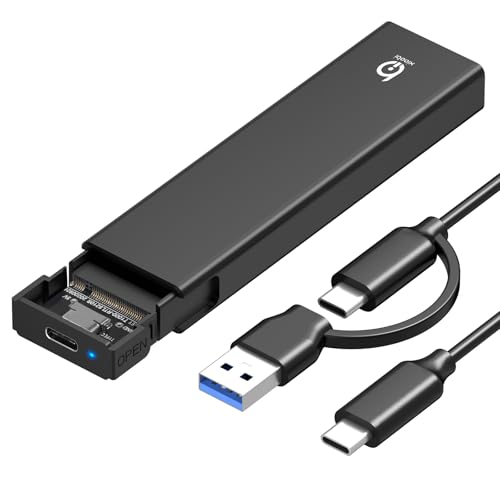
- USB 3.2 Gen 2 with up to 10Gbps speeds
- Supports common NVMe sizes from 2230 to 2280
- Aluminum housing with thermal pad for cooling
Best For: High-speed portable NVMe storage for major operating systems
Versatile Dual-Protocol Choice
dockteck Tool-Free M.2 NVMe SATA SSD Enclosure

- Works with both NVMe and SATA M.2 SSDs
- Supports 2230 to 2280 sizes up to 4TB
- Includes two cables and a thermal pad
Best For: Anyone who wants one enclosure for both NVMe and SATA M.2 drives
Tool-Free Dual-Protocol Pick – SABRENT Tool-Free NVMe & SATA M.2 SSD Enclosure
If you want one of the most flexible SSD enclosures under 100, this SABRENT model is built for M.2 drives that need quick swaps and simple setup. It supports both NVMe and SATA M.2 SSDs, makes installation tool-free, and runs over USB 3.2 Type-C for fast everyday transfers.
Best For: Users who want a portable enclosure for either NVMe or SATA M.2 drives without needing tools.
Pros:
- Supports both M.2 NVMe and M.2 SATA drives in 2242/2260/2280 sizes
- 100% tool-free design for fast install and removal
- USB 3.2 Type-C interface with up to 10Gbps throughput
- Slim aluminum body with thermal pad for heat transfer
Cons:
- Does not fit 2.5-inch SATA drives or mSATA drives
- Not compatible with M.2 drives that already have a heatsink
This is a strong pick if you need a compact enclosure that can handle either common M.2 SSD type. The tradeoff is that it is limited to bare M.2 drives, so check your drive size and interface before buying.
2.5-Inch SATA Value Pick – UGREEN USB C Hard Drive Enclosure for 2.5" SATA SSD/HDD
For shoppers comparing SSD enclosures under 100, this UGREEN option is a straightforward 2.5-inch SATA enclosure for SSDs and HDDs. It focuses on easy setup, UASP support, and broad device compatibility, making it a practical pick for backups, upgrades, and portable storage.
Best For: Anyone with a 2.5-inch SATA SSD who wants an easy, aluminum enclosure with broad compatibility.
Pros:
- Supports 2.5-inch SATA III/II/I SSDs and HDDs up to 6TB
- Tool-free installation with no driver required
- USB-C interface with UASP support for faster transfers
- Premium aluminum alloy body for heat dissipation
Cons:
- Only works with 2.5-inch SATA drives, not M.2 SSDs
- Top speed is 6Gbps, not the faster 10Gbps class
This enclosure makes sense if your drive is a standard 2.5-inch SATA SSD and you want something simple to use across computers and other supported devices. If you need NVMe support, though, you’ll need a different enclosure type.
Transparent NVMe Speed Pick – M.2 NVMe SSD Enclosure with USB 3.2 Gen 2
Among SSD enclosures under 100, this M.2 NVMe model is aimed at users who want fast USB 3.2 Gen 2 performance and broad NVMe size support. It works with 2230 through 2280 NVMe drives, includes both USB-C and USB-A connection options, and uses a tool-free design for quick drive changes.
Best For: NVMe SSD owners who want a fast, portable enclosure with USB-C and USB-A flexibility.
Pros:
- Supports NVMe M-Key and B+M Key drives in 2230/2242/2260/2280 sizes
- USB 3.2 Gen 2 with up to 10Gbps transfer speed
- Includes USB-C to C cable plus USB-A adapter
- Tool-free design and transparent shell
Cons:
- Not compatible with SATA-based M.2 drives
- Not designed for drives with a pre-installed heatsink
This is a good fit if your drive is definitely NVMe and you want a fast enclosure that works on more than just USB-C devices. Its main limitation is the same one common to many NVMe enclosures: it does not support SATA M.2 SSDs.
Easy-Install SATA Carry Pick – BENFEI 2.5 Inch SATA to USB Tool Free Enclosure
If you need a no-fuss option among SSD enclosures under 100, this BENFEI unit is designed for 2.5-inch SATA SSDs and HDDs with tool-free installation. It supports USB Type-C and Type-A connection options, offers UASP acceleration, and keeps the setup simple for everyday file transfers or drive swaps.
Best For: Users who want a budget-friendly 2.5-inch SATA enclosure with both USB-C and USB-A connection options.
Pros:
- Tool-free installation with plug-and-play use
- USB Type-C/Type-A plug design for more connection flexibility
- Supports 2.5-inch SATA drives up to 6TB
- UASP support for faster transfers than standard USB 3.0
Cons:
- Limited to 2.5-inch SATA SSDs and HDDs
- Maximum speed is 5Gbps, below 10Gbps NVMe enclosures
This enclosure is a practical choice if you have a SATA drive and want straightforward portability without extra setup steps. It is not the right match for M.2 NVMe drives, but it covers the basics well for standard 2.5-inch storage.
Tool-Free NVMe Pick – UGREEN Tool-Free USB-C 10Gbps NVMe Enclosure
If you want one of the more convenient ssd enclosures under 100 for an M.2 NVMe drive, this UGREEN model focuses on speed, portability, and easy installation. It supports USB 3.2 Gen 2 for up to 10Gbps transfers, uses a tool-free buckle design, and comes with a silicone case for added protection on the move.
Best For: Users who want a portable, tool-free NVMe enclosure for quick swaps and everyday external storage.
Pros:
- Tool-free design makes SSD installation quick and simple.
- USB 3.2 Gen 2 support delivers up to 10Gbps transfer speeds.
- Supports M-key and B&M-key NVMe SSDs in 2230/2242/2260/2280 sizes up to 8TB.
- Includes an aluminum body, silicone thermal pad, and extra silicone case for portability.
Cons:
- Does not support SATA NGFF SSDs or mSATA SSDs.
- To reach 10Gbps, you need a USB-C 3.2 Gen2 cable and compatible host.
Overall, this is a practical pick if your priority is fast NVMe storage in a compact enclosure with minimal setup. The included protection features and wide platform compatibility make it easy to recommend for travel or everyday backup use.
Budget SATA Option – SABRENT 2.5in Tool-Free SATA to USB 3.0 Enclosure
For buyers shopping ssd enclosures under 100 for a 2.5-inch SATA drive, this SABRENT enclosure keeps things simple: tool-free installation, USB 3.0 support, and UASP optimization for SSD use. It is designed for standard notebook 2.5-inch SATA and SATA II drives, making it a straightforward choice for repurposing an older SSD.
Best For: Turning a 2.5-inch SATA SSD into a simple external drive with minimal setup.
Pros:
- Tool-free design makes drive installation easy.
- Supports 2.5-inch SATA and SATA II drives, with SSD optimization and UASP SATA III.
- USB 3.0 supports up to 5Gbps transfer rates.
- Hot-swappable and plug-and-play with no drivers required.
Cons:
- Only works with 2.5-inch SATA drives, not NVMe.
- Plastic enclosure material is less premium than aluminum alternatives.
This is a solid utility enclosure if you already have a SATA SSD and want a low-friction way to reuse it externally. It is not the fastest option in the category, but it covers the basics well for backup, file transfer, and general portable storage.
Smart NVMe Choice – DOCKCASE Explorer Edition M.2 NVMe Enclosure
If you want a more advanced option among ssd enclosures under 100, the DOCKCASE Explorer Edition adds smart monitoring features on top of standard NVMe support. It offers USB 3.2 Gen 2 speeds up to 10Gbps, supports M-key and B+M-key NVMe drives, and includes an HD display that surfaces SSD health, life, power-on count, and remaining capacity.
Best For: Users who want real-time drive status, added data-protection features, and fast NVMe performance.
Pros:
- HD display shows SSD health, life prediction, power-on count, and remaining capacity.
- 10s power-loss protection helps reduce write loss during sudden power failure.
- USB 3.2 Gen 2 and UASP support theoretical speeds up to 10Gbps.
- Supports 2230/2242/2260/2280 NVMe drives and includes USB-C cables.
Cons:
- More feature-heavy than a basic enclosure, so it may be more than some buyers need.
- Power-shortage warning suggests performance can depend on available power.
As a smart enclosure, this DOCKCASE model stands out for users who care about visibility and protection as much as speed. The extra monitoring and power-loss safeguards make it especially appealing for sensitive data and frequent use.
Budget 2.5-Inch SATA Pick – ORICO 2.5 inch External Hard Drive Enclosure
If you want SSD enclosures under 100 for a simple 2.5-inch drive, this ORICO model is a straightforward choice. It supports 7mm and 9.5mm SATA SSDs and HDDs, works over USB 3.0, and includes UASP support for faster transfers on compatible systems.
Best For: Turning an old 2.5-inch SATA SSD or HDD into a portable external drive without tool-based installation.
Pros:
- Tool-free, plug-and-play setup with hot-swap support
- UASP acceleration and up to 5Gbps USB 3.0 transfer speed
- Wide compatibility with Windows, Mac OS, Linux, routers, and game consoles
- Lightweight ABS body makes it easy to carry
Cons:
- Only supports 2.5-inch SATA drives, not M.2 SSDs
- Performance gains depend on UASP-compatible devices
For basic external storage and drive recovery, this enclosure keeps things simple and portable. It is best suited to users who already have a 2.5-inch SATA drive and want a no-fuss USB enclosure.
Fast NVMe Tool-Free Option – M.2 NVMe SSD Enclosure, Tool-Free Installation
Among SSD enclosures under 100, this M.2 NVMe model stands out if speed matters more than legacy drive support. It uses USB 3.2 Gen 2 for up to 10Gbps transfers, supports M-Key and B+M Key NVMe drives in common lengths, and is designed for quick tool-free setup.
Best For: Users who want a compact external NVMe enclosure for fast file transfers across Windows, macOS, and Linux.
Pros:
- Up to 10Gbps with USB 3.2 Gen 2
- Tool-free, plug-and-play installation
- Supports 2230, 2242, 2260, and 2280 NVMe SSDs
- Aluminum alloy housing and thermal pad help with heat dissipation
Cons:
- Not compatible with SATA or mSATA SSDs
- M.2 SSDs with heatsinks are not supported
This is a strong pick if you already own an NVMe drive and want a simple, high-speed enclosure. Its focus on thermal management and broad OS compatibility makes it practical for everyday portable storage.
Versatile Dual-Protocol Choice – dockteck Tool-Free M.2 NVMe SATA SSD Enclosure
If you are comparing SSD enclosures under 100 and want one that handles more than just one drive type, this dockteck enclosure is especially flexible. It supports both NVMe and SATA M.2 SSDs, offers up to 10Gbps on NVMe and 6Gbps on SATA, and includes tool-free installation for easy swaps.
Best For: Users who need one enclosure for both NVMe and SATA M.2 SSDs in common sizes.
Pros:
- Supports both NVMe and SATA protocols
- Up to 10Gbps on NVMe and 6Gbps on SATA
- Tool-free, plug-and-play design with no drivers required
- Includes thermal pad, USB-C to C cable, and USB-A to C cable
Cons:
- SSD is not included
- Sleep mode activates after 15 minutes of inactivity
This enclosure is the most versatile option here for mixed-drive households or anyone with both SATA and NVMe M.2 drives. Broad device and OS support make it easy to use across PCs, phones, tablets, and game consoles.
How We Picked These SSD Enclosures Under 100
We focused on enclosures that offer strong real-world performance, broad drive compatibility, and practical features like tool-free installation, UASP support, aluminum housings, and USB-C connectivity. For SSD Enclosures Under 100, value matters as much as speed, so we prioritized models that balance performance with durability and straightforward setup.
Quick Comparison: What Matters Most
Not every enclosure is built for the same job. NVMe enclosures are the better choice for faster transfer speeds and heavier workloads, while SATA enclosures are a smart pick for older 2.5-inch SSDs and hard drives. If you need plug-and-play convenience, look for tool-free designs. If you care about cooler operation during long transfers, aluminum construction can help dissipate heat more effectively.
Key Buying Factors for SSD Enclosures Under 100
Drive Type and Form Factor
Start by matching the enclosure to your drive. M.2 NVMe and M.2 SATA drives are not interchangeable in every enclosure, and 2.5-inch SATA SSDs need a different style of housing. Check supported sizes such as 2230, 2242, 2260, and 2280 before buying.
Connection Speed
USB 3.2 Gen 2 and 10Gbps enclosures are ideal if you want faster file transfers and better performance from NVMe drives. For everyday backups, media storage, or older SATA SSDs, USB 3.0 can still be plenty fast and often costs less.
Tool-Free Vs. Secure Fit
Tool-free enclosures are convenient if you swap drives often. If the enclosure will stay in one place, a more secure internal fit and better thermal design may be worth prioritizing over speed alone.
Heat Management
Faster drives generate more heat, especially during large transfers. Aluminum shells, thermal pads, and ventilation all help maintain stable performance and protect drive longevity.
Extra Features
Some models include UASP for improved responsiveness, support for both USB-C and USB-A, or added protection features for more dependable data handling. Choose based on your workflow instead of paying for features you will not use.
Who Should Buy Which SSD Enclosures Under 100?
If you want the fastest portable storage for modern systems, choose an NVMe enclosure with 10Gbps USB-C and solid thermal design. If you are repurposing an older laptop or desktop SSD, a 2.5-inch SATA enclosure is usually the most economical choice. For frequent drive swapping, go with a tool-free model. For simple backup drives and occasional use, a basic enclosure with reliable UASP support is often all you need.
In short, the best pick depends on your drive type, transfer-speed needs, and how often you plan to open the enclosure. That makes it easier to find one of the best SSD Enclosures Under 100 without overspending on features that do not match your use case.