
If your laptop runs hot during gaming, editing, or long work sessions, a laptop cooling pad with temperature display makes it easier to monitor heat and stay ahead of throttling.
Below, we focus on the models that balance cooling performance, display usefulness, noise, adjustability, and laptop compatibility so you can pick the right fit with confidence.
Best 10 Laptop Cooling Pad with Temperature Display Picks for 2026
Vacuum Fan Pick
KLIM Tempest Laptop Cooler with Display

- 4000 RPM vacuum fan for fast cooling
- Auto temperature detection plus manual mode
- Compact and portable with display
Best For: Portable, targeted cooling for exhaust-vent laptops
Aluminum Cooling Pad
Thermaltake Massive TM Temperature Sensor Pad

- Dual 120mm temperature-regulated fans
- Adjustable sensor monitors up to four areas
- Aluminum build with display/control panel
Best For: Desktop use with temperature-regulated airflow
Smart Vacuum Cooler
IETS GT202UB Temperature Display Cooler
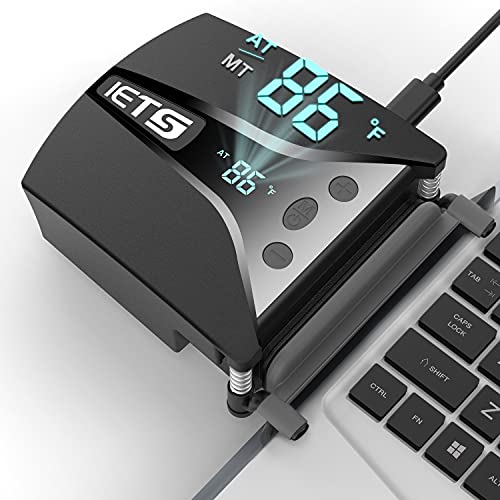
- 2600-5000 RPM blower for rapid cooling
- Automatic temperature-based speed control
- Clip arm and dust-proof net
Best For: Gaming laptops needing smart vacuum cooling
High-Fan RGB Pad
KYOLLY 13-Fan Laptop Cooler with LCD

- 13 fans for broad airflow
- LCD screen for cooling control
- 9 angles plus phone holder
Best For: Large laptops and ergonomic desk setups
Thermoelectric Cooling Stand
Metfut Laptop Cooling Pad with Detachable Fan
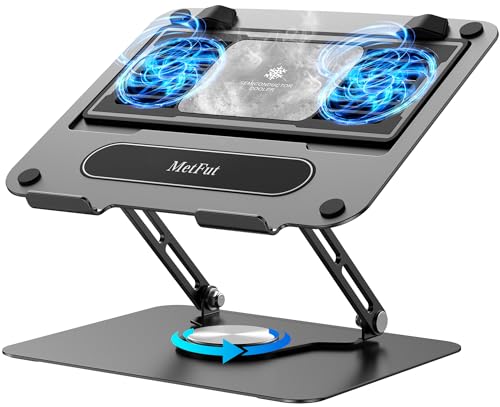
- Peltier-based cooling for faster heat reduction
- Detachable cooler and adjustable stand design
- Ultra-quiet operation with sturdy carbon steel build
Best For: People who want stronger cooling and an ergonomic, stable stand
RGB Gaming Cooler
ChillCore 9-Fan Laptop Cooling Pad

- 9 fans for broad airflow on large laptops
- LCD display shows fan speed at a glance
- 8 height settings and 10 RGB light modes
Best For: Gamers with larger laptops who want airflow, display feedback, and RGB style
Quiet Multi-Fan Stand
TECKNET Laptop Cooling Pad with Phone Stand

- 9 fans with stepless speed control up to 2600 RPM
- LED brightness tracks fan speed for simple status checking
- 5 height settings plus dual USB ports and phone holder
Best For: Quiet, ergonomic cooling with handy desk extras
Turbo 11-Fan RGB Cooler
Gaming Laptop Cooling Pad with Digital Display

- 11 turbo fans for strong airflow
- HD digital display with touch controls
- 6 height settings and quiet operation
Best For: Gamers and heavy laptop users needing strong cooling
V12 Sealed Turbo Stand
Laptop Cooling Pad with Temperature Display Control

- 5.5-inch turbo fan with airtight chamber
- 3 USB ports for peripherals
- Dust filter and 3 tilt angles
Best For: Large laptops and demanding gaming or rendering work
K10 8-Fan RGB Stand
Laptop Cooling Pad with LCD Display

- 8 fans for broad cooling coverage
- LCD readout shows fan speed
- 6 height settings with quiet operation
Best For: 15 to 17.3-inch laptops needing quiet cooling
Vacuum Fan Pick – KLIM Tempest Laptop Cooler with Display
If you want a laptop cooling pad with temperature display that focuses on fast, targeted cooling, the KLIM Tempest is built around a high-speed vacuum fan and automatic temperature detection. It is designed for laptops with a side or rear exhaust, and the included sleeves, hooks, fastening plates, and foam pads help improve fit.
Best For: Gamers and laptop users who want compact, portable cooling with automatic temperature sensing.
Pros:
- 4000 RPM motor pushes strong airflow for rapid cooling.
- Automatic mode detects laptop temperature and selects a fan speed.
- Manual mode offers 13 speed levels for more control.
- Small, lightweight design is easy to carry and use on the go.
Cons:
- Works only with laptops that have a side or rear air exhaust.
- Fit may require using the included accessories and reading the manual.
Overall, the Tempest is a practical choice if you want a compact cooler with a display and automatic temperature-based operation rather than a large traditional pad.
Aluminum Cooling Pad – Thermaltake Massive TM Temperature Sensor Pad
The Thermaltake Massive TM is a laptop cooling pad with temperature display features focused on steady airflow and simple control. Its dual 120mm fans are temperature regulated, and the adjustable sensor can monitor up to four different areas while the control panel lets you switch modes easily.
Best For: Users who want a full-size aluminum cooling pad with temperature-based fan control.
Pros:
- Dual 120mm fans provide strong ventilation.
- Temperature sensor can monitor up to four areas.
- Display/control panel includes lock and fan controls.
- Aluminum panel gives it a sturdy, premium feel.
Cons:
- Heavier and larger than compact portable coolers.
- Designed for 10″-17″ laptops, so it is not ultra-compact.
This is a straightforward pick if you want a traditional cooling pad with a visible control panel, temperature sensing, and dual-fan airflow in a desktop-friendly design.
Smart Vacuum Cooler – IETS GT202UB Temperature Display Cooler
If you need a laptop cooling pad with temperature display for a gaming machine, the IETS GT202UB leans hard into high-speed vacuum cooling and automatic temperature-based fan selection. Its blower runs from 2600 to 5000 RPM, and the retractable clip arm is designed to keep the cooler firmly attached during use.
Best For: Gaming laptops that need aggressive cooling and automatic temperature detection.
Pros:
- High-speed blower ranges from 2600 to 5000 RPM.
- Automatic temperature detection adjusts fan speed as needed.
- Retractable clip arm helps secure the cooler to the laptop.
- Dust-proof net helps reduce internal dust buildup.
Cons:
- Requires a compatible exhaust layout for best use.
- More specialized than a simple universal cooling pad.
The GT202UB is a strong fit if you want smart, temperature-aware cooling in a compact vacuum-style unit instead of a broad fan mat.
High-Fan RGB Pad – KYOLLY 13-Fan Laptop Cooler with LCD
This KYOLLY model is a laptop cooling pad with temperature display for buyers who want broad surface cooling and a few convenience extras. It uses 13 fans, shows cooling status through an LCD screen, and adds 9 height settings plus a built-in phone holder for more ergonomic desk use.
Best For: People who want a large, multi-fan cooling pad with an LCD screen and adjustable angles.
Pros:
- 13 fans provide wide-area airflow.
- LCD screen lets you monitor cooling and control speed.
- 9 adjustable height angles improve comfort.
- Built-in phone holder and dual USB ports add convenience.
Cons:
- Bulkier and heavier than compact cooling options.
- RGB lighting may be unnecessary for users who only want basic cooling.
Choose this one if you want a feature-rich cooling stand that combines temperature-style monitoring, multiple fans, and adjustable ergonomics in a single desk accessory.
Thermoelectric Cooling Stand – Metfut Laptop Cooling Pad with Detachable Fan
If you want a laptop cooling pad with temperature display in the broader sense of active cooling feedback, this MetFut model stands out for its thermoelectric Peltier design rather than a basic fan-only platform. It combines a semiconductor cooling panel with two ultra-quiet fans, making it a stronger pick when you want more aggressive heat reduction for a 10-16 inch laptop, tablet, or DJ mixer setup.
Best For: Users who want stronger-than-average cooling and a sturdy, adjustable stand for laptops up to 15.6 inches.
Pros:
- Thermoelectric Peltier cooling is designed for rapid temperature reduction.
- Detachable cooler gives you flexibility for normal use or extra cooling.
- Carbon steel framework and anti-slip pads add stability for desk use.
- Height and angle adjustments help improve ergonomic comfort.
Cons:
- Maximum 20W cooling requires a compatible 20W USB adapter sold separately.
- Humidity or idle operation can create mist on the cooling panel.
- Best fit is listed up to 15.6-inch laptops, even though the stand supports 10-16 inch devices.
This is a good choice if you care more about real cooling performance and solid build quality than flashy extras. The detachable design and low-noise operation make it especially practical for extended work sessions.
RGB Gaming Cooler – ChillCore 9-Fan Laptop Cooling Pad
This laptop cooling pad with temperature display-style monitoring is aimed at gamers who want a quick status readout plus visible fan control. The ChillCore A21 uses 9 fans, an LCD display for fan speed, and RGB lighting modes, so it fits best when cooling performance and a more animated desktop setup both matter.
Best For: Gamers and power users with 15.6-19.3 inch laptops who want lots of airflow and RGB styling.
Pros:
- 9 fans provide strong multi-zone airflow for larger laptops.
- LCD display shows current fan speed clearly.
- 8 height settings help improve comfort during long sessions.
- 10 RGB light modes add a customizable gaming look.
Cons:
- Bulky size may be more than casual users need.
- Air cooling is effective, but it is not the same as thermoelectric cooling.
- RGB lighting may be unnecessary if you prefer a plain work setup.
Overall, this is a feature-packed cooling pad for users who want easy fan-speed visibility and a strong gaming aesthetic. It offers a lot of cooling hardware for the price category, especially if you have a larger laptop.
Quiet Multi-Fan Stand – TECKNET Laptop Cooling Pad with Phone Stand
If you want a laptop cooling pad with temperature display features in the form of visible operating status, the TECKNET model keeps things practical with LED brightness that syncs to fan speed. Its 9 fans, 360-degree airflow, and whisper-quiet design make it a strong everyday choice for work, gaming, or movie watching on 12-17.3 inch laptops.
Best For: Users who want quiet, adjustable cooling with a phone holder and dual USB ports.
Pros:
- 9 fans with stepless speed control up to 2600 RPM for flexible cooling.
- LED brightness syncs with fan speed for quick status awareness.
- 5 height settings and up to 34° tilt support ergonomic use.
- Dual USB ports and a built-in phone holder add everyday convenience.
Cons:
- Noise is low, but it is still a fan-based cooler rather than a semiconductor system.
- Best fit tops out at 17.3-inch laptops, so very large systems are excluded.
- The phone stand may not matter if you want a very minimal cooling setup.
This is the most balanced option in the group if you want quiet operation, useful ergonomics, and easy monitoring without extra complexity. It is well suited to users who want a reliable cooling stand that also helps keep accessories organized.
Turbo 11-Fan RGB Cooler – Gaming Laptop Cooling Pad with Digital Display
If you want a laptop cooling pad with temperature display-style control and easy monitoring, this ICE COOREL model is built for high-output gaming and long work sessions. Its 11 high-speed turbo fans are designed to move a lot of air across a wide cooling area, while the HD digital display and touch controls make speed changes simple on the fly.
Best For: Gamers, video editors, and heavy laptop users who want strong cooling, adjustable height, and quiet operation.
Pros:
- 11 high-speed turbo fans for massive airflow and broad heat dissipation
- HD digital display with intuitive touch controls for fan speed and RGB modes
- Near-silent fan motor helps keep noise down during gaming or work
- 6 height settings and a sturdy iron mesh panel for better comfort and support
Cons:
- Best suited to laptops up to 17 inches, so larger systems are not supported
- RGB lighting may be more than some buyers want for a simple work setup
Overall, this is a strong pick if you want aggressive cooling plus easy front-panel controls in a desktop-style laptop stand. The combination of airflow, adjustability, and quiet performance makes it a practical choice for demanding users.
V12 Sealed Turbo Stand – Laptop Cooling Pad with Temperature Display Control
For buyers looking for a laptop cooling pad with temperature display-style speed control and workstation-friendly extras, the llano V12 is built for bigger laptops and sustained loads. Its large 5.5-inch turbofan, airtight pressure chamber, and scroll-wheel airflow adjustment are aimed at fast cooling, while the touch-mute RGB control keeps the setup easy to use.
Best For: 15.6 to 19-inch laptops, especially gaming or rendering setups that need strong cooling and extra USB ports.
Pros:
- 5.5-inch turbo fan with sealed foam chamber for concentrated cooling
- Three USB 2.0 ports add useful hub functionality for peripherals
- High-density removable dust filter helps protect internal laptop fans
- Three tilt angles and a reinforced chassis support larger laptops
Cons:
- Noise is rated at up to 70 dB, so it is not the quietest option
- USB ports are for peripherals only and cannot charge devices
This model stands out if you want cooling power plus practical desk expansion in one unit. It is especially appealing for users who run demanding workloads and want a more complete station around their laptop.
K10 8-Fan RGB Stand – Laptop Cooling Pad with LCD Display
If you want a laptop cooling pad with temperature display-like fan monitoring and simple controls, the ICE COOREL K10 keeps things straightforward. It uses eight cooling fans, an LCD readout for current fan speed, and touch buttons for adjusting both fan speed and RGB lighting, making it a practical option for everyday gaming or work.
Best For: Users with 15 to 17.3-inch laptops who want quiet multi-fan cooling and an easy-to-read display.
Pros:
- Eight cooling fans help move air effectively across the laptop base
- LCD display shows current fan speed at a glance
- 6 height adjustments support more comfortable typing and viewing
- Whisper-quiet design makes it easier to use in shared spaces
Cons:
- Supports laptops up to 17.3 inches, so it is not ideal for larger machines
- RGB lighting may not suit buyers who want a plain, minimal look
As an all-around cooling stand, this one balances fan count, quiet operation, and simple on-device control. It is a sensible choice if you want strong cooling without a more complex setup.
How We Picked the Best Laptop Cooling Pad with Temperature Display
We prioritized cooling design, the clarity and usefulness of the temperature display, fan control options, build quality, and real-world compatibility with common laptop sizes. We also considered whether a model is better suited to gaming rigs, slimmer productivity laptops, or heavier 15.6-inch to 19-inch machines.
Quick Comparison
For maximum airflow, look at multi-fan and high-RPM designs. For more focused cooling and smarter heat monitoring, vacuum-style models with a temperature readout can be a better match. If you want comfort and ergonomics too, adjustable-angle stands with USB ports and stable frames are worth paying attention to.
Key Buying Factors for a Laptop Cooling Pad with Temperature Display
Display Quality and Temperature Sensing
A temperature display is only helpful if it is readable at a glance and reacts quickly enough to reflect load changes. Look for clear numbers, sensible placement, and modes that help you understand whether the laptop surface or intake area is actually being cooled.
Fan Type and Airflow
Big fans tend to spread airflow broadly, while vacuum and turbofan designs can concentrate cooling on hot exhaust areas. If your laptop runs especially warm near the vents, targeted airflow may matter more than raw fan count.
Noise and Speed Control
Stepless controls and multiple speed settings let you reduce noise for office use or increase airflow for gaming sessions. Quiet operation is especially important if you plan to use the pad on a desk all day.
Size, Stability, and Comfort
Check the supported laptop size, surface grip, and height adjustment range. A stable base and comfortable viewing angle can make a bigger difference than extra lighting features.
Extra Features That Matter
USB hubs, phone stands, RGB lighting, and detachable components are useful only if they do not compromise cooling performance. Treat them as convenience features, not the main reason to buy.
Who Should Buy Which Laptop Cooling Pad with Temperature Display?
Gamers and power users should lean toward stronger airflow, higher fan speeds, and more aggressive cooling designs. Office users and students may prefer a quieter Laptop Cooling Pad with Temperature Display and a simple stand layout. If you move between desks often, choose a lighter model with easy height adjustment and broad compatibility. For large gaming laptops, favor pads built for 17-inch-plus devices and stable cooling coverage.
In short, the best option is the one that matches your laptop’s heat pattern, your noise tolerance, and how you actually use the machine day to day.