
If your laptop runs hot during gaming, streaming, or heavy multitasking, a laptop cooling pad with adjustable fan speed can make a real difference. The right model helps reduce heat, improve comfort, and support more consistent performance.
In this roundup, we focus on cooling pads that balance airflow, noise, size compatibility, and usability so you can pick a stand that fits your laptop and your workload.
Best 10 Laptop Cooling Pad with Adjustable Fan Speed Picks for 2026
Smart Cooling Pick
llano V12 Ultra Smart-Control Cooling Pad

- Software-adjusted Low/Medium/High modes
- 5.5-inch turbo fan up to 2800 RPM
- 3 height settings and 3-port USB 3.0 hub
Best For: Large gaming laptops that need smart, adjustable cooling
Quiet Adjustable Choice
TECKNET 9-Fan Stepless Speed Cooling Pad

- Nine fans with stepless speed control
- Quiet operation under 40 dB
- Five height settings plus built-in phone holder
Best For: Quiet, adjustable cooling for everyday laptops
Simple Manual Control
Thermaltake Massive V20 Metal Cooling Pad
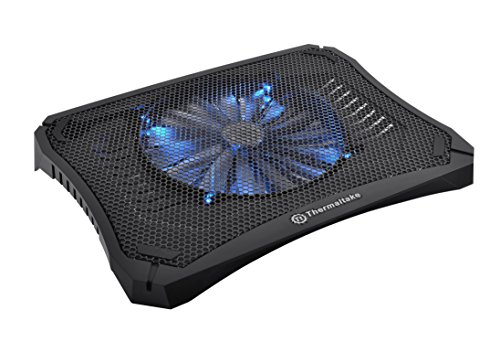
- 200mm fan with adjustable speed control
- Metal mesh design for better airflow
- Fits notebooks up to 17 inches
Best For: Simple, manual cooling for mainstream laptops
Performance Monster
IETS GT500 Variable-Speed Turbo Cooler

- Variable speed from 0 to 5000 RPM
- Sealed foam and turbofan for strong cooling
- 3-port USB hub included
Best For: High-performance laptops where maximum cooling matters more than noise
ChillCore RGB 9-Fan Cooler

- Nine fans with adjustable cooling modes
- LCD display shows current fan speed
- Eight height settings for better comfort
Best For: Large gaming laptops and ergonomic setups
High-Power RGB Cooler

- 5.5-inch turbo fan with sealed foam chamber
- Scroll wheel for precise airflow adjustment
- 3 USB ports plus dust filter and RGB lighting
Best For: Gamers and power users who want strong cooling with adjustable speed
Multi-Fan Value Stand
LIANGSTAR 6-Fan Adjustable Cooler

- Six quiet fans with two speed-control switches
- Seven height settings for better ergonomics
- Metal mesh top with non-slip stability features
Best For: Users who want a budget-friendly adjustable cooling stand
Display-Ready Turbo Cooler

- 5.5-inch turbo fan for fast cooling
- LED display shows real-time fan speed
- Includes mouse pad, dust filter, and USB-A to C cable
Best For: People who want strong cooling with a speed display and bundled extras
Smart Cooling Pick – llano V12 Ultra Smart-Control Cooling Pad
If you want a laptop cooling pad with adjustable fan speed for a large gaming notebook, the llano V12 Ultra is built around smart control and serious airflow. Its 5.5-inch turbo fan can run in three software-driven cooling modes or be adjusted manually, making it a flexible pick for heavy workloads, gaming, or streaming.
Best For: Owners of 15.6-inch to 19-inch gaming laptops who want software control, strong cooling, and extra USB ports.
Pros:
- Smart software offers Low, Medium, and High cooling modes that automatically adjust fan speed.
- Large 5.5-inch turbo fan reaches up to 2800 RPM for rapid heat dissipation.
- Three adjustable height angles help improve comfort during long sessions.
- Includes a 3-port USB 3.0 hub plus RGB lighting for a more complete desk setup.
Cons:
- Designed for larger laptops, so it is not the best fit for smaller systems.
- Software control is optional, but it adds extra setup if you want the smart modes.
The llano V12 Ultra stands out when you want both performance and control in a large-format cooler. It is especially appealing if you prefer a cooler that can adapt fan speed automatically, yet still give you manual control when needed.
Quiet Adjustable Choice – TECKNET 9-Fan Stepless Speed Cooling Pad
This laptop cooling pad with adjustable fan speed is a practical option if you want broad airflow without a lot of noise. The TECKNET model uses nine fans with stepless speed control up to 2600 RPM, so you can fine-tune cooling for work, gaming, or media use.
Best For: Users who want a quieter, ergonomic cooling stand for 12-inch to 17.3-inch laptops.
Pros:
- Nine fans provide 360-degree surround airflow for more even heat dissipation.
- Stepless speed control lets you dial in the fan speed up to 2600 RPM.
- Whisper-quiet operation is rated below 40 dB.
- Five height settings and a built-in phone holder improve comfort and convenience.
Cons:
- It is sized for mainstream laptops, not oversized 18-inch-plus gaming systems.
- Performance-focused buyers may prefer a more aggressive turbo-style cooler.
The TECKNET pad is a balanced choice if you want adjustable cooling, quiet operation, and a comfortable viewing angle. It is especially useful for everyday laptop users who need steady airflow rather than maximum blast cooling.
Simple Manual Control – Thermaltake Massive V20 Metal Cooling Pad
If you want a straightforward laptop cooling pad with adjustable fan speed, the Thermaltake Massive V20 keeps things simple with one large 200mm fan and a manual speed controller. Its metal mesh top is designed to move a lot of air across laptops up to 17 inches, making it a solid basic cooling stand.
Best For: Users who want a simple, metal-mesh cooling pad with manual fan control for laptops up to 17 inches.
Pros:
- Single 200mm fan offers strong airflow with adjustable speed control.
- Metal mesh build helps improve cooling efficiency.
- LED light switch and fan speed controller are built into the pad.
- Works with notebooks up to 17 inches.
Cons:
- Only one fan, so it is less specialized than multi-fan or turbo-fan models.
- Cooling features are basic compared with newer pads that include software or multi-mode control.
The Massive V20 is a no-frills option for buyers who mainly want manual fan adjustment and a durable metal design. It makes sense if you prefer a simple cooling pad over extra features.
Performance Monster – IETS GT500 Variable-Speed Turbo Cooler
For buyers who want a laptop cooling pad with adjustable fan speed and maximum output, the IETS GT500 is built like a performance-focused cooler. Its industrial-grade turbofan spins up to 5000 RPM, and the infinitely variable speed control lets you tune cooling for office work, gaming, or standby use.
Best For: Performance users with 13-inch to 17.3-inch laptops who need strong, adjustable cooling and do not mind more noise at high speed.
Pros:
- Infinitely variable speed control ranges from 0 to 5000 RPM.
- Sealed foam design and turbofan aim for 360-degree cooling coverage.
- Bottom air intake is made to help rear-exhaust gaming laptops.
- Includes a 3-port USB hub with a dedicated data line.
Cons:
- Noise can reach 65 dB at the highest speed.
- May be too aggressive for users who are sensitive to fan noise.
The GT500 is best viewed as a high-power cooling tool rather than a quiet desk accessory. If cooling performance is the top priority, its variable speed and sealed airflow design make it a standout option.
TECKNET Quiet Dual-Fan Cooling Pad – TECKNET Laptop Cooling Pad
If you want a laptop cooling pad with adjustable fan speed for everyday work or gaming, the TECKNET model is built around targeted airflow and simple control. Its two large 110mm fans and internal channel design focus cool air toward the center of the laptop, while the side switch lets you move from low noise to maximum cooling as needed.
Best For: Students, office users, and gamers who want a slim, portable cooler with easy speed adjustment and USB-C/USB-A compatibility.
Pros:
- Two large fans with a channel design for more concentrated cooling
- Freely adjustable fan speed from 0 to maximum
- Thin, lightweight build that is easy to carry
- USB-C and USB-A ports add broad device compatibility
Cons:
- USB-A cable is included, so some setups may need the right cable type
- Cooling focus is designed for targeted airflow rather than maximum fan count
Overall, this TECKNET cooler is a practical pick if you want straightforward speed control, portable design, and a pad that works well for both quiet daily use and heavier gaming sessions.
ChillCore RGB 9-Fan Cooler – ChillCore Laptop Cooling Pad
For buyers looking for a laptop cooling pad with adjustable fan speed and a more aggressive cooling layout, the ChillCore pad stands out with nine fans and multiple speed modes. It also adds an LCD display for quick fan-speed checks, plus RGB lighting if you want a gaming-focused look alongside practical cooling.
Best For: Large gaming laptops and users who want strong cooling, height adjustment, and visible speed control.
Pros:
- 9 fans offer a high-output cooling layout
- Adjustable fan modes with LCD readout for simple control
- 8 height settings improve comfort for typing and viewing
- Whisper-quiet design helps reduce noise even at higher settings
Cons:
- RGB lighting may not appeal to users who prefer a plain setup
- Best suited to larger laptops, so it may be more pad than smaller systems need
This is a strong choice if you want a cooler that combines high fan count, easy speed adjustment, and ergonomic flexibility for long gaming or work sessions.
OImaster 3-Speed Cross-Flow Cooler – Laptop Cooler with Adjustable Stand
If you need a laptop cooling pad with adjustable fan speed in a compact, travel-friendly form, this OImaster cooler takes a different approach with a single cross-flow turbine fan. It offers three speed modes, a small footprint, and adjustable stands, making it useful for cooling and posture support at home, in the office, or on the go.
Best For: Travelers, students, and home-office users who want a compact cooling solution with three fan speeds and stand adjustment.
Pros:
- Three speed modes from breeze to strong wind
- Cross-flow turbine fan is designed for stronger heat dissipation
- Compact, vertical-standing design saves space
- Two adjustable stands help improve typing and viewing posture
Cons:
- Uses one fan instead of a multi-fan cooling layout
- Cooling focus is more compact than high-capacity gaming pads
For users who value portability and a simple three-speed setup, this cooler is a sensible pick that doubles as a small desk fan and a stable laptop stand.
High-Power RGB Cooler – llano V12 5.5-Inch Turbo Fan
If you want a laptop cooling pad with adjustable fan speed for demanding gaming or rendering, the llano V12 is built to move a lot of air fast. Its 5.5-inch turbo fan, sealed foam chamber, and 36W power design are aimed at high-output cooling, while the scroll wheel gives you precise airflow control.
Best For: Gaming laptops and creative-work setups that need strong, adjustable cooling plus a USB hub.
Pros:
- Large 5.5-inch turbo fan and sealed pressure chamber for aggressive cooling performance.
- Scroll-wheel control makes fan speed adjustments quick and precise.
- Three USB 2.0 ports add convenience for a mouse, keyboard, or drive.
- Dust filter and memory foam seal help reduce dust buildup around laptop vents.
Cons:
- The single-fan turbo design is focused on power rather than a multi-fan layout.
- RGB lighting may not appeal to buyers who want a plain, low-profile look.
- Designed for 15.6-19 inch laptops, so smaller devices may not benefit as much.
Overall, this is a strong pick if your priority is rapid cooling with simple speed control and extra connectivity. It leans more toward performance-focused users than casual office setups.
Multi-Fan Value Stand – LIANGSTAR 6-Fan Adjustable Cooler
This laptop cooling pad with adjustable fan speed is a straightforward choice if you want flexible airflow and a more traditional multi-fan design. With six quiet fans, two fan-speed switch controls, and seven height settings, it covers the basics well for everyday work or gaming.
Best For: Budget-conscious buyers who want a stable, adjustable cooling stand with multiple fans.
Pros:
- Six ultra-quiet fans can run together or in smaller groups for flexible cooling.
- Two independent switches let you adjust fan speed from 0 to max.
- Seven height settings help match your viewing angle and comfort.
- Metal mesh top, non-slip baffle, and bottom anti-skid pads improve stability.
Cons:
- The included USB port count is limited to two.
- Cooling performance is tied to small fans rather than a large turbo fan.
- Best fit tops out at 17.3-inch laptops, so larger systems are out.
It’s a practical option if you want adjustable fan control without paying for a premium turbo-style cooler. The design is simple, functional, and geared toward broad compatibility.
Display-Ready Turbo Cooler – llano V12 with Mouse Pad
For buyers comparing a laptop cooling pad with adjustable fan speed, this llano V12 stands out for its real-time LED speed display and touch controls. It uses the same 5.5-inch turbo fan approach as the brand’s other V12 model, but adds a mouse pad in the box for a more complete desk setup.
Best For: Users who want strong cooling, visible speed feedback, and a bundled mouse pad.
Pros:
- 5.5-inch turbo fan is designed for rapid CPU and GPU temperature reduction.
- LED display shows current fan speed in real time.
- Touch controls make it easy to adjust cooling levels.
- Includes a large mouse pad and dust filter in the package.
Cons:
- Single-fan design may feel less familiar than multi-fan cooling pads.
- Heavier build at 2.15 kg may be less portable.
- RGB lighting is not listed here, so it’s a more utilitarian setup.
This model is a smart fit if you like clear feedback and quick adjustments while working or gaming. It combines high-output cooling with practical extras that make desk use easier.
How We Picked the Best Laptop Cooling Pad with Adjustable Fan Speed
We prioritized cooling pads with adjustable fan control, reliable build quality, and broad laptop compatibility. Since fan speed affects both cooling output and noise, we looked for models that offer stepless control, multiple speed settings, or smart software tuning. We also considered stand stability, port options, and whether the design suits gaming laptops, thin notebooks, or larger 17-inch systems.
Quick Comparison
For maximum cooling, high-RPM turbo and sealed-air designs tend to perform best, especially under sustained gaming loads. For everyday use, quieter multi-fan pads with lower speed settings are usually the better fit. If you want a mix of cooling and ergonomics, look for height adjustment, a sturdy mesh surface, and enough surface area for your laptop size.
Key Buying Factors for a Laptop Cooling Pad with Adjustable Fan Speed
Cooling Power
Check fan size, RPM range, and airflow design. Larger fans can move more air quietly, while turbo-style units can push stronger cooling for demanding systems.
Noise Control
Adjustable fan speed matters because the best setting is not always the highest one. A good pad should let you dial down noise for office work or increase airflow during gaming sessions.
Fit and Stability
Make sure the cooling pad supports your laptop’s size and weight. Non-slip supports, raised edges, and solid hinges help prevent wobble when typing or moving the screen.
Power and Connectivity
USB-powered pads are common, but some offer USB-A and USB-C compatibility or extra pass-through ports. That can be useful if you need to keep a mouse, headset, or drive connected.
Ergonomics and Extras
An adjustable stand can improve viewing angle and typing comfort. RGB lighting, phone holders, and software controls are nice extras, but they should come after cooling performance and stability.
Who Should Buy Which Laptop Cooling Pad with Adjustable Fan Speed?
Gamers and creators should lean toward stronger airflow, wider speed ranges, and larger pads that cover 15.6-inch and bigger laptops. Office users and students may prefer quieter, simpler models with moderate speed control and a lighter footprint. If your laptop is especially hot, choose a high-performance pad with a turbo fan or sealed cooling chamber; if comfort and portability matter more, a quieter multi-fan model is usually the smarter choice.