
The right desktop can make large drawings easier to navigate, BIM models smoother to edit, and rendering less of a bottleneck. But an architect who mostly works in 2D CAD needs a different machine from a studio producing frequent 3D visualizations.
These 10 desktops span compact workstations, conventional office towers, and systems with dedicated graphics. Use the buying guide below to match their hardware to your software, project size, and upgrade plans.
Best 10 Desktop Computer for Architects Picks for 2026
Storage-Rich RTX Pick
Dell Tower with Ultra 7, RTX 5060 and 2TB SSD

- 20-core Core Ultra 7 and RTX 5060
- 32GB DDR5 RAM and 2TB SSD
- Windows 11 Pro; keyboard and mouse included
Best For: Design work with substantial local project storage
Professional Workstation Pick
Dell Pro Max T2 with RTX 2000 Ada

- RTX 2000 Ada with 16GB graphics memory
- Stated ISV certifications
- Thunderbolt 4 and four GPU display outputs
Best For: Professional CAD workflows and multi-display setups
CPU-Focused Workstation Pick

- 20-core Core Ultra 7 265K
- 32GB DDR5 RAM and 1TB SSD
- Integrated graphics in this configuration
Best For: CPU-focused work with a planned graphics upgrade
1TB RTX Tower Pick

- 20-core Core Ultra 7 and RTX 5060 8GB
- 32GB DDR5 RAM and 1TB SSD
- HDMI 2.1 and DisplayPort 1.4a
Best For: Modeling on a general-purpose RTX-equipped tower
Best Compact CAD Workstation

- Compact, roughly three-pound workstation
- 32GB DDR5 RAM and 1TB SSD
- Listed ISV certification includes AutoCAD
Best For: Space-conscious CAD workstations
Best Easy-Access Tower

- Core Ultra 7 265 and 32GB DDR5
- Tool-less case access
- Supports two 4K displays
Best For: Office workflows with straightforward tower access
Best Wired Multi-Monitor Tower
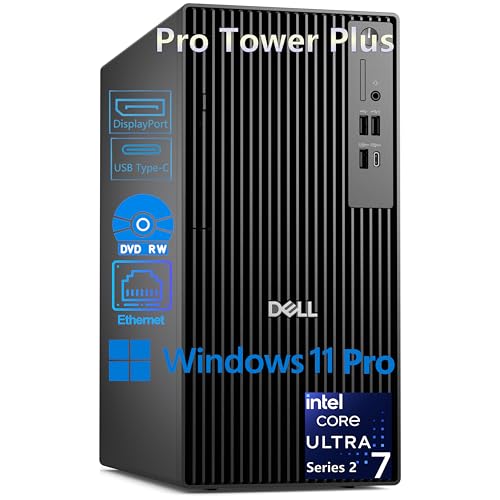
- Three DisplayPort outputs for up to three 4K displays
- Core Ultra 7 265 and 1TB SSD
- Windows 11 Pro; 16GB RAM installed
Best For: Wired, multi-monitor design desks
Best for 3D Workflows

- RTX 5060 with 8GB dedicated memory
- 20-core Core Ultra 7 processor
- 32GB DDR5 RAM and 1TB NVMe SSD
Best For: Architects balancing 3D work and multitasking
Best for Drafting and Multitasking

- 12-core Core i7-12700K
- 32GB DDR5 RAM and 1TB SSD
- Dual 4K support via HDMI and DisplayPort
Best For: Drafting-focused, dual-monitor office setups
Best for Large Project Archives

- 1TB SSD plus 4TB HDD
- 32GB RAM and dedicated Quadro K1200
- Renewed system with older components
Best For: Local storage for drawings and project archives
Storage-Rich RTX Pick – Dell Tower with Ultra 7, RTX 5060 and 2TB SSD
If you need a desktop computer for architects that balances dedicated graphics with room for project files, this Dell tower pairs an Intel Core Ultra 7 265F, RTX 5060, 32GB DDR5 RAM and a 2TB SSD.
Best For: Architects who want a general-purpose design tower with generous built-in storage.
Pros:
- 20-core processor and dedicated RTX 5060 graphics for modeling and graphics-heavy work.
- 32GB DDR5 RAM and a 2TB SSD support multitasking and large local file collections.
- Windows 11 Pro, Wi-Fi 6, and an included keyboard and mouse simplify setup.
Cons:
- The supplied notes do not identify professional-application certifications.
- Confirm the display connections you need; the listed port details are limited.
Choose this configuration when storage capacity matters as much as GPU acceleration; check your CAD software’s hardware requirements before purchasing.
For buyers seeking a desktop computer for architects with professional graphics, the Dell Pro Max Tower T2 combines an RTX 2000 Ada 16GB GPU with a 20-core Core Ultra 7 265 vPro, 32GB DDR5 RAM and a 1TB SSD.
Best For: Architecture teams prioritizing professional graphics and stated ISV certification for CAD workflows.
Pros:
- RTX 2000 Ada graphics have 16GB of dedicated memory.
- Stated ISV certifications target compatibility with professional applications.
- Thunderbolt 4, multiple USB ports and four GPU Mini DisplayPort outputs offer flexible connectivity.
Cons:
- The 1TB SSD offers less built-in storage than the 2TB Dell tower in this roundup.
- The computer was resealed for an SSD upgrade; the upgraded drive has a separate seller warranty.
This is the most explicitly workstation-oriented option here. Verify certification for your specific software and review the component-by-component warranty terms.
The Lenovo ThinkStation P2 is a desktop computer for architects whose current work is more CPU-focused: its Core Ultra 7 265K has 20 cores, alongside 32GB DDR5 RAM and a 1TB SSD. This listed configuration uses integrated graphics, so assess your 3D needs carefully.
Best For: CPU-heavy design and office work where dedicated graphics can be addressed separately.
Pros:
- 20-core Core Ultra 7 265K with a listed boost speed up to 5.5GHz.
- 32GB DDR5 RAM, 1TB SSD and a 500W 80 PLUS Platinum power supply.
- Wi-Fi 7 and a broad selection of USB and display connections.
Cons:
- This configuration lists integrated graphics, not an installed NVIDIA RTX card; graphics-intensive modeling may require an upgrade.
- The stated seller warranty is 30 days.
The listing says the platform supports NVIDIA RTX 5000 Ada graphics, but that is an upgrade capability—not the GPU included here. Confirm compatibility and upgrade costs before choosing it for demanding visualization.
For a desktop computer for architects that includes dedicated graphics without requiring an immediate GPU upgrade, this Dell Tower 2026 combines a 20-core Core Ultra 7 265F with an RTX 5060 8GB, 32GB DDR5 RAM and a 1TB SSD.
Best For: Architects seeking an RTX-equipped general-purpose tower for modeling and everyday productivity.
Pros:
- RTX 5060 with 8GB GDDR7 dedicated graphics memory.
- 32GB DDR5 5600MT/s RAM and a PCIe NVMe SSD.
- HDMI 2.1 and DisplayPort 1.4a outputs, plus Wi-Fi 6 and Gigabit Ethernet.
Cons:
- The 1TB SSD may require external or additional storage for extensive project archives.
- No professional CAD certification is identified in the supplied notes.
This is a practical pick if your software benefits from a dedicated RTX GPU. Check application-specific GPU and memory requirements, particularly for complex scenes.
Best Compact CAD Workstation – Lenovo ThinkStation P3 Tiny
If you need a desktop computer for architects without giving up much desk space, the Lenovo ThinkStation P3 Tiny is a compelling option. Its Core i7-14700, 32GB of DDR5 memory, and 1TB SSD come in a roughly three-pound chassis, with listed ISV certification for AutoCAD and other professional applications.
Best For: Architects who primarily work in CAD and need a compact, multi-display workstation.
Pros:
- Listed ISV certification includes AutoCAD, SOLIDWORKS, ArcGIS, Creo, and MATLAB.
- 32GB RAM and a 1TB SSD provide room for demanding daily multitasking and files.
- DisplayPort and HDMI support two displays; USB, Ethernet, Wi-Fi 6, and Bluetooth cover common peripherals.
Cons:
- Intel UHD Graphics 770 is integrated graphics; the listing does not specify a dedicated GPU for demanding rendering.
- The seller resealed the computer to upgrade its memory and SSD; those parts carry a separate three-year warranty, while Lenovo covers the remaining components for one year.
The P3 Tiny stands out for its small footprint and stated software certifications. If GPU-heavy visualization is central to your work, verify that its integrated graphics meet your application requirements before buying.
Best Easy-Access Tower – Dell Tower Desktop
For buyers comparing a desktop computer for architects, this Dell Tower Desktop offers a Core Ultra 7 265 processor, 32GB of DDR5 memory, and a case designed for convenient access to internal components. It is a practical choice for drawing work and office multitasking, provided its integrated graphics suit your software.
Best For: Architects who want a conventional tower with 32GB RAM, multiple-monitor connections, and straightforward access for upgrades.
Pros:
- 32GB DDR5 memory supports working across drawings and other applications.
- HDMI 2.1 and DisplayPort can connect two 4K displays, according to the listing.
- Tool-less entry and a removable side panel simplify access to internal components.
- Includes one year of onsite service for eligible hardware issues that cannot be resolved remotely.
Cons:
- Integrated Intel UHD Graphics may be a limiting factor for GPU-intensive visualization.
- Ships with Windows 11 Home rather than Pro.
The accessible chassis and generous installed memory make this an approachable tower for everyday design workflows. Check your CAD and rendering software’s graphics requirements before relying on it for complex 3D work.
Best Wired Multi-Monitor Tower – Dell Pro Tower Plus
The Dell Pro Tower Plus is a desktop computer for architects who want a wired workstation setup with room to spread drawings and reference material across monitors. Its Core Ultra 7 265, 1TB SSD, Windows 11 Pro, and three DisplayPort outputs make it a business-oriented option, though the installed 16GB of RAM warrants consideration for larger projects.
Best For: Architects who use multiple DisplayPort monitors, wired Ethernet, and Windows 11 Pro features.
Pros:
- Three DisplayPort 1.4a connections support up to three 4K displays, according to the listing.
- Core Ultra 7 265 processor and 1TB PCIe NVMe SSD support responsive everyday work.
- Windows 11 Pro includes business features such as BitLocker and Remote Desktop.
- Multiple USB ports, including two USB-C connections, accommodate peripherals.
Cons:
- Installed memory is listed as 16GB; confirm the configuration if you need more RAM for large projects.
- Integrated graphics are not a substitute for a dedicated GPU in demanding rendering workflows.
- No built-in Wi-Fi or HDMI port is listed; networking uses Ethernet unless you add an adapter.
Choose this tower for its three-monitor DisplayPort setup and business OS, not for a ready-made rendering system. Its listed specifications make memory capacity, graphics needs, and your monitor connections the key checks before purchase.
Best for 3D Workflows – Dell Tower with RTX 5060
For architects who move between drawings, models, and visual presentations, this desktop computer for architects offers a strong mix of processing power and dedicated graphics. It pairs a 20-core Intel Core Ultra 7 265F with an NVIDIA RTX 5060, 32GB of DDR5 memory, and a 1TB NVMe SSD.
Best For: Architects who want dedicated graphics for 3D work alongside responsive everyday multitasking.
Pros:
- RTX 5060 with 8GB of dedicated memory supports graphics-intensive workloads.
- 32GB DDR5 RAM and a 1TB NVMe SSD suit large files and multiple open applications.
- HDMI and DisplayPort outputs, Wi-Fi 6, and an expandable tower support a flexible desk setup.
Cons:
- The supplied specifications do not establish certification for specific architecture applications.
- Projects needing more than 1TB of local storage will require an upgrade or external drive.
This is the most graphics-focused option here on the listed hardware. Check the requirements of your particular modeling and rendering software before choosing it for a production workflow.
Best for Drafting and Multitasking – Dell QCT1250 Tower
If your desktop computer for architects will focus on drawings, documents, and multiple applications rather than demanding GPU rendering, this Dell tower is worth considering. Its Core i7-12700K, 32GB of DDR5 RAM, and 1TB PCIe SSD provide a capable foundation for CPU-driven work.
Best For: Drafting-heavy offices that prioritize multitasking, dual displays, and business connectivity over dedicated graphics.
Pros:
- 12-core, 20-thread Core i7-12700K supports demanding multitasking.
- 32GB DDR5 RAM and a 1TB PCIe SSD offer useful capacity for working files.
- HDMI and DisplayPort support dual 4K monitors; USB-C, Ethernet, Wi-Fi, and Bluetooth add connection options.
Cons:
- Integrated Intel UHD Graphics 770 is a less compelling choice for GPU-intensive visualization than a desktop with dedicated graphics.
- The listing gives conflicting memory-upgrade details, so confirm the maximum supported RAM before planning an expansion.
Choose this configuration for a dual-monitor productivity station, not on the assumption that it has workstation-class graphics. Check your software’s GPU requirements if 3D visualization is central to your work.
Best for Large Project Archives – Renewed HP Workstation
This renewed HP desktop computer for architects stands out for its storage arrangement: a 1TB SSD for active work plus a 4TB hard drive for project archives. It also lists 32GB of RAM, an 8th-generation six-core Core i5, and a dedicated NVIDIA Quadro K1200 graphics card.
Best For: Architects who need substantial local archive space and can accommodate older, renewed workstation hardware.
Pros:
- 1TB SSD and 4TB HDD separate active files from bulk storage.
- Quadro K1200 provides 4GB of dedicated graphics memory.
- Two DisplayPort connections, USB-C, Ethernet, Wi-Fi, and Bluetooth support varied peripherals.
Cons:
- The 8th-generation processor and Quadro K1200 are older components; verify performance against your current software requirements.
- This is a renewed system with a listed 90-day extended warranty.
The large secondary drive is its clearest advantage. Although the listing mentions design-software compatibility, confirm the exact model’s certification and support for your applications before relying on it for professional projects.
How We Picked the Best Desktop Computer for Architects
We compared the listed processors, graphics hardware, memory, storage, and form factors against common architectural tasks: 2D drafting, BIM modeling, 3D navigation, and rendering. We also considered whether a system has room to grow. These are specification-based recommendations, not claims of hands-on benchmarks; confirm each seller’s exact configuration before buying.
Quick Comparison: Which Type Fits Your Workflow?
For rendering and demanding 3D views: The Dell towers with GeForce RTX 5060 graphics offer a more suitable starting point than desktops without a clearly listed dedicated GPU. Check your renderer’s supported graphics hardware and video-memory requirements first.
For professional workstation graphics: The Dell Pro Max Tower T2 pairs an RTX 2000 Ada 16GB with a Core Ultra 7 processor. It is worth considering if your software workflow or IT policy favors a professional GPU; verify application certifications for the exact configuration.
For space-conscious offices: The Lenovo ThinkStation P3 Tiny minimizes desk space, but its small chassis can limit graphics and expansion options. Confirm its installed GPU before choosing it for heavy visualization.
For basic drafting on a tight budget: The older Intel-based Dell tower and HP workstation may be adequate for lighter projects. The HP’s Quadro K1200 is an older 4GB card, so do not assume it will handle modern GPU rendering well.
Key Buying Factors for a Desktop Computer for Architects
Match the Processor to Your Software
Fast individual cores help with many interactive CAD and BIM operations, while additional cores can help with CPU-based rendering and multitasking. Check your primary applications’ current recommendations rather than choosing by core count alone.
Verify the Graphics Configuration
A dedicated GPU matters most for complex 3D models, real-time visualization, and GPU rendering. An RTX 5060 and an RTX 2000 Ada serve different priorities: compare renderer compatibility, required VRAM, professional-driver needs, and price. Several listed towers do not specify a discrete GPU; confirm what is actually installed before ordering.
Plan for Memory, Storage, and Displays
For substantial BIM files or several design applications open at once, 32GB RAM is a practical starting point; 16GB is less comfortable and may require an upgrade. A 1TB SSD suits many active projects, while 2TB provides more local room for assets and render outputs. Check spare memory slots, drive bays, monitor connections, and power-supply capacity if you expect to expand.
Who Should Buy Which Desktop Computer for Architects?
Choose an RTX 5060 Dell tower if GPU-supported visualization is central to your work and its exact specifications meet your renderer’s requirements. Consider the Dell Pro Max for a professional-GPU workflow. The ThinkStation P2 is a candidate for CAD-focused work, but verify its graphics configuration. Pick the P3 Tiny when footprint matters more than internal expandability. For lighter drafting or a lower initial cost, compare the remaining Dell and HP systems carefully, allowing for possible memory, graphics, or platform limitations.