
If your laptop runs hot during gaming, editing, or long work sessions, the right cooling pad can make a noticeable difference. A good laptop cooling pad with USB-C power can improve airflow, reduce thermal throttling, and add a more comfortable typing angle.
In this roundup, we focus on practical options with modern power connections, adjustable stands, and fan setups that make sense for different laptop sizes and performance needs.
Best 10 Laptop Cooling Pad with USB-C Power Picks for 2026
Quiet Multi-Port Cooling
Amazon Basics 6-Fan Adjustable Stand

- 6 quiet fans for multi-angle cooling
- 6 height settings for better ergonomics
- USB-A and USB-C hubs for accessories
Best For: Everyday users who want a quiet, adjustable stand with USB-C connectivity.
High-Output RGB Cooling
KLIM Turbofrost USB-C/DC Gaming Pad

- 4 fans reach 16,000 RPM combined
- USB-C or DC power for flexible use
- 3 extra USB-A ports and RGB lighting
Best For: Gamers and creators who want strong cooling with USB-C/DC power.
Stealth RGB Performance
KLIM Turbofrost Full Black USB-C/DC

- 16,000 RPM combined fan speed
- USB-C or DC power for desk flexibility
- Full black finish with 3 USB-A ports
Best For: Users who want high cooling performance in a discreet black design.
RGB Performance Pick
Gaming Laptop Cooling Pad with USB Hub
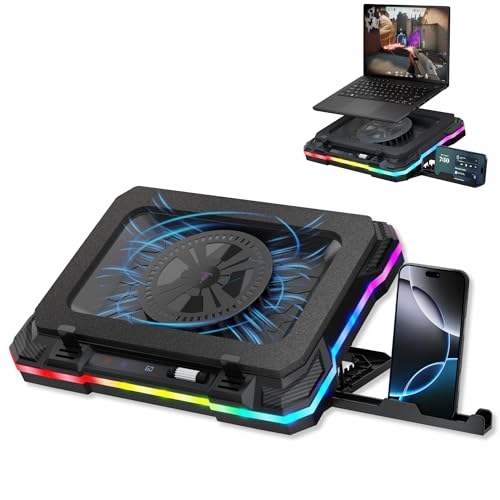
- 600 to 2800 RPM fan speed control
- 2 USB-A 3.0 and 2 USB-C hub ports
- 7 tilt levels and 10 lighting modes
Best For: Gamers who want adjustable cooling plus extra USB-C/USB-A connectivity
Quiet All-Rounder
TECKNET Laptop Cooling Pad with Phone Stand

- 9 fans with 360° surround airflow
- Whisper-quiet operation under 40 dB
- 5 height settings and dual USB ports
Best For: Quiet everyday cooling for work, gaming, and media use
High-Fan Value Pick
Laptop Cooling Pad with 10 Fans

- 10 fans with 5-speed control
- USB Type-C expansion plus dual ports
- 7 height settings with RGB lighting
Best For: Users who want wide cooling coverage and USB-C expansion ports
Premium Direct-Airflow Pick
KLIM Turbofrost MAX Gaming Laptop Cooling Pad

- USB-C or DC power for desk and travel use
- Smart inlay directs airflow under the laptop
- 3 USB-A ports and LCD fan control
Best For: Gamers and remote workers who need flexible power and focused cooling.
Turbo Fan Hub Pick
Brook Saviortop Gaming Laptop Cooling Pad

- 3500 RPM turbo fan for fast cooling
- USB-C input with 3 USB outputs
- Adjustable height and touch-controlled RGB
Best For: Users who want cooling, USB-C connectivity, and ergonomic adjustment.
Quiet Multi-Port Cooling – Amazon Basics 6-Fan Adjustable Stand
If you want a laptop cooling pad with USB-C power-style convenience for everyday use, this Amazon Basics stand focuses on quiet airflow and flexible placement. Its 6-fan layout is built to move heat away from 12-17 inch laptops, while the adjustable-height base adds a more comfortable typing angle for work, streaming, or light gaming.
Best For: Users who want a simple, quiet cooling stand with built-in USB-A and USB-C hubs for desk use.
Pros:
- 6 ultra-quiet fans spread cooling across multiple angles.
- 6 height settings help with both ergonomics and heat release.
- USB-A and USB-C hubs add peripheral connectivity.
- Fits laptops up to 17 inches, including major brands.
Cons:
- Not designed for charging phones or other devices.
- Cooling is aimed at general performance rather than high-output gaming.
Overall, this is a practical choice if you value a quiet, adjustable cooling pad with USB-C connectivity and straightforward day-to-day usability.
High-Output RGB Cooling – KLIM Turbofrost USB-C/DC Gaming Pad
This laptop cooling pad with USB-C power is aimed at users who need stronger airflow for gaming or rendering. The KLIM Turbofrost uses four 4,000 RPM fans, aluminum construction, and a sealed anti-dust design to push cooling performance while keeping the setup flexible with USB-C or DC power.
Best For: Gamers and power users who want maximum airflow, RGB lighting, and USB-C or DC powering options.
Pros:
- Four turbo fans deliver 16,000 RPM of combined cooling force.
- USB-C or DC power lets you use it at a desk or from a laptop port.
- Aircraft-grade aluminum helps with heat dissipation.
- Three extra USB-A ports expand peripheral connectivity.
Cons:
- Built for performance, so it may be more than casual users need.
- RGB lighting adds features some buyers may not want.
If you want aggressive cooling with flexible USB-C power and extra ports, this model is clearly tuned for demanding desktop setups.
Portable Dual-Port Cooling – TECKNET Quiet Fan Stand for 12-15.6"
If you need a laptop cooling pad with USB-C power support for a smaller machine, the TECKNET stand is built around targeted airflow and easy portability. Its dual-fan layout and internal channel design aim cooling at the center of the laptop, while the thin, lightweight body makes it easy to move between a desk, sofa, or bed.
Best For: Students, office workers, and travelers who want a slim cooling stand with USB-C and USB-A options.
Pros:
- Two large fans and internal channels target the hottest area.
- Fan speed is adjustable from low to maximum.
- USB-C and USB-A ports support broad compatibility.
- Lightweight design is easy to carry in a laptop bag.
Cons:
- Designed for 12-15.6 inch laptops, so larger systems are out.
- Includes only an A-A connection cable.
For portable cooling and simple dual-port connectivity, this TECKNET pad offers a balanced mix of convenience, comfort, and targeted airflow.
Stealth RGB Performance – KLIM Turbofrost Full Black USB-C/DC
This laptop cooling pad with USB-C power is the stealthier version of KLIM’s high-output cooling platform, finished in full black but keeping the same performance-focused design. With four 4,000 RPM fans, aluminum construction, and USB-C or DC power, it is built for keeping larger laptops cooler during gaming, rendering, or long work sessions.
Best For: Buyers who want the same strong KLIM cooling performance in a more understated black finish.
Pros:
- Four turbo fans provide 16,000 RPM of combined airflow.
- USB-C or DC power gives flexible setup options.
- Three USB-A ports support extra accessories.
- Full black design is more subdued than RGB-heavy alternatives.
Cons:
- Still a performance-first model, so it may be overbuilt for light use.
- Large size is better suited to desk setups than travel.
This version is a strong pick if you like the KLIM Turbofrost feature set but want a more discreet look while keeping USB-C power flexibility.
RGB Performance Pick – Gaming Laptop Cooling Pad with USB Hub
If you want a laptop cooling pad with USB-C power features for a gaming setup, this model focuses on airflow, ergonomics, and extra connectivity. It uses a single fan with 600 to 2800 RPM speed control to help reduce heat buildup, while the adjustable 7-level stand and integrated phone holder make it easier to game or work comfortably.
Best For: Gamers and power users who want a cooling stand with adjustable viewing angles, a phone holder, and built-in USB-C/USB-A hub ports.
Pros:
- Fan speed ranges from 600 to 2800 RPM for adjustable cooling intensity.
- Built-in hub includes 2 USB-A 3.0 and 2 USB-C ports for connecting accessories.
- 7 tilt levels between 20° and 40° help improve viewing comfort.
- Includes 10 lighting modes for a more personalized gaming look.
Cons:
- The USB hub is not intended for charging.
- Single-fan design may not suit buyers looking for maximum airflow coverage.
This is a practical choice if you value setup convenience as much as cooling. The extra ports, phone holder, and angle adjustments give it a more desk-friendly feel than a basic fan-only pad.
Quiet All-Rounder – TECKNET Laptop Cooling Pad with Phone Stand
This laptop cooling pad with USB-C power support is designed for users who want quiet, steady cooling without giving up desk flexibility. Its 9-fan layout provides 360° surround airflow, while stepless speed control up to 2600 RPM lets you tune cooling to the task at hand.
Best For: People who want a quiet cooling stand for work, gaming, or watching videos with a built-in phone holder and extra USB port.
Pros:
- 9 fans with 360° airflow help dissipate heat quickly.
- Whisper-quiet operation stays below 40 dB.
- 5 height settings and up to 34° tilt support ergonomic use.
- Dual USB ports let one stay free for accessories while the pad runs.
Cons:
- The product notes do not specify USB-C input; it uses dual USB ports.
- Best fit tops out at 17.3-inch laptops, so larger systems are excluded.
Overall, this is the most balanced option here for everyday use. It combines quiet cooling, decent adjustability, and a practical phone stand in a format that should fit most common laptops.
High-Fan Value Pick – Laptop Cooling Pad with 10 Fans
For buyers comparing a laptop cooling pad with USB-C power support and a larger fan array, this model stands out with 10 fans and a type-C port on the stand. It offers 5-speed fan control, RGB lighting options, and 7 adjustable heights, making it geared toward users who want both cooling and a more customizable desk setup.
Best For: Users who want a large-fan cooling stand with RGB lighting, height adjustment, and USB Type-C expansion ports.
Pros:
- 10 fans, including 4 large and 6 small units, for broad cooling coverage.
- 5-speed fan settings help tailor airflow to work or gaming.
- USB Type-C port plus dual expansion ports for peripherals.
- 7 adjustable heights and non-slip design support comfort and stability.
Cons:
- The notes do not mention USB-C input power, only a USB Type-C port.
- RGB lighting may be unnecessary if you want a plain, low-profile cooler.
This is a strong pick if you want more fan coverage and onboard port expansion in one unit. The combination of height settings, lighting modes, and Type-C connectivity makes it a versatile option for mixed work and gaming use.
Premium Direct-Airflow Pick – KLIM Turbofrost MAX Gaming Laptop Cooling Pad
If you want a laptop cooling pad with USB-C power that can run from your laptop when you are away from an outlet, the KLIM Turbofrost MAX is built for that use case. Its smart inlay channels airflow directly under the laptop, while the sealed foam helps keep the cooling focused on the hottest parts of the chassis during gaming or heavy work.
Best For: Gamers and remote workers who want direct airflow, USB-C power flexibility, and extra USB ports.
Pros:
- Dual power options: DC adapter for desk use or USB-C power from the laptop
- Smart inlay and TurboFan XL focus airflow beneath the laptop for targeted cooling
- 3 extra USB-A ports help keep your peripherals connected
- LCD speed display and auto-saving RGB settings add convenient control
Cons:
- Only one fan, so it relies on the sealed airflow design rather than multi-fan coverage
- RGB lighting and LCD features may be more than some buyers need
This is a strong choice if you want a cooling pad that balances performance with flexibility. The USB-C power option makes it easier to use on the go, while the direct-airflow design and included USB ports make it a practical desktop companion too.
Turbo Fan Hub Pick – Brook Saviortop Gaming Laptop Cooling Pad
The Brook Saviortop is a laptop cooling pad with USB-C power and hub-style convenience for people who want cooling and extra connectivity in one stand. Its 3500 RPM turbo fan is built to lower temperatures quickly, and the adjustable height makes it easier to improve both airflow and ergonomics during long sessions.
Best For: Gamers, creators, and office users who want a fast cooler with USB-C hub functionality.
Pros:
- 3500 RPM turbo fan is designed for strong temperature reduction
- Integrated USB-C input plus 3 USB outputs expand device connectivity
- Two-step height adjustment improves posture and airflow
- Touch control and 6 RGB lighting modes offer easy customization
Cons:
- Cooling stand is larger and heavier than simpler pads
- Warranty is listed as 1 year
- Best fit is aimed at larger laptops, especially 17-18 inch models
For buyers who want a practical cooling pad that doubles as a small docking station, this Brook model makes a lot of sense. The USB-C input and extra ports add convenience, while the high-speed fan and adjustable stand focus on everyday performance.
High-Power Cooling Stand – llano V12 Gaming Laptop Cooling Pad
The llano V12 is a laptop cooling pad with USB-C power support through its included USB-A to C cable, but its main strength is raw cooling output. With a large 5.5-inch turbofan, sealed foam chamber, and 36W power adapter, it is aimed at users who need aggressive airflow for demanding gaming or rendering sessions.
Best For: Power users who want strong cooling, dust protection, and adjustable comfort for large laptops.
Pros:
- 5.5-inch turbo fan and sealed chamber are designed for strong cooling performance
- 36W power adapter supports high output during demanding tasks
- 3-port USB hub adds peripheral connectivity
- Dust filter, foam seal, and adjustable tilt angles improve usability
Cons:
- USB ports are for peripherals only and not for charging devices
- One-year warranty is shorter than some competitors
- May be more cooling stand than casual everyday accessory
If cooling performance is the priority, the V12 is the most aggressive option in this group. It combines high power output with dust filtration and adjustable angles, making it a strong fit for intensive workloads and long gaming sessions.
How We Picked the Best Laptop Cooling Pad with USB-C Power
We looked for models that balance cooling performance, build quality, noise control, and convenience. USB-C support mattered, but so did the basics: stable laptop support, sensible fan placement, adjustable height, and enough power flexibility for modern setups. We also favored products that fit a clear use case, whether that means quiet office work or heavier gaming loads.
Quick Comparison: What Stands Out
Not every cooler is built for the same job. Multi-fan pads with broad coverage are usually better for everyday laptops and mixed use, while high-RPM turbo designs are more suited to gaming rigs and sustained high heat. If you want simplicity, look for a straightforward USB-C powered pad. If you need more desk connectivity, a model with extra ports or a USB hub may be the better fit.
Key Buying Factors for a Laptop Cooling Pad with USB-C Power
Power Delivery and Port Type
USB-C power is convenient, but check whether the pad is USB-C only, USB-C and USB-A compatible, or capable of using DC input as well. Dual-power designs can be more flexible with desktops, docks, and travel setups.
Fan Style and Cooling Coverage
Larger fans can move air more quietly, while multiple smaller fans may spread airflow across a wider area. If your laptop heats up near the center or rear vents, prioritize airflow alignment over fan count alone.
Noise and Speed Control
For office use, a quieter pad with adjustable speed is usually the best value. For gaming or creative workloads, faster fans can help more, but only if you can tolerate the extra sound.
Fit and Ergonomics
Make sure the stand supports your laptop size and offers a stable angle. Adjustable height is useful for comfort, especially if you spend hours typing or using an external keyboard.
Who Should Buy Which Laptop Cooling Pad with USB-C Power?
If you want the simplest everyday upgrade, choose a balanced pad with USB-C support, good adjustability, and moderate noise. Gamers and power users should lean toward high-airflow or turbo-fan models that are built for sustained heat. If you work in a shared space, prioritize quieter designs and fine speed control. For larger laptops, look for wide support ranges and a sturdy frame that keeps the machine secure under load.
In short, the best Laptop Cooling Pad with USB-C Power is the one that matches your workload, noise tolerance, and desk setup—not just the one with the most fans.