
If you want a cleaner desk without giving up fast numeric entry, a keyboard with detachable number pad is a smart upgrade. It gives you the freedom to separate the numpad when you need space, then snap it back in when spreadsheets or data work call.
Our roundup focuses on models that balance comfort, connectivity, and layout flexibility so you can choose the right setup for work, gaming, travel, or all-day typing.
Best 10 Keyboard with Detachable Number Pad Picks for 2026
Premium Modular RGB Board
be quiet! Dark Mount Mechanical Keyboard
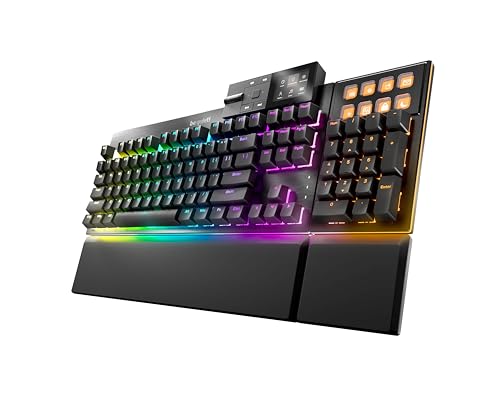
- Detachable numpad mounts left, right, or off
- Silent tactile switches with sound dampening
- Programmable display keys and ARGB lighting
Best For: Gamers who want modular placement and quiet mechanical switches
Ergonomic Split Work Setup
ProtoArc Bluetooth Ergonomic Keyboard

- Split curved layout supports a more natural typing posture
- Separate numeric keypad for flexible desk setup
- Connects to 3 devices via Bluetooth or USB
Best For: Users who want ergonomic comfort and a detachable numpad
Dual-Device Ergonomic Office Pick
HP 960 Ergonomic Wireless Keyboard

- Split-zone layout with negative tilt and wrist rest
- Detached numeric keypad for flexible placement
- 20 programmable keys and 3-device switching
Best For: Office users who want ergonomic comfort and productivity shortcuts
Portable Folding Travel Option
MEETION Bluetooth Foldable Keyboard

- Built-in numeric keypad and touchpad in one body
- Folding design with metal support bars
- Bluetooth 5.3 pairs with up to 3 devices
Best For: Travelers who want a compact all-in-one keyboard with numeric input
Flexible Wireless Pick
Meetion Split Keyboard with Mini Numpad

- Numpad can go on either side for flexible placement
- 2.4GHz USB and dual Bluetooth connections
- Compact, travel-friendly design with auto-sleep
Best For: Left-handed users, accountants, and travelers who want a portable split setup
Ergonomic Core Pick
ProtoArc EK04 Split Keyboard + Numpad

- Split ergonomic design with separate numeric keypad
- Hard leather palm rest for added support
- Rechargeable USB-C model with Windows-only USB setup
Best For: Windows typists who want an ergonomic split board with a rechargeable numpad
Split Workstation Pick
MEETION Wave Keys Ergonomic Wireless Keyboard

- Fully separate mini numeric keypad for flexible positioning
- Wave layout, wrist rest, and 9 shortcut keys
- 2.4G receiver plus independent Bluetooth channels
Best For: Financial and office users who want a separate keypad
Left-Hand Friendly Choice
MEETION Wave Ergonomic Keyboard with Separate Keypad
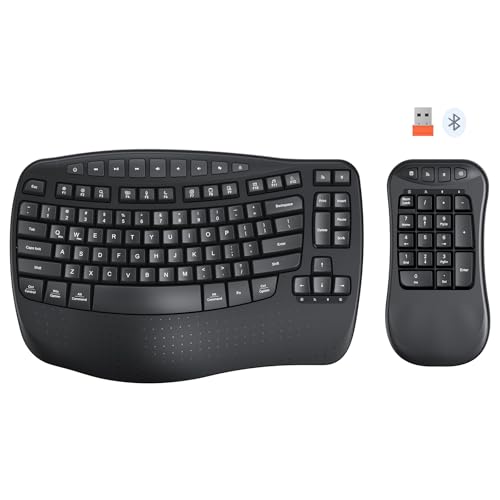
- Split 2-in-1 design supports flexible keypad placement
- Left-handed users can move the keypad to the left
- Wrist rest, tilt feet, and wave layout aid comfort
Best For: Left-handed typists and ergonomic desk setups
Premium Modular RGB Board – be quiet! Dark Mount Mechanical Keyboard
If you want a keyboard with detachable number pad that feels built for both gaming and desk flexibility, the be quiet! Dark Mount stands out with a fully modular layout. The numpad can mount on either side or be left off entirely, and the media dock also moves left or right, making it easy to tailor the setup to your space and workflow.
Best For: Gamers and power users who want a highly customizable, quiet mechanical keyboard with modular attachments.
Pros:
- Detachable numpad can attach left, right, or be removed completely
- Silent tactile, pre-lubricated switches with 3 sound-dampening layers
- Programmable display keys, per-key ARGB, and customizable lighting effects
- Includes split palm rest, adjustable feet, and hot-swappable switches
Cons:
- Modular design may be more than some buyers need for simple typing
- Premium feature set is geared more toward enthusiasts than basic office use
- Many customization options may take time to set up
The Dark Mount is a strong pick if you want a detachable numpad without giving up premium build quality or deep customization. It is especially appealing for gaming setups where quiet operation, RGB control, and flexible placement all matter.
Ergonomic Split Work Setup – ProtoArc Bluetooth Ergonomic Keyboard
This keyboard with detachable number pad is designed for users who want ergonomic comfort and workspace flexibility in one package. The split keyset, curved layout, and separate numeric keypad help support a more natural typing posture while letting you position the numpad where it works best for your desk.
Best For: Office and home users who want an ergonomic split keyboard with a separate numpad and multi-device support.
Pros:
- Split, curved keyset is designed to reduce wrist and forearm strain
- Separate numeric keypad adds flexibility to your desk layout
- Connects to up to 3 devices via Bluetooth or 2.4G USB receiver
- Includes a hard leather-surface palm rest and adjustable tilt legs
Cons:
- Wrist rest is hard and non-removable, not cushioned
- No backlighting
- Split ergonomic layout may take time to get used to
ProtoArc keeps the focus on comfort, portability, and practical connectivity rather than flashy extras. If you want a separate numpad and an ergonomic layout for long typing sessions, this is a straightforward, productivity-oriented option.
Dual-Device Ergonomic Office Pick – HP 960 Ergonomic Wireless Keyboard
If you’re shopping for a keyboard with detachable number pad for office work, the HP 960 Ergonomic Wireless Keyboard brings a practical split-zone layout with strong productivity features. The separate numeric keypad lets you place the numpad where it suits your workflow, while the keyboard itself adds negative tilt, quiet typing, and multi-device switching for busy desks.
Best For: Professionals who want an ergonomic wireless keyboard with a separate numpad, programmable shortcuts, and multi-device connectivity.
Pros:
- Split-zone design with negative tilt and foam wrist rest for comfort
- Detached numeric keypad for a more flexible setup
- 20 programmable keys plus a Copilot key for shortcuts
- Connects to 3 devices via Bluetooth or HP Unifying Dongle
Cons:
- Uses scissor-switch keys, not mechanical switches
- Number pad is separate, so it takes up extra desk space when attached or placed nearby
- Built for productivity, so it lacks gaming-oriented features like RGB lighting
The HP 960 is a sensible choice if comfort and shortcuts matter more than flashy extras. It combines a detached numpad with broad connectivity and a roomy wrist rest, making it well suited to long work sessions.
Portable Folding Travel Option – MEETION Bluetooth Foldable Keyboard
For anyone who wants a keyboard with detachable number pad in a portable form factor, this MEETION folding model takes a different approach by building the numpad and touchpad into one travel-friendly design. It is aimed at mobile work, with a compact foldable body, stable support bars, and multi-device Bluetooth switching for use across laptops, tablets, and phones.
Best For: Travelers and mobile workers who want a foldable keyboard with an integrated number pad and touchpad.
Pros:
- Built-in numeric keypad and touchpad reduce the need for extra peripherals
- Folding design with metal support bars aims to stay flat and rigid
- Pairs with up to 3 devices over Bluetooth 5.3
- USB-C rechargeable battery with long standby time
Cons:
- Not a true separate detachable numpad design
- Integrated touchpad and compact layout may feel different from full-size desktop keyboards
- Best suited to portability rather than a traditional stationary setup
This model makes the most sense if portability is the top priority and you want fewer items to carry. While it does not use a standalone detachable numpad, it still covers numeric input, cursor control, and travel convenience in one unit.
Ergo Combo Pick – ProtoArc EKM04 Split Keyboard + Numpad
If you want a keyboard with detachable number pad for a Windows setup, the ProtoArc EKM04 is built around flexibility and comfort. The split keyboard, separate numeric keypad, and included mouse make it a practical choice for people who need a more adaptable desk layout without extra setup steps.
Best For: Windows users who want a split ergonomic combo with a separate numpad and mouse.
Pros:
- Separate numeric keypad lets you place the pad where it works best for your workspace.
- Curved split keyset and scooped scissors-switch keys are designed for a more relaxed typing posture.
- Hard leather palm rest adds wrist support and durability during long typing sessions.
- Plug-and-play 2.4GHz USB connection works with the keyboard, numpad, and mouse right away on Windows.
Cons:
- Windows-only and not compatible with Mac OS.
- No Bluetooth support, so this is not a wireless multi-device option.
- Keyboard and numpad are not backlit.
This is a solid fit if you value ergonomic positioning and want the numeric pad physically separated from the main board. Just note that the split layout may take some getting used to, especially if you are switching from a standard keyboard.
Flexible Wireless Pick – Meetion Split Keyboard with Mini Numpad
The Meetion split keyboard is a good keyboard with detachable number pad option if you need flexibility for accounting work, left-handed use, or a compact travel setup. It gives you both 2.4GHz USB and Bluetooth connection choices, so you can match it to different devices and work styles.
Best For: People who want a portable split keyboard and numpad that can be positioned on either side.
Pros:
- Separate numeric keypad can be placed on either side for left-handed users or more comfortable number entry.
- Supports a shared 2.4GHz USB receiver plus two independent Bluetooth channels.
- Compact, lightweight keypad design is easy to carry in a laptop bag or backpack.
- Auto-sleep and on/off switch help conserve battery life.
Cons:
- Requires AAA batteries for both the keyboard and keypad, and they are not included.
- Some multimedia shortcuts are not fully compatible with Mac.
- Battery-powered design may be less convenient than rechargeable models.
This model stands out for portability and connection flexibility, especially if you want to shift the numpad to either side of the keyboard. It is a practical pick for office work, home use, and business travel, as long as you are fine managing replaceable batteries.
Ergonomic Core Pick – ProtoArc EK04 Split Keyboard + Numpad
If you are shopping for a keyboard with detachable number pad for a Windows desk, the ProtoArc EK04 keeps the focus on ergonomic typing and workspace flexibility. The split keyset, hard palm rest, and separate numeric keypad are aimed at people who spend long hours typing and want a more adjustable layout.
Best For: Windows users who want a split ergonomic keyboard with a separate numpad and rechargeable power.
Pros:
- Curved split keyset is designed to support a more natural wrist and forearm posture.
- Separate numeric keypad lets you personalize your workspace layout.
- Hard leather palm rest adds support and durability for all-day typing.
- Rechargeable battery with USB-C charging and up to 250 hours of standby time.
Cons:
- Windows-only and not compatible with Mac OS.
- No Bluetooth support.
- Not backlit.
This is a straightforward ergonomic option for users who want the numpad apart from the main keyboard without giving up a simple plug-and-play setup. The split layout may take some adjustment, but the design is clearly aimed at comfort and productivity.
Flexible Ergonomic Combo – MEETION Wave Keyboard with Separate Numeric Keypad
If you want a keyboard with detachable number pad for mixed typing and data entry, this MEETION setup is built around flexibility. The main keyboard and numeric keypad can be placed together or apart, so you can adapt the layout to your desk, handedness, or workflow. It also adds a curved wrist rest and wave-shaped keys for a more comfortable long-session typing position.
Best For: Accountants, data-entry users, and left-handed buyers who want a flexible split layout.
Pros:
- Keyboard and number pad can be freely combined or separated for custom layouts
- Separate Bluetooth channels plus shared 2.4G receiver support multi-device use
- Built-in wrist rest and adjustable tilt feet add ergonomic support
- Works with both Windows and macOS
Cons:
- Uses batteries for both the keyboard and keypad
- Batteries are not included
- Requires more setup choices than a standard one-piece keyboard
This is a practical pick if you want the number pad to move with your work instead of forcing your hands into one fixed position. The detachable design is the main advantage here, especially for desks that need to switch between compact and number-heavy tasks.
Split Workstation Pick – MEETION Wave Keys Ergonomic Wireless Keyboard
This keyboard with detachable number pad is aimed at users who want more placement freedom on a busy desk. The keyboard section and mini numeric keypad are fully separate, so you can position the keypad where it feels most natural or tuck it away when you need extra space. The wave layout and wrist rest are designed to make long typing sessions feel less tiring.
Best For: Financial work, office typing, and anyone who wants a fully separate keypad layout.
Pros:
- Fully separate numeric keypad gives you flexible placement options
- Wave design and wrist rest support more comfortable typing
- Shared 2.4G receiver and independent Bluetooth channels allow multiple connection modes
- Includes 9 shortcut keys for faster everyday workflow
Cons:
- Product details list Windows compatibility more prominently than macOS
- Battery-powered design adds maintenance
- Orange USB receiver can be confused with the included black adapter
As a split keyboard, it offers a straightforward way to separate number input from the main typing area without giving up wireless convenience. It makes the most sense for people who value layout freedom and quick shortcuts over a compact all-in-one design.
Left-Hand Friendly Choice – MEETION Wave Ergonomic Keyboard with Separate Keypad
If you are shopping for a keyboard with detachable number pad and want a layout that adapts to your workspace, this MEETION model keeps things simple and flexible. The main keyboard and numeric keypad can be separated and rearranged, which is useful for left-handed users or anyone who wants to center the typing area. A curved wrist rest and wave-style keys add comfort for longer sessions.
Best For: Left-handed users, accountants, and anyone who wants a flexible ergonomic split setup.
Pros:
- Split 2-in-1 design lets you separate and rearrange the keypad
- Left-handed users can place the keypad on the left side
- Curved wrist rest and adjustable tilt feet support ergonomic typing
- Shared 2.4G receiver and dedicated Bluetooth channels offer versatile connectivity
Cons:
- Uses USB power rather than a built-in rechargeable battery
- Mechanical switch type may not suit every buyer
- More adaptable than a standard keyboard, but also more complex to set up
This model is strongest when workspace flexibility matters as much as comfort. The detachable keypad makes it easier to match your typing habits, while the ergonomic shape helps justify the split design for everyday use.
How We Picked the Best Keyboard with Detachable Number Pad
We prioritized keyboards that offer real modular value, not just a compact layout. That means detachable or separate number pads, dependable wireless or wired performance, ergonomic design choices, and features that make daily use easier such as wrist rests, multi-device pairing, hot-swappable switches, or programmable keys.
We also looked at build quality, portability, and whether the layout makes sense for people who still rely on numeric input but do not want a permanently attached full-size board.
Quick Comparison: Which Style Fits Your Workflow?
A Keyboard with Detachable Number Pad can suit very different users. Some models lean toward premium mechanical typing and customization, while others focus on ergonomic split designs, portability, or multi-device convenience. If you want the most desk flexibility, choose a model with a truly separate numpad. If comfort matters most, a split or wave-style keyboard may be the better fit.
Key Buying Factors for a Keyboard with Detachable Number Pad
Connection Type
Check whether the keyboard uses Bluetooth, 2.4GHz wireless, a USB dongle, or a wired connection. Multi-device support is especially useful if you switch between a laptop, desktop, and tablet.
Ergonomics and Layout
Split designs, tenting, wrist rests, and curved key rows can reduce strain. If you type for long sessions, comfort may matter more than raw compactness.
Numpad Placement and Size
Some detachable number pads are full-size; others are mini or repositionable. Make sure the pad is easy to place where you want it and still comfortable for frequent number entry.
Customization and Controls
Features like programmable keys, hot-swappable switches, and media controls can improve productivity. These extras are especially helpful if you want one keyboard to handle work and entertainment.
Portability and Desk Space
If you travel often or work in a small space, a lighter build or foldable design may be worth more than premium materials. A detachable numpad should add flexibility, not clutter.
Who Should Buy Which Keyboard with Detachable Number Pad?
Choose a premium mechanical model if you want a refined typing feel and long-term customization. Pick an ergonomic split keyboard if comfort and posture are your top priorities. Go with a foldable or compact wireless option if portability is the main goal. And if you work with spreadsheets, finance, or data entry, a Keyboard with Detachable Number Pad that keeps the numpad within easy reach will likely deliver the best day-to-day value.