
If you want a faster, cleaner coding setup, the right macro-equipped keyboard can cut repetitive work and keep essential commands close at hand.
Below, we’ve rounded up 10 strong options for programmers who want programmable keys, practical layouts, and a better workflow in 2026.
Best 10 Keyboard for Programmers with Macro Keys Picks for 2026
Macro-Ready Mechanical Pick
Redragon K550 RGB Gaming Keyboard with 12 Macro G Keys

- 12 onboard macro keys work without extra software
- Aluminum top plate and wrist rest support long sessions
- USB pass-through and media controls improve desk convenience
Best For: programmers who want lots of onboard macros and a full-size wired board
One-Hand Workflow Keypad
Razer Tartarus V2 32-Key Programmable Keypad

- 32 programmable keys with Hypershift macro support
- 8-way thumbpad adds directional control
- Compact one-handed design saves desk space
Best For: users who want a dedicated macro pad instead of a full keyboard
Wireless Macro Workhorse
RK ROYAL KLUDGE L75 Tri-Mode 75% Keyboard

- Five macro keys and a touch-sensitive nameplate add shortcuts
- Tri-mode wireless plus USB-C supports flexible setups
- Gasket mount and sound dampening improve typing comfort
Best For: programmers who want wireless flexibility and a quieter premium feel
Open-Source Full-Size Option
Keychron C2 Pro QMK/VIA Mechanical Keyboard

- QMK/VIA lets you remap every key and create macros
- Full-size wired board works with macOS, Windows, and Linux
- PBT keycaps and 1000 Hz polling suit daily productivity
Best For: programmers who want open-source remapping on a full-size keyboard
Macro-Friendly Full-Size Pick
Redragon K513 RGB Membrane Gaming Keyboard

- 5 onboard macro G keys with no extra software
- Full 104-key layout with dedicated media controls
- RGB lighting with preset and customizable modes
Best For: Programmers wanting an affordable full-size keyboard with simple macro access
Ultra-Compact Macro Pad
BTXETUEL 12 Key Mechanical Gaming Keyboard

- 12 programmable keys for shortcuts, scripts, and media control
- Plug-and-play HID design with wide OS compatibility
- Hot-swappable mechanical red switches in a tiny footprint
Best For: One-handed macro control and compact shortcut workflows
Stream Control TKL Choice
darkFlash K87PRO Mechanical Keyboard
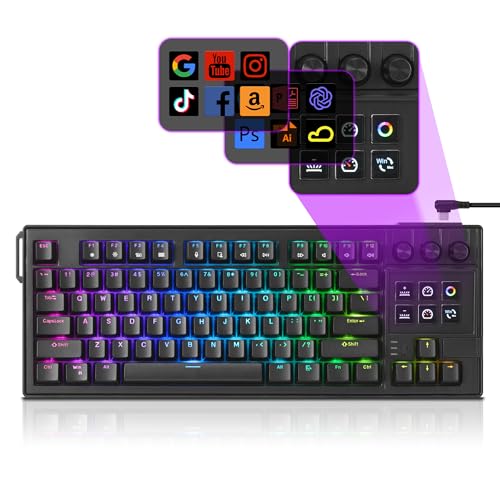
- 6 LCD keys support macros, shortcuts, and live info
- 3 knobs add fast control for media, brightness, and zoom
- Hot-swap gasket mount with full key remapping software
Best For: Power users who want display keys, knobs, and compact TKL layout
Layered Macro Pad
9 Fully Programmable Keys with 6 Layers
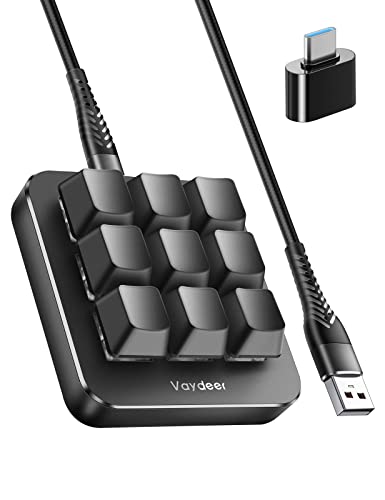
- 9 programmable NKRO keys for macros and shortcuts
- 6 layers for different apps or workflows
- Supports hotkeys, multimedia, and one-click launches
Best For: Programmers and productivity users who need layered shortcut control
12-Key RGB Macro Pad
12-Key Mini Macro Keyboard with Knob

- 12 programmable non-conflict keys for macros
- RGB lighting with per-key adjustment in software
- Memory function lets saved setups move between computers
Best For: Programmers who want more programmable keys in a compact pad
Macro-Ready Mechanical Pick – Redragon K550 RGB Gaming Keyboard with 12 Macro G Keys
If you want a keyboard for programmers with macro keys that also leans into a sturdier mechanical feel, the Redragon K550 is built around onboard G1-G12 shortcuts. The macro keys work on the fly without extra software, while the aluminum top plate, extra USB pass-through, and media controls make it practical for a busy desk setup.
Best For: Programmers and power users who want lots of onboard macros, a solid build, and a full-size layout.
Pros:
- 12 onboard macro keys can be edited directly without additional software
- Aluminum top plate adds stability and a more premium desktop feel
- Built-in USB pass-through helps reduce cable clutter
- Dedicated media controls and volume scroll bar add convenience
Cons:
- Wired-only design may not suit minimalist wireless setups
- Full-size footprint takes more desk space than compact boards
- Custom clicky switches may be louder than some programmers prefer
This is a strong fit if you value direct-access macros and a durable full-size board over a smaller, quieter layout. The K550 focuses on utility first, which makes it easy to justify for workflow-heavy use.
One-Hand Workflow Keypad – Razer Tartarus V2 32-Key Programmable Keypad
For anyone shopping for a keyboard for programmers with macro keys, the Razer Tartarus V2 is a different approach: a one-handed programmable keypad with 32 assignable keys. It uses mecha-membrane switches, includes an 8-way thumbpad, and supports fully programmable macros through Razer Hypershift for complex command layers.
Best For: Programmers, streamers, and power users who want a compact macro pad and one-handed control.
Pros:
- 32 programmable keys provide plenty of custom hotkey options
- Hypershift supports remapping and multi-step macro combinations
- 8-way thumbpad improves movement and navigation control
- Individually backlit Chroma RGB keys add customization
Cons:
- One-handed layout is not a full keyboard replacement
- Mecha-membrane feel may not satisfy fans of true mechanical switches
- Best as a specialized tool rather than an all-purpose typing board
The Tartarus V2 makes sense if your workflow benefits from concentrated shortcut access in a small footprint. It is especially appealing when macros matter more than traditional typing comfort.
Wireless Macro Workhorse – RK ROYAL KLUDGE L75 Tri-Mode 75% Keyboard
If you need a keyboard for programmers with macro keys that also handles daily work and travel-friendly flexibility, the RK ROYAL KLUDGE L75 is built around five customizable macro keys, a volume knob, and tri-mode connectivity. Its gasket mount, sound-dampening layers, and hot-swappable design make it a more refined option for people who want macros without giving up typing comfort.
Best For: Programmers who want programmable macros, wireless flexibility, and a quieter premium typing feel.
Pros:
- Five customizable M1-M5 macro keys support shortcuts and complex commands
- Tri-mode connectivity works over Bluetooth, 2.4GHz, or USB-C
- Gasket mount and five sound-dampening layers reduce hollow noise
- 8000 mAh battery offers very long wireless runtime
Cons:
- 75% layout is smaller, so it lacks a full numpad
- Macro key count is lower than boards with dedicated macro banks
- Wireless features may be unnecessary for users who only want a wired desk setup
The L75 stands out as a balanced choice for productivity-focused users who want macro keys in a more modern, flexible package. It blends customization, portability, and comfort better than many macro-first boards.
Open-Source Full-Size Option – Keychron C2 Pro QMK/VIA Mechanical Keyboard
The Keychron C2 Pro is a practical keyboard for programmers with macro keys if you want full-size coverage and deep remapping control. With QMK/VIA support, you can program every key and build macros across macOS, Windows, or Linux, while the wired USB-C connection and 1000 Hz polling rate keep it straightforward for desk work.
Best For: Programmers who want full-size layout, cross-platform remapping, and open-source customization.
Pros:
- QMK/VIA support lets you remap every key and create macros
- Works across macOS, Windows, and Linux
- Double-shot PBT keycaps are durable and oil resistant
- South-facing RGB lighting helps with visibility and keycap compatibility
Cons:
- Wired-only design limits placement flexibility
- No dedicated macro key bank; macros are configured through remapping
- Full-size layout may be larger than some users need
If you care more about flexible software control than dedicated macro buttons, the C2 Pro is an easy recommendation. It is a clean, capable choice for coding setups that need reliable customization across operating systems.
Macro-Friendly Full-Size Pick – Redragon K513 RGB Membrane Gaming Keyboard
If you want a keyboard for programmers with macro keys that still keeps a traditional full-size layout, the Redragon K513 is a practical budget-friendly option. Its 104-key membrane design gives you a familiar typing area, while the five onboard G keys let you trigger custom actions without extra software.
Best For: Programmers and budget buyers who want full-size keys plus easy onboard macros.
Pros:
- 5 programmable onboard macro keys work on the fly without additional software
- Full 104-key layout keeps navigation and number entry familiar
- Dedicated media keys offer quick playback control
- RGB backlighting includes 6 preset modes and an onboard customizable mode
Cons:
- Membrane switch design instead of a mechanical switch
- Macros are limited to the five onboard G keys
- Wired-only setup may not suit wireless desk preferences
Overall, the K513 makes sense if you value extra macro control and a standard layout more than premium switch feel. It covers the basics well for coding, general productivity, and light gaming.
Ultra-Compact Macro Pad – BTXETUEL 12 Key Mechanical Gaming Keyboard
BTXETUEL Sayodevice OSU Keypad 12-Key USB Hotswappable Red Mechanical Switch Keyboard
Check Price On AmazonFor a programmer who wants a compact keyboard for programmers with macro keys, this 12-key BTXETUEL keypad is built for shortcuts rather than full typing. Each key can be programmed for actions like copy, paste, undo, redo, media controls, multi-step operations, and custom scripts, making it useful as a dedicated command pad.
Best For: Users who want a small programmable macro pad for shortcuts, scripts, and one-handed control.
Pros:
- 12 programmable keys support shortcuts, multi-step operations, and custom scripts
- Plug-and-play HID design works without a driver
- Compatible with Windows, Linux, MacOS, Android, and Raspberry
- Mechanical red switches and hot-swappable design add customization
Cons:
- Very small 12-key layout is not a replacement for a full keyboard
- Best used as a secondary keypad rather than a primary typing board
- Function-focused layout may require setup time for your workflow
In short, this keypad is a workflow tool first and a keyboard second. It is a smart add-on if you want programmable controls close at hand for editing, development, or repetitive tasks.
Stream Control TKL Choice – darkFlash K87PRO Mechanical Keyboard
The darkFlash K87PRO is a strong keyboard for programmers with macro keys if you also want stream-style controls and a cleaner desk footprint. Its six LCD keys can show icons, GIFs, or system info, while the three rotary knobs add fast control for volume, media, brightness, zoom, and other custom functions.
Best For: Programmers, streamers, and power users who want programmable display keys and knob control in a compact TKL board.
Pros:
- 6 customizable LCD keys can run macros, apps, websites, and shortcuts
- 3 independent knobs provide quick control over media, brightness, zoom, and more
- Full key programming software lets you remap every key
- Hot-swap gasket mount design improves customization and typing feel
Cons:
- TKL layout removes the numpad for users who rely on it
- Extra LCD and knob features may be more than casual users need
- Wired USB setup only, with no wireless option listed
For anyone who wants programmable controls without giving up a quality mechanical typing experience, this model offers the most advanced feature set in the group. It is especially appealing if your workflow benefits from quick-access macros and visual key labels.
Layered Macro Pad – 9 Fully Programmable Keys with 6 Layers
If you want a keyboard for programmers with macro keys that also works well for office shortcuts, the Vaydeer one-handed mechanical keypad is built around speed and customization. Its 9 programmable NKRO keys, 6 functional layers, and macro support make it useful for coding workflows, repetitive commands, and quick app or system actions.
Best For: Programmers, designers, and productivity users who want a compact macro pad with layered shortcuts.
Pros:
- 9 fully programmable NKRO keys with support for macros and simultaneous inputs
- 6 customizable layers for switching between different workflows or applications
- Supports multimedia control, hotkeys, one-click launch actions, and real mouse functions
- OTA upgrades plus export/import settings for easier backup and sharing
Cons:
- One-handed layout means it is an add-on, not a full replacement keyboard
- Advanced setup may take some time if you want to build multiple layers
Overall, this is a practical macro keypad if you need a compact control surface for coding shortcuts and repetitive tasks. The layered design gives it more flexibility than a basic 9-key pad, especially for users who want different setups for different apps.
Compact Shortcut Pad – 6-Key Hot-Swappable Mini Macro Keypad
For shoppers comparing a keyboard for programmers with macro keys, the SIKAI CASE keypad is a compact option focused on simple shortcut automation. It lets you program regular keys or combo actions, stores six custom shortcuts onboard, and works across multiple operating systems after setup on Windows.
Best For: Programmers and creators who want a small, easy-to-store macro keypad for repeat shortcuts.
Pros:
- Six programmable keys with onboard memory for saved shortcuts
- Works with Windows, Mac, Linux, and VISTA after Windows-based configuration
- Can handle shortcut combos, text snippets, app launches, and multimedia controls
- Hot-swappable switch design adds flexibility for users who like customization
Cons:
- Programming requires a Windows computer first
- Each macro is limited to up to 5 characters, so it is not built for long sequences
This keypad makes sense if you want a straightforward macro board for common coding and office shortcuts without a lot of extra complexity. It is especially appealing when desk space is tight and you just need a few dependable programmable keys.
12-Key RGB Macro Pad – 12-Key Mini Macro Keyboard with Knob
If you need a keyboard for programmers with macro keys and want more inputs than a basic pad, this 12-key mini mechanical macro pad adds flexible control in a compact size. It supports multiple function modes, onboard memory, and one-key macro actions, and it can be configured on Windows before being used on other systems.
Best For: Programmers, multitaskers, and gamers who want a 12-key macro pad with memory and RGB customization.
Pros:
- 12 non-conflict keys with macro support for fast repeated actions
- Configuration software with a floating window and simple drag-and-drop setup
- RGB backlighting can be adjusted individually in the software
- Driver-free use after setup on Windows, with memory support for other computers
Cons:
- Setup software requires extraction before use
- Windows is required for initial configuration
This is a strong choice if you want a compact programmable keypad with more keys to map than many entry-level macro pads. The extra inputs and memory function make it a good fit for users who move between machines but want the same shortcut layout.
How We Picked the Best Keyboard for Programmers with Macro Keys
We focused on models that make sense for real programming workflows, not just gaming. That means reliable build quality, usable macro options, sensible layouts, and software or onboard controls that let you assign shortcuts without a hassle. We also looked at switch types, connectivity, hot-swap support, knob or media controls, and whether the board feels practical for daily typing.
Quick Comparison: What Matters Most
The best Keyboard for Programmers with Macro Keys is not always the one with the most buttons. Full-size boards suit users who want a familiar typing layout plus macros. Compact keyboards and keypads are better if you already prefer a separate macro layer or need a smaller desk footprint. Wireless models add flexibility, while wired options are often simpler for desktop reliability and low-latency use.
Key Buying Factors for a Keyboard for Programmers with Macro Keys
Macro Placement and Quantity
Look for macros that are easy to reach but unlikely to be pressed by accident. Dedicated columns, side keys, knobs, and programmable pads all work differently, so choose the style that matches your coding habits.
Customization Software
Good macro support should include remapping, layers, launch commands, and app-specific profiles. QMK/VIA support is especially useful if you want flexible, long-term control without being tied to clunky software.
Layout and Comfort
Full-size keyboards are best if you rely on a numpad or want a traditional typing experience. TKL and 75% layouts save space and can improve mouse positioning, while standalone macro pads are ideal for adding shortcuts to an existing board.
Build, Switches, and Noise
Mechanical switches tend to offer better feel and durability, but membrane options may be quieter and more affordable. Gasket mounts, hot-swap sockets, and media knobs can make daily use more comfortable and adaptable.
Who Should Buy Which Keyboard for Programmers with Macro Keys?
Choose a full-size macro keyboard if you want one device to handle typing, shortcuts, and number entry. Pick a compact board or TKL if desk space matters and you want a cleaner layout for long coding sessions. Go with a one-handed keypad or macro pad if you already love your main keyboard and just need extra programmable control for builds, IDE actions, snippets, or app switching.
For most buyers, the best choice is the one that fits your workflow first and your desk second. A great programmer keyboard should make repetitive tasks easier, not add setup friction.