
If you want fewer cables and easier access to your most-used accessories, a keyboard with USB passthrough can be a smart upgrade. It lets you plug in a mouse, flash drive, headset receiver, or charging cable right from the keyboard.
We compared 10 options for different users, from gaming-focused mechanical boards to compact office-friendly models with built-in hubs.
Best 10 Keyboard with USB Passthrough Picks for 2026
Premium Mechanical Gaming Pick
SteelSeries Apex 7 Blue Switch with OLED
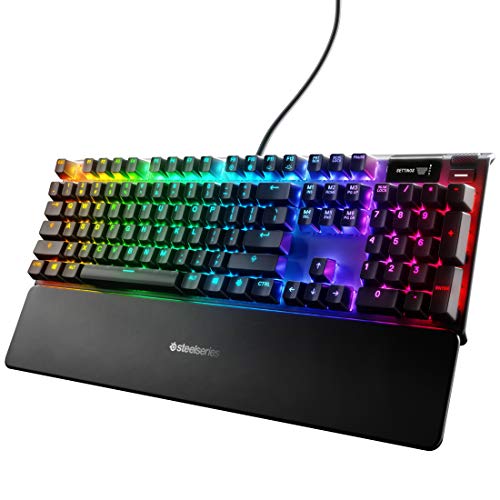
- USB passthrough with media controls
- OLED smart display for quick info
- Durable aluminum build with RGB lighting
Best For: Gamers wanting a premium wired mechanical keyboard
Budget Hub-Friendly Office Choice
Adesso AKB-132HB Multimedia Keyboard
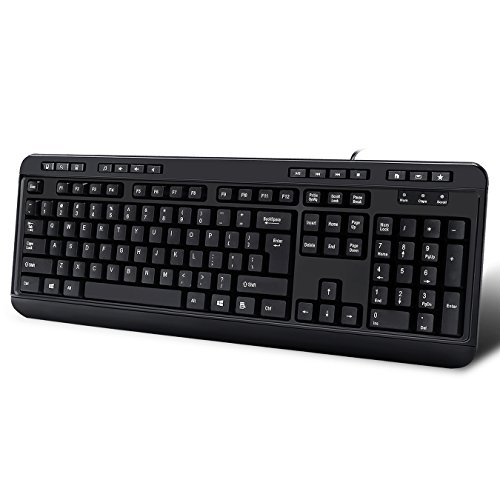
- Three built-in USB ports
- Quiet membrane switches
- Multimedia and Windows shortcut keys
Best For: Users who want a quiet keyboard with extra USB ports
Quiet Mechanical Gaming Option
SteelSeries Apex 7 Red Switch with OLED
- USB passthrough with media controls
- Linear switches for quieter typing
- OLED display and aluminum build
Best For: Gamers who want a quieter mechanical board with premium features
Modern USB-C Desk Upgrade
Macally Wired USB-C Keyboard with Hub

- USB-C connection with 3 extra ports
- Quiet low-profile scissor switches
- Works with Mac, PC, and Chrome
Best For: Mac and PC users needing a slim keyboard with built-in USB ports
ROG RX Red Optical
ASUS ROG Strix Scope RX Gaming Mechanical Keyboard

- USB 2.0 passthrough for easy peripheral access
- Fast ROG RX Red optical switches with 1.5mm actuation
- IP57 resistance and aluminum top plate add durability
Best For: Gamers who want a fast, durable keyboard with passthrough convenience
3-Port USB Hub
Macally Wired Keyboard for Mac with USB Hub

- 3-port hub with 2 USB-A and 1 USB-C connections
- 2-in-1 USB-A/USB-C plug broadens compatibility
- Backlit keys with 3 brightness levels
Best For: Mac and cross-platform users who need built-in USB hub convenience
Compact Clicky RGB
Razer BlackWidow V3 Mechanical Gaming Keyboard

- USB passthrough adds convenient peripheral access
- Green switches deliver tactile, clicky feedback
- Compact layout with Chroma RGB and macro support
Best For: Gamers who want a compact, clicky RGB keyboard with passthrough
Compact Trackball Pick
Perixx PERIBOARD-505H mini keyboard with trackball
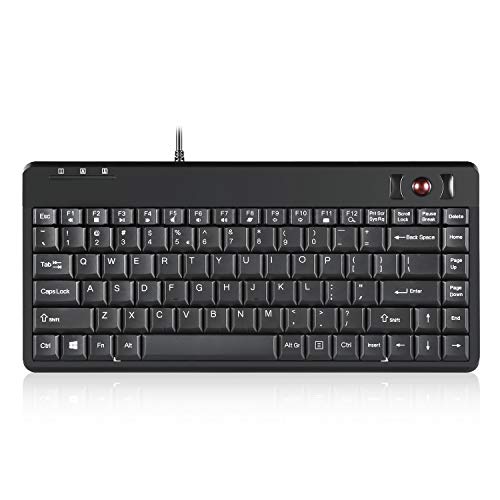
- Built-in 0.55-inch trackball with click buttons
- Two USB hubs for extra device connections
- Compact membrane layout for quiet typing
Best For: Workstations that need typing, pointing, and USB passthrough in one device
Compact Keypad Upgrade
Perixx PERIBOARD-220H compact keyboard with number pad

- Built-in numeric keypad in a compact layout
- Two USB hubs add easy passthrough connectivity
- Quiet membrane keys with plug-and-play setup
Best For: Workstations, POS systems, and desks that need a number pad plus USB hubs
Ultra-Compact USB Hub Keyboard
Perixx PERIBOARD-409H mini keyboard with 2 USB hubs
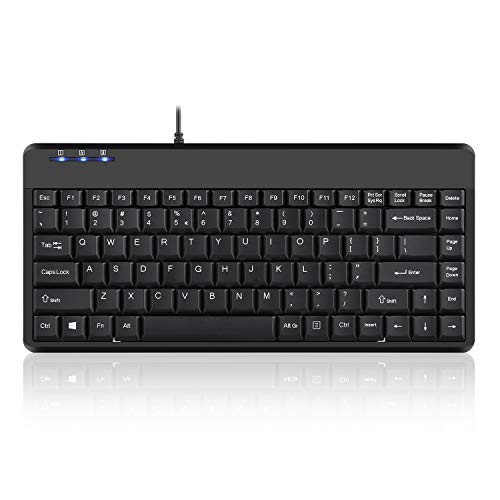
- Mini 87-key design saves space on the desk
- Two side USB hubs for extra peripherals
- Plug-and-play wired setup with a long cable
Best For: Small desks and simple Windows setups needing extra USB ports
Premium Mechanical Gaming Pick – SteelSeries Apex 7 Blue Switch with OLED
If you want a keyboard with USB passthrough that also doubles as a feature-rich gaming hub, the SteelSeries Apex 7 is built for that job. It pairs a wired USB connection with an integrated OLED smart display, media controls, and a durable aluminum frame, making it a strong fit for players who want fast access to settings and extra convenience at the desk.
Best For: Gamers who want a durable mechanical keyboard with onboard controls and a premium feel.
Pros:
- USB passthrough plus media controls for easy desk access
- OLED smart display for in-game info and quick adjustments
- Aircraft-grade aluminum alloy body for added stability
- RGB backlighting with per-key customization
Cons:
- Wired-only design may not suit clutter-free setups
- Blue tactile-and-clicky switches can be noisy for shared spaces
- Premium features may be more than basic typists need
The Apex 7 stands out if you want a keyboard with USB passthrough and gaming-focused extras in one package. Its combination of a robust build, RGB lighting, and an integrated display makes it more than a simple input device.
Budget Hub-Friendly Office Choice – Adesso AKB-132HB Multimedia Keyboard
This keyboard with USB passthrough is aimed at simple desktop convenience rather than flashy gaming extras. The Adesso AKB-132HB adds three built-in USB ports, multimedia hotkeys, and quiet membrane switches, so it works well when you want an affordable wired keyboard with easy access for peripherals.
Best For: Office and home users who want extra USB ports and quiet everyday typing.
Pros:
- 3 built-in USB ports for plugging in accessories
- Multimedia hotkeys and Windows one-touch controls
- Quiet membrane switches for lower-noise typing
- Plug-and-play USB connectivity
Cons:
- Membrane switches lack the feel of a mechanical board
- Best fit is basic productivity, not advanced gaming
- Plastic build is less premium than metal alternatives
The AKB-132HB is a practical pick if your priority is easy USB expansion at the keyboard itself. It keeps the feature set focused on convenience, with a straightforward layout and quiet typing experience.
Quiet Mechanical Gaming Option – SteelSeries Apex 7 Red Switch with OLED
If you need a keyboard with USB passthrough and prefer a quieter mechanical feel, the SteelSeries Apex 7 Red Switch version is a strong match. It keeps the same OLED smart display, RGB lighting, and aluminum build as the other Apex 7 model, while using linear switches for a smoother, quieter typing and gaming experience.
Best For: Gamers who want a quieter mechanical keyboard with onboard display and premium construction.
Pros:
- USB passthrough and media controls for added desk convenience
- OLED smart display for settings and live info
- Linear switches for a quieter, smoother feel
- Aircraft-grade aluminum alloy frame and magnetic wrist rest
Cons:
- 84-key layout is smaller than a full-size board
- Wired-only setup may limit placement flexibility
- Gaming-focused features may be unnecessary for basic use
This model is best if you want the Apex 7 feature set but prefer linear switches over clicky tactility. It blends convenience, durability, and a quieter key feel in a compact mechanical package.
Modern USB-C Desk Upgrade – Macally Wired USB-C Keyboard with Hub
For a keyboard with USB passthrough that fits modern Macs and mixed-device desks, the Macally premium wired model is an easy everyday choice. It offers a USB-C connection plus 2 USB-A ports and 1 USB-C port, so you can connect a mouse, flash drive, webcam, or similar accessories directly from the keyboard.
Best For: Mac and PC users who want a slim wired keyboard with multiple built-in USB ports.
Pros:
- Built-in hub with 2 USB-A ports and 1 USB-C port
- USB-C wired connection for newer devices
- 107 keys with 16 shortcut keys for broad compatibility
- Quiet scissor switches and low-profile design
Cons:
- Not water resistant
- Focuses on productivity rather than gaming features
- Wired design may not suit every setup
The Macally stands out as a practical desk upgrade if you want both USB expansion and a cleaner, low-profile typing experience. Its mix of Mac-friendly connectivity and built-in ports makes it especially useful for streamlined work setups.
ROG RX Red Optical – ASUS ROG Strix Scope RX Gaming Mechanical Keyboard
If you want a keyboard with USB passthrough for gaming and everyday use, the ASUS ROG Strix Scope RX is built around speed, durability, and convenience. Its USB 2.0 passthrough lets you keep an extra device close at hand, while the ROG RX Red optical switches are tuned for fast, linear input.
Best For: Gamers who want a fast optical mechanical keyboard with a USB 2.0 passthrough and rugged build.
Pros:
- USB 2.0 passthrough adds convenient peripheral access.
- ROG RX Red optical switches offer a 1.5mm actuation point and 100-million-keystroke lifespan.
- IP57 water and dust resistance plus an aluminum alloy top cover improve durability.
- Wider Ctrl key, Stealth key, and quick-toggle function are useful for gaming and work.
Cons:
- Wired USB 2.0 connection may not suit buyers looking for wireless flexibility.
- Designed primarily for Windows-compatible setups.
This is a strong pick if you want a feature-rich gaming board that pairs fast optical switches with practical passthrough support. It leans more toward performance and toughness than minimalist desk setups.
3-Port USB Hub – Macally Wired Keyboard for Mac with USB Hub
The Macally wired keyboard with USB passthrough is a practical choice if you want a tidy desktop setup with extra connections built in. It includes a 3-port hub with 2 USB-A ports and 1 USB-C port, plus a dual-interface plug that works with USB-A or USB-C devices.
Best For: Mac and multi-device users who want a wired keyboard with built-in USB hub convenience.
Pros:
- Built-in 3-port hub includes 2 USB-A and 1 USB-C port.
- 2-in-1 USB-A and USB-C plug improves compatibility across devices.
- White LED backlit keys offer 3 brightness levels.
- Auto OS detection supports Mac, Windows, Android, and iPad use.
Cons:
- Scissor-switch design may not appeal to mechanical keyboard fans.
- Not water resistant.
This keyboard focuses on utility first, especially if you regularly connect a mouse, drive, or other peripherals directly through the board. It is a sensible option for office or home setups where convenience matters more than gaming features.
Compact Clicky RGB – Razer BlackWidow V3 Mechanical Gaming Keyboard
The Razer BlackWidow V3 is a compact mechanical gaming keyboard with USB passthrough support, built for players who want clicky feedback and desk-saving size. Its green mechanical switches deliver a tactile, clicky feel, and the included wrist rest helps with longer sessions.
Best For: Gamers who want a compact clicky board with USB passthrough, RGB lighting, and macro support.
Pros:
- USB passthrough adds a handy connection point on the keyboard.
- Green mechanical switches provide tactile, clicky feedback.
- Chroma RGB lighting offers customizable effects.
- Programmable macro functionality supports more advanced key setups.
Cons:
- Renewed condition may not be preferred by every buyer.
- Compact form factor may feel less spacious than full-size boards.
If you want a gaming-focused keyboard with USB passthrough and a responsive clicky feel, this model covers the essentials well. The compact layout and wrist rest make it appealing for smaller desks and long play sessions.
Compact Trackball Pick – Perixx PERIBOARD-505H mini keyboard with trackball
If you want a keyboard with USB passthrough that also replaces your mouse, the Perixx PERIBOARD-505H is built for compact workspaces and specialized setups. It combines an 87-key membrane keyboard with a built-in 0.55-inch trackball, plus two USB hubs for connecting extra devices directly at the keyboard.
Best For: Industrial, office, or desk setups that need keyboard input, pointer control, and extra USB connections in one compact unit.
Pros:
- Built-in trackball with left-click and right-click buttons acts as a mouse replacement.
- Two extra USB hubs add convenient passthrough connectivity for other peripherals.
- Compact 12.4 x 5.79 inch footprint helps save desk space.
- Quiet membrane keys are designed for comfortable typing with less pressure.
Cons:
- Uses a mini layout, so it is not ideal if you prefer a full-size typing surface.
- Trackball design may take some adjustment if you are used to a standard mouse.
For buyers who prioritize space savings and integrated controls, this model offers a practical all-in-one approach. The USB hubs are a useful bonus when your ports are limited, and the trackball makes it especially appealing for workstation or industrial use.
Compact Keypad Upgrade – Perixx PERIBOARD-220H compact keyboard with number pad
The Perixx PERIBOARD-220H is a practical keyboard with USB passthrough for users who need a smaller footprint but still want a built-in number pad. Its dual USB hubs on the back make it easy to plug in a mouse, flash drive, or other accessory without adding another hub to your desk.
Best For: Office, POS, kiosk, and rack setups that need compact sizing plus a numeric keypad and extra USB ports.
Pros:
- Integrated numeric keypad in a space-saving compact layout.
- Two built-in USB hubs expand connectivity on the keyboard itself.
- Quiet membrane switches with 3 mm key travel suit shared environments.
- Plug-and-play USB setup works without extra drivers.
Cons:
- Compact design may feel tight if you prefer a larger desktop keyboard.
- USB-A hubs are useful, but the product is still focused on basic expansion rather than high-end docking.
This is a straightforward option for anyone who needs a number pad and convenient USB expansion in one unit. It is especially sensible for professional setups where quiet operation and simple installation matter.
Ultra-Compact USB Hub Keyboard – Perixx PERIBOARD-409H mini keyboard with 2 USB hubs
Perixx PERIBOARD-409H Wired USB Mini Keyboard with 2 USB Hubs, Black, US English Layout
Check Price On AmazonIf you need a keyboard with USB passthrough in a very compact form, the Perixx PERIBOARD-409H is built to keep the desk clean. It drops the number pad to save space and adds two side-mounted USB ports for connecting a mouse, keypad, or flash drive directly at the keyboard.
Best For: Users who want a small wired keyboard with extra USB ports for a lean desk setup.
Pros:
- Mini 87-key layout saves desk space by removing the number pad area.
- Two built-in USB hubs provide practical passthrough connectivity.
- Membrane keys are rated for a long 10,000,000-cycle switch life.
- Simple plug-and-play USB setup with a long 5’9″ cable.
Cons:
- No integrated trackball or number pad, so it is more basic than some alternatives.
- Wired USB design is limited to the supported Windows systems listed in the notes.
For buyers who mainly want compact size and convenient extra ports, this model keeps things focused and efficient. It is a good fit when the priority is freeing up desk space while still getting useful USB expansion at the keyboard.
How We Picked the Best Keyboard with USB Passthrough
For this roundup, we prioritized keyboards that add real utility through USB ports, not just style. That means looking at port count and type, connection flexibility, layout quality, compatibility, and whether the keyboard suits gaming, Mac use, or general productivity.
We also favored models that balance convenience with everyday usability. A great Keyboard with USB Passthrough should be easy to position, stable on the desk, and simple to use without creating a cluttered setup.
Quick Comparison
The best choices in this group fall into a few buckets: full-size mechanical gaming keyboards with passthrough for peripherals, compact office keyboards with hub ports for basic access, and Mac-oriented wired keyboards with USB-A and USB-C support. If you need the fastest accessory access for gaming, look at gaming models first. If you want a practical desk hub, the Macally and Perixx options are better fits.
Key Buying Factors for a Keyboard with USB Passthrough
Port Type and Number
Check whether the keyboard offers USB-A, USB-C, or both. More ports help, but the real value depends on what you plan to connect. A single easy-to-reach port may be enough for a wireless receiver; multiple ports are better if you regularly swap drives or devices.
Connection Method
Most USB passthrough keyboards still need two connections to your computer: one for the keyboard and one for the hub. Make sure your PC or Mac has enough available ports, especially if you use a laptop dock or compact workstation.
Layout and Size
Full-size keyboards are ideal if you want dedicated media keys, a numpad, or extra stability. Compact and mini models save space, which can be helpful on smaller desks, but they may trade away navigation keys or typing comfort.
Use Case
Gamers usually benefit from mechanical switches, strong build quality, and easy-access passthrough ports for a mouse receiver or headset dongle. Office users may care more about quiet typing, compatibility, and a compact footprint. Mac buyers should verify key layout and macOS support before choosing.
Who Should Buy Which Keyboard with USB Passthrough?
If you want a feature-rich gaming board, choose a full-size mechanical model with passthrough and media controls. If your goal is desk organization and everyday convenience, a wired hub keyboard can work well as a simple accessory station. Mac users should focus on keyboards designed for Apple systems, while buyers with limited space should consider compact or mini layouts with built-in USB ports.
In short, the best Keyboard with USB Passthrough is the one that matches your desk space, device mix, and how often you actually use those extra ports.