
Wi-Fi is convenient, but a wired connection can deliver more consistent speed, lower latency, and fewer interruptions. The right Ethernet adapter can add dependable network access to a laptop, tablet, desktop, or gaming device without a built-in Ethernet port.
This roundup compares 10 Ethernet adapters across USB-A, USB-C, hub, 2.5Gbps, and powerline designs so you can choose the best fit for your setup, connection speed, and available ports.
Best 10 Ethernet Adapters Picks for 2026
Best Compact Pick

- Up to 1 Gbps wired speeds
- Lightweight aluminum design
- 18-month limited warranty
Best For: Portable USB-C networking
Best Whole-Home Option

- Extends Ethernet over electrical wiring
- Includes passthrough outlets
- Two-adapter kit with cables
Best For: Hard-to-wire rooms and multi-story homes
Best Broad Compatibility

- Up to 1000 Mbps throughput
- Plug-and-play on several platforms
- Compact aluminum housing
Best For: USB-C laptops, tablets, and handhelds
Best Simple Computer Adapter
Amazon Basics USB 3.0 Gigabit Adapter
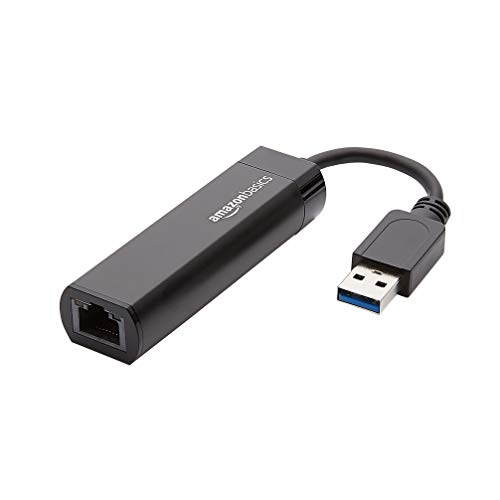
- 10/100/1000 Mbps support
- Wake-on-LAN capability
- Designed for computers and laptops
Best For: Straightforward USB 3.0 computer networking
Best Nintendo Switch Pick

- Gigabit speeds up to 1000 Mbps
- Supports Nintendo Switch and major desktop OS families
- Compact, foldable, and USB-powered
Best For: Nintendo Switch users and USB-A laptops needing portable wired networking
Best USB-A/C Flexibility
BENFEI USB-A/C Gigabit Ethernet

- USB-A/C connectivity with Gigabit Ethernet
- Broad Windows, Mac, Linux, ChromeOS, and Android support
- Aluminum shell with an 18-month warranty
Best For: Users switching between USB-A and USB-C computers and tablets
Best 2.5GbE Upgrade
UGREEN USB-C 2.5G Ethernet Adapter

- Supports wired speeds up to 2.5Gbps
- Designed for USB-C and Thunderbolt 3/4 devices
- Aluminum body with low-power Realtek chipset
Best For: USB-C users with 2.5GbE network equipment and high-bandwidth workloads
Best Hub-and-Ethernet Combo
4-in-1 USB 3.0 Gigabit Adapter
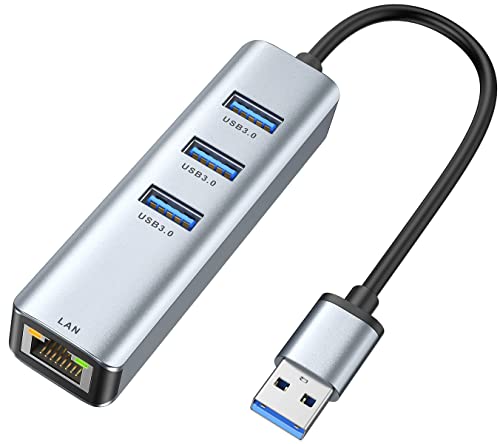
- Gigabit Ethernet plus three USB 3.0 ports
- Up to 5Gbps USB data transfer
- 24-month warranty and broad OS support
Best For: Laptop users who need wired networking and extra USB-A connectivity
Best Simple Wired Connection
uni USB 3.0 Gigabit Ethernet Adapter
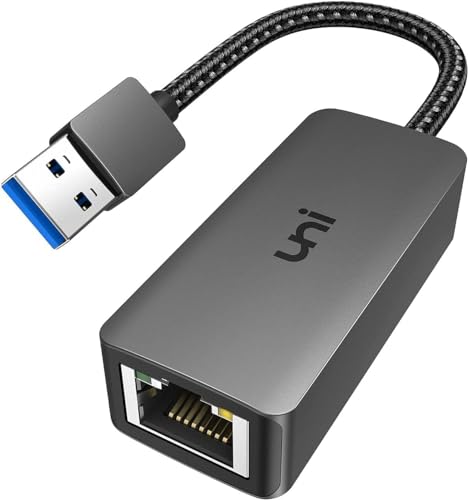
- 10/100/1000Mbps support over USB 3.0
- Braided cable, aluminum case, and LED indicator
- 18-month warranty with customer support
Best For: Users needing a dedicated USB-A Gigabit Ethernet connection
Best Simple Pick

- Convertible USB-A and USB-C connector
- Three USB 3.0 ports plus Gigabit Ethernet
- Up to 5Gbps USB data transfer
Best For: Mixed-device setups needing USB-A/C compatibility and wired networking
Best Compact Pick – Anker USB-C Gigabit Adapter
If you need a portable ethernet adapter for a USB-C device, the Anker PowerExpand offers a straightforward wired connection at speeds up to 1 Gbps. Its compact aluminum design is well suited to travel, workstations, and modern laptops or tablets.
Best For: USB-C users who want a lightweight, single-port Gigabit Ethernet adapter.
Pros:
- Supports connection speeds up to 1 Gbps.
- Compact design weighs about as much as a AA battery.
- Aluminum exterior and braided-nylon cable provide a premium feel.
- Includes an 18-month limited warranty.
Cons:
- Provides one Ethernet port and no additional hub ports.
- Requires a compatible USB-C device.
This is a strong choice when portability and build quality matter more than extra connectivity. Confirm that your device has a compatible USB-C port before buying.
Best Whole-Home Option – TP-Link AV1000 Powerline Kit
Unlike USB ethernet adapters, the TP-Link AV1000 kit extends wired networking through your home’s existing electrical wiring. It can help connect desktops, smart TVs, and game consoles in rooms where running Ethernet cable or using Wi-Fi is difficult.
Best For: Multi-story homes, basements, garages, or other areas separated by thick walls and weak wireless coverage.
Pros:
- Uses existing electrical wiring to extend network connectivity.
- Offers AV1000 powerline speeds and a Gigabit Ethernet port.
- Passthrough outlets and noise filtering help preserve outlet usability.
- Includes two Ethernet cables and supports plug-and-play setup.
Cons:
- Adapters must connect directly to wall outlets on the same electrical circuit.
- Does not work with power strips, surge protectors, or extension cords.
- Performance may be limited by AFCI breakers or certain network equipment.
This kit is more specialized than a conventional ethernet adapter, but it offers a practical way to add wired connectivity across difficult areas. Installation conditions and household wiring will strongly affect results.
Best Broad Compatibility – UGREEN USB-C Ethernet Adapter
The UGREEN USB-C ethernet adapter adds a Gigabit RJ45 port to compatible laptops, tablets, smartphones, and handheld devices. It supports up to 1000 Mbps, offers plug-and-play operation on several current platforms, and uses a compact aluminum housing for travel.
Best For: Users who need one USB-C network adapter for laptops, tablets, smartphones, or compatible gaming handhelds.
Pros:
- Supports speeds up to 1000 Mbps and backward compatibility with 100/10 Mbps networks.
- Works with Windows 11/10/8.1/8, macOS, Chrome OS, and Android without drivers.
- Compatible with USB-C and Thunderbolt 3/4 ports on many devices.
- Aluminum housing, reinforced cable tail, and LED status indicator add useful details.
Cons:
- Drivers are required for Windows XP/7/Vista and Linux.
- Compatibility still depends on the device supporting wired networking through USB-C.
With broad platform support and a small aluminum body, this is a versatile pick for people who move between several USB-C devices. Older operating systems may require manual driver installation.
Best Simple Computer Adapter – Amazon Basics USB 3.0 Gigabit Adapter
The Amazon Basics USB 3.0 ethernet adapter is a simple way to connect a computer or laptop to a router, modem, or network switch. It supports 10/100/1000 Mbps Ethernet and is designed for Windows and macOS systems, with additional compatibility listed for ChromeOS and Linux.
Best For: Computer and laptop users who want a basic USB 3.0-to-Gigabit Ethernet connection.
Pros:
- Supports Gigabit Ethernet speeds up to 1000 Mbps.
- Connects computers and laptops to routers, modems, or network switches.
- Includes Wake-on-LAN and Energy Efficient Ethernet features.
- Supports IPv4/IPv6 checksum offload to help reduce CPU loading.
Cons:
- Does not support smart TVs or gaming consoles such as Nintendo Switch.
- Compatibility is focused on computers and laptops with USB 3.0.
This adapter is a practical choice for a computer-focused setup when you do not need USB-C connectivity or extra ports. Avoid it for the smart TV and console use cases specifically excluded in the product notes.
Best Nintendo Switch Pick – TP-Link UE306 Gigabit Adapter
If you need a dependable wired connection, the TP-Link UE306 is one of the most versatile ethernet adapters for USB-A devices. Its USB 3.0 interface supports Gigabit Ethernet, while plug-and-play compatibility makes setup straightforward for supported systems.
Best For: Nintendo Switch users, travelers, and laptops or tablets without a built-in RJ45 port.
Pros:
- Supports 10/100/1000 Mbps Gigabit Ethernet.
- Works with Nintendo Switch, Windows, macOS, and Linux devices as specified.
- Compact foldable design measures 2.8 x 1.0 x 0.6 inches.
- USB-powered and backward compatible with USB 2.0 and 1.1.
Cons:
- Uses a USB-A connection rather than USB-C.
- Maximum performance depends on the connected network and equipment.
The UE306 is a practical choice when stable wired networking and Nintendo Switch support matter most. Its portable design and two-year manufacturer warranty add useful everyday convenience.
Best USB-A/C Flexibility – BENFEI USB-A/C Gigabit Ethernet
The BENFEI adapter is a flexible option among ethernet adapters, offering USB-A/C connectivity and Gigabit Ethernet for compatible computers and tablets. It is designed for file transfers, video calls, gaming, and HD streaming without requiring an external power source.
Best For: MacBook, Windows, ChromeOS, Linux, and Android users who want broad USB-A/C compatibility.
Pros:
- Supports up to 1000 Mbps Gigabit Ethernet over a USB 5Gbps bus.
- Compatible with USB-A/C devices and a wide range of operating systems.
- Includes features such as Wake-on-LAN, duplex support, and auto MDIX.
- Aluminum shell, nylon cable, link/activity LEDs, and an 18-month warranty.
Cons:
- Does not support Windows RT.
- Not compatible with Nintendo Switch.
- Reaching 1Gbps requires CAT6 or better Ethernet cabling.
Choose the BENFEI when connection flexibility is more important than specialized console support. Its USB-A/C design and broad compatibility make it a useful general-purpose adapter for mixed-device households.
Best 2.5GbE Upgrade – UGREEN USB-C 2.5G Ethernet Adapter
For newer USB-C laptops and faster networks, the UGREEN adapter stands out among ethernet adapters with support for speeds up to 2.5Gbps. It is built for demanding uses such as NAS transfers, 4K/8K streaming, and gaming when compatible network hardware is available.
Best For: USB-C laptop, tablet, and smartphone users upgrading from Gigabit to 2.5Gb Ethernet.
Pros:
- Supports network speeds up to 2.5Gbps.
- Uses a Realtek RTL8156BG chip designed for lower power consumption and reduced heat.
- Compatible with USB-C and Thunderbolt 3/4 devices listed in the product details.
- Durable aluminum construction with indicator lights.
Cons:
- Requires 2.5Gb-capable switches, routers, and network equipment to reach its top speed.
- Its listed minimum operating system support is Windows 11 and Android 13.
- It is not intended for USB-A-only devices without an appropriate connection.
The UGREEN is the strongest performance-oriented pick here, provided your network supports 2.5GbE. For ordinary Gigabit connections, its extra capacity may be unnecessary, but it offers a useful upgrade path for modern USB-C systems.
Best Hub-and-Ethernet Combo – 4-in-1 USB 3.0 Gigabit Adapter
For shoppers seeking ethernet adapters with extra connectivity, the ABLEWE combines a 10/100/1000Mbps RJ45 port with three USB 3.0 ports. It can connect multiple peripherals while providing a wired network connection from a compatible USB 3.0 device.
Best For: Laptop users who need both Gigabit Ethernet and additional USB-A ports.
Pros:
- Combines one Gigabit Ethernet port with three USB 3.0 ports.
- Supports simultaneous use of the hub ports.
- Offers up to 5Gbps USB data transfer and broad Windows, macOS, Linux, and Chrome OS compatibility.
- Compact aluminum design includes a 24-month warranty.
Cons:
- Requires a USB 3.0 port for its stated high-speed performance.
- Its larger hub design may be more than needed if you only need Ethernet.
The ABLEWE is a practical choice when a single USB port needs to handle networking and several peripherals. Its combination of Gigabit Ethernet, three USB ports, and wide operating-system support makes it especially useful for compact laptop setups.
Best Simple Wired Connection – uni USB 3.0 Gigabit Ethernet Adapter
The uni is a streamlined option among ethernet adapters, connecting a USB-A laptop or desktop to a 10/100/1000Mbps wired network. Its driver-free setup on many listed platforms, braided cable, status LED, and aluminum case suit everyday work and streaming setups.
Best For: Users who want a dedicated USB-to-Gigabit Ethernet connection without extra hub ports.
Pros:
- Supports 10/100/1000Mbps networking through USB 3.0.
- Backward compatible with USB 2.0 and USB 1.1.
- Braided cable, aluminum housing, and LED status indicator support portable everyday use.
- Supports features including Wake-on-LAN and IPv4/IPv6 protocols.
Cons:
- Windows 11 requires a driver according to the product notes.
- Not compatible with Nintendo Switch and not recommended for TVs.
- USB 2.0 limits network speed to 10/100M.
Choose the uni when you prefer a compact, dedicated adapter over a multiport hub. It delivers Gigabit capability on USB 3.0 and adds useful durability and status features, though compatibility notes should be checked before purchase.
Best Simple Pick – 4-in-1 USB Ethernet Hub
This ALL-LUCKY model stands out among ethernet adapters by combining a convertible USB-A/USB-C connector with three USB 3.0 ports and a 1000Mbps RJ45 port. It is designed for newer laptops, tablets, and other compatible devices that need both wired networking and peripheral expansion.
Best For: Users switching between USB-A and USB-C devices who need Ethernet plus three USB-A ports.
Pros:
- Convertible connector supports USB-A and USB-C host ports.
- Provides one Gigabit Ethernet port and three USB 3.0 ports.
- Supports up to 5Gbps USB data transfer and 10/100/1000Mbps networking.
- Compact, portable design works with listed Windows, macOS, iPadOS, and Chrome OS devices.
Cons:
- Windows 7 requires a driver, according to the notes.
- USB output is limited to 900mA and does not support charging devices.
- A CAT6-or-better cable is needed to reach 1Gbps.
The ALL-LUCKY is a versatile pick for households or workspaces using a mix of USB-A and USB-C hardware. Its adaptable connector and three-port hub are useful, but the charging limitation means it is intended for peripherals and data rather than power delivery.
How We Picked These Ethernet Adapters
We selected options that cover the most common wired-network needs, from compact USB-C adapters and basic USB 3.0 models to multiport hubs and powerline networking kits. We considered advertised network speed, connector type, portability, plug-and-play support, compatibility, extra ports, and the practical needs of laptops, desktops, streaming devices, and consoles.
Because performance depends on the computer, router, cabling, and network plan, advertised speeds should be treated as maximum link rates rather than guaranteed internet speeds. Compatibility is equally important: some adapters may require drivers, while others work immediately with supported operating systems and devices.
Quick Comparison
| Adapter type | Best for | Typical advantage | Watch for |
|---|---|---|---|
| USB-C to Gigabit Ethernet | Modern laptops and tablets | Compact, simple wired access | USB-C port compatibility and limited expansion |
| USB-A to Gigabit Ethernet | Older laptops and desktops | Broad compatibility | May occupy a standard USB port |
| Ethernet hub | Users needing ports and networking | Adds USB ports alongside RJ45 | Larger size and shared bandwidth |
| 2.5Gbps adapter | Fast local networks and newer hardware | Higher wired-network ceiling | Requires compatible router, cabling, and service |
| Powerline kit | Rooms without convenient Ethernet cabling | Uses a home’s electrical wiring | Results vary by circuit and wiring quality |
Key Buying Factors for Ethernet Adapters
Speed and Network Compatibility
Gigabit Ethernet is sufficient for most broadband plans, streaming, video calls, and general file transfers. A 2.5Gbps model makes more sense when your router, computer, network storage, and cables can support faster-than-gigabit links.
Connector and Device Support
Choose USB-C for newer laptops and mobile devices, or USB-A for older computers and many desktops. Dual USB-A/USB-C hubs can be useful when several devices need one adapter, but check whether the included connectors and operating-system support match your hardware.
Portability, Drivers, and Construction
A small aluminum adapter is convenient for travel and everyday laptop use. Driver-free or plug-and-play designs reduce setup friction, although operating-system support can still vary. If the adapter will remain connected at a desk, a hub or longer cable may be more practical than the smallest model.
Powerline Considerations
Powerline Ethernet Adapters are different from USB models: they extend a network through electrical outlets. For best results, plug them directly into wall outlets and avoid judging performance solely by the kit’s maximum advertised rate.
Who Should Buy Which Ethernet Adapters?
Choose a compact USB-C Gigabit adapter if you want a straightforward wired connection for a modern laptop. Pick a USB-A model for an older computer or a device without USB-C. If you need extra peripherals as well as Ethernet, a multiport hub provides better everyday flexibility.
For demanding local transfers or compatible high-speed networks, consider the 2.5Gbps option. Nintendo Switch users should prioritize a model that specifically supports the console and its available USB ports. If the router is far away and running cable is difficult, a powerline kit may be the most practical alternative, provided your home’s wiring is suitable.