
Wi-Fi is convenient, but a wired connection can provide better stability, lower latency, and more consistent speeds for work, streaming, gaming, and large downloads. The right Ethernet adapter adds that connection to devices that lack a built-in RJ45 port.
We selected 10 Ethernet adapters under $50, including USB-A and USB-C models with gigabit and 2.5Gbps support. Use the guide below to match port type, speed, compatibility, and portability to your setup.
Best 10 Ethernet Adapters Under 50 Picks for 2026
Reliable USB-A Pick
Amazon Basics Gigabit Ethernet Adapter
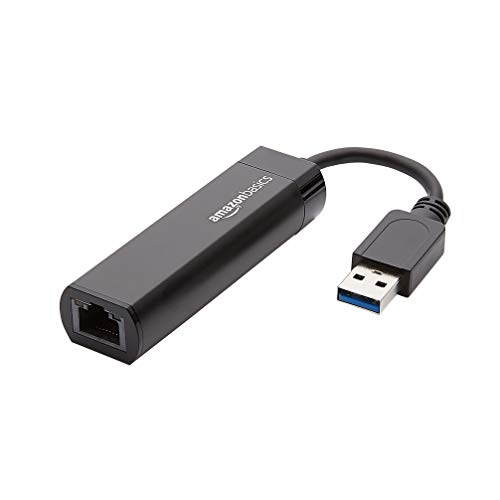
- USB 3.0 to Gigabit Ethernet
- Supports up to 1,000 Mbps
- Designed for computers and laptops
Best For: Computer users needing a simple USB-A wired connection
Portable USB-C Pick
Anker PowerExpand Ethernet Adapter

- USB-C connectivity
- Up to 1 Gbps speeds
- Aluminum body with braided cable
Best For: Traveling USB-C laptop users
Most Versatile USB-C Pick
UGREEN 1000Mbps Ethernet Adapter

- Up to 1,000 Mbps
- Works with many USB-C devices
- Driver-free on several current systems
Best For: USB-C device owners needing broad compatibility
Best for Nintendo Switch

- Supports Nintendo Switch
- Up to 1 Gbps over USB 3.0
- Foldable, travel-friendly design
Best For: Nintendo Switch players and USB-A laptop users
Fastest 2.5Gb Upgrade

- Up to 2.5Gbps wired networking
- Aluminum shell and status LEDs
- Windows, macOS, Linux, and ChromeOS support
Best For: 2.5Gbps upgrades, NAS transfers, gaming, and high-speed streaming
Most Versatile Connection
BENFEI USB A/C Gigabit Adapter

- USB-A and USB-C connectivity
- Gigabit speeds up to 1000Mbps
- 18-month warranty and status LEDs
Best For: Portable use across USB-A and USB-C computers
Best for Switch Compatibility
UGREEN USB 3.0 Gigabit Adapter

- Gigabit speeds up to 1000Mbps
- Plug-and-play setup
- Works with Nintendo Switch and Switch OLED
Best For: Switch gaming and compact USB-A Gigabit networking
Best Compact USB-C Pick
BENFEI USB-C to Gigabit Ethernet Adapter

- Up to 1Gbps wired networking
- Compact aluminum design with braided cable
- 18-month warranty and broad USB-C compatibility
Best For: USB-C users who want a durable, portable Ethernet adapter
Best Multiport Option
TECKNET USB-C/A Ethernet Hub Adapter

- Gigabit Ethernet up to 1000Mbps
- Three USB 3.0 ports included
- Works with major desktop and mobile operating systems
Best For: Users who need Ethernet and additional USB ports
Best Simple Value
Amazon Basics USB-C to RJ45 Adapter

- Supports 10/100/1000Mbps networks
- Compact aluminum housing
- Compatible with Nintendo Switch and needs no external power
Best For: Portable, straightforward USB-C Ethernet connectivity
Reliable USB-A Pick – Amazon Basics Gigabit Ethernet Adapter
If you need ethernet adapters under 50 for a Windows or Mac computer with a USB-A port, this Amazon Basics model offers a straightforward wired connection. It supports Gigabit Ethernet and connects your computer or laptop to a router, modem, or network switch.
Best For: Computer users who want an affordable USB 3.0 to Gigabit Ethernet connection.
Pros:
- Supports data rates up to 1,000 Mbps.
- Works with Windows, macOS, ChromeOS, and Linux according to the supplied details.
- Includes Wake-on-LAN, Green Ethernet, and energy-efficient Ethernet support.
Cons:
- Not intended for Smart TVs or gaming consoles such as Nintendo Switch.
- Requires a compatible USB 3.0 or USB-A connection.
This is a practical choice when you want a simple wired network upgrade for a computer or laptop and do not need console or Smart TV compatibility.
Portable USB-C Pick – Anker PowerExpand Ethernet Adapter
For shoppers comparing ethernet adapters under 50 for newer devices, the Anker USB-C to Ethernet Adapter provides a wired connection through a USB-C 3.0 port. Its compact build and up-to-1 Gbps speed make it convenient for travel and everyday use.
Best For: USB-C laptop and device users who prioritize portability and a polished design.
Pros:
- Supports stable connection speeds of up to 1 Gbps.
- Compact design measures just over half an inch thick and weighs about as much as a AA battery.
- Features an aluminum exterior and braided-nylon cable.
Cons:
- Requires a compatible USB-C 3.0 device.
- The supplied notes do not specify support for gaming consoles or Smart TVs.
The Anker stands out for users who want Gigabit Ethernet without adding much bulk to a laptop bag, while its aluminum housing complements premium devices.
Most Versatile USB-C Pick – UGREEN 1000Mbps Ethernet Adapter
This UGREEN model is a flexible option among ethernet adapters under 50, adding a Gigabit RJ45 port to USB-C and Thunderbolt devices. It supports up to 1,000 Mbps, offers broad device compatibility, and is driver-free on several current operating systems.
Best For: Users switching between USB-C laptops, tablets, smartphones, and gaming handhelds.
Pros:
- Supports up to 1,000 Mbps and is backward compatible with 100/10 Mbps networks.
- Works with Windows, macOS, ChromeOS, Android, iPadOS devices, Nintendo Switch, and Steam Deck through compatible ports.
- Offers plug-and-play support on Windows 11/10/8.1/8, macOS, ChromeOS, and Android.
- Uses an aluminum alloy case, reinforced cable tail, and wear-resistant port.
Cons:
- Drivers are required for Windows XP/7/Vista and Linux.
- Compatibility depends on having a USB-C or Thunderbolt 3/4 port.
With its wide device support and compact construction, the UGREEN is a strong all-around choice for households using several modern USB-C devices.
Best for Nintendo Switch – TP-Link UE306 Gigabit Adapter
Among ethernet adapters under 50, the TP-Link UE306 is a useful pick for Nintendo Switch owners and USB-A computer users. Its USB 3.0 connection supports 10/100/1000 Mbps networking, helping provide a stable wired link for gaming, streaming, file transfers, or video calls.
Best For: Nintendo Switch players and travelers who need a compact USB-A Gigabit adapter.
Pros:
- Officially supports Nintendo Switch and provides a wired network connection.
- Delivers up to 1 Gbps without external power.
- Requires no driver for Nintendo Switch, Windows 11/10/8.1/8, and Linux.
- Compact 2.8-by-1-by-0.6-inch design includes a foldable USB connector.
Cons:
- Uses USB-A rather than USB-C.
- The supplied details list Windows, Linux, and Nintendo Switch support but do not specify macOS plug-and-play support.
The UE306 is especially compelling for Switch gaming, combining console support, Gigabit speeds, and a foldable design that is easy to pack for travel.
Fastest 2.5Gb Upgrade – UGREEN 2.5Gb Aluminum Adapter
For shoppers comparing ethernet adapters under 50, the UGREEN USB to Ethernet Adapter stands out with 2.5Gbps support for compatible networks. Its aluminum housing, USB 3.0 connection, and RTL8156BG chip are aimed at stable, high-speed wired networking for modern laptops and desktops.
Best For: Users upgrading from Gigabit Ethernet to 2.5Gbps for faster downloads, streaming, gaming, or NAS transfers.
Pros:
- Supports network speeds up to 2.5Gbps.
- Uses an updated RTL8156BG chip designed for stable, lower-power operation.
- Durable aluminum construction with status indicator lights.
- Compatible with Windows, macOS, Linux, and ChromeOS.
Cons:
- Requires compatible 2.5Gbps network equipment to reach its maximum speed.
- Not compatible with all Nintendo Switch, TV, Synology NAS, or Wii devices.
- Uses a USB 3.0 Type-A interface rather than USB-C.
This is the performance-focused choice in this group. It makes the most sense if your router, switch, and network plan can take advantage of speeds above 1Gbps; otherwise, a Gigabit adapter may offer better value.
Most Versatile Connection – BENFEI USB A/C Gigabit Adapter
Among ethernet adapters under 50, the BENFEI USB 3.0 to Ethernet Adapter is a flexible pick because it supports both USB-A and USB-C devices. It provides Gigabit networking, broad operating-system compatibility, and a compact aluminum-shell design for laptops, tablets, and desktops.
Best For: Users who need one portable Gigabit adapter for computers with either USB-A or USB-C ports.
Pros:
- Supports up to 1000Mbps Gigabit Ethernet over USB.
- USB-A/C design works with a wide range of computers and tablets.
- Offers driver-free installation with native support for Chrome, Mac, and Windows.
- Includes link and activity LEDs, plus an 18-month warranty.
Cons:
- Does not support Windows RT.
- Not compatible with Nintendo Switch.
- Reaching 1Gbps requires CAT6 or better Ethernet cabling.
The dual-connector design gives this BENFEI model an advantage for mixed-device households or changing laptops. Choose it when broad port and operating-system compatibility matters more than 2.5Gbps performance.
Best for Switch Compatibility – UGREEN USB 3.0 Gigabit Adapter
For buyers seeking ethernet adapters under 50 with simple setup, the UGREEN USB 3.0 Gigabit Adapter offers plug-and-play wired networking at up to 1000Mbps. It is especially notable for compatibility with Nintendo Switch and Switch OLED, while also working with many laptops, desktops, TV boxes, and supported operating systems.
Best For: Nintendo Switch owners and users who want a compact, driver-free Gigabit adapter for USB-A devices.
Pros:
- Supports Gigabit network speeds up to 1000Mbps.
- Plug-and-play operation on supported Windows, macOS, and ChromeOS systems.
- Compatible with Nintendo Switch and Switch OLED.
- Compact design is easy to carry in a pocket or briefcase.
Cons:
- Designed for USB-A ports, limiting use with devices that lack USB-A.
- Does not offer the 2.5Gbps capacity of the faster UGREEN model.
- Compatibility varies by device and operating system.
This model is a practical value pick for basic Gigabit networking and Switch gaming. Its strongest advantage is the combination of easy setup, portability, and stated Nintendo Switch compatibility.
Best Compact USB-C Pick – BENFEI USB-C to Gigabit Ethernet Adapter
If you need ethernet adapters under 50 for a USB-C laptop, tablet, or phone, the BENFEI adapter is a compact way to add a wired Gigabit connection. It supports speeds up to 1Gbps, provided you use a suitable CAT6-or-better Ethernet cable and compatible network.
Best For: USB-C device owners who want a small, durable adapter for stable wired networking.
Pros:
- Supports Gigabit Ethernet and 10/100Mbps networks.
- Broad compatibility with many Apple, Samsung, Dell, Google, and other USB-C devices.
- Braided nylon cable and aluminum housing add durability and heat insulation.
- Includes an 18-month warranty.
Cons:
- Not compatible with Nintendo Switch.
- Requires a CAT6-or-better cable to reach 1Gbps.
This is a focused, portable choice rather than a multiport hub. Its wide device compatibility and straightforward wired performance make it a practical pick when you only need Ethernet.
Best Multiport Option – TECKNET USB-C/A Ethernet Hub Adapter
Among ethernet adapters under 50, the TECKNET stands out if you need more than a network connection. It combines Gigabit Ethernet with three USB 3.0 ports, and its USB-C/A design helps it work with a wider range of computers and tablets.
Best For: Laptop and tablet users who need wired Internet plus extra USB ports.
Pros:
- Provides up to 1000Mbps Ethernet connectivity.
- Adds three USB 3.0 ports with transfer speeds up to 5Gbps.
- Supports Windows, macOS, Chrome OS, Linux, and Android.
- Aluminum construction, LED indicators, surge protection, and registered 36-month warranty support.
Cons:
- Larger than a single-purpose Ethernet adapter.
- The 36-month warranty requires registration.
The TECKNET is the most versatile option here for desk setups and port-limited devices. Choose it when the added USB connectivity is more valuable than having the smallest possible adapter.
Best Simple Value – Amazon Basics USB-C to RJ45 Adapter
For shoppers comparing ethernet adapters under 50, the Amazon Basics USB-C to RJ45 adapter keeps things simple. It adds a wired Gigabit Ethernet port without requiring external power, while its compact aluminum housing is easy to carry.
Best For: USB-C computer and Nintendo Switch users who want a basic, portable Ethernet connection.
Pros:
- Supports 10Mbps, 100Mbps, and 1000Mbps Ethernet networks.
- Works with Nintendo Switch and current USB-C devices.
- Plug-and-play design needs no external power adapter.
- Small, lightweight aluminum housing is travel-friendly.
Cons:
- Provides a single Ethernet function rather than extra USB ports.
- Supplied details specify general USB-C compatibility but do not list operating systems.
This adapter is a sensible choice when you want an uncomplicated wired connection in a small package. It is especially appealing for users who value portability and Nintendo Switch compatibility over hub features.
How We Picked the Best Ethernet Adapters Under 50
We focused on practical, widely compatible adapters priced below $50. The selection includes USB 3.0 and USB-C models, with gigabit options for most home and office networks and a 2.5Gbps model for newer high-speed connections. We also considered plug-and-play support, operating-system compatibility, portable designs, cable convenience, and use with devices such as the Nintendo Switch, iPad, Android hardware, and iPhone 15.
Because adapter performance depends on the host port, network equipment, and internet plan, advertised maximum speeds should be treated as upper limits rather than guarantees.
Quick Comparison
| Type | Typical maximum speed | Best suited to |
|---|---|---|
| USB 3.0 to Gigabit Ethernet | 1Gbps | Older laptops, desktops, and gaming devices with USB-A |
| USB-C to Gigabit Ethernet | 1Gbps | Modern laptops, tablets, phones, and compact setups |
| USB-C to 2.5Gbps Ethernet | 2.5Gbps | Fast local networks, NAS use, and upgraded broadband plans |
Key Buying Factors for Ethernet Adapters Under $50
Port and Connector Compatibility
Check whether your device has USB-A or USB-C. A USB-C connector may fit physically but still require compatible operating-system and hardware support. If your laptop has only USB-C ports, choose a USB-C model rather than relying on an extra hub or converter.
Speed Requirements
Gigabit Ethernet is sufficient for most internet plans, video calls, 4K streaming, gaming, and everyday file transfers. A 2.5Gbps adapter makes more sense when your router, switch, storage device, and host USB port all support faster networking.
Compatibility and Setup
Driver-free or plug-and-play designs are generally easiest, especially for travel or shared workstations. Confirm support for your version of Windows, macOS, ChromeOS, iPadOS, Android, or other platform before buying. Console compatibility can be more limited than computer compatibility.
Build and Portability
Aluminum housings can help with durability and heat dissipation, while compact plastic models may be lighter and less expensive. Consider cable length, strain relief, and whether the adapter can fit comfortably beside other connected devices.
Who Should Buy Which Ethernet Adapters Under 50?
- For a USB-A laptop or desktop: Choose a USB 3.0 gigabit adapter from Amazon Basics, UGREEN, BENFEI, or TP-Link.
- For a modern USB-C laptop: A compact gigabit USB-C adapter from Anker, UGREEN, BENFEI, TECKNET, or Amazon Basics is a practical choice.
- For the fastest local network: Select the UGREEN 2.5Gbps model, but only if the rest of your network supports that speed.
- For gaming or a Nintendo Switch: Prioritize confirmed console support, plug-and-play setup, and a stable gigabit connection over extra speed.
- For travel: Pick the smallest USB-C or aluminum adapter that matches your device, with broad OS support and no separate power brick.
Before ordering, verify your device’s port, operating system, network speed, and available clearance. A correctly matched gigabit adapter will usually deliver the best balance of cost, reliability, and simplicity.