
A dependable WiFi adapter can add wireless connectivity to a desktop, replace an unreliable internal card, or provide a faster route to a modern router. The right choice depends on your network standard, USB port, operating system, and the distance between your PC and router.
We’ve gathered 10 WiFi adapters across budget AC, WiFi 6, and WiFi 6E categories so you can match performance, antenna design, and compatibility to the way you use your computer.
Best 10 Wifi Adapters Picks for 2026
Best Value Wi-Fi 6 Upgrade
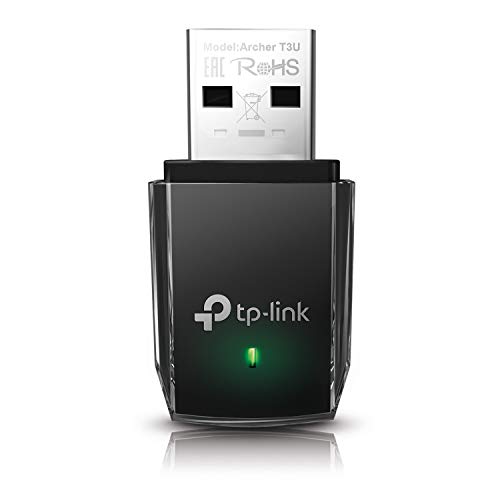
- AC1300 dual-band connectivity
- USB 3.0 compact design
- Windows and older Mac support
Best For: Everyday connectivity on compatible PCs and laptops
Best Wi-Fi 6 Performance
NETGEAR Nighthawk A7500 AX1800

- AX1800 Wi-Fi 6 speeds
- Adjustable high-gain antenna
- USB 3.0 for Windows 10/11
Best For: Streaming, gaming, and calls on busy networks
Best Long-Range Budget Pick

- AC600 dual-band connectivity
- 5dBi adjustable high-gain antenna
- Supports Windows XP through 11
Best For: Older PCs needing improved Wi-Fi reception
Best Wi-Fi 6E Upgrade
NETGEAR Nighthawk A8000 AXE3000

- Tri-band Wi-Fi 6E up to 3Gbps
- 6GHz support with compatible router
- Adjustable antenna and cradle
Best For: High-performance Windows 10/11 systems with Wi-Fi 6E routers
Best Wi-Fi 6 Upgrade

- AX1800 dual-band Wi-Fi 6 connectivity
- Adjustable 5dBi antenna with 1-meter USB 3.0 cable
- Windows 10/11 support with WPA3, MU-MIMO, and OFDMA
Best For: Windows users upgrading to Wi-Fi 6
Best Plug-and-Play Range

- AX900 Wi-Fi 6 dual-band connectivity
- 6dBi omnidirectional high-gain antenna
- Built-in driver for Windows 7, 10, and 11
Best For: Windows users prioritizing easy setup and reception
Best Budget Long-Range Option

- AC1300 dual-band wireless speeds
- Two external 5dBi high-gain antennas
- USB 3.0 with Windows 11/10/8.1/8/7/XP support
Best For: Windows users wanting affordable extended-range Wi-Fi
Best Windows 10/11 WiFi 6 Pick

- WiFi 6 dual-band connectivity
- Built-in Windows 10/11 drivers
- Supports up to 600 Mbps on 5 GHz
Best For: Windows 10/11 users upgrading to WiFi 6
Best Range-Focused WiFi Adapter
TP-Link Archer T3U Plus AC1300

- Adjustable high-gain external antenna
- AC1300 dual-band WiFi
- Supports Windows and macOS 10.9-10.15
Best For: Desktops needing flexible antenna positioning
Best Compact Budget WiFi Adapter
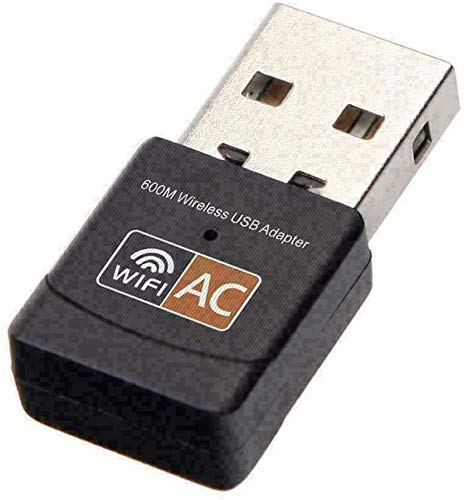
- Small 1.14-inch USB design
- Dual-band 2.4 GHz and 5 GHz support
- Drivers available for Mac, Linux, and Windows
Best For: Basic wireless upgrades for desktops and laptops
Best Value Wi-Fi 6 Upgrade – TP-Link Archer T3U AC1300
The TP-Link Archer T3U is a compact choice for adding dependable dual-band connectivity to a desktop, laptop, or other compatible computer. As wifi adapters go, it balances AC1300 speeds, USB 3.0 performance, and broad Windows compatibility in a portable design.
Best For: Everyday browsing, streaming, and general home networking on Windows PCs or compatible older Macs.
Pros:
- Dual-band AC1300 connectivity across 2.4GHz and 5GHz.
- USB 3.0 interface and compact, portable design.
- MU-MIMO and beamforming support for a more responsive connection.
- Supports Windows 11 through XP and Mac OS X 10.9–10.14.
Cons:
- Compatibility is limited to older listed Mac OS versions.
- Compact design may not offer the same reception flexibility as an external high-gain antenna.
The Archer T3U is a sensible all-purpose pick when you want a small USB upgrade without needing Wi-Fi 6 features. Its dual-band support and wide operating-system coverage make it especially practical for mixed-age computers.
Best Wi-Fi 6 Performance – NETGEAR Nighthawk A7500 AX1800
The NETGEAR Nighthawk A7500 is a strong option for upgrading a Windows 10 or 11 PC to Wi-Fi 6 without replacing its network card. Among wifi adapters, it stands out with AX1800 dual-band speeds, USB 3.0, and a flippable high-gain antenna for improved reception.
Best For: Busy households that need steadier connections for HD streaming, video calls, and gaming.
Pros:
- Wi-Fi 6 AX1800 dual-band speeds up to 1.8Gbps.
- External high-gain antenna can be adjusted for better signal reception.
- USB 3.0 supports faster data transfer than USB 2.0.
- Works with any Wi-Fi router or mesh system and supports WPA3.
Cons:
- Supports Windows 10 and 11 only.
- Larger than a basic compact USB dongle.
The A7500 is a practical upgrade for a newer Windows PC that needs better throughput and connection stability. Its adjustable antenna is particularly useful when the computer sits farther from the router.
Best Long-Range Budget Pick – TP-Link Archer T2U Plus AC600
The TP-Link Archer T2U Plus adds dual-band 802.11ac connectivity through USB while using a high-gain 5dBi antenna to improve reception. It is one of the more flexible wifi adapters for older Windows computers that need a stronger signal and straightforward setup.
Best For: Desktop or laptop users who prioritize range and antenna adjustability over maximum speed.
Pros:
- Dual-band speeds up to 600Mbps, with up to 433Mbps on 5GHz.
- Adjustable, multi-directional 5dBi high-gain antenna.
- Supports Windows 11, 10, 8.1, 8, 7, and XP.
- Compatible with common WEP, WPA, and WPA2 security standards.
Cons:
- Does not support macOS despite some general compatibility listings.
- Lower maximum speed than the AC1300 and Wi-Fi 6 options.
- Long antenna design is less portable than a mini dongle.
The Archer T2U Plus makes sense when signal reach matters more than headline speed. Its rotatable antenna gives you more control over reception, while broad Windows support helps extend the useful life of older PCs.
Best Wi-Fi 6E Upgrade – NETGEAR Nighthawk A8000 AXE3000
The NETGEAR Nighthawk A8000 is a premium USB option for Windows 10 and 11 computers, adding tri-band Wi-Fi 6E with access to the less-crowded 6GHz band. It is among the fastest wifi adapters in this roundup, with an adjustable antenna and included cradle for positioning.
Best For: Wi-Fi 6E router owners who want high throughput, lower latency, and a cleaner 6GHz connection.
Pros:
- AXE3000 tri-band performance with speeds up to 3Gbps.
- Adds 6GHz connectivity for compatible Wi-Fi 6E routers.
- Flippable high-gain antenna and included cradle help optimize reception.
- Supports WPA3 and backward compatibility with Wi-Fi 6E, Wi-Fi 6, and Wi-Fi 5 networks.
Cons:
- 6GHz benefits require a Wi-Fi 6E router.
- Windows 10 and 11 are the supported operating systems.
- Higher-end features may be unnecessary for basic browsing.
The A8000 is the most future-focused choice here, especially for demanding streaming and low-latency gaming. It delivers its biggest advantage when paired with a Wi-Fi 6E router and connected through USB 3.0.
Best Wi-Fi 6 Upgrade – TP-Link Archer TX20U Plus
The TP-Link Archer TX20U Plus is a strong choice among wifi adapters for Windows desktops and laptops that need a modern Wi-Fi 6 connection. Its AX1800 dual-band design, adjustable antennas, and included 1-meter USB 3.0 cable make it easier to position for reception and performance.
Best For: Windows 10 or 11 users upgrading to Wi-Fi 6 for gaming, streaming, downloads, and improved coverage.
Pros:
- AX1800 dual-band speeds up to 1,201 Mbps on 5GHz and 574 Mbps on 2.4GHz
- High-gain 5dBi antenna and flexible cable help optimize placement
- Supports WPA3, MU-MIMO, and OFDMA for security and network efficiency
- Backed by a two-year manufacturer warranty
Cons:
- Compatible only with Windows 10 and 11
- Not compatible with macOS or Linux
- Actual speeds depend on the connected router
Choose this adapter if you have a Wi-Fi 6 router and want a feature-rich desktop upgrade. Its Windows-only compatibility is the main limitation, but the antenna flexibility and newer wireless features make it a capable option for demanding home networks.
Best Plug-and-Play Range – Tenda U11 Pro
The Tenda U11 Pro is one of the more convenient wifi adapters for Windows users who want a high-gain external antenna without downloading drivers. Its AX900 Wi-Fi 6 connection and 6dBi omnidirectional antenna are designed to improve reception in areas where a computer’s internal wireless hardware struggles.
Best For: Windows 7, 10, or 11 desktops and laptops needing simple setup and stronger wireless reception.
Pros:
- Built-in driver supports plug-and-play setup on compatible Windows systems
- 6dBi omnidirectional antenna is designed for improved signal reception
- Supports dual-band Wi-Fi 6, MU-MIMO, and 5GHz access-point mode
- Can create a hotspot for up to eight devices in 5GHz AP mode
Cons:
- Uses a USB 2.0 interface
- Windows compatibility is specified; other platforms are not listed
- One-year warranty is shorter than some competing options
The U11 Pro makes sense when easy installation and antenna gain matter more than maximum throughput. It is a practical Windows-focused adapter for improving coverage, though users seeking USB 3.0 connectivity or broader operating-system support should look elsewhere.
Best Budget Long-Range Option – Nineplus AC1300 Adapter
The Nineplus AC1300 is a budget-friendly choice among wifi adapters for Windows desktops and laptops that need dual-band wireless connectivity. It combines two external 5dBi antennas with USB 3.0 and supports up to 867 Mbps on 5GHz and 400 Mbps on 2.4GHz.
Best For: Windows users seeking an affordable adapter with external antennas for longer-range browsing, gaming, streaming, and online meetings.
Pros:
- AC1300 dual-band speeds with up to 867 Mbps on 5GHz
- Two 5dBi antennas are designed to improve signal reception and coverage
- USB 3.0 supports faster data transfer and is backward compatible with USB 2.0
- Includes online setup assistance and two-year support
Cons:
- Does not support macOS, Chromebook, or Linux
- Windows 7 may require manual driver installation
- Uses Wi-Fi 5 rather than Wi-Fi 6
This Nineplus adapter is a sensible value pick for replacing faulty built-in Wi-Fi or extending coverage on a Windows machine. Its dual external antennas and USB 3.0 interface are useful advantages, but platform support is limited and it lacks newer Wi-Fi 6 features.
Best Windows 10/11 WiFi 6 Pick – UGREEN AX900 USB WiFi Adapter
If you need a straightforward upgrade for a Windows desktop or laptop, this UGREEN WiFi adapter adds dual-band WiFi 6 connectivity through USB 3.0. It supports up to 600 Mbps on 5 GHz and 287 Mbps on 2.4 GHz, provided you pair it with a compatible WiFi 6 router.
Best For: Windows 10/11 users who want a compact WiFi 6 adapter with built-in drivers.
Pros:
- WiFi 6 dual-band support with up to AX900-rated combined speeds
- Built-in drivers support CD-free installation on Windows 10/11
- Supports both receiving a wireless connection and sharing WiFi with other devices
- Includes WPA-PSK and WPA2-PSK security support
Cons:
- Does not support macOS, Linux, or Windows 7/8/8.1
- Reaching the advertised AX900 rating requires a WiFi 6 router
- The manufacturer recommends keeping it within 30 feet of the router
The UGREEN is a focused choice for newer Windows systems. Its built-in setup and WiFi 6 support make it convenient, but compatibility is narrower than some older WiFi adapters.
Best Range-Focused WiFi Adapter – TP-Link Archer T3U Plus AC1300
For desktops that need flexible placement and stronger reception, the TP-Link Archer T3U Plus combines AC1300 dual-band WiFi with an external high-gain antenna. It can deliver up to 867 Mbps on 5 GHz or 400 Mbps on 2.4 GHz, depending on the router and network conditions.
Best For: Desktop users who want an adjustable antenna and broad Windows or macOS compatibility.
Pros:
- AC1300 dual-band speeds of up to 867 Mbps on 5 GHz and 400 Mbps on 2.4 GHz
- External high-gain antenna helps improve signal reception and transmission
- Rotating, multidirectional antenna can be aimed toward the router
- Supports MU-MIMO and Windows 11/10/8.1/8/7/XP plus macOS 10.9-10.15
Cons:
- Its advertised speeds depend on the connected router and network
- The external antenna design is less compact than a mini adapter
- Listed macOS support ends at version 10.15
The Archer T3U Plus is a practical option when antenna positioning matters more than a low-profile design. Its wide operating-system support also makes it useful for older computers.
Best Compact Budget WiFi Adapter – DWS AC600 Mini USB Adapter
This compact DWS WiFi adapter is designed for basic dual-band connectivity in a small USB form factor. It supports 2.4 GHz and 5 GHz networks with a listed data rate of up to 600 Mbps, making it a simple option for desktops, laptops, and notebooks.
Best For: Users seeking a small AC600 adapter with support for Windows, macOS, and Linux drivers.
Pros:
- Compact design measures about 1.14 inches long
- Supports dual-band 2.4 GHz and 5 GHz wireless connections
- Compatible with desktop and laptop computers
- Driver downloads are provided for Mac, Linux, and Windows when no CD drive is available
Cons:
- The supplied details list IEEE 802.11n rather than WiFi 5 or WiFi 6
- Driver installation may require downloading files if a CD drive is unavailable
- Operating-system compatibility details are limited in the listing
The DWS adapter prioritizes portability and broad driver availability over advanced features. It is worth considering for a basic connection upgrade where a low-profile USB design is important.
How We Picked These Wifi Adapters
We compared the selected models by wireless standard, advertised throughput, band support, antenna configuration, connection type, and likely use case. The list includes compact adapters for basic connectivity, dual-band AC models for everyday streaming and browsing, and newer WiFi 6 or WiFi 6E options for compatible routers and busy networks.
Advertised speeds are theoretical maximums rather than guaranteed internet performance. Actual results depend on your router, broadband plan, USB standard, signal strength, interference, drivers, and network traffic.
Quick Comparison
- AC600: Affordable dual-band connectivity for browsing, streaming, and ordinary home use.
- AC1300: A practical middle ground with more headroom for downloads and multiple devices.
- WiFi 6 AX900: A modern option for compatible routers, especially in crowded networks.
- WiFi 6 AX1800: Better suited to higher-throughput connections and demanding desktop use.
- WiFi 6E A8000: The most forward-looking choice here, provided your router and computer support the 6 GHz band.
Key Buying Factors for Wifi Adapters
Wireless Standard and Speed
Choose an AC adapter for cost-effective everyday use, WiFi 6 for improved efficiency on newer networks, or WiFi 6E if you specifically need access to 6 GHz. Match the adapter’s class to your router; buying a faster model will not upgrade an older router.
Band Support
Dual-band adapters use 2.4 GHz and 5 GHz. The 2.4 GHz band generally reaches farther, while 5 GHz can deliver better speeds nearby. WiFi 6E adds 6 GHz, which can reduce congestion but usually has shorter range and requires compatible equipment.
Antenna and Placement
External or adjustable antennas can help a desktop maintain a stronger signal, particularly when the computer is under a desk or far from the router. Mini adapters are easier to carry but may sacrifice range and flexibility.
Compatibility and USB Connection
Check support for your operating system before buying, especially with older Windows versions or macOS. A USB 3.0 connection is preferable for higher-speed adapters, while a USB 2.0 port can become a bottleneck. Driver availability also matters after installation or a system update.
Who Should Buy Which Wifi Adapters?
Choose an AC600 model if you need inexpensive wireless access for browsing, email, streaming, or a backup connection. Choose an AC1300 model for a balanced upgrade to an older desktop or laptop. Choose WiFi 6 AX900 for a newer router and a moderately busy home network.
Choose a WiFi 6 AX1800 adapter when your internet service and local network can take advantage of higher throughput. Choose the WiFi 6E option only when your router supports 6 GHz and you want additional spectrum for compatible devices. For any model, prioritize stable drivers and sensible antenna placement over headline speed alone.