
Choosing the right computer cooling fan can reduce heat, improve airflow, and make a noisy workstation or gaming setup more comfortable. This roundup covers ten practical options, including USB-powered fans, laptop cooling pads, PWM case fans, and high-airflow models.
Before buying, match the fan to your device, available power connection, installation space, and noise expectations. The guide below highlights the differences that matter most so you can narrow the list quickly.
Best 10 Computer Cooling Fans Under 200 Picks for 2026
Best USB Component Fan

- 18 dBA ultra-quiet operation
- USB-powered with speed controller
- Flat or upright placement
Best For: Quiet cooling for computers, consoles, and AV cabinets
Best Portable Laptop Pad
havit HV-F2056 Laptop Cooling Pad

- Three quiet USB-powered fans
- Two adjustable height settings
- Extra USB port included
Best For: Portable cooling and ergonomic support for large laptops
Best PWM Case Fan

- 120mm pressure-optimized design
- 4-pin PWM speed control
- 1700 RPM performance with six-year warranty
Best For: Desktop CPU coolers, radiators, and case ventilation
Best Five-Fan Laptop Cooler

- Five quiet fans with selectable modes
- Six adjustable height settings
- Two extra USB hubs
Best For: Adjustable cooling and connectivity for 12- to 17-inch laptops
Best USB Device Cooler

- USB-powered plug-and-play design
- Three-speed controller with off mode
- Dual ball bearings for flexible placement
Best For: Routers and other USB-equipped electronics
Best Quiet Large Case Fan
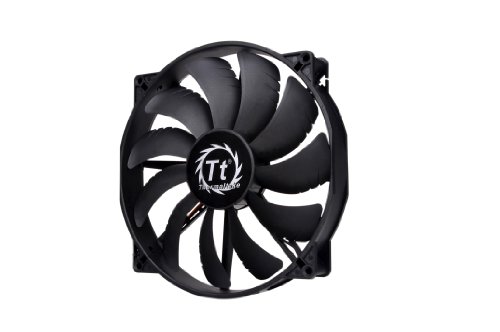
- Up to 129.64 CFM airflow
- 200 x 30mm high-airflow design
- 3-pin 12V connection
Best For: Large desktop cases needing simple, quiet airflow
Best USB Convenience
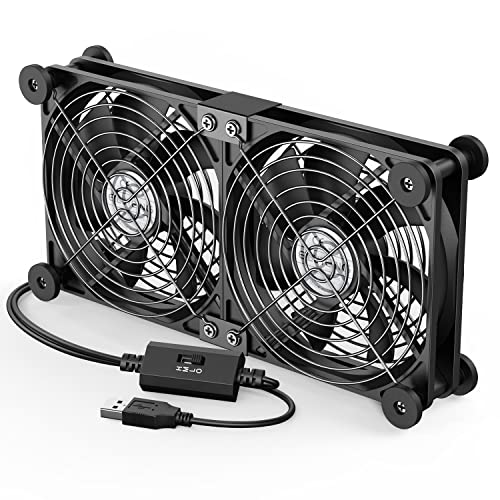
- Dual 120mm fans run from a USB port
- Three speeds from 900 to 1,500 RPM
- Works with laptops, routers, consoles, and receivers
Best For: External cooling for USB-equipped electronics
Best Variable-Speed AC Option

- AC-plug operation with included speed controller
- 700–2,800 RPM range and up to 95.8 CFM airflow
- Dual-ball bearings rated for 50,000 hours
Best For: High-airflow external cooling from an AC outlet
Best USB Component Fan – AC Infinity MULTIFAN S3
For computer cooling fans under 200, the AC Infinity MULTIFAN S3 is a compact USB-powered option for desktops, cabinets, consoles, and other electronics. Its speed controller lets you balance airflow and noise, while the stand supports either flat or upright placement.
Best For: Quiet cooling for computers, AV components, game consoles, and enclosed cabinets.
Pros:
- Ultra-quiet 18 dBA operation with adjustable speed control.
- USB power works with many computer, AV, and console ports.
- Dual-ball bearings are rated for a 67,000-hour lifespan.
- Compact 120mm design can stand upright or lie flat.
Cons:
- Its 52 CFM airflow is suited to targeted cooling rather than large cases.
- Uses USB power instead of a standard internal PC fan connector.
The MULTIFAN S3 is a flexible choice when you need simple, low-noise airflow without installing a fan inside a computer case.
Best Portable Laptop Pad – havit HV-F2056 Laptop Cooling Pad
Among computer cooling fans under 200, the havit HV-F2056 is a portable laptop cooling pad for 15.6- to 17-inch systems. Three quiet USB fans circulate air beneath the laptop, while the adjustable stand adds a more comfortable working or viewing angle.
Best For: Large laptops used for work, gaming, entertainment, or travel.
Pros:
- Three ultra-quiet fans help circulate air beneath the laptop.
- Two adjustable height settings provide ergonomic positioning.
- Slim, lightweight design is convenient for portability.
- Includes an extra USB port for connecting another device.
Cons:
- Designed for laptops from 15.6 to 17 inches, so it may be oversized for smaller systems.
- USB-C devices require a USB-C-to-USB adapter.
The HV-F2056 combines basic cooling with stand functionality, making it a practical pick for users who want easier laptop positioning as well as added airflow.
Best PWM Case Fan – Noctua NF-P12 redux-1700 PWM
For computer cooling fans under 200, the Noctua NF-P12 redux-1700 PWM is a 120mm internal PC fan built for strong airflow and automatic speed control. Its pressure-optimized design suits CPU coolers, water-cooling radiators, and case ventilation.
Best For: Desktop builders who need a 4-pin PWM fan for coolers, radiators, or chassis airflow.
Pros:
- 4-pin PWM control allows compatible motherboards to adjust speed automatically.
- Pressure-optimized blades provide strong airflow for radiators and CPU coolers.
- 1700 RPM maximum speed balances performance with quiet operation.
- Includes a six-year manufacturer warranty.
Cons:
- Requires a compatible 12V 4-pin motherboard or fan connection.
- Maximum noise is rated at 25.1 dB(A), so it is not the quietest option at full speed.
The NF-P12 redux-1700 PWM is a focused choice for desktop cooling setups where dependable PWM control and pressure-oriented airflow matter more than USB convenience.
Best Five-Fan Laptop Cooler – Kootek Laptop Cooling Pad
Among computer cooling fans under 200, the Kootek laptop cooling pad offers five USB-powered fans and broad coverage for 12- to 17-inch laptops. Two switches let you select fan and LED operation, while six height settings provide flexible positioning.
Best For: Laptop users who want adjustable cooling coverage, stand angles, and extra USB connectivity.
Pros:
- Five quiet fans provide broad airflow coverage, with selectable fan operation.
- Six adjustable height settings support different viewing and typing angles.
- Two built-in USB hubs add connectivity for peripherals.
- Front stoppers help keep compatible laptops from sliding.
Cons:
- At 1.16 kg, it is less portable than slimmer cooling pads.
- Best performance requires connection to a 5V 1A adapter.
- USB-C devices require a USB-C-to-USB adapter.
The Kootek pad is a feature-rich option for extended laptop sessions, especially when you want multiple cooling modes and a highly adjustable stand rather than maximum portability.
Best High-Airflow RGB Fan – Thermaltake CT200 ARGB PWM
For computer cooling fans under 200, the Thermaltake CT200 stands out when you need substantial airflow in a large-fan setup without giving up lighting control. Its 200mm frame delivers up to 131.6 CFM, while PWM control and a 5V ARGB connection support adjustable performance and motherboard-synced effects.
Best For: Large desktop builds that prioritize high airflow, coordinated ARGB lighting, and simple fan daisy-chaining.
Pros:
- High airflow output of up to 131.6 CFM with 1.92mm-H2O static pressure.
- 9 addressable LEDs support 16.8 million colors through a 3-pin 5V ARGB connector.
- 4-pin PWM daisy-chain connectors and included extension cables simplify installation.
- Hydraulic bearing and 500–900 rpm range support quieter operation and control.
Cons:
- Its 200mm size requires compatible case mounting space.
- It is a single-fan pack, so additional fans may be needed for a complete setup.
The CT200 is a practical choice for spacious cases where airflow and visual coordination matter. Confirm your case supports a 200mm fan and that your motherboard has the required PWM and 5V ARGB connections.
Best USB Device Cooler – Quiet 120mm Router Fan
Among computer cooling fans under 200, this 120mm USB fan is a flexible option for equipment with a USB port. It includes a three-level speed controller, silicone feet for vibration reduction, and dual ball bearings for horizontal or vertical placement.
Best For: Routers, modems, DVRs, game consoles, TV boxes, and other USB-equipped devices that need extra ventilation.
Pros:
- USB-powered design works with devices that provide a USB interface.
- Low, medium, and high settings plus an off mode allow easy noise and airflow adjustment.
- Silicone rubber feet help reduce vibration and listed noise ranges from 9.3–16.8dBA.
- Dual ball bearings support upright or flat installation and a stated 50,000-hour lifespan.
Cons:
- It is designed for USB-connected equipment rather than standard internal desktop fan headers.
- The 120mm format may not fit every device or enclosure.
This fan makes sense when you want plug-and-play cooling without opening a desktop case. Check the available space around the target device and ensure a USB port is accessible for power.
Best Quiet Large Case Fan – Thermaltake Pure 20
For buyers comparing computer cooling fans under 200, the Thermaltake Pure 20 offers a straightforward large-format cooling solution. Its 200 x 30mm design produces up to 129.64 CFM at 800 rpm, with a blade shape intended to focus airflow while limiting excess noise.
Best For: Desktop cases with compatible 200mm mounts that need high airflow and a simple, quiet cooling upgrade.
Pros:
- 200 x 30mm frame provides high airflow and air pressure for large cases.
- Rated airflow reaches 129.64 CFM at a maximum 800 rpm.
- Blade design balances focused airflow with a listed 28.2dB noise level.
- Shaved frame supports easier installation, and anti-vibration mounting helps reduce movement and noise.
Cons:
- It uses a 3-pin, 12V connector rather than PWM control.
- Compatibility depends on having a suitable 200mm mounting location.
- The long-life sleeve bearing may be less suitable than a ball-bearing design for some installation orientations.
The Pure 20 is a good fit for a compatible chassis when you want strong airflow without RGB hardware or complex controls. Verify the case mount and available 12V 3-pin header before buying.
Best Multi-Fan Value – Thermalright TL-C12C X3
For shoppers comparing computer cooling fans under 200, this three-pack is a practical choice for upgrading several case positions or pairing fans with a CPU cooler. Its 4-pin PWM connection enables motherboard-controlled speed adjustment, while the 120mm design delivers up to 66.17 CFM at 1,550 RPM.
Best For: Desktop builders who need multiple 120mm PWM fans for cases, radiators, or CPU coolers.
Pros:
- Three 120mm fans provide broad cooling coverage.
- 4-pin PWM control adjusts speed based on motherboard temperature.
- S-FDB bearings and silicone corner pads help reduce vibration and noise.
- Includes up to 66.17 CFM airflow at a rated 25.6 dBA.
Cons:
- Requires a compatible 4-pin PWM connection for automatic speed control.
- Its 1,550 RPM maximum speed is lower than some high-speed fans.
The TL-C12C X3 stands out when you want several matching fans without complicated installation. It offers useful PWM control, solid airflow, and noise-reduction features in one three-fan package.
Best USB Convenience – ELUTENG Dual 120mm USB Fan
Among computer cooling fans under 200, the ELUTENG dual-fan unit is suited to devices without a standard PC fan header. It connects through USB, runs both 120mm fans together, and offers three selectable speeds for cooling laptops, routers, consoles, receivers, and other equipment.
Best For: USB-equipped electronics and setups that need portable, plug-and-play cooling without internal wiring.
Pros:
- USB-powered design works with laptops, routers, consoles, and other USB devices.
- Two connected 120mm fans provide combined airflow.
- Three speed settings range from 900 to 1,500 RPM.
- Protective metal grilles and removable rubber shock absorbers improve practical usability.
Cons:
- Both fans run together rather than independently.
- Its maximum noise rating reaches 32.5 dB at the highest setting.
- It is an external USB cooler, not a direct replacement for an internal 4-pin PC fan.
This ELUTENG model is a flexible solution when convenience matters more than motherboard integration. The adjustable controller, USB power, and horizontal or vertical placement make it especially useful for external device cooling.
Best Variable-Speed AC Option – Easy Cloud 120mm AC Fan
For computer cooling fans under 200 that need outlet power and broad speed adjustment, this 120mm axial fan includes an AC plug and controller. Its speed range runs from 700 to 2,800 RPM, with stated airflow up to 95.8 CFM for cooling PCs, servers, consoles, routers, and other equipment.
Best For: Users who want a high-airflow 120mm fan with adjustable speed and direct AC-outlet operation.
Pros:
- Variable controller adjusts the fan from 700 to 2,800 RPM.
- Stated airflow reaches 95.8 CFM for demanding cooling tasks.
- AC plug simplifies powering the fan from an outlet.
- Dual-ball bearings are rated for a 50,000-hour lifespan.
Cons:
- Its noise rating is listed below 41 dB, so maximum-speed operation may be audible.
- Uses a 2-pin connection rather than a standard motherboard 4-pin PWM plug.
- The AC-powered format may be less convenient for compact internal PC builds.
The Easy Cloud fan is a strong fit when airflow and flexible manual control take priority. Its outlet-powered design broadens compatibility, though builders seeking motherboard-based fan curves may prefer a conventional PWM model.
How We Picked the Best Computer Cooling Fans Under 200
We grouped these Computer Cooling Fans Under 200 by their intended use rather than treating every model as interchangeable. The selection includes internal 120mm and 200mm case fans, laptop cooling stands, USB-powered accessory fans, router and receiver coolers, and an AC-powered axial fan. We considered cooling approach, power input, speed control, installation requirements, stated noise features, and compatibility.
Because cooling needs vary widely, a fan designed for a desktop case may not be suitable for a laptop or networking cabinet. A useful choice should deliver appropriate airflow without requiring adapters, mounting hardware, or electrical access you do not have.
Quick Comparison
- For desktop case upgrades: Noctua, Thermaltake, and Thermalright models use standard case-fan formats, with PWM control available on compatible motherboards.
- For laptops: The havit and Kootek cooling pads provide a raised platform and active airflow for larger laptop sizes.
- For external equipment: AC Infinity, ELUTENG, and the router fan use USB power and adjustable speed control for routers, receivers, DVRs, and other enclosures.
- For maximum coverage: The 200mm Thermaltake fan can move substantial air where a large mounting position is available.
- For wall-powered cooling: The AC-plug fan is intended for setups that need a separate variable-speed fan rather than a motherboard-connected model.
Key Buying Factors for Computer Cooling Fans Under 200
Size and Fit
Measure the mounting area before ordering. A 120mm fan is common in desktop cases, while a 200mm model requires a compatible large-fan mount. Laptop pads should match the computer’s screen size and footprint, not just its advertised diagonal range.
Power and Control
USB fans are convenient for laptops, routers, receivers, and small enclosures. PWM fans connect to compatible motherboard headers and can adjust automatically with system temperature. AC-powered models need a suitable outlet and should be kept clear of obstructions.
Airflow, Noise, and Speed
Higher speed can improve heat removal but may increase noise. Look for a controller or PWM support when you want to balance cooling and acoustics. For sensitive equipment near a desk or living area, adjustable low-speed operation is especially useful.
Installation and Safety
Check whether the product includes mounting hardware, anti-vibration features, or a stand. Keep external fans’ grilles unobstructed, route cables away from blades, and verify voltage compatibility before connecting any non-USB model.
Who Should Buy Which Computer Cooling Fans Under 200?
Choose a standard PWM case fan if you are improving airflow inside a desktop PC and have an open 120mm mounting position. Choose a 200mm fan when your case supports the larger format and you want broad airflow at a lower rotational speed.
Choose a laptop cooling pad for a portable computer that runs hot during gaming, rendering, or extended workloads. Choose a USB accessory fan for routers, DVRs, receivers, or compact spaces where simple placement matters more than internal case integration.
Choose an AC-powered fan only when its separate power arrangement suits your setup. For most buyers, the best option is the one that fits securely, connects directly to available power, and provides controllable airflow without unnecessary complexity.