
Workstations running CPUs, GPUs, storage arrays, or other demanding hardware need consistent airflow to maintain performance and component longevity. The right fan depends on more than size: connector type, static pressure, noise, speed control, and installation space all matter.
This roundup compares 10 computer cooling fans for workstations, from quiet USB fans and PWM case fans to high-airflow AC-powered models designed for cabinets, servers, and other enclosed equipment.
Best 10 Computer Cooling Fans for Workstations Picks for 2026
USB Electronics Cooling Pick

- USB-powered 120mm fan for flexible placement
- Multi-speed controller for airflow adjustment
- 18 dBA rating with dual-ball bearings
Best For: External workstation, cabinet, and electronics cooling
High-Pressure Performance Pick

- Up to 2,100 RPM and 72.8 CFM airflow
- 4.15 mm-H2O static pressure for radiators
- Daisy-chain control through one PWM connector
Best For: High-performance radiator and heatsink cooling
Adjustable AC Cooling Pick

- Two fans with up to 170 CFM combined airflow
- AC-powered variable speed controller
- Supports intake or exhaust configurations
Best For: External workstation, server, and equipment enclosures
High-Pressure Workstation Cooling

- 119.6 CFM airflow with 3.57 mm-H2O static pressure
- PWM control from 500 to 2000 RPM
- Five-year warranty and hydraulic bearing
Best For: 140mm workstation radiators, heatsinks, and high-airflow builds
Versatile Rack Ventilation
Wathai Dual Ball 3 x 120mm Fan

- Three 120mm fans for intake or exhaust ventilation
- AC-powered variable speed controller
- Dual-ball bearings support flat or upright placement
Best For: DIY workstation cabinets, server racks, and equipment enclosures
High-Speed Daisy-Chain Cooling

- 104.8 CFM airflow at up to 3000 RPM
- 28mm frame with high static pressure design
- Daisy-chain connectors simplify multi-fan wiring
Best For: High-performance 120mm workstation builds with PWM control
Quiet USB Cooling Pick

- Dual 120mm fans with 104 CFM total airflow
- 19 dBA operation with adjustable speed control
- Flat or upright placement with USB power
Best For: Quiet supplemental cooling for workstations and AV equipment
High-Speed AC Cooling Pick
Easy Cloud 120mm Variable-Speed Fan

- 95.8 CFM airflow with 700–2800 RPM range
- AC plug powers the fan from a wall outlet
- Dual-ball bearings rated for 50,000 hours
Best For: Equipment cabinets and workstations needing strong adjustable ventilation
Portable Dual-Fan Pick
ELUTENG Dual USB 120mm Cooling Fan
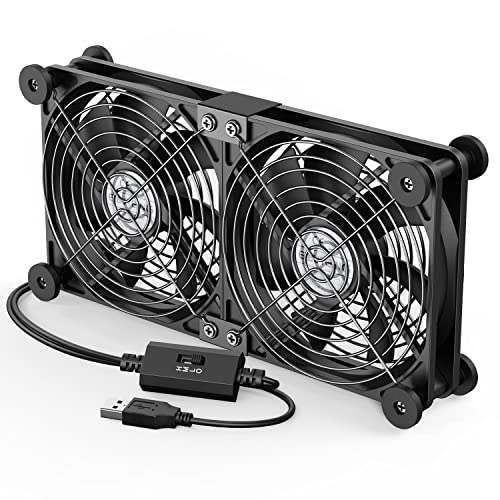
- Two connected 120mm fans run simultaneously
- Three speeds from 900 to 1500 RPM
- USB-powered with horizontal or vertical placement
Best For: Portable cooling for USB-equipped workstation devices
Quiet PWM Value Pick – Thermalright TL-C12C X3
For shoppers comparing computer cooling fans for workstations, the Thermalright TL-C12C X3 offers a practical three-fan setup for cases, CPU coolers, and radiators. Its 4-pin PWM connection supports automatic motherboard speed control, while the 120mm design delivers up to 66.17 CFM at 1,550 RPM.
Best For: Workstation builders who want three PWM-controlled fans with low-noise features.
Pros:
- Three 120mm fans are included for broad case or cooler coverage.
- 4-pin PWM control can adjust speed according to system temperature.
- S-FDB bearings and silicone corner pads help reduce noise and vibration.
- Produces up to 66.17 CFM with a rated noise level of 25.6 dBA.
Cons:
- Maximum speed is 1,550 RPM, below some performance-focused alternatives.
- Requires compatible 4-pin PWM motherboard or fan-control connections.
This is a balanced choice when a workstation needs several affordable fans without giving up PWM control or basic noise reduction. The included cable length also supports PWM fan chaining in suitable setups.
USB Electronics Cooling Pick – AC Infinity MULTIFAN S3
The AC Infinity MULTIFAN S3 is a convenient option for computer cooling fans for workstations when you need external or component-level cooling rather than a standard motherboard installation. It uses USB power, includes a multi-speed controller, and produces up to 52 CFM at a rated 18 dBA.
Best For: Quiet USB-powered cooling for electronics, AV equipment, cabinets, and workstations without an available fan header.
Pros:
- USB plug works with USB ports on computers, AV equipment, and game consoles.
- Multi-speed controller allows airflow and noise adjustment.
- Dual-ball bearings are rated for a 67,000-hour lifespan and support horizontal or vertical placement.
- UL-certified design includes noise-absorption pads.
Cons:
- USB power and 5V operation make it less suited to direct motherboard fan control.
- This is a single-fan package rather than a multi-fan kit.
Choose this model when flexibility and quiet operation matter more than internal case integration. Its controller and USB connection make it especially useful for cooling a workstation cabinet or nearby equipment.
High-Pressure Performance Pick – CORSAIR RS120 Triple Pack
For demanding computer cooling fans for workstations, the CORSAIR RS120 triple pack emphasizes high airflow and radiator performance. Each 120mm PWM fan can reach 2,100 RPM, move up to 72.8 CFM, and provide 4.15 mm-H2O static pressure for pushing air through heatsinks and radiators.
Best For: Performance-oriented workstations using radiators, heatsinks, or restricted airflow paths.
Pros:
- Daisy-chain design lets multiple fans share a single 4-pin PWM connector.
- AirGuide vanes direct airflow toward hot components.
- High static pressure suits radiator and heatsink mounting.
- Magnetic Dome bearings are designed to reduce friction and support longevity.
Cons:
- Rated noise is 36 dBA, making it less focused on ultra-quiet operation.
- Requires a compatible 4-pin PWM connection for speed control.
This pack is a strong fit for workstation builds where thermal headroom is the priority. Its daisy-chain wiring can also simplify installation when several fans need coordinated PWM control.
Adjustable AC Cooling Pick – Wathai Dual 120mm Fan
The Wathai dual-fan kit is a flexible choice among computer cooling fans for workstations, servers, and external cases. It includes two 120mm fans, an AC plug, variable speed control, and reversible intake or exhaust positioning for installations that need substantial airflow outside a standard PC fan header.
Best For: External workstation, server, cabinet, or equipment cooling where AC power and adjustable airflow are useful.
Pros:
- Two fans provide combined airflow rated at up to 170 CFM.
- AC plug and speed knob support 100–240V input and adjustable operation.
- Fans can be configured for intake or exhaust airflow.
- Dual-ball bearings support horizontal or vertical placement, with a stated 50,000-hour lifespan.
Cons:
- Its 35 dB noise rating is higher than the quieter options in this roundup.
- AC-powered external design is less convenient for standard motherboard installation.
- The product uses a relatively large combined 240mm footprint.
This kit makes sense when a workstation or equipment enclosure needs adjustable, high-volume airflow and does not have convenient internal fan headers. Protective metal grilles add a practical layer of coverage for external placement.
High-Pressure Workstation Cooling – TOUGHFAN 14 Pro
For demanding computer cooling fans for workstations, the Thermaltake TOUGHFAN 14 Pro emphasizes high airflow and static pressure for heatsinks, radiators, and case ventilation. Its PWM control supports speeds from 500 to 2000 RPM, while the 140mm design and tight 0.6mm tip clearance are intended to improve airflow efficiency.
Best For: Workstations using radiators or heatsinks that need strong pressure and airflow from a single 140mm fan.
Pros:
- Up to 119.6 CFM airflow and 3.57 mm-H2O static pressure.
- PWM control with a 500–2000 RPM operating range.
- Metal-reinforced motor hub and second-generation hydraulic bearing.
- Includes a five-year manufacturer warranty.
Cons:
- Only one fan is included.
- Its 31.6 dB-A noise rating may not suit noise-sensitive workspaces.
- Designed for 140mm mounting spaces, limiting compatibility with smaller cases.
The TOUGHFAN 14 Pro is a focused choice when workstation cooling depends on radiator or heatsink performance. Verify 140mm clearance and motherboard or controller support for its 4-pin connector before buying.
Versatile Rack Ventilation – Wathai Dual Ball 3 x 120mm Fan
The Wathai three-fan setup offers a practical approach to computer cooling fans for workstations, server racks, cabinets, and other equipment enclosures. It connects to AC power and includes a variable speed controller, allowing the combined 120mm fans to be adjusted or switched off as needed.
Best For: Workstations, cabinets, racks, and DIY ventilation projects that benefit from three independently mounted 120mm fans and adjustable AC-powered control.
Pros:
- Three 120mm fans provide a combined listed airflow of 85 CFM per fan.
- AC input supports 100–240V, with adjustable 3–12V DC output.
- Dual-ball bearings support horizontal or vertical placement.
- Protective metal grilles allow intake or exhaust installation.
Cons:
- The 2500 RPM fans may be relatively loud at the listed 35 dB rating.
- The AC plug and speed controller require an external power connection rather than a standard motherboard header.
- The three-fan assembly is over 14 inches long, so it needs substantial mounting space.
This Wathai kit is better suited to enclosure ventilation than conventional internal PC fan replacement. Its controller and dual-ball bearings make it flexible for rack, cabinet, or workstation cooling layouts, provided you have room for the three-fan arrangement.
High-Speed Daisy-Chain Cooling – ASUS ProArt PF120
ASUS ProArt PF120 120mm PWM Fan, 3000RPM, High Airflow/Static Pressure, Daisy-Chain Design
Check Price On AmazonThe ASUS ProArt PF120 is a 120mm PWM fan for computer cooling fans for workstations that need strong airflow in a compact frame. Its 28mm frame, 104.8 CFM airflow rating, high static pressure design, and speeds up to 3000 RPM make it suitable for varied workloads, while its daisy-chain connectors can simplify multi-fan installation.
Best For: Performance-oriented workstation builds that need high-speed 120mm cooling and streamlined daisy-chain wiring.
Pros:
- Up to 104.8 CFM airflow at speeds reaching 3000 RPM.
- 28mm frame and 0.5mm blade-to-frame gap support airflow and pressure performance.
- PWM control enables adjustment for different workloads.
- Patented daisy-chain connectors can simplify multi-fan installation.
Cons:
- Its listed 39 dB noise level may be noticeable at high speed.
- Only one fan is included.
- Requires a compatible 120mm mounting location and PWM connection.
The PF120 is a strong option for workstation users who prioritize cooling capacity and tidy multi-fan installation. Its high maximum speed is useful for demanding loads, but users seeking quieter operation should plan to manage the PWM curve.
Quiet USB Cooling Pick – AC Infinity MULTIFAN S7
For workstation setups that need supplemental cooling without much noise, the AC Infinity MULTIFAN S7 is a practical choice among computer cooling fans for workstations. Its dual 120mm fans deliver 104 CFM total airflow, while the included controller lets you balance cooling and sound.
Best For: Quiet cooling for computers, AV components, consoles, receivers, and cabinets with an available USB port.
Pros:
- Dual 120mm fans provide 104 CFM of total airflow.
- Low 19 dBA noise rating with noise-absorption pads.
- Multi-speed controller supports adjustable airflow.
- Dual-ball bearings are rated for a 67,000-hour lifespan and allow flat or upright placement.
Cons:
- USB-powered design may be less suitable when no nearby USB port is available.
- Designed as supplemental equipment cooling rather than a traditional internal case-fan replacement.
The MULTIFAN S7 stands out when quiet operation and flexible placement matter most. Its USB connection and compact profile make it especially convenient for workstation peripherals, electronics cabinets, and other enclosed components.
High-Speed AC Cooling Pick – Easy Cloud 120mm Variable-Speed Fan
The Easy Cloud 120mm axial fan suits workstations and equipment cabinets that need strong, adjustable ventilation from a wall outlet. Unlike USB-only computer cooling fans for workstations, it uses an AC plug and a 3V-to-12V controller to provide a broad speed range.
Best For: PC, server cabinet, DVR, router, console, and equipment cooling where AC power and higher airflow are priorities.
Pros:
- Adjustable speed from 700 to 2800 RPM.
- Provides 95.8 CFM airflow for active ventilation.
- Dual-ball bearings are rated for a 50,000-hour lifespan.
- AC plug simplifies powering the fan from an outlet.
Cons:
- Noise can reach under 41 dB, making it less quiet than the USB alternatives here.
- Its AC-powered format may be less convenient for portable or USB-only setups.
This fan is a strong fit when a workstation or equipment enclosure needs more aggressive airflow and independent outlet power. The variable controller helps reduce output when maximum cooling is unnecessary, but quiet-office users should account for its higher stated noise level.
Portable Dual-Fan Pick – ELUTENG Dual USB 120mm Cooling Fan
The ELUTENG dual USB fan is a flexible option for workstations where cooling needs to move between a desk, laptop, router, or enclosed device. Its two connected 120mm fans run together, and the three-speed controller makes it easy to choose between quieter operation and stronger airflow.
Best For: USB-equipped laptops, PCs, routers, hard-drive enclosures, AV devices, and game consoles that benefit from portable supplemental cooling.
Pros:
- Dual 120mm fans operate together for broader cooling coverage.
- Three speed settings run from 900 to 1500 RPM.
- USB plug-and-play power supports horizontal or vertical placement.
- Metal safety grilles and removable rubber shock absorbers improve stability and protection.
Cons:
- Maximum listed airflow is about 30 CFM, lower than the other options in this group.
- Requires an available USB port and is intended for supplemental rather than internal case cooling.
Choose the ELUTENG when portability, simple USB power, and dual-fan coverage are more important than maximum airflow. Its adjustable speeds and protective grilles make it a convenient everyday cooling aid for desk-side equipment.
How We Picked the Best Computer Cooling Fans for Workstations
We focused on the specifications and use cases that matter in real workstation builds: airflow, static pressure, speed control, bearing design, power connection, noise potential, and installation flexibility. The selection includes standard 120mm fans, larger 140mm models, USB-powered cooling fans, and AC or DC options for cabinets and server equipment.
We also considered whether each fan is better suited to a traditional PC case, a radiator or heatsink, an equipment cabinet, or supplemental cooling for devices without a spare motherboard header. Because workstation layouts vary widely, no single fan is ideal for every system.
Quick Comparison
- Best for standard PC upgrades: PWM 120mm fans with motherboard speed control.
- Best for radiators and restrictive filters: High-static-pressure fans.
- Best for simple external cooling: USB fans with inline speed controllers.
- Best for cabinets and servers: AC-powered or DC fans with suitable voltage and mounting support.
- Best for larger airflow volumes: A 140mm fan, provided the chassis supports it.
Key Buying Factors for Computer Cooling Fans for Workstations
Size and Mounting Compatibility
Check the available mounting pattern before buying. A 120mm fan is widely supported, while a 140mm model can move more air at lower speeds but may not fit every case, radiator, or equipment enclosure.
Airflow Versus Static Pressure
High airflow is useful for open case ventilation. Static pressure is more important when air must pass through radiator fins, dense filters, drive cages, or narrow vents. For CPU or liquid-cooling radiators, prioritize a fan designed for pressure rather than relying on the highest advertised CFM alone.
Power and Control
Four-pin PWM fans can usually be controlled by a motherboard or fan hub. Three-pin, USB, AC, and DC models may use an inline controller or run at a fixed voltage. Verify the connector, voltage, amperage, and available headers before installation.
Noise and Durability
Bearings, maximum RPM, blade design, and speed control all affect noise. A fan that can run slowly is often quieter in normal use, while dual-ball or hydraulic-style bearings may be preferable for equipment that operates continuously. Also check whether the fan includes a grille, screws, adapters, or mounting hardware.
Who Should Buy Which Computer Cooling Fans for Workstations?
Choose a PWM 120mm model if you are improving airflow inside a conventional workstation PC and want automatic motherboard control. Choose a high-static-pressure 120mm or 140mm fan for a radiator, tower heatsink, restrictive filter, or compact enclosure. USB models are convenient for laptops, DVRs, receivers, network equipment, and other devices without an accessible fan header.
For server racks, cabinets, or industrial-style enclosures, select an AC or DC fan only after confirming the electrical requirements and mounting arrangement. A fan controller can help balance cooling and noise, but it should be rated for the fan’s voltage and current. Finally, use larger or multiple fans when the enclosure has enough intake and exhaust area to support the additional airflow.