
Choosing a computer cooling fan can be confusing when product listings mix case fans, laptop cooling pads, USB blowers, and high-powered AC models. The right choice depends mainly on your device, available ports, noise tolerance, and how much airflow you actually need.
This roundup includes 10 accessible options for first-time buyers, from simple 120mm PWM case fans to portable laptop stands and adjustable USB cooling fans. Use the guide below to narrow the list quickly and avoid buying a fan that does not fit your setup.
Best 10 Computer Cooling Fans for Beginners Picks for 2026
Best Simple USB Cooler
AC Infinity MULTIFAN S5 Dual 80mm Fan

- Two compact 80mm fans use USB power
- Included controller adjusts speed and noise
- Dual-ball bearings allow flat or upright placement
Best For: Targeted cooling for electronics, consoles, and compact spaces
Best Laptop Cooling Pad

- Three quiet USB-powered fans cool from underneath
- Fits laptops measuring 15.6 to 17 inches
- Two height settings support a more comfortable setup
Best For: Laptop users wanting simple, portable external cooling
Best ARGB 5-Pack
Thermalright TL-C12C-S 120mm PWM Fans

- Five 120mm fans provide broad desktop cooling coverage
- 4-pin PWM control supports automatic speed adjustment
- ARGB lighting offers up to 17 modes and synchronization
Best For: Larger desktop builds needing airflow and coordinated lighting
Best Multi-Fan Laptop Pad

- Five fans cover the laptop base
- Six height settings improve ergonomics
- Dual USB hub adds connectivity
Best For: Large laptops and users wanting adjustable cooling
Best Adjustable Utility Fan
Easy Cloud 120mm AC Cooling Fan

- Plugs directly into an AC outlet
- Speed controller spans 700–2800 RPM
- Up to 95.8 CFM airflow
Best For: DIY cooling, cabinets, consoles, and routers
Best Slim Starter Pad
TECKNET Triple-Fan Laptop Cooler

- Three quiet 110mm fans run at 1200 RPM
- USB-powered with no external adapter
- Two height settings and dual USB ports
Best For: Everyday cooling for 12- to 17-inch laptops
Best Plug-and-Play Pick
ELUTENG Dual USB 120mm Cooling Fan
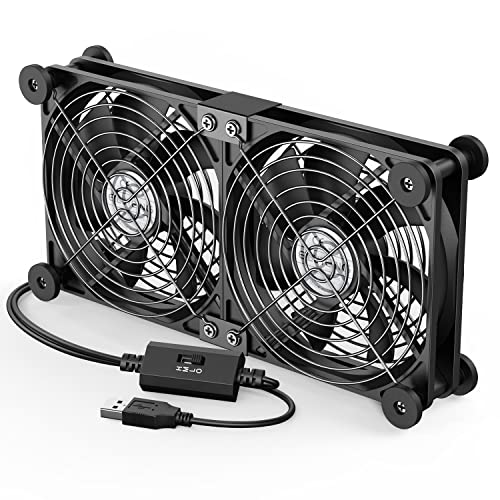
- USB-powered and plug-and-play
- Three adjustable speed settings
- Works horizontally or vertically
Best For: External cooling for USB-equipped devices
Best Simple Laptop Stand
ICE COOREL Six-Fan Cooling Pad

- Six adjustable-speed cooling fans
- Five adjustable height settings
- Two USB 2.0 ports included
Best For: Elevated laptop cooling at home or in the office
Best Adjustable Laptop Cooler

- Six fans with separate group control
- Seven height adjustments
- Two USB ports and phone holder
Best For: Customizable laptop cooling and desk positioning
Best Quiet 3-Pack – Thermalright TL-C12C X3 120mm PWM Fans
For beginners choosing computer cooling fans, this three-pack offers a straightforward way to add airflow to a desktop case or support a CPU cooler. The 4-pin PWM connection allows compatible motherboards to adjust fan speed based on temperature, while the 120mm format and included 55cm cables simplify common installations.
Best For: Beginners who want three quiet, motherboard-controlled 120mm fans for a desktop case or CPU cooling setup.
Pros:
- Three 120mm fans provide a practical multi-fan upgrade.
- 4-pin PWM control supports automatic speed adjustment on compatible motherboards.
- S-FDB bearings and silicone corner pads are designed to reduce noise and vibration.
- Provides up to 66.17 CFM of airflow at a listed 25.6 dBA noise level.
Cons:
- Requires a compatible 4-pin PWM connection for automatic control.
- The standard 120mm size may not fit compact or nonstandard cases.
This is a beginner-friendly choice when you need several standard-size fans without giving up PWM control. Check your case mounting points and available fan headers before ordering.
Best Simple USB Cooler – AC Infinity MULTIFAN S5 Dual 80mm Fan
For beginners who prefer a plug-and-play option, the AC Infinity MULTIFAN S5 uses USB power instead of a motherboard fan header. Its dual 80mm fans and included speed controller can cool electronics, cabinets, game consoles, or other equipment while keeping setup simple.
Best For: Beginners cooling electronics or compact spaces with USB power and adjustable fan speed.
Pros:
- USB plug works with available USB ports on many electronics and consoles.
- Speed controller lets you balance airflow and noise.
- Dual-ball bearings support horizontal or vertical placement.
- Listed total airflow is 52 CFM with total noise of 18 dBA.
Cons:
- 80mm fans are smaller than the 120mm fans commonly used in desktop cases.
- USB power makes it less suited to motherboard-based PC fan control.
This cooler is especially approachable if you do not want to open a PC or connect internal wiring. Its compact dual-fan design is better suited to targeted equipment cooling than a full desktop airflow overhaul.
Best Laptop Cooling Pad – havit HV-F2056 Triple-Fan Pad
For beginners with a laptop rather than a desktop, the havit HV-F2056 is an easy computer cooling fans solution that requires no internal installation. Three USB-powered fans circulate air beneath laptops from 15.6 to 17 inches, while the slim stand also provides two adjustable height settings.
Best For: Laptop users who want portable under-device airflow and a more comfortable viewing or typing angle.
Pros:
- Designed for 15.6- to 17-inch laptops.
- Three quiet fans circulate air beneath the laptop.
- Two height settings add ergonomic flexibility.
- Includes an extra USB port and a power switch.
Cons:
- It is designed for laptops, not internal desktop case installation.
- USB-C devices may require a separate USB-C-to-USB adapter.
- Compatibility is centered on the listed laptop size range.
This is one of the simplest cooling choices for a beginner because it works externally and doubles as a stand. Confirm your laptop fits the 15.6- to 17-inch format and check your available USB connection.
Best ARGB 5-Pack – Thermalright TL-C12C-S 120mm PWM Fans
Beginners assembling a larger desktop system may appreciate this five-pack of 120mm computer cooling fans. The fans combine 4-pin PWM speed control with S-FDB bearings and ARGB lighting, giving compatible builds both configurable airflow and synchronized illumination.
Best For: Beginners outfitting a larger desktop case with multiple PWM fans and compatible ARGB lighting.
Pros:
- Five 120mm fans can support broad case or CPU cooler coverage.
- 4-pin PWM connections allow automatic speed adjustment on compatible motherboards.
- ARGB lighting supports up to 17 modes and motherboard synchronization.
- Each fan is listed at up to 66.17 CFM and 25.6 dBA.
Cons:
- Requires compatible 4-pin PWM and ARGB motherboard connections for full functionality.
- Five fans may be more than a basic beginner build needs.
- The standard 120mm size must match the case or cooler mounting locations.
This pack makes sense for a roomy case or a build where coordinated lighting is part of the goal. Before buying, verify both the fan mounts and the motherboard headers needed for PWM and ARGB control.
Best Multi-Fan Laptop Pad – Kootek 5-Fan Cooling Stand
For beginners comparing computer cooling fans for beginners, the Kootek laptop cooling pad is an approachable option for improving airflow beneath 12- to 17-inch laptops. It uses five USB-powered fans, adjustable height settings, and selectable fan operation for flexible everyday cooling.
Best For: Laptop users who want broad cooling coverage, an adjustable viewing angle, and extra USB connectivity.
Pros:
- Five fans provide cooling coverage across the laptop base.
- Six adjustable height settings support a more comfortable setup.
- Two USB ports add connectivity for compatible peripherals.
- Fan and blue LED controls allow different operating combinations.
Cons:
- Best performance requires a 5V 1A adapter; the included cable is USB-to-USB.
- The 1.16 kg stand is less portable than a slim cooling pad.
- Blue LEDs may not suit users seeking an unlit setup.
Choose this model if you value adjustable ergonomics and multiple fan settings more than minimal size. Its front stoppers and broad compatibility also make it a practical starting point for larger laptops.
Best Adjustable Utility Fan – Easy Cloud 120mm AC Cooling Fan
Beginners exploring computer cooling fans for beginners may appreciate this 120mm utility fan because its controller makes speed adjustment straightforward. It plugs into an AC outlet and can provide airflow for PCs, consoles, cabinets, routers, and other equipment when a conventional case-fan installation is not convenient.
Best For: DIY cooling and ventilation projects that need a plug-in fan with adjustable speed.
Pros:
- AC plug makes setup simple without a dedicated internal fan header.
- Controller adjusts speed from 700 to 2800 RPM.
- Rated airflow reaches 95.8 CFM.
- Dual-ball bearings are rated for a 50,000-hour lifespan.
Cons:
- Its exposed utility-fan format is less tidy than a standard enclosed case fan.
- Noise is specified at under 41 dB, so it may not be silent at higher speeds.
- The 2-pin, 12V fan may require planning for the intended installation.
This is a flexible choice for users who need directed airflow rather than a drop-in motherboard fan. Confirm the mounting space and power arrangement before buying, especially for a permanent PC installation.
Best Slim Starter Pad – TECKNET Triple-Fan Laptop Cooler
For beginners shopping for computer cooling fans for beginners, the TECKNET laptop cooling pad offers a simple USB-powered way to improve airflow under a 12- to 17-inch laptop. Its three 110mm fans run at 1200 RPM, while the slim profile and two height settings keep the setup easy to use.
Best For: Laptop owners who want a straightforward, portable cooling pad for work, browsing, or extended gaming.
Pros:
- Three fans operate at 1200 RPM to draw cool air beneath the laptop.
- USB-powered design needs no external power adapter.
- Two USB ports provide an additional connection for peripherals.
- Rubber pads and adjustable height settings support stability and comfort.
Cons:
- The included cable is USB-A to USB-A, which may not suit every device.
- Only two height settings are available.
- It is designed for laptops up to 17 inches rather than larger systems.
The TECKNET is a sensible entry-level pad when you want uncomplicated USB operation and a relatively slim design. Its dedicated switch, LED indicator, and broad laptop compatibility make it easy to manage without advanced setup.
Best Plug-and-Play Pick – ELUTENG Dual USB 120mm Cooling Fan
For beginners exploring computer cooling fans for beginners, the ELUTENG dual USB fan is a straightforward option for adding airflow to a laptop, router, game console, receiver, or other USB-equipped device. Its two connected 120mm fans plug in without internal installation, while the controller provides three speed settings.
Best For: Beginners who want flexible USB-powered cooling for a desk setup, electronics cabinet, or external device.
Pros:
- Plug-and-play USB power works with many USB-equipped devices.
- Three adjustable speeds provide low, medium, and high airflow settings.
- Can be positioned horizontally or vertically and includes removable rubber shock absorbers.
- Metal grilles help protect fingers and fan blades.
Cons:
- This is an external cooling solution rather than an internally installed PC fan.
- Both fans run together, so they cannot be controlled independently.
This ELUTENG model makes cooling simple when you do not want to open a computer case. Its dual-fan design and adjustable controller offer useful flexibility, though buyers should confirm that their device has a suitable USB port and enough room for the 120mm unit.
Best Simple Laptop Stand – ICE COOREL Six-Fan Cooling Pad
The ICE COOREL cooling pad is a beginner-friendly way to add airflow beneath a laptop without installing computer cooling fans inside the machine. It uses six adjustable-speed fans, a metal mesh surface, and five height settings to combine cooling with a more comfortable laptop position.
Best For: Laptop users who want an elevated cooling stand for home or office use, with compatibility for laptops up to 17 inches.
Pros:
- Six 70mm fans operate at adjustable speeds from 2400 to 2600 RPM.
- Five height settings allow the stand to be used flat or raised.
- Metal mesh helps support heat dissipation and provides a firm laptop surface.
- Two USB 2.0 ports add connectivity while the pad is in use.
Cons:
- Its cooling-pad format is designed for laptops rather than desktop case installation.
- The unit is relatively substantial at about 1.03 kg.
For beginners, this cooling pad avoids the complexity of opening a laptop or choosing internal fan connectors. The adjustable stand and extra USB ports make it practical for everyday work, while the six-fan layout is suited to users who prefer broad airflow beneath the laptop.
Best Adjustable Laptop Cooler – LIANGSTAR Six-Fan Cooling Pad
The LIANGSTAR cooling pad gives beginners more control than a basic laptop stand. Its six fans can run together or in separate groups, and two controls let you adjust fan speed. Seven height positions, a phone holder, and a large metal mesh surface add practical features for laptops from 12 to 17.3 inches.
Best For: Laptop users who want adjustable airflow, multiple viewing angles, and convenient desk features for a broad range of notebook sizes.
Pros:
- Six quiet fans can operate together or as separate groups of three.
- Two controls allow the fan speed to be adjusted from off to maximum.
- Seven height settings and a non-slip baffle support different laptop positions.
- Includes two USB ports and a built-in phone holder.
Cons:
- The cooling pad is an external laptop accessory, not a replacement for an internal desktop fan.
- Its 1.8-pound weight may be less convenient for frequent carrying.
This LIANGSTAR model is a strong fit for beginners who want to tune cooling rather than use a single fixed setting. Its wide size range and ergonomic adjustments make it versatile, while the separate fan-group controls can help avoid running more airflow than necessary.
How We Picked the Best Computer Cooling Fans for Beginners
We focused on products with straightforward installation, accessible controls, useful compatibility information, and practical cooling applications. The selection covers internal PC case fans, laptop cooling pads, USB-powered fans, and AC-powered utility fans so beginners can compare solutions for different devices.
We also considered fan size, power connection, speed control, noise-related features, portability, and the likelihood that a first-time buyer can use the product without specialized tools or advanced hardware knowledge. A fan’s advertised speed is only one factor; fit, airflow direction, and placement often matter just as much.
Quick Comparison
| Fan type | Best for | What to check |
|---|---|---|
| 120mm PWM case fan | Desktop PC airflow | Case clearance, motherboard header, mounting holes |
| Multi-pack case fans | Building or refreshing several fans | Fan headers, RGB support, cable management |
| Laptop cooling pad | Notebook users and gaming laptops | Laptop size, stand angle, USB ports, fan layout |
| USB cooling fan | Routers, receivers, consoles, and small spaces | USB power availability, orientation, speed control |
| AC-powered fan | Servers or high-airflow utility cooling | Voltage, plug type, noise, and safe placement |
Key Buying Factors for Computer Cooling Fans for Beginners
Match the Fan to Your Device
Internal desktop fans are not interchangeable with laptop cooling pads. A 120mm case fan normally mounts inside a compatible PC case, while a laptop pad sits beneath the computer and connects through USB. For external equipment, a USB fan is usually easier and safer than modifying the device.
Check Power and Compatibility
Desktop PWM fans commonly use a four-pin motherboard header, although many systems can also run three-pin fans. Confirm that your motherboard has enough headers or plan for a splitter or hub. Laptop pads and USB fans need an available USB port, while AC models require the correct voltage and plug arrangement.
Consider Noise and Control
Look for PWM control, adjustable speed controllers, or multiple speed settings if noise matters. More fans can move more air, but they may also increase sound and cable clutter. A slower, correctly placed fan is often more useful than several fans running at maximum speed.
Think About Size and Airflow Direction
Measure available space before ordering. For a desktop, use a balanced intake-and-exhaust layout rather than placing every fan in the same direction. For laptops, choose a pad that supports the full base and has a comfortable, stable angle.
Who Should Buy Which Computer Cooling Fans for Beginners?
Desktop PC beginners: Choose a 120mm PWM fan or a multi-pack if your case supports multiple mounts. A multi-pack makes sense for a new build or a case that needs both intake and exhaust fans.
Laptop owners: A cooling pad is the simplest option. Pick a compact slim model for portability, or a larger multi-fan stand if you need stronger airflow and adjustable height.
Users cooling small electronics: USB models are convenient for receivers, network equipment, and other devices with nearby USB power. Choose adjustable speed when continuous operation and noise are concerns.
Server or workshop users: An AC-powered axial fan may provide stronger utility airflow, but it demands more care. Verify voltage and keep exposed blades, cables, and ventilation paths safely managed.