
Choosing the right computer cooling fan can improve airflow, reduce heat buildup, and make a PC or equipment setup noticeably quieter. The best option depends on your device, available power connections, noise tolerance, and whether you need a replacement, upgrade, or portable cooling solution.
We compared 10 practical choices across case fans, USB-powered fans, laptop cooling pads, and higher-airflow models to help you find a suitable match without paying for features you do not need.
Best 10 Computer Cooling Fans Picks for 2026
Best Quiet USB Fan

- USB-powered for electronics and consoles
- 18 dBA operation with speed control
- 52 CFM airflow and dual-ball bearings
Best For: Quiet, targeted cooling for AV equipment and game consoles
Best ARGB Fan Kit

- Three 120mm PWM fans with ARGB lighting
- Daisy-chain design simplifies wiring
- 72.8 CFM airflow with high static pressure
Best For: Gaming PCs, radiators, and custom illuminated builds
Best AC-Powered Fan
Variable-Speed 120mm Muffin Fan

- AC plug with included speed controller
- 700–2,800 RPM adjustment range
- Up to 95.8 CFM airflow
Best For: Equipment cabinets and electronics needing outlet-powered ventilation
Best Laptop Cooling Stand

- Five USB-powered fans with selectable modes
- Six adjustable height settings
- Fits 12- to 17-inch laptops and adds two USB hubs
Best For: Desk-based laptop cooling with ergonomic height adjustment
Radiator-Ready Performance

- Daisy-chain PWM control
- Up to 2,100 RPM and 72.8 CFM
- 4.15mm-H2O static pressure
Best For: Radiators, heatsinks, and performance-focused PC builds
Flexible USB Cooling
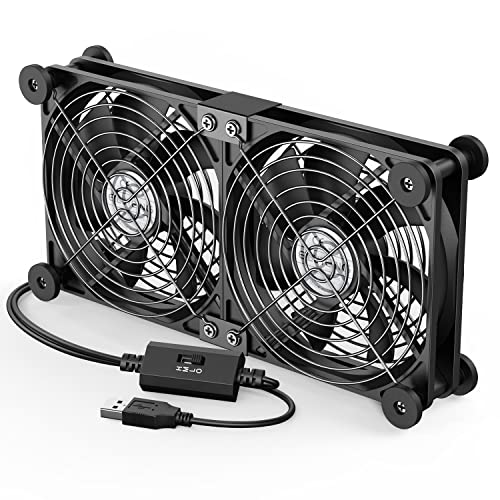
- USB plug-and-play operation
- Three adjustable speed settings
- Dual-fan design for varied devices
Best For: External cooling for PCs, consoles, routers, and enclosures
Quiet PWM Balance

- Pressure-optimized 120mm design
- 25.1 dB(A) maximum noise
- 4-pin PWM speed control
Best For: Quiet desktops, CPU coolers, radiators, and case ventilation
Versatile 12V Cooling

- 1,800 RPM with 66 CFM airflow
- Dual-ball bearings and mesh covers
- Uses a 2-pin XH2.54 connector
Best For: Compatible 12V electronics and replacement ventilation
Quiet USB Convenience

- Dual 120mm USB-powered fans
- 104 CFM total airflow at 19 dBA
- Multi-speed controller and dual-ball bearings
Best For: Quiet cooling for consoles and AV electronics
PWM PC Upgrades

- Three 120mm fans with 4-pin PWM
- Up to 1,550 RPM and 66.17 CFM each
- S-FDB bearings and silicone pads
Best For: Desktop cases, radiators, and CPU coolers
Best Quiet USB Fan – Ultra-Quiet 120mm Cooling
The AC Infinity MULTIFAN S3 is a practical choice when you need computer cooling fans for a console, receiver, DVR, cabinet, or other electronics. Its USB power, adjustable speed controller, and 18 dBA noise rating make it especially suitable for quieter setups.
Best For: Quiet cooling for AV equipment, game consoles, computers, and enclosed cabinets.
Pros:
- USB-powered for convenient connection to compatible electronics and consoles.
- Multi-speed controller lets you balance airflow and noise.
- Dual-ball bearings support 67,000 hours of service and flexible horizontal or vertical placement.
- Provides up to 52 CFM of airflow at a stated 18 dBA noise level.
Cons:
- Single-fan design may not provide the coverage of a multi-fan kit.
- USB power may be less suitable for installations without an available USB port.
Choose this model when low noise and simple USB installation matter more than maximum airflow. The included controller and compact 120mm format make it an adaptable option for targeted electronics cooling.
Best ARGB Fan Kit – CORSAIR RS120 Triple Pack
The CORSAIR RS120 ARGB three-pack is designed for desktop builders who want computer cooling fans with coordinated lighting and streamlined connections. Daisy-chaining reduces cable clutter, while PWM control and AirGuide vanes help direct airflow toward radiators, heatsinks, and hot components.
Best For: Gaming PCs and custom builds needing three PWM fans with ARGB lighting and radiator-friendly airflow.
Pros:
- Daisy-chains multiple fans through one 4-pin PWM and one 5V ARGB connection.
- Reaches up to 2,100 RPM and provides up to 72.8 CFM airflow.
- AirGuide technology directs airflow toward targeted components.
- High static pressure of 2.8mm-H2O suits radiator and heatsink installations.
Cons:
- ARGB lighting requires a compatible motherboard.
- Its stated noise level is higher than the quietest fans in this roundup.
- Requires compatible PWM and ARGB connections for full functionality.
This kit is a strong fit for performance-oriented PC builds where cooling, lighting, and tidy wiring are all priorities. Verify motherboard headers before installation to use the lighting and control features.
Best AC-Powered Fan – Variable-Speed 120mm Muffin Fan
This Easy Cloud model is a versatile option among computer cooling fans when you need outlet-powered ventilation for a PC, server cabinet, DVR, router, console, or other equipment. Its included controller adjusts the fan from 700 to 2,800 RPM, allowing you to prioritize quieter operation or stronger airflow.
Best For: AC-outlet-powered cooling and ventilation for equipment cabinets, servers, electronics, and work areas.
Pros:
- AC plug simplifies powering the fan from a standard outlet.
- Variable-speed controller provides a 700–2,800 RPM adjustment range.
- Rated airflow reaches 95.8 CFM for strong ventilation.
- Dual-ball bearings are rated for a 50,000-hour lifespan.
Cons:
- Its stated noise level is below 41 dB, so it may be more noticeable at higher speeds.
- Uses a 2-pin connection and may require more installation planning than a standard PC fan.
- Only one fan is included.
Consider this fan when outlet power and broad speed control are more useful than a conventional motherboard connection. Its high airflow rating makes it suitable for larger spaces or equipment that needs active cabinet ventilation.
Best Laptop Cooling Stand – Kootek Five-Fan Cooler Pad
The Kootek laptop cooling pad combines five USB-powered fans with an adjustable stand, making it a convenient alternative to individual computer cooling fans for laptops. It supports 12- to 17-inch models, offers selectable fan operation, and adds two USB hub ports for peripherals.
Best For: Laptop users who want adjustable cooling, elevated ergonomics, and broad 12- to 17-inch compatibility.
Pros:
- Five fans provide broad coverage, with separate controls for one, four, or all five fans.
- Six adjustable height settings support a more comfortable viewing and typing angle.
- Built-in dual USB hub adds connectivity for peripherals.
- Front stoppers help secure compatible laptops from slipping.
Cons:
- Requires a 5V 1A adapter for best performance; insufficient power may slow or stop the fans.
- Blue LEDs cannot be separated from fan operation according to the supplied controls.
- Its 1.16 kg weight and larger stand footprint reduce portability.
This is a practical choice for desks rather than travel, especially if you value both cooling and an elevated laptop position. The selectable fan modes let you avoid running all five fans when lighter cooling is sufficient.
Radiator-Ready Performance – CORSAIR RS120 120mm PWM Fan
For builders choosing computer cooling fans for radiators, heatsinks, or case airflow, the CORSAIR RS120 combines strong airflow with convenient daisy-chain control. Its 4-pin PWM connection supports speeds up to 2,100 RPM, while AirGuide vanes help direct airflow toward hotter components.
Best For: PC builders who want a high-static-pressure 120mm fan with streamlined PWM connections.
Pros:
- Daisy-chains multiple fans through a single 4-pin PWM connector.
- Reaches up to 2,100 RPM and 72.8 CFM of airflow.
- 4.15mm-H2O static pressure suits radiators and heatsinks.
- Magnetic Dome bearing is designed for quieter, longer-lasting operation.
Cons:
- Its 36 dB noise rating may be noticeable at maximum speed.
- This is a single-fan pack, so multi-fan setups require additional units.
The RS120 is a practical choice when cooling performance and simplified fan wiring matter more than ultra-low peak noise. Its PWM control and focused airflow make it especially suitable for radiator-based systems.
Flexible USB Cooling – ELUTENG Dual 120mm USB Fan
The ELUTENG dual USB fan offers a simple way to add computer cooling fans to devices with a USB port. Its two connected 120mm fans can sit horizontally or vertically, with three adjustable speed settings for cooling PCs, routers, hard-drive enclosures, game consoles, and other equipment.
Best For: USB-powered cooling for laptops, consoles, routers, AV equipment, and external enclosures.
Pros:
- Plug-and-play USB power avoids internal PC wiring.
- Two connected fans provide combined airflow of up to 31.98 CFM.
- Three speed settings range from 900 to 1,500 RPM per fan.
- Rubber shock absorbers and protective metal grilles support stable, safer placement.
Cons:
- USB 5V power makes it less suited to standard internal desktop fan installations.
- The dual-fan unit is larger than a single compact cooling fan.
Choose this model when you need versatile external cooling rather than a motherboard-connected case fan. Its adjustable speeds, one-meter cable, and horizontal or vertical placement make it convenient for varied USB-equipped devices.
Quiet PWM Balance – Noctua NF-P12 redux-1700 PWM
The Noctua NF-P12 redux-1700 PWM is a pressure-optimized option among computer cooling fans, designed for CPU coolers, water-cooling radiators, and quiet chassis ventilation. Its 4-pin PWM control can automatically adjust speed up to 1,700 RPM, balancing airflow when needed with quieter operation at idle.
Best For: Quiet desktop builds needing a versatile 120mm fan for radiators, CPU coolers, or case ventilation.
Pros:
- Pressure-optimized design suits radiators and air-based CPU coolers.
- 4-pin PWM supports automatic motherboard speed control.
- Maximum noise is rated at 25.1 dB(A).
- Rated for more than 150,000 hours MTTF and backed by a six-year warranty.
Cons:
- Its 1,700 RPM maximum is lower than some performance-oriented 120mm fans.
- Optional accessories such as anti-vibration mounts and splitters are separate additions.
The NF-P12 redux-1700 PWM is a strong all-around pick for users who value controlled noise without giving up radiator or heatsink compatibility. It is particularly appealing for systems that rely on motherboard-based PWM management.
Versatile 12V Cooling – 120mm Dual Ball Fan 2-Pack
This 120mm option is a practical choice when you need computer cooling fans for a 12V device using a 2-pin XH2.54 connector. It offers 1,800 RPM airflow, dual-ball bearings, and included mesh covers for added blade protection.
Best For: 12V amplifiers, refrigerators, camper fridges, entertainment equipment, solar equipment, and compatible replacement applications.
Pros:
- Two 120mm fans with dual-ball bearings and 1,800 RPM speed.
- Rated at 66 CFM airflow and less than 33 dB noise.
- Includes mesh covers that help prevent blade contact and block dust.
- Useful across several 12V ventilation applications.
Cons:
- The 2-pin XH2.54 connector is not compatible with standard computer fan interfaces.
- Requires correct positive and negative wiring.
Choose this pack when connector compatibility and 12V operation matter more than motherboard-controlled speed adjustment. Confirm the plug type and available mounting space before buying.
Quiet USB Convenience – AC Infinity MULTIFAN S7
The AC Infinity MULTIFAN S7 is a convenient pick for cooling electronics when you want computer cooling fans powered through USB. Its dual 120mm design combines adjustable speed control, 104 CFM total airflow, and a low 19 dBA noise rating.
Best For: Game consoles, AV electronics, receivers, DVRs, computers, and other devices with an accessible USB port.
Pros:
- USB power works with ports found on many AV electronics and game consoles.
- Multi-speed controller lets you balance airflow and noise.
- Dual-ball bearings support upright or flat placement and are rated for a 67,000-hour lifespan.
- Provides 104 CFM total airflow at 19 dBA total noise.
Cons:
- It is designed as a USB-powered electronics cooling unit rather than a standard motherboard fan.
- The supplied information lists one item, so verify package contents for your setup.
This is a strong choice for simple, low-noise cooling without opening a PC case or wiring directly to a power supply. The controller and flexible positioning make it especially practical for entertainment equipment.
PWM PC Upgrades – Thermalright TL-C12C X3
For desktop builders comparing computer cooling fans, the Thermalright TL-C12C X3 provides three 120mm fans with 4-pin PWM control. The motherboard can adjust fan speed based on temperature, while S-FDB bearings and silicone corner pads help support quieter operation.
Best For: Desktop cases, CPU coolers, radiators, and builds that support 4-pin PWM fan control.
Pros:
- Three 120mm fans offer up to 66.17 CFM airflow each.
- 4-pin PWM connection enables automatic motherboard speed control.
- S-FDB bearings are designed to reduce blade shake and extend service life.
- Silicone corner pads help reduce vibration, with rated noise of 25.6 dBA.
Cons:
- Requires a compatible 4-pin PWM connection for automatic speed control.
- Maximum speed is 1,550 RPM, which may not suit every high-airflow requirement.
This three-fan set is a well-rounded option for a desktop airflow refresh or CPU-cooling setup. Its PWM control and vibration-reducing features make it more adaptable than basic fixed-speed fans.
How We Picked These Computer Cooling Fans
We focused on the factors that most affect real-world cooling performance and installation: fan size, power connection, speed control, airflow potential, bearing design, noise characteristics, included accessories, and intended use. The selection includes standard 120mm case fans, USB models for laptops and external equipment, AC-powered options for servers or workshops, and a multi-fan laptop cooling pad.
Because specifications such as RPM and noise ratings are not always measured under identical conditions, they should be used as comparison points rather than guarantees. Compatibility and placement are equally important: a powerful fan cannot help much if it does not fit your case or receive adequate intake space.
Quick Comparison
| Best For | Look For | Suitable Options |
|---|---|---|
| Quiet PC upgrades | PWM control and noise-focused design | Noctua NF-P12 redux-1700 PWM, CORSAIR RS120 |
| Budget case airflow | 120mm size, 3- or 4-pin connection, multi-packs | Thermalright TL-C12C X3, 12V two-pack |
| USB-powered cooling | 5V USB power and adjustable speed | AC Infinity MULTIFAN S3, ELUTENG |
| Dual-fan equipment cooling | Two-fan coverage and a controller | AC Infinity MULTIFAN S7 |
| Laptops | Adjustable stand and broad device support | Kootek five-fan cooling pad |
| High-voltage or server use | Correct AC voltage and secure placement | 120mm AC plug fan |
Key Buying Factors for Computer Cooling Fans
Size and Installation
Confirm the mounting dimensions before buying. A 120mm fan is a common case size, but laptop pads and external cooling fans use different mounting approaches. Check clearance around RAM, radiators, drive cages, filters, and side panels.
Power and Control
USB fans are convenient for laptops, routers, receivers, and other equipment with an available USB port. Standard PC fans typically use 3-pin DC or 4-pin PWM connectors. PWM models allow compatible motherboards or fan hubs to adjust speed automatically. AC-powered fans require extra care: verify the voltage, plug type, and intended environment before connecting them.
Noise, Bearings, and Airflow
Higher RPM can move more air but may produce more noise. For everyday desktops, a reliable bearing, reasonable speed range, and PWM control often provide a better balance than maximum rated speed. Ball-bearing models can suit continuous-use equipment, while fluid-dynamic or similar bearing designs are commonly chosen for quieter PC builds.
Lighting and Accessories
ARGB lighting is mainly an appearance feature and requires compatible motherboard headers or a controller. Daisy-chain connections can simplify cable management, while included controllers, stands, or speed knobs may be more valuable than lighting for practical cooling projects.
Who Should Buy Which Computer Cooling Fans?
Choose a quiet PWM fan such as the Noctua or CORSAIR RS120 for a conventional desktop where motherboard control and low operating noise matter. Select the Thermalright three-pack or a 12V two-pack when you need affordable airflow across several case positions.
For USB-powered devices, the AC Infinity MULTIFAN S3 is a compact single-fan solution, while the MULTIFAN S7 is better for wider equipment or areas that benefit from two fans. The ELUTENG model is another flexible USB choice with adjustable speed. Laptop owners should consider the Kootek cooling pad when they want both airflow and a raised workstation position.
Finally, choose the AC plug model only when its voltage and installation requirements match your setup. It is more appropriate for dedicated equipment cooling than a typical motherboard-based PC upgrade.