
Compact smart displays make it easier to check calendars, control smart-home devices, and keep information visible without taking over your space. The best models balance screen size, voice control, sound, and ease of use.
In this roundup, we focus on practical picks for different rooms and routines, from bedside assistants to wall-mounted hubs and family organizers.
Best 10 Compact Smart Displays Picks for 2026
Compact Alexa Hub

- 5.5-inch screen for quick glances
- Deeper bass and clearer vocals
- Built-in camera for calls and check-ins
Best For: Small spaces and everyday Alexa tasks
Ultra-Compact Calendar Core
DAKboard CPU Mini Dashboard Module
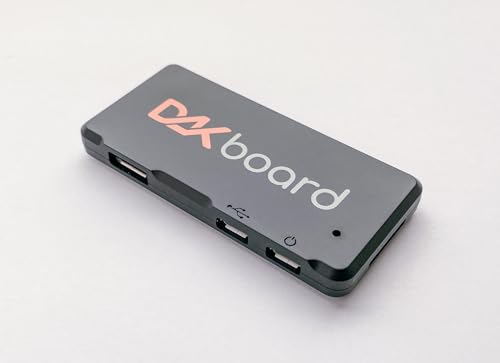
- Tiny 3-watt design hides behind a monitor
- Built for calendars, photos, weather, and to-dos
- Supports major cloud and task integrations
Best For: Simple family dashboards and basic info screens
Refurbished Compact Echo Screen
Like-New Echo Show 5 Value Pick
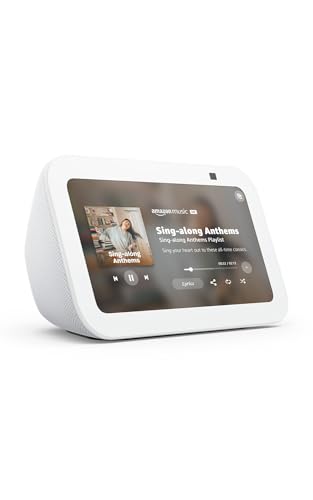
- Certified like-new with limited warranty
- 5.5-inch Alexa display for daily basics
- Lower-cost way to get the newest model
Best For: Value shoppers who are fine with refurbished
Family Calendar Display
10.1-Inch Smart Photo Calendar

- Shared family calendar with two-way sync
- Also works as a digital photo frame
- Includes chores, rewards, and meal planning
Best For: Households that need a planning hub
Kitchen Hub Smart Display
Amazon Echo Show 15, 15.6" Full HD home hub

- 15.6-inch Full HD display
- Built-in Fire TV streaming
- Widgets for calendars and smart home
Best For: Families wanting a central home hub
Retro Desktop Smart Display
4-Inch Retro Mini Android TV smart display

- Tiny 4-inch desktop size
- Android 11 with app downloads
- Retro design with multiple uses
Best For: Retro-themed desks and bedside tables
Compact Smart Display with Stand
Like-New Echo Show 5 with adjustable stand

- 5.5-inch compact display
- Adjustable stand with USB-C charging
- 2 MP camera for drop-in calls
Best For: Small rooms and bedside use with charging
Home Security Control Center

- Auto-opens live feeds for doorbell and camera events
- Shows four camera views on one screen
- Stores events locally for quick replay
Best For: homes that want a security-first smart display
Small-Area Smart Screen
Echo Show 5 with Adjustable Stand

- 5.5-inch screen fits compact spaces
- Adjustable stand improves viewing
- USB-C port adds charging convenience
Best For: small rooms and nightstands
Google Assistant Display Pick

- 7-inch screen shows weather, calendars, and photos
- Google Assistant handles smart home control and reminders
- Supports streaming from YouTube and Spotify
Best For: Google-based smart homes and routine control
Compact Alexa Hub – Echo Show 5 Smart Display
If you want one of the more practical compact smart displays for a bedside table, desk, or kitchen counter, the Echo Show 5 keeps the focus on quick glances and everyday Alexa tasks. Its 5.5-inch screen is built for checking news, weather, calls, cameras, music, and smart home controls without taking up much space.
Best For: Small-space buyers who want a compact Alexa screen for calls, cameras, music, and routine smart home control.
Pros:
- 5.5-inch display keeps news, weather, song titles, and other essentials easy to see at a glance
- Updated sound adds deeper bass and clearer vocals for music, podcasts, and shows
- Built-in camera supports check-ins, video calls, and compatible video doorbell viewing
- Can control compatible lights and thermostats and show rotating photo slideshows
Cons:
- Small screen is better for quick interactions than for immersive viewing
- Uses a 2 MP camera, so it is more functional than premium on video calls
As a compact smart display, the Echo Show 5 is strongest when you want Alexa in a small footprint with useful daily features. It balances size, privacy controls, and smart home convenience well for rooms where space matters.
Ultra-Compact Calendar Core – DAKboard CPU Mini Dashboard Module
If you’re looking for compact smart displays that turn an existing monitor into a simple home dashboard, the DAKboard CPU Mini is built for basic, low-power use. It focuses on essentials like calendars, photos, weather, and to-do lists rather than full media playback or touchscreen-heavy interaction.
Best For: Buyers who want a tiny, affordable dashboard processor for a basic family calendar or info screen.
Pros:
- Very small, low-power design that can hide behind a monitor
- Supports essentials like calendars, photos, weather, and simple to-do lists
- Works with integrations including Google Calendar, Microsoft OneDrive, Apple iCloud, and Todoist
- Mini-HDMI cable is included for easy monitor connection
Cons:
- Not recommended for continuous video streaming like YouTube
- Not suited for heavy animation or touchscreen use
This is a good fit if your idea of a smart display is a clean, always-visible household information board. Just keep its performance limits in mind and choose it for simple dashboard duties, not entertainment.
Refurbished Compact Echo Screen – Like-New Echo Show 5 Value Pick
This like-new Echo Show 5 is a budget-friendly way to get a compact smart display with the same core features as the newest model. It keeps the 5.5-inch screen, Alexa voice control, camera, and smart home tools, while the refurbished condition may help lower the cost.
Best For: Shoppers who want a tested, certified like-new Echo Show 5 for everyday Alexa use at a lower price point.
Pros:
- Certified like-new, tested, and backed by the same limited warranty as a new device
- 5.5-inch display is useful for weather, news, calls, cameras, and media at a glance
- Updated sound includes deeper bass and clearer vocals
- Supports smart home control, photo slideshows, and privacy controls like mic/camera off and camera shutter
Cons:
- May arrive in generic Amazon-branded packaging
- Refurbished format may not appeal to buyers who only want brand-new hardware
If your priority is value, this refurbished Echo Show 5 delivers the same compact smart display experience in a lower-cost package. It makes the most sense when you want the features, not the box.
Family Calendar Display – 10.1-Inch Smart Photo Calendar
For households that want compact smart displays with more focus on organization than voice assistant features, this 10.1-inch wall or countertop screen acts as both a calendar and a digital photo frame. It is designed to sync family schedules, show shared updates, and rotate into photo display mode when the calendar is not in use.
Best For: Families who need a shared schedule hub with photo display and chore tracking.
Pros:
- 10-inch portable design can be placed on a countertop, coffee table, or wall
- Two-way sync lets family members share calendar updates across linked accounts
- Works as both a smart calendar and a digital photo frame via the Touchtime app
- Includes chore tasks, star rewards, and AI meal-plan generation for household organization
Cons:
- More specialized than a general-purpose smart display
- Not described as a media or video streaming device
This is best viewed as a family command center rather than an Alexa-style assistant screen. If your main goal is coordinating schedules, chores, photos, and meal planning, it covers a lot of daily planning in one compact device.
Kitchen Hub Smart Display – Amazon Echo Show 15, 15.6" Full HD home hub
If you want one of the most practical compact smart displays for a busy home, the Echo Show 15 focuses on organization and entertainment in one large wall-friendly screen. Its 15.6-inch Full HD display is designed to keep calendars, to-do lists, weather, smart-home controls, and streaming apps easy to reach in a kitchen or family space.
Best For: Families who want a central smart display for schedules, streaming, smart home control, and video calls.
Pros:
- Large 15.6-inch Full HD screen works well for shared home organization.
- Built-in Fire TV supports streaming from apps like Prime Video, Netflix, YouTube, and Apple TV.
- Smart home dashboard makes it easy to control lights and check camera feeds.
- Centered camera with 3.3x zoom and wide field of view is built for video calls.
Cons:
- Much larger than typical compact smart displays, so it needs more wall or counter space.
- Entertainment features may require subscriptions for some services.
- Best suited to a shared room rather than a small bedside setup.
This model stands out if your priority is turning a display into a true home hub. It is less about tiny footprint and more about making everyday tasks visible and easy to manage in one place.
Retro Desktop Smart Display – 4-Inch Retro Mini Android TV smart display
For shoppers looking for unusual compact smart displays, this 4-inch retro mini Android TV is more of a fun desktop gadget than a conventional smart screen. It combines a vintage TV look with Android 11, letting you use it as a mini home TV, secondary monitor, retro gaming console, photo frame, or calendar display.
Best For: Anyone who wants a tiny, retro-styled smart display for desks, shelves, or bedside tables.
Pros:
- Very compact 4-inch footprint fits easily on desks and shelves.
- Android 11 supports Play Store app downloads for streaming and gaming.
- Multi-use design works as a photo frame, calendar, monitor, or retro console.
- Vintage 80s–90s styling makes it a standout decorative piece.
Cons:
- 480p SD resolution is far below larger modern smart displays.
- Best as a novelty or secondary screen rather than a primary display.
- Small size limits how useful it is for everyday viewing from a distance.
This is the most style-first option in the roundup, with practicality coming from its flexibility rather than screen quality. It makes sense if you want a conversation piece that still offers some real smart features.
Compact Smart Display with Stand – Like-New Echo Show 5 with adjustable stand
Like-New Amazon Echo Show 5 (newest model) with Adjustable Stand with USB-C Charging Port | Charcoal
Check Price On AmazonThe Echo Show 5 is one of the more practical compact smart displays if you want a small screen for daily information, video calls, and smart home control. This like-new bundle adds an adjustable stand with a USB-C charging port, making it easier to position on a nightstand or desk while keeping another device powered nearby.
Best For: Bedrooms, desks, and small spaces where a compact Alexa display needs flexible viewing and charging.
Pros:
- 5.5-inch display is a good fit for tight spaces.
- Adjustable stand tilts forward or backward for better viewing.
- Built-in 2 MP camera supports drop-in video calls.
- USB-C charging port on the stand adds convenient device charging.
Cons:
- Smaller screen is less suited to shared-room entertainment than larger displays.
- Like-new condition may not appeal to buyers who want a brand-new unit.
- Sound improvements are noted, but it is still a compact screen-first device.
This is a strong pick if you want a small Alexa display that does the basics well without taking up much room. The included stand makes it easier to use than many entry-level smart screens.
Home Security Control Center – eufy Smart Display E10 8" Hub
If you want compact smart displays that double as a home security dashboard, the eufy Smart Display E10 is built for quick, hands-free monitoring. Its 8-inch touchscreen automatically wakes for doorbell rings, door unlocks, and camera detections, then shows live feeds and voice alerts so you can see what’s happening right away. It also keeps historical events locally stored for fast replay with no buffering.
Best For: Families who want a centralized, easy-to-use monitor for doorbells, cameras, and daily security summaries.
Pros:
- Automatic live-feed alerts for doorbell, door, and camera activity
- Four-view monitoring lets you see multiple camera feeds at once
- Local storage supports instant playback of past events without buffering
- 8-inch touchscreen is designed to be simple for kids and seniors
Cons:
- Requires HomeBase 3 for advanced facial and package recognition features
- Larger than the smallest compact smart displays at 8 inches
Overall, this is a strong pick if your priority is security visibility rather than general-purpose smart display features. It focuses on fast access to live video, practical monitoring, and straightforward controls in one dedicated hub.
Small-Area Smart Screen – Echo Show 5 with Adjustable Stand
For shoppers comparing compact smart displays, the Echo Show 5 keeps things simple with a 5.5-inch screen that fits well on a nightstand, desk, or kitchen counter. It handles weather, calls, camera viewing, streaming, and smart home control, while the adjustable stand helps you tilt the screen for a better viewing angle. The built-in USB-C port in the stand is a useful bonus if you want to charge a device nearby.
Best For: Bedrooms, desks, and small spaces where a small smart display needs to do a little bit of everything.
Pros:
- Compact 5.5-inch display suits tight spaces
- Adjustable stand improves viewing angles
- USB-C charging port adds convenience for nearby devices
- Supports calls, camera checks, smart home control, and photo viewing
Cons:
- Smaller screen is less ideal for multi-use viewing than larger displays
- Like-New condition may not appeal to buyers who want a brand-new unit
This is a practical option if you want a versatile smart display without taking up much room. It’s especially appealing when you value everyday convenience features more than a larger screen.
Google Assistant Display Pick – Google Nest Hub 1st Gen 7"
The Google Nest Hub is a straightforward choice if you want compact smart displays centered on voice control and everyday convenience. Its 7-inch touchscreen shows weather, calendars, YouTube videos, and Google Photos, while Google Assistant helps you manage reminders and compatible smart home devices hands-free. With support for streaming services like YouTube and Spotify, it can also serve as a simple entertainment screen.
Best For: Google households that want a compact, voice-controlled display for routines, media, and smart home control.
Pros:
- 7-inch touchscreen is a practical size for counters and side tables
- Google Assistant built in for hands-free control and reminders
- Works with over 200 smart home devices from 50+ brands
- Supports YouTube, Spotify, Pandora, and Google Photos
Cons:
- Older 1st Gen model may not suit buyers wanting the newest hardware
- No built-in camera for video calls or drop-in features
If your home already leans on Google services, this display is an easy fit. It balances a compact footprint with solid assistant features, making it a useful everyday hub rather than a screen that tries to do everything.
How We Picked the Best Compact Smart Displays
We focused on display size, responsiveness, voice assistant compatibility, speaker quality, mounting or placement flexibility, and how well each device fits into small spaces. We also favored models that are easy to use daily, not just impressive on paper.
Because Compact Smart Displays are often used for quick glances and hands-free control, we looked for clear screens, reliable wake words or touch controls, and useful software features such as timers, calendars, routines, and smart-home dashboards.
Quick Comparison
For Alexa-heavy homes, Echo Show models are usually the most straightforward choice. If your routine centers on Google services, a Google Assistant-based display may feel more natural. For custom dashboard or wall-mounted use, specialized control panels and digital calendar screens are better suited than general-purpose assistants.
Key Buying Factors for Compact Smart Displays
Screen Size and Placement
Smaller screens are better for bedside tables and desks, while larger displays work well in kitchens and common areas. Think about viewing distance and whether you want a device that sits upright, mounts to a wall, or moves from room to room.
Voice Assistant and Ecosystem
Choose a platform that matches the devices and services you already use. Alexa, Google Assistant, and dedicated smart-home interfaces each have strengths, but the best experience usually comes from staying within one ecosystem.
Sound, Visibility, and Everyday Use
Look for improved speakers if you plan to use music, alarms, or video calls. Brightness, viewing angles, and touchscreen responsiveness also matter, especially in kitchens and bright rooms. A good compact smart display should be easy to read at a glance and simple to operate with wet hands, busy mornings, or quick voice commands.
Smart-Home and Family Features
If you want a shared household hub, prioritize calendars, reminders, shopping lists, and camera or device control. If the device is mainly for one person, portability and a smaller footprint may matter more than broad hub functionality.
Who Should Buy Which Compact Smart Displays?
Buy a smaller smart display if you want an affordable bedside helper, compact kitchen assistant, or secondary smart-home screen. Choose a larger hub if your main goal is family scheduling or device management. If you need a more specialized setup, such as a wall dashboard or security control panel, go with a purpose-built model instead of a general assistant display.
In short, the best Compact Smart Displays are the ones that match your space, your ecosystem, and the tasks you use every day.