
Need a simple way to read, clone, or back up SATA drives on a Windows PC? The right dock can make drive swaps faster, recovery easier, and storage expansion far less messy.
In this roundup, we focus on the best options for speed, compatibility, bay count, and everyday usability so you can choose a dock that fits your workflow.
Best 10 Hard Drive Docking Stations for Windows Picks for 2026
Dual-Bay Cloner Dock
SABRENT USB 3.0 Dual Bay Hard Drive Docking Station & Cloner

- Holds two 2.5"/3.5" SATA drives
- Offline cloning up to 60Mbps
- Plug-and-play, no drivers needed
Best For: Windows users who want a dual-bay dock with offline cloning
Flat-Bay SATA Dock
SABRENT USB 3.0 to SATA Hard Drive Docking Station

- Fits 2.5" and 3.5" SATA drives
- Windows 10/11 plug-and-play setup
- Includes 12V power for 3.5" HDDs
Best For: Windows users who need a basic single-drive SATA dock
USB-C Ready Clone Dock
WAVLINK USB 3.0 and USB C to SATA Dual-Bay Dock

- USB-A and USB-C connectivity
- Dual-bay support for SATA drives
- Offline cloning up to 60Mbps
Best For: Windows users who want a dual-bay SATA dock with USB-C support
10Gbps USB-C Dock
SABRENT USB-C Hard Drive Docking Station

- 10Gbps USB-C SATA connection
- Supports 2.5"/3.5" SSDs and HDDs
- Includes USB-A and USB-C cables
Best For: Windows users who want a USB-C dock with 10Gbps SATA performance
4-Bay Cloning and Expansion Dock
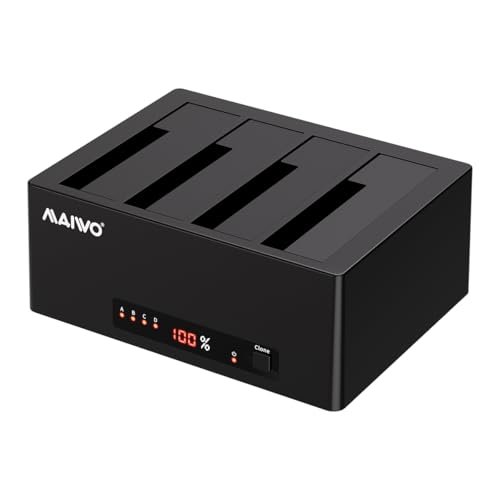
- 1-to-3 offline cloning support
- Up to 96TB total capacity
- USB 3.0 with UASP, 6Gbps
Best For: Windows users needing cloning and large multi-drive expansion
Simple Single-Bay SATA Dock
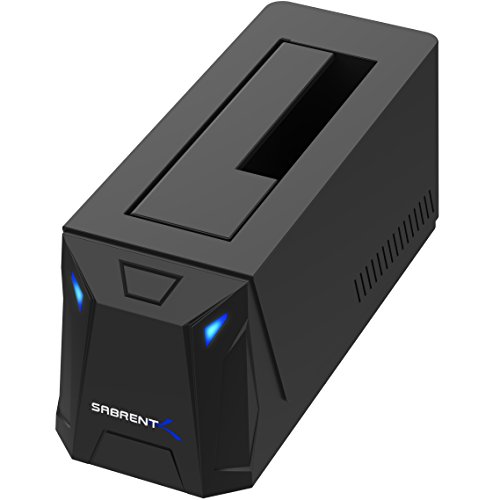
- Supports 2.5-inch and 3.5-inch SATA drives
- USB 3.0 with UASP up to 5Gbps
- Includes AC adapter and status LEDs
Best For: Windows users who want a simple single-drive SATA dock
Dual-Bay USB-C Cloner Dock

- Dual-bay offline cloning support
- USB-C and USB-A cable included
- UASP/Trim with 5Gbps speed
Best For: Windows users wanting a compact dual-bay cloning dock
Lay-Flat USB 3.0 Single-Drive Dock
ORICO Hard Drive Lay-Flat Docking Station

- USB 3.0 with UASP up to 5Gbps
- Supports 2.5-inch and 3.5-inch SATA drives up to 24TB
- Tool-free, hot-swappable design with broad Windows support
Best For: Windows users who want a simple single-drive dock for backups and quick access
4-Bay Offline Clone Dock
SABRENT 4-Bay USB 3.0 Hard Drive Docking Station

- Supports up to four 2.5-inch or 3.5-inch SATA drives
- Offline clone function works without a computer
- Trayless USB 3.0 dock with plug-and-play operation
Best For: Windows users who manage multiple drives and want easy cloning
Dual-Bay USB-C Clone Dock
SABRENT Dual-Bay USB-C Hard Drive Docking Station

- Two-bay dock for reading and writing two SATA drives
- Offline cloning up to 60MBps without a computer
- USB-C host connection with USB 3.0 speeds up to 5Gbps
Best For: Windows users who want dual-drive access and computer-free cloning
Dual-Bay Cloner Dock – SABRENT USB 3.0 Dual Bay Hard Drive Docking Station & Cloner
If you want hard drive docking stations for windows that can both access and duplicate drives, this SABRENT dual-bay model is built for straightforward SATA storage work. It supports 2.5″ and 3.5″ SATA HDDs or SSDs, includes plug-and-play operation, and adds offline cloning for quick drive swaps without software.
Best For: Windows users who want a dual-bay dock with offline cloning for SATA drives.
Pros:
- Supports two 2.5″/3.5″ SATA HDDs or SSDs.
- Offline cloning is supported up to 60Mbps.
- Plug and play with no drivers needed.
- USB 3.0 connection supports up to 5Gbps.
Cons:
- Limited to SATA drives, not other interface types.
- Cloning is offline only, not online clone.
For Windows-focused backup, transfer, and duplication tasks, this dock covers the basics well while keeping setup simple. It is especially useful if you regularly move between bare drives and want cloning built into the dock itself.
Flat-Bay SATA Dock – SABRENT USB 3.0 to SATA Hard Drive Docking Station
For simple hard drive docking stations for windows, this SABRENT lay-flat dock is a practical single-bay option for bare SATA drives. It supports 2.5″ and 3.5″ SATA HDDs and SSDs, uses USB 3.0 with UASP, and is designed for plug-and-play use on Windows 10/11.
Best For: Windows users who need a basic single-drive SATA dock for everyday drive access.
Pros:
- Works with 2.5″ and 3.5″ SATA HDDs and SSDs.
- Plug and play on Windows 10/11 with no drivers.
- Includes a 12V/2A power adapter for 3.5″ drives.
- Supports USB 3.0 with UASP for better throughput.
Cons:
- Does not support IDE/PATA, M.2, SAS, or drives in USB enclosures.
- Uses USB Type-A, so USB-C-only systems need an adapter.
- S.M.A.R.T. diagnostics are not passed through the bridge.
This is a good fit if you mainly need reliable access to bare SATA drives rather than advanced extras. The included power supply and tool-free design make it easy to use for quick Windows-based backups or file recovery.
USB-C Ready Clone Dock – WAVLINK USB 3.0 and USB C to SATA Dual-Bay Dock
This WAVLINK model stands out among hard drive docking stations for windows if you want both USB-A and USB-C compatibility in a dual-bay SATA dock. It supports 2.5″ and 3.5″ HDDs or SSDs, offers UASP-based transfer speeds up to 6Gbps, and includes offline cloning for straightforward drive duplication.
Best For: Windows users who want a dual-bay SATA dock with USB-C support and offline cloning.
Pros:
- Dual-bay dock supports 2.5″ and 3.5″ SATA HDD/SSD.
- USB 3.0 and USB-C compatibility adds flexibility.
- UASP support enables speeds up to 6Gbps.
- Offline cloning is supported up to 60Mbps.
Cons:
- Offline cloning requires the target disk to be equal or larger.
- Online cloning is not supported.
- Not compatible with M1/M2-based Mac systems.
If your Windows setup needs a more modern connection without giving up SATA flexibility, this dock is a strong middle ground. The built-in power switch, hot-swapping support, and dual-bay layout make it convenient for routine transfers and backups.
10Gbps USB-C Dock – SABRENT USB-C Hard Drive Docking Station
For hard drive docking stations for windows with a faster modern connection, this SABRENT USB-C dock is built around 10Gbps performance and simple hot-swap use. It works with 2.5″ and 3.5″ SATA SSDs and HDDs, includes both USB-A and USB-C to USB-C cables, and comes with a power adapter for 3.5″ drives.
Best For: Windows users who want a USB-C dock with 10Gbps SATA performance.
Pros:
- 10Gbps USB-C connection for faster SATA transfers.
- Supports 2.5″ and 3.5″ SATA SSDs and HDDs.
- Includes both USB-A and USB-C to USB-C cables.
- Tool-less, hot-swappable design with a dust cover.
Cons:
- Single-bay design, so it handles one drive at a time.
- Only supports SATA drives, not other interfaces.
This is the strongest fit if you want a clean Windows dock setup and are prioritizing connection speed over multi-drive features. The included cables and tool-free bay make it easy to use for backups, transfers, and general drive maintenance.
4-Bay Cloning and Expansion Dock – MAIWO 4-Bay SATA Dock
If you want hard drive docking stations for windows that can do more than basic file access, the MAIWO 4-bay model stands out for cloning and large-capacity expansion. It supports 2.5-inch and 3.5-inch SATA HDDs and SSDs, works with Windows as well as several other operating systems, and can run as a direct-attached storage hub for up to four drives at once.
Best For: Users who need a Windows-friendly 4-bay dock for offline cloning and high-capacity storage expansion.
Pros:
- Supports 1-to-3 offline cloning without connecting to a computer
- Handles both 2.5-inch and 3.5-inch SATA HDDs and SSDs
- Up to 96TB total capacity with up to 24TB per bay
- USB 3.0 transfer speeds up to 6Gbps with UASP support
Cons:
- Only supports SATA drives, not SAS or NVMe
- Best suited to users who can benefit from a larger 4-bay footprint
This is the most feature-rich option here if your priority is cloning plus multi-drive storage in one unit. It makes sense for heavy backup, archiving, or media workflows where capacity and flexibility matter more than size.
Simple Single-Bay SATA Dock – SABRENT USB 3.0 SATA Dock
For straightforward hard drive docking stations for windows, the SABRENT EC-UBLB keeps things simple: insert a 2.5-inch or 3.5-inch SATA drive, connect power, and access it over USB 3.0. It is built for SATA drives only, supports hot-swapping, and includes status lights so you can see when the drive is active.
Best For: Windows users who want a basic, reliable single-bay SATA dock for everyday drive access.
Pros:
- Supports 2.5-inch and 3.5-inch SATA HDDs and SSDs up to 20TB
- USB 3.0 with UASP and up to 5Gbps transfer speed
- AC adapter included and required for operation
- Auto-sleeps after 30 minutes of inactivity
Cons:
- Not compatible with SAS or M.2 NVMe drives
- New or blank drives must be initialized first in Windows Disk Management
- Single-bay design offers no cloning or multi-drive expansion
This dock is a practical pick if you just need dependable SATA drive access without extra features. It is a good fit for backups, drive testing, or occasional transfers when simplicity matters most.
Dual-Bay USB-C Cloner Dock – ORICO 2-Bay SATA Dock
If you are comparing hard drive docking stations for windows and want a compact two-bay option, the ORICO USB-C to SATA dock is designed for cloning and simultaneous drive access. It supports 2.5-inch and 3.5-inch SATA drives, works with Windows and other major platforms, and includes offline clone mode plus a dust-resistant, non-slip design.
Best For: Users who want a compact dual-bay dock for Windows-friendly cloning and everyday SATA drive use.
Pros:
- Dual-bay support with offline cloning
- Compatible with Windows, Mac, Linux, iPad OS, and Android
- UASP and Trim support with 5Gbps transfer rate
- USB-C and USB-A 2-in-1 cable included
Cons:
- Clone mode requires the target disk to be larger than the source disk
- Auto sleep activates after 10 minutes of inactivity
- Limited to SATA drives only
This dock is a strong middle-ground choice if you need more flexibility than a single-bay unit but do not want a larger 4-bay setup. Its cloning support and compact design make it useful for quick duplication and frequent drive handling.
Lay-Flat USB 3.0 Single-Drive Dock – ORICO Hard Drive Lay-Flat Docking Station
If you want one of the more straightforward hard drive docking stations for windows, this ORICO lay-flat dock focuses on speed, simplicity, and broad compatibility. It uses USB 3.0 with UASP for transfers up to 5Gbps, supports 2.5-inch and 3.5-inch SATA HDDs and SSDs up to 24TB, and is designed for quick drive swaps without tools.
Best For: Windows users who need a simple single-drive dock for backups, cloning, and fast access to SATA drives.
Pros:
- USB 3.0 with UASP supports up to 5Gbps transfer speeds
- Fits 2.5-inch and 3.5-inch SATA HDDs and SSDs up to 24TB
- Tool-free, hot-swappable design makes drive changes easy
- Compatible with Windows XP through Windows 11, plus Linux and Mac OS 9.1+
Cons:
- Single-drive design is not meant for managing multiple drives at once
- Best speed claims depend on drive type and system support
Overall, this is a practical pick if you mainly need a dock for routine Windows file transfers and occasional drive access. The lay-flat cooling design and bundled power adapter make it a low-fuss option for everyday use.
4-Bay Offline Clone Dock – SABRENT 4-Bay USB 3.0 Hard Drive Docking Station
Among hard drive docking stations for windows, this SABRENT 4-bay dock is built for people who juggle several SATA drives at once. It connects over USB 3.0 for up to 5Gbps transfers, accepts up to four 2.5-inch or 3.5-inch SATA HDDs and SSDs, and adds an offline clone function so you can duplicate drives without a computer.
Best For: Windows users who need a multi-drive dock for backups, cloning, and frequent drive handling.
Pros:
- Holds up to four SATA HDDs or SSDs in one dock
- Offline clone feature works without a computer
- Trayless, tool-free design simplifies drive insertion
- USB 3.0 connection supports up to 5Gbps and is plug and play
Cons:
- Requires an external power adapter for multi-drive operation
- Cloning is handled directly by the dock, so progress is limited to the dock’s LED indicators
This is a strong choice if your workflow involves copying, backing up, or rotating several SATA drives on a Windows PC. The four-bay layout and offline clone mode make it especially useful for storage-heavy setups.
Dual-Bay USB-C Clone Dock – SABRENT Dual-Bay USB-C Hard Drive Docking Station
If you want hard drive docking stations for windows with a more modern connection, this SABRENT dual-bay model combines USB-C connectivity with two-drive support and offline cloning. It works with 2.5-inch and 3.5-inch SATA HDDs and SSDs, lets both bays mount as separate drives over USB, and can clone one drive to another without a computer at up to 60MBps.
Best For: Windows users who want a dual-bay dock for file management and computer-free drive cloning.
Pros:
- Dual-bay design reads and writes two SATA drives at once
- Offline cloning reaches up to 60MBps without needing a PC
- USB-C connection with USB 3.0 speeds up to 5Gbps
- Tool-free, hot-swappable bays with individual activity LEDs
Cons:
- Requires a computer with USB-C or your own USB-C to USB-A cable
- Does not support IDE/PATA, M.2, NVMe, or 4-pin Molex drives
- Target drive for cloning must be the same size as the source or larger
This dock makes sense if you want a flexible two-drive setup on Windows and value direct cloning as much as regular file access. Its USB-C host connection is convenient, but compatibility with your PC’s ports is worth checking before you buy.
How We Picked the Best Hard Drive Docking Stations for Windows
We narrowed these Hard Drive Docking Stations for Windows by looking at core buyer needs: SATA compatibility, Windows-friendly connectivity, transfer speed, offline cloning support, and whether the dock handles both 2.5-inch and 3.5-inch drives. We also considered practical features such as UASP support, USB-C vs. USB-A options, and how well each dock suits either occasional recovery work or regular multi-drive use.
Quick Comparison
If you want the simplest setup, a single-bay dock is usually the easiest choice for backups and drive access. Dual-bay models are better if you clone drives often or compare two drives side by side. Four-bay docks are the strongest choice for power users who manage multiple drives, run larger data projects, or need a more flexible storage bench.
Key Buying Factors for Hard Drive Docking Stations for Windows
Drive Support
Check that the dock supports both 2.5-inch and 3.5-inch SATA HDDs and SSDs if you plan to use mixed drives. Some docks also support higher capacities, which matters for large backup libraries and archival storage.
Connection Type and Speed
USB 3.0 models are still reliable for everyday use, while USB-C and 10Gbps options can offer better performance on newer Windows systems. UASP support is worth prioritizing because it can improve throughput and responsiveness with compatible drives.
Bay Count and Cloning
Single-bay docks are best for straightforward access. Dual-bay units are ideal if you want offline cloning or need to compare source and target drives without software. Four-bay docks make sense when you need more capacity and a dedicated workstation-style setup.
Power and Stability
Desktop docks should provide stable power for 3.5-inch drives and multiple bays. If you will use the dock for long sessions, look for a design that emphasizes heat management and secure drive seating.
Who Should Buy Which Hard Drive Docking Stations for Windows?
Choose a single-bay dock if you mainly need quick access to one drive at a time. Choose a dual-bay model if cloning, migration, and drive duplication are part of your routine. Choose a four-bay dock if you manage lots of media, backups, or test drives and want a more capable bench tool.
For most Windows users, the best pick comes down to how often you swap drives, whether you need cloning, and whether you prefer USB-A simplicity or USB-C flexibility. Matching those needs will help you get the most practical value from your dock.