
Choosing the right yoke can make a home cockpit feel far more authentic, but the best option depends on your platform, comfort, and control needs.
Below, we focus on the most compelling flight simulator yokes under 500, with picks suited to casual flyers, serious sim pilots, and Xbox or PC users alike.
Best 10 Flight Simulator Yokes Under 500 Picks for 2026
Premium All-In-One Yoke
Honeycomb Alpha Flight Controls

- 180° yoke with smooth self-centering control
- Built-in switch panel adds cockpit functions
- Clamp or micro-suction mounting options
Best For: Desktop sim pilots who want realism and integrated switches
Airliner-Inspired Bundle
Thrustmaster TCA Yoke Boeing Edition

- Boeing 787-inspired yoke and quadrant bundle
- Pendular motion with 8.3-inch range
- 35 buttons plus 2 additional axes
Best For: PC and Xbox simmers who want a Boeing-style cockpit bundle
Feature-Rich Control Set
Logitech G PRO Flight Yoke System

- Stainless steel shaft with smooth, accurate control
- 54 programmable controls for cockpit mapping
- Includes throttle quadrant and desk clamps
Best For: PC simmers who want a traditional yoke with lots of inputs
Force Feedback Upgrade

- Force feedback with 4.2 Nm roll torque
- 180° roll rotation and 95 mm pitch travel
- PC-only USB yoke base for custom rigs
Best For: PC users who want a force-feedback yoke base
Entry-Level Pick

- 180° yoke rotation with self-centering
- Minimal dead zone for precise control
- Essential left/right switch and button layout
Best For: Entry-level PC sim pilots who want core controls
Complete Control Bundle
Logitech G Pro Yoke + Pedals Bundle

- Includes both yoke system and rudder pedals
- 14 buttons, POV hat, and 3-position switch
- Self-centering pedals with toe brakes
Best For: Pilots building a fuller yoke-and-pedals setup
Feature-Rich Choice
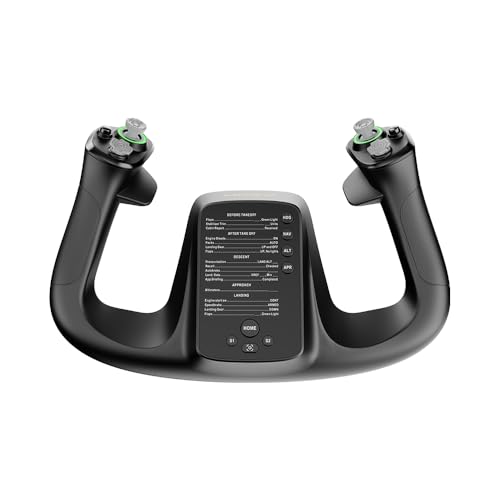
- 34 configurable inputs for broad control
- Customizable RGB lighting
- PA66 composite build with quick-release design
Best For: PC sim users wanting lots of inputs and a premium feel
Best All-in-One Pick
Turtle Beach VelocityOne Flight Universal Control System

- All-in-one yoke, throttle, trim wheel, and rudder controls
- 180° yoke rotation with hall effect sensing
- Works with Xbox and Windows flight sims
Best For: Sim pilots who want a feature-packed universal controller
Best Premium Display Yoke

- Built-in 4.3-inch touchscreen display
- 26 programmable inputs and custom RGB lighting
- Carbon fiber reinforced composite construction
Best For: Sim pilots who want a premium, highly customizable yoke handle
Best PC Sim Classic
Logitech G PRO Flight Yoke System

- Stainless steel yoke shaft for smooth control
- Throttle quadrant included with the system
- 54+ programmable controls and secure desk clamp
Best For: PC sim pilots who want a classic yoke-and-quadrant setup
Premium All-In-One Yoke – Honeycomb Alpha Flight Controls
If you’re comparing flight simulator yokes under 500, the Honeycomb Alpha is a strong pick for pilots who want a more realistic, all-in-one desktop setup. It combines a smooth 180° yoke with an integrated switch panel, so you get core flight controls and essential cockpit functions in one unit.
Best For: Sim pilots who want a realistic yoke with built-in switches and solid desktop mounting.
Pros:
- 180° rotation with a dampened, self-centering feel and minimal deadzone
- Integrated switch panel with ignition, avionics, lights, and LED backlighting
- Includes multiple buttons and rocker switches for cockpit-style control
- Comes with clamp mounting or a micro-suction option for thicker desks
Cons:
- Bulkier than a simple yoke-only controller
- Best suited to players who want a dedicated desk setup
The Honeycomb Alpha stands out as a practical choice if you want realism without piecing together multiple accessories. Its build, controls, and mounting options make it one of the most well-rounded flight sim yokes for everyday use.
Airliner-Inspired Bundle – Thrustmaster TCA Yoke Boeing Edition
For buyers shopping for flight simulator yokes under 500, the Thrustmaster TCA Yoke & Quadrant Boeing Edition is aimed at anyone who wants an airliner-style setup. Its Boeing 787-inspired design, pendular motion, and included throttle quadrant make it a more complete cockpit package for MSFS and other compatible sims.
Best For: Boeing fans and sim pilots who want a yoke-plus-throttle bundle for PC or Xbox.
Pros:
- Officially licensed Boeing design based on the 787 airliner
- Pendular mechanism with 8.3-inch range for smooth movement
- Includes a throttle quadrant with autopilot functions
- Offers 35 action buttons and 2 additional axes
Cons:
- Designed around an airliner feel, so it may not suit every aircraft style
- Best value if you want both the yoke and quadrant together
This bundle is a good fit if you want a more immersive commercial-airliner experience instead of a basic yoke alone. The included throttle unit and broad compatibility make it a compelling setup for focused sim flying.
Feature-Rich Control Set – Logitech G PRO Flight Yoke System
If you’re narrowing down flight simulator yokes under 500, the Logitech G PRO Flight Yoke System is a straightforward option for pilots who want lots of mapped controls. It pairs a stainless steel yoke shaft with a throttle quadrant and a high number of programmable inputs, making it useful for building cockpit muscle memory.
Best For: Sim pilots who want a traditional yoke setup with lots of programmable controls.
Pros:
- Stainless steel yoke shaft for robust, smooth, accurate control
- 54 programmable controls across the yoke and throttle quadrant
- Includes 2 desk clamps for flexible mounting
- Compatible with Windows and major PC flight sims
Cons:
- Requires optional software download for some simulator support
- More basic in design than newer premium-style yokes
This is a dependable pick if you care more about control count and familiar handling than extra gimmicks. The included quadrant and flexible clamp setup help it work well as a core flight sim desk system.
Force Feedback Upgrade – MOZA AY90 FFB Yoke Base
Among flight simulator yokes under 500, the MOZA AY90 stands out for one main reason: force feedback. This PC-only yoke base is built for sim pilots who want stronger physical response, with listed roll torque, push-pull force, and realistic travel that can make control inputs feel more alive.
Best For: PC sim pilots who want force feedback and a more tactile yoke base.
Pros:
- Force feedback design with 4.2 Nm roll torque and up to 90 N push-pull force
- 180° roll rotation and 95 mm of pitch travel
- Corded USB PC connection for a direct desktop setup
- Compact yoke base format for building a custom sim rig
Cons:
- PC only, so it won’t suit console users
- Base-only design means you may need other controls to complete the setup
The AY90 is the most specialized option here, especially if you want feedback that goes beyond standard spring tension. It makes the most sense for pilots building a PC-focused setup around more realistic control feel.
Entry-Level Pick – Honeycomb Alpha LITE
If you want flight simulator yokes under 500 with a simple learning curve, the Honeycomb Alpha LITE keeps the focus on the essentials. It offers a realistic 180° yoke rotation, self-centering action, and minimal dead zone, which makes it a practical choice for first-time sim pilots who want responsive control without extra complexity.
Best For: Entry-level PC sim pilots who want a straightforward yoke focused on core flight control.
Pros:
- 180° yoke rotation with self-centering mechanism for precise control.
- Minimal dead zone helps with smooth, exact maneuvers.
- Simple left/right controls cover the essentials for an optimal flight experience.
- Built with high-quality materials and precision components for long-lasting use.
Cons:
- Focused on the most important controls, so it is not a feature-heavy option.
- Compatible with PC flight simulators and MSFS 20 & 24, which limits platform flexibility.
This is a sensible pick if you want reliable core controls and do not need a crowded button layout. For beginner-friendly flying in PC sims, it emphasizes feel and durability over extra inputs.
Complete Control Bundle – Logitech G Pro Yoke + Pedals Bundle
For buyers comparing flight simulator yokes under 500 and wanting a more complete setup, this Logitech bundle combines the PRO Flight Yoke System with matching rudder pedals. The yoke brings realistic controls, 14 buttons, a POV hat, and a 3-position mode switch, while the pedals add smooth self-centering action and differential toe brakes for fuller runway control.
Best For: Sim pilots who want yoke and rudder pedals together for a more complete control setup.
Pros:
- Bundle includes both the yoke system and rudder pedals.
- Yoke offers 14 buttons, a POV hat, and a 3-position mode switch.
- Rudder pedals provide smooth self-centering control and differential toe brakes.
- Adjustable foot rests with non-slip materials improve fit and stability.
Cons:
- It is a larger bundle, so it takes more desk and floor space.
- The feature set is broader than a basic starter yoke, which may be more than some beginners need.
This bundle stands out when you want more realism and more controls in one purchase. It is especially practical if you want to build a stronger sim setup without piecing together separate components.
Feature-Rich Choice – MOZA MFY Yoke
If you are shopping for flight simulator yokes under 500 and want a control set with a more modern feature list, the MOZA Flight Controls MFY Yoke offers 34 configurable inputs and customizable RGB lighting. Its PA66 composite build, aluminum alloy quick-release, and ergonomic design are aimed at durability and comfort, while the drift-free control system supports precision flying.
Best For: PC sim users who want a compact yoke with lots of configurable inputs and a premium-feeling build.
Pros:
- 34 configurable inputs give you plenty of control options.
- Customizable RGB lighting adds a personalized touch.
- PA66 composite materials and aluminum alloy quick-release emphasize durability.
- Drift-free control is designed for precision and accuracy.
Cons:
- It is PC-focused, so it is not positioned as a broad cross-platform option.
- The feature-rich layout may be more than a minimalist setup needs.
This is a strong option if you want a yoke that leans into customization and input depth. It balances compact weight with a more advanced control set, making it a compelling pick for PC flight sim rigs.
Best All-in-One Pick – Turtle Beach VelocityOne Flight Universal Control System
If you’re looking at flight simulator yokes under 500 and want one setup that covers most controls in a single unit, the Turtle Beach VelocityOne Flight is a strong all-in-one option. It combines a yoke, throttle quadrant, trim wheel, rudder and brake controls, plus a full-color management display for setup and learning.
Best For: Sim pilots who want a feature-packed, universal controller for Xbox and Windows flight sims.
Pros:
- Includes yoke handle, throttle quadrant, trim wheel, and integrated rudder/brake controls
- True 180° yoke rotation with a non-contact hall effect sensor
- 12 analog axes, 2 POV switches, and 2 four-way HAT switches
- Designed for Xbox and Windows titles like Microsoft Flight Simulator 2020 and 2024
Cons:
- Large, all-in-one layout may take more desk space than a basic yoke
- Best suited to users who want an integrated system rather than a simple standalone yoke
This is a practical choice if you want broad control coverage without piecing together separate accessories. The secure clamping system also makes it easier to fit into a variety of home cockpit setups.
Best Premium Display Yoke – MOZA MFY Pro Yoke Handle
Among flight simulator yokes under 500, the MOZA MFY Pro stands out if you want a more modern, instrument-rich yoke handle. Its integrated 4.3-inch touchscreen, programmable inputs, and Hall effect thumbsticks make it geared toward users who like quick access to cockpit data and custom control layouts.
Best For: Sim pilots who want a premium yoke handle with a built-in touchscreen and lots of customization.
Pros:
- Built from carbon fiber reinforced composite for a premium, durable feel
- Integrated 4.3-inch touchscreen for flight info, shortcuts, and checklists
- 26 programmable inputs for flexible control mapping
- Hall effect thumbsticks offer contactless, drift-free operation
Cons:
- Only the yoke handle is included, so it is not a full all-in-one system
- May appeal more to users who want advanced features than a simple plug-and-fly setup
This is a strong pick if you value interface and customization as much as control feel. The touchscreen and programmable menu make it especially appealing for simmers building a more advanced cockpit workflow.
Best PC Sim Classic – Logitech G PRO Flight Yoke System
If you want a traditional PC-focused option in the flight simulator yokes under 500 category, the Logitech G PRO Flight Yoke System keeps things straightforward and simulation-oriented. With a stainless steel yoke shaft, throttle quadrant, and a high number of programmable controls, it suits pilots who want familiar hardware and solid desk mounting.
Best For: PC sim pilots who want a classic yoke-and-quadrant setup with plenty of programmable controls.
Pros:
- Stainless steel yoke shaft for smooth, accurate control
- Throttle quadrant included for a more complete cockpit setup
- At least 54 programmable controls with POV hat, 14 buttons, and a 3-position mode switch
- Desk clamp design offers secure mounting flexibility
Cons:
- Renewed listing may not appeal to buyers who want brand-new hardware only
- PC-only compatibility limits it to Windows sim setups
This is a good match for simmers who prefer a proven, conventional layout over newer gimmicks. It emphasizes control depth and stable mounting, which makes it useful for serious desktop flight sim use.
How We Picked the Best Flight Simulator Yokes Under 500
We prioritized build quality, control accuracy, software support, platform compatibility, and overall value. For Flight Simulator Yokes Under 500, the best choices balance realistic handling with enough buttons, switches, and throttle options to reduce reliance on the keyboard.
We also considered mounting flexibility, desk footprint, and whether the yoke is a better fit for general aviation, airliner-style flying, or advanced simulation setups.
Quick Comparison
In this category, the main tradeoffs are realism versus convenience. Entry-level and midrange yokes often offer a strong feel and straightforward setup, while higher-end options may add more programmable controls, more precise centering, or force feedback for added immersion. If you fly on Xbox, cross-platform support matters just as much as stick feel.
Key Buying Factors for Flight Simulator Yokes Under 500
Compatibility
Check whether the yoke works with PC only or also supports Xbox, and confirm compatibility with your simulator of choice. Some models need extra software or firmware updates to unlock full functionality.
Travel, Resistance, and Centering
A good yoke should feel smooth through the full range of motion without excessive dead zones or abrupt centering. If you want a more immersive experience, consider whether force feedback or adjustable resistance matters to your style of flying.
Controls and Expansion
More buttons, switches, and axes can improve realism, especially if you want to manage flaps, trim, gear, and autopilot without reaching for the mouse. Bundles with quadrants or rudder pedals can deliver better value than the yoke alone.
Desk Space and Mounting
Yokes vary widely in size. Measure your desk depth and make sure the unit leaves enough room for monitors, keyboards, and any added throttle hardware.
Who Should Buy Which Flight Simulator Yokes Under 500?
If you want the easiest path to a convincing cockpit, choose a well-rounded yoke with strong software support and a sturdy feel. If you fly mainly on Xbox, prioritize platform compatibility and an all-in-one control system. If realism is your top concern, look at higher-end Flight Simulator Yokes Under 500 with better precision, force feedback, or bundle options that add pedals and throttles for a more complete setup.
For most buyers, the best choice is the one that matches your simulator, your desk, and the type of aircraft you fly most often. A carefully chosen yoke can improve both immersion and control more than almost any other single upgrade.