
Choosing the right home server for Home Assistant can make your smart home faster, quieter, and easier to expand. The best option depends on your automation load, storage needs, and whether you want an all-in-one appliance or a flexible build.
In this roundup, we focused on practical hardware that can run Home Assistant smoothly, support add-ons and containers, and fit different budgets and space constraints.
Best 10 Home Server for Home Assistant Picks for 2026
Server-Class Choice
ZimaBoard 2 for Home Assistant, NAS & Docker

- Intel N150 x86 board with 8GB LPDDR5 and 32GB eMMC
- Dual 2.5GbE, dual SATA, and PCIe 3.0 x4 expandability
- ZimaOS preinstalled, with support for Home Assistant and Docker
Best For: Users who want an always-on Home Assistant host that can also grow into a NAS or homelab
Rack Organizer Pick
DeskPi RackMate T0 Mini Server Cabinet
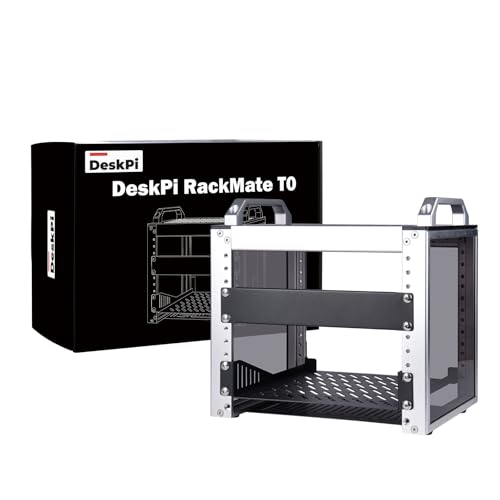
- 4U open 10-inch cabinet for compact home lab builds
- Perforated side panels and open layout support airflow
- Aluminum alloy and acrylic frame with easy access
Best For: A compact rack for organizing a Home Assistant server and related network gear
Ready-to-Run Pick
TurnKey Node for Home Assistant

- Home Assistant OS preinstalled for a quick start
- AMD Ryzen R2514 with 16GB RAM and 512GB SSD
- Compact mini PC with VESA mount and 24/7 operation support
Best For: Anyone who wants a ready-to-use Home Assistant mini PC with minimal setup
Expanded Rack Pick
DeskPi RackMate T1 8U Mini Server Cabinet
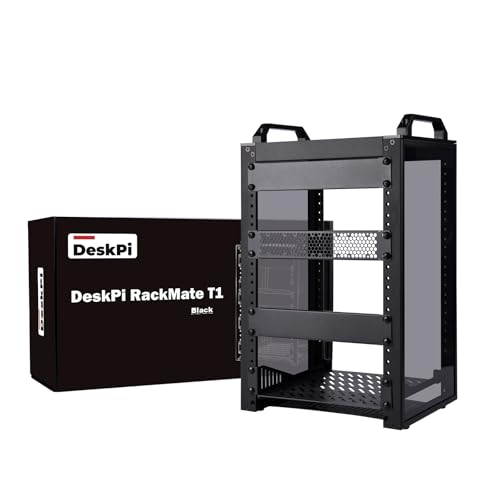
- 8U open rack in a compact 10-inch format
- Translucent acrylic sides with aluminum alloy frame
- Good fit for a growing Home Assistant server stack
Best For: A small open rack with more room for a Home Assistant build and extra gear
DIY x86 Homelab Choice
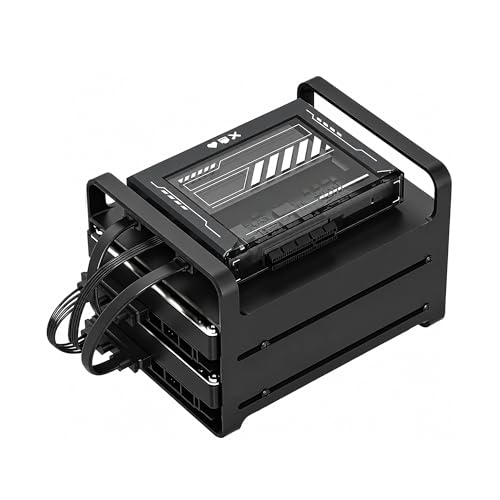
- Intel quad-core x86 platform for broad compatibility.
- 16GB RAM supports always-on multi-service workloads.
- Includes 2-bay NAS kit with dual SATA and PCIe expansion.
Best For: DIY homelab builders who want Home Assistant plus NAS flexibility
Balanced Mini PC Pick

- Ryzen 5 3500U gives it more headroom than entry-level chips.
- 16GB RAM, 512GB SSD, and 2.5GbE come ready to go.
- Good fit for Home Assistant plus Proxmox or light server tasks.
Best For: Anyone wanting a compact, general-purpose Home Assistant mini server
Quiet Always-On Option

- Fanless passive design for silent 24/7 operation.
- CasaOS preinstalled for quick app-based setup.
- x86 platform supports Home Assistant and other native apps.
Best For: Users who want a silent, low-power Home Assistant server with easy setup
Premium AI NAS
Ryzen 7 PRO 8845HS NAS for Home Assistant

- 8-core/16-thread AMD Ryzen 7 PRO 8845HS
- Supports 20+ Docker containers and virtualization
- Dual 10GbE and ZFS hybrid storage support
Best For: Advanced home lab users needing a powerful Home Assistant server plus AI and NAS features
Plug-and-Play Choice
Home Assistant preinstalled mini PC
- Home Assistant OS preinstalled
- Compact 5" x 5" x 1.7" design
- Dual NVMe and dual SO-DIMM expansion
Best For: Anyone who wants a simple preconfigured Home Assistant home server
Storage-First NAS

- 2-bay NAS with 4TB total capacity
- RAID 1 mode offers automatic backup
- Closed system with SSL encryption
Best For: Users who want shared storage and backups alongside a basic Home Assistant setup
Server-Class Choice – ZimaBoard 2 for Home Assistant, NAS & Docker
If you’re shopping for a home server for Home Assistant, ZimaBoard 2 stands out as a purpose-built x86 platform rather than a typical SBC. It combines an Intel N150 quad-core CPU, 8GB LPDDR5 memory, 32GB eMMC storage, dual 2.5GbE, and dual SATA in a compact fanless design, making it a practical base for always-on smart home and self-hosted services.
Best For: Users who want a flexible, always-on Home Assistant host that can also handle NAS, Docker, routing, and homelab tasks.
Pros:
- Native Home Assistant, Docker, and NAS-friendly x86 hardware with ZimaOS preinstalled
- Dual SATA and dual 2.5GbE give it stronger storage and networking options than many small boards
- PCIe 3.0 x4 expansion supports upgrades like 10GbE, NVMe adapters, or accelerators
- Supports a wide range of operating systems, including TrueNAS, Proxmox, Debian, Ubuntu Server, and pfSense
Cons:
- 32GB eMMC is enough for a base system, but you may still want external storage for larger workloads
- Expansion flexibility is excellent, but advanced builds may require extra adapters and planning
- It is aimed at server use, so it is more specialized than a simple plug-and-play mini PC
ZimaBoard 2 is the most server-oriented option in this roundup, and that makes it a strong fit if you want Home Assistant on hardware that can grow into a larger private cloud or homelab. If you value storage, networking, and expandability as much as automation, this is the most versatile foundation here.
Rack Organizer Pick – DeskPi RackMate T0 Mini Server Cabinet
If you’re building a home server for Home Assistant with multiple small devices, this 10-inch mini rack gives you a cleaner way to organize the setup. The RackMate T0 is a 4U open cabinet made from aluminum alloy and acrylic, with perforated side panels and a compact 7.87-inch depth, so it fits neatly on a desk or in a small home lab.
Best For: Anyone who wants a compact open rack for a Home Assistant server, cluster, or small network stack.
Pros:
- 10-inch width and 4U height make it a space-saving mini rack for small setups
- Open design makes installation, maintenance, and cable access easier
- Perforated side panels help improve airflow for server cooling
- Aluminum alloy and acrylic construction keeps the cabinet light and practical
Cons:
- Requires assembly, so it’s not a ready-to-use enclosed cabinet
- Open-frame design offers less dust protection than a closed rack
- It is the cabinet only, so you still need to add the actual Home Assistant hardware
The RackMate T0 is less about computing power and more about giving your home server a tidy, accessible home. It makes sense if you already have hardware in mind and want a compact rack that supports better organization and airflow.
Ready-to-Run Pick – TurnKey Node for Home Assistant
For buyers who want a home server for Home Assistant without starting from scratch, the TurnKey Node is a straightforward mini PC option. It ships with Home Assistant OS preinstalled and pairs an AMD Ryzen R2514 processor, 16GB RAM, and a 512GB SSD, so it is set up for local automation, containers, and 24/7 operation right out of the box.
Best For: Users who want a ready-to-run Home Assistant mini PC with SSD storage and solid all-in-one hardware.
Pros:
- Home Assistant OS is preinstalled for a simpler setup
- AMD Ryzen R2514, 16GB RAM, and 512GB SSD provide a strong starting point for automation workloads
- Supports continuous operation, virtualization, storage, and containers
- Compact 5 x 5 x 1.7-inch design with VESA mount kit for flexible placement
Cons:
- It uses integrated storage and memory specs from the listing, so buyers should verify the exact configuration they need
- Networking is limited to gigabit Ethernet rather than multi-gig options
- It is optimized for Home Assistant and general use, not for the deeper expansion of a server-class board
This is the easiest pick if you want to get Home Assistant running quickly on dedicated hardware. It trades some expandability for convenience, but that can be exactly what many smart home users want.
Expanded Rack Pick – DeskPi RackMate T1 8U Mini Server Cabinet
If your home server for Home Assistant is growing beyond a single device, the RackMate T1 gives you more vertical space in the same compact 10-inch format. This 8U open rack uses aluminum alloy with translucent acrylic side panels, making it a practical fit for a small home lab, server stack, or network gear setup.
Best For: Users who need a small open rack with more capacity for a Home Assistant server and supporting equipment.
Pros:
- 8U height provides more room than the 4U version for expanding setups
- Open design makes devices easier to access for installation and maintenance
- Translucent acrylic sides add a lighter look while helping reduce dust
- Flat-packed with included hardware for straightforward assembly
Cons:
- Still requires assembly, so it takes more effort than a finished enclosure
- Open-frame layout is practical, but not as protective as a fully closed cabinet
- The rack itself does not include any server hardware or mounts beyond the cabinet system
The T1 is the better choice when a small rack needs to hold more than just one box. For a Home Assistant-centered build with room to add networking or other lab gear, the extra 8U capacity can be a smart middle ground.
DIY x86 Homelab Choice – ZimaBlade 7700 2-Bay NAS Kit
If you want a home server for Home Assistant that can also handle storage, Docker, and media, the ZimaBlade 7700 is built for that kind of flexible setup. It uses an Intel quad-core x86 platform with 16GB RAM, so it is aimed at users who want broad compatibility and room to experiment rather than a locked-down appliance.
Best For: DIY users who want one low-power box for Home Assistant, NAS duties, and self-hosted apps.
Pros:
- x86 hardware for wide OS and software compatibility.
- 16GB RAM suits always-on multi-service workloads.
- Includes a 2-bay NAS kit with power supply, drive cage, and dual SATA cables.
- PCIe expansion adds flexibility for future upgrades.
Cons:
- Assembly is required.
- More of a build-it-yourself platform than a turnkey appliance.
- Best suited to users comfortable setting up their own services.
The ZimaBlade 7700 makes sense if you want a compact, customizable box that can grow with a Home Assistant lab. It is not the simplest option, but it offers the kind of flexibility that DIY homelab users usually want.
Balanced Mini PC Pick – GMKtec Ryzen 5 3500U Mini PC
This GMKtec mini PC is a practical home server for Home Assistant if you want a compact machine with stronger general-purpose hardware. The Ryzen 5 3500U, 16GB RAM, and 512GB SSD give it enough headroom for multitasking, and the 2.5GbE port is useful if you plan to connect it into a more demanding home network.
Best For: Users who want a small, well-rounded mini PC for Home Assistant, Proxmox, and other light server tasks.
Pros:
- Ryzen 5 3500U offers more performance than Intel N150/N97-class chips.
- 16GB dual-channel RAM and 512GB SSD come preinstalled.
- 2.5GbE LAN is a plus for server and networking use.
- Supports triple 4K display output and plenty of everyday connectivity.
Cons:
- It is more of a general mini PC than a purpose-built home server.
- Fans and desktop hardware may be less ideal than a low-power dedicated appliance.
- Expansion is useful, but the design is still compact and limited by size.
For a Home Assistant setup that also needs a capable desktop-class mini PC, this is a strong middle ground. It is especially attractive if you want extra networking speed and enough performance for other light server workloads.
Quiet Always-On Option – ZimaBlade 7700 Starter Kit
If your goal is a quiet home server for Home Assistant, this ZimaBlade starter kit is designed around low-noise, always-on use. It runs on Intel x86 hardware with CasaOS preinstalled, so you can get started quickly and still keep the flexibility to run Home Assistant, Plex, Nextcloud, and other native apps.
Best For: Home users who want a silent, low-power Home Assistant server with simple setup.
Pros:
- Fanless passive design keeps noise to a minimum.
- CasaOS preinstalled for a simpler, app-based setup.
- x86 platform supports native Home Assistant and other services.
- PCIe x4 expansion allows storage or networking upgrades.
Cons:
- It is better suited to light services than heavy workloads.
- Starter kit storage is modest at 32GB eMMC.
- Expansion is flexible, but additional modules may be needed for bigger builds.
This is a strong choice if you value quiet operation and want a straightforward path into self-hosting. For a Home Assistant-focused server, it offers a good mix of simplicity, low power use, and upgrade potential.
Premium AI NAS – Ryzen 7 PRO 8845HS NAS for Home Assistant
If you want a home server for Home Assistant that can also handle heavier Docker, virtualization, and media workloads, this Nimo AI NAS is built for far more than basic automation. The Ryzen 7 PRO 8845HS, fast Radeon 780M graphics, and integrated Ryzen AI NPU make it a strong pick for users who want one box to run smart home services, local AI tasks, and storage at the same time.
Best For: Power users who want a Home Assistant server that can also serve as a high-performance NAS, AI box, and container host.
Pros:
- AMD Ryzen 7 PRO 8845HS with 8 cores and 16 threads for strong multitasking
- Integrated Ryzen AI NPU with support for local AI workloads and offline privacy
- Designed to run 20+ Docker containers, including Home Assistant, web servers, and databases
- Dual 10GbE networking and ZFS hybrid storage support for fast, flexible deployments
Cons:
- Far more machine than many basic Home Assistant setups need
- Storage and configuration are geared toward advanced users
Overall, this is the most capable option in the group if you want your Home Assistant server to double as a serious all-in-one home lab system. It makes sense when automation is just one part of a larger local workload.
Plug-and-Play Choice – Home Assistant preinstalled mini PC
This TK Node mini PC is a practical home server for Home Assistant if you want a compact system that arrives with Home Assistant OS already installed. With an AMD R2314 processor, 8GB of RAM, and a 256GB SSD, it is aimed at straightforward local automation, 24/7 operation, and clean deployment without cloud dependence.
Best For: Buyers who want a simple, preconfigured Home Assistant machine for reliable everyday smart home control.
Pros:
- Home Assistant OS preinstalled for a faster setup
- Compact 5″ x 5″ x 1.7″ footprint with VESA mount support
- Built for continuous operation with low 65W power consumption
- Expandable memory and storage with dual SO-DIMM and dual NVMe slots
Cons:
- 8GB RAM and 256GB SSD are modest for heavier workloads
- Less suited to users who want a large NAS or advanced AI server
This is the easiest option here for getting Home Assistant up and running quickly. It focuses on reliability, compact size, and practical expandability instead of raw performance.
Storage-First NAS – 4TB two-bay LinkStation 720
The Buffalo LinkStation 720 is a more storage-focused home server for Home Assistant if you also want centralized file access, backups, and a private cloud-style setup. It is not a dedicated Home Assistant appliance, but its 2-bay NAS design, included drives, and secure file-sharing features make it useful for households that want both automation and shared storage in one network device.
Best For: Families or small offices that want shared network storage alongside a simple Home Assistant-friendly home server setup.
Pros:
- 2-bay NAS with 4TB total capacity and included hard drives
- RAID 1 option provides automatic backup with 2TB usable capacity
- Closed system design and SSL encryption for more secure file transfers
- Supports Windows, Mac, Linux, iOS, and Android devices
Cons:
- Not purpose-built for Home Assistant hardware or preinstalled automation software
- Less flexible than a mini PC for running containers or local services
If storage and backup matter as much as smart home control, this LinkStation makes a lot of sense. It is best treated as a NAS companion to your Home Assistant setup rather than a performance-first automation host.
How We Picked the Best Home Server for Home Assistant
We prioritized systems that offer enough CPU and RAM for responsive automations, sensible storage options, and modern network connectivity. We also considered whether each Home Server for Home Assistant is better suited to beginners, power users, or buyers who want a low-maintenance appliance.
Preference went to models with SSD-based storage, at least one fast Ethernet option where possible, and a form factor that matches real-world use: compact desktop units, mini server racks, and NAS-style devices.
Quick Comparison: What Matters Most
For most Home Assistant setups, the biggest differences are not raw specs alone but the overall platform. Mini PCs usually offer the best balance of performance and flexibility. NAS devices make sense if you want shared storage and backup features. Small racks are best when you are organizing multiple devices and networking gear in one place.
If you expect to run containers, local voice processing, databases, or several integrations, aim higher on RAM and storage endurance. If you only need automations and a modest add-on stack, a lower-power system can still be a smart buy.
Key Buying Factors for a Home Server for Home Assistant
Processor and Memory
Home Assistant itself is lightweight, but add-ons, history retention, dashboards, and other services add up. Look for a modern quad-core CPU as a comfortable baseline, and choose 8GB RAM for simpler setups or 16GB+ if you want room for Docker, monitoring, media tools, or virtual machines.
Storage Type and Capacity
An SSD is strongly preferred for speed and reliability. eMMC can work for lean installs, but SSDs are a better long-term choice, especially if you expect frequent writes from logs, databases, or camera-related workloads. If you need backups, media, or shared files, consider a NAS or a system with SATA expansion.
Networking and Expansion
Fast wired networking helps Home Assistant stay responsive, especially when you add local devices, backups, or other services. Dual Ethernet and SATA expansion are useful extras for advanced users. PCIe support can also be valuable if you plan to add storage, networking, or specialized hardware later.
Noise, Power, and Placement
Since a home server often runs 24/7, low noise and efficient power use matter. A quiet mini PC may be ideal for a living area or office, while a rack or NAS may fit better in a utility space.
Who Should Buy Which Home Server for Home Assistant?
Beginners: Choose a preinstalled Home Assistant system or a ready-to-run NAS if you want the least setup hassle.
Power users: Pick a flexible x86 mini PC or expandable home server if you plan to run Docker, Proxmox, or multiple self-hosted apps alongside Home Assistant.
Storage-focused buyers: Go with a NAS if your priority is backups, file sharing, and data protection in one box.
Organized homelab builders: Choose a mini rack if you want a cleaner, more scalable setup for networking gear and server hardware.