
A good home server for Nextcloud gives you control over file syncing, photo backups, and sharing without relying entirely on a hosted cloud service. The right hardware depends on how many people will use it—and how much setup you want to handle.
This roundup spans ready-made NAS devices and more flexible x86 systems. Use the buying guide below to narrow the field by storage needs, software compatibility, and ongoing maintenance.
Best 10 Home Server for Nextcloud Picks for 2026
Best for Power Users

- Six-core Core i3; expandable DDR5
- 10GbE and 2.5GbE networking
- Docker, VMs, and flexible storage
Best For: Demanding multi-service home servers
Best for Shared Storage

- Four bays with RAID options
- 10GbE plus 2.5GbE ports
- Docker and VM support
Best For: Families and small teams sharing files
Best for Fast Networks

- Two 10GbE network ports
- Ryzen Embedded CPU; expandable RAM
- Four bays plus M.2 expansion
Best For: Multi-service setups on fast wired networks
Best for DIY Builds

- 16GB memory and x86 platform
- Dual SATA and dual 2.5GbE
- PCIe slot for expansion
Best For: Hands-on Nextcloud and homelab builds
Simple Private Cloud

- Two-bay, diskless NAS
- File syncing and automated backups
- Nextcloud support not confirmed
Best For: Synology private-cloud basics
DIY Nextcloud Candidate
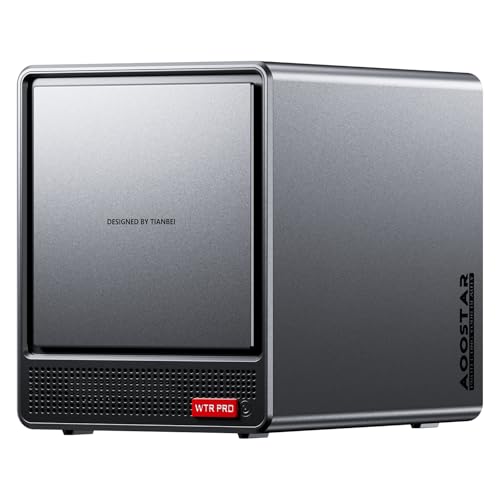
- Ryzen 7 5825U for multitasking
- Four HDD bays, two M.2 slots
- Requires RAM, drives, and OS
Best For: Hands-on home-lab builders
Media-Focused Private Cloud

- Two-bay, diskless NAS
- Media streaming and backup tools
- Nextcloud support not confirmed
Best For: Media and backup-focused households
Quiet Home NAS

- Intel quad-core CPU and 4GB RAM
- 2.5GbE networking; two drive bays
- Rated at 19dB(A); diskless
Best For: Quiet household storage and a personal-cloud project
DIY Homelab Pick
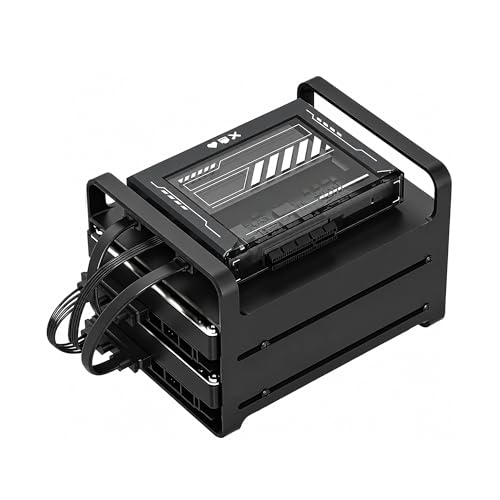
- Intel quad-core x86 platform
- 16GB RAM for lightweight services
- Drive cage, SATA cables, and PCIe slot
Best For: Hands-on Linux and Docker self-hosting
High-Speed Upgrade

- Intel N150 and 8GB DDR5
- Dual 5GbE network ports
- Three M.2 slots; diskless
Best For: Multi-service setups needing faster networking
Best for Power Users – UGREEN NAS DXP4800 Pro
If you need a home server for Nextcloud alongside other self-hosted services, the DXP4800 Pro has the hardware to consider: a six-core Intel Core i3, 8GB of expandable DDR5 memory, and support for Docker and virtual machines. Check how you plan to deploy Nextcloud before buying; the supplied notes do not list it as a preinstalled app.
Best For: Power users running multiple services and managing large local storage pools.
Pros:
- Core i3-1315U and expandable memory suit demanding multitasking.
- 10GbE plus 2.5GbE ports support fast wired networking.
- Four drive bays, two M.2 slots, and multiple RAID options offer storage flexibility.
Cons:
- Nextcloud setup requires choosing and configuring a compatible deployment method.
- Its professional-oriented hardware may be more than a basic file server needs.
Choose this model when Nextcloud will be one part of a broader Docker or VM setup. Its networking and expansion are compelling, but they matter most if the rest of your network and workloads can use them.
Best for Shared Storage – UGREEN DXP4800 Plus
The DXP4800 Plus is a practical home server for Nextcloud shoppers who also want centralized backups and shared family or team files. It supports Docker and virtual machines, while its apps provide access across computers and mobile devices; the supplied notes do not identify Nextcloud as a built-in app.
Best For: Families, creators, and small teams combining private storage with self-hosted services.
Pros:
- Four-bay storage supports a variety of RAID configurations.
- 10GbE and 2.5GbE ports provide wired networking options.
- Docker and VM support leave room for additional services.
Cons:
- Storage drives must be purchased separately.
- Wired Ethernet only; the notes specify no Wi-Fi support.
- Nextcloud installation and maintenance remain your responsibility.
This is a balanced pick if shared storage comes first and Nextcloud is an additional project. Budget for compatible drives, and remember that real transfer speeds depend on your network and storage setup.
Best for Fast Networks – UGREEN NAS DXP4800 GT
For a home server for Nextcloud that will also handle media, backups, or other self-hosted workloads, the DXP4800 GT offers a Ryzen Embedded processor, 8GB of expandable memory, and Docker and VM support. Its two 10GbE ports stand out for households or teams with suitably equipped wired networks.
Best For: Creators and office teams with fast networking and several services to host.
Pros:
- Dual 10GbE ports provide substantial aggregate bandwidth with compatible equipment.
- Four storage bays and two M.2 slots allow a flexible storage build.
- Docker, VMs, and an SD card slot broaden its uses beyond file sharing.
Cons:
- Drives are not included.
- Getting the most from dual 10GbE requires compatible network equipment.
- The notes do not specify a preinstalled Nextcloud app.
Consider the GT when network throughput is a priority, not merely a specification on the box. Plan your Nextcloud deployment and drive purchases separately, and treat the quoted dual-port bandwidth as aggregate rather than single-client speed.
Best for DIY Builds – ZimaBoard 2 1664
The ZimaBoard 2 1664 suits anyone who wants to build a home server for Nextcloud rather than buy a conventional four-bay NAS. This compact x86 board has 16GB of memory, dual SATA connections, dual 2.5GbE ports, and a PCIe 3.0 x4 slot for a more customizable setup.
Best For: Hands-on users assembling a small self-hosting server or homelab.
Pros:
- 16GB of LPDDR5 memory and a quad-core Intel N150 support multiple home-server tasks.
- Dual SATA and dual 2.5GbE provide direct storage and wired networking connections.
- PCIe expansion and support for several server operating systems offer build flexibility.
Cons:
- Only two native SATA connections, compared with four bays on the NAS models here.
- A Nextcloud deployment and attached-drive setup require hands-on configuration.
Pick this board if control over the operating system and expansion matters more than an integrated NAS chassis. Its 64GB eMMC is onboard storage, not a substitute for the separate drives a sizable file library will need.
Simple Private Cloud – Synology DiskStation DS223j
The two-bay, diskless Synology DS223j is a straightforward private-cloud NAS, but it is not a confirmed home server for Nextcloud: the supplied details do not establish Nextcloud compatibility. Its documented strengths are remote file access, sharing, and automated backups through Synology’s software.
Best For: Buyers who want an easy-to-manage Synology private cloud rather than a verified Nextcloud installation.
Pros:
- Two bays provide room for a storage setup tailored to your needs.
- Supports file sharing and syncing across multiple platforms.
- Offers automated backups for computers and mobile devices, plus a two-year warranty.
Cons:
- Diskless; drives must be purchased separately.
- The supplied specifications do not confirm support for running Nextcloud.
Choose the DS223j for Synology’s documented cloud and backup features. If Nextcloud itself is essential, verify installation support before buying.
The AOOSTAR WTR PRO is a flexible home server for Nextcloud builders willing to install and configure their own system. Its eight-core AMD Ryzen 7 5825U, four hard-drive bays, two M.2 slots, and dual 2.5GbE ports offer substantial hardware for a home lab, although the supplied notes do not confirm a tested Nextcloud setup.
Best For: Hands-on users assembling a NAS or multipurpose home lab from a barebones machine.
Pros:
- Eight-core, 16-thread processor is intended for multitasking, virtualization, and Docker workloads.
- Four hard-drive bays and two M.2 slots allow a mix of storage types.
- Dual 2.5GbE ports provide flexible network connectivity.
Cons:
- Ships without RAM, storage, or an operating system.
- Nextcloud installation and compatibility are not confirmed in the supplied notes.
This is the most configurable option here, but it also demands the most setup. Budget for memory, drives, an OS, and time to validate your preferred Nextcloud installation method.
The two-bay, diskless Synology DS225+ combines private-cloud storage with media streaming and creator-focused backup features. If you are shopping for a home server for Nextcloud, note that its supplied specifications describe Synology’s cloud features but do not confirm Nextcloud support.
Best For: Households prioritizing a Synology media library, file access, and automated backups.
Pros:
- Designed for streaming personal movies, shows, and photos.
- Supports automated backups to cloud services, external drives, and remote NAS devices.
- Offers RAID redundancy and snapshot technology, with a three-year warranty.
Cons:
- Diskless; storage drives are an additional purchase.
- Nextcloud compatibility is not established by the supplied product details.
The DS225+ makes sense when media and backup tools are the main draw. Confirm a viable Nextcloud installation path separately if that application is your deciding requirement.
Quiet Home NAS – TERRAMASTER F2-425
If you want a compact home server for Nextcloud, the TERRAMASTER F2-425 offers a two-bay, diskless x86 NAS with 4GB RAM and a 2.5GbE port. Its low stated noise level and tool-free drive trays make it particularly appealing for a shared living space.
Best For: Households that want a quiet NAS alongside a self-hosted personal cloud.
Pros:
- Intel quad-core processor, 4GB RAM, and 2.5GbE support everyday file sharing.
- Two bays support up to 60TB of installed storage and flexible TRAID arrays.
- Rated at 19dB(A), with tool-free Push-Lock drive trays.
Cons:
- Diskless: hard drives must be purchased separately.
- Two drive bays limit internal drive expansion.
This is the straightforward, quieter option of the three. Check that your preferred Nextcloud installation method is supported before buying; the supplied details do not specify a Nextcloud app or installation workflow.
For a hands-on home server for Nextcloud, the ZimaBlade 7700 kit supplies an x86 platform with 16GB RAM, a two-drive cage, and SATA cables. Its stated support for Linux and Docker makes it a flexible starting point if you prefer assembling and managing your own server.
Best For: Tinkerers who want a DIY NAS that can also host other lightweight services.
Pros:
- Intel quad-core x86 platform is intended for Linux, Docker, and CasaOS.
- 16GB RAM provides room for multiple lightweight workloads.
- Includes a two-drive cage, dual SATA cables, and power supply; a PCIe slot allows optional expansion.
Cons:
- DIY setup demands more hands-on configuration than an appliance-style NAS.
- Drives are not listed among the included kit components.
Choose this kit for control over your operating system and services, not for a promised one-click Nextcloud setup. The supplied notes establish its general self-hosting capabilities but do not document a specific Nextcloud installation.
If your home server for Nextcloud will share space with other demanding services, the TERRAMASTER F2-425 Plus provides an Intel N150 processor, 8GB DDR5 memory, dual 5GbE ports, and three M.2 slots. It is a diskless, two-bay NAS aimed at buyers who want more networking and storage flexibility.
Best For: Home-lab users or small teams planning fast network access and multiple services.
Pros:
- Dual 5GbE ports support link aggregation and SMB Multichannel.
- Three M.2 slots can be used for SSD cache or independent storage pools.
- Intel N150 and 8GB DDR5 support the product’s stated Docker and virtual-machine use cases.
Cons:
- Diskless: drives must be supplied separately.
- Taking advantage of dual 5GbE depends on a suitable network setup.
This is the most expansion-oriented choice here, especially if fast transfers and SSD options matter beyond your personal cloud. The supplied notes do not confirm a dedicated Nextcloud app, so verify your intended deployment approach.
How We Picked the Best Home Server for Nextcloud
We selected a mix of two-bay and four-bay NAS devices, plus x86 DIY-oriented systems, to cover different budgets and levels of hands-on setup. Our focus was on practical considerations for self-hosting: drive capacity, room to expand, network connectivity, memory, and the freedom to install or run Nextcloud. Inclusion does not mean Nextcloud is preinstalled or officially supported on every device; confirm the installation method and current software requirements before buying.
Quick Comparison: Which Type Fits?
Two-bay NAS: A compact choice for a small household that wants mirrored storage and relatively simple management. Check whether your preferred Nextcloud installation method is supported by the NAS operating system.
Four-bay NAS: Better suited to growing photo and file libraries, more users, or flexible storage layouts. Additional bays give you expansion options but increase the cost of a fully populated system.
x86 DIY server or barebones NAS: Best when you want control over the operating system, containers, or virtual machines. Budget for any missing RAM, boot drive, storage drives, and the time needed to maintain the setup.
Key Buying Factors for a Home Server for Nextcloud
Software Compatibility Comes First
Decide how you will run Nextcloud before choosing hardware: through a supported NAS app or container workflow, or on an operating system you install yourself. Verify that your chosen platform can run the database and other services required by your intended deployment. A fast processor cannot make up for a setup you cannot install or keep updated comfortably.
Storage, Backups, and Drive Costs
Most NAS listings here are diskless, so account for drives in the total price. Two bays can provide a straightforward mirror; four bays offer more capacity and layout choices. RAID or mirroring can keep a server available after a drive failure, but neither replaces a separate backup. Plan an external or off-site copy of important files.
Memory, Network, and Power
More users, previews, and additional services can increase memory demand. Check installed RAM, whether it is upgradeable, and what a barebones model omits. Faster Ethernet is useful only if your router or switch and client devices can benefit from it. For an always-on Home Server for Nextcloud, also consider idle power use, noise, and where the unit will sit.
Who Should Buy Which Home Server for Nextcloud?
Choose a two-bay NAS if you value a small footprint and manageable storage needs; compare the Synology and TerraMaster options based on your preferred software workflow. Look at the UGREEN four-bay models if your household or small team expects its storage library to grow. Consider the AOOSTAR barebones system, ZimaBoard 2, or x86 DIY kit if you are comfortable installing and maintaining your own stack. Whichever route you take, check the exact model’s Nextcloud installation path, included components, and full drive-inclusive cost before ordering.