
Wi-Fi is convenient, but a wired connection can deliver lower latency, steadier throughput, and fewer interference problems. The right 2.5GbE adapter makes it easy to upgrade a laptop, desktop, or compact workstation without replacing your network hardware.
We’ve gathered 10 USB and PCIe options, including USB-C, USB-A, and internal network cards, so you can match the adapter to your computer, ports, operating system, and network setup.
Best 10 Ethernet Adapters with 2.5 Gigabit Speeds Picks for 2026
Best USB-C Performance
Cable Matters 2.5Gb Ethernet Adapter
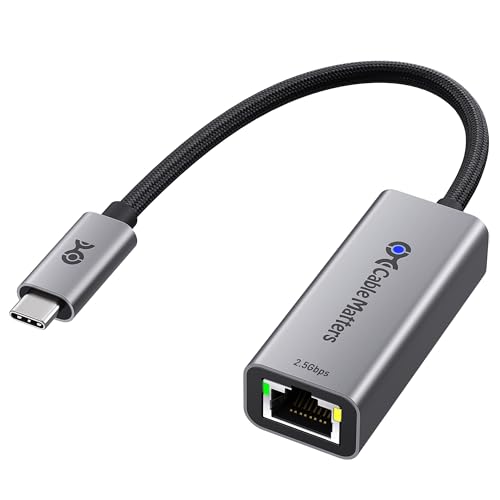
- Up to 2.5Gbps Ethernet
- USB-C and Thunderbolt compatibility
- Aluminum housing with braided cable
Best For: USB-C users needing durable, fast wired networking
Best Aluminum USB-C Upgrade

- Up to 2.5Gbps wired networking
- Low-power RTL8156BG chipset
- Reinforced aluminum design with status lights
Best For: Modern USB-C laptops and tablets
Best Desktop PCIe Card
TP-Link TX201 2.5Gb Network Card

- PCIe networking up to 2.5Gbps
- Includes low-profile and full-height brackets
- QoS and Wake on LAN support
Best For: Desktop PCs, gaming systems, and home servers
Best Dual-Connector Option
Plugable 2.5G USB Ethernet Adapter

- USB-C and USB-A compatibility
- Up to 2.5Gbps with USB 3.0
- Supports Cat 5e or better cabling
Best For: Users connecting both newer and older computers
Best Plug-and-Play Pick
TP-Link USB-C 2.5G Ethernet Adapter

- Up to 2.5Gbps wired networking
- Plug-and-play USB-C connection
- Compact aluminum design with broad compatibility
Best For: Easy USB-C networking upgrades for laptops, tablets, and compatible phones
Best for Everyday Use
WAVLINK USB-C/USB-A 2.5G Adapter
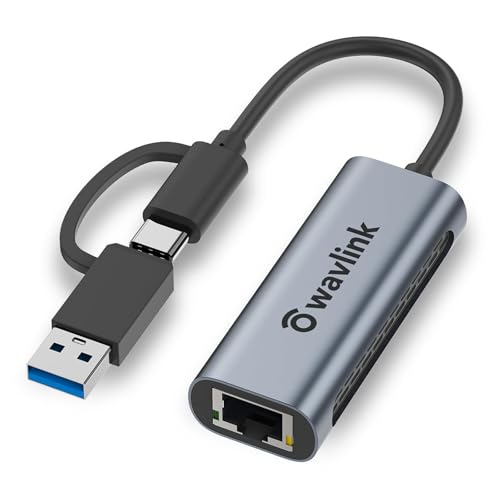
- Up to 2.5Gbps with backward compatibility
- Includes USB-C and USB-A connections
- Portable aluminum body with ventilation
Best For: Households or offices using computers with mixed USB port types
Best for Efficient Performance
UGREEN USB 3.0 2.5Gb Ethernet Adapter

- Up to 2.5Gbps over USB-A
- Power-efficient RTL8156BG chipset
- Aluminum housing with reinforced ports
Best For: USB-A computers upgrading from Gigabit Ethernet
Best for Power Users

- 2.5G/1G/100M auto-negotiation
- NBASE-T works with Cat 5e cabling
- Wake-on-LAN and VLAN support
Best For: Creators and workstation users
Best USB-A Option
Cudy UE25A 2.5G Ethernet Adapter

- 2.5Gbps Ethernet over USB-A 3.0
- Plug-and-play on major current platforms
- Built-in cable with Wake-on-LAN
Best For: USB-A laptops, PCs, and gaming setups
Best USB-C Performance – Cable Matters 2.5Gb Ethernet Adapter
The Cable Matters USB-C adapter is a practical choice among ethernet adapters with 2.5 gigabit speeds, adding a fast wired connection to compatible laptops, desktops, tablets, and other USB-C or Thunderbolt devices. Its aluminum housing, braided cable, and broad operating-system support suit demanding home, office, and network-storage setups.
Best For: USB-C and Thunderbolt users who want a durable 2.5Gbps connection for streaming, gaming, large transfers, or NAS access.
Pros:
- Supports Ethernet speeds up to 2.5Gbps.
- Compatible with Windows, macOS, Linux, ChromeOS, and iOS.
- Aluminum housing and braided pigtail cable improve durability and heat dissipation.
- Works with USB-C and Thunderbolt 3, 4, and 5 devices.
Cons:
- May require the latest Realtek driver for best results on some older systems or Linux kernels.
- Not compatible with Android devices.
Choose this model when broad compatibility and a reinforced design matter as much as 2.5Gbps throughput. Remember that full performance depends on the rest of your network hardware and cabling.
Best Aluminum USB-C Upgrade – UGREEN 2.5G Ethernet Adapter
UGREEN’s USB-C adapter is designed for modern laptops and tablets that lack a built-in Ethernet port. It belongs among ethernet adapters with 2.5 gigabit speeds that can help upgrade a 1Gbps network, provided the router, switch, cable, and host device all support the faster connection.
Best For: Users upgrading a USB-C laptop or tablet from Wi-Fi or 1Gbps Ethernet to a stable 2.5Gbps wired link.
Pros:
- Supports data rates up to 2.5Gbps.
- RTL8156BG chipset is designed for low-power, cooler operation.
- Aluminum construction and reinforced ports are suited to regular use.
- Indicator lights show transmission status.
Cons:
- Full 2.5Gbps performance requires compatible network equipment and cabling.
- Listed minimum operating-system requirements include Android 13 and Windows 11.
This is a sensible choice for a sleek, portable USB-C networking upgrade, especially if you already have a 2.5Gbps switch or router. Check your device and operating-system requirements before buying.
Best Desktop PCIe Card – TP-Link TX201 2.5Gb Network Card
The TP-Link TX201 is an internal PCIe solution for desktop owners who want ethernet adapters with 2.5 gigabit speeds without using an external USB port. It automatically negotiates 2.5Gbps, 1Gbps, or 100Mbps connections and includes both standard and low-profile brackets for different computer cases.
Best For: Desktop PCs, gaming systems, and home servers with an available PCIe slot and a compatible 2.5Gbps network.
Pros:
- Provides up to 2.5Gbps Ethernet through a PCIe interface.
- Backwards compatible with 1Gbps and 100Mbps Base-T connections.
- QoS is designed to prioritize performance for gaming.
- Includes Wake on LAN and standard and low-profile brackets.
Cons:
- Requires opening the desktop and installing a PCIe card.
- Not intended for laptops or other systems without an available PCIe slot.
For a desktop upgrade, the TX201 offers useful flexibility: it supports older network speeds while leaving room for a 2.5Gbps connection. Its two bracket options also make it easier to fit in full-height or mini-tower cases.
Best Dual-Connector Option – Plugable 2.5G USB Ethernet Adapter
Plugable’s adapter stands out among ethernet adapters with 2.5 gigabit speeds because its hybrid design supports both USB-C and USB-A connections. That makes it useful for moving between newer laptops and older computers, while USB 3.0 is required to reach full performance.
Best For: Households or workplaces that need one 2.5Gbps adapter for both USB-C and USB-A computers.
Pros:
- Offers up to 2.5Gbps performance with compatible equipment.
- Dual USB-C and USB-A design improves device flexibility.
- Works with Cat 5e or better cabling for the 2.5Gbps signal.
- Supports Windows, macOS, ChromeOS, and listed iPhone models.
Cons:
- USB 3.0 is required for full performance.
- Actual speeds can be limited by the ISP, network, cable, or host system.
This is a strong all-purpose pick when connector flexibility is more important than having the smallest possible adapter. Its two-year coverage and lifetime support add reassurance for buyers managing several types of devices.
Best Plug-and-Play Pick – TP-Link USB-C 2.5G Ethernet Adapter
For a simple way to add faster wired networking, the TP-Link UE302C is one of the more convenient ethernet adapters with 2.5 gigabit speeds. Its USB-C connection, broad device support, and plug-and-play setup make it practical for laptops, tablets, and compatible phones.
Best For: Users who want a compact USB-C adapter with easy setup and broad operating-system compatibility.
Pros:
- Supports network speeds up to 2.5 Gbps and works with 10/100/1000Mbps networks.
- Compatible with USB-C and Thunderbolt 3/4 devices, including many MacBook, iPad, Windows, Chromebook, Linux, and iOS devices.
- Aluminum construction, indicator lights, and a compact, travel-friendly design.
- Plug-and-play setup with a two-year manufacturer warranty.
Cons:
- Requires a compatible USB-C port and 2.5Gb-capable network equipment to reach its top speed.
- The supplied specifications identify the hardware interface as USB 3.0, so actual performance depends on the host port and network.
The UE302C is a strong all-around choice when convenience matters. It combines 2.5GbE support with a small aluminum body and no-manual-driver setup, making it especially suitable for mobile users and quick upgrades.
Best for Everyday Use – WAVLINK USB-C/USB-A 2.5G Adapter
The WAVLINK NWU330GCA stands out among ethernet adapters with 2.5 gigabit speeds because it includes both USB-C and USB-A connectivity. That flexibility makes it useful for computers with different port types, while its aluminum housing keeps the design portable for office or travel use.
Best For: People who need one 2.5GbE adapter that can connect through either USB-C or USB-A.
Pros:
- Provides speeds up to 2.5 Gbps and remains backward compatible with 10/100/1000Mbps networks.
- Two-in-one USB-C and USB-A design suits a wider range of computers and tablets.
- Aluminum case, ventilation holes, and status LEDs support portable everyday use.
- Includes a two-year warranty, with an additional six months for registered members.
Cons:
- Not intended for smartphones according to the supplied product notes.
- USB 3.0 is required for full performance.
- Older operating systems may require driver installation, and some macOS features require drivers.
Choose the WAVLINK when port flexibility is more important than the simplest possible setup. Its included USB-C and USB-A options reduce the need for separate adapters, though older systems may need extra software.
Best for Efficient Performance – UGREEN USB 3.0 2.5Gb Ethernet Adapter
The UGREEN 25051 is a practical choice among ethernet adapters with 2.5 gigabit speeds for devices that use USB-A. It pairs a 2.5GbE connection with an RTL8156BG chip described as power-efficient and cooler-running, making it suitable for faster downloads, NAS transfers, streaming, and gaming.
Best For: USB-A laptops and desktops that need a stable 2.5GbE connection and a straightforward upgrade from Gigabit Ethernet.
Pros:
- Supports internet and network speeds up to 2.5Gbps.
- RTL8156BG chip is designed for lower power consumption, reduced heat, and stable performance.
- Aluminum construction, reinforced ports, and indicator lights improve durability and usability.
- Compatible with Windows, macOS, Linux, and ChromeOS systems.
Cons:
- Uses USB 3.0 Type-A rather than USB-C, so newer devices may need an additional hub or adapter.
- Supplied notes list incompatibility with some Nintendo Switch, TV, Synology NAS, and Wii devices.
- A 2.5Gb-capable router or switch is required to use the maximum speed.
The UGREEN is a sensible fit for USB-A equipment that needs more than standard Gigabit Ethernet. Its cooling-focused chipset and durable aluminum housing add practical value, but check device compatibility before buying.
Best USB-C Upgrade – SABRENT NT-25GA 2.5GbE Adapter
The SABRENT NT-25GA is a practical choice among ethernet adapters with 2.5 gigabit speeds if your laptop, desktop, Mac, or iPad Pro has a USB-C data port. It adds a wired RJ45 connection, supports 2.5G, 1G, and 100M auto-negotiation, and uses a compact aluminum housing for sustained transfers.
Best For: USB-C laptops, Macs, iPad Pros, and users who want a compact adapter with Wake-on-LAN, PXE, and a two-year warranty.
Pros:
- Supports up to 2.5GbE and automatically falls back to 1Gbps or 100Mbps.
- Works with current Windows, macOS, ChromeOS, and Linux systems without drivers in most cases.
- Aluminum housing helps with heat management during long transfers.
- Includes Wake-on-LAN, PXE boot, MAC-address support, and Realtek Dragon software compatibility.
Cons:
- Requires a USB-C data port running USB 3.0 or faster; charge-only and USB 2.0 connections limit performance.
- No USB-A connector or converter is included.
- Reaching 2.5Gbps also requires compatible networking equipment, cabling, and a faster-than-1Gbps source.
Choose the NT-25GA when you want a well-equipped USB-C adapter for multi-gig networking and travel. Its speed depends on the complete network setup, but the broad compatibility and business-friendly features add flexibility.
Best for Power Users – StarTech 2.5GbE USB-C Adapter
The StarTech US2GC30 is designed for power users seeking ethernet adapters with 2.5 gigabit speeds for high-performance laptops and workstations. Its USB-C connection supports 2.5G, 1G, and 100Mbps networks, while NBASE-T allows 2.5Gbps operation over existing Cat 5e cabling.
Best For: Content creators, workstation users, and mixed Windows, Mac, Linux, or hypervisor environments that need multi-gig connectivity and advanced network features.
Pros:
- Supports 2.5Gbps, 1Gbps, and 100Mbps auto-negotiation.
- Uses USB-C 3.2 Gen 1 and is compatible with Thunderbolt 3 ports.
- Supports NBASE-T, Wake-on-LAN, VLAN, and 9K jumbo frames where supported.
- Can use existing Cat 5e cables for 2.5Gbps connections.
Cons:
- Requires a compatible USB-C 3.2 Gen 1 or faster host connection for maximum bandwidth.
- 9K jumbo frames are no longer supported in macOS.
- The supplied specifications list Windows 10 as the minimum required operating system version, while other compatibility varies by platform.
The StarTech adapter stands out when network-management features matter as much as raw speed. It is a strong fit for professional systems, provided your computer and network are configured to support the desired connection rate.
Best USB-A Option – Cudy UE25A 2.5G Ethernet Adapter
The Cudy UE25A is a convenient pick among ethernet adapters with 2.5 gigabit speeds for computers and other devices with USB-A 3.0. It adds a 2.5Gbps RJ45 port, includes a short flexible cable for positioning, and supports plug-and-play use on Windows 10/11, macOS, Linux, and ChromeOS.
Best For: USB-A laptops, PCs, gaming setups, and users who want a compact adapter with a built-in cable and Wake-on-LAN support.
Pros:
- Adds 2.5Gbps Ethernet through a USB-A 3.0 connection.
- Supports Windows 10/11, macOS, Linux, and ChromeOS without drivers in the listed plug-and-play cases.
- Backward compatible with 10/100/1000Mbps networks.
- Includes Wake-on-LAN, hardware flow control, an activity LED, and a flexible 150mm cable.
Cons:
- It uses USB-A, so it is not the right match for USB-C-only devices without additional hardware.
- Older Windows versions may require a manual driver installation.
- Maximum speed requires USB 3.0 and compatible 2.5GbE network equipment.
For older or USB-A-equipped computers, the UE25A offers a straightforward way to move beyond Gigabit Ethernet. Its compact cabled design is useful on a desk, while backward compatibility keeps it practical with existing networks.
How We Picked the Best Ethernet Adapters with 2.5 Gigabit Speeds
We focused on adapters that support 2.5Gbps Ethernet and are designed for practical multi-gig networking. The lineup includes USB-C and USB-A dongles for laptops and desktops, plus a PCIe card for compatible tower PCs. We also considered connection type, advertised compatibility, plug-and-play convenience, build quality, portability, and whether the design suits home offices, gaming setups, media servers, or general upgrades.
Actual performance depends on the computer port, drivers, Ethernet cabling, switch or router, and internet or local-network service. A 2.5GbE adapter cannot create speeds that the rest of the network does not support.
Quick Comparison
USB-C models are generally the most convenient choice for newer laptops and tablets. USB-A adapters remain useful for older notebooks, desktops, and systems without USB-C. The TP-Link TX201 is different: it installs inside a desktop PC through a PCIe slot and is better suited to a permanent connection. Multi-port hubs are not included here, so each selected product focuses primarily on wired Ethernet access.
- Best for newer laptops: USB-C adapters from Cable Matters, UGREEN, Plugable, TP-Link, WAVLINK, SABRENT, or StarTech.
- Best for older computers: USB-A options from UGREEN or Cudy, depending on available ports.
- Best for a desktop upgrade: The TP-Link TX201 PCIe network card.
- Best for flexible port compatibility: Plugable’s USB-C and USB configuration.
Key Buying Factors for Ethernet Adapters with 2.5 Gigabit Speeds
Connection Type and Port Bandwidth
Check whether your computer has USB-C, USB-A, or an open PCIe slot. For USB adapters, a sufficiently fast USB port matters; an older or slower port may limit throughput. Avoid assuming that every USB-C port offers the same data performance, because some support charging or display output but have limited data bandwidth.
Network Equipment and Cabling
Your router, switch, and cable should all support the desired speed. Cat5e cable can often handle 2.5GbE over typical home distances, while Cat6 or better may provide additional margin for newer multi-gig networks. Confirm that the connected network device has a 2.5GbE port rather than only 1GbE.
Operating-System Support and Drivers
Verify compatibility with your version of Windows, macOS, Linux, or another operating system before buying. Some adapters are broadly plug and play, while others may require a driver download. Business users should also check support for managed devices and security policies.
Heat, Size, and Cable Placement
Compact metal housings can help with durability and heat dissipation, but any 2.5GbE adapter may become warm during sustained transfers. Leave airflow around the dongle and avoid bending the attached cable sharply. For permanent desktop use, an internal PCIe card can be tidier than an external adapter.
Who Should Buy Which Ethernet Adapters with 2.5 Gigabit Speeds?
Choose a USB-C adapter if you use a modern laptop and want the simplest path to wired networking for video calls, gaming, large downloads, or network storage. Pick a USB-A model for an older computer or a desktop with no convenient USB-C port. If you want a clean, always-connected desktop installation, choose the PCIe card instead.
For travel and occasional use, prioritize a compact adapter with a sturdy housing and a cable layout that will not block neighboring ports. For demanding file transfers or a home server, prioritize a fast host port, reliable cooling, current drivers, and a 2.5GbE switch or router. Finally, compare warranty coverage, return policies, and compatibility with your specific computer before ordering.