
If you need more high-speed NVMe storage without replacing your motherboard, an M.2 adapter with PCIe bifurcation is one of the most efficient upgrades you can make.
These expansion cards let a single PCIe slot host multiple M.2 drives, making them a practical choice for gaming rigs, workstations, and compact storage builds.
Best 10 M.2 Adapter with PCIe Bifurcation Picks for 2026
High-Capacity Intel/AMD Build

- Adds support for four NVMe M.2 drives
- Works with Intel VROC and AMD Threadripper RAID
- Includes heatsink and blower fan cooling
Best For: High-drive-count Intel VROC or Threadripper builds
Easy Multi-Drive Expansion
GLOTRENDS ST560 Quad M.2 Adapter

- Adds four NVMe slots over PCIe 3.0 x8
- Works without motherboard or CPU bifurcation
- Supports software RAID on Windows, Linux, and macOS
Best For: Flexible four-SSD builds without special motherboard support
PCIe 4.0 RAID-Ready Upgrade

- Supports four NVMe M.2 2280 SSDs
- Needs motherboard PCIe split/bifurcation support
- Uses heatsink plus four independent power modules
Best For: PCIe 4.0 desktop builds with bifurcation support
Dual-Drive PCIe 4.0 Builder
GLOTRENDS PA21 Dual M.2 Adapter
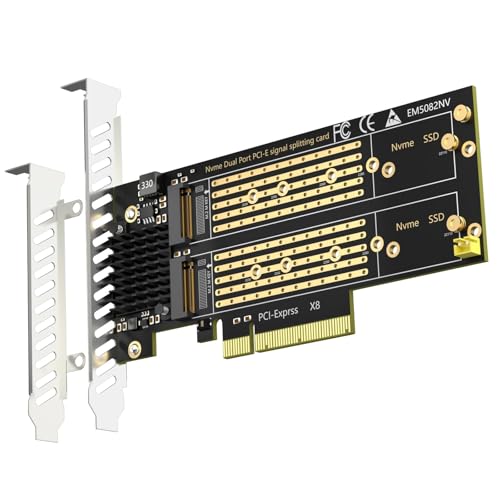
- Supports two NVMe SSDs on PCIe 4.0 x8
- Requires motherboard PCIe bifurcation support
- Supports soft RAID and OS booting on compatible systems
Best For: Dual-NVMe builds on bifurcation-capable motherboards
Quad-Drive Cooling Pick
SABRENT EC-P4BF 4x NVMe x16 Adapter

- Fits four M.2 NVMe SSDs on one x16 card
- Needs UEFI PCIe bifurcation support
- Includes thermal pads and optional fan cooling
Best For: Users building a four-drive NVMe array with cooling
Bifurcation Required Pick
GLOTRENDS PA41 Quad M.2 x16 Adapter
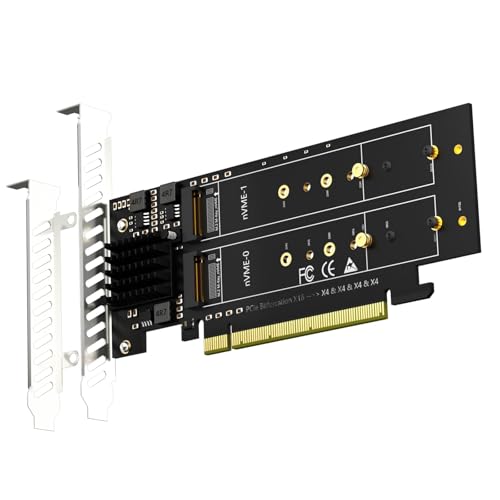
- Adds four NVMe drives in one PCIe 4.0 x16 slot
- Needs x4x4x4x4 or Hyper M.2 X16 bifurcation mode
- Supports soft RAID and OS boot on compatible boards
Best For: Builders who can verify bifurcation support before buying
Compact Dual-Drive Option
10Gtek Dual M.2 NVMe x8 Adapter

- Adds two NVMe drives through PCIe bifurcation
- Fits PCIe 3.0 x8 slots and includes two bracket sizes
- Supports common 2230 to 2280 M.2 SSDs
Best For: Users wanting a dual-NVMe expansion card for a compatible x8 slot
Quad-Lane Storage Expansion

- Adds four NVMe SSDs in one x16 slot
- Needs x4x4x4x4 PCIe bifurcation
- Includes heatsink and LED status lights
Best For: Server and workstation builds with bifurcation support
Dual-Drive Option

- Holds two NVMe SSDs in one card
- No bifurcation required
- Uses ASMedia ASM2812 for separate x4 channels
Best For: Systems that need dual NVMe expansion without BIOS bifurcation
Low-Profile Quad Expansion

- Four NVMe slots in a low-profile design
- Includes bracket for 2U server cases
- Needs x4x4x4x4 bifurcation support
Best For: 2U and compact server builds needing four NVMe drives
High-Capacity Intel/AMD Build – ASUS Hyper M.2 X16 Card V2
If you need an M.2 adapter with PCIe bifurcation for a high-drive-count build, the ASUS Hyper M.2 X16 Card V2 is designed to add up to four NVMe SSDs through a PCIe 3.0 x16 slot. It supports Intel VROC setups and AMD Ryzen Threadripper NVMe RAID, while the blower-style fan and heatsink help keep M.2 drives from throttling.
Best For: Builders using Intel VROC or Threadripper systems who want four NVMe drives on one expansion card.
Pros:
- Supports four additional NVMe M.2 drives
- Works with Intel VROC and AMD Ryzen Threadripper NVMe RAID
- PCIe 3.0 x16 interface, compatible with x8 and x16 slots
- Integrated blower fan and heatsink for cooling
Cons:
- Designed around platform support for RAID features like VROC or Threadripper NVMe RAID
- Limited to PCIe 3.0 bandwidth
- Requires a compatible desktop expansion slot
This card is a strong fit when you want ASUS hardware, four-drive support, and built-in cooling in a proven full-length layout. It is best suited to systems that can take advantage of the intended RAID and VROC workflows.
Easy Multi-Drive Expansion – GLOTRENDS ST560 Quad M.2 Adapter
This M.2 adapter with PCIe bifurcation is built for users who want four NVMe drives on a PCIe 3.0 x8 card without relying on motherboard or CPU bifurcation support. The ST560 uses an ASM2824 controller, supports software RAID setup across Windows, Linux, and macOS, and includes both standard and low-profile brackets for flexible installs.
Best For: Users who want a 4-slot NVMe adapter that works without motherboard bifurcation support.
Pros:
- Expands to 4x M.2 NVMe drives on PCIe 3.0 x8
- Does not require motherboard or CPU bifurcation support
- Supports software RAID setup on Windows, Linux, and macOS
- Includes standard and low-profile brackets
Cons:
- No hardware RAID support
- Intel VROC requires a separate license
- Booting from NVMe requires BIOS/UEFI setup and OS reinstallation
The ST560 is a practical choice if you want broad compatibility and simple multi-drive expansion. Its key advantage is letting you build a four-SSD setup even when your motherboard does not provide bifurcation support.
PCIe 4.0 RAID-Ready Upgrade – KONYEAD Quad M.2 x16 Card
For a PCIe bifurcation-based M.2 adapter that aims at high bandwidth, this KONYEAD x16 card supports four NVMe M.2 2280 drives and requires the motherboard to provide PCIe split modes such as X4X4X4X4 or 4X4. It uses four independent power modules and an aluminum alloy heatsink plate to help support high-power SSDs and manage heat.
Best For: Desktop builders who already have motherboard bifurcation support and want PCIe 4.0 NVMe RAID potential.
Pros:
- Supports four NVMe M.2 2280 drives
- PCIe 4.0 x16 design with up to 256Gbps claimed bandwidth
- Requires and works with motherboard PCIe split modes like X4X4X4X4
- Includes aluminum heatsink and four independent power modules
Cons:
- Motherboard bifurcation support is required
- Only some boards may provide the needed split-channel layout
- NVMe SSDs are not included
This card makes sense when you are building around a bifurcation-capable motherboard and want a PCIe 4.0 x16 carrier for four SSDs. The cooling and power design are strong points, but compatibility planning matters before purchase.
Dual-Drive PCIe 4.0 Builder – GLOTRENDS PA21 Dual M.2 Adapter
If you want a dual-drive M.2 adapter with PCIe bifurcation support requirements clearly defined, the GLOTRENDS PA21 is built for two NVMe SSDs on a PCIe 4.0 x8 card. It supports soft RAID through the OS, works with Windows, Linux, and macOS, and can boot from NVMe after BIOS/UEFI setup and OS reinstallation on a compatible system.
Best For: Users with bifurcation-capable motherboards who want a fast dual-NVMe adapter for storage or booting.
Pros:
- Supports two M.2 NVMe SSDs in 22110/2280/2260/2242/2230 sizes
- PCIe 4.0 x8 interface for high-bandwidth storage builds
- Supports soft RAID on Intel/AMD platforms
- Can support OS booting with the right BIOS/UEFI setup
Cons:
- Requires a motherboard that supports PCIe bifurcation
- Does not support Mac Pro 5.1
- Some older motherboards may only support storage use, not booting
The PA21 is a good fit when you want a simpler two-drive layout but still need bifurcation planning and PCIe 4.0 performance. Its value is in straightforward dual-NVMe expansion with broad OS support and boot potential on compatible systems.
Quad-Drive Cooling Pick – SABRENT EC-P4BF 4x NVMe x16 Adapter
If you want a serious M.2 adapter with PCIe bifurcation for a multi-drive NVMe build, this SABRENT card is built for up to four M.2 NVMe SSDs in a single physical x16 slot. It supports PCIe 4.0 drives, works with older PCIe generations when bifurcation is available, and adds active cooling for users who want to reduce throttling under sustained load.
Best For: Desktop builders who want four NVMe drives in one slot and have UEFI PCIe bifurcation support.
Pros:
- Holds up to four M.2 NVMe SSDs in 2230/2242/2260/2280 sizes
- Supports PCIe 4.0 and also works with older 3.0/2.0 systems that support bifurcation
- Includes thermal padding and optional rear fan cooling
- Plug-and-play design with LED drive status indicators
Cons:
- Requires a motherboard with UEFI PCIe bifurcation support
- Needs a physical x16 PCIe slot
- Best features depend on compatible NVMe SSDs and platform support
Overall, this is a strong choice if you need maximum drive density and want built-in cooling support. It is especially appealing for users planning software RAID, UEFI RAID, or simply a clean high-capacity storage expansion.
Bifurcation Required Pick – GLOTRENDS PA41 Quad M.2 x16 Adapter
This M.2 adapter with PCIe bifurcation is designed for adding four NVMe drives in a PCIe 4.0 x16 slot, but it depends on motherboard bifurcation support to unlock that full capacity. The card supports common M.2 lengths, works across Intel and AMD platforms for soft RAID setups, and can boot an OS in supported systems after a fresh install and BIOS setup.
Best For: PC builders who want four NVMe slots and already know their board supports x4x4x4x4 bifurcation.
Pros:
- Supports four NVMe SSDs in 2230/2242/2260/2280/22110 sizes
- Works with Intel and AMD systems for soft RAID
- Supports OS booting on compatible motherboards
- PCIe 4.0 x16 design for high-speed storage expansion
Cons:
- Requires motherboard PCIe bifurcation support to use all four drives
- X8X4X4 or X4X4X8 modes can only recognize three SSDs
- Not supported on Mac Pro 5.1 or Windows 7
This is a practical option if you want wide device support and are comfortable checking BIOS lane-splitting settings first. It is less forgiving than simpler adapters, but it rewards compatible systems with a lot of NVMe capacity in one slot.
Compact Dual-Drive Option – 10Gtek Dual M.2 NVMe x8 Adapter
If you need an M.2 adapter with PCIe bifurcation for just two NVMe SSDs, this 10Gtek card is a simpler expansion path than quad-drive boards. It fits a PCIe 3.0 x8 slot, supports common M.2 form factors, and relies on motherboard and BIOS split support so both drives can be recognized.
Best For: Desktop users who want a two-drive NVMe upgrade in an x8 slot and have bifurcation support available.
Pros:
- Supports two NVMe drives via bifurcation
- Works with PCIe 3.0 and is backward compatible with PCIe 2.0 and 1.0
- Includes both full-height and low-profile brackets
- Supports 2230/2242/2260/2280 M.2 drive sizes
Cons:
- Motherboard and BIOS must support bifurcation
- Hot swapping is not supported
- Standard mounting screw is not included
For a lighter-duty dual-drive setup, this card offers a straightforward way to add NVMe storage without moving to a larger quad adapter. It is best for compatible desktop systems where bracket flexibility and simple expansion matter more than maximum drive count.
Quad-Lane Storage Expansion – RIITOP 4-Port NVMe x16 Card
If you need an M.2 adapter with PCIe bifurcation for building a dense NVMe array, this RIITOP 4-port card is designed for exactly that use case. It installs into a PCIe 4.0 or 3.0 x16 slot and can host four M.2 NVMe SSDs at once, but it only works when the motherboard supports x4x4x4x4 bifurcation in BIOS.
Best For: Server builds, X299/X399 systems, and users who specifically want four NVMe drives on one adapter with bifurcation support.
Pros:
- Supports up to 4x M.2 NVMe SSDs in a single x16 slot
- Includes a heatsink to help manage drive temperature
- LED indicators show each SSD’s working status
- Fits 2280, 2260, 2242, and 2230 NVMe drives
Cons:
- Requires motherboard PCIe x16 bifurcation support
- Does not support SATA-based M.2 SSDs
- No hardware RAID support
This is a strong pick if your platform already supports bifurcation and you want maximum drive density from one expansion slot. If not, only one M.2 drive may be recognized, so compatibility is the deciding factor.
Dual-Drive Option – RIITOP Dual NVMe PCIe Adapter
This M.2 adapter with PCIe bifurcation is a practical choice when you want to add two NVMe SSDs without depending on motherboard bifurcation. RIITOP uses an ASMedia ASM2812 chipset, so each drive gets its own PCIe x4 channel as long as you have an open PCIe x8 or x16 slot available.
Best For: Users who want a two-drive NVMe expansion card that does not require motherboard bifurcation.
Pros:
- Supports two M.2 NVMe SSDs in one adapter
- Does not depend on motherboard bifurcation
- Each SSD gets its own PCIe x4 channel
- Works with 22110, 2280, 2260, 2242, and 2230 NVMe drives
Cons:
- Requires an available PCIe x8 or x16 slot
- Supports NVMe M-key SSDs only
- Does not support hardware RAID
For most buyers, the biggest advantage here is simplicity: no BIOS bifurcation setup is needed. That makes it easier to use in a wider range of systems, while still giving you dual-drive NVMe expansion.
Low-Profile Quad Expansion – RIITOP 4-Port NVMe 2U Card
For compact server or rackmount builds, this M.2 adapter with PCIe bifurcation is aimed at users who need four NVMe drives in a lower-profile form factor. It fits a PCIe 4.0 or 3.0 x16 slot, requires x4x4x4x4 bifurcation, and comes with a low-profile bracket designed for 2U cases.
Best For: 2U server builds and compact systems that need four NVMe drives on one bifurcation card.
Pros:
- Supports four NVMe SSDs on one x16 adapter
- Includes a low-profile bracket for 2U cases
- LED indicators show each drive’s status
- Compatible with 22110, 2280, 2260, and 2242 drives
Cons:
- Motherboard must support PCIe x16 bifurcation
- X8x4x4 or x4x4x8 modes may only recognize 3 drives
- Does not support hardware RAID
This model makes the most sense when space is tight and you need a four-drive NVMe layout without a full-height bracket. Just make sure your board can actually run the required bifurcation mode before buying.
How We Picked These M.2 Adapter with PCIe Bifurcation Cards
We focused on compatibility, lane requirements, drive count, cooling, and ease of setup. The best options balance bandwidth with real-world usability, so you are not left with a card that works only on paper.
We also prioritized models that support common NVMe sizes, include heatsinks or fan cooling where needed, and clearly state whether they require PCIe bifurcation or can use alternative RAID tools.
Quick Comparison
In simple terms, the main difference is how many drives you want to install and whether your motherboard supports lane splitting. Dual-drive cards are easier to match with mainstream boards, while quad-drive cards usually need a more capable platform and a fuller x16 slot.
If your board supports bifurcation, you can often get the cleanest setup and best direct-drive compatibility. If it does not, some cards in this roundup rely on software-managed RAID or other controller-friendly approaches instead.
Key Buying Factors for an M.2 Adapter with PCIe Bifurcation
Motherboard Support
This is the first thing to check. Your BIOS must support PCIe bifurcation if the card depends on it. Look for x4/x4, x8/x8, or x4/x4/x4/x4 split options, depending on the adapter and number of SSDs.
PCIe Generation and Slot Width
Match the card to your platform. PCIe 4.0 cards offer more headroom, but they only reach that potential on a compatible system. Also confirm whether the card needs a full x16 slot or can operate in x8.
Cooling and Drive Density
Four NVMe drives can run hot, especially in sustained transfers. A good heatsink, thermal pads, or active fan cooling can help maintain performance and protect drive longevity.
Supported SSD Sizes
Most buyers should verify support for 2280 drives, but some cards also accept 22110, 2260, 2242, or even 2230. Choose based on the drives you already own or plan to install.
RAID and Operating System Needs
Some users want raw drive access, while others want software RAID or a bootable storage array. Make sure the adapter matches your storage goal and does not require extra setup you are not prepared to handle.
Who Should Buy Which M.2 Adapter with PCIe Bifurcation?
If you want the simplest upgrade, a dual-slot adapter is usually the safest pick for mainstream desktops. If you are building a high-capacity workstation or homelab, a quad-drive M.2 Adapter with PCIe Bifurcation is the better long-term choice.
Choose a bifurcation-based model when your motherboard supports it and you want direct, efficient access to multiple NVMe drives. Pick a software-RAID-friendly card if compatibility is more important than maximum raw bandwidth.