
If you need stronger whole-home coverage without sacrificing performance, a Wi-Fi extender with dedicated backhaul can make a major difference. It helps keep the link between your main router and extender more stable, which is especially useful for streaming, gaming, and video calls.
In this roundup, we focus on models that better handle modern homes, multiple devices, and demanding internet plans. Use the picks below to find the right balance of speed, range, and ease of setup.
Best 10 Wi-Fi Extender with Dedicated Backhaul Picks for 2026
Tri-Band Whole-Home Mesh

- 6 GHz band can serve as backhaul by default
- Covers up to 7,200 sq. ft. and 200 devices
- Tri-band Wi‑Fi 6E with app-based setup
Best For: Large homes needing stable mesh coverage with 6 GHz backhaul support
Wi-Fi 7 Signal Booster
TP-Link RE223BE Dual-Band Extender

- Wi‑Fi 7 extender with MLO when paired with a Wi‑Fi 7 router
- Up to 3.2 Gbps and 2,400 sq. ft. coverage
- EasyMesh support plus an Ethernet port
Best For: Wi‑Fi 7 router owners wanting a coverage booster with modern efficiency
Wi-Fi 6 Coverage Booster
Linksys RE7310 AX1800 Extender
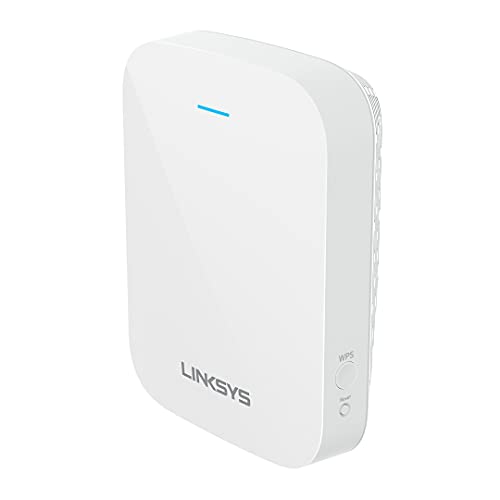
- Wi‑Fi 6 dual-band extender with beamforming
- Up to 2,000 sq. ft. coverage and 1.8 Gbps
- Includes access point mode for wired use
Best For: Everyday homes that want an easy Wi‑Fi 6 coverage boost
Budget Mesh-Ready Extender

- Dual-band AC1200 with EasyMesh support
- Up to 1,600 sq. ft. and 32 devices
- Includes one Ethernet port
Best For: Budget buyers wanting simple coverage expansion with a wired port
Compact Dual-Band Range Booster
NETGEAR EX5000 AC1200 Mesh Extender

- Up to 1,000 sq. ft. of added coverage
- Supports up to 15 devices
- Dual-band speeds up to 1200 Mbps
Best For: Small homes needing a simple coverage boost
Wi-Fi 7 Tri-Band Power Extender

- Wi-Fi 7 tri-band with 6 GHz support
- 2.5 Gbps Ethernet port for wired backhaul-style use
- Covers up to 2,800 sq. ft. and 128 devices
Best For: Large homes with Wi-Fi 7 routers and multi-gig internet
Value Dual-Band Mesh Extender

- Covers up to 1,200 sq. ft.
- Supports up to 30 devices
- Dual-band with OneMesh compatibility
Best For: Budget buyers needing better coverage in medium spaces
Editor’s Choice
TP-Link AX3000 WiFi 6 Range Extender

- AX3000 Wi-Fi 6 with up to 2404 Mbps on 5 GHz
- Gigabit Ethernet port and AP mode for wired use
- EasyMesh compatible for broader coverage
Best For: Larger homes wanting a fast Wi-Fi 6 extender with wired flexibility
Value Pick
TP-Link RE515X AX1500 WiFi 6 Extender

- AX1500 Wi-Fi 6 with up to 1201 Mbps on 5 GHz
- Covers up to 1,800 sq. ft. and 64 devices
- Gigabit Ethernet, AP mode, and EasyMesh support
Best For: Shoppers wanting a budget-friendlier Wi-Fi 6 extender with Ethernet
Budget-Friendly Upgrade
TP-Link AC1900 WiFi Range Extender

- AC1900 dual-band with up to 1300 Mbps on 5 GHz
- Three external antennas for wider coverage
- Gigabit Ethernet port plus AP mode
Best For: Affordable coverage expansion with a wired Ethernet option
Tri-Band Whole-Home Mesh – TP-Link Deco XE75 3-Pack
If you want a Wi-Fi extender with dedicated backhaul-like stability, this Deco XE75 mesh system is built around a 6 GHz band that can serve as a backhaul by default. That makes it a strong fit for homes that need wide coverage, steadier node-to-node links, and fewer dead zones without juggling a separate extender setup.
Best For: Larger homes and heavy-use households that want a tri-band mesh system with automatic 6 GHz backhaul and easy app setup.
Pros:
- 6 GHz band can work as backhaul by default for stable mesh connections
- Coverage up to 7,200 sq. ft. with support for up to 200 devices
- Tri-band Wi-Fi 6E speeds up to 5,400 Mbps
- Easy setup and management through the Deco app
Cons:
- Requires a modem for most internet service providers
- 6 GHz benefits are most useful with Wi-Fi 6E-compatible gear
This is less of a simple extender and more of a full mesh replacement, but that is exactly why it stands out for stable whole-home coverage. If you want the most practical path to a dedicated-backhaul-style experience, the XE75 is the most robust option here.
Wi-Fi 7 Signal Booster – TP-Link RE223BE Dual-Band Extender
The RE223BE is a modern Wi-Fi extender with dedicated backhaul-style benefits when paired with a Wi-Fi 7 router, since MLO can combine bands for better throughput, lower latency, and reliability. It is a dual-band extender, so it focuses on extending coverage with Wi-Fi 7 features rather than adding a 6 GHz backhaul channel.
Best For: Users with a Wi-Fi 7 router who want a compact extender for stronger coverage, better reliability, and EasyMesh support.
Pros:
- Wi-Fi 7 features including MLO, Multi-RUs, 160 MHz, and 4K-QAM when paired with a Wi-Fi 7 router
- Speeds up to 3.2 Gbps with coverage up to 2,400 sq. ft.
- Supports up to 64 devices and includes an Ethernet port
- EasyMesh-compatible and set up through the Tether app
Cons:
- No 6 GHz band support
- Like other extenders, it is designed to improve coverage, not directly increase speed
This is a good match if you already have a Wi-Fi 7 router and want a straightforward way to stretch coverage with newer standards. It is not a true tri-band backhaul solution, but it does bring meaningful Wi-Fi 7 efficiency to a range-extender format.
Wi-Fi 6 Coverage Booster – Linksys RE7310 AX1800 Extender
The Linksys RE7310 is a simple Wi-Fi extender with dedicated backhaul-style use in the sense that its dual-band design can help keep your home network organized without complicated setup. It does not add a separate backhaul band, but it does offer Wi-Fi 6, beamforming, and an access point mode for more flexible placement.
Best For: Households that want an easy-to-use Wi-Fi 6 extender for everyday coverage and flexible wired access point use.
Pros:
- Wi-Fi 6 with dual-band simultaneous streaming
- Coverage up to 2,000 sq. ft. and speeds up to 1.8 Gbps
- Beamforming and MU-MIMO help support multiple devices
- Access point mode adds flexibility with a wired connection
Cons:
- No dedicated backhaul band
- Not as fast or expansive as higher-end mesh systems
This is a practical extender if you want a mainstream upgrade without overcomplicating your network. It is best viewed as a solid coverage tool rather than a premium mesh replacement.
Budget Mesh-Ready Extender – TP-Link RE315 AC1200
If you are shopping for a Wi-Fi extender with dedicated backhaul features on a budget, the RE315 is better thought of as a mesh-ready range extender than a true backhaul system. It uses dual-band Wi-Fi, Adaptive Path Selection, and EasyMesh compatibility to improve coverage without adding premium mesh pricing.
Best For: Budget-conscious buyers who want a simple extender for extra coverage, wired device support, and EasyMesh compatibility.
Pros:
- Dual-band AC1200 speeds up to 867 Mbps on 5 GHz and 300 Mbps on 2.4 GHz
- Coverage up to 1,600 sq. ft. and support for 32 devices
- One Ethernet port for wired connectivity
- EasyMesh-compatible and managed through the Tether app
Cons:
- No dedicated backhaul band
- Not compatible with mesh Wi-Fi systems like Deco
This is the most affordable-feeling option in the group, but it is also the least advanced. Choose it if your main goal is basic coverage expansion and a wired port, not a dedicated-backhaul mesh experience.
Compact Dual-Band Range Booster – NETGEAR EX5000 AC1200 Mesh Extender
If you want a simple Wi-Fi extender with dedicated backhaul-style convenience in a compact package, the NETGEAR EX5000 is built for basic whole-home coverage rather than cutting-edge speed. It adds up to 1,000 sq. ft. of range, supports up to 15 devices, and works with almost any Wi-Fi router or gateway, making it a practical pick for filling weak-signal areas.
Best For: Small homes or apartments that need an easy dual-band coverage boost for everyday devices.
Pros:
- Extends coverage up to 1,000 sq. ft.
- Supports up to 15 connected devices
- Dual-band Wi-Fi up to 1200 Mbps
- Compatible with most routers, gateways, and cable modems with Wi-Fi
Cons:
- Not a tri-band or Wi-Fi 7 model
- No Ethernet performance claims beyond the listed RJ45 connector type
- Best suited to coverage extension, not top-tier throughput
Overall, the EX5000 is a straightforward range extender for users who value compatibility and easy setup over advanced networking features. If your priority is reliable coverage in a modest footprint, it fits the job well.
Wi-Fi 7 Tri-Band Power Extender – TP-Link RE653BE BE10000
For buyers looking for a Wi-Fi extender with dedicated backhaul-style performance and the newest wireless features, the TP-Link RE653BE stands out. It uses tri-band Wi-Fi 7 with a 6 GHz band, MLO support when paired with a Wi-Fi 7 router, and a 2.5 Gbps Ethernet port to help deliver fast, low-latency connectivity across a large home.
Best For: Large households with Wi-Fi 7 gear that want a fast tri-band extender with multi-gig wired support.
Pros:
- Tri-band Wi-Fi 7 with 6 GHz support and MLO when paired with a Wi-Fi 7 router
- Up to 10 Gbps total wireless rating and 2.5 Gbps Ethernet port
- Coverage up to 2,800 sq. ft. and support for up to 128 devices
- EasyMesh compatibility and app-based setup via Tether
Cons:
- Advanced features depend on pairing with a Wi-Fi 7 router
- Higher-end capability may be more than basic internet plans need
- Wireless extenders improve coverage rather than directly increasing speed
This is the most feature-rich option in the group, aimed at users who want modern Wi-Fi 7 capabilities and broad coverage in one extender. If your network is already built for fast multi-gig service, the RE653BE is the strongest upgrade path here.
Value Dual-Band Mesh Extender – TP-Link RE220 AC750
The TP-Link RE220 is a budget-friendly Wi-Fi extender with dedicated backhaul-style simplicity for users who mainly need stronger coverage in a few dead zones. It uses dual-band Wi-Fi, supports OneMesh, and can cover up to 1,200 sq. ft. for up to 30 devices, making it a solid everyday fix for homes with basic networking needs.
Best For: Budget-conscious shoppers who want a compact extender for improving coverage in medium-sized spaces.
Pros:
- Up to 1,200 sq. ft. of coverage
- Supports up to 30 devices
- Dual-band performance with 2.4 GHz and 5 GHz support
- OneMesh support for easier network expansion
Cons:
- Lower data rate than newer Wi-Fi 6 or Wi-Fi 7 extenders
- USB 2.0 connector type is less versatile than Ethernet on some models
- Not designed for high-end throughput or advanced band features
For straightforward range extension on a tighter budget, the RE220 covers the essentials without adding complexity. It is a good fit if you want dependable signal improvement rather than premium wireless performance.
Editor’s Choice – TP-Link AX3000 WiFi 6 Range Extender
If you want a Wi-Fi extender with dedicated backhaul-style reliability benefits in a simple extender form, the TP-Link RE715X is built for strong whole-home coverage. It combines Wi-Fi 6, EasyMesh support, and a gigabit Ethernet port, making it a practical pick for boosting signal in larger spaces without adding much setup complexity.
Best For: Homes that want a fast Wi-Fi 6 extender with EasyMesh support and wired-device flexibility.
Pros:
- AX3000 class speeds with up to 2404 Mbps on 5 GHz and 574 Mbps on 2.4 GHz
- Two high-gain directional antennas with beamforming for wider, more reliable coverage
- Gigabit Ethernet port plus AP mode for wired connections or hotspot-style use
- EasyMesh compatible for smoother whole-home network expansion
Cons:
- As an extender, it is designed to improve coverage, not directly increase speeds
- Not compatible with mesh WiFi systems like Deco
Overall, the RE715X is the strongest performance option here if you want a modern Wi-Fi 6 extender with flexible placement and an Ethernet port. It is a good fit when coverage, stability, and easy app-based setup matter more than chasing a full mesh system.
Value Pick – TP-Link RE515X AX1500 WiFi 6 Extender
The TP-Link RE515X is a straightforward Wi-Fi extender with dedicated backhaul-style convenience in mind for users who want simple expansion, app setup, and Ethernet support. Its AX1500 Wi-Fi 6 rating and EasyMesh compatibility make it a sensible choice for improving coverage across medium-sized homes.
Best For: Buyers who want a lower-cost Wi-Fi 6 extender with Ethernet and EasyMesh compatibility.
Pros:
- Wi-Fi 6 AX1500 speeds with up to 1201 Mbps on 5 GHz and 300 Mbps on 2.4 GHz
- Supports up to 1,800 square feet and 64 devices
- Gigabit Ethernet port plus AP mode for wired networking options
- TP-Link Tether app setup and intelligent signal indicator simplify placement
Cons:
- Lower bandwidth rating than the AX3000 model
- Still an extender, so it is intended to improve coverage rather than directly increase speed
If you mainly want dependable coverage expansion without paying for the top-tier model, the RE515X is the most balanced choice. It keeps the essentials: Wi-Fi 6, Ethernet, app setup, and EasyMesh support.
Budget-Friendly Upgrade – TP-Link AC1900 WiFi Range Extender
The TP-Link RE550 is a solid Wi-Fi extender with dedicated backhaul-style practicality for homes that need broader coverage and a wired option at a lower entry point. Its AC1900 dual-band design, gigabit Ethernet port, and EasyMesh compatibility make it a versatile upgrade for everyday streaming and browsing.
Best For: Households that want an affordable extender with strong coverage and a gigabit port.
Pros:
- AC1900 dual-band speeds with up to 1300 Mbps on 5 GHz and 600 Mbps on 2.4 GHz
- Three adjustable external antennas for broader coverage
- Gigabit Ethernet port and AP mode for wired-device support
- EasyMesh compatible for simple whole-home expansion
Cons:
- Supports fewer devices than the Wi-Fi 6 models listed here
- As with all extenders, it is meant to improve coverage rather than directly increase speeds
The RE550 makes sense when you want practical coverage extension and a wired port without moving up to a newer Wi-Fi 6 model. It is a capable, well-rounded pick for everyday use, especially in smaller to mid-size homes.
How We Picked the Best Wi-Fi Extender with Dedicated Backhaul
We prioritized extenders and mesh-style systems that offer a stronger, more stable wireless uplink, plus features that matter in real homes: dual-band or tri-band designs, Ethernet ports, EasyMesh or mesh compatibility, and enough coverage for apartments, multi-story homes, or larger spaces. We also favored models with clearer performance claims from trusted brands and practical extras like Wi-Fi 6 or Wi-Fi 7 support.
Quick Comparison
Not every Wi-Fi Extender with Dedicated Backhaul is built the same. Tri-band Wi-Fi 6E and Wi-Fi 7 options are usually the best fit for larger households and busier networks because they can preserve more throughput while handling more devices. Dual-band models are often better if you want a lower-cost way to improve coverage, especially when you only need to fix a dead zone or extend a strong router signal into one part of the home.
Key Buying Factors for Wi-Fi Extender with Dedicated Backhaul
Backhaul Type
Dedicated backhaul can be wireless or wired, depending on the model. A separate band or a direct Ethernet link helps prevent extender traffic from competing as much with your devices’ traffic, which usually means better stability and fewer slowdowns.
Speed and Wi-Fi Standard
Match the extender to your router and internet plan. Wi-Fi 6 is a solid baseline for most homes, while Wi-Fi 6E and Wi-Fi 7 are better if you want more headroom, lower congestion, and longer-term value.
Coverage and Device Count
Check the rated square footage and number of supported devices, but treat those as optimistic estimates. For crowded homes, choose a model with more capacity than you think you need.
Ethernet Ports and Placement
An Ethernet port can turn an extender into a more versatile node for TVs, consoles, desktops, or smart hubs. Placement matters just as much: put the unit where it still receives a strong signal from the main router.
Who Should Buy Which Wi-Fi Extender with Dedicated Backhaul?
If you want the simplest upgrade for a small or medium home, choose a dual-band extender with Ethernet and EasyMesh support. If you need more consistent speed across multiple floors or many devices, a tri-band Wi-Fi 6E or Wi-Fi 7 system is the smarter pick. Heavy streamers, gamers, and remote workers should lean toward models with dedicated backhaul and stronger throughput, while budget shoppers can still get meaningful improvement from a well-placed AC1200-class extender.
In short, the best choice depends on whether you are solving one dead zone or building a more reliable whole-home network. Focus on stability first, then speed, then coverage.