
Choosing a hard drive enclosure with 10Gbps USB is one of the easiest ways to get fast, flexible external storage from a SATA SSD or HDD. The right enclosure can improve transfer speed, simplify backups, and make drive swaps far less frustrating.
Below, we focus on practical options for everyday users, creators, and storage-heavy workflows, with a mix of compact single-bay models and higher-capacity multi-bay enclosures.
Best 10 Hard Drive Enclosure with 10Gbps USB Picks for 2026
Compact 2.5-Inch Option
UGREEN USB C Hard Drive Enclosure for 2.5" SATA

- USB-C Gen 2 interface with 10Gbps support
- Tool-free installation, no driver needed
- Aluminum enclosure with built-in chipset for cooling
Best For: simple portable 2.5-inch SATA storage and backups
RAID Desktop Storage
TERRAMASTER D2-320 2-Bay USB 3.2 Gen 2

- 10Gbps USB 3.2 Gen 2 connection
- RAID 0, RAID 1, JBOD, and Single modes
- Tool-free trays with temperature-controlled fan
Best For: dual-bay desktop storage with RAID and backup flexibility
Hot-Swap Dock Choice
SABRENT USB-C Hard Drive Docking Station DS-UC1B

- 10Gbps USB 3.2 Gen 2x1 dock
- Hot-swappable for 2.5-inch and 3.5-inch SATA drives
- Includes power adapter and both USB-A/USB-C cables
Best For: quick drive swapping, backups, and SATA drive testing
Fanless 3.5-Inch Pick
Avolusion PRO-G2 USB 3.2 Gen 2 Enclosure

- USB 3.2 Gen 2 with 10Gbps speed
- Fan-less design for quiet desktop use
- Supports up to 32TB with plug-and-play setup
Best For: quiet desktop backups with a single 3.5-inch SATA drive
4-Bay Media and Backup Hub
WAVLINK 4-Bay 10Gbps USB-C Enclosure

- Four bays for 3.5-inch and 2.5-inch SATA drives
- Up to 10Gbps USB-C 3.2 transfer speed
- Dual fans, aluminum shell, and HDMI output
Best For: Desk setups needing high-capacity storage and extra connectivity
Quiet 4-Bay DAS for Fast Transfers
TERRAMASTER D4-320 10Gbps Enclosure

- USB 3.2 Gen2 with up to 10Gbps transfer speed
- Tool-free trays, hot swapping, and push-lock design
- Supports 4 drives with quiet, temperature-controlled cooling
Best For: Users who want simple, fast multi-drive storage without RAID
Compact 2.5-Inch Adapter Pick
Cable Matters 10Gbps USB-C Enclosure

- Single-bay enclosure for 2.5-inch SATA SSDs/HDDs
- Up to 10Gbps with compatible computers
- Aluminum shell with included USB-C and USB cables
Best For: Portable single-drive storage and laptop expansion
4-Bay USB-C DAS
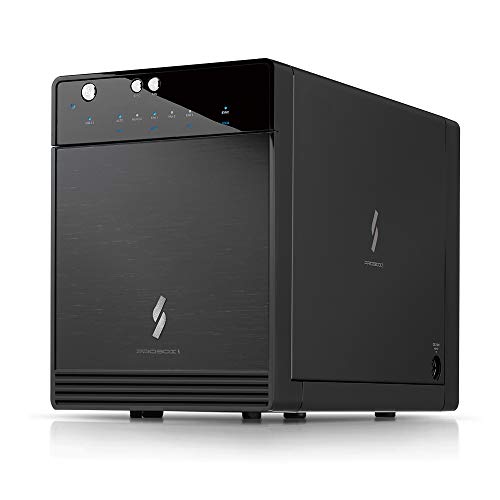
- USB 3.2 Gen 2 Type-C with up to 10Gbps
- Supports up to 4 x 30TB 3.5-inch SATA drives
- Includes smart fan, S.M.A.R.T., and power sync
Best For: Desktop storage expansion with multiple SATA drives
Universal Single-Bay Enclosure

- USB 3.1 Type-C with 10Gbps output
- Supports 2.5-inch and 3.5-inch SATA drives
- Includes 12V/2A power adapter and power switch
Best For: Single-drive SATA storage with external power
Dual-Bay Cooling DAS

- USB 3.2 Gen 2 with up to 10Gbps
- Supports two 2.5-inch/3.5-inch SATA drives
- Built-in fan and hot-swap support
Best For: Two-drive external storage with cooling and hot swap
Compact 2.5-Inch Option – UGREEN USB C Hard Drive Enclosure for 2.5" SATA
If you want a hard drive enclosure with 10Gbps USB on the connection side but only need to house a single 2.5-inch SATA drive, this UGREEN model is a practical, tool-free pick. Its USB-C port is USB 3.1 Gen 2, while the SATA side supports up to 6Gbps, so it is built for easy portable storage, backups, and drive recovery rather than multi-bay RAID workflows.
Best For: Users who need a simple 2.5-inch SATA enclosure for portable SSD or HDD storage, backups, and recovery.
Pros:
- USB-C port supports USB 3.1 Gen 2 with 10Gbps interface speed
- Tool-free, plug-and-play installation with no driver required
- Aluminum build and ASM235CM chipset help with heat dissipation
- Compatible with many Windows, Mac, Linux, and console setups
Cons:
- SATA drive speed is limited to 6Gbps
- Supports only one 2.5-inch SATA drive
- Not designed for 3.5-inch drives or RAID use
Overall, this is a straightforward enclosure for users who value simplicity, broad compatibility, and a compact metal design. It makes sense if your priority is adding portable SATA storage over maximizing raw drive performance.
RAID Desktop Storage – TERRAMASTER D2-320 2-Bay USB 3.2 Gen 2
The TERRAMASTER D2-320 is a strong hard drive enclosure with 10Gbps USB if you need a two-bay desktop DAS with flexible RAID options. It supports RAID 0, RAID 1, JBOD, and Single mode, and its USB 3.2 Gen 2 connection is designed for fast transfer speeds with either HDDs or SSDs in the enclosure.
Best For: Users who want a dual-bay DAS with RAID options for backups, capacity, and higher-speed desktop storage.
Pros:
- USB 3.2 Gen 2 interface delivers up to 10Gbps transfer speed
- Supports RAID 0, RAID 1, JBOD, and Single mode
- Tool-free tray design and push-lock mechanism simplify drive swapping
- Built-in temperature-controlled fan helps manage heat and noise
Cons:
- It is a DAS, not a NAS
- Bulkier desktop unit than a single-drive enclosure
- Diskless model requires you to supply your own drives
For users building a fast, flexible local storage setup, the D2-320 offers far more configuration depth than a basic enclosure. It is especially appealing when redundancy, capacity scaling, and easy drive access matter.
Hot-Swap Dock Choice – SABRENT USB-C Hard Drive Docking Station DS-UC1B
If you want a hard drive enclosure with 10Gbps USB speed and the convenience of a dock, this SABRENT model is built for fast drive swaps. It supports both 2.5-inch and 3.5-inch SATA SSDs and HDDs, includes a power adapter for larger drives, and uses a USB 3.2 Gen 2×1 connection for maximum SATA performance.
Best For: People who frequently swap SATA drives for backups, transfers, or drive testing.
Pros:
- USB-C dock supports 10Gbps USB 3.2 Gen 2×1 transfer speed
- Tool-less, hot-swappable design makes drive changes quick
- Works with both 2.5-inch and 3.5-inch SATA SSDs and HDDs
- Includes USB-A and USB-C to USB-C cables plus power adapter
Cons:
- Dock-style design is less protective than a closed enclosure
- Single-bay setup only
- Requires the included power adapter for 3.5-inch drives
This dock is a good fit if convenience matters more than a sealed enclosure. It is especially useful for users who regularly clone, back up, or test different SATA drives on Windows, Mac, or Linux.
Fanless 3.5-Inch Pick – Avolusion PRO-G2 USB 3.2 Gen 2 Enclosure
The Avolusion PRO-G2 is a hard drive enclosure with 10Gbps USB support aimed at users turning a 3.5-inch SATA drive into a desktop external drive. It uses USB 3.2 Gen 2 for fast transfers, includes a fan-less cooling design for quiet operation, and is built for Windows and macOS without driver setup.
Best For: Desktop users who want a quiet 3.5-inch SATA enclosure for backups and everyday external storage.
Pros:
- USB 3.2 Gen 2 interface delivers up to 10Gbps transfer speed
- Fan-less design keeps operation quiet
- Plug-and-play use with no drivers needed
- Supports up to 32TB and includes USB-C and USB-A adapter cable
Cons:
- Designed for 3.5-inch drives only
- Requires an external power adapter
- Desktop-oriented size and 3-pound weight limit portability
For users who want a dependable desktop enclosure rather than a compact travel case, the PRO-G2 is well aligned. Its quiet cooling approach and large capacity support make it a solid pick for backup-focused storage.
4-Bay Media and Backup Hub – WAVLINK 4-Bay 10Gbps USB-C Enclosure
If you want a hard drive enclosure with 10Gbps USB and room to grow, this WAVLINK 4-bay dock leans into capacity and connectivity. It supports 3.5-inch and 2.5-inch SATA HDDs/SSDs, reaches up to 10Gbps over USB-C 3.2, and even adds HDMI output for a more flexible desktop setup.
Best For: Users who need a multi-bay enclosure for large backups, media libraries, or a drive-heavy workstation with display output.
Pros:
- Four SATA bays with support for both 3.5-inch and 2.5-inch drives and up to 128TB total capacity.
- USB-C 3.2 connection with up to 10Gbps transfer speeds for large file moves.
- Built-in temperature-controlled dual fans and aluminum shell for cooling.
- Independent power switches for each bay plus HDMI 4K@60Hz support under the stated conditions.
Cons:
- 2.5-inch hard drives need additional 2.5-inch to 3.5-inch mounting brackets, which are not included.
- HDMI output depends on host USB-C video support and the correct USB-C to C cable.
- Bulkier than a simple single-drive enclosure.
Overall, this is the most feature-packed pick here if you want storage expansion first and portability second. The combination of four bays, cooling, and display output makes it well suited to a desk-bound setup.
Quiet 4-Bay DAS for Fast Transfers – TERRAMASTER D4-320 10Gbps Enclosure
The TERRAMASTER D4-320 is a practical hard drive enclosure with 10Gbps USB for users who want fast direct-attached storage without RAID complexity. It supports four individual drives, is plug-and-play across major operating systems, and pairs tool-free trays with a temperature-controlled fan for easier everyday use.
Best For: Buyers who want a straightforward 4-bay DAS for backups, media storage, or mixed drive installs on Mac, Windows, or Linux.
Pros:
- USB 3.2 Gen2 delivers up to 10Gbps, with claimed speeds up to 1,016 MB/s across four drives.
- Supports 3.5-inch and 2.5-inch SATA HDDs plus 2.5-inch SATA SSDs.
- Tool-free trays and a push-lock design make drive installation simple.
- Hot-swappable design and quiet cooling with sound-damping measures.
Cons:
- No RAID function, so it is not aimed at users who want hardware redundancy or striping.
- Plastic enclosure material may feel less premium than aluminum alternatives.
- Diskless model means you supply all drives separately.
This is a solid pick if your main priority is reliable multi-drive storage over extra features. It keeps the workflow simple, runs across common operating systems, and focuses on speed and convenience.
Compact 2.5-Inch Adapter Pick – Cable Matters 10Gbps USB-C Enclosure
If you only need a single-drive hard drive enclosure with 10Gbps USB, this Cable Matters aluminum model is a compact way to turn a 2.5-inch SATA SSD or HDD into portable storage. It supports up to 10Gbps with a compatible computer, includes USB-C cables, and is built around a lightweight aluminum shell for heat dissipation.
Best For: Users who want a simple, portable 2.5-inch SATA enclosure for backup, cloning, or laptop storage expansion.
Pros:
- Up to 10Gbps transfer rate with compatible systems.
- Works with 2.5-inch SATA SSDs and HDDs up to 9.5mm thick.
- Aluminum housing helps protect the drive and aid cooling.
- Includes USB-C and USB cables and supports UASP, TRIM, and S.M.A.R.T. with compatible setups.
Cons:
- Limited to one 2.5-inch drive, so it is not for large multi-drive storage needs.
- Does not support 3.5-inch drives.
- Actual performance still depends on your computer and drive limits.
This is the most portable and focused option in the group. It is best when you want a dependable single-drive enclosure rather than a desktop storage dock.
4-Bay USB-C DAS – Mediasonic 4-Bay USB-C DAS
If you need a hard drive enclosure with 10Gbps USB for a larger storage pool, this Mediasonic 4-bay DAS is built for straightforward expansion. It supports up to four 3.5-inch SATA drives, uses USB 3.2 Gen 2 Type-C for up to 10Gbps transfer, and includes features like S.M.A.R.T., power sync, and a smart fan with thermal sensor.
Best For: Users who want a multi-bay desktop enclosure for expanding SATA storage over a fast USB-C connection.
Pros:
- 4-bay design supports up to 4 x 30TB drives.
- USB 3.2 Gen 2 Type-C with up to 10Gbps transfer.
- Smart fan with built-in thermal sensor helps with cooling.
- Supports S.M.A.R.T. and power sync features.
Cons:
- Built for 3.5-inch SATA drives only, not 2.5-inch or non-SATA media.
- Larger desktop footprint than a single-bay enclosure.
This is a practical pick if your priority is adding a lot of SATA capacity in one enclosure rather than maximizing portability. The included USB-C cable and broad OS support make it easier to slot into a Windows, Mac, or Linux setup.
Universal Single-Bay Enclosure – MAIWO 2.5/3.5 SATA Enclosure
This hard drive enclosure with 10Gbps USB is a simple way to turn a 2.5-inch or 3.5-inch SATA drive into external storage. MAIWO pairs a USB 3.1 Type-C 10Gbps interface with UASP support, an independent 12V/2A power adapter, and an aluminum alloy body designed for better heat dissipation.
Best For: Anyone who wants a single-drive SATA enclosure for SSDs or HDDs with external power and broad device support.
Pros:
- Supports both 2.5-inch and 3.5-inch SATA SSD/HDD drives.
- USB 3.1 Type-C interface is rated for 10Gbps transfer.
- Includes 12V/2A independent power supply and power switch.
- Aluminum alloy case and honeycomb design aid cooling.
Cons:
- Single-bay design supports only one drive at a time.
- Does not support IDE, U.2, or SAS drives.
If you need a flexible enclosure for one SATA drive, this model focuses on compatibility and stable operation rather than multi-drive expansion. The included USB-A to USB-C cable and tool kit also make setup more convenient.
Dual-Bay Cooling DAS – CENMATE 2-Bay USB-C DAS
For buyers comparing a hard drive enclosure with 10Gbps USB, this CENMATE dual-bay model stands out as a no-RAID DAS with hot-swappable drive support. It uses USB 3.2 Gen 2 with up to 10Gbps transfer, supports 2.5-inch and 3.5-inch SATA HDDs and SSDs, and adds a built-in fan plus aluminum construction for cooling.
Best For: Users who want two-drive external storage with hot swap support and active cooling.
Pros:
- Dual-bay enclosure supports two SATA drives.
- USB 3.2 Gen 2 connection offers up to 10Gbps.
- Hot-swappable design adds convenience for drive changes.
- Built-in fan and aluminum body help manage heat.
Cons:
- Explicitly a DAS with no RAID or NAS functionality.
- Fan noise is noted at around 40-50 decibels.
This is a sensible choice if you want flexible two-drive storage without moving into RAID management. The included USB A/C cable and wide OS compatibility make it easy to integrate into mixed setups.
How We Picked the Best Hard Drive Enclosure with 10Gbps USB
We prioritized real-world performance, drive compatibility, cooling, ease of installation, and connection quality. For a Hard Drive Enclosure with 10Gbps USB, the best choice is not just about peak speed; stable transfer rates, UASP support, and reliable thermal design matter just as much.
We also considered whether each enclosure makes sense for SSDs, 2.5-inch laptop drives, 3.5-inch desktop HDDs, or multi-bay storage needs. That helps narrow the field to models that fit different users instead of pushing one design for everyone.
Quick Comparison
Single-bay 2.5-inch enclosures are the simplest and most portable, making them ideal for repurposing old SATA SSDs or notebook drives. Docking stations and 3.5-inch enclosures are better for quick access to larger HDDs, while 2-bay and 4-bay DAS units are the right pick if you want more capacity, better organization, or RAID options.
If speed is your top priority, look for USB 3.2 Gen 2, UASP, and a short, quality USB-C cable. If capacity matters more, confirm the supported drive size and total bay count before buying.
Key Buying Factors for a Hard Drive Enclosure with 10Gbps USB
Drive Type and Size
Make sure the enclosure supports your drive class: 2.5-inch SATA SSD/HDD, 3.5-inch HDD, or both. Some models are limited to SATA drives only, while others are designed for mixed-size compatibility.
Cooling and Durability
Aluminum shells help dissipate heat, and active cooling is useful for 3.5-inch or multi-bay enclosures that run longer transfers. Poor cooling can throttle performance and shorten drive life.
Connection and Compatibility
USB-C with USB 3.2 Gen 2 gives you the full 10Gbps ceiling, but the host port and cable must also support it. Check Windows and macOS compatibility if you plan to move the enclosure between systems.
Ease of Use
Tool-free trays, hot-swap designs, and clearly labeled status lights make day-to-day use much easier. For backup workflows, a simple enclosure is often more valuable than extra features you will not use.
Who Should Buy Which Hard Drive Enclosure with 10Gbps USB?
If you want a compact travel-friendly solution, choose a single-bay 2.5-inch enclosure. If you need frequent drive swaps or desktop-style convenience, a dock may be the better fit. Users building a home media library, backup station, or small NAS-style setup should focus on 2-bay or 4-bay units with solid cooling and enough capacity for future growth.
In short, the best Hard Drive Enclosure with 10Gbps USB is the one that matches your drive size, workload, and expansion plans—not just the highest spec on the box.