
If your home Wi-Fi drops in bedrooms, basements, or outdoor spaces, a Wi-Fi 7 range extender can help fill the gaps without replacing your whole network.
Below, we’ve narrowed the field to the strongest options for speed, range, Ethernet flexibility, and mesh-friendly performance.
Best 10 Wi-Fi 7 Range Extender Picks for 2026
Flagship Tri-Band Speed Booster

- Tri-band with 6 GHz support
- 2.5 Gbps Ethernet port
- Up to 2,800 sq. ft. coverage
Best For: Large homes and Wi-Fi 7 users who want maximum coverage and wired flexibility
Budget-Friendly Mesh-Compatible Pick

- Dual-band Wi-Fi 7 up to 3600 Mbps
- Works with virtually all routers
- Supports ASUS AiMesh
Best For: Buyers who want broad compatibility and easy mesh-style expansion
Value Dual-Band Option

- Dual-band Wi-Fi 7 with MLO
- Up to 2,400 sq. ft. coverage
- No 6 GHz band
Best For: Medium-size homes that want Wi-Fi 7 basics and EasyMesh support
Outdoor Coverage Specialist

- IP65 weather-resistant design
- Dual 2.5G PoE+ ports
- Up to 2,800 sq. ft. outdoor coverage
Best For: Outdoor spaces and weather-exposed areas that need durable Wi-Fi 7 coverage
Editor’s Pick
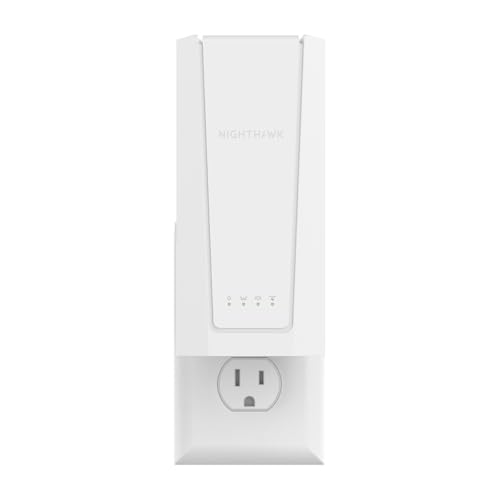
- Adds up to 1,500 sq. ft. of coverage
- Supports up to 45 devices
- Includes 2.5 Gig Ethernet and smart roaming
Best For: Users wanting simple Wi-Fi 7 coverage expansion with a wired port
Premium Pick
- BE5000 Wi-Fi 7 speeds up to 5 Gbps
- Adds up to 1,500 sq. ft. and 45 devices
- Includes smart roaming and 2.5 Gig Ethernet
Best For: Buyers wanting a higher-speed NETGEAR extender with simple roaming
Best with Extra Features
TP-Link BE6300 Wi-Fi 7 Range Extender RE403BE

- Wi‑Fi 7 features with MLO and 160 MHz support
- 2.5G Ethernet port for multi-gig wired use
- Up to 2,800 sq. ft. and 64 devices
Best For: Homes that want Wi‑Fi 7 features and broad dual-band coverage
Best Compact Option
NETGEAR EXS18 WiFi 7 Range Extender
- Adds up to 1,200 sq. ft. of coverage
- BE3600 Wi‑Fi 7 with Smart Roaming
- 2.5 Gig Ethernet port and WPA3 security
Best For: Smaller homes or offices needing a simple Wi‑Fi 7 extender
Best Value Alternative
TP-Link RE615X AX1800 Range Extender

- Wi‑Fi 6 AX1800 with up to 2,100 sq. ft. coverage
- EasyMesh-compatible for broader whole-home use
- Gigabit Ethernet port for wired devices
Best For: Buyers who want a Wi‑Fi 6 extender instead of Wi‑Fi 7
Flagship Tri-Band Speed Booster – TP-Link RE653BE Wi-Fi 7
If you want a Wi-Fi 7 range extender that leans into maximum throughput and future-ready features, the TP-Link RE653BE is built for that role. Its tri-band design adds the 6 GHz band, and when paired with a Wi-Fi 7 router it can use MLO, Multi-RUs, and 4K-QAM to improve efficiency across compatible devices.
Best For: Large homes, gigabit-plus users, and Wi-Fi 7 setups that can use tri-band coverage and a 2.5 Gbps wired port.
Pros:
- Tri-band Wi-Fi 7 with 6 GHz support for less congestion and more channel options
- Rated up to 10 Gbps total wireless throughput with 6 streams
- 2.5 Gbps Ethernet port for faster wired backhaul or device connections
- Supports EasyMesh and covers up to 2,800 sq. ft. for up to 128 devices
Cons:
- To get the full Wi-Fi 7 feature set, it needs a compatible Wi-Fi 7 router
- It is an extender, so it improves coverage rather than directly increasing internet plan speed
Overall, this is the most capable option in the group if you want a Wi-Fi 7 range extender with premium wireless specs, wired flexibility, and broad home coverage. It makes the most sense for buyers who want headroom for demanding streaming, gaming, and multi-device homes.
Budget-Friendly Mesh-Compatible Pick – ASUS RP-BE58 BE3600
The ASUS RP-BE58 is a straightforward Wi-Fi 7 range extender for users who want easier whole-home coverage without moving to tri-band hardware. It uses dual-band Wi-Fi 7, supports Multi-Link Operation, and works with virtually any Wi-Fi router, while also fitting into ASUS AiMesh systems.
Best For: Homes that want a simple dual-band Wi-Fi 7 extender with broad router compatibility and AiMesh support.
Pros:
- Wi-Fi 7 dual-band extender rated up to 3600 Mbps
- Multi-Link Operation helps maintain stable connections across multiple bands
- Works with virtually all Wi-Fi routers, modems, and cable routers
- Supports ASUS AiMesh and app-based setup
Cons:
- Dual-band only, so it lacks the 6 GHz band found on tri-band models
- Coverage and speed are more modest than higher-end Wi-Fi 7 extenders
In practice, this ASUS model is a sensible pick if you want Wi-Fi 7 features and simple setup without overbuying. It is especially appealing for mixed-device homes that need compatibility and seamless roaming more than raw top-end specs.
Value Dual-Band Option – TP-Link RE223BE BE3200
The TP-Link RE223BE is a practical Wi-Fi 7 range extender if you want the newer standard without paying for 6 GHz support you may not need. It runs on the 2.4 GHz and 5 GHz bands, supports MLO and EasyMesh, and is rated for up to 2,400 sq. ft. of coverage.
Best For: Shoppers who want a dual-band Wi-Fi 7 extender for medium-size homes and EasyMesh expansion.
Pros:
- Wi-Fi 7 dual-band design with up to 3.2 Gbps class performance
- Supports MLO, Multi-RUs, and 160 MHz for compatible Wi-Fi 7 routers
- Up to 2,400 sq. ft. coverage and support for up to 64 devices
- Includes an Ethernet port and EasyMesh compatibility
Cons:
- No 6 GHz band support
- Lower device capacity and coverage than the higher-end tri-band TP-Link model
This is the most balanced option if you want a Wi-Fi 7 range extender that focuses on essential features and everyday coverage. It is a good fit when you mainly need to clean up dead zones and improve stability in a typical family home.
Outdoor Coverage Specialist – TP-Link Deco BE25 Outdoor
The TP-Link Deco BE25 Outdoor stands out if your Wi-Fi 7 range extender needs to work beyond the walls of the house. It combines dual-band Wi-Fi 7, IP65 weather resistance, and flexible power options, making it a strong choice for yards, patios, or other outdoor network zones.
Best For: Outdoor Wi-Fi expansion, hard-to-reach areas, and users who need weather-resistant mesh coverage.
Pros:
- IP65-rated for rain, dust, moisture, shocks, and vibrations
- Dual 2.5G PoE+ ports and support for wired or wireless backhaul
- Covers up to an additional 2,800 sq. ft. and up to 150 devices
- Supports Wi-Fi 7 features like MLO and works with the Deco app
Cons:
- Dual-band only, so there is no 6 GHz band
- Outdoor-focused design may be more than many indoor-only buyers need
As a specialized Wi-Fi 7 range extender, this Deco model is less about indoor simplicity and more about extending a reliable network into demanding outdoor spaces. If you need durability, PoE flexibility, and broad coverage outside, it is the most purpose-built choice here.
Editor’s Pick – NETGEAR EXS25 WiFi 7 Extender
If you want a Wi-Fi 7 range extender that focuses on straightforward coverage and strong everyday performance, the NETGEAR EXS25 is a practical pick. It adds up to 1,500 sq. ft. of coverage, supports up to 45 devices, and uses BE4500 dual-band WiFi 7 speeds to help keep traffic moving across busy homes. It also includes a 2.5 Gig Ethernet port for wired devices that need a faster, more stable connection.
Best For: Homes that need solid Wi-Fi 7 extension, smart roaming, and a multi-gig wired port.
Pros:
- Extends coverage up to 1,500 sq. ft. and supports up to 45 devices
- BE4500 WiFi 7 performance rated up to 4.5 Gbps
- Smart roaming helps devices stay connected to the strongest network
- 2.5 Gig Ethernet port adds wired flexibility for consoles or streaming gear
Cons:
- Dual-band design may not suit buyers specifically looking for tri-band extension
- Best Wi-Fi 7 features are most relevant with a Wi-Fi 7 router
Overall, the EXS25 is a balanced Wi-Fi 7 range extender for users who want easy coverage expansion plus a useful wired port. It keeps the feature set focused on speed, roaming, and compatibility rather than extra complexity.
Value Upgrade – BE3600 WiFi 7 Range Extender
The BE3600 WiFi 7 range extender is built for buyers who want a feature-packed signal booster with broad home coverage. It combines dual-band WiFi 7 support, MLO, and 4K-QAM with a 3.6 Gbps total bandwidth rating, plus coverage for up to 2,500 sq. ft. and 66 devices. If your priority is reducing dead zones while supporting a large number of connected devices, this model is aimed squarely at that job.
Best For: Larger homes that need wide coverage, many connected devices, and Wi-Fi 7 features.
Pros:
- Covers up to 2,500 sq. ft. and supports up to 66 devices
- Wi-Fi 7 features include MLO and 4K-QAM
- 3.6 Gbps total bandwidth is suited to streaming and gaming
- WPS setup or browser-based setup is available with no app required
Cons:
- Uses dual-band 2.4 GHz and 5.8 GHz rather than a tri-band design
- Feature set may be more than needed for small apartments or lighter use
In practice, this extender stands out for its large stated coverage area and device capacity. It is a strong fit if you want a Wi-Fi 7 range extender that can handle a busy household without forcing app-based setup.
Premium Pick – NETGEAR EXS27 WiFi 7 Extender
The NETGEAR EXS27 is a Wi-Fi 7 range extender for shoppers who want the same coverage focus as the EXS25, but with BE5000 speeds rated up to 5 Gbps. It adds up to 1,500 sq. ft. of range, supports up to 45 devices, and includes smart roaming to help devices stay on the strongest available network as you move around the house. A 2.5 Gig Ethernet port rounds it out for wired connections that need more than basic throughput.
Best For: Users who want NETGEAR’s higher-speed Wi-Fi 7 extender with easy roaming and wired support.
Pros:
- BE5000 WiFi 7 speeds rated up to 5 Gbps
- Adds up to 1,500 sq. ft. of coverage and supports 45 devices
- Smart roaming helps maintain a stronger connection while moving around
- 2.5 Gig Ethernet port supports multi-gig wired devices
Cons:
- Coverage footprint matches the EXS25 rather than exceeding it
- Two-band design may not appeal to buyers wanting a different band layout
The EXS27 makes sense if you like NETGEAR’s extender approach but want the higher stated speed ceiling. It is a polished Wi-Fi 7 range extender for homes that need dependable coverage, smart roaming, and a faster headline spec.
Best with Extra Features – TP-Link BE6300 Wi-Fi 7 Range Extender RE403BE
If you want a Wi-Fi 7 range extender that adds newer features without overcomplicating setup, the TP-Link RE403BE is built for practical whole-home coverage. It supports dual-band Wi‑Fi 7 with MLO when paired with a compatible Wi‑Fi 7 router, adds a 2.5G Ethernet port, and is rated for up to 2,800 sq. ft. and 64 devices.
Best For: Homes that want Wi‑Fi 7 features, multi-gig wired support, and broad coverage without needing the 6 GHz band.
Pros:
- Wi‑Fi 7 support with MLO, Multi‑RUs, 160 MHz, and 4K-QAM when paired with a Wi‑Fi 7 router
- Up to 6.3 Gbps combined wireless throughput and 2.5G LAN port for faster wired connections
- Coverage rated up to 2,800 sq. ft. and support for up to 64 devices
- EasyMesh compatibility and Tether app setup for straightforward installation
Cons:
- Does not support the 6 GHz band
- As with any extender, it is designed to improve coverage, not directly increase speed
Overall, the RE403BE is a strong choice if you want a modern Wi‑Fi 7 range extender with useful wired connectivity and broad coverage. Just make sure your router setup matches its dual-band design and that you do not need 6 GHz support.
Best Compact Option – NETGEAR EXS18 WiFi 7 Range Extender
The NETGEAR EXS18 is a straightforward Wi-Fi 7 range extender for adding coverage where your signal drops off. It focuses on practical essentials: BE3600 speeds, smart roaming, WPA3 security, and a 2.5 Gig Ethernet port for devices that benefit from wired stability.
Best For: Smaller homes or offices that need easier dead-zone reduction, smart roaming, and a simple Wi‑Fi 7 upgrade path.
Pros:
- Adds coverage up to 1,200 sq. ft. and supports up to 40 devices
- BE3600 Wi‑Fi 7 performance rated up to 3.6 Gbps
- Smart Roaming helps devices stay on the strongest signal using the same SSID
- 2.5 Gig Ethernet port and WPA3 security
Cons:
- Smaller coverage area than larger-range extenders
- Dual-band only, so it does not include 6 GHz support
If you want a Wi‑Fi 7 range extender that is easy to place and easy to live with, the EXS18 is a sensible pick. It is less ambitious than bigger models, but it covers the basics well with modern security and wired connectivity.
Best Value Alternative – TP-Link RE615X AX1800 Range Extender
The TP-Link RE615X is not a Wi-Fi 7 range extender, but it is a useful lower-cost alternative if you mainly want stronger Wi‑Fi coverage and EasyMesh support. It offers dual-band AX1800 performance, a gigabit Ethernet port, and coverage rated up to 2,100 sq. ft. for up to 64 devices.
Best For: Buyers who do not need Wi‑Fi 7 yet and want a solid Wi‑Fi 6 extender with mesh compatibility and wired support.
Pros:
- Dual-band AX1800 speeds up to 1201 Mbps on 5 GHz and 574 Mbps on 2.4 GHz
- Coverage rated up to 2,100 sq. ft. and support for up to 64 devices
- EasyMesh compatibility for expanded whole-home coverage
- Gigabit Ethernet port for wired devices and stable connections
Cons:
- Not a Wi‑Fi 7 product
- Does not support the 6 GHz band
The RE615X makes sense if your priority is dependable coverage rather than the newest wireless standard. It is a practical Wi‑Fi 6 fallback for users who want mesh-style expansion and wired flexibility.
How We Picked the Best Wi-Fi 7 Range Extender
We focused on Wi-Fi 7 Range Extender models that balance real-world coverage, modern connectivity, and practical setup. Priority went to units with dual-band or tri-band support, Ethernet ports, strong advertised coverage, and features like mesh compatibility or outdoor-rated hardware where relevant. We also considered whether each extender is a good fit for mixed-device homes, gaming, streaming, and larger floor plans.
Quick Comparison
Think of the lineup in three groups: high-capacity models for the fastest backhaul and most demanding homes, balanced midrange extenders for everyday coverage boosts, and specialty picks for outdoor or mesh-based installations. If you need wired stability for a console, TV, or desktop, choose a model with a multi-gig Ethernet port. If your router and devices are already modern, a higher-tier Wi-Fi 7 extender can help preserve more of your network’s potential.
Key Buying Factors for a Wi-Fi 7 Range Extender
Speed Class and Band Support
Look at the rated class, but read it as a guide rather than a guarantee. Dual-band units are often enough for standard coverage extension, while tri-band models can better manage congestion in busy households. If your router supports Wi-Fi 7 features, you’ll be better positioned to benefit from improved efficiency and bandwidth handling.
Coverage and Placement
Coverage claims are useful, but placement matters just as much. A Wi-Fi 7 Range Extender should be installed where it still receives a strong signal from the router, not in the dead zone itself. That usually means halfway between the router and the weak area.
Ethernet and Multi-Gig Ports
An Ethernet port is important if you want to connect a smart TV, desktop, or game console. Multi-gig ports add more headroom for faster wired links and can reduce bottlenecks in homes with faster internet plans.
Mesh and Compatibility
Some extenders work as mesh nodes or integrate into broader mesh systems, while others function best as traditional signal boosters. If you want seamless roaming across the house, compatibility with your existing router or mesh ecosystem should be high on your checklist.
Who Should Buy Which Wi-Fi 7 Range Extender?
Choose a higher-end Wi-Fi 7 Range Extender if you have gigabit-plus internet, many active devices, or a large multi-story home. Pick a midrange model if you mainly want better coverage for streaming, video calls, and everyday browsing. Go with an outdoor-rated or PoE-capable option if you need coverage for a patio, yard, or detached area. If your current network is older and your budget is tight, a Wi-Fi 6 extender may still be the more sensible short-term upgrade.
In short, buy for your layout first, then match speed, ports, and mesh support to how you actually use the network.